I. What is VidMuse?
VidMuse is an MV creation Agent specifically designed for musicians. It can accurately understand your musical works and produce exquisite music videos according to your needs.
Product Access
Core Features
Unlike traditional material generation tools, it does not rely on luck-based random selection.
- For music: It acts as a listener. It can understand your musical structure, identify emotional fluctuations, and recognize the rhythm and phases of the music.
- For videos: It acts as a director. Based on audio signals, it automatically plans the story, shot division, camera movement, and editing rhythm.
In simple terms, in the world of VidMuse, audio is the script. You provide the sound, and it brings your imagination of the musical world to life.
VidMuse utilizes world-class production models such as Gemini, Sora, Kling, NanoBanana🍌, and more. However, you don’t need to learn how to use prompts—you just need to issue instructions.
II. How to Use VidMuse?
When using VidMuse, please establish the following collaborative relationship:
You are the decision-maker: You don't need to understand the timeline of editing software; you only need to be responsible for the feeling of the final effect. You are the director who controls the direction. VidMuse is the executor and planner: It is not a simple material generator, but your MV production supplier. Like a producer, it can break down the Intro, Verse, Chorus, and Bridge of a song. It understands montage language and knows when to use close-ups to convey emotions and when to use wide shots to show grandeur.
Beginner's Guide (Quick Experience)
Step 1 🔥: Upload Music
When you open VidMuse, click [Music] to upload your music work, select the aspect ratio for the MV, enter your requirements for the MV (either detailed or brief), and click [Create] to start creation.
.PNG&w=3840&q=75)
You can also upload your photos/MV actor photos to specify the desired appearance of the actors.
VidMuse supports two visual presentation modes: 16:9 (landscape) and 9:16 (portrait).
| Item | Short Requirements | Long Requirements |
|---|---|---|
| Example | Create a performance-style MV. Refer to the images for the appearance of the male and female leads. | Generate an MV for the first 1:15 of this song, similar to a dynamic Vogue magazine spread. The background is minimalist high-saturation solid colors (bright yellow, magenta). The protagonist wears an oversized glossy patent leather jacket and sunglasses, snapping fingers at the camera with a straight face. With the beat of the drums, the screen presents Glitch Art distortion effects, with colors drastically switching between black and white and red and blue. |
| Director Personality | Unrestrained personality, pursuing unexpected surprises | Rigorous personality, striving for 100% realization of ideas |
⚠️ There is no significant difference in the Agent's effect between short and long requirements! Clearer requirements will help VidMuse understand your needs. You can also gradually collaborate with VidMuse in the product to clarify requirements.
Step 2 🔥🔥: Check Results
After you upload your requirements and music, VidMuse will automatically start working. It will:
- Analyze your music, including lyrics, musical details, and your requirements.
- Understand your needs and start planning the video style, creative outline, scenes, and shot design.
- Generate the first frame image and all shot video files...
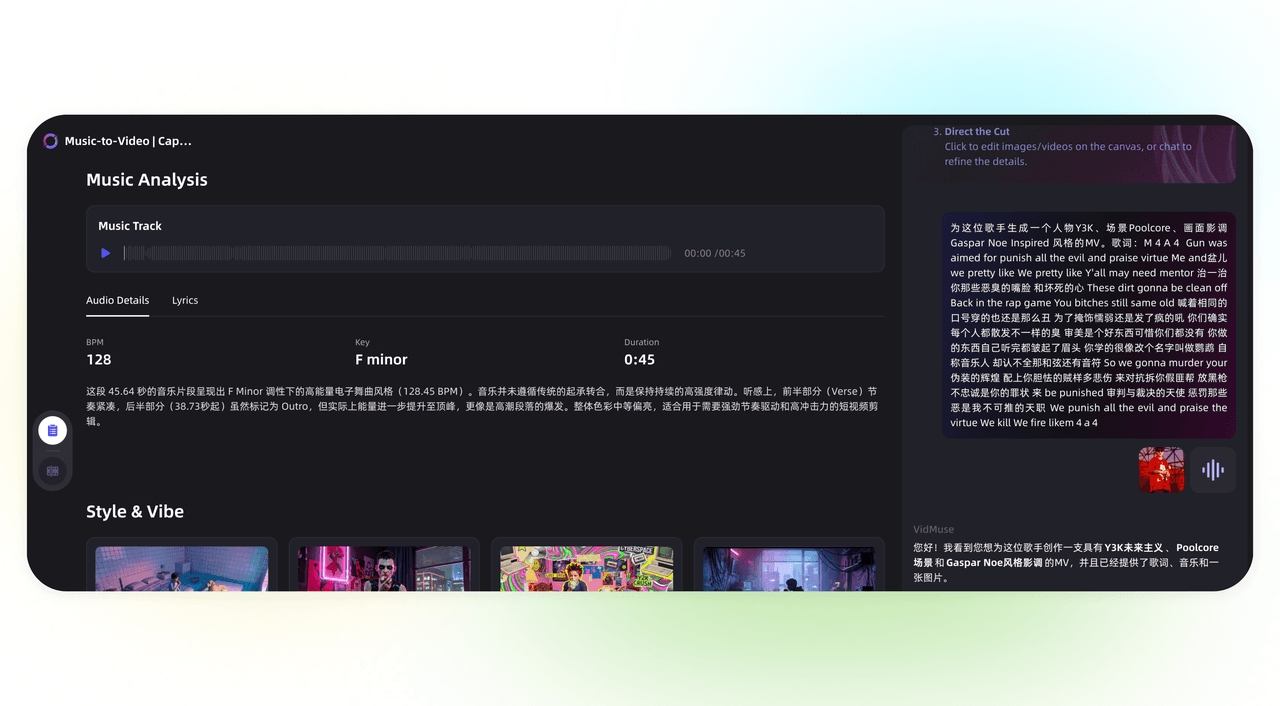
Step 3 🔥🔥🔥: Revise the Work
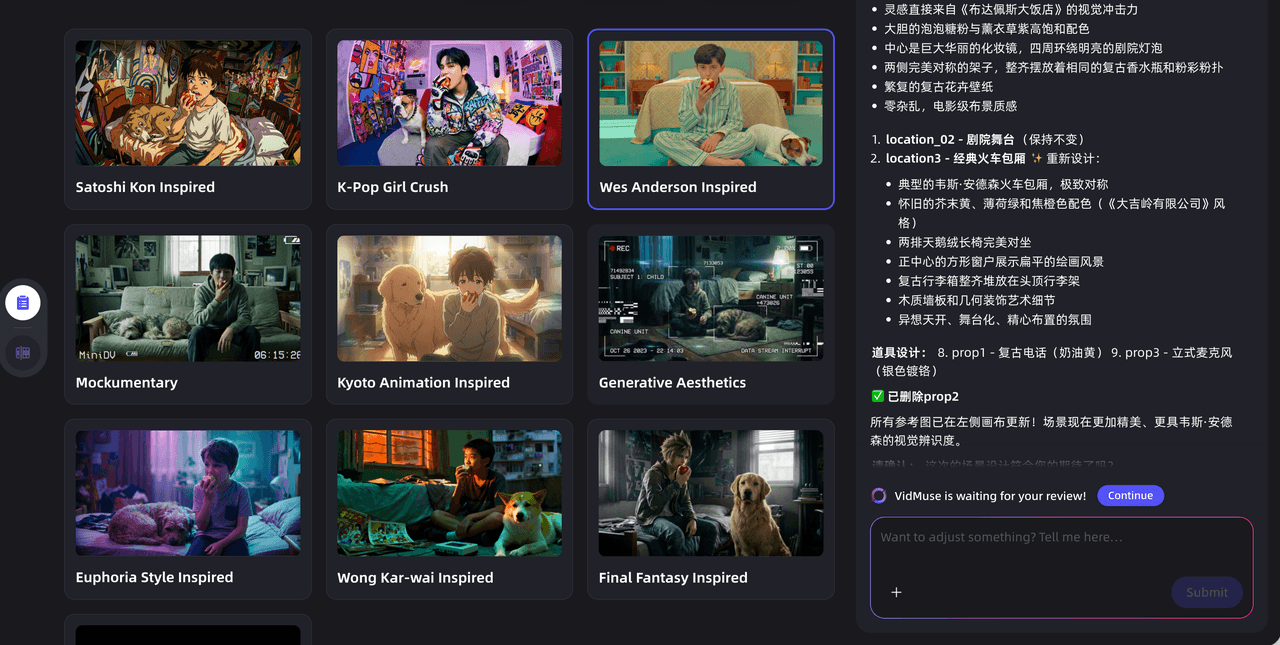
VidMuse will automatically think about the information needed to design the MV. You can communicate with VidMuse and design your work according to its guidance. Feel free to fully communicate with VidMuse to make revisions and create a work that meets your needs!
Typically, based on the collaborative communication with you, VidMuse will confirm the following key elements:
- MV Style
- Creative Outline
- Actor, Prop, and Scene Design
- Scene-by-Scene Design
- Shot List
- Materials
- ······
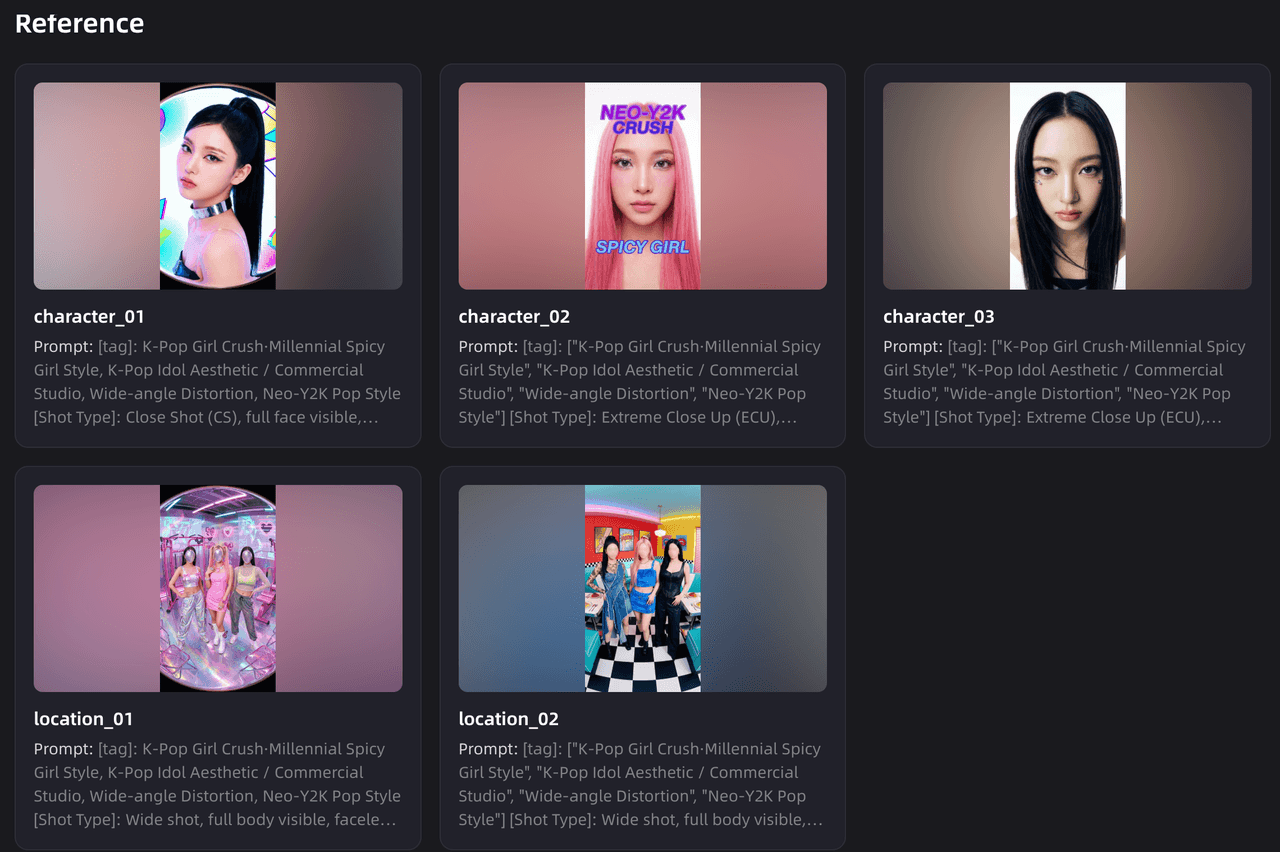
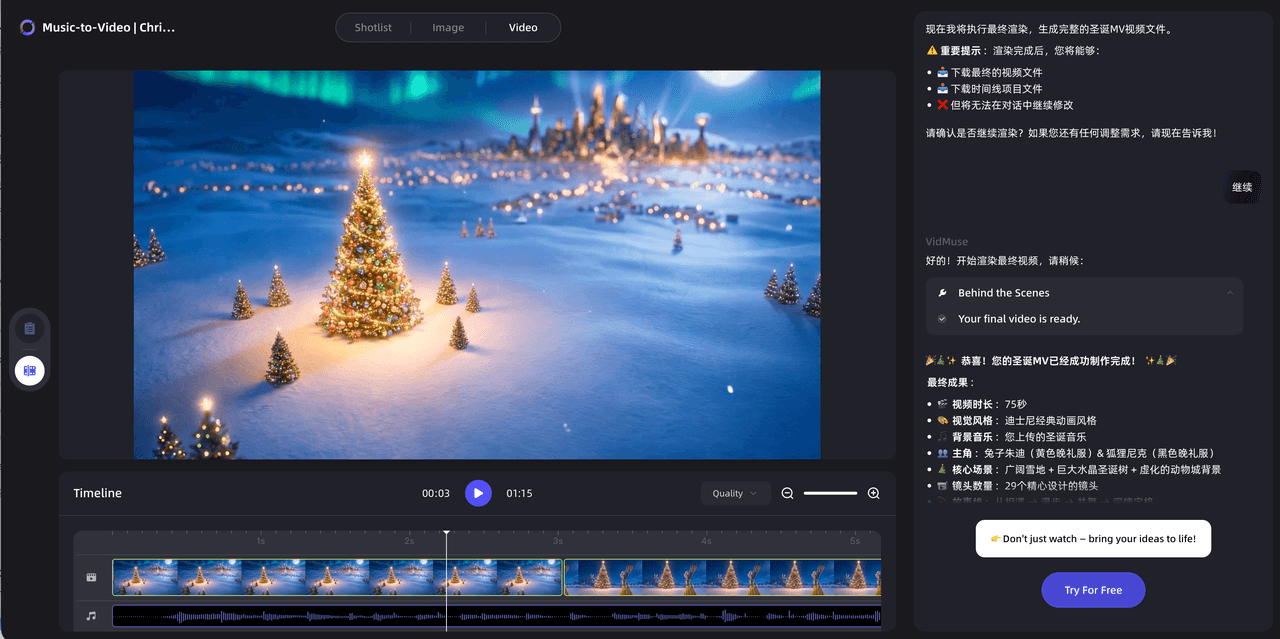
Step 4: Preview
VidMuse wants users to experience the MV effect in more diverse ways, so a preview panel is designed. After the shot design is completed, you can click the preview mode to check the shot switching rhythm and shot content design of the MV. You can also further view the shots and videos.
🔥 Things You Need to Note
-
The right side of VidMuse is your planning area. All your modification requirements can be issued in the chat area on the right.
-
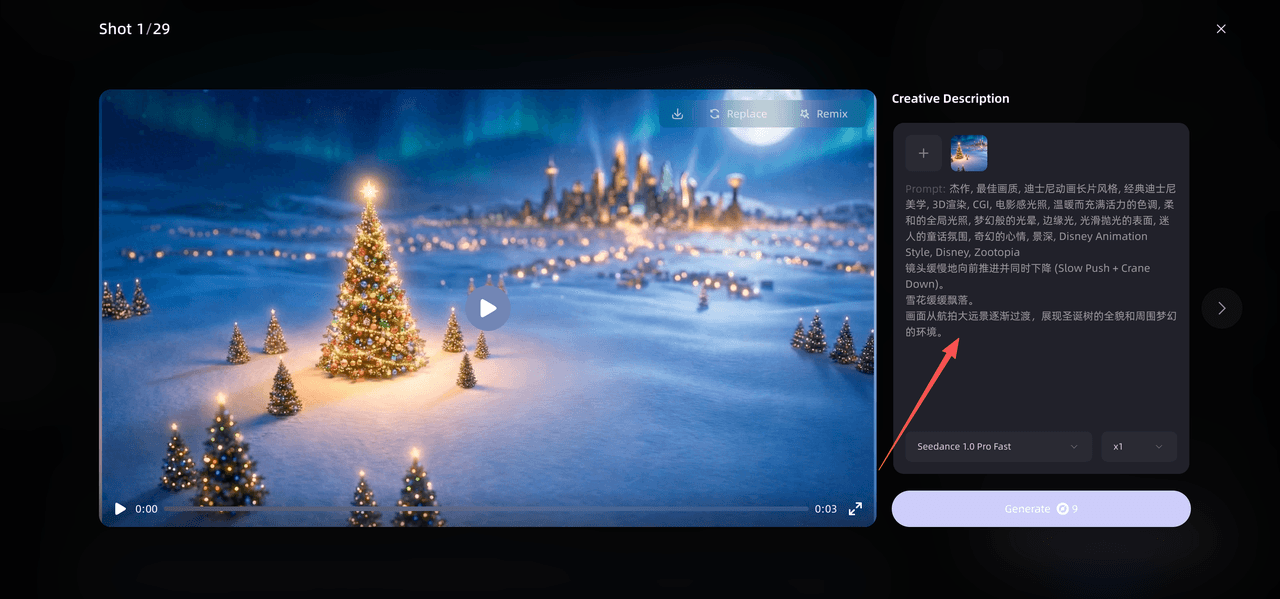
If you are not satisfied with the results delivered by VidMuse, you can enter your modification requirements in the planning area or directly modify them on the canvas!
You can directly modify shots, video materials, actors, props, scenes, etc., on the canvas. You can also make changes in the planning area. You can say things like: However: If you are not satisfied with the creative outline and shot planning, currently modifications are only supported in the planning area.
III. Q&A
Q: Why can't I log in?
A: VidMuse supports registration with domestic email addresses. You can check your internet connection—no need for VPN. If you are using a VPN, please check your server node.
Q: Why is everything in English? Is there a Chinese version available?
A: VidMuse supports Chinese conversations. You can submit requirements in Chinese. The Chinese version of the interface is under urgent development 🏃♀️.
Q: Can I get more points?
A: Of course! Send your works and personal introduction to the assistant (contact information below) for a chance to get Super Creation Points! 🎉
📮 DM:support@vidmuse.ai 👾 Discord:https://discord.gg/CahCmBCDgE ℹ️ WeChat:VidMuse_ai
Q: Is the security of my works guaranteed?
A: Absolutely! VidMuse will strictly protect the privacy of your works—your works are only visible to you. You can also share them on your social media after completion to let more people see them 😄.
Q: How often is VidMuse updated?
A: We update every week! Please follow our product updates.
🎵 To Every Music Creator
Sound is a vessel for emotions. Every note played is a unique resonance between you and the world.
We deeply believe that your music deserves not only to be heard but also to be seen. In this era where screens are everywhere, visuals are no longer just a medium of communication but also an amplifier of emotions. They give concrete shapes to abstract melodies and give flowing sounds a reason to linger.
The birth of VidMuse stems from reverence for creation itself. We are committed to providing you with a pair of "visible ears" to help you transform the melodies flowing in your mind into the light and shadow dancing on the screen. This is not about anxiety over traffic but a pure audio-visual resonance.
We believe that the visualization of music should not be a random patchwork but a logical interpretation and a visual expression of the musician's spiritual values.
VidMuse is a rational builder. It is responsible for understanding the Structure, Groove, and Narrative in your music, and through precise automatic planning, transforms invisible sound waves into tangible images.
You define the soul of the sound—VidMuse makes it visible.

Written By
VidMuse Team
Continue Reading
Latest blog posts related to AI video creation.
Happy Horse 1.0 x VidMuse AI: Full Integration Guide
Learn how to use Happy Horse 1.0 on VidMuse AI, from Creative Brief to final video export. A step-by-step tutorial for indie musicians and creators.
ChatGPT Images 2.0 Release Guide and What's New
ChatGPT Images 2.0 launches April 21, 2026 with thinking AI, multilingual text, and up to 2K resolution for visual creation.