

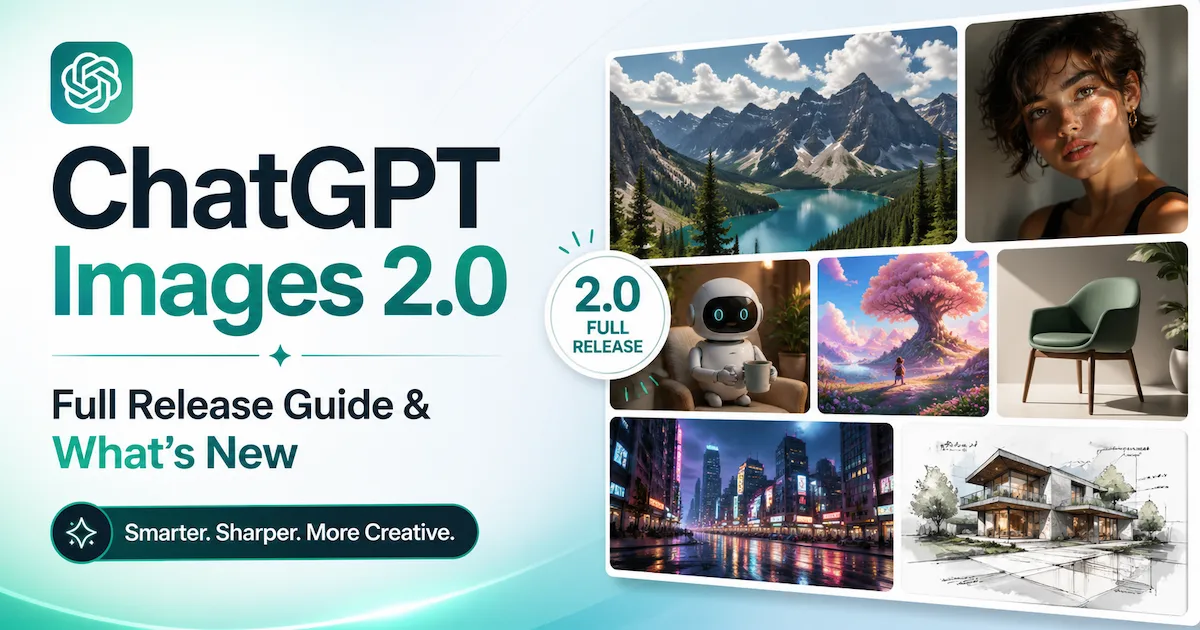
ChatGPT Images 2.0 is OpenAI's most significant image generation upgrade to date, released on April 21, 2026. Built on the new gpt-image-2 model, it introduces thinking-powered image generation, near-perfect multilingual text rendering, up to 2K resolution via the API, and the ability to produce up to eight coherent images from a single prompt — all within the familiar ChatGPT interface.
Whether you're a designer, marketer, indie musician, or developer, this release fundamentally changes what you can realistically build with an AI image generator.
Key Takeaways
- ChatGPT Images 2.0 launched April 21, 2026 and is powered by the gpt-image-2 model, available to all ChatGPT and Codex users at no extra cost in standard mode.
- Its "thinking" capability — reserved for Plus, Pro, and Business subscribers — allows the model to search the web, self-review outputs, and generate up to eight coherent images from one prompt.
- Text rendering is now a genuine strength: the model handles dense multilingual typography in Japanese, Korean, Chinese, Hindi, and Bengali with high accuracy.
- On the Artificial Analysis Image Arena, GPT Image 2 scored 1,512 Elo compared to Nano Banana's 1,271 Overchat — a meaningful benchmark lead over its closest rival.
- VidMuse integrates ChatGPT Images 2.0 (alongside Flux.2 and Midjourney V7) as one of its image generation options for producing high-fidelity video keyframes inside its AI music video workflow.
What Is ChatGPT Images 2.0?
ChatGPT Images 2.0 is OpenAI's next-generation image creation system, built on the gpt-image-2 model and designed to move image generation from single-shot rendering toward strategic visual design.
A year before this release, OpenAI launched the original ChatGPT Images, which proved that AI could create images that were both aesthetic and genuinely useful. The underlying architecture has been described by Research Lead Boyuan Chen as "revamped from scratch" — a "generalist model" or a "GPT for images" capable of handling 3D-style perspective shifts and complex spatial reasoning through simple text prompts.
The core philosophy shift is captured in how OpenAI frames the release: images are described as a language, not decoration — capable of explaining mechanisms, staging moods, and making arguments, just as a well-written sentence does.
This model is not a visual style upgrade. It is a systemic rethink of how an AI interacts with a visual prompt, adding a reasoning layer that plans before it generates.
The Biggest New Features in ChatGPT Images 2.0
ChatGPT Images 2.0 introduces several capabilities that previous versions and competing tools simply couldn't deliver reliably — with text rendering, multilingual support, thinking mode, and flexible aspect ratios being the headline changes.
1 - Thinking Mode: The Model Plans Before It Draws
When a thinking or Pro model is selected in ChatGPT, Images 2.0 activates an agentic reasoning layer. This gives it the ability to search the web, make multiple images from one prompt, and double-check its own outputs — enabling the creation of marketing assets in various sizes as well as multi-paneled comic strips.
This is not a superficial feature. Thinking mode means the model can be handed a vague brief — "create a product launch announcement graphic for a Tokyo bakery" — and it will research real context, plan a visual structure, produce the image, and verify it before delivering. That's the difference between a render engine and a visual thought partner.
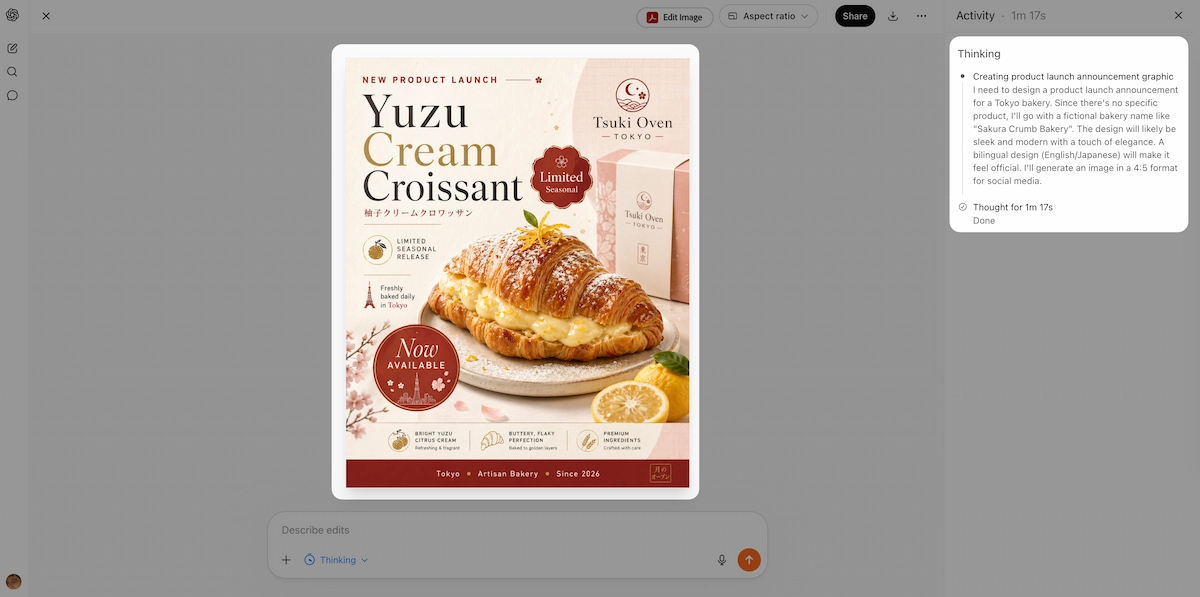
Thinking mode is available to ChatGPT Plus, Pro, and Business subscribers.
2 - Text Rendering That Actually Works
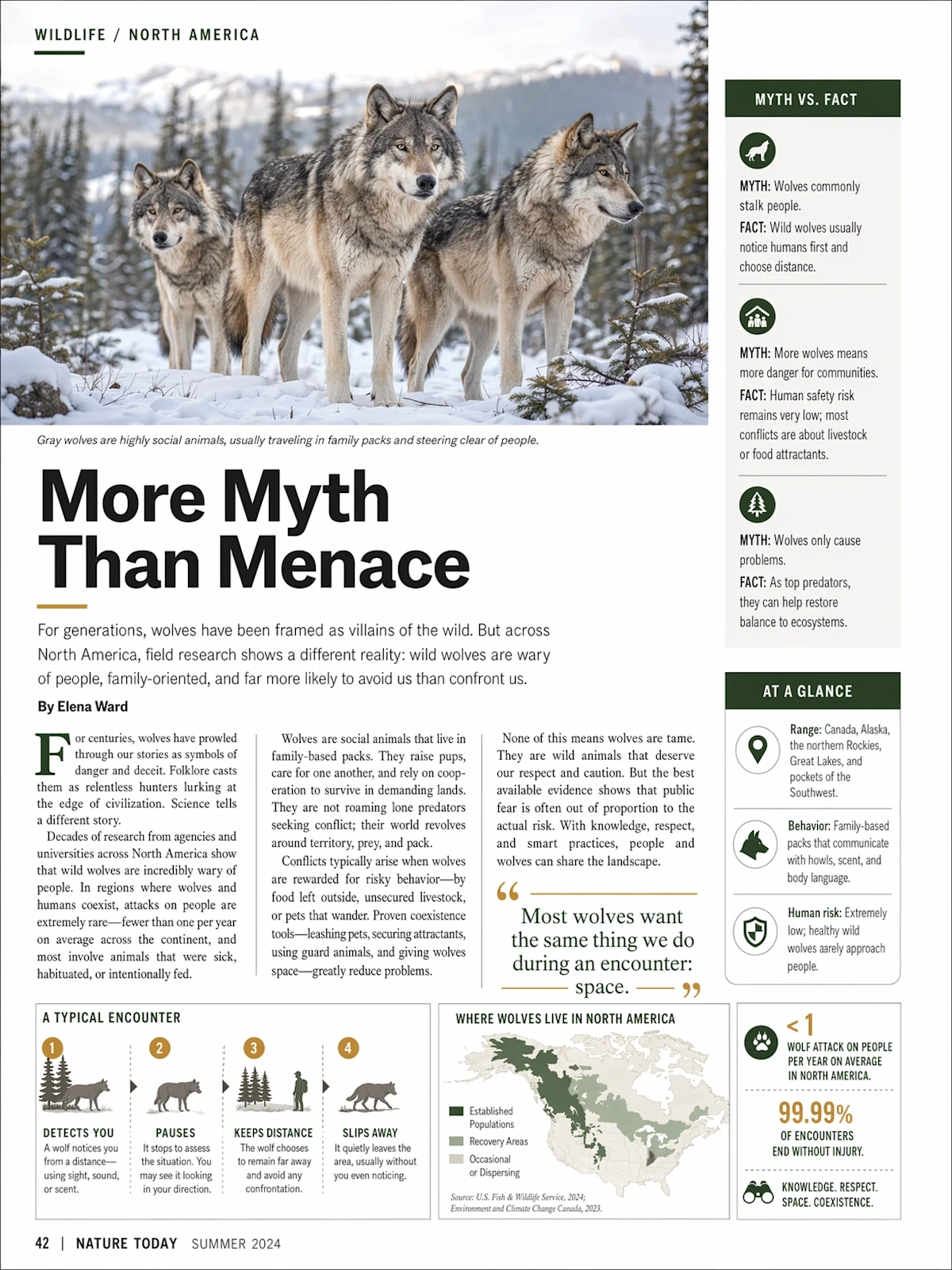
Text inside images has historically been the biggest weakness of AI image models. ChatGPT Images 2.0 integrates written language naturally into scenes — including handwritten notes, signage, UI labels, and posters — with correct spelling and consistent spacing.
This matters enormously for practical workflows. Magazine covers, product labels, instructional diagrams, restaurant menus, and social graphics all require legible text. Previous models, including DALL-E 3 and early Midjourney versions, were genuinely unreliable here. The model also understands physics, lighting, and material properties at a depth that goes beyond pattern matching, and complex multi-object scenes no longer suffer from occlusion or misplacement.
3 - Multilingual Typography at Scale
One of the most persistent "tells" of AI-generated imagery has been the inability to render legible text. OpenAI claims Images 2.0 marks a "step change" in this department — the model is now capable of producing readable typography even in dense compositions, such as scientific diagrams, menus, or infographic posters.
Crucially, the model doesn't just translate labels — the text is "rendered correctly but with language that flows coherently," ensuring that labels and explanations feel natively integrated into the design. For brands creating localized advertising across Asian or South Asian markets, this removes a long-standing bottleneck.
4 - Up to Eight Images from One Prompt
For creators working on storyboards or brand campaigns, the most impactful new feature may be the ability to generate up to eight distinct images from a single prompt — with "character and object continuity" maintained across the series.
This solves a workflow that was genuinely painful before: you no longer need to prompt one image at a time and manually stitch a coherent sequence together. A manga page sequence, a multi-format social campaign, a storyboard — all can be generated as a set.
5 - Flexible Aspect Ratios
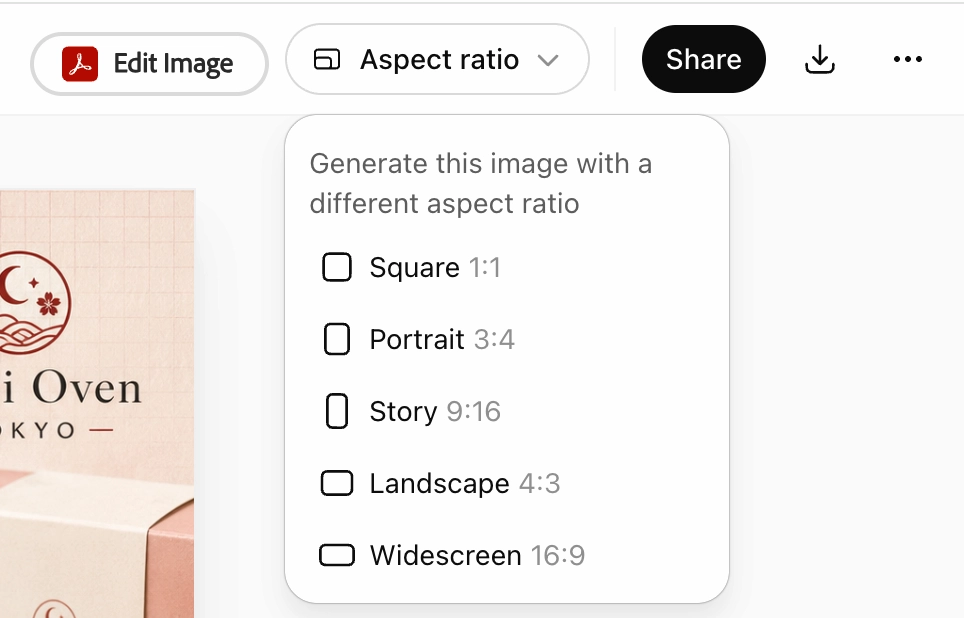
The model supports aspect ratios as wide as 3:1 and as tall as 1:3. That means wide banners, portrait posters, mobile screen mockups, and social graphics can all be produced in the dimensions they'll actually be used in — not cropped into them afterward.
6 - Real-World Knowledge (December 2025 Cutoff)
The model carries a knowledge cutoff of December 2025, which is meaningfully more recent than its predecessors. This matters for educational explainers, infographics referencing current events or design trends, and any output where factual accuracy is part of the visual.
ChatGPT Images 2.0 vs Nano Banana: How Do They Compare?
ChatGPT Images 2.0 leads Nano Banana 2 (Google's Gemini 3.1 Flash Image) across most measurable dimensions in 2026, with the most decisive gap in text rendering and complex layout precision.
Nano Banana — a name that refers to Google's image generation model embedded in Gemini — has been a formidable competitor. Google announced Nano Banana 2 (also known as Gemini 3.1 Flash Image) earlier in 2026, a state-of-the-art image model that delivered Nano Banana Pro-level image quality with notable improvements — and OpenAI launched ChatGPT Images 2.0 directly in response.
| Feature | ChatGPT Images 2.0 | Nano Banana 2 (Gemini 3.1 Flash) |
|---|---|---|
| Text Rendering | Winner: ~99% accuracy; handles labels and UI precisely. | Struggling; prone to gibberish in complex scenes. |
| Layout Precision | Winner: Precise execution of grids and spatial layouts. | Interpretive; often misaligns labels or grid elements. |
| Generation Speed | Winner: ~3 seconds (Instant mode). | 20–40 seconds depending on mode. |
| Web Grounding | Grounded via reasoning architecture. | Winner: Real-time Google Search integration for news/geo accuracy. |
| LMArena Elo | 1,512 (Ranked #1) | Competitive (Trailing by 242 points). |
| Best For | Professional design, UI mockups, and speed. | High-volume iteration and real-time info grounding. |
Here's how the two models stack up across core dimensions:
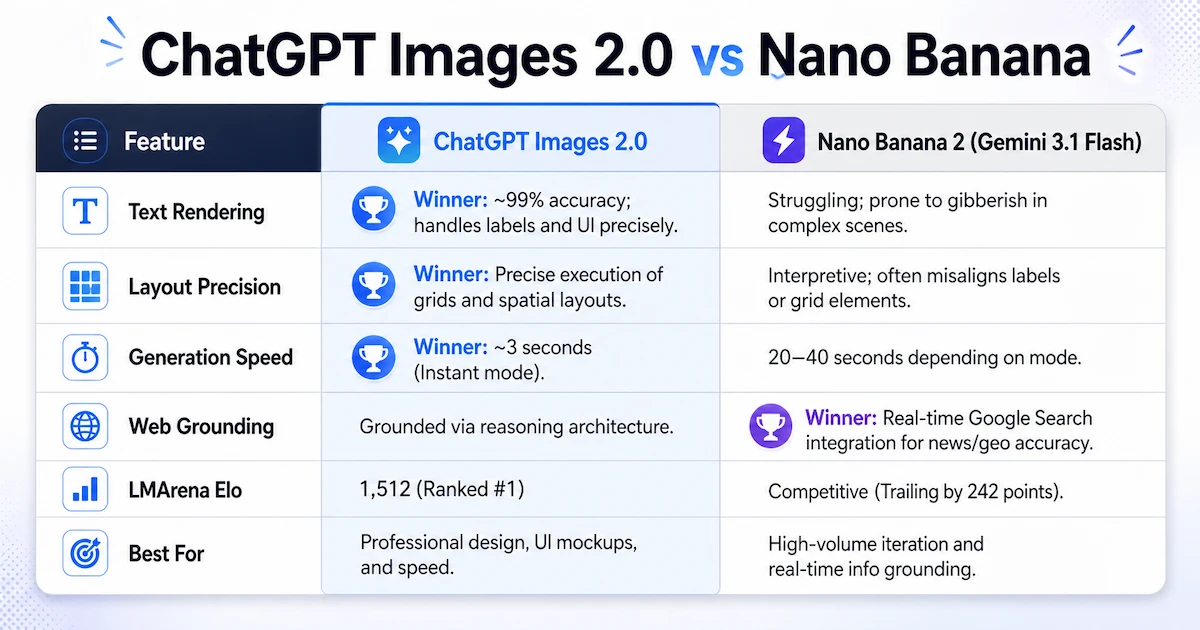
Text Rendering GPT Image 2 wins on text rendering with approximately 99% character accuracy, while Nano Banana 2 can still produce gibberish or scribble-like text in complex multi-element compositions. For any workflow involving labels, UI mockups, or multilingual design, this is a decisive advantage.
Layout Precision A typical test generating a 3×3 clothing grid with text labels showed GPT-Image-2 precisely executing the layout with clear, correctly matched labels — while Nano Banana Pro interpreted the grid as a "reference layout," resulting in mixed clothing and misaligned labels.
Generation Speed GPT Image 2 in Instant mode generates images in roughly 3 seconds — much faster than Nano Banana 2 at 30–40 seconds in Pro mode and around 20 seconds in Fast mode.
Real-Time Web Search Both models support real-time information grounding, but they implement it differently. Nano Banana Pro performs real-time Google searches before generation, making it ideal for scenarios requiring the latest information. GPT-Image-2's reasoning architecture gives it the advantage for precise text and complex layouts.
Leaderboard Standing Just 12 hours after launch, GPT-Image-2 topped the LMArena Image leaderboard with an Elo score of 1,512, leaving Nano Banana Pro with a record-breaking lead of +242 points.
Where Nano Banana 2 still competes: For high-volume, fast-iteration workflows where generation speed matters more than layout precision, Nano Banana 2 remains capable. Google Search grounding also gives it an edge in narrow use cases where real-time geographic or news-based reference is the primary need.
Who Can Access ChatGPT Images 2.0?
ChatGPT Images 2.0 is available to all users, but advanced thinking features require a paid ChatGPT subscription.
Access breaks down as follows:
- All ChatGPT users (free and paid): Standard image generation with the new gpt-image-2 model in Instant mode. Faster generation, improved text rendering, and better instruction following are available immediately.
- ChatGPT Plus, Pro, and Business subscribers: Full access to thinking mode — web search during generation, multi-image output (up to eight per prompt), and self-review of outputs.
- Codex users: Images 2.0 is available inside Codex workspaces, allowing designers and developers to generate and iterate on UI directions and visual assets within the same environment where they build and ship products.
- API developers: Access via the gpt-image-2 model in the API, with pricing based on quality and resolution.
The ChatGPT Images 2.0 API (gpt-image-2)
The gpt-image-2 API gives developers and businesses access to the same model that powers ChatGPT Images 2.0, with support for image generation, editing, and multiple output formats and resolutions.
API pricing for gpt-image-2 is as follows:
- Image input: $8.00 per 1M tokens
- Cached image input: $2.00 per 1M tokens
- Image output: $30.00 per 1M tokens
Resolution up to 2K is available in the standard API. Outputs above 2K are currently in beta and may produce inconsistent results in some cases.
Key API capabilities include:
- Text-to-image generation with aspect ratios up to 3:1 and as tall as 1:3
- Image-to-image editing with masking support
- Multilingual text rendering
- Quality parameter control (lower quality settings reduce cost for less demanding workflows)
- Maximum single edge of 3,840px; total pixel count must be between 655,360 and 8,294,400
For developers building localized advertising tools, design platforms, educational content pipelines, or creative automation systems, the API offers a meaningful upgrade over what was possible with gpt-image-1.5.
How to Get the Most From ChatGPT Image 2.0 Prompts
Effective ChatGPT image 2.0 prompts are specific about scene, format, style, and text — because the model is now capable of executing precise instructions rather than approximating them.
Follow these principles when prompting:
- Specify the format and aspect ratio directly. If you need a 16:9 banner, say so in the prompt. The model will generate to fit.
- Include exact text strings you want rendered. The model will now actually spell them correctly. Don't describe text — write it out as you want it to appear.
- Name the visual style explicitly. "Magazine spread," "shonen manga," "mid-century poster," "disposable camera photo" — the model understands these as visual languages, not vague references.
- Use thinking mode for complex multi-part briefs. If your prompt involves gathering real-world context (a specific building, a current trend, a localized campaign), thinking mode will use web search to inform the output.
- Request multiple outputs as a set. Instead of generating one image and iterating, describe the full sequence you need. Specify character continuity if the same character or product should appear across images.
- State what should not appear. The model respects negative constraints, which helps eliminate common hallucinations in complex scenes.
A strong prompt structure for professional use:
Scene: [environment, time of day, setting] | Subject: [what/who is featured] | Style: [visual language] | Text: [exact copy to render] | Format: [aspect ratio or dimensions] | Mood: [lighting, atmosphere]
How VidMuse Uses ChatGPT Images 2.0 for Video Keyframes
VidMuse AI integrates ChatGPT Images 2.0 as one of its image generation models, enabling creators to produce high-fidelity keyframes that drive the visual identity of AI music videos.
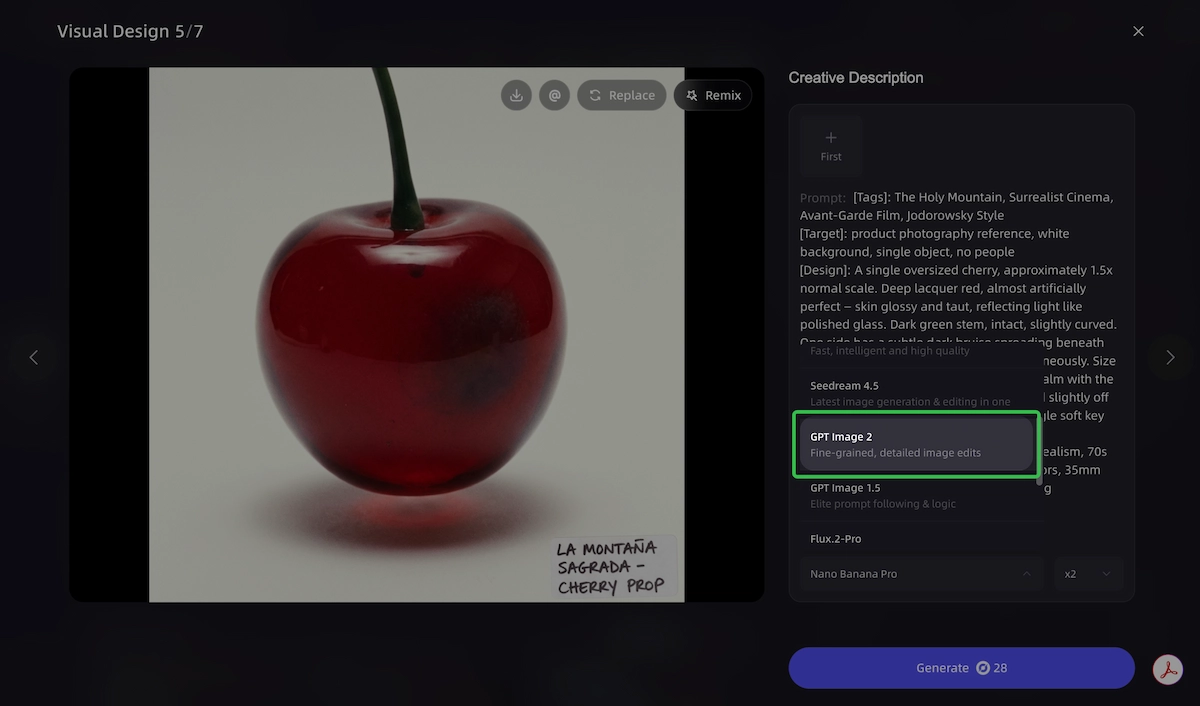
In the VidMuse workflow, the image generation step sits between the Storyboard stage and the Video Generation stage. When building a music video — whether a Story MV, Abstract MV, Performance MV, or Viral Short — each scene's visual character is anchored by a keyframe. The quality and specificity of that keyframe directly determines how well the video generation model (Seedance 2.0, Kling V2.6 Pro, Veo 3.1, and others in VidMuse's model matrix) can faithfully extend it into motion.
ChatGPT Images 2.0 is particularly well-suited to this role because:
- Its precise instruction following means the keyframe matches the creative brief, not a vague approximation of it.
- Its stylistic fidelity across cinematic stills, manga, and photorealism allows it to serve Story, Abstract, and Performance MV formats without switching tools.
- Its multi-image output capability (in thinking mode) allows an entire scene sequence to be generated with consistent character and object continuity — accelerating storyboard production significantly.
- Its text rendering capability means any on-screen title cards, lyric overlays, or product labels in the video are generated cleanly from the start.
VidMuse also includes Flux.2 and Midjourney V7 as alternative image generation options in its Asset Library, giving creators the flexibility to match image style to the specific visual language of a track.
Watch for how the image generation step determines the color palette and character consistency carried through the full video output.
Known Limitations You Should Understand
ChatGPT Images 2.0 is a major step forward, but it has specific failure modes that are worth knowing before building workflows around it.
OpenAI has been transparent about where the model still struggles:
- Spatial reasoning on hidden or reversed surfaces. Tasks like origami folding guides, or labels that need to appear accurately on the underside or back of an object, remain unreliable.
- Very dense or repetitive fine detail. Outputs depicting fine grain textures like sand at high zoom, or highly repetitive micro-patterns, may show inconsistency.
- Precise arrow and label placement in technical diagrams. Infographics and part diagrams should be reviewed carefully before use in technical documentation.
- API outputs above 2K resolution. These are currently in beta and can produce inconsistent results in some cases.
- Current events after December 2025. The knowledge cutoff means prompts referencing events, products, or people that emerged after that date may produce inaccurate or incomplete visual results. In thinking mode, web search can partially compensate — but it is not guaranteed.
If your workflow depends on any of these tasks, build in a manual review step rather than treating outputs as publish-ready.
FAQ
How many images does ChatGPT allow you to generate at once?
In standard Instant mode, ChatGPT generates one image per prompt. When thinking mode is activated — available to Plus, Pro, and Business subscribers — the model can produce up to eight distinct images from a single prompt, with character and object continuity maintained across the set. The API follows similar logic based on the parameters you pass.
Why can't I upload images to ChatGPT for editing?
Image upload is available in ChatGPT to paid subscribers (Plus, Pro, Business) and in some free-tier contexts, though access can vary by region and rollout status. If you cannot upload images, check that you are logged into a paid account and that image input is enabled in your settings. The gpt-image-2 API also accepts image URLs and base64 data URIs for image-to-image editing workflows.
How long does ChatGPT take to make an image with Images 2.0?
In Instant mode, GPT Image 2 generates images in roughly 3 seconds — making it significantly faster than most competing models at equivalent quality. Thinking mode takes longer because the model searches the web, plans the composition, and self-reviews the output before delivering the final image. Expect 15–60 seconds in thinking mode depending on prompt complexity.
What is the ChatGPT Plus image upload feature?
ChatGPT Plus subscribers can upload images directly into the chat interface and use them as references for new image generation or editing. In Images 2.0, uploaded images can be transformed into visual explainers, redesigned in a different style, or used as the starting point for image-to-image editing through the gpt-image-2 model. This is separate from the ability to attach images to text conversations for analysis.
What is the difference between ChatGPT Images 2.0 vs Nano Banana in practical use?
GPT Image 2 leads Nano Banana 2 in text rendering (approximately 99% character accuracy), UI and layout precision, and generation speed. Nano Banana 2's main edge is Google Search grounding for real-time geographic or news-based visual reference. For most commercial use cases — marketing assets, infographics, multilingual design, and storyboards — ChatGPT Images 2.0 is the more reliable choice in 2026.
Is the ChatGPT Images 2.0 API available for developers?
Yes. The gpt-image-2 model is available through the OpenAI API. Pricing is based on quality and resolution: $8.00 per 1M input tokens, $2.00 per 1M cached input tokens, and $30.00 per 1M output tokens for images. Standard resolution up to 2K is stable; outputs above 2K are in beta. Developers can also pass image URLs or base64 data URIs for image-to-image editing tasks.
What are the best ChatGPT image 2.0 prompts for professional use?
The most effective prompts for professional workflows are specific about five things: the scene and environment, the exact text to be rendered, the visual style (named explicitly), the target format or aspect ratio, and — in thinking mode — any real-world reference the model should retrieve before generating. The model responds to specificity in a way previous versions did not: it can follow complex multi-part instructions and preserve fine-grained details through the full generation.
Does ChatGPT Images 2.0 support non-English text?
Yes, and this is one of its headline improvements. The model has significantly improved non-Latin text rendering, including Japanese, Korean, Chinese, Hindi, and Bengali. Text is not just translated — it flows coherently as part of the visual design, which makes it genuinely usable for localized advertising, multilingual educational content, and international campaigns.
Final Words
ChatGPT Images 2.0 represents a meaningful shift in what AI image generation can reliably do for real production workflows. The combination of thinking-powered planning, accurate multilingual text rendering, multi-image output, and a stronger knowledge base means that the gap between "AI-generated asset" and "publish-ready visual" has narrowed significantly.
For indie musicians, marketers, designers, and developers, this release changes what you can realistically build in a single session — from a single frame to a full visual campaign.
If you're creating music videos, VidMuse puts ChatGPT Images 2.0 directly inside the keyframe generation step of its AI Director workflow — alongside Midjourney V7 and Flux.2 — so you can match the image model to your visual style without leaving the platform. The Scene & Shots List, Storyboard, and Video Generation stages then carry that visual identity into motion.
Start your first music video with VidMuse and see how ChatGPT Images 2.0 keyframes translate into full scenes.

Written By
VidMuse Team
Continue Reading
Latest blog posts related to AI video creation.
PixVerse V6 x VidMuse AI: Model Guide and Video Workflow
PixVerse V6 review and VidMuse integration guide. Capabilities, 15s 1080p video, prompt tips, model comparison, pricing, and how to use V6 in VidMuse workflows.
FLUX 3: What It Is, Capabilities, and How to Access It
FLUX 3 is Black Forest Labs' multimodal AI model for image, video, audio, and action. Full guide: capabilities, FLUX 3 vs FLUX 2, availability, and pricing.
Free Music Visualizer: 10 Best Free Tools in 2026
Compare 10 best free music visualizers in 2026. Waveform tools, AI music video makers, watermark policies, export limits, and which tool fits your workflow.