

Nano Banana Pro Direct Answer
Nano Banana Pro, officially known as Gemini 3 Pro Image, is Google DeepMind's advanced AI image generation and editing model. It was introduced in November 2025 as a professional-grade step up from the original Nano Banana model, with stronger reasoning, real-world knowledge grounding, multilingual text rendering, multi-image composition, and 2K or 4K output.
For creators using VidMuse AI, Nano Banana Pro is especially useful before video generation begins. It can create album art, lyric cards, mood boards, storyboard panels, and visual references that help an AI music video keep a consistent character, style, and visual identity across scenes.
Create Your AI Video in Minutes
Turn your song, visual idea, and reference images into a complete AI music video workflow with VidMuse.
Key Takeaways
- Nano Banana Pro is Gemini 3 Pro Image. It is Google's professional image generation and editing model built on the Gemini 3 Pro reasoning engine.
- Text rendering is the major practical upgrade. It can generate more legible multilingual text for album covers, posters, labels, lyric cards, and visual mockups.
- It supports complex visual composition. Nano Banana Pro can use multiple reference images and maintain subject, brand, or character identity across generated assets.
- 2K and 4K output make it useful for production. The model is a fit for album art, campaign visuals, social assets, and storyboard references.
- VidMuse uses image models like Nano Banana Pro in pre-production. The strongest use cases are Reference Generation, Storyboard, and keyframe creation before AI video rendering.
What Is Nano Banana Pro?
Nano Banana Pro is Google DeepMind's image generation and editing model formally named Gemini 3 Pro Image. Google introduced it on November 20, 2025, as the successor to the original Nano Banana, which was based on Gemini 2.5 Flash Image.
The "Nano Banana" name began as community shorthand for Google's Gemini image models and became widely used by creators. Nano Banana Pro moves the family from fast casual editing toward professional creative production: more precise prompts, better text, stronger composition, and deeper grounding in real-world knowledge.
Unlike purely aesthetic image generators, Nano Banana Pro benefits from Gemini 3 Pro's reasoning layer. That makes it useful for more than "beautiful pictures." It can create diagrams, data-informed graphics, multilingual layouts, branded mockups, and detailed storyboard frames where semantic accuracy matters.
How VidMuse Uses Nano Banana Pro for AI Music Video Creation
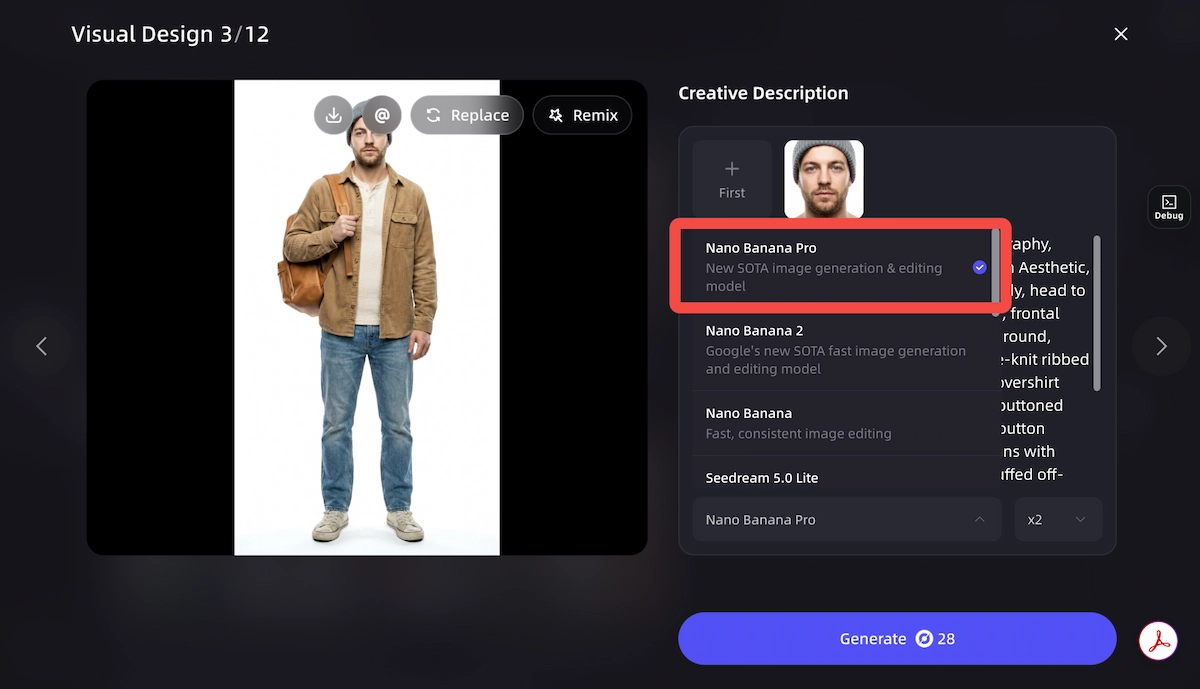
VidMuse's agent-based production workflow moves through Creative Brief, Reference Generation, Scene and Shots List, Storyboard, and Video Generation. Nano Banana Pro is most relevant at the Reference Generation and Storyboard stages, where still images define the look that video models later extend into motion.
Start with a Creative Brief
Describe the song, visual style, artist identity, target audience, mood, and references you want the video to follow.
Generate visual references
Use Nano Banana Pro for album art, character references, lighting studies, mood boards, and keyframe concepts.
Build storyboard panels
Turn the selected visual direction into scene-by-scene frames with consistent characters, locations, and camera language.
Refine text and layout
Use Nano Banana Pro for lyric cards, title frames, posters, and multilingual graphics where readable text matters.
Send approved frames into video generation
Use the final references as anchors for downstream models such as Seedance, Veo, Kling, or other VidMuse video options.
Build a Visual Identity for Your Song
Use VidMuse to plan the creative brief, generate references, and turn approved storyboard frames into AI video.
Where Nano Banana Pro Fits in the VidMuse Workflow
Reference Generation
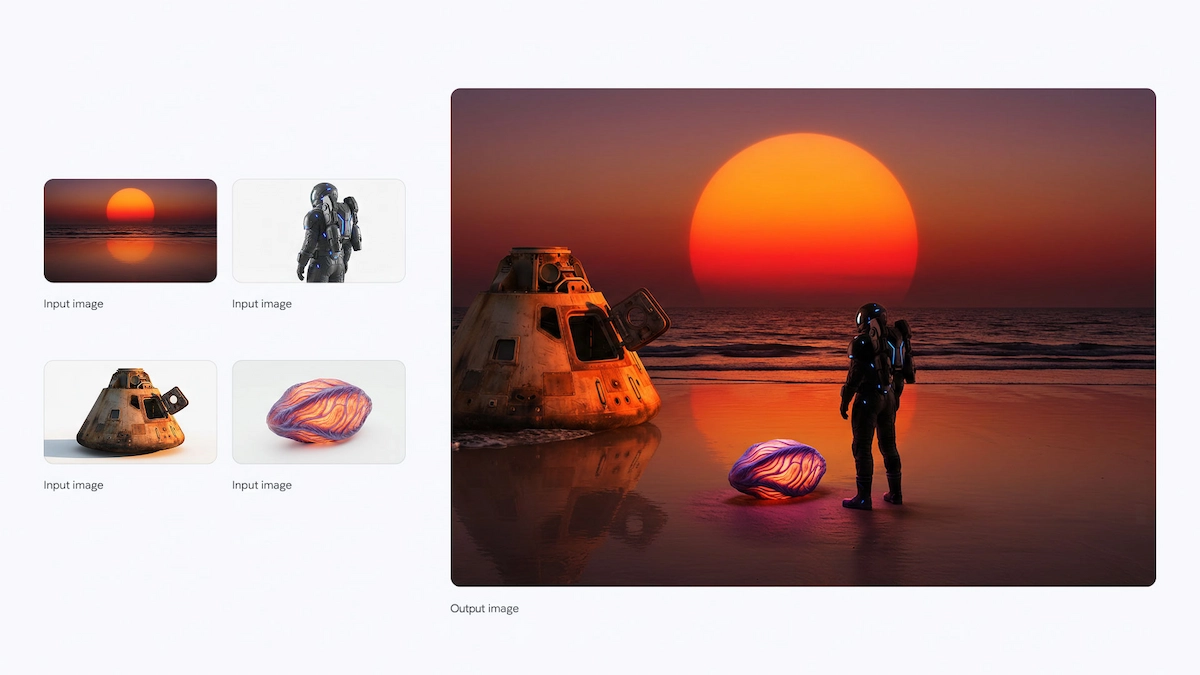
Use Nano Banana Pro's multi-image input capability to blend visual references into one cohesive direction. A creator can combine an artist portrait, a mood board, a lighting reference, and a background style to produce a consistent set of visual anchors.
Storyboard Production
Generate panel-by-panel storyboard frames with consistent character appearance, camera angles, and directorial annotations. For music video production, this helps prevent the common AI problem where every shot feels like it came from a different world.
Text Overlays and Keyframes
For videos that include lyric cards, title sequences, tour posters, or multilingual captions, Nano Banana Pro's text rendering can reduce the amount of post-production cleanup needed after image generation.
Nano Banana vs Nano Banana Pro vs Nano Banana 2
Nano Banana, Nano Banana Pro, and Nano Banana 2 serve different production needs. The best choice depends on whether you prioritize speed, maximum precision, or a balance of both.
Nano Banana
Best for
- Fast generation for quick ideation
- Good fit for casual editing and social content
- Lower latency and cost than Pro-style models
Watch out
- Less reliable for multilingual text
- Weaker fit for commercial layouts and complex references
Nano Banana Pro
Best for
- Best for professional image quality and precision
- Strong text rendering and world-knowledge grounding
- Useful for album art, posters, mockups, and storyboards
Watch out
- Higher latency and cost than Flash-style models
- Overkill for high-volume disposable social drafts
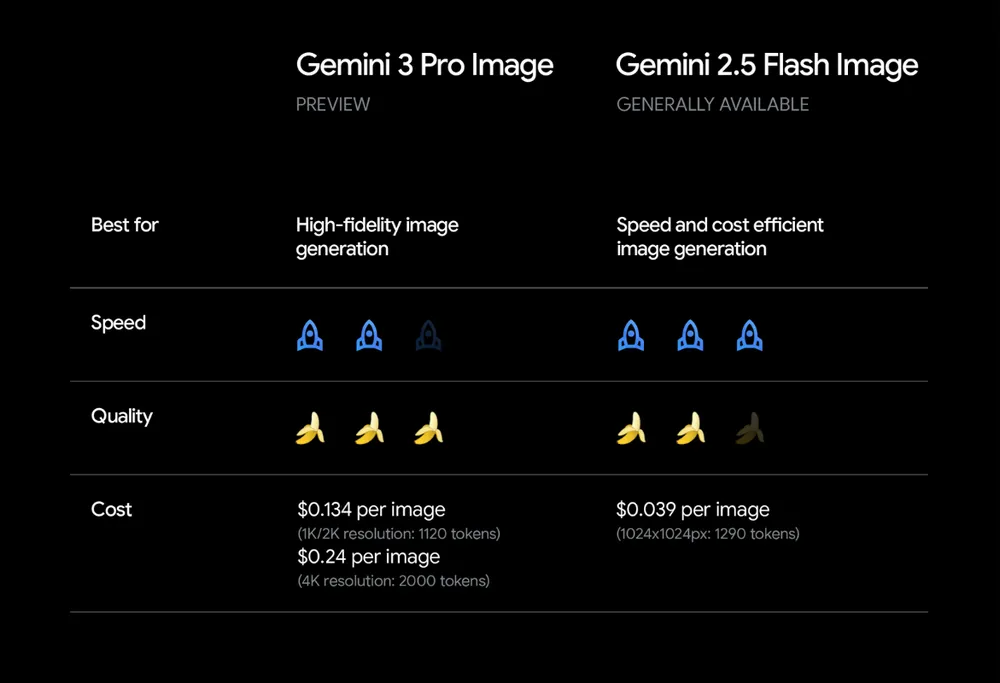
Nano Banana 2, also known as Gemini 3.1 Flash Image, is the newer Flash-speed member of the family. It is designed to bring many Pro-level capabilities into faster workflows. For most creator workflows, Nano Banana 2 is a strong starting point; Nano Banana Pro remains valuable when precision, reasoning depth, or carefully reviewed production assets matter more than speed.
Core Features of Nano Banana Pro
Enhanced Reasoning and Real-World Knowledge
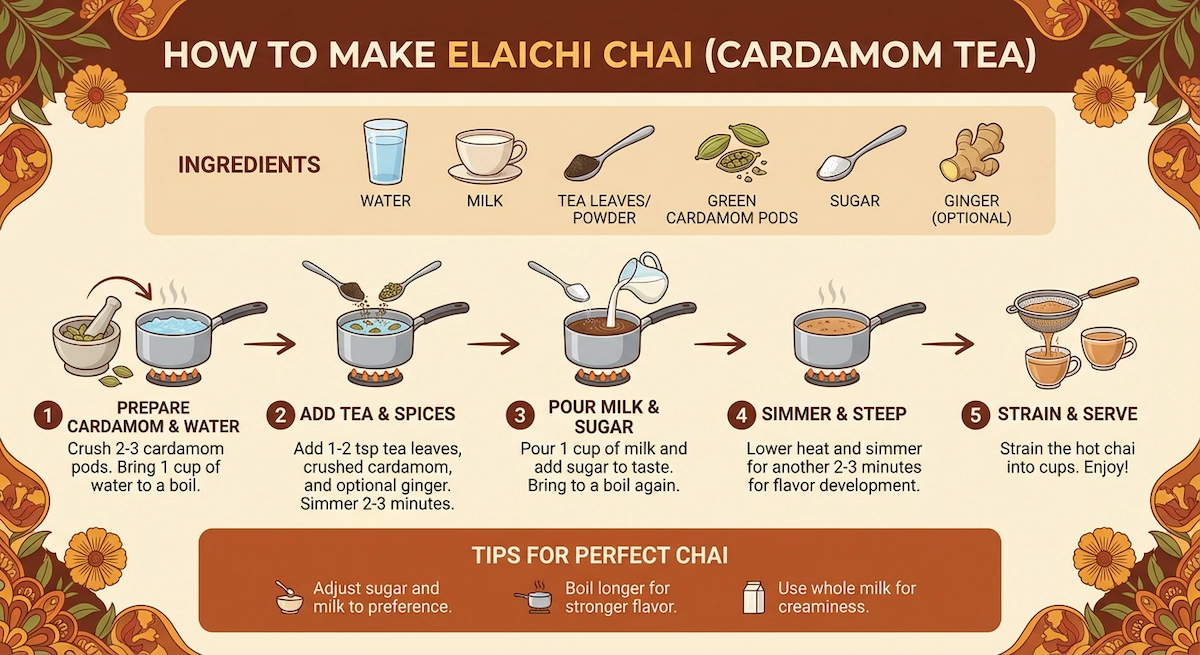
Nano Banana Pro does not only generate polished images. It can also generate more accurate visuals because it is connected to Gemini 3 Pro's reasoning ability and, on supported surfaces, Google Search grounding. This is useful for recipe cards, scientific diagrams, educational explainers, event graphics, and data-informed visuals.
Superior Text Rendering in Multiple Languages
Text inside AI-generated images has historically been unreliable. Nano Banana Pro directly improves that workflow by generating clearer text in posters, labels, mockups, slides, and multilingual creative assets. It can handle short taglines, visual labels, local-language campaign copy, and more complex text layouts with better consistency than older image models.
Studio-Quality Creative Controls
Nano Banana Pro gives creators control over camera angle, focal depth, color grading, lighting, composition, and localized editing. It can also transform an existing image by changing a scene from day to night, adjusting wardrobe color, replacing a background, or refining a specific region without discarding the entire composition.
Consistency Across Compositions
Maintaining a consistent character, product, or visual identity across a sequence is one of the hardest problems in AI image generation. Nano Banana Pro is useful for campaign sets, storyboard frames, artist personas, recurring product visuals, and branded social assets because it can preserve more identity details across multiple compositions.
How to Access Nano Banana Pro
Nano Banana Pro is available through several Google surfaces, with access and quotas depending on account type and product. Always check current Google product terms before building a commercial workflow around a specific quota or feature.
Open the Gemini app
Go to gemini.google.com or use the Gemini mobile app on a supported account.
Select image creation
Choose the image creation flow, then select the model option that activates Nano Banana Pro where available.
Write a precise prompt
Include subject, composition, location, action, style, lighting, and any exact text that should appear in the image.
Add references when needed
Use reference images for character identity, product details, brand palette, pose, or background style.
Review quota and export settings
Free and paid access levels can differ by surface, so confirm resolution, quota, and usage terms before production export.
Paid access has historically included higher quotas through Google AI subscription tiers, Workspace surfaces, Google AI Studio, Vertex AI, and related product integrations. Free access may exist but is usually quota-limited.
Prompting Tips for Nano Banana Pro
Effective prompting is the difference between a generic image and a production-ready visual. Google's prompt guidance emphasizes specific details rather than vague mood words.
Core Prompt Elements
- Subject: Who or what is in the image.
- Composition: How the image is framed.
- Action: What is happening.
- Location: Where the scene takes place.
- Style: The medium, aesthetic, era, or art direction.
- Editing instruction: What should change when modifying an existing image.
- Text instruction: Exact words, placement, font direction, and hierarchy.
Prompt Examples by Use Case
Storyboard panel: "Create a black and white storyboard sketch showing an establishing shot of a rain-soaked Tokyo street corner, hand-drawn panel borders, director notes in the margins, cinematic 16:9 composition."
Album art: "A cinematic square album cover for an indie electronic track, lone singer under violet stage haze, reflective floor, bold white title text 'AFTER MIDNIGHT' at the top center, 1:1, 4K."
Product mockup: "A minimalist coffee packaging mockup showing a kraft paper bag with the text 'ORIGIN BLEND' in clean serif typography, flat lay composition, natural shadow, white background, 1:1."
Multilingual infographic: "Generate a step-by-step recipe card for elaichi chai in Japanese, with illustrated ingredient icons, clean sans-serif typography, warm cream background, and hand-drawn accents."
Day-to-night edit: "Take this urban street scene and transform the lighting to deep night. Add neon reflections on wet pavement, preserve all architectural details, and apply cinematic blue-teal color grading."
Nano Banana Pro API and Developer Access
Developers and enterprise teams can access Nano Banana Pro through Google AI Studio, the Gemini API, and Vertex AI where supported. The model designation is associated with gemini-3-pro-image or preview variants depending on the API surface and release phase.
Key API-oriented capabilities include:
- Text-to-image and image-to-image generation.
- Multi-image input for reference-guided composition.
- Google Search grounding on supported surfaces.
- 2K and 4K output.
- SynthID digital watermarking for AI-generated images.
For developers choosing between Gemini image models, the practical tradeoff is speed versus precision. Flash-style image models are better for high-volume iteration, while Nano Banana Pro is better when quality, semantic accuracy, and review-ready assets matter.
Common Limitations and Tradeoffs
Nano Banana Pro is powerful, but production teams should still review outputs carefully.
- Small text can still fail. Very small type, decorative fonts, and dense legal copy may need manual cleanup.
- Factual visuals require fact-checking. Diagrams, charts, maps, and data graphics should be reviewed by a human before publication.
- Multilingual copy needs native review. Grammar, cultural nuance, and typography conventions can vary by locale.
- Complex edits can introduce artifacts. Background replacement, lighting changes, and multi-reference blends can alter details unintentionally.
- Long sequences can drift. Character or product consistency may weaken across many separate generations.
- Speed and cost are higher than Flash models. Use Nano Banana Pro for assets worth careful review, not every rough draft.
When to Use Nano Banana Pro on VidMuse
Nano Banana Pro is strongest when the image must become a visual anchor for the rest of the video workflow.
Use Nano Banana Pro
Best for
- Album covers and key art that need readable text
- Storyboard panels with consistent characters
- Lyric cards, title frames, and multilingual visual assets
- Reference images for AI music video generation
Watch out
- Not necessary for disposable rough drafts
Use a faster model first
Best for
- High-volume ideation
- Casual social posts
- Exploring many styles before choosing a direction
- Low-cost experimentation before final production
Watch out
- Less suitable for final typography and precision layouts
Create Album Art and Storyboards with VidMuse
Use Nano Banana Pro-style image generation inside a full AI music video planning and production workflow.
Related Reading
- ChatGPT Image 2.0 release
- Seedream 4.5 image model integration
- Seedance 2.0 AI video model
- AI music video generator
FAQ
What is Nano Banana Pro?
Nano Banana Pro is Google DeepMind's AI image generation and editing model officially known as Gemini 3 Pro Image. It is built on Gemini 3 Pro and is designed for professional image generation, editing, text rendering, and knowledge-grounded visual creation.
Is Nano Banana Pro free?
Nano Banana Pro has been available through several Google surfaces with different quota rules. Some users may receive limited free access, while paid plans and developer products can provide higher usage limits. Always check the current Google product terms for your account.
What is the difference between Nano Banana and Nano Banana Pro?
Nano Banana is the faster Gemini 2.5 Flash Image model for casual editing and high-volume ideation. Nano Banana Pro is based on Gemini 3 Pro Image and is better for professional output, text rendering, reference-heavy composition, and 2K or 4K assets.
How do I use Nano Banana Pro in the Gemini app?
Open Gemini, choose the image creation flow, select the available model option associated with Nano Banana Pro, then write a specific prompt with subject, composition, lighting, style, and any exact text to render.
What is the Nano Banana Pro API?
The Nano Banana Pro API is available through Google AI Studio, the Gemini API, and Vertex AI where supported. Developers use it for text-to-image and image-to-image generation, multi-reference composition, high-resolution output, and grounded visual creation.
How does Nano Banana Pro help AI music video production?
It helps create album art, character references, visual mood boards, lyric cards, and storyboard keyframes. In VidMuse, those images can guide later scene planning and AI video generation.
How does Nano Banana Pro compare with Nano Banana 2?
Nano Banana 2, or Gemini 3.1 Flash Image, is designed for Pro-level quality at Flash-level speed. Nano Banana Pro remains useful when a team prioritizes precision and carefully reviewed production assets over speed.
Final Words
Nano Banana Pro matters because it moves AI image generation closer to production design. For musicians, brands, and video creators, the value is not only a better-looking image. It is a more reliable visual planning layer: album art, storyboard frames, lyric graphics, product mockups, and reference images that can carry into a larger creative workflow.
Inside VidMuse, that makes Nano Banana Pro a natural pre-production partner. Use it to define the look, approve the visual direction, and give downstream video models a stronger target before generation begins.
Turn Your Visual Idea into an AI Music Video
Plan references, generate storyboards, and create video clips in one VidMuse workflow.

Written By
VidMuse Team
Continue Reading
Latest blog posts related to AI video creation.
PixVerse V6 x VidMuse AI: Model Guide and Video Workflow
PixVerse V6 review and VidMuse integration guide. Capabilities, 15s 1080p video, prompt tips, model comparison, pricing, and how to use V6 in VidMuse workflows.
FLUX 3: What It Is, Capabilities, and How to Access It
FLUX 3 is Black Forest Labs' multimodal AI model for image, video, audio, and action. Full guide: capabilities, FLUX 3 vs FLUX 2, availability, and pricing.
Free Music Visualizer: 10 Best Free Tools in 2026
Compare 10 best free music visualizers in 2026. Waveform tools, AI music video makers, watermark policies, export limits, and which tool fits your workflow.