

PixVerse V6 x VidMuse AI: Model Guide and Video Workflow
PixVerse V6 is PixVerse's flagship AI video generation model — producing 15-second continuous 1080p video clips with native audio, detailed camera controls (pan, tilt, zoom, tracking, crane), and realistic human rendering. Released in 2026, V6 supports text-to-video, image-to-video, transitions, video extension, and reference-driven workflows. PixVerse V6 is one of 20+ video generation models available in VidMuse, where it fits into VidMuse's AI Director workflow at the video generation stage — alongside Seedance, Kling, Veo, Hailuo, and others.
This article covers what PixVerse V6 can do, how it works inside VidMuse's multi-model workflow, how it compares to competing video models, prompt writing tips, pricing, the difference between V6 and C1, and the limitations you should know.
Key Takeaways
-
PixVerse V6 generates 15-second continuous 1080p video clips with native audio and detailed camera controls (pan, tilt, zoom, tracking, crane).
-
V6 supports text-to-video, image-to-video, transitions, video extension, and reference-driven generation with realistic human texture and motion.
-
VidMuse integrates PixVerse V6 as one of 20+ video models in its AI Director workflow — users can select V6 for specific shots alongside Seedance, Kling, Veo, and others.
-
V6 is the all-round cinematic model; PixVerse C1 is the character-consistency model for multi-shot sequences. Different tools for different jobs.
-
Free tier is available on pixverse.ai; paid plans unlock higher volume and remove restrictions. In VidMuse, V6 is accessed through VidMuse's credit system.
What Is PixVerse V6?
PixVerse V6 is PixVerse's flagship video generation model, producing 15-second continuous 1080p clips with native audio, camera motion control, and realistic human rendering. It is the all-round cinematic model in PixVerse's lineup — distinct from C1 (character consistency) and R1 (effects).
PixVerse (pixverse.ai) is an AI video generation platform that has iterated rapidly through model versions. V6 represents the current flagship, with improvements in motion quality, human realism, camera specificity, and audio synchronization over previous versions (V5, V4.5, V3.5).
| Attribute | Value |
|---|---|
| Developer | PixVerse (pixverse.ai) |
| Model | V6 (flagship) |
| Max duration | 15 seconds continuous |
| Resolution | 1080p native |
| Audio | Native audio sync |
| Camera controls | Pan, tilt, zoom, tracking, crane |
| Input modes | Text-to-video, image-to-video, transitions, extension, reference |
| Style range | Photorealism, cinematic, animation, product showcase, lifestyle |
| Free tier | Yes (with limits) |
| API | Available via PixVerse developer portal |
| Available in VidMuse | ✅ Yes — one of 20+ video models |
PixVerse V6 Key Capabilities
PixVerse V6 excels at cinematic single-shot generation with strong camera controls, realistic human rendering, and native audio — here's what each capability delivers.
Text-to-Video
V6 generates video from text prompts with native audio. It handles detailed scene descriptions with character positioning, lighting direction, action sequences, and environmental context. Output is 15 seconds at 1080p. Prompt specificity matters — V6 responds strongly to camera direction, lighting cues, and action descriptions. Generic prompts produce generic output; detailed prompts produce significantly better results.
Image-to-Video
Supply a start image and V6 animates it with camera motion, character movement, and consistent visual rendering. This is one of V6's strongest modes — particularly effective for product shots (a product rotates on a surface), character portraits (a person turns and smiles), and scene animations (a landscape comes to life with wind and clouds).
The image-to-video mode maintains the visual style, colors, and composition of the input image while adding motion. For creators who generate keyframes with image models (Flux.2-Pro, Midjourney, Seedream), V6's I2V mode turns those still frames into motion video.
Camera and Motion Control
V6 supports specific camera movements: pan, tilt, zoom, tracking shots, and crane movements. These can be specified in the prompt or via dedicated controls on PixVerse's platform.
What makes V6's camera control notable: the movements feel physically plausible — a tracking shot has natural parallax, a crane shot has smooth vertical lift — rather than simple programmatic motion. Human motion is similarly grounded: facial expressions are detailed, body movement has weight, and interactive gestures (picking up objects, turning to face camera) look natural for clips in the 5-15 second range.
Native Audio
V6 generates synchronized audio alongside video — not as a separate step. Audio types include environmental sounds (wind, footsteps, traffic), action-driven audio (impacts, door closing, glass clinking), and dialogue (lip-synced to character speech). Audio quality is strongest for environmental and action sounds; dialogue sync is improving but can be inconsistent on complex speech, especially in non-English languages.
Transition and Extension
V6 supports two specialized modes:
- Transition: Supply two images or clip endpoints, and V6 generates a coherent visual bridge between them. This maintains lighting, character consistency, and scene logic across the transition.
- Extension: Continue an existing video clip beyond its original duration. V6 extends the scene while maintaining visual consistency (lighting, character position, camera direction).
Both modes are useful for building longer sequences from individual 15-second clips — a key consideration since V6's per-clip duration is capped at 15 seconds.
Style Range
V6 handles a broad range of visual styles: photorealism with realistic skin textures and natural light, cinematic film look with grain and color grading, animation and stylized visuals, clean product photography, and lifestyle footage. It is strongest in realistic settings with human subjects and product close-ups. Stylized and abstract outputs are capable but not V6's primary strength compared to models specifically tuned for those styles.
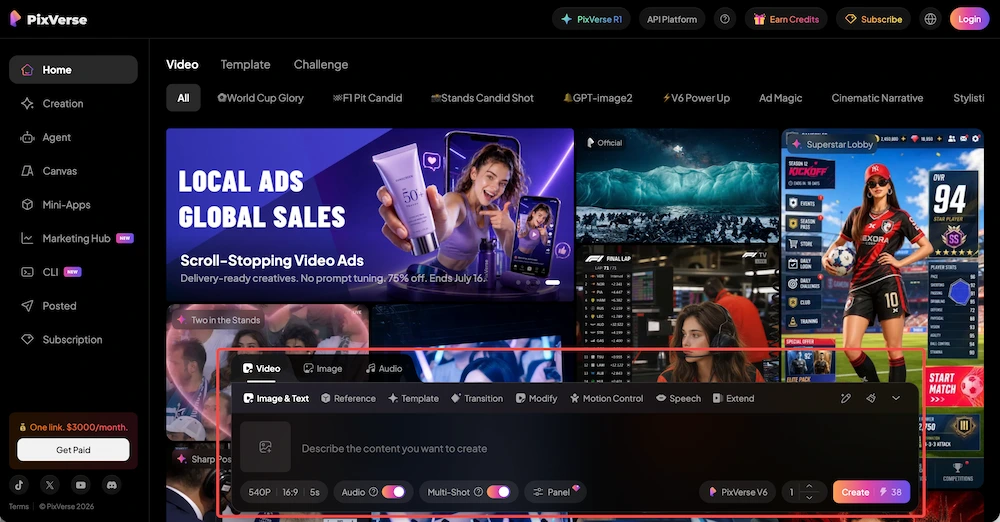
PixVerse V6 in VidMuse: How It Works
VidMuse integrates PixVerse V6 as one of 20+ video generation models in its AI Director workflow — you can select V6 for any shot alongside Seedance, Kling, Veo, Hailuo, and others.
Where V6 fits in the pipeline: VidMuse's AI Director workflow runs: Assets Upload → Creative Brief → Reference Generation → Scene & Shots → Storyboard → Video Generation. PixVerse V6 operates at the final Video Generation stage. All the planning — scene logic, shot order, timing, visual references — happens before any model generates a single frame.
Model selection: You can manually select V6 for specific shots in your storyboard (e.g., use V6 for a cinematic hero shot, Seedance for a fast-paced montage, Kling for a controlled motion sequence) or let VidMuse auto-select based on each shot's requirements.
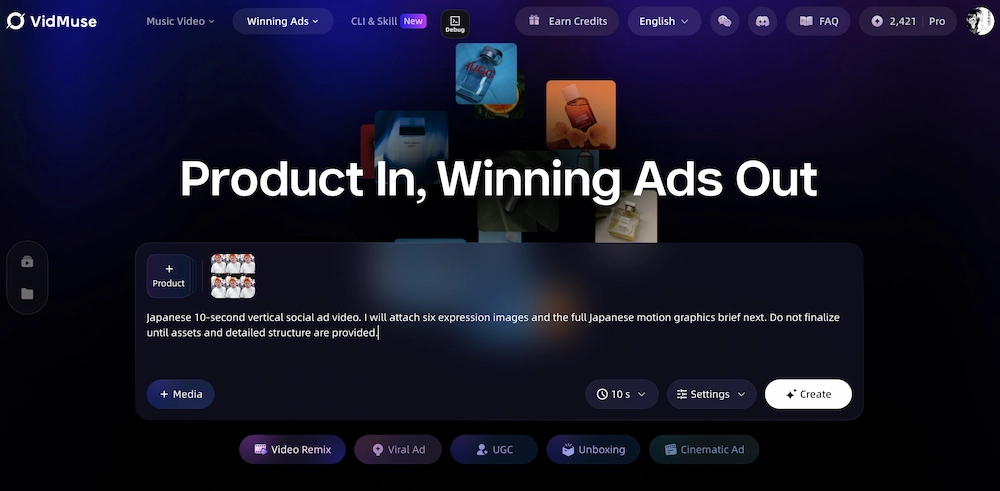
When to choose V6 in VidMuse:
| Shot Type | Why V6 | Alternative in VidMuse |
|---|---|---|
| Cinematic hero shot with camera motion | V6's named camera controls + realism | Seedance 2.0 Pro (also strong) |
| Product close-up with natural lighting | V6's realistic texture rendering | Kling V3.0 Pro |
| Animated or stylized scene | V6 handles stylized range | Hailuo 2.3 Pro |
| Human character with facial expression | V6's human rendering strength | Seedance 2.0 Pro |
| Quick draft / fast iteration | V6 is fast for single shots | Seedance 2.0 Fast (faster) |
Music video use case: V6's cinematic camera control, realistic motion, and native audio sync make it a strong choice for story MV and performance MV shots. Use VidMuse's AI music video generator to plan the storyboard, then select V6 for cinematic shots where realism matters.
Ad video use case: V6's product rendering quality and lifestyle footage realism suit product showcase clips and UGC-style ad content. Use VidMuse's AI ad generator workflow to plan the ad script and shot list, then select V6 for product hero shots and lifestyle scenes.
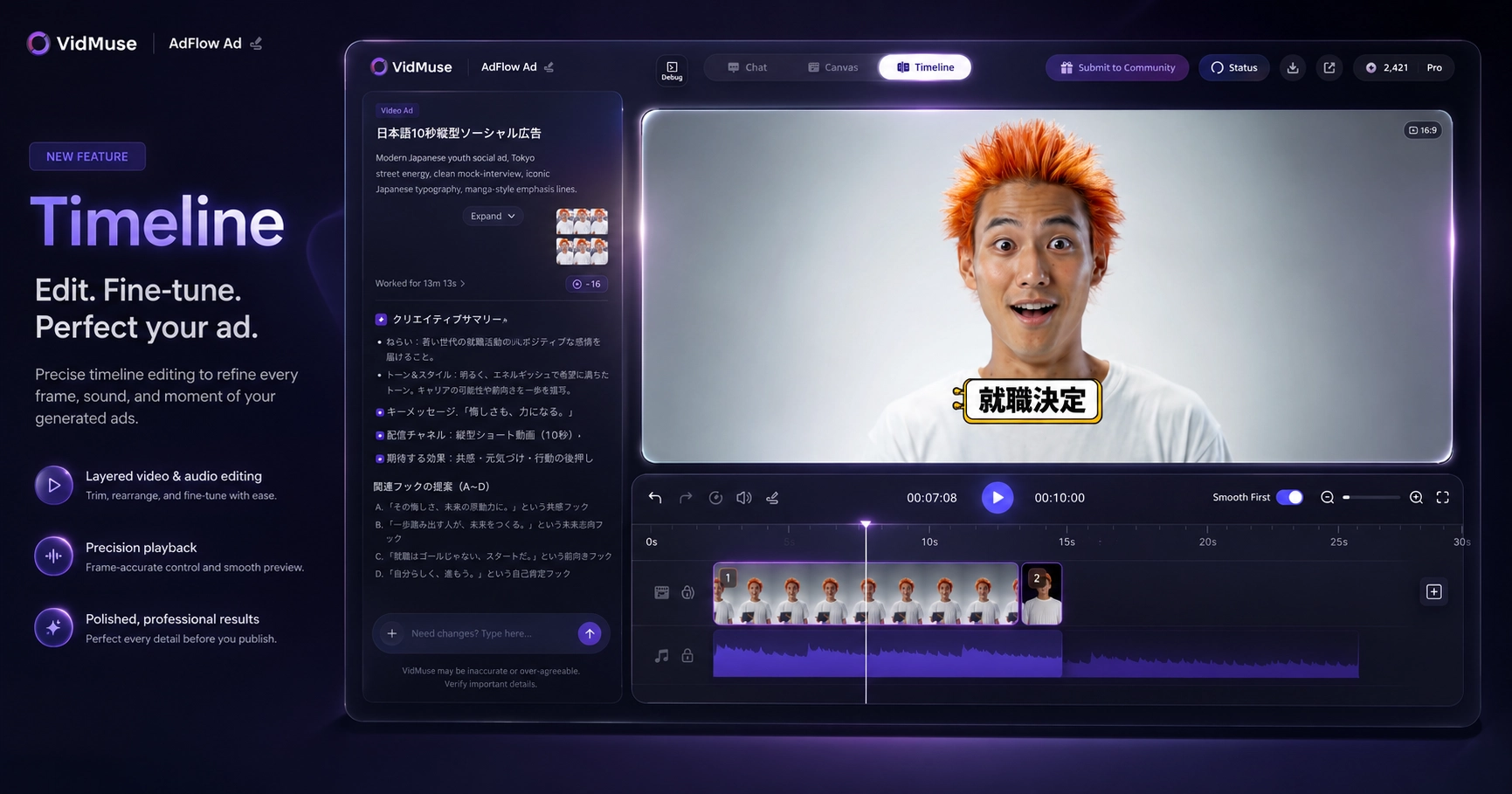
VidMuse 2.0 features like Shot Refine by Quoting let you iterate on V6-generated clips — select any clip on the timeline, describe a revision, and VidMuse regenerates it without rebuilding the entire storyboard. The video to video maker workflow also connects naturally with V6's reference-driven generation.
For the full VidMuse workflow overview, see our VidMuse guide. For storyboard templates, see AI video templates.
Use PixVerse V6 in VidMuse
Select PixVerse V6 for any shot in VidMuse's AI Director workflow — alongside Seedance, Kling, Veo, and 17 other video models.
PixVerse V6 vs Other AI Video Models
PixVerse V6 competes directly with Seedance 2.0, Kling V3.0, Veo 3.1, and Hailuo 2.3 — here's how they compare on key specs.
| Feature | PixVerse V6 | Seedance 2.0 Pro | Kling V3.0 Pro | Veo 3.1 | Hailuo 2.3 Pro |
|---|---|---|---|---|---|
| Max duration | 15s | 10s | 10s | Varies | 10s |
| Resolution | 1080p | 1080p | 1080p | Up to 4K | 1080p |
| Native audio | ✅ Yes | ❌ No | ❌ No | ✅ Yes | ❌ No |
| Camera control | Pan, tilt, zoom, tracking, crane | Basic | Motion brush | Google controls | Basic |
| Image-to-video | ✅ | ✅ | ✅ | ✅ | ✅ |
| Transition | ✅ | Limited | ❌ | ❌ | ❌ |
| Human realism | Strong | Strong | Strong | Strong | Good |
| Style range | Broad | Broad | Broad | Broad | Broad |
| Available in VidMuse | ✅ | ✅ | ✅ | ✅ | ✅ |
V6 leads in per-clip duration (15s vs 10s) and camera control specificity — you can name exact camera movements rather than relying on general motion controls. Seedance 2.0 Pro and Kling V3.0 Pro compete on motion quality and visual fidelity. Veo 3.1 matches on native audio and offers higher resolution options.
All five models are available in VidMuse's AI Director workflow. You can compare outputs shot-by-shot in the same project — use V6 for a hero shot, Seedance for a montage clip, and Kling for a character sequence, all within one storyboard.
Model specs as of July 2026. Models update frequently — check each provider's official site for current capabilities.
PixVerse V6 Prompt Tips
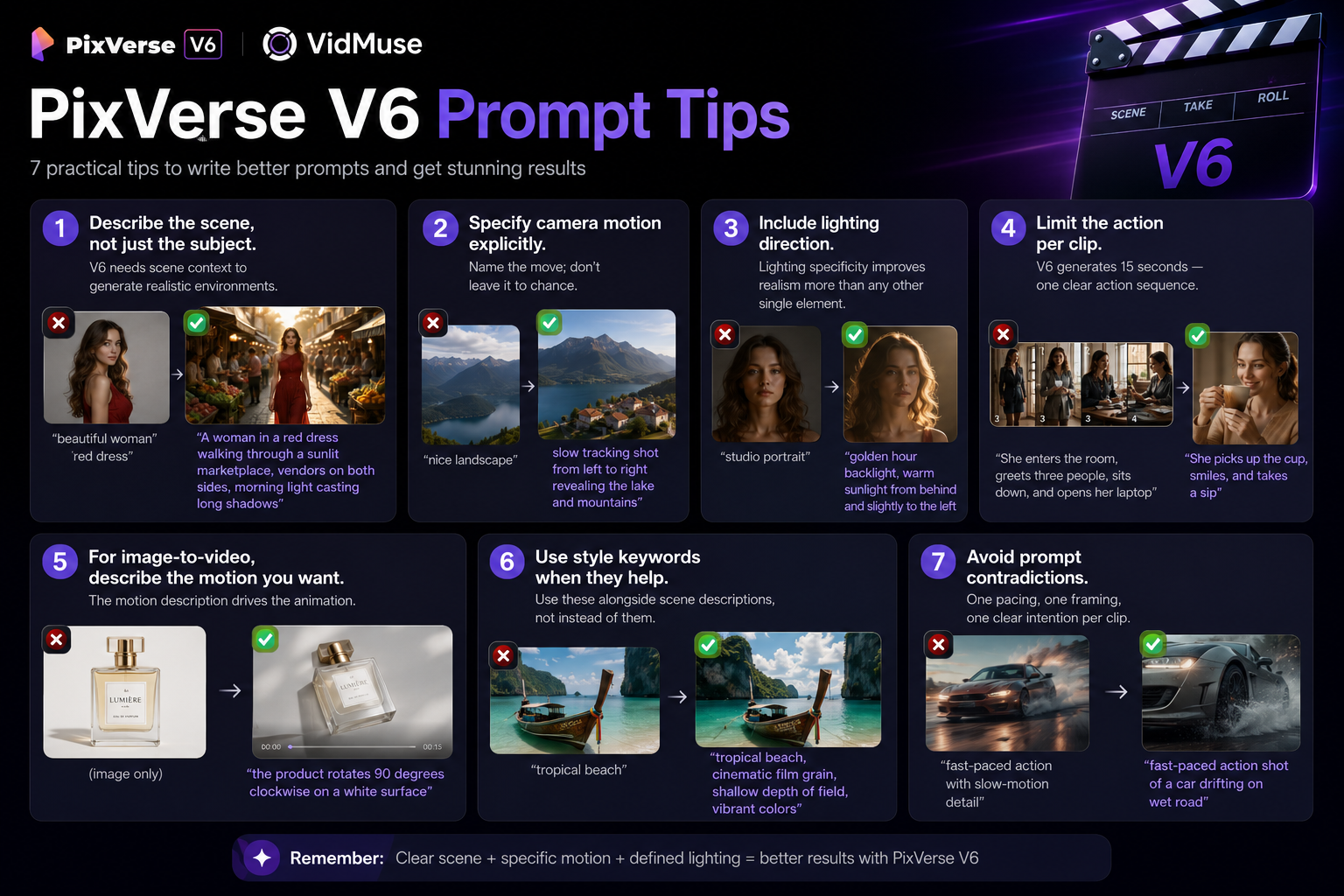
Writing effective prompts for PixVerse V6 requires specificity in scene description, camera direction, and motion — not just aesthetic keywords. Here are seven practical tips:
1. Describe the scene, not just the subject. "A woman in a red dress walking through a sunlit marketplace, vendors on both sides, morning light casting long shadows" outperforms "beautiful woman red dress." V6 needs scene context to generate realistic environments.
2. Specify camera motion explicitly. V6 understands named camera moves: "slow tracking shot from left to right," "crane shot rising above the rooftop," "close-up push-in on the product label." Name the move; don't leave it to chance.
3. Include lighting direction. "Golden hour backlight" or "soft overhead studio light with fill from the left" gives V6 concrete rendering targets. Lighting specificity improves realism more than any other single prompt element.
4. Limit the action per clip. V6 generates 15 seconds — one clear action sequence, not a complex narrative. "She picks up the cup, smiles, and takes a sip" works. "She enters the room, greets three people, sits down, and opens her laptop" is too many events for one clip.
5. For image-to-video, describe the motion you want. Don't just upload an image — add "slow camera push in with subtle hair movement" or "the product rotates 90 degrees clockwise on a white surface." The motion description drives the animation.
6. Use style keywords when they help. "Cinematic film grain, shallow depth of field," "documentary handheld feel," "clean product photography style" — V6 responds to style direction. Use these alongside scene descriptions, not instead of them.
7. Avoid prompt contradictions. "Fast-paced action with slow-motion detail" or "close-up wide shot" confuses the model. One pacing, one framing, one clear intention per clip.
PixVerse V6 Pricing
PixVerse V6 is available through pixverse.ai's free tier with limited credits — paid plans unlock higher volume and remove restrictions.
Current pricing structure (as of July 2026):
- Free tier: Limited credits per month, lower generation priority, watermark on some outputs. Enough to test V6's capabilities and quality.
- Paid plans: Increased credits, faster generation, priority queue, watermark removal. Several tiers available based on volume.
- API access: Available via PixVerse's developer portal for programmatic generation.
Note: PixVerse updates pricing frequently. Check pixverse.ai/pricing for the most current plans and credit allocations.
VidMuse alternative: When using PixVerse V6 through VidMuse, costs are handled through VidMuse's credit system — you don't need a separate PixVerse subscription. VidMuse consolidates access to V6 and 20+ other models under one account.
PixVerse V6 vs PixVerse C1
PixVerse V6 is the all-round cinematic model; PixVerse C1 is the character-consistency model for multi-shot sequences. Readers often confuse these two — they solve different problems.
| Feature | PixVerse V6 | PixVerse C1 |
|---|---|---|
| Best for | Cinematic single clips | Character-consistent multi-shot |
| Duration | 15s | Varies |
| Character consistency | Good per clip | Designed for cross-clip consistency |
| Camera control | Full (pan, tilt, zoom, tracking, crane) | Basic |
| Native audio | ✅ Yes | Check current availability |
| Resolution | 1080p | 1080p |
| Primary strength | Visual fidelity + camera control | Same character across multiple scenes |
Decision rule: If you need one polished cinematic shot with specific camera motion, use V6. If you need a series of shots where the same character appears consistently across scenes, C1 is designed for that purpose. In VidMuse, both are available — you can mix V6 and C1 within the same storyboard, selecting the best model for each shot.
PixVerse V6 Limitations
PixVerse V6 is strong for single cinematic clips but has clear limitations to understand before committing to a workflow.
1. 15-second cap. V6 generates up to 15 seconds per clip. For longer content, you need to chain clips — which introduces potential consistency issues between clips (lighting shifts, character drift). VidMuse's timeline editor helps manage multi-clip assembly.
2. Single-shot focus. V6 excels at individual shots, not multi-shot sequences. Character appearance can drift between separately generated clips. For multi-shot consistency, consider PixVerse C1 or use VidMuse's storyboard planning with visual references to maintain continuity.
3. Prompt sensitivity. V6 responds strongly to prompt wording — slight changes produce very different outputs. Expect iteration. This is both a strength (you can fine-tune results) and a friction point (inconsistent results from similar prompts).
4. Audio quality varies. Native audio is a genuine feature, not a gimmick — but quality is inconsistent. Environmental sounds and action audio are reliable. Dialogue sync works but can be imprecise on complex or fast speech, especially in non-English languages.
5. Free tier limits. Free credits are limited. Serious production — more than a few test clips per month — requires a paid plan or using V6 through VidMuse's credit system.
6. Not open-weight. V6 is available through PixVerse's platform and API, but you cannot run it locally, fine-tune it, or host it on your own infrastructure. For local inference, you need a different model.
FAQ: PixVerse V6
What is PixVerse V6?
PixVerse V6 is PixVerse's flagship AI video generation model. It produces 15-second continuous 1080p video clips with native audio, detailed camera controls (pan, tilt, zoom, tracking, crane), and realistic human rendering. It supports text-to-video, image-to-video, transitions, video extension, and reference-driven workflows.
Is PixVerse V6 free?
PixVerse V6 has a free tier on pixverse.ai with limited credits per month. Paid plans unlock higher volume, faster generation, and watermark removal. When using V6 through VidMuse, costs are handled through VidMuse's credit system — no separate PixVerse subscription needed. Check pixverse.ai for current pricing as of July 2026.
What resolution does PixVerse V6 support?
PixVerse V6 generates video at 1080p native resolution. This is higher than many competing models' free tiers, which often cap at 720p. 1080p is publish-ready for TikTok, Instagram Reels, YouTube, and most social platforms.
How long are PixVerse V6 videos?
PixVerse V6 generates up to 15 seconds of continuous video per clip. For longer content, clips can be chained together using V6's transition and extension modes, or assembled on VidMuse's timeline editor with multi-clip management and consistency controls.
Does PixVerse V6 support image-to-video?
Yes. Upload a start image and V6 animates it with camera motion, character movement, and native audio. This is one of V6's strongest features — particularly effective for product shots, character portraits, and scene animations. Describe the desired motion in your prompt for best results.
How does PixVerse V6 compare to Kling V3?
Both produce 1080p video with strong visual fidelity. V6 leads in per-clip duration (15s vs 10s) and camera control specificity (named camera moves vs motion brush). Kling V3 Pro is competitive on motion quality and character rendering. Both are available in VidMuse for shot-by-shot comparison within the same project.
Can I use PixVerse V6 in VidMuse?
Yes. PixVerse V6 is one of 20+ video generation models integrated into VidMuse's AI Director workflow. You can select V6 for specific shots in your storyboard, use it for music videos or ad videos, or let VidMuse auto-select the best model per shot. V6 works alongside Seedance, Kling, Veo, Hailuo, Vidu, Wan, and others in the same project.
Conclusion
PixVerse V6 is one of the strongest single-shot cinematic video models available in 2026. Its 15-second 1080p output, named camera controls, realistic human rendering, and native audio make it a practical tool for product videos, music video shots, ad content, and creative projects that need polished single clips.
The model's limitations are real — 15-second cap, prompt sensitivity, and inconsistent dialogue audio — but within its sweet spot (cinematic single shots with camera motion and human subjects), V6 delivers production-quality output.
In VidMuse's AI Director workflow, V6 is one of 20+ models you can select per shot. Use V6 where it excels — cinematic hero shots, product close-ups, character scenes — and switch to Seedance, Kling, or Veo for shots where they're stronger. The best way to evaluate PixVerse V6 is to test it in the context of a real creative project, and VidMuse lets you do that alongside every other major model.
Create Videos with PixVerse V6 + VidMuse
VidMuse's AI Director workflow turns your creative brief into planned scenes, storyboard, and final video — with PixVerse V6 and 20+ models at your disposal.

Written By
VidMuse Team
Continue Reading
Latest blog posts related to AI video creation.
FLUX 3: What It Is, Capabilities, and How to Access It
FLUX 3 is Black Forest Labs' multimodal AI model for image, video, audio, and action. Full guide: capabilities, FLUX 3 vs FLUX 2, availability, and pricing.
Free Music Visualizer: 10 Best Free Tools in 2026
Compare 10 best free music visualizers in 2026. Waveform tools, AI music video makers, watermark policies, export limits, and which tool fits your workflow.
How to Make Product Video Ads with AI (Step-by-Step)
Learn how to make product video ads with AI step by step. Full 6-phase VidMuse tutorial, input tips, ad type guide, and alternative approaches compared.