
Seedance 2.5 Guide: Specs, Prompts, and AI Video Workflow
Seedance 2.5 is ByteDance's next-generation AI video model, and its headline feature is a single, continuous 30-second clip generated in one pass — roughly double the length of Seedance 2.0 — combined with up to 50 multimodal reference inputs for locking characters, products, and style across the shot. ByteDance unveiled it at the Volcano Engine FORCE conference on June 23, 2026, and began rolling it out through its own apps in early July 2026. This guide covers what actually changed, how to prompt it, and how to plan a shot before you spend a generation on it.
Key Takeaways
- Seedance 2.5 generates a native 30-second clip in a single pass, up from roughly 15 seconds on Seedance 2.0.
- It accepts up to 50 multimodal reference inputs (images, video, and audio) in one generation, compared with around a dozen on 2.0.
- New region-level editing lets you fix one part of a frame — a background, a product, a face — without regenerating the whole clip.
- ByteDance began rolling Seedance 2.5 out through its own apps, Dreamina and Jimeng, in early July 2026, with broader third-party and API access expected to follow later in the month.
- Resolution and final pricing were not fully confirmed by ByteDance at announcement, so treat any specific numbers you see as provisional until you check the official model page.
What Is Seedance 2.5?
Seedance 2.5 is ByteDance's follow-up to Seedance 2.0, built to generate longer, more controllable single-take video from a text prompt or a starting image. ByteDance skipped the 2.1–2.4 version numbers entirely, jumping straight to 2.5 to signal a generational change in duration and reference handling rather than an incremental update.
The model's stated capabilities, per ByteDance's own announcement, are:
- 30-second native generation. One continuous take instead of several short clips stitched together, which removes the visible seams — a shifting face, a lighting jump — that stitching tends to introduce.
- Up to 50 reference inputs. A single generation can draw on as many as 50 images, video clips, and audio files to hold a character, product, location, or voice steady across the full 30 seconds.
- Region-level editing. You can redraw a specific part of a generated frame — swap a background, correct a product detail — while leaving the rest of the shot untouched.
- 3D blockout previsualization. A rough, untextured 3D layout ("white model") that lets you plan composition and camera position before running the final render.
- Native audio. Sound and video are generated in the same pass rather than added afterward, so dialogue, effects, and motion stay in sync without a separate audio step.
ByteDance has also described roughly 20% better prompt adherence over Seedance 2.0, though independent benchmarks for this figure were not yet published at launch.
Seedance 2.5 vs. Seedance 2.0: What Changed
Seedance 2.0 is not being retired — it's still a strong, generally available option, and it received its own upgrade to native 4K output at the same June 2026 event where 2.5 was unveiled. The table below lays out where the two models diverge.
| Capability | Seedance 2.0 | Seedance 2.5 |
|---|---|---|
| Max native clip length | ~15 seconds | 30 seconds, single continuous pass |
| Reference inputs | Roughly 9 images + 3 video + 3 audio | Up to 50 combined references |
| Editing | Targeted clip/character/action edits | Region-level editing of a specific frame area |
| Previsualization | Not available | 3D white-model blockout |
| Audio | Native audio, generated with video | Native audio, generated with video |
| Resolution | Native 4K (added June 2026) | Not officially confirmed at launch |
| Availability | Generally available | Phased rollout starting early July 2026 |
If you've been holding off on a project waiting for multimodal references or in-place editing specifically, Seedance 2.0 already covers both. What 2.5 primarily adds is more: longer single takes and a much larger reference pool, not a new category of capability.
Where to Access Seedance 2.5
ByteDance's rollout followed a staged sequence rather than a single global switch-on:
- Enterprise beta — limited access for select partners, starting in late June 2026.
- First-party consumer apps — Dreamina for international users and Jimeng for users in China, from early July 2026.
- CapCut integration — expected to follow in mid-July 2026, given CapCut's large existing editing audience.
- Third-party API access — broader developer access through Volcano Engine and third-party inference platforms, expected later in July 2026.
Because access rolled out platform by platform, availability, output resolution, and pricing can differ depending on where you're generating from. Check the platform you plan to use directly rather than assuming every claim from the announcement is live everywhere at once.
How to Write a Seedance 2.5 Prompt
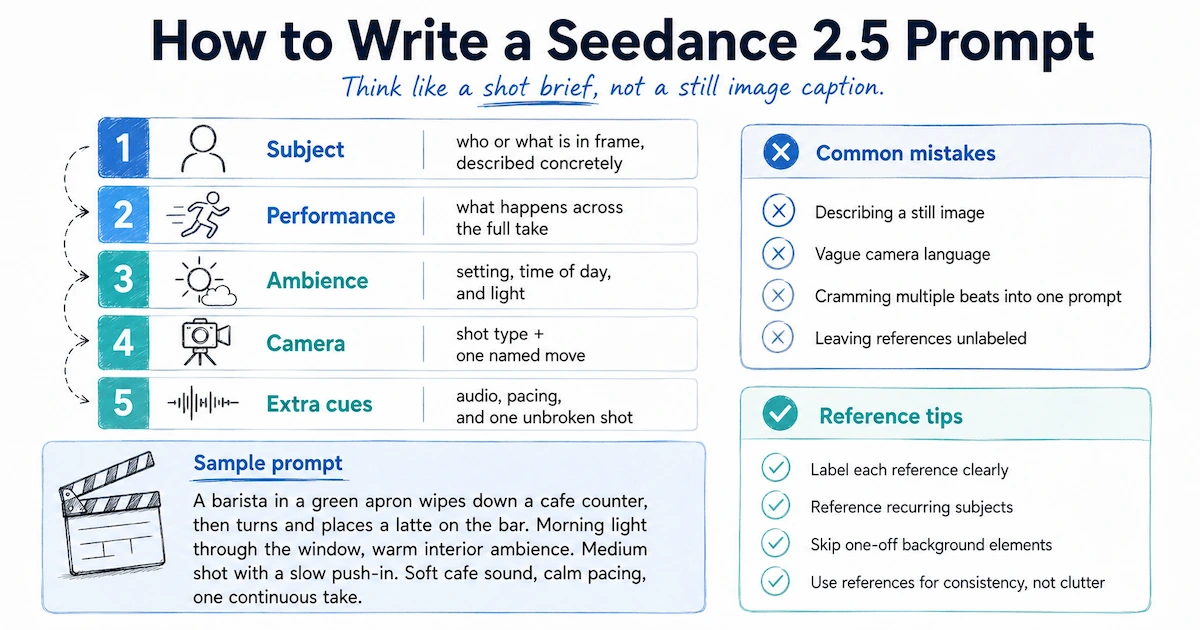
A 30-second single-take model rewards a prompt that reads like a short shot brief rather than a caption for a still image. One practical way to structure it:
- Subject — who or what is in frame, described concretely (e.g., "a barista in a green apron" rather than "a person").
- Performance — what the subject does, and how, across the full length of the take, not just at one instant.
- Ambience — the setting, time of day, and light.
- Camera — a specific shot type plus one named move ("slow push-in," "low tracking shot"), rather than a vague word like "cinematic."
- Extra cues — audio, pacing notes, and whether the take should read as one unbroken shot.
Common mistakes worth avoiding:
- Describing a still image. A video model needs motion over time, not a frozen scene in words.
- Vague camera language. "Cinematic" tells the model nothing useful; name the shot and the move.
- Cramming a multi-beat sequence into one prompt. Keep one clear action per generation, and use references to carry a look across separate shots instead of trying to script an entire scene in a single prompt.
- Leaving references unlabeled. If you're supplying several reference images, say in the prompt what each one is for — the character, the product, the location — so the model isn't guessing which reference drives which part of the frame.
With up to 50 reference slots available, it's tempting to upload everything you have. In practice, reference every recurring subject — a character who appears more than once, a product that has to stay identical — and skip one-off background elements that don't need to persist.
A Simple Workflow for Planning a 30-Second Shot
A single 30-second generation is a bigger commitment than a 5-second test clip, so it helps to plan before you spend the run:
- Write the beat, not just the scene.
Break the 30 seconds into a rough three-part shape: setup, the main action or reveal, and a closing frame. This gives the model — and you — a clear arc instead of one long, undifferentiated description.
- Gather your references first.
Collect character, product, and location images (and any style or audio reference) before you write the final prompt, so you know what you can lock in versus what you're leaving to the model's interpretation.
- Draft at a lower setting if one's available.
Where the platform allows it, generate a quick draft to check composition and pacing before committing to a longer or higher-resolution render.
- Use region editing for fixes, not full re-renders.
If one element is wrong — a color, a prop, a background detail — target that region instead of regenerating the whole clip and risking everything else that was already correct.
- Review against your brief before publishing.
Check the output against the shot list you started with, and confirm platform rights and content policies for anything based on a real person, brand, or copyrighted character.
Planning Seedance 2.5 Shots With VidMuse
Prompting a single model well is one part of the job; planning what to prompt in the first place is the other. VidMuse approaches AI video as a structured AI Director workflow — moving from assets and a creative brief through reference generation, a scene and shot list, and a storyboard, before any clip gets generated. That planning layer sits upstream of whichever video model ends up rendering the shot, so it applies just as well to a long single-take model like Seedance 2.5 as it does to shorter clips.
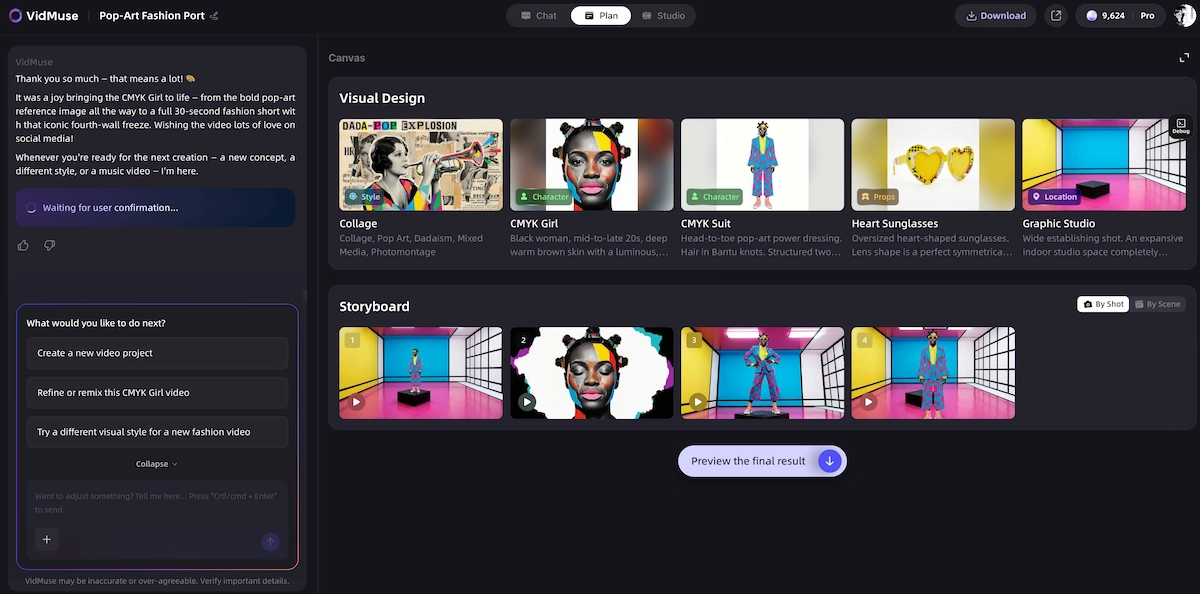
A few features that map directly onto the kind of planning a longer, reference-heavy model rewards:
- Storyboard-first planning.
Since a 30-second single-take generation is a bigger commitment than a short clip, sketching the scene logic and shot order in a storyboard before generating helps you avoid spending a full run on a beat that doesn't work.
- Asset Library & Memory.
With models supporting many more reference inputs, keeping character, product, and location references organized and reusable across shots — rather than re-uploading them each time — is what keeps a sequence consistent.
- Shot Refine by Quoting and the Timeline Editor.
For iterating on a specific part of a generated shot or arranging multiple generations into a longer sequence, VidMuse's 2.0 control features give you a way to refine and assemble without starting over.
- Model-aware generation.
VidMuse is built to work as a workflow layer around video models rather than tying you to one; it currently supports Seedance 2.0 Fast, Seedance 2.0 Pro, Seedance V1.5 Pro, and Seedance 1.0 Pro Fast, alongside models like Kling, Veo, and Hailuo. As newer Seedance releases roll out more broadly, model support is something to confirm on the current model list rather than assume.
If your project centers on a song or soundtrack, VidMuse's Music Video module turns music, lyrics, and references into scenes, shots, and beat-aware pacing. If it's a product or campaign spot, the Ad Video module works from product photos, links, and briefs toward a structured ad with voiceover, subtitles, and a CTA — both sit alongside the general AI Director workflow rather than replacing it.
Plan Your Shot Before You Generate
Storyboard your scenes, lock in references, and let VidMuse's AI Director turn your brief into a ready-to-generate shot list.
Limitations and Things to Verify Before You Commit
- Some specs weren't fully disclosed at launch.
Output resolution and final API pricing for Seedance 2.5 were not officially confirmed by ByteDance when the model was announced. Platform-reported figures may vary until ByteDance publishes official specifications — verify against the current model page before you rely on a specific number.
- Rollout was staged, not global.
Access, region availability, and feature parity differed by platform in the early weeks after launch. What's available in one app may not yet be available in another.
- Content and copyright filters apply.
Following copyright disputes over Seedance 2.0, ByteDance added filters restricting generation of recognizable real faces and copyrighted characters; expect similar restrictions to carry into 2.5. Review your platform's content policy before submitting anything based on real people or licensed IP.
- Longer takes still need human review.
A single continuous 30-second shot reduces stitching artifacts, but it doesn't remove the need to check the result for continuity, factual accuracy in any on-screen text, and fit with your brand or platform requirements before publishing.
- AI Director planning tools are not a guarantee of output quality.
A storyboard and reference library make a shot more likely to match your intent, but the underlying video model still determines the final result — planning reduces wasted generations, it doesn't replace review.
FAQ
What is Seedance 2.5?
Seedance 2.5 is ByteDance's next-generation AI video model, announced in June 2026, that generates a single continuous 30-second video clip from a text or image prompt and accepts up to 50 multimodal reference inputs in one generation.
When did Seedance 2.5 launch?
ByteDance announced Seedance 2.5 on stage at the Volcano Engine FORCE conference on June 23, 2026, and began a phased public rollout in early July 2026, starting with its own Dreamina and Jimeng apps before broader third-party and API access.
How is Seedance 2.5 different from Seedance 2.0?
The main differences are clip length (30 seconds versus roughly 15 seconds), reference capacity (up to 50 versus around a dozen), and the addition of region-level editing and 3D blockout previsualization. Seedance 2.0 also received a native 4K upgrade around the same time 2.5 was announced.
Does Seedance 2.5 support text-to-video and image-to-video?
Yes. Seedance 2.5 supports both text-to-video and image-to-video generation, with region-level editing available afterward to modify a specific part of the resulting clip.
Is Seedance 2.5 available everywhere yet?
Not immediately at launch. ByteDance rolled it out in stages — enterprise beta first, then its own consumer apps, then CapCut, then broader third-party API access — so availability and feature details can vary by platform in the weeks after announcement.
Can VidMuse generate video with Seedance 2.5 directly?
VidMuse's confirmed Seedance integrations are Seedance 2.0 Fast, Seedance 2.0 Pro, Seedance V1.5 Pro, and Seedance 1.0 Pro Fast. VidMuse's storyboard and reference-planning workflow is designed to work with the underlying video model layer, so check the current model list for the latest supported Seedance version before starting a project.
Conclusion
Seedance 2.5's real upgrade is length and reference capacity, not a new class of capability — if you already use Seedance 2.0's multimodal references and native audio, 2.5 mainly lets you do more of that in a single continuous take. The prompt habits that work on 2.0 carry over directly: write a clear shot brief, name your camera move, and label what each reference is for. Because a 30-second generation is a bigger commitment than a short clip, planning the beat and gathering references before you generate matters more than ever — which is exactly the gap a storyboard-first workflow like VidMuse's is built to close, regardless of which Seedance version ends up rendering the final shot.
Ready to plan your next shot before you generate it? See how VidMuse's AI Director workflow works.
Turn Your Idea Into Video
From prompt to storyboard to final clip — VidMuse handles the planning so you don't waste a generation.

Written By
VidMuse Team
Continue Reading
Latest blog posts related to AI video creation.
Amazon Product Video Ads Generator: VidMuse AI Guide 2026
Turn any Amazon product link into UGC, unboxing, or avatar-led video ads with VidMuse's AI ad generator, plus how it compares to Amazon's own native tool.

Facebook Video Ads Creator Guide: Specs, Sizes & AI Workflow
Learn the right facebook video ads creator setup — 2026 sizes, specs, examples, and AI prompts — plus how VidMuse turns a product link into a publish-ready ad.
VidMuse AI FAQ
Find answers to common VidMuse AI questions about credits, pricing, billing, video generation, project setup, character consistency, style control, editing, exporting, and support.