
Amazon Product Video Ads Generator: VidMuse AI Guide 2026
The fastest way to turn an Amazon listing into a video ad is to paste the product link into an amazon product video ads generator and let AI handle the script, visuals, and pacing. VidMuse does this by pulling images, title, and details straight from an Amazon, eBay, or Shopify link, then building a full storyboard around a format you choose — UGC-style, unboxing, hero showcase, or AI avatar presenter — and exporting it ready to run on TikTok, Reels, Shorts, or Amazon's own ad placements.
This guide walks through how VidMuse's workflow works, which features matter for Amazon sellers specifically, and where Amazon's own built-in Video Generator still fits in.
Key Takeaways
- VidMuse works as an amazon url to video generator: paste a product link and it pulls images, title, and details automatically to start a storyboard — no manual upload required.
- A single Amazon listing can become several ad formats through VidMuse — UGC-style, unboxing, hero product showcase, AI avatar presenter, or a 15/30-second digital TV spot — without reshooting anything.
- VidMuse's reference ad remix lets you rebuild the pacing and structure of a proven ad format around your own product, useful for sellers who've seen a competitor's creative work.
- Amazon also has its own free, native Video Generator for Sponsored Brands video and Streaming TV campaigns, but it's scoped to Amazon's own ad console and English-language US creative — it doesn't cover social or avatar-led formats.
- No AI ad generator, including VidMuse's, can guarantee ad performance; creative is one input alongside targeting, offer, and product-market fit.
What Is an Amazon Product Video Ads Generator?
An amazon product video ads generator is software that converts product inputs — a listing link, images, or brand assets — into a finished video ad without manual editing. VidMuse applies an AI Director workflow specifically to this problem: you can paste a product link from Amazon, eBay, or Shopify and the AI ad generator automatically pulls your product images, title, and details to start building your storyboard, then plans the ad angle, generates the visuals, and assembles a publish-ready video around it.
This matters for Amazon sellers because a listing's product photos were built for the detail page, not for a 9-second social hook or a 15-second Streaming TV spot. VidMuse's job is to take those same assets and reshape them into whichever ad format the destination platform actually rewards — UGC-style for TikTok and Reels, hero showcase for Amazon Posts, or an avatar presenter for a talking-head ad.
How VidMuse Turns an Amazon Link Into a Video Ad
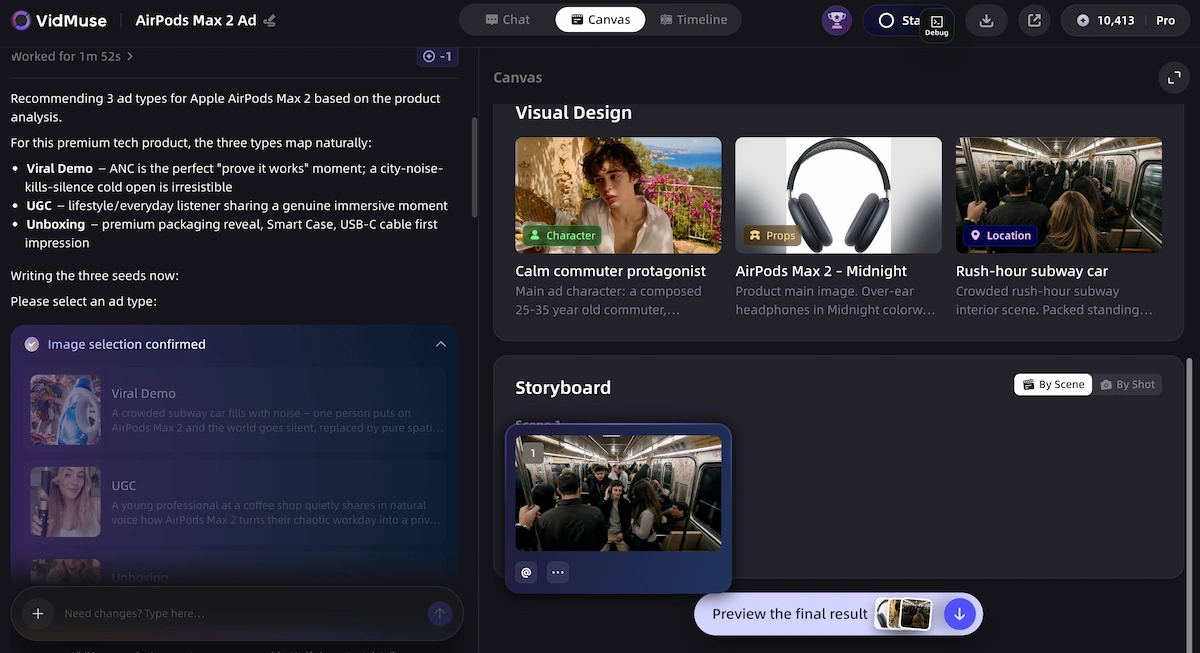
VidMuse's core input is the product itself, not a template. Paste an Amazon listing URL, and VidMuse automatically pulls your product images, title, and details to start building your storyboard — the same starting point whether the product is a kitchen gadget, a skincare item, or an electronics accessory.
Paste a Product Link. Get a Video Ad.
VidMuse pulls your product details, plans the storyboard, and helps you generate a polished product ad without manual editing.
From there, the practical workflow looks like this:
- Copy the Amazon product listing URL.
- Paste it into VidMuse's product input field.
- Let the AI extract images, title, and key details automatically.
- Add a benefit, offer, or CTA line to steer the script and hook.
- Choose an ad format — UGC, unboxing, hero showcase, avatar, or demo — and generate.
- Review the storyboard, swap music or voiceover, and export in the aspect ratio the platform needs (9:16 for Reels/TikTok, 16:9 for Streaming TV or YouTube).
This is the most direct answer to "amazon url to video generator free" — VidMuse's free tier lets you run this workflow on a first product ad before deciding whether to upgrade for higher-resolution export or additional generations.
VidMuse AI Ad Generator Feature Highlights
VidMuse's feature set is built around the specific problem of turning one product into many ad angles, quickly.
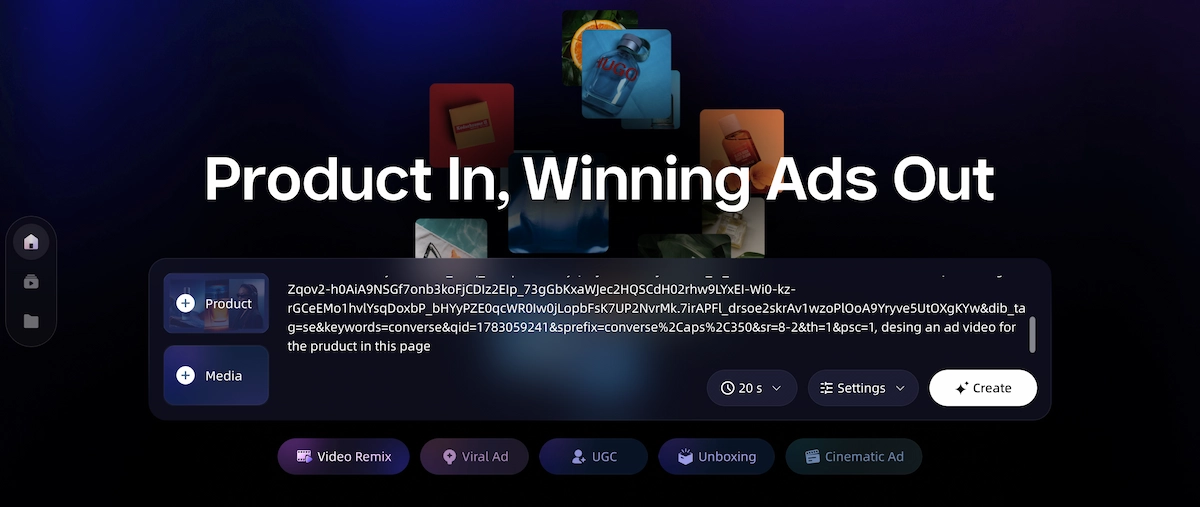
- Import from an Amazon link.
Skip the upload entirely — paste a product link from Amazon, eBay, or Shopify and VidMuse's AI ad generator automatically pulls your product images, title, and details to start building your storyboard. This removes the biggest friction point in most product-ad workflows: gathering and re-uploading assets that already exist on the listing.
- Multiple ad template workflows from one product.
VidMuse maps the same listing to UGC-style ads, AI avatar ads, unboxing ads, viral demo ads, product review ads, and digital TV spot formats — meaning one Amazon product can generate several distinct ad angles to test, rather than a single fixed video.
- Reference ad remix.
Upload any reference ad and swap in your product, scenes, and branding — VidMuse matches pacing, camera language, and scene rhythm. This is useful for rebuilding the structure of a format you've seen work, without claiming to copy or download an existing platform video directly.
- Music-aware pacing and voiceover.
Upload music or voiceover and use AI-assisted pacing to align scene rhythm with audio, with multilingual narration built in for sellers targeting markets outside English.
- Keyframe and clip consistency.
Because the storyboard is generated from the same product images, VidMuse keeps the product's look consistent across every shot and scene in the finished ad, rather than drifting between clips.
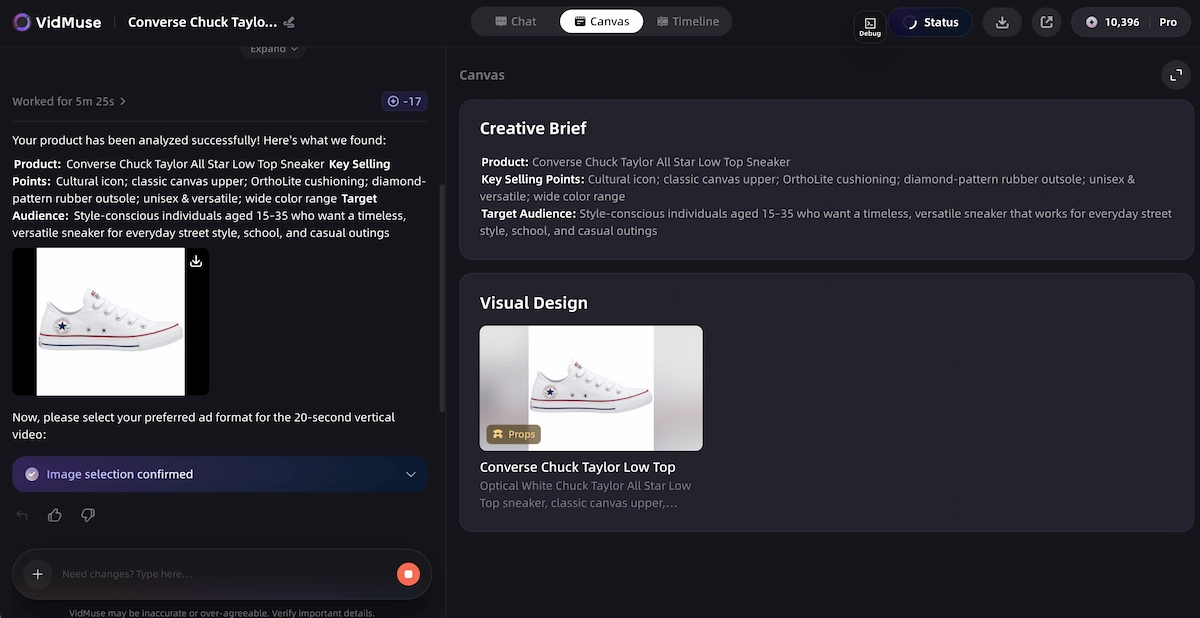
- AI creative brief and storyboard planning.
Drop in your product image, add your benefit or offer, and VidMuse suggests a shot-by-shot sequence around the hook, product reveal, benefit, proof point, and CTA, so you're not starting from a blank script.
One limitation worth flagging: VidMuse-generated videos export as standard MP4 files for you to upload into your own ad account — they aren't submitted through Amazon Ads Console automatically, so pairing a VidMuse ad with an Amazon Sponsored Brands or Streaming TV campaign still requires a manual upload step.
Turn Your Amazon Listing Into a Video Ad
Paste an Amazon product link and let VidMuse create UGC, unboxing, avatar, or showcase-style ads in minutes.
Step-by-Step: The VidMuse Ad Workflow
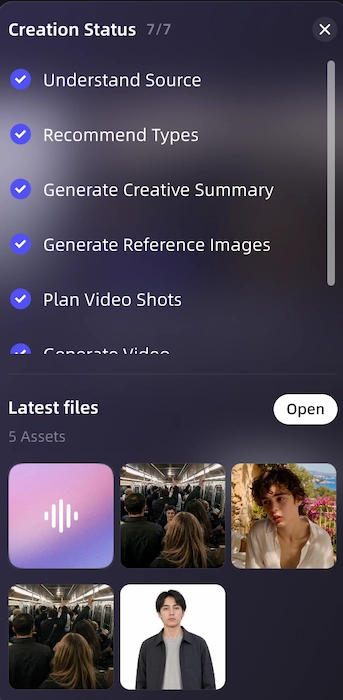
VidMuse follows a six-phase workflow from product link to finished MP4:
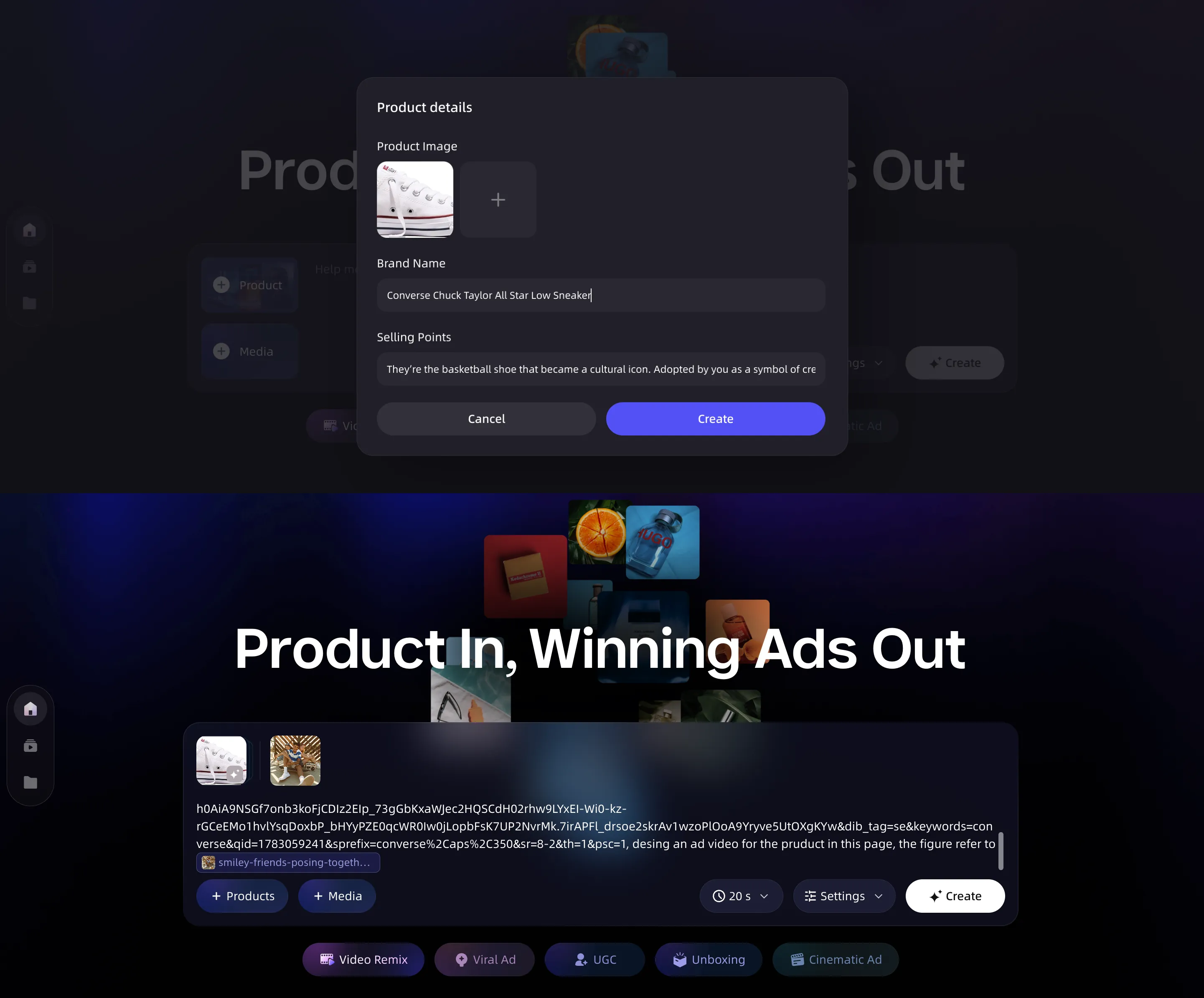
- Input & understand.
Pull the product link, photos, description, and any reference ad or brand assets; the AI extracts category, audience, tone, and selling points.
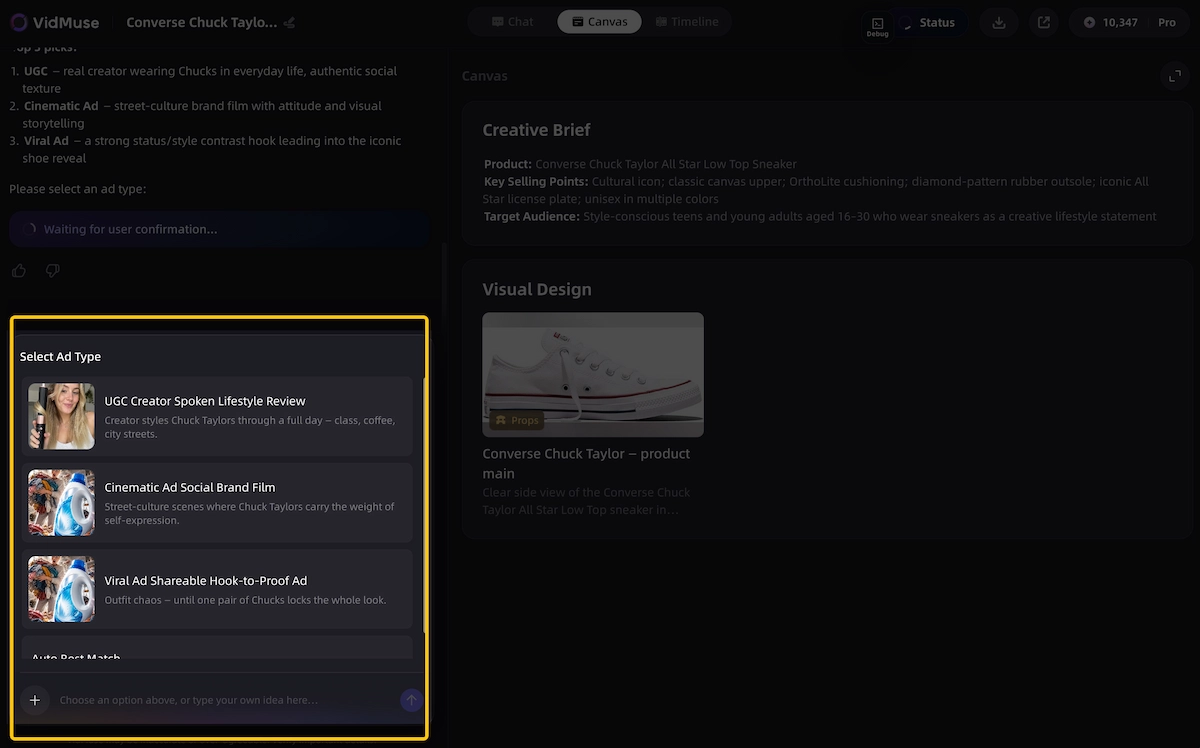
- Creative planning.
Pick an ad template — unboxing, UGC, hero showcase, or avatar — and outline the script, shot list, and CTA.
- Asset generation.
Generate consistent keyframes per shot and produce or process voiceover and background music.
- Video clip generation.
Turn keyframes into motion clips with camera movement matched to the planned pacing.
- Timeline assembly.
Arrange clips, sync audio, add subtitles and CTA text, and check total duration against the platform's spec.
- Render & deliver.
Merge tracks, burn in subtitles, normalize audio and color, and export the final MP4.
Try the workflow on a real product with the VidMuse AI ad generator, or see how a full listing becomes a finished ad in the winning product ads walkthrough. For the format specifically built around creator-style hooks, the AI UGC and AI unboxing video maker guides go deeper on those two templates.
Paste a Product Link. Get a Video Ad.
VidMuse pulls your product details, plans the storyboard, and helps you generate a polished product ad without manual editing.
Amazon's Native Video Generator: Where It Still Fits
Amazon also offers its own free video tool, and it's worth using alongside VidMuse rather than instead of it, since the two solve different placements. Video Generator is a free, AI-powered tool built into the Amazon Ads console that produces ad-ready videos optimized for Sponsored Brands campaigns directly from product information, and it has since expanded to Streaming TV.
- It's a free tool provided by Amazon Ads, allowing an unlimited number of videos at no additional cost, accessed through the Sponsored Brands campaign workflow.
- Output is currently limited to English-language creatives in the US marketplace.
- On the Streaming TV side, the beta lets advertisers create up to six 15-second video ads from just a product ASIN or image within minutes, at no additional cost, and these ads can run alongside Amazon's Streaming TV footprint, which includes Prime Video, Twitch, and Fire TV Channels inventory.
- Creative control is limited to editing the headline copy, font, and logo within a fixed template — there's no storyboard planning, remix, or format switching.
The practical split: use Amazon's native tool when the ad is going straight into a Sponsored Brands or Streaming TV campaign inside Amazon Ads Console, since it's free and pre-formatted to spec. Use VidMuse when the ad needs to run on social platforms, needs an avatar presenter or UGC hook, or when you want to generate several creative angles from the same listing to test against each other.
Need Product Ads Beyond Amazon?
Create social-ready product videos, UGC ads, unboxing clips, and avatar-led ads from the same Amazon listing.
Limitations and When Each Tool Fits
Neither tool replaces a full production process, and both have real limits worth knowing before committing a campaign.
- VidMuse exports don't auto-submit to Amazon Ads. Videos come out as MP4 files you upload manually into whichever ad account you're running the campaign from.
- Reference-ad remixing is style inspiration, not duplication. VidMuse's remix feature rebuilds pacing and structure around your own product and assets; it does not copy or download an existing platform video.
- Amazon's native tool is scoped narrowly. It's built for Sponsored Brands video and Streaming TV only, in English, in the US marketplace — it isn't designed for social-native formats.
- No tool guarantees performance. AI-generated video improves creative speed and the number of angles you can test, but conversion still depends on the product, offer, targeting, and landing page — not the video alone.
Test More Product Ads from One Amazon Listing
Generate multiple ad angles from the same product link, including UGC, unboxing, demo, and avatar-style videos.
FAQ
Can VidMuse turn an Amazon product link into a video ad automatically?
Yes. Paste an Amazon, eBay, or Shopify product link into VidMuse and it pulls the product images, title, and details automatically to start building a storyboard — no manual upload of assets required.
What ad formats can VidMuse generate from one Amazon listing?
The same product can be turned into UGC-style ads, AI avatar ads, unboxing ads, viral demo ads, product review ads, or a digital TV spot format, so sellers can test several creative angles from one set of product assets.
Is VidMuse free to use for Amazon product ads?
VidMuse offers a free tier that supports the full link-to-storyboard workflow, with paid plans available for higher-resolution export and additional generations.
Does VidMuse support non-English voiceovers for Amazon product ads?
Yes. VidMuse includes built-in multilingual narration, so a product ad can be generated with voiceover in a target audience's language without a separate dubbing tool.
How is VidMuse different from Amazon's own Video Generator?
Amazon's native tool is built specifically for its own ad inventory — Sponsored Brands video and Streaming TV — using a fixed template you can edit for headline, font, and logo. VidMuse adds full storyboard planning, multiple ad formats, reference ad remixing, and export for platforms outside Amazon, such as TikTok and Reels.
Does Amazon have a Prime Video-specific ad generator?
Not as a separate product. Amazon's Streaming TV Video Generator (beta) creates ads that can serve across its Streaming TV footprint, which includes Prime Video, Twitch, and Fire TV Channels inventory, rather than a tool built exclusively for Prime Video.
Can I use a VidMuse-generated ad in an Amazon Sponsored Brands campaign?
VidMuse exports standard MP4 files, which you can upload manually into a Sponsored Brands or Streaming TV campaign as long as the file meets Amazon's creative specs — VidMuse doesn't submit directly through Amazon Ads Console.
Can an AI ad generator guarantee my Amazon listing will sell better?
No. Whether using VidMuse or Amazon's native tool, AI-created video improves creative speed and testing volume, but performance still depends on the product, offer, targeting, and landing page.
Conclusion
For most Amazon sellers building ads that run beyond Amazon's own console — TikTok, Reels, Shorts, or any UGC-style, unboxing, or avatar-led format — VidMuse's AI ad generator is the more complete tool: paste the listing link, pick a format, and get a fully storyboarded, publish-ready video without touching Amazon's fixed templates. Amazon's own native Video Generator remains the right default only when the ad is staying inside a Sponsored Brands or Streaming TV campaign in Amazon Ads Console. Many sellers end up using both — Amazon's tool for on-platform Sponsored Brands and Streaming TV creative, and VidMuse for everything that needs to work harder off-Amazon.
Test More Product Ads from One Amazon Listing
Generate multiple ad angles from the same product link, including UGC, unboxing, demo, and avatar-style videos.

Written By
VidMuse Team
Continue Reading
Latest blog posts related to AI video creation.
Seedance 2.5 Guide: Specs, Prompts, and AI Video Workflow
Seedance 2.5 explained: 30-second native clips, 50 references, and region editing. See prompt tips and how to plan shots before you generate.
Facebook Video Ads Creator Guide: Specs, Sizes & AI Workflow
Learn the right facebook video ads creator setup — 2026 sizes, specs, examples, and AI prompts — plus how VidMuse turns a product link into a publish-ready ad.
VidMuse AI FAQ
Find answers to common VidMuse AI questions about credits, pricing, billing, video generation, project setup, character consistency, style control, editing, exporting, and support.