
An AI unboxing video maker lets you produce authentic product reveal videos — complete with packaging close-ups, reaction moments, and UGC-style pacing — without ever touching a camera or owning physical inventory.
Whether you're a DTC brand, an indie creator, or an SMB marketer, the right AI unboxing video generator can turn a product image and a brief description into a publish-ready ad in minutes.
Key Takeaways
- An AI unboxing video maker generates product reveal content from images, text prompts, or product URLs — no physical sample or camera required.
- The best tools combine scene planning, AI avatar or hands-only framing, branded text overlays, and platform-optimized export (9:16 for TikTok/Reels, 16:9 for YouTube).
- For brands that need studio-quality output — not just a quick clip — platforms with agent-based workflows (like VidMuse) plan each shot rather than executing a single one-shot prompt.
- Unboxing ads perform across Shopify product pages, Amazon listings, TikTok Shop, and paid social, making them one of the highest-ROI video formats for ecommerce.
- You do not need a physical product: AI simulation and generative video models can recreate the reveal experience before manufacturing even begins.
Create Your AI Unboxing Video in Minutes
Upload your product images, set your brief, and let VidMuse plan every scene — from sealed package to hero reveal. No camera. No crew. No guesswork.
What Is an AI Unboxing Video Maker?
An AI unboxing video maker is a software tool that uses generative AI to produce product reveal videos automatically — simulating the experience of opening a package, revealing its contents, and reacting to what's inside.
The format borrows the emotional structure of organic unboxing content that dominates TikTok, YouTube, and Instagram: a sealed package arrives, tension builds, and the product reveal triggers a "want" response in the viewer. AI tools replicate that arc programmatically, giving brands repeatable, scalable access to one of ecommerce's most conversion-proven video types.
There are two core approaches in the market right now:
- Template-based generators: Pre-built scene sequences where you drop in product images and text. Fast, affordable, limited in visual originality.
- Agent-based generators: AI plans the full shot list, generates each scene individually using video and image models, and assembles them into a coherent narrative. Higher quality, more control, more production value.
Top AI Unboxing Video Maker Tools Compared
1 - VidMuse AI
VidMuse AI is the most workflow-complete AI unboxing video maker available for brands that need production-quality output, not just a quick clip. Its dedicated Unboxing Ads template, introduced in VidMuse Launches AI Ad Generator, runs an agent-based pipeline — the platform plans a full multi-scene reveal arc rather than executing a single one-shot prompt.
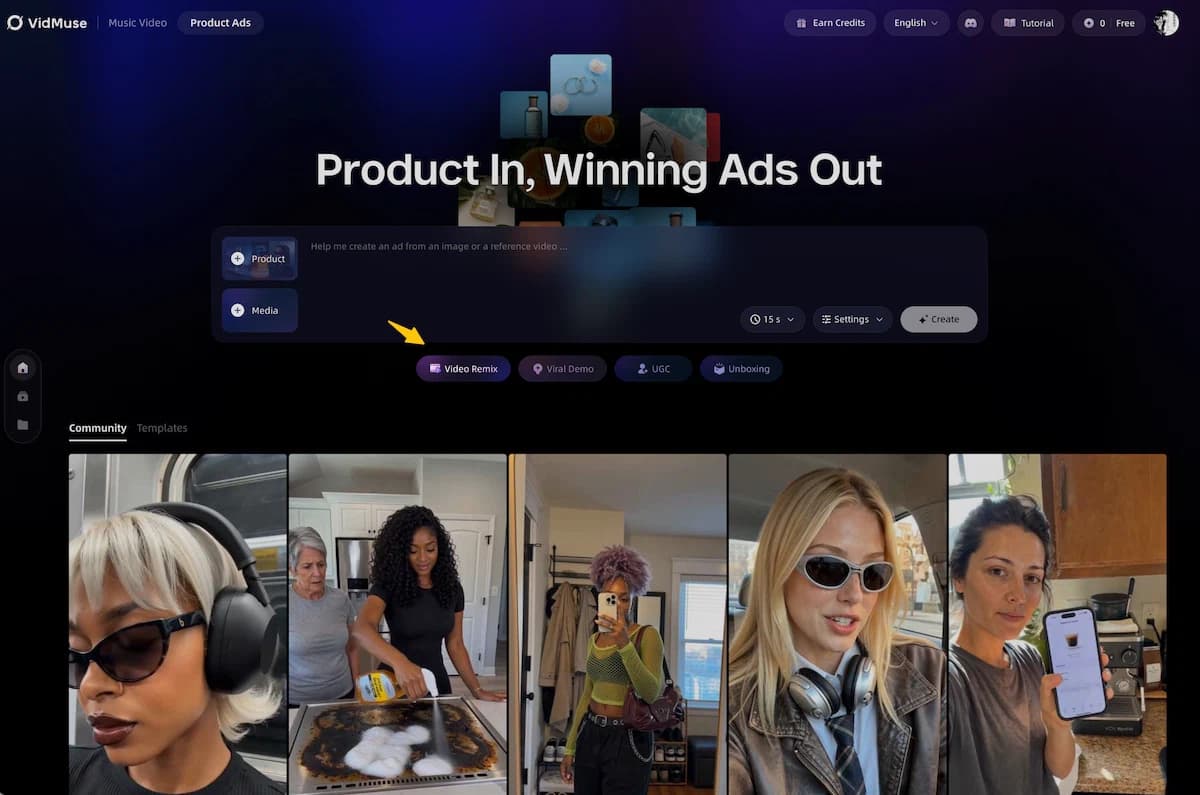
Visual coverage is comprehensive. VidMuse AI ad generator supports every core shot type an unboxing ad requires:
- Product reveal and unboxing sequence shots
- Box opening cinematic animation
- Product hero close-ups and detail shots
- Lifestyle context shots placing the product in a real-world setting
- "Wow moment" dramatic reveal frames
- Custom brand colors and aesthetic applied across all scenes
- Both 9:16 vertical (TikTok/Reels/YouTube Shorts) and 16:9 horizontal (Amazon/YouTube) output
Four distinct unboxing styles are available, each suited to a different product category and platform context:
- Clean & Minimal — white background, elegant reveal; best for skincare, jewelry, luxury goods
- Hype / Energetic — fast cuts, bold on-screen text, loud music; best for tech, sneakers, lifestyle drops
- Cinematic — slow reveal, dramatic lighting; best for premium or aspirational product launches
- Casual / Authentic — lifestyle feel, natural setting; best for UGC-style organic social content
- Social Media Ad — pacing and format pre-optimized for TikTok Shop, Reels, and YouTube Shorts
Audio and narration are built in, not bolted on. VidMuse generates AI voiceover narration, supports multi-language voiceover for international campaigns, adds background music (generated or uploaded), applies sound effect-style pacing, and syncs energetic hype music to the ad's cut rhythm — all within the same pipeline.
Text and subtitle features include on-screen subtitles and captions, product name and feature callouts, CTA overlays ("Buy Now," "Link in Bio"), and bilingual subtitle support — useful for cross-market DTC campaigns.
Five input methods are supported, giving VidMuse meaningful flexibility over template-only tools:
| Input | What VidMuse Does |
|---|---|
| Amazon / eBay link | Auto-scrapes product info and images |
| Your product photos | Uses as visual reference across scenes |
| Product description / features | Builds the script and shot plan around it |
| Reference unboxing video | Remixes the style for your product |
| Brand guidelines | Applies colors, tone, and visual style |
Create Your AI Unboxing Video in Minutes
Upload your product images, set your brief, and let VidMuse plan every scene — from sealed package to hero reveal. No camera. No crew. No guesswork.
Current limitations to know: VidMuse generates AI visuals only — it cannot film real hands opening a real box, does not incorporate live-action footage, and does not support frame-by-frame editing of footage you've filmed yourself. If your campaign requires real-world footage, VidMuse's output works best as a complement to live shooting, not a replacement.
Example prompts that work well with VidMuse's Unboxing Ads template:
- "Make a 30-second unboxing ad for my skincare set — here's my Amazon link"
- "Create a cinematic unboxing reveal for my sneakers with hype music"
- "Unboxing style promo for my tech gadget — fast cuts, energetic, YouTube Shorts format"
- "Luxury unboxing ad for my jewelry — elegant, slow reveal, soft music"
2 - Alici.AI
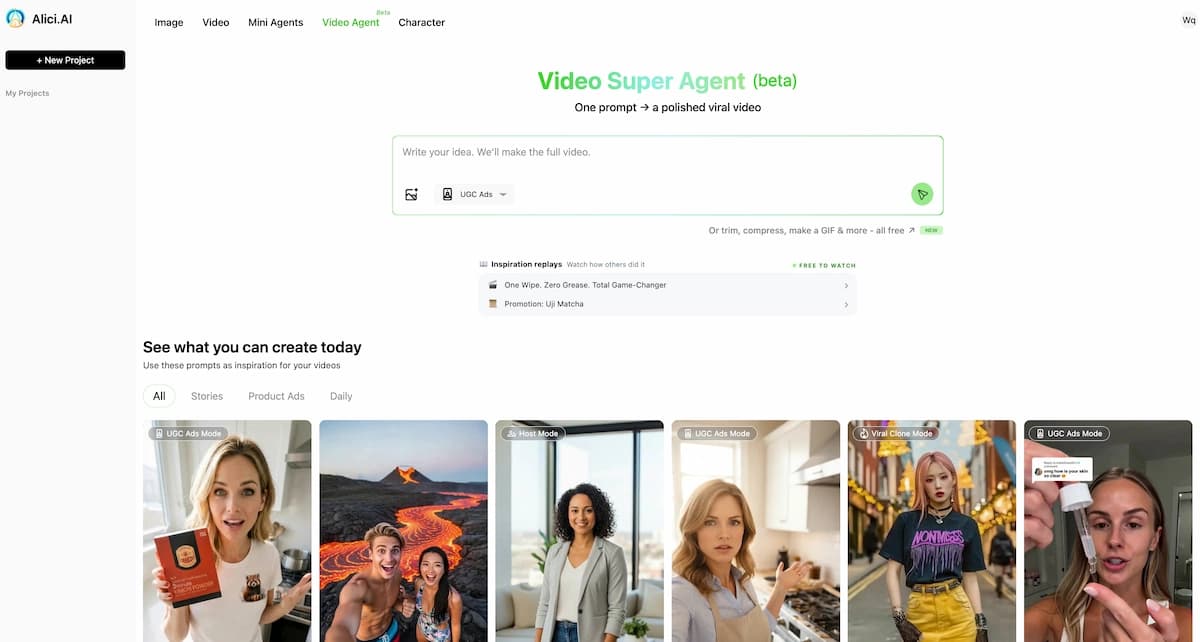
Alici.AI's AI unboxing video generator is built specifically for the no-face-on-camera format: hands-only packaging close-ups, product detail shots, voice reactions, and TikTok-style ecommerce pacing. The platform targets TikTok Shop, Shopify, Amazon, and Etsy sellers who need a product-first reveal without going on camera themselves.
The tool ships with a pre-structured prompt recipe that maps a 15-second UGC-style unboxing arc: scroll-stopping hook, pattern break (seal tear), hero reveal, detail tour, and CTA. Users can customize each beat for their product category — jewelry, skincare, gadgets, apparel — without rebuilding the structure from scratch.
Alici is a strong choice for solo operators who want an opinionated, fast starting point for short-form organic content.
3 - Opus Clip (Agent Opus)
Agent Opus transforms product descriptions, scripts, or simple prompts into complete product reveal videos with dynamic motion graphics, professional voiceover, and brand assets — no camera setup, editing timeline, or stock footage hunting required. It generates publish-ready unboxing videos optimized for YouTube, TikTok, Instagram Reels, and product pages.
Agent Opus is particularly strong for brands that need to scale unboxing content across many SKUs quickly, with consistent brand voice and voiceover without a production team.
4 - Luma AI
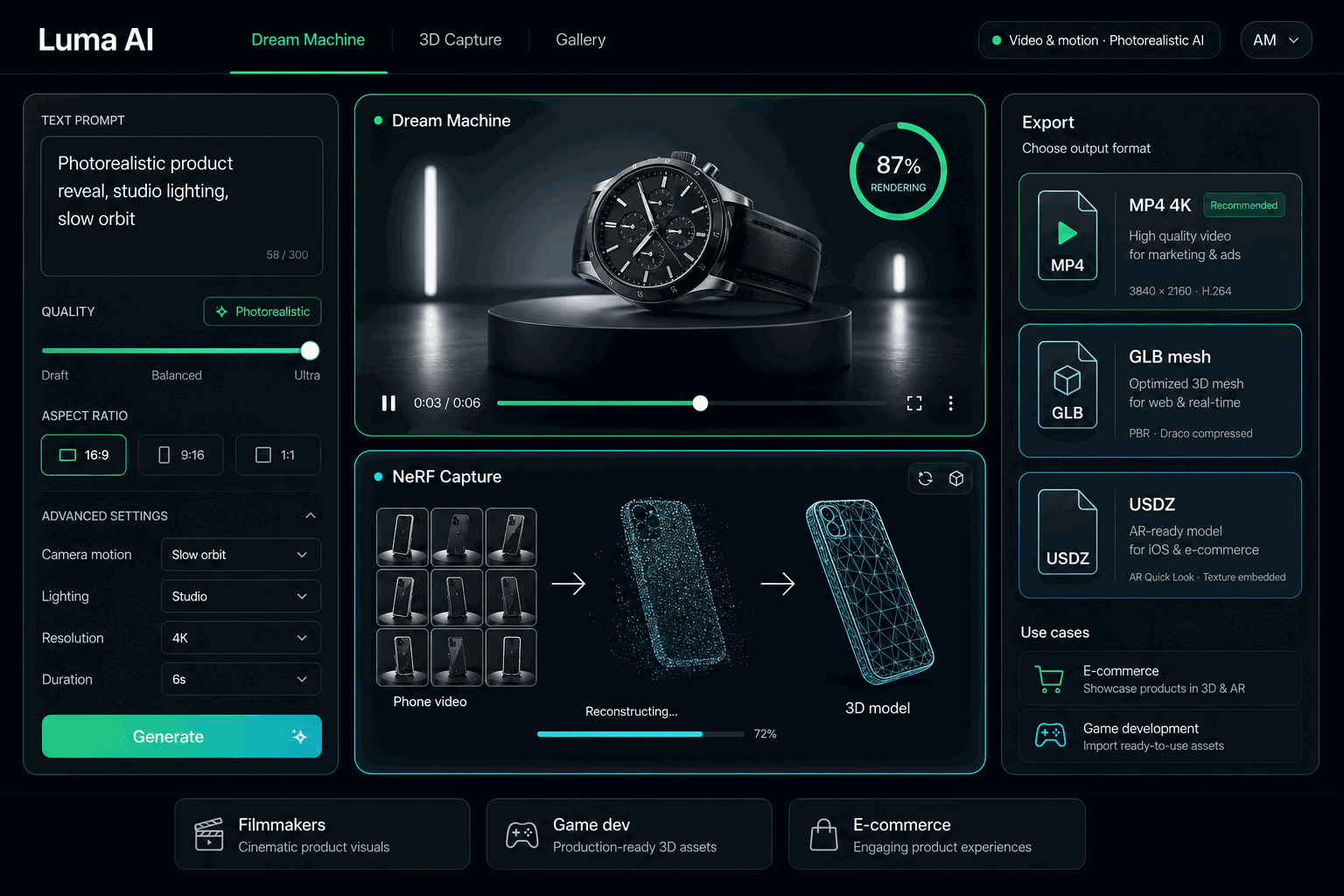
Luma AI's Product Unboxing Video Simulator takes a pre-production angle: it allows brands to generate realistic unboxing-style videos before manufacturing, shipping, or large-scale production. The simulator can recreate box opening sequences, lid removal, packaging layers, tissue wrap reveals, product placement inside packaging, and branded inserts.
Startups often need compelling visuals before manufacturing begins — AI-powered unboxing simulation helps founders present investor-ready product visuals, build excitement before production, run pre-order campaigns confidently, and launch crowdfunding pages with realistic reveals.
Luma AI is best for pre-launch and crowdfunding scenarios where no physical product yet exists.
5- insMind AI
insMind AI focuses on product reveal and unboxing video creation using a combination of AI video generator and image-to-video tools. Its unboxing maker is designed for brands that want to create ecommerce demos and UGC-style clips from existing product photos, with particular strength in producing teaser reveals optimized for listing pages.
How to Create an AI Unboxing Video Step by Step
The following workflow applies whether you're using VidMuse's full agent pipeline or a lighter template-based tool. Adjust the depth of each step based on the platform you choose.
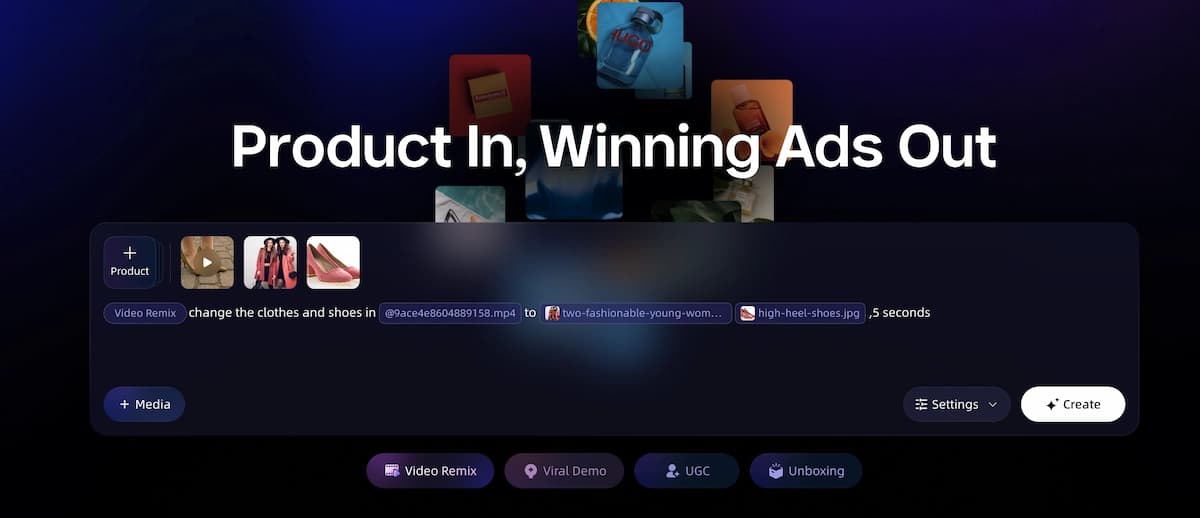
Step 1: Gather your product assets.
Collect your best product images — minimum two angles: a packaged view and a product-out-of-box view. If you have packaging mockups or 3D renders, include those. You do not need the physical item; AI image generators can fill visual gaps.
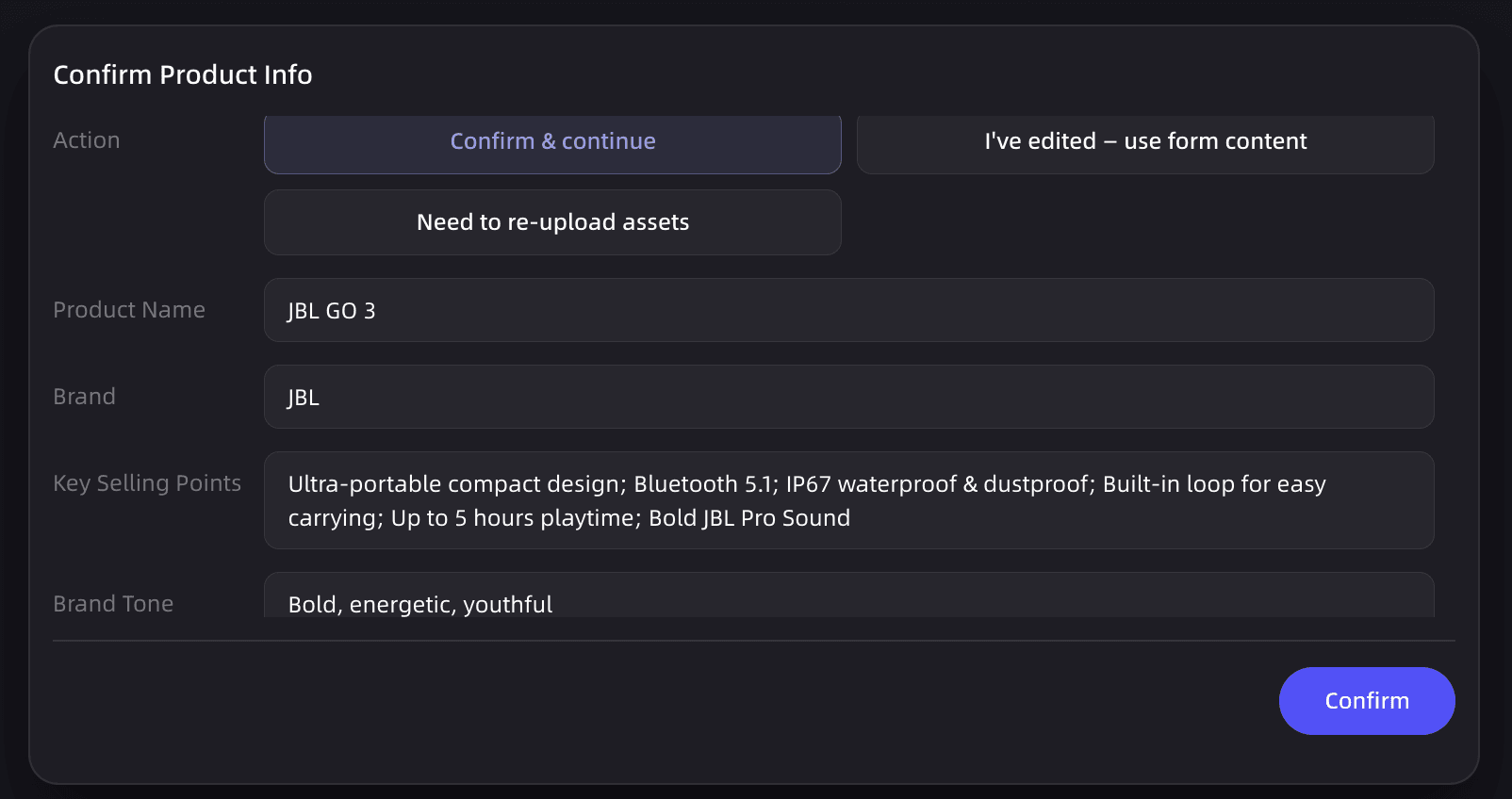
Step 2: Define your creative brief.
Write two to three sentences answering: What is the product? Who is it for? What is the single most impressive thing about it? This becomes the brief the AI uses to plan the reveal arc. In VidMuse, this step feeds directly into agent-based scene planning.
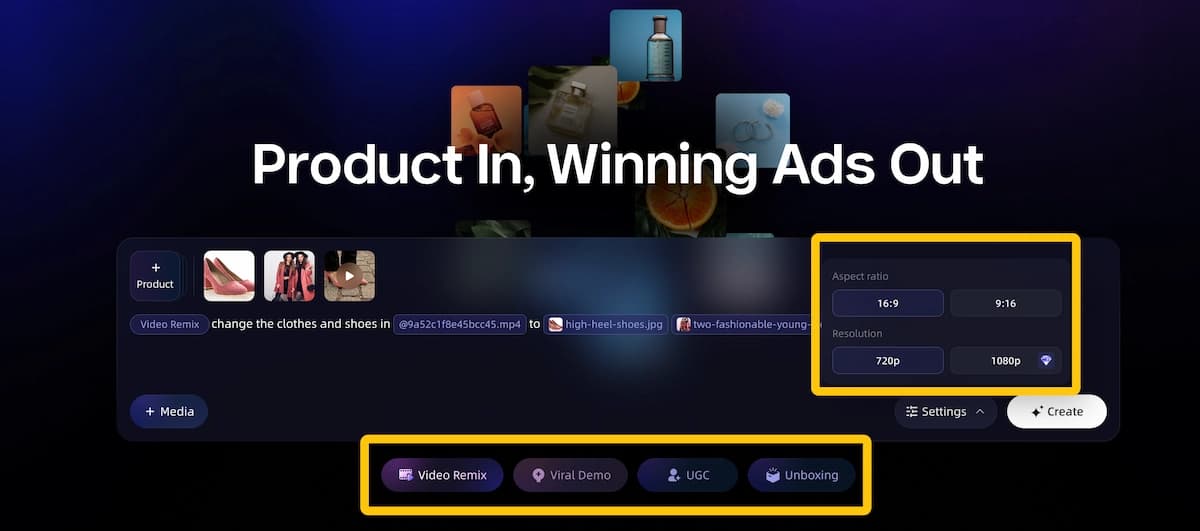
Step 3: Select your format and framing.
Decide between hands-only (product-hero) and avatar-presenter (human-reaction) formats. Choose your aspect ratio: 9:16 for TikTok/Reels, 16:9 for YouTube or Amazon.
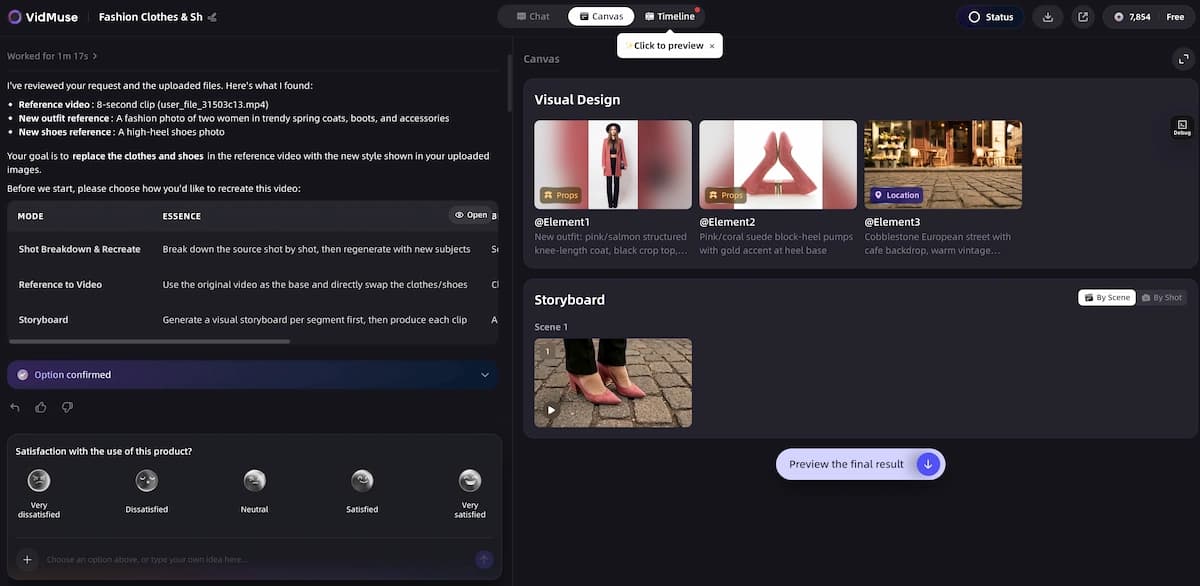
Step 4: Generate a storyboard or shot list.
Good AI unboxing tools produce a scene plan before generating video. Review it. A standard unboxing arc covers: hook (sealed package in frame), pattern break (opening motion), hero reveal, detail pass (close-ups of key features), and CTA. Adjust if a beat is missing or misaligned with your product.
Step 5: Generate video scenes.
Run video generation. In VidMuse Studio mode, this uses models like Seedance 2.0 Pro or Kling V3.0 Pro depending on the shot type. In lighter tools, a single click generates the full clip from a template.
Step 6: Refine problem shots.
If a specific scene missed — wrong framing, blurry product text, awkward motion — use shot-level refinement rather than regenerating everything. VidMuse's Shot Refine by Quoting feature handles this natively.
Step 7: Add voiceover, music, and text overlays.
Layer in AI-generated voiceover reactions, background music timed to the reveal beats, and on-screen text callouts for key product features or pricing.
Step 8: Export and publish.
Download in the correct format for each platform. Schedule across TikTok Shop, Reels, product pages, and paid social simultaneously if your tool supports multi-format export.
Where VidMuse Fits: Full-Pipeline Unboxing Ad Production
VidMuse is built for brands that treat unboxing video as a paid creative asset, not just an organic post. Its Unboxing Ads template sits inside a broader product ads suite alongside Viral Demo Ads, Product Review Ads, TVC, and UGC-Style Ads — meaning a single product launch can generate a coordinated multi-format campaign from one creative brief and one asset set.
Create Your AI Unboxing Video in Minutes
Upload your product images, set your brief, and let VidMuse plan every scene — from sealed package to hero reveal. No camera. No crew. No guesswork.
The agent-based logic distinguishes VidMuse from clip generators: instead of producing one output from one prompt, it plans a full shot sequence, generates reference imagery, builds a storyboard for review, and then executes video generation with the model best suited to each shot type. For unboxing ads this translates into a coherent visual arc with intentional pacing — hook, open, reveal, detail pass, wow moment, CTA — rather than a looping product montage.
The five-input-method flexibility means you don't need to build assets from scratch. Drop in your Amazon product link, a reference competitor unboxing video, or a set of brand guidelines, and VidMuse adapts its pipeline accordingly. This is particularly useful for ecommerce operators managing large SKU catalogs who need consistent creative output across many products without rebuilding the brief each time.
For brands that need international reach, multi-language voiceover and bilingual subtitle support remove the need for separate localization workflows. For DTC brands testing creative, the four distinct style options — Minimal, Hype, Cinematic, Casual — let you run style A/B tests within the same product campaign before committing budget to a single creative direction.
The Timeline Editor provides post-generation editorial control without requiring a separate video editing tool. The Shot Refine by Quoting feature means a single underperforming scene doesn't require regenerating the full video. Together, these VidMuse 2.0 features close the gap between AI generation and professional editorial workflow.
AI UGC Unboxing Video Generator: When to Use Which Approach
Choosing between an AI UGC unboxing video generator and a more polished production tool depends on your distribution channel, audience, and budget.
Use a lightweight AI UGC-style tool when:
- You're posting organic content to TikTok or Instagram and want native, creator-feel aesthetics
- Speed matters more than production quality (you need 10 variations tested this week)
- Your product category (fashion, beauty, lifestyle goods) benefits from casual, relatable framing
Use an agent-based production platform when:
- You're running paid social ads where creative quality directly affects CPM and conversion
- You need the video to work on an Amazon product page or Shopify listing alongside professional photography
- You're creating a launch campaign that includes unboxing as one of several coordinated ad formats
Use a pre-production simulator (like Luma AI) when:
- Your physical product doesn't exist yet
- You need investor-ready or pre-order visuals
- You're testing packaging designs before committing to production
There's no single right answer. Many brands use a fast UGC tool for organic content velocity and a higher-quality pipeline for paid creative — the two serve different functions in a content strategy.
Key Features to Look for in an AI Unboxing Video Generator
Not all AI unboxing video tools are built the same. Before choosing a platform, evaluate these criteria:
Scene planning vs. one-shot generation.
One-shot tools produce a clip from a single prompt. Agent-based tools plan a multi-scene arc — hook, reveal, detail pass, CTA — and generate each shot individually. The latter produces far more coherent, platform-ready results.
Hands-only vs. avatar-based framing.
Some tools generate disembodied hands and packaging close-ups (ideal when the product is the hero). Others use AI avatars that appear on camera reacting to the product. Both have use cases; the right choice depends on your brand tone.
Text and logo preservation.
Product packaging contains brand text, nutrition labels, barcodes, and logos. Many video AI models distort text. Look for tools that explicitly support text-safe generation or image-anchored reference frames.
Platform export formats.
TikTok, Instagram Reels, and YouTube Shorts require 9:16 vertical. Amazon and Shopify pages prefer 16:9 horizontal. The best tools let you export in both without re-editing.
Voiceover and sound design.
Authentic unboxing content is audio-driven: the tear of a seal, a voice reaction, on-screen text popping in rhythm. Tools that bundle AI voiceover and background music sync reduce post-production work significantly.
Workflow depth.
Can you feed in a creative brief? Does the tool generate a storyboard you can review before video generation? Workflow visibility prevents wasted credits and surprise outputs.
What full-featured AI unboxing support actually looks like.
VidMuse's Unboxing Ads template covers the complete visual arc out of the box: product reveal sequences, box opening cinematic animation, product hero close-ups, lifestyle context shots, and "wow moment" dramatic reveals. On the input side, you can feed it an Amazon or eBay product link for auto-scraped product info and images, upload your own product photos as visual reference, paste a product description, drop in a reference unboxing video to remix its style, or supply brand guidelines to lock in colors and tone. Most lightweight tools accept only one input type. VidMuse accepts all five.
Create Your AI Unboxing Video in Minutes
Upload your product images, set your brief, and let VidMuse plan every scene — from sealed package to hero reveal. No camera. No crew. No guesswork.
FAQ: AI Unboxing Video Makers
What is an AI unboxing video maker?
An AI unboxing video maker is a tool that generates product reveal videos automatically using generative AI — simulating the experience of opening a package and revealing a product without requiring physical filming. You supply a product image or description, and the AI builds a multi-scene reveal video with motion, voiceover, and text overlays.
Can I create an AI UGC unboxing video without physical inventory?
Yes. Most AI unboxing video generators work entirely from product images, 3D renders, or even just a product description. Luma AI's product unboxing simulator is specifically designed for pre-production scenarios where no physical sample exists yet. VidMuse can generate reference imagery from uploaded assets before producing video, so physical inventory is not required.
What's the best AI unboxing video generator for TikTok Shop?
For TikTok Shop, the right tool depends on whether you're producing organic content or paid creative. For organic UGC-style content at speed, Alici.AI's hands-only format or PixelPanda's avatar presenter approach are optimized for short-form pacing. For paid TikTok creative where production quality affects CPM and conversion, VidMuse's Social Media Ad style — pre-optimized for TikTok/Reels/YouTube Shorts pacing, with AI voiceover, hype music sync, CTA overlays, and 9:16 vertical export — produces ad-ready output. You can also feed in a competitor's unboxing video as a style reference, and VidMuse will remix that aesthetic for your product.
How long should an AI-generated unboxing video be?
Fifteen seconds is a strong default for TikTok, Reels, and TikTok Shop. This is long enough to deliver a hook, opening, hero reveal, one or two detail close-ups, and a CTA without losing short-form momentum. For YouTube product pages or Amazon listings, 30–60 seconds allows more detail coverage. VidMuse supports up to two-minute productions for music video-style brand content.
Does an AI unboxing video replace filming with a real creator?
Not always, and that depends on your goal. AI-generated unboxing content is faster, cheaper, and more scalable than coordinating with real creators, and it works well for ad creative testing, product page enrichment, and launch teasers. For top-of-funnel organic content on platforms that heavily weight authentic creator relationships, a hybrid approach — AI for volume, real creators for key hero moments — often performs best.
What models power AI unboxing video generation in VidMuse?
VidMuse's Studio mode uses Nano Banana 2 and Nano Banana Pro for image generation and Seedance 2.0 Pro, Kling V3.0 Pro, and Omnihuman 1.5 as primary video generation models, with additional models from its full matrix — including Veo 3.1, Hailuo 2.3 Pro, and Wan 2.7 — used as needed for specific shot types. Lite mode uses Seedream 5.0 Lite for image generation and Seedance 2.0 Fast as the primary video model, prioritizing speed and cost efficiency over maximum fidelity.
Final Words
The AI unboxing video maker category has matured significantly. What started as template-based clip generators has evolved into agent-driven production pipelines capable of planning, storyboarding, generating, and refining multi-scene product reveal ads — without a camera, studio, or physical inventory.
For brands choosing a tool, the decision comes down to use case: fast UGC content for organic channels (Alici.AI, PixelPanda), text-to-video production at scale (Opus Clip), pre-production visualization (Luma AI), or high-quality full-pipeline ad production (VidMuse).
If you're producing unboxing ads for paid social, TikTok Shop, Amazon listings, or a product launch campaign, VidMuse's agent-based workflow covers the full production stack: five input methods, four style options, comprehensive visual shot types, built-in voiceover and music, bilingual subtitle support, and post-generation editorial control via Shot Refine and the Timeline Editor. It's the pipeline for brands that need more than a clip — they need a campaign-ready creative asset.
Ready to create your first AI unboxing video? Start with VidMuse's Unboxing Ads template after reviewing the VidMuse guide, drop in your Amazon link or product images, pick your style, and let the agent plan your full reveal sequence.
Create Your AI Unboxing Video in Minutes
Upload your product images, set your brief, and let VidMuse plan every scene — from sealed package to hero reveal. No camera. No crew. No guesswork.

Written By
VidMuse Team
Continue Reading
Latest blog posts related to AI video creation.
Seedance 2.5 Guide: Specs, Prompts, and AI Video Workflow
Seedance 2.5 explained: 30-second native clips, 50 references, and region editing. See prompt tips and how to plan shots before you generate.
Amazon Product Video Ads Generator: VidMuse AI Guide 2026
Turn any Amazon product link into UGC, unboxing, or avatar-led video ads with VidMuse's AI ad generator, plus how it compares to Amazon's own native tool.
Facebook Video Ads Creator Guide: Specs, Sizes & AI Workflow
Learn the right facebook video ads creator setup — 2026 sizes, specs, examples, and AI prompts — plus how VidMuse turns a product link into a publish-ready ad.