
Kling 3.0: Features, Models, and How to Use It
Kling 3.0 is Kuaishou's latest generation of AI video and image creation models, released in early 2026. It introduces multi-character scene management, an onboard AI Director for structured shot sequences, native multilingual audio, and — in its Omni variant — reference-driven identity locking across shots. If you're evaluating Kling 3.0 for creative production, commercial advertising, or music video generation, this guide covers every feature, both model variants, pricing context, and where it fits in a real production workflow.
Key Takeaways
- Kling 3.0 comes in two variants: Kling VIDEO 3.0 (V3) is prompt-driven and supports 3+ characters per scene; Kling VIDEO 3.0 Omni (O3) is reference-driven and locks character identity across shots using Elements 3.0 and video references.
- Both models support native audio — dialogue, ambient sound, and music — generated in sync with the video in a single pass, across five languages: Chinese, English, Japanese, Korean, and Spanish.
- The AI Director feature in V3 turns a single text prompt into a multi-shot sequence of up to six shots, handling camera transitions and pacing automatically.
- O3's R2V mode (Reference-to-Video) allows up to 4 reference images to anchor a character's appearance throughout the entire generated video — preventing identity drift across camera angles.
- VidMuse integrates Kling V3.0 Pro as part of its multi-model video generation stack, making it available within a structured music video production workflow without requiring a separate Kling account or API key.
Create Your AI Video in Minutes
Turn your idea into a video with VidMuse.
What Is Kling 3.0?
Kling 3.0 refers to the third-generation AI video and image generation models from Kuaishou, the Chinese technology company. The series encompasses two distinct model architectures: Kling VIDEO 3.0 (commonly called V3) and Kling VIDEO 3.0 Omni (commonly called O3), each optimized for different production priorities.
At the core, Kling 3.0 is a text-to-video and image-to-video generation system capable of producing clips up to 15 seconds in length at resolutions up to 2K (V3) or 4K (O3). What distinguishes it from earlier Kling versions is the depth of its narrative and consistency controls: multi-character tracking, structured multi-shot sequencing, and native audiovisual generation are all built into the model rather than added as post-processing layers.
The models are accessible directly through kling.ai, through third-party platforms like PixVerse, and through integrated creative platforms like VidMuse, which builds Kling V3.0 Pro into a full music video production pipeline.
Using Kling V3.0 Pro for Music Video Generation with VidMuse AI
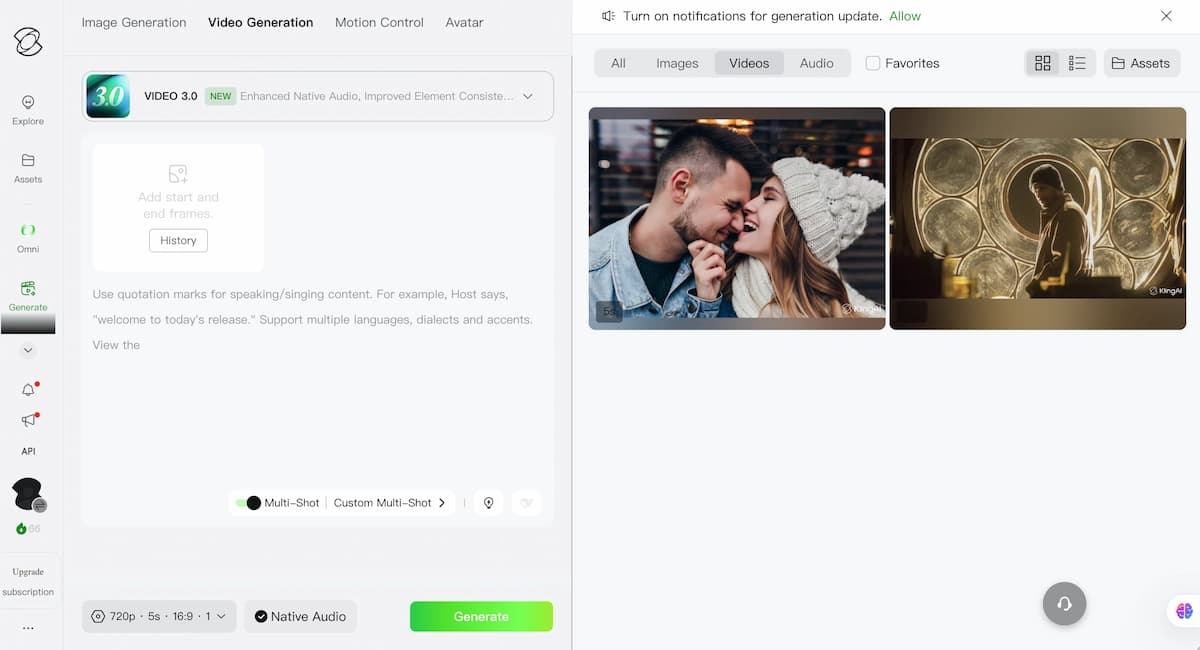
VidMuse AI integrates Kling V3.0 Pro as one of its video generation models, making its multi-character and AI Director capabilities available within a structured music video production workflow. This section is relevant if you're looking to use Kling 3.0 specifically for music video creation rather than as a standalone tool.
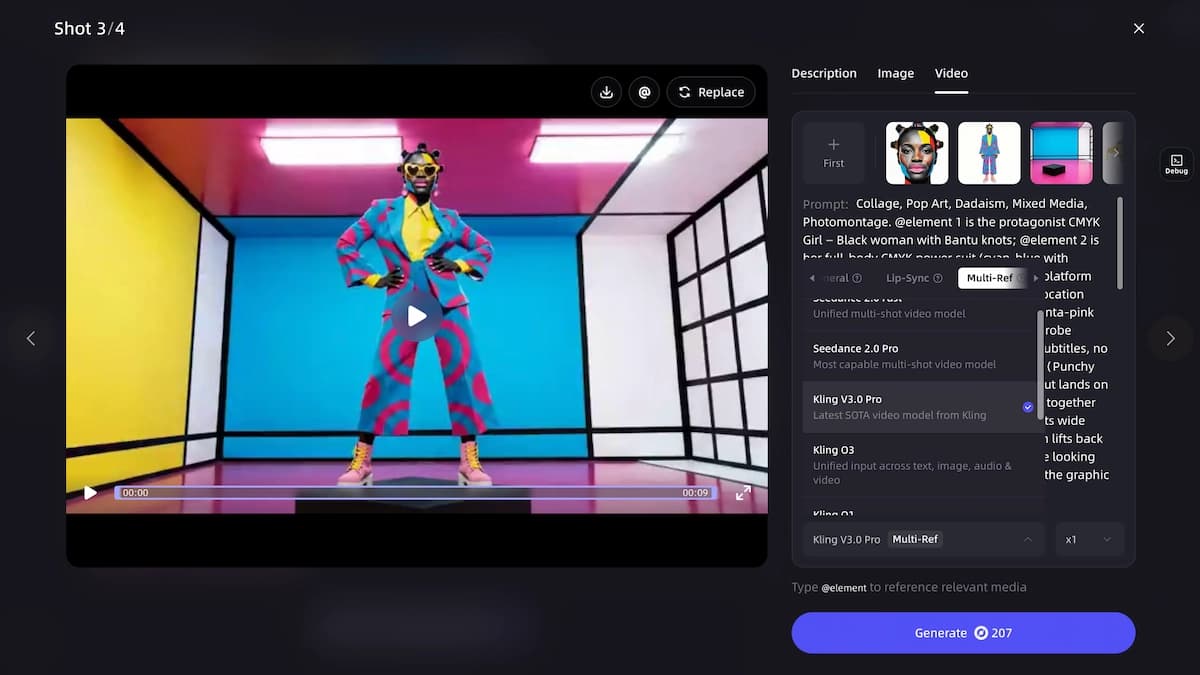
VidMuse is an AI music video generator built around an agent-based production workflow: Creative Brief → Reference Generation → Scene & Shot List → Storyboard → Video Generation. Rather than executing single-shot prompts, VidMuse plans the full music video before generating individual clips.
Within this workflow, Kling V3.0 Pro handles shots that require:
- Multiple performers in a shared frame
- Cinematic camera movement with realistic physics
- Complex scene environments that need high prompt adherence
VidMuse also provides access to Seedance 2.0, Wan 2.7, Happy Horse 1.0, and other models in its generation stack — the platform's Shot Refine by Quoting feature (a VidMuse 2.0 capability) lets you selectively regenerate specific shots using a different model, which means you can use Kling V3.0 Pro for populated performance shots and switch to another model for abstract or landscape segments within the same video.
For indie musicians who have produced tracks using Suno AI (available natively within VidMuse), the platform's integration of Kling V3.0 Pro provides a path from audio to studio-quality visual production without requiring a separate Kling account or API integration.
Learn more in the VidMuse AI music video generator guide or explore the full VidMuse platform.
Create Your AI Video in Minutes
Turn your idea into a video with VidMuse.
Kling V3 vs O3: The Two Models Explained
Kling VIDEO 3.0 (V3)
Best for
- Prompt-driven creative exploration
- Multi-character scenes
- AI Director multi-shot sequencing
Watch out
- Less identity locking than O3 for recurring characters or products
Kling VIDEO 3.0 Omni (O3)
Best for
- Reference-driven identity consistency
- Elements 3.0 voice binding
- R2V with up to 4 image references
Watch out
- Higher cost and more setup before generation
Choosing between Kling VIDEO 3.0 and Kling VIDEO 3.0 Omni depends on whether your production priority is creative freedom or visual consistency. This is the most important distinction in the Kling 3.0 model family, and getting it wrong costs both time and credits.
Kling VIDEO 3.0 (V3): Prompt-Driven Powerhouse
V3 is designed for creators who start with a script or idea and want the model to interpret it with high semantic accuracy. Its architecture is optimized for:
- Handling scenes with three or more distinct characters tracked across a single shot
- Executing an AI Director mode that converts a single text prompt into a multi-shot sequence with up to six camera angles
- Enabling rapid ideation without needing to prepare reference libraries in advance
- Maintaining high prompt adherence — nuanced descriptive language (lighting quality, character posture, emotional register) translates accurately into the output
V3 is the better choice when you're exploring a new concept, building a populated narrative environment, or testing shot language before committing to a final production.
Kling VIDEO 3.0 Omni (O3): Reference-Driven Consistency Engine
O3 is built for scenarios where a specific character, product, or visual identity must remain unchanged across multiple shots or clips. Its key capabilities:
- Elements 3.0: Upload a 3–8 second video clip to define a character element, extracting both visual appearance and a "Signature Voice" bound to that subject
- R2V (Reference-to-Video): Upload up to 4 reference images — the model uses them as visual anchors throughout the generated clip without using them as the first frame
- 4K image output: O3 supports 4K resolution for image generation; V3 caps at 2K
- Up to 10 image references for image generation tasks (V3 supports one)
O3 is the right model for commercial advertising, episodic content with a recurring character, product demonstration videos where packaging or logos must remain legible, and any project where "identity drift" — the tendency of AI models to gradually shift a character's appearance — is unacceptable.
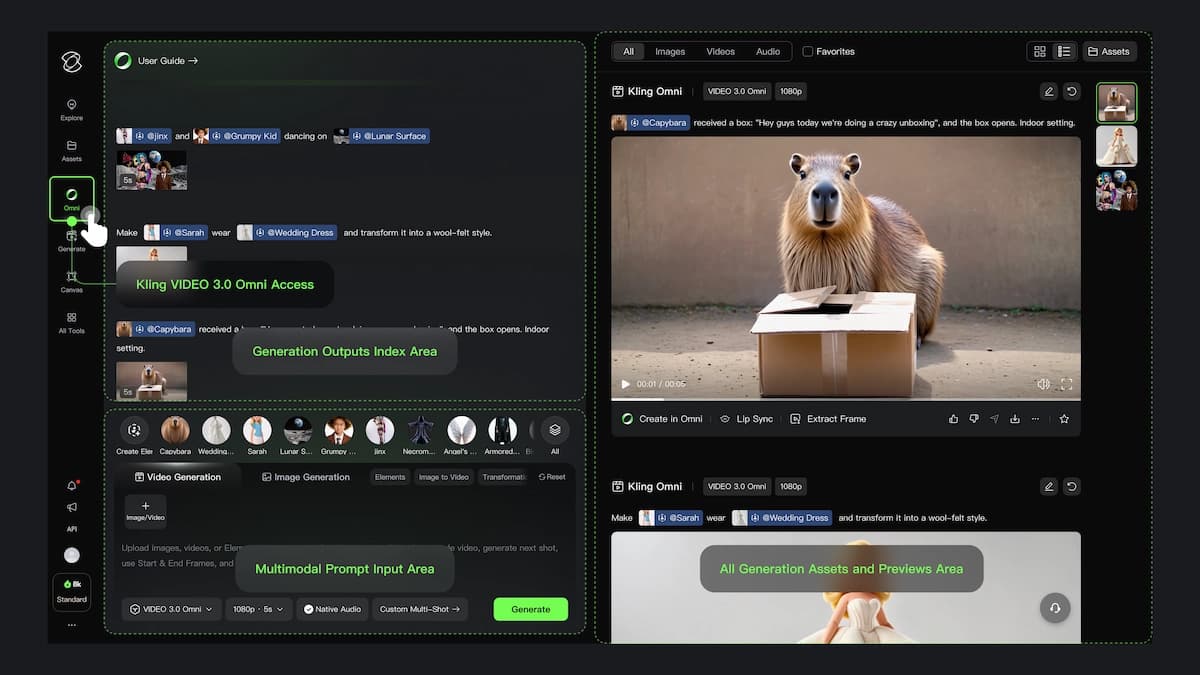
In practice: use V3 to draft and explore; use O3 to finalize and lock. Many workflows use both in sequence.
Kling 3.0 Core Features
Kling 3.0 introduces four capabilities that represent genuine advances over earlier Kling versions: multi-character coreference, the AI Director system, native multilingual audio, and expanded video duration.
Multi-Character Coreference
Earlier AI video models struggled to maintain distinct identities for more than two characters in a single scene. Kling 3.0 uses an upgraded coreference engine that tracks three or more subjects simultaneously, maintaining unique visual traits — face structure, clothing, posture — even during complex group interactions like conversations, shared meals, or crowd scenes.
This matters for:
- Narrative shorts with ensemble casts
- Corporate content showing team interactions
- Music videos with multiple performers in a shared frame
AI Director and Multi-Shot Sequencing
The AI Director is V3's most distinctive feature. A single text prompt can generate a sequence of up to six shots — the model plans camera angles, transitions, and pacing internally, outputting a complete cinematic clip rather than a single static take.
Supported shot structures include shot-reverse-shot dialogue, cross-cutting, and tracking sequences. Duration flexibility (3–15 seconds per generation) gives the AI enough temporal space to execute these transitions naturally.
Native Multilingual Audio Generation
Both V3 and O3 generate dialogue, sound effects, and ambient audio simultaneously with the video — not as a post-processing step. Supported languages are Chinese, English, Japanese, Korean, and Spanish. Characters can conduct bilingual conversations within a single clip, with lip sync and facial expressions calibrated to match the spoken language's phonemic rhythm.
For creators producing content for international markets, this removes the dubbing step for initial concept verification. Commercial-grade final audio still warrants a professional mix review, but for ideation and client previews, native audio substantially reduces production overhead.
Flexible Duration and Aspect Ratio
Both models generate video from 3 to 15 seconds (default 5 seconds). Supported aspect ratios for video are 16:9, 9:16, and 1:1. Image generation supports eight ratios: 16:9, 9:16, 1:1, 4:3, 3:4, 3:2, 2:3, and 21:9.
Kling 3.0 Omni (O3): Reference Control and Voice Binding
Kling VIDEO 3.0 Omni delivers industrial-grade consistency by anchoring generation to uploaded reference material rather than relying on prompt description alone. This section covers the mechanics of how O3's reference system works — which matters both for evaluating when to use it and for structuring your reference assets correctly.
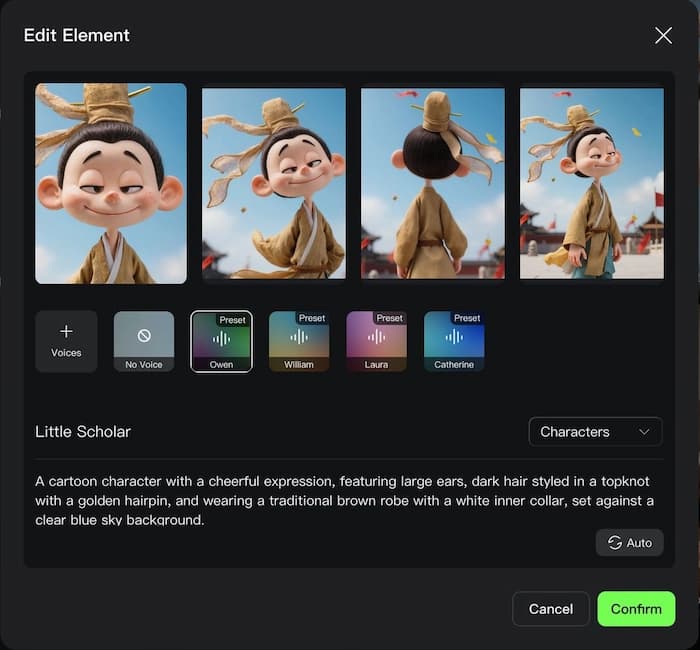
Elements 3.0 and Video Character References
To define a character element in O3, you upload a 3–8 second video clip showing the subject. The model does three things with it:
- Extracts the character's visual identity — face geometry, skin tone, hair, clothing — from multiple angles within the clip
- Extracts the subject's voice to create a "Signature Voice" that persists across generations
- Builds a quasi-3D representation that remains stable even during rapid head turns or brief occlusions
The result is that characters don't just look similar across shots — they look identical. This is the technical difference between "enhanced prompt adherence" (V3's approach) and "element locking" (O3's approach).
R2V: Reference-to-Video Mode
R2V is exclusive to O3. You provide up to 4 still images of a character or object. The model uses these as visual anchors — not as the first frame of the video, but as a constant identity reference throughout the entire generation. The scene composition, motion, and environment are still driven by your text prompt.
R2V is particularly suited to:
- Multi-shot narratives where the same character appears in different environments
- Product showcase videos where the product's shape, finish, and logo must remain accurate across camera angles
- Storyboarding workflows where a character model has been established in image generation and needs to carry forward into video
Integrated Audiovisual Harmony in O3
In O3, when a character's voice has been extracted via video element, the model generates lip movements and facial expressions that are phonetically synchronized to that specific voice — not a generic text-to-speech approximation. Ambient sound and background music are generated to match the semantic content of the scene description.
How to Use Kling 3.0 Step by Step
Choose your platform
Open kling.ai, PixVerse, or VidMuse depending on whether you want standalone generation or a structured music video workflow.
Select V3 or O3
Use V3 for prompt-led exploration and multi-shot scenes; use O3 when references and identity locking matter most.
Set generation parameters
Choose quality tier, duration, aspect ratio, resolution, and whether native audio should be enabled.
Write the prompt or upload references
Describe subject, action, environment, lighting, camera movement, and add O3 references when consistency is required.
Generate and review
Check identity, motion, lip sync, audio, and credit cost before extending or regenerating the shot.
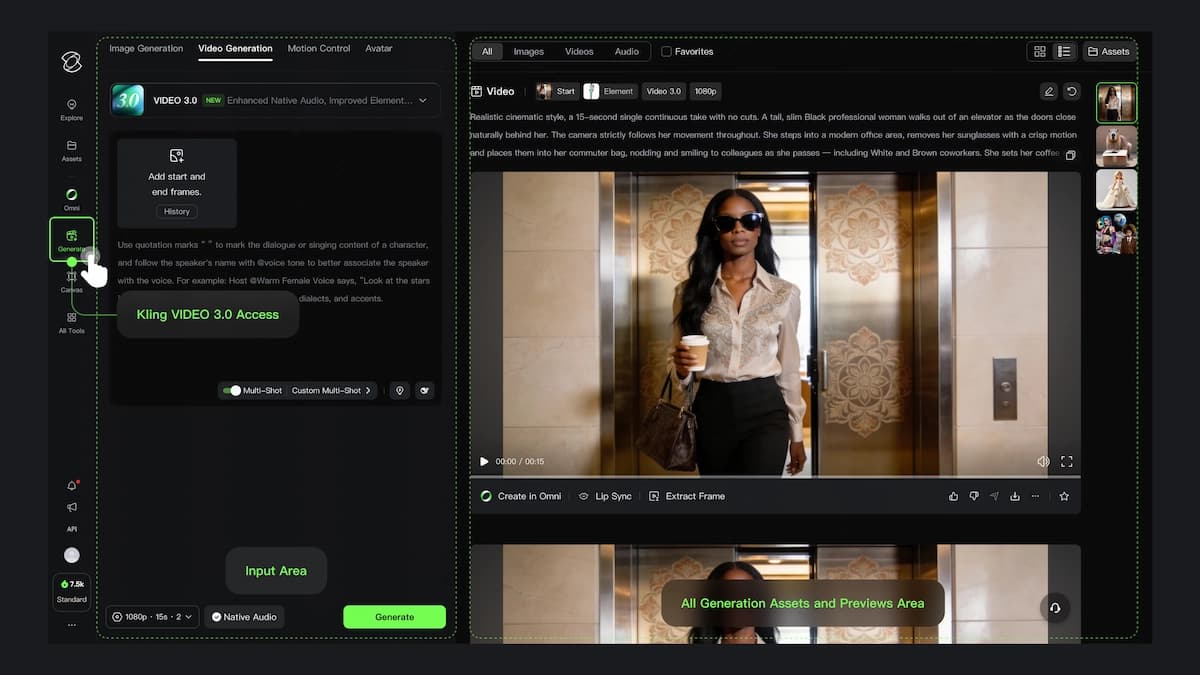
Accessing and using Kling 3.0 requires choosing your platform, setting generation parameters, and structuring your prompt or reference assets before generating. The steps below apply whether you're working through kling.ai directly, through PixVerse, or through a platform like VidMuse that integrates Kling V3.0 Pro.
For Video Generation
- Access the platform — log into your chosen interface (kling.ai, PixVerse, or VidMuse)
- Select the model — choose Kling VIDEO 3.0 (V3) for prompt-driven generation or Kling VIDEO 3.0 Omni (O3) for reference-driven consistency
- Choose quality tier — Standard for faster, lower-cost output; Pro for higher visual fidelity
- Set parameters — duration (3–15 seconds), aspect ratio (16:9, 9:16, or 1:1), audio on/off
- Write your prompt — include subject, action, environment, lighting, and camera movement; be specific ("a woman in a red raincoat walks through a rain-soaked Tokyo street, neon reflections on wet pavement, handheld tracking shot, medium frame" outperforms "woman walking in city")
- For O3 only: upload reference images (up to 4 for R2V) or a video clip for Elements 3.0 before generating
- Enable multi-shot mode if you want the AI Director to plan a sequence of camera angles within a single generation
- Generate and review — check lip sync, identity consistency, and motion stability before iterating
For Image Generation
- Select Kling VIDEO 3.0 or Kling VIDEO 3.0 Omni in the image panel
- Choose resolution: 1K, 2K, or (O3 only) 4K
- Select aspect ratio from the eight available options
- Write your prompt and optionally upload reference images (O3: up to 10; V3: one)
- Generate — 4K outputs via O3 are suitable for marketing stills, product review crops, and print-adjacent commercial use
Prompt Tips for Better Kling 3.0 Results
- Lead with subject, then action, then environment: "a ceramic mug on a walnut desk, soft steam rising, slow push-in camera, morning window light"
- Specify camera movement explicitly: Kling 3.0 responds well to cinematographic vocabulary (handheld tracking, dolly push, overhead crane)
- Test short before extending: start at 3–5 seconds, confirm the direction, then re-run at longer durations
- For R2V, use clean reference images: multiple angles, good lighting, uncluttered backgrounds
- Selectively enable audio: audio generation costs additional credits; disable it during early ideation passes
Kling 3.0 Pricing: What It Costs
Kling 3.0 pricing is credit-based, with costs varying by model variant, quality tier, resolution, and whether native audio is enabled. The figures below reflect PixVerse's published pricing for Kling models as of early 2026; direct Kling.ai pricing may differ and should be verified at kling.ai.
On PixVerse:
- Kling O3 Standard video (no audio): ~25 credits per second
- Kling O3 Standard video (with audio): ~35 credits per second
- Kling O3 Pro video (no audio): ~35 credits per second
- Kling O3 Pro video (with audio): ~45 credits per second
- Kling 3.0 Standard video (no audio): ~20 credits per second
- Kling 3.0 Standard video (with audio): ~28 credits per second
- Kling 3.0 Pro video (no audio): ~25 credits per second
- Kling 3.0 Pro video (with audio): ~35 credits per second
- Image generation (Kling O3 or 3.0, 1K/2K): ~10 credits per image
- Kling O3 image at 4K: ~20 credits per image
A practical benchmark: a 5-second Kling 3.0 Standard clip without audio costs approximately 100 credits; the same clip with audio costs approximately 140 credits. O3 at equivalent settings runs 125 and 175 credits respectively.
For Kling 3.0 API access, pricing is managed through Kuaishou's developer platform. Check the official Kling AI developer documentation for current API rate schedules, as these are subject to change.
Kling 3.0 vs Previous Versions: What Changed
Kling 3.0 represents a step-change in character handling and audiovisual coherence rather than incremental quality improvement. Key differences from Kling 2.x and earlier versions:
- Multi-character tracking: earlier versions reliably handled one or two subjects; V3 introduces coreference for three or more
- Native audio integration: previous Kling models generated silent video by default; audio synchronization was a separate workflow step; in 3.0 it's a single-pass generation option
- AI Director / multi-shot: earlier versions generated single continuous shots; V3 introduces structured multi-shot sequencing from a single prompt
- Reference-to-Video (R2V): a new capability exclusive to O3, not present in Kling 2.x
- 4K image resolution: O3 introduces 4K image output; prior Kling image models maxed at 2K
Kling 1.x and 2.x versions (including Kling 1.0 Pro Fast and 2.6 Pro, both of which remain available in some platforms including VidMuse) remain useful for specific cost-optimized workflows — particularly fast-turnaround social content where identity locking and multi-shot planning are not priorities.
Common Mistakes and Limitations
Even with Kling 3.0's advances, there are consistent failure patterns that produce poor output — most of which are avoidable with prompt discipline and the right model choice.
Using O3 When V3 Would Suffice
O3 costs more and requires reference assets. For early ideation, concept testing, and any shot where identity consistency isn't the priority, V3 at Standard quality is faster and meaningfully cheaper. Save O3 for the shots that require it.
Weak Reference Images for R2V
R2V quality is directly tied to reference image quality. Blurry images, inconsistent lighting across references, cluttered backgrounds, and extreme angles all degrade the model's ability to lock identity. Use multiple clean reference angles shot under similar lighting conditions.
Hands, Precise Typography, and Multiple Subjects in O3
Kling 3.0 shares the limitations common to most current AI video models: complex hand gestures are prone to distortion, precise text rendering within a video frame is unreliable for anything beyond short phrases, and maintaining distinct identities for more than two subjects simultaneously in O3 (which is optimized for 1–2 elements) can produce inconsistencies.
Treating Native Audio as a Finished Product
Native audio generation in both models is genuinely useful for concept verification and client previews. For commercial release, dialogue clarity, rights clearance, and professional audio mastering are still required. The audio generation should be treated as a production proxy, not a deliverable.
Ignoring Credit Cost During Iteration
Pro + audio on a 10-second O3 clip can cost 450 credits. Running 10 iterations to find the right prompt direction at that rate accumulates quickly. Run V3 Standard without audio for prompt iteration; switch to O3 Pro with audio only when the concept is locked.
FAQ
What is the Kling 3.0 release date?
Kling VIDEO 3.0 and Kling VIDEO 3.0 Omni were released in early 2026. Third-party platforms including PixVerse and VidMuse followed with integrations in the months after the initial Kling AI release. Check kling.ai/blog for the most current announcement timeline.
What are the key features of Kling 3.0?
Kling 3.0's standout capabilities are multi-character coreference (three or more subjects in a single scene), the AI Director for structured multi-shot sequences from a single prompt, native multilingual audio generation (five languages in a single pass), and — in the O3 variant — Reference-to-Video (R2V) identity locking using up to four reference images. Both models support video up to 15 seconds and eight image aspect ratios.
How does Kling 3.0 differ from previous versions?
The main advances over Kling 2.x are multi-character scene management, native audio as a first-class generation mode, the AI Director multi-shot system, and the O3 model's R2V reference control. Earlier Kling versions generated single-shot silent clips; Kling 3.0 can produce structured audiovisual sequences from a single text input.
What is Kling 3.0 Omni, and when should I use it?
Kling VIDEO 3.0 Omni (O3) is the reference-driven variant of Kling 3.0, designed for productions where character or product identity must remain visually identical across multiple shots or clips. It uses Elements 3.0 (video-based character locking) and R2V (still-image-based visual anchoring) to prevent identity drift. Choose O3 when you're producing commercial advertising, episodic content with a recurring character, or product videos where logos and packaging details must stay legible and accurate.
What does Kling 3.0 cost?
Kling 3.0 uses a credit-based pricing model. On PixVerse, Kling 3.0 Standard video runs approximately 20 credits per second without audio and 28 credits per second with audio. O3 Standard runs approximately 25 credits per second without audio. Image generation starts at roughly 10 credits per image for 1K/2K resolution; O3 at 4K runs approximately 20 credits per image. Kling AI's own platform pricing may differ — verify at kling.ai for current rates.
Is there a Kling 3.0 API?
Yes, Kling 3.0 models are accessible via Kuaishou's API platform. API access pricing and rate limits are managed through Kuaishou's developer documentation. Some platforms — including VidMuse — have already integrated Kling V3.0 Pro via API, making it available within their own interfaces without requiring direct API credential setup.
Can I use Kling 3.0 for music videos?
Yes. Kling V3.0 Pro is integrated into VidMuse, an AI music video creation platform. Within VidMuse's workflow — which covers Creative Brief through to final video generation — Kling V3.0 Pro handles multi-character performance shots and complex narrative scenes. VidMuse also supports Suno AI for track generation natively, creating a path from audio production through to full visual production in a single platform.
What languages does Kling 3.0 support for audio generation?
Both V3 and O3 support native audio generation in Chinese, English, Japanese, Korean, and Spanish. Characters can conduct bilingual conversations within a single generation, with lip sync and facial expression calibrated to each language's phonemic patterns.
In The END
Kling 3.0 represents a meaningful advance in AI video generation — not just in output quality, but in the structural depth of what the model can plan and execute. Multi-character tracking, AI Director sequencing, native audio, and O3's reference locking collectively shift the model from a shot-generation tool to something closer to a production assistant.
The practical takeaway for most creators is straightforward: use V3 for exploration and O3 for finalization. V3 Standard without audio is your low-cost iteration environment; O3 Pro with audio is your commercial-grade output mode. Knowing which phase you're in before you generate saves both time and credits.
For music video producers specifically, VidMuse's integration of Kling V3.0 Pro within a structured production pipeline — combined with Suno AI for track generation and multi-model shot refinement — makes it one of the most direct paths from an audio file to a finished visual production. Explore the VidMuse AI music video generator to see how Kling 3.0 fits into a complete creation workflow.
Create Your AI Video in Minutes
Turn your idea into a video with VidMuse.

Written By
VidMuse Team
Continue Reading
Latest blog posts related to AI video creation.
Seedance 2.5 Guide: Specs, Prompts, and AI Video Workflow
Seedance 2.5 explained: 30-second native clips, 50 references, and region editing. See prompt tips and how to plan shots before you generate.
Amazon Product Video Ads Generator: VidMuse AI Guide 2026
Turn any Amazon product link into UGC, unboxing, or avatar-led video ads with VidMuse's AI ad generator, plus how it compares to Amazon's own native tool.

Facebook Video Ads Creator Guide: Specs, Sizes & AI Workflow
Learn the right facebook video ads creator setup — 2026 sizes, specs, examples, and AI prompts — plus how VidMuse turns a product link into a publish-ready ad.