

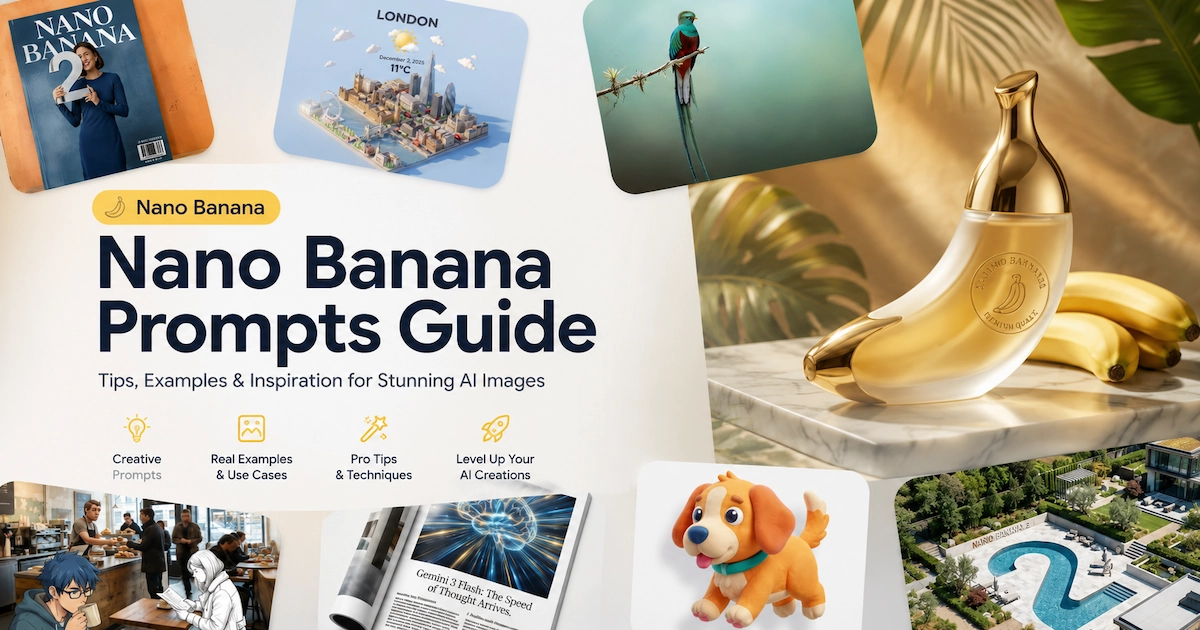
Nano Banana Prompts: The Complete Guide for 2026
Writing effective nano banana prompts means understanding that Nano Banana isn't a keyword-match engine — it's a reasoning model. The right prompt describes a scene narratively, directs the camera, and tells the model exactly what to keep, what to change, and what to render. This guide walks you through every prompting framework, from basic text-to-image generation to advanced face swaps and spherical lat/long transformations, so you can get precise results whether you're working directly in the API or inside VidMuse AI.
Key Takeaways
- Nano Banana responds best to narrative, scene-description prompts — not keyword lists. Use the formula [Subject] + [Action] + [Location] + [Composition] + [Style] as your starting structure.
- There are three distinct Nano Banana models: Nano Banana (speed-focused), Nano Banana 2 (balanced performance with web search grounding), and Nano Banana Pro (professional asset production with thinking mode).
- For face swaps and person swaps, upload reference images alongside your prompt and explicitly describe what stays the same and what changes.
- Nano Banana Pro supports up to 14 reference images per prompt — up to 6 high-fidelity objects and up to 5 characters — making it uniquely powerful for multi-subject compositions.
- Inside VidMuse AI, Nano Banana models power the reference image generation stage of the full MV workflow, letting you build storyboard-ready visuals before video generation begins.
What Is Nano Banana?
Nano Banana is Google's native image generation capability built into the Gemini model family. It refers to three distinct models:
- Nano Banana — built on Gemini 2.5 Flash Image, optimized for speed and high-volume, low-latency tasks
- Nano Banana 2 — built on Gemini 3.1 Flash Image Preview, the best all-around balance of quality, speed, and cost; includes real-time web search grounding
- Nano Banana Pro — built on Gemini 3 Pro Image Preview, designed for professional asset production; uses a "thinking" process to reason through complex prompts before generating
Unlike earlier diffusion models, Nano Banana models apply deep language reasoning to fully interpret your prompt before generating. This means they handle complex, multi-part instructions, render legible text, support conversational multi-turn editing, and can ground images in real-world data via Google Search.
All three models are available inside VidMuse AI under the Image Generation section, alongside Flux.2-Pro, GPT Images 2.0, Seedream 5.0, and Midjourney V7.
Nano Banana
Best for
- Fast high-volume generation
- Good for simple prompt iterations
- Low-latency 1K outputs
Watch out
- Less suitable for complex multi-reference swaps
Nano Banana 2
Best for
- Balanced quality, speed, and cost
- Real-time web search grounding
- Strong all-around prompt performance
Watch out
- Lower ceiling than Pro for professional multi-reference work
Nano Banana Pro
Best for
- Best for face swaps and person swaps
- Professional 2K-4K assets
- Complex multi-reference composition
Watch out
- Use it when fidelity matters more than speed
Create Your AI Video in Minutes
Turn your idea into a video with VidMuse.
The Core Prompting Principle
Every Nano Banana prompt works better when you describe the scene, not list the keywords.
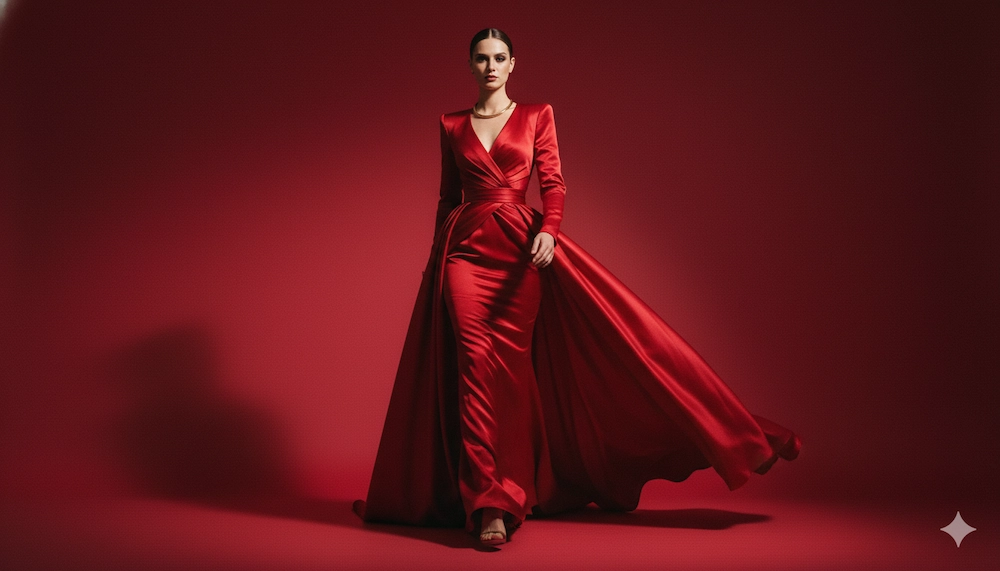
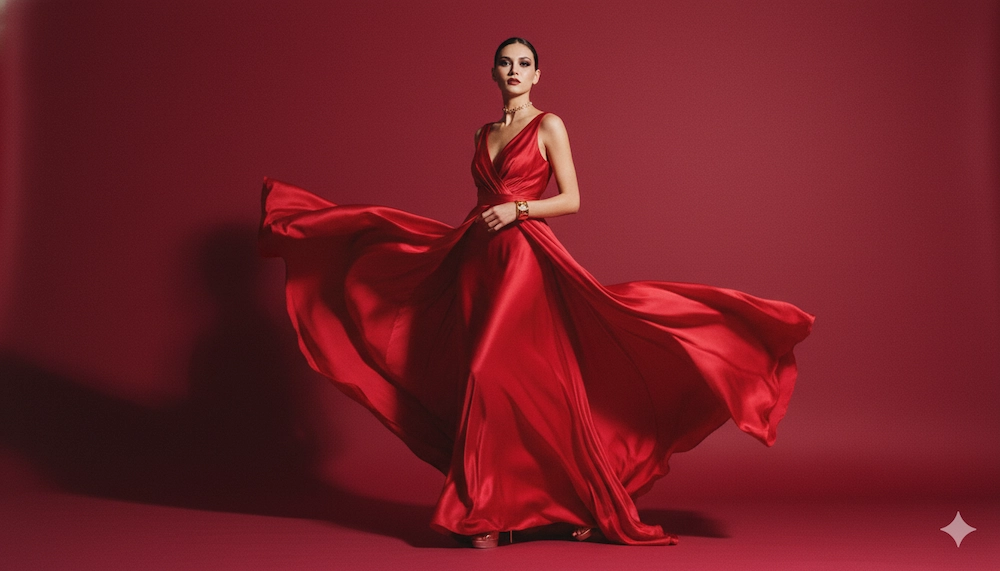
A prompt like "woman, red dress, studio, fashion" gives the model four disconnected data points. A prompt like "A fashion model in a tailored red dress, standing with a confident posture in a seamless deep-cherry studio, shot on medium-format film, center-framed, high saturation editorial lighting" gives it a complete directorial brief.
| Prompt 1 | Prompt 2 |
|---|---|
| A fashion model in a tailored red dress, standing with a confident posture in a seamless deep-cherry studio, shot on medium-format film, center-framed, high saturation editorial lighting | woman, red dress, studio, fashion |
 |  |
This is the single most important shift for anyone learning how to prompt Nano Banana: move from listing to directing.
Five Nano Banana Prompt Frameworks
Describe the scene
Start with subject, action, location, composition, and style instead of keyword lists.
Choose the right framework
Use text-to-image, reference-image, conversational edit, grounded generation, or Creative Director Mode based on the task.
Lock what should stay unchanged
For edits, face swaps, and person swaps, explicitly name the background, pose, lighting, and identity details to preserve.
Specify output needs
Add aspect ratio, resolution, projection format, text rendering requirements, or storyboard context when needed.
Iterate conversationally
Refine from the generated result with focused changes instead of restarting from scratch.
These are the five official prompting frameworks, each suited to a different creation mode.
Framework 1: Text-to-Image Generation
Use this when you're starting from scratch with no reference image.
Formula: [Subject] + [Action] + [Location/Context] + [Composition] + [Style]
Example nano banana prompts:
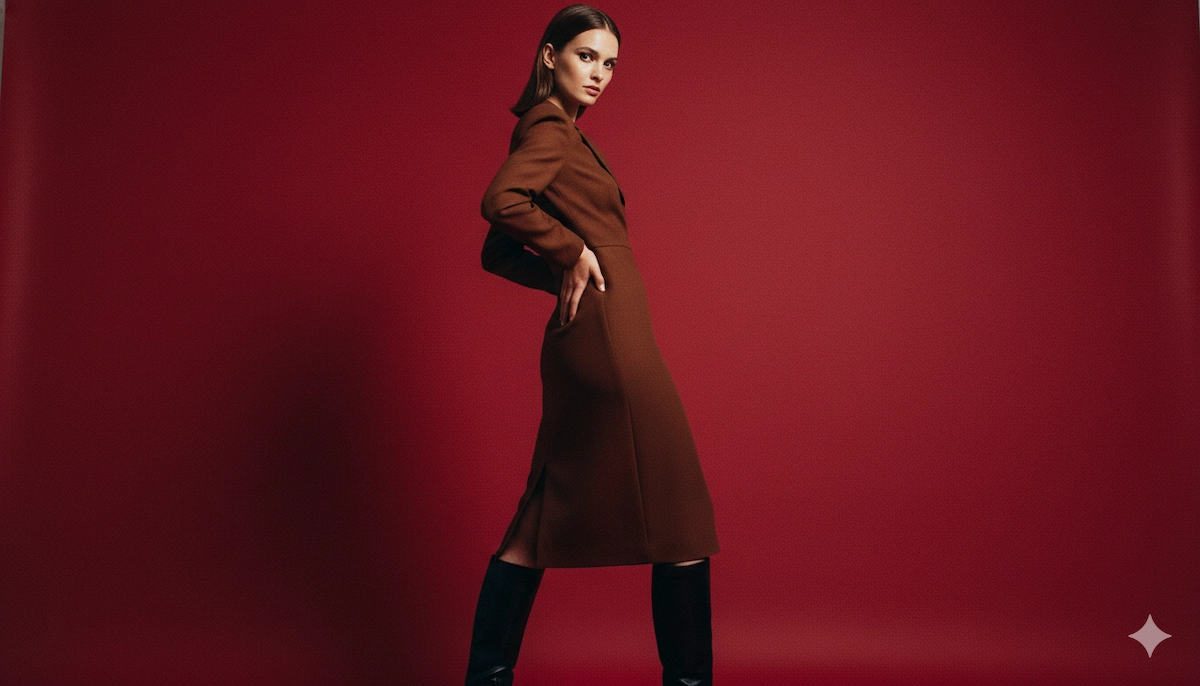
"A striking fashion model wearing a tailored brown dress and sleek boots, posing with a confident statuesque stance, slightly turned. A seamless deep cherry-red studio backdrop. Medium-full shot, center-framed. Fashion magazine editorial style, shot on medium-format analog film, pronounced grain, high saturation, cinematic lighting."
Start strong — open your prompt with a clear subject and the dominant action or state. The model prioritizes the first clause.
Framework 2: Multimodal Generation (With Reference Images)
Use this when you have existing images you want to combine or reference.
Formula: [Reference images] + [Relationship instruction] + [New scenario]
Example: Upload a napkin sketch and a fabric swatch, then prompt: "Using the attached sketch as the structure and the fabric sample as the texture, transform this into a high-fidelity 3D armchair render, placed in a sun-drenched minimalist living room."

Nano Banana Pro supports up to 6 high-fidelity object references and up to 5 character references in a single prompt. Nano Banana 2 supports up to 10 object references and up to 4 character references.
Framework 3: Conversational Image Editing
Use this after you have a generated base image and want to refine it without starting over.
This is the recommended workflow for iteration. The model holds context across turns, so you can follow up with: "Keep everything the same, but make the lighting warmer and change the background to matte black."
For semantic masking (inpainting a specific region), be explicit about what stays unchanged: "Remove the car from the foreground. Keep the building, the sky, and the people on the left side of the frame exactly as they are."
Framework 4: Real-Time Web-Grounded Generation
Nano Banana 2 and Nano Banana Pro can search the web before generating, pulling in current data to inform the image.
Formula: [Search/source request] + [Analytical task] + [Visual translation]
Example: "Search for current weather conditions in Tokyo. Visualize this as a miniature city-in-a-cup scene embedded in a modern smartphone UI, matching the actual weather mood — if rainy, grey and wet; if sunny, warm golden tones."
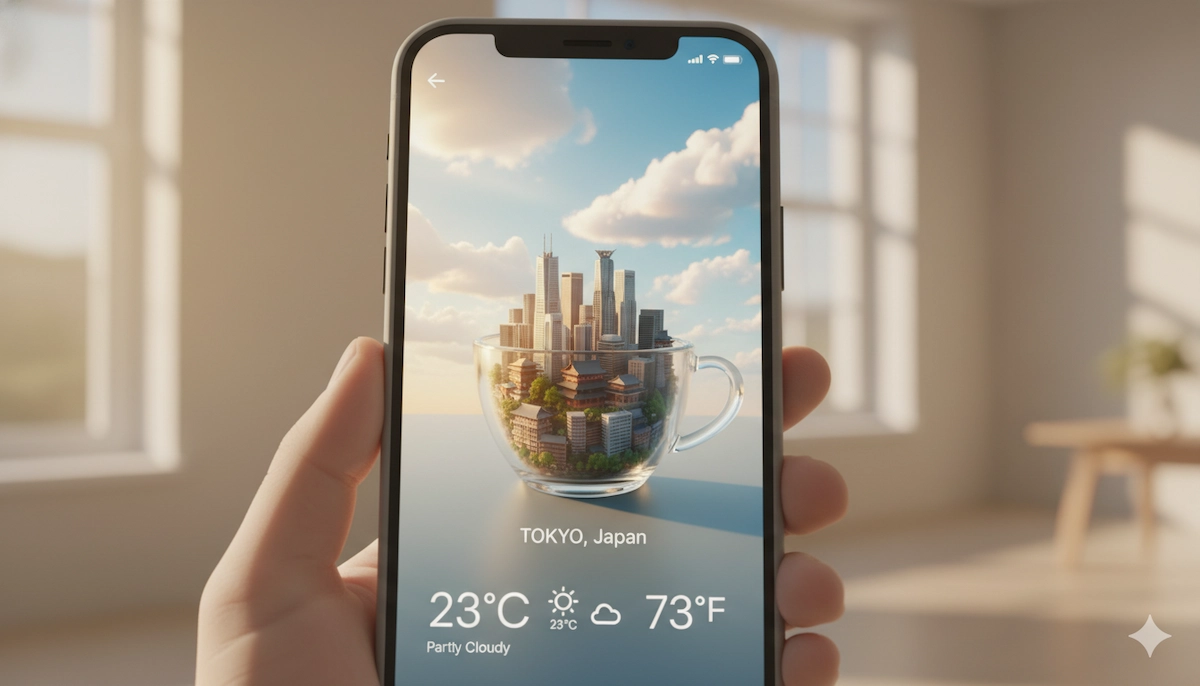
This is particularly powerful for marketing teams building localized, time-sensitive visuals.
Framework 5: Creative Director Mode
This is how to write prompts for nano banana when you need results that go beyond technically competent and into visually distinctive.
Break your prompt into four sub-directives:
- Lighting design: "Three-point softbox setup" for even product lighting; "Chiaroscuro with harsh high contrast" for drama; "Golden hour backlighting with long shadows" for warmth.
- Camera and lens: Specify hardware ("shot on a Fujifilm camera for authentic color science") and optics ("85mm portrait lens, f/1.8, soft bokeh background").
- Color grading: "Cinematic color grading with muted teal tones" or "rendered as if on 1980s color film, slightly grainy".
- Materiality: Don't write "armor" — write "ornate elven plate armor, etched with silver leaf patterns, pauldrons shaped like falcon wings."
How to Prompt Nano Banana for Face Swaps and Person Swaps
The nano banana face swap prompt and nano banana pro swap person prompt approaches both rely on the same principle: upload the reference, specify what preserves, and describe the composite clearly.
Face Swap Prompt Structure
- Upload a base scene image and a reference portrait
- Identify the target face explicitly: "The woman in the blue jacket on the left"
- State the swap: "Replace her face with the face from the attached reference portrait"
- Lock everything else: "Preserve the original lighting, background, body pose, clothing, and expression angle exactly"
Example nano banana face swap prompt:
"Take the first image of the woman with brown hair and blue eyes. Add the logo from the second image onto her black t-shirt. Ensure the woman's face and features remain completely unchanged. The logo should look like it's naturally printed on the fabric, following the shirt's folds."
Person Swap Prompt Structure
For a full-body person replacement:
"Create a professional e-commerce fashion photo. Take the blue floral dress from the first image and place it on the woman from the second image. Generate a realistic full-body shot with the lighting and shadows adjusted to match the outdoor environment."
The key for how to prompt nano banana pro for person swaps: describe the preserved elements (dress, environment, lighting) with equal or more detail than the swap itself. The model needs to understand what it's anchoring to.
For highest fidelity on a person swap, use Nano Banana Pro over Nano Banana 2 — the thinking mode reasons through consistency before committing to the final render.
Nano Banana Prompt for Turning Images into Spherical Lat/Long
The nano banana prompt for turning image into spherical lat/long is a specialized use case for creating 360-degree equirectangular projections — useful in VR environments, virtual tours, and panoramic backgrounds.
The prompt approach:
- Upload your source image
- Specify the target projection explicitly
- Describe the desired environmental continuity
Example prompt:
"Take the attached forest landscape photograph and convert it into a seamless spherical equirectangular (lat/long) panorama. Extend the scene naturally in all directions — top toward a sky with matching lighting, bottom toward a forest floor consistent with the foreground, and horizontally with continuous tree coverage. The result should be a 2:1 aspect ratio image suitable for use as a 360-degree HDRI environment map."
For best results with this use case, use a 16:9 or 2:1 aspect ratio setting, specify 2K or 4K resolution for sufficient detail, and describe the environmental tone (time of day, weather, color temperature) so the model extends the scene consistently.
This workflow pairs well with VidMuse's Asset Library feature — once you generate a spherical environment, you can store it as a reusable background asset for multiple scene generations.
How to Get the Best Results with Nano Banana Prompts
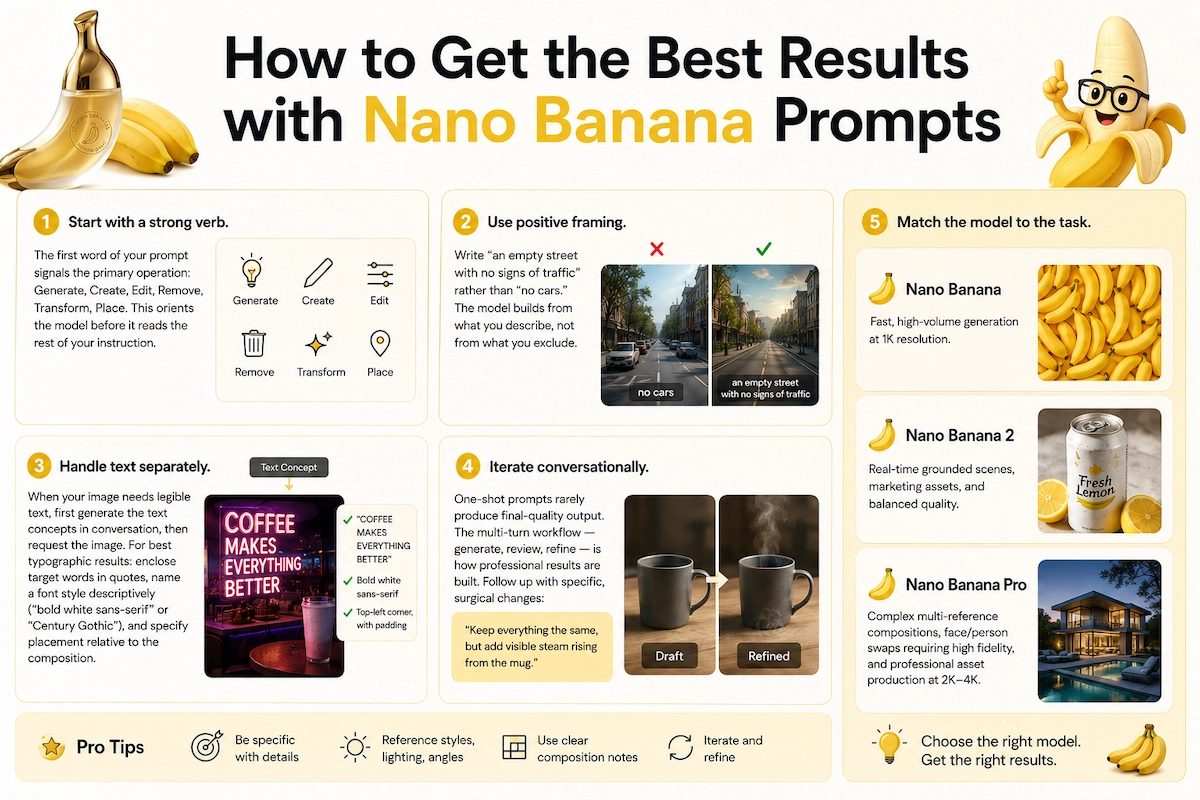
How to get the best results with nano banana prompts comes down to five practical habits:
1. Start with a strong verb.
The first word of your prompt signals the primary operation: Generate, Create, Edit, Remove, Transform, Place. This orients the model before it reads the rest of your instruction.
2. Use positive framing.
Write "an empty street with no signs of traffic" rather than "no cars." The model builds from what you describe, not from what you exclude.
3. Handle text separately.
When your image needs legible text, first generate the text concepts in conversation, then request the image. For best typographic results: enclose target words in quotes, name a font style descriptively ("bold white sans-serif" or "Century Gothic"), and specify placement relative to the composition.
4. Iterate conversationally.
One-shot prompts rarely produce final-quality output. The multi-turn workflow — generate, review, refine — is how professional results are built. Follow up with specific, surgical changes: "Keep everything the same, but add visible steam rising from the mug."
5. Match the model to the task.
Use Nano Banana for fast, high-volume generation at 1K resolution. Use Nano Banana 2 for real-time grounded scenes, marketing assets, and balanced quality. Use Nano Banana Pro for complex multi-reference compositions, face/person swaps requiring high fidelity, and professional asset production at 2K–4K.
Nano Banana Prompts Inside VidMuse
VidMuse AI integrates Nano Banana, Nano Banana 2, and Nano Banana Pro as part of its image generation layer — sitting directly inside the broader MV production workflow.
Here's how nano banana prompts fit into the VidMuse pipeline:
The core VidMuse workflow moves from Creative Brief → Reference Generation → Scene & Shot List → Storyboard → Video Generation. Nano Banana models power the Reference Generation stage — the point where your written direction becomes visual reference that guides every downstream decision.
In practice:
- Use Nano Banana 2 in VidMuse to quickly generate scene reference images: environmental mood, lighting direction, character visual language
- Use Nano Banana Pro for hero shots that will appear in your storyboard — character consistency across multiple angles, product placement visuals, or any reference that needs to hold fidelity through 30–90 seconds of video
- Use the Asset Library & Memory feature (VidMuse 2.0) to store your best-performing reference images, so you can pull consistent visual identities into future projects without re-generating from scratch
For indie musicians using VidMuse to turn Suno AI tracks into visual content, the Nano Banana prompt frameworks above — especially Creative Director Mode — translate directly into storyboard-quality reference images before a single frame of video is generated.
Watch this walkthrough to see the full Reference Generation stage in action:
Pay attention to how the creative brief language maps directly onto the image prompt structure — the same scene description that defines your MV concept becomes the core of your Nano Banana prompt. After watching, the key takeaway is that the prompt is not a separate creative step from your brief; it is your brief, made specific enough for the model to execute.
Common Nano Banana Prompting Mistakes
Even experienced prompt writers run into these consistently:
Keyword-listing instead of scene-writing.
"Woman, sunset, beach, dramatic" gives the model four adjectives. "A woman standing at the edge of the shoreline, facing the ocean, shot from behind, golden hour light creating a long shadow, wide-angle lens, cinematic aspect ratio" gives it a scene. The quality difference is significant.
Not specifying what to preserve during edits.
In any editing prompt, the model will interpret ambiguity as permission to change. If you want something locked, say so explicitly and specifically.
Using negative framing.
"No blur, no noise, no overexposure" is less effective than describing the positive target state: "Sharp focus, clean shadows, balanced exposure."
Forgetting aspect ratio and resolution.
The model defaults to 1:1 at 1K unless you specify otherwise. For video storyboard references, set 16:9 explicitly. For portrait work, use 9:16.
Expecting identical results on regeneration.
Nano Banana models are probabilistic. If a result is close but not perfect, iterate from that output conversationally rather than regenerating from scratch — you'll converge faster.
Skipping the text-first rule.
When your image needs legible embedded text (posters, signage, captions), generate the text concepts first in a separate prompt turn, then ask for the image incorporating that text. Jumping straight to image generation with complex text requirements increases error rates.
Nano Banana Prompts: Daily Limits and Usage Notes
How many nano banana prompts per day you can run depends on the platform and plan you're using. Access via the Gemini API is rate-limited and billed per output token — image resolution directly affects token cost (512px at 747 tokens, up to 4K at 2,520 tokens per image). For high-volume generation, the Gemini Batch API offers higher rate limits in exchange for up to 24-hour turnaround.
Inside VidMuse AI, generation limits are governed by your VidMuse plan tier rather than the underlying model limits — check your account dashboard for current credit usage and limits.
For nano banana prompts generator use cases (automated or bulk generation workflows), the Batch API is the recommended path. For individual creative workflows, conversational multi-turn usage is more efficient than sending many separate single-shot prompts.
Regarding the nano banana prompts github and nano banana prompts reddit communities: developer repositories on GitHub typically share prompt templates, API integration patterns, and evaluation frameworks for systematic prompt testing. Reddit discussions tend to focus on creative use cases, unexpected outputs, and workarounds for edge cases. Both are useful for expanding your prompt vocabulary, but the official Google Cloud documentation and the guide you're reading now should be your ground truth for technical specifications.
FAQ about Nano Banana Prompts
How do I write prompts for Nano Banana if I've never used an AI image model before?
Start with the five-part formula: describe your subject, what they're doing, where they are, how the shot is framed, and what visual style it should have. Don't try to write a perfect prompt on the first attempt — generate an initial image, then refine it conversationally. The model holds context across a session, so you can make surgical changes without rewriting from scratch.
What's the best nano banana pro swap person prompt structure?
Upload two images: the base scene and your reference person. In your prompt, explicitly name what transfers (the person's likeness, their body position, their clothing), what gets replaced, and what stays completely unchanged (background, lighting, other figures). The more detail you give about the preserved elements, the higher the fidelity of the final composite.
How do I use a nano banana face swap prompt without losing the original background?
After uploading your base and reference images, end your prompt with a preservation lock: *"The background, lighting direction, shadow placement, and all other figures in the scene must remain completely unchanged."* Semantic masking works by the model inferring a region from your description — the more precisely you bound that region linguistically, the cleaner the edit.
How do I prompt Nano Banana for spherical lat/long output?
Describe the equirectangular projection explicitly: *"Convert this image to a seamless spherical equirectangular panorama suitable for use as a 360-degree environment map, 2:1 aspect ratio."* Then describe how the model should extend the scene in each direction — sky above, ground below, and continuous scene elements left and right — so the edges tile cleanly.
How many nano banana prompts can I run per day?
Via the Gemini API, rate limits depend on your tier and the resolution of images you're generating (higher resolution = more tokens per image). Inside VidMuse AI, your daily or monthly generation capacity is determined by your plan. For bulk workflows, the Gemini Batch API provides higher throughput at the cost of up to 24-hour delivery time.
Is there a difference between how to prompt Nano Banana versus Nano Banana Pro?
Yes. Nano Banana and Nano Banana 2 handle most creative and marketing use cases well with standard descriptive prompts. Nano Banana Pro is designed for complex multi-reference compositions, professional asset production, and cases where the "thinking" mode — where the model generates interim composition images before the final output — meaningfully improves accuracy. For face swaps, person swaps, and multi-character consistency, Pro is the stronger choice.
Where can I find nano banana prompts examples beyond this guide?
The official Google Cloud AI documentation maintains a prompting guide with generated examples across photography, illustration, text rendering, and product mockup use cases. Developer communities on GitHub publish prompt template repositories, and platform-specific communities on Reddit discuss real-world creative applications. For music video and visual content creation, VidMuse's template library provides context-specific starting prompts across Story MV, Abstract MV, Performance MV, Viral Short, TVC, and Explainer categories.
Take Home
Nano banana prompts work when you think like a director, not a search engine. The model's deep reasoning capability means it can handle complex, layered instructions — but only if you give it complete, specific direction. Use the frameworks in this guide as your starting templates, iterate conversationally from your first output, match your model tier to your quality requirements, and preserve explicitly what you don't want changed.
For creators building inside VidMuse AI, Nano Banana isn't just an image generator — it's the visual foundation of your entire MV production pipeline. The reference images you generate with these prompts become the creative anchor for every shot, scene, and storyboard decision downstream.
Ready to put these prompts to work? Start a new project in VidMuse AI, open the Reference Generation stage, and use the Creative Director framework above on your next brief.
Create Your AI Video in Minutes
Turn your idea into a video with VidMuse.

Written By
VidMuse Team
Continue Reading
Latest blog posts related to AI video creation.
PixVerse V6 x VidMuse AI: Model Guide and Video Workflow
PixVerse V6 review and VidMuse integration guide. Capabilities, 15s 1080p video, prompt tips, model comparison, pricing, and how to use V6 in VidMuse workflows.
FLUX 3: What It Is, Capabilities, and How to Access It
FLUX 3 is Black Forest Labs' multimodal AI model for image, video, audio, and action. Full guide: capabilities, FLUX 3 vs FLUX 2, availability, and pricing.
Free Music Visualizer: 10 Best Free Tools in 2026
Compare 10 best free music visualizers in 2026. Waveform tools, AI music video makers, watermark policies, export limits, and which tool fits your workflow.