

Nano Banana: Google's AI Image Generator Guide 2026
Nano Banana is Google's native AI image generation capability built directly into Gemini — it lets you create, edit, and iterate on images through conversational text prompts, uploaded references, or a combination of both.
As of 2026 it spans three model tiers: the original Nano Banana (Gemini 2.5 Flash Image), Nano Banana 2 (Gemini 3.1 Flash Image), and Nano Banana Pro (Gemini 3 Pro Image). If you've seen the name trending in AI circles and wondered whether it's a meme or a serious creative tool — it's very much the latter, and it's becoming a core part of how musicians, marketers, and indie creators build visual assets without a photography budget.
Create Your AI Video in Minutes
Turn your idea into a video with VidMuse.
Key Takeaways
- Nano Banana is Google's official name for Gemini's native image generation system, accessible via the Gemini app, Google AI Studio, and the Gemini API — no separate account required.
- Three model tiers exist in 2026: Nano Banana (Gemini 2.5 Flash Image), Nano Banana 2 (Gemini 3.1 Flash Image), and Nano Banana Pro (Gemini 3 Pro Image) — each with different speed, resolution, and pricing tradeoffs.
- Free access is available with daily limits; Nano Banana Pro requires a paid Gemini plan or API billing for full 2K and 4K output.
- Nano Banana's strongest differentiator is conversational, multi-turn editing — you refine the same image in a single session rather than regenerating from scratch each time.
- Nano Banana-generated images can be imported into VidMuse as visual reference frames, anchoring the aesthetic of AI-generated music video sequences across scenes.
Create Your AI Video in Minutes
Turn your idea into a video with VidMuse.
What Is Nano Banana?
Nano Banana is the name Google DeepMind uses for Gemini's native image generation capabilities. Nano Banana is the name for Gemini's native image generation capabilities. Gemini can generate and process images conversationally with text, images, or a combination of both — letting you create, edit, and iterate on visuals with unprecedented control.
It is not a standalone application. Nano Banana is a capability layer within Google's Gemini multimodal model family, which means it inherits universal language support, Google account integration, and cross-platform access across gemini.google.com, the Gemini mobile app on iOS and Android, and via the Gemini Developer API.
The name has a notable origin story. The "Nano Banana" codename originated from internal Google testing at LMArena in August 2025, where it was used to identify what would become Gemini 2.5 Flash Image. The playful name captured the community's imagination and went viral in AI circles, becoming so popular that Google embraced it as a cultural touchstone for their image generation lineup.
What makes Nano Banana distinct from earlier text-to-image tools is its foundation in Gemini's multimodal language understanding. Rather than matching visual patterns statistically, it draws on Gemini's deep language comprehension, real-world knowledge, and reasoning to interpret what you actually mean — not just what you literally typed.
The Three Nano Banana Models Explained
Understanding which model tier you're working with matters because capabilities, resolution limits, and access rules differ meaningfully across all three.
Nano Banana refers to three distinct models available in the Gemini API:
| Model Name | Underlying Architecture | Core Optimization & Use Case |
|---|---|---|
| Nano Banana | Gemini 2.5 Flash Image | The original, speed-optimized version. |
| Nano Banana 2 | Gemini 3.1 Flash Image Preview | Optimized for speed and high-volume developer use cases. |
| Nano Banana Pro | Gemini 3 Pro Image Preview | Designed for professional asset production using advanced reasoning and high-fidelity text rendering. |
Nano Banana
Best for
- Fast ideation
- Free-tier friendly
- Good for everyday image editing
Watch out
- Less advanced than Nano Banana 2 or Pro for production assets
Nano Banana 2
Best for
- Flash-speed generation
- Better subject consistency
- Strong default for creators
Watch out
- Still needs review for final commercial outputs
Nano Banana Pro
Best for
- Highest fidelity
- Up to 4K output
- Advanced reasoning and text rendering
Watch out
- Slower and paid-tier oriented for full capability
Here's the practical difference between them for creators:
Nano Banana (original) is best for fast ideation, casual generation, and low-cost exploration. It handles everyday editing tasks, quick reference generation, and standard social media visuals well. It's the most accessible free-tier option.
Nano Banana 2 raises the bar significantly. It unlocks pro-level image generation at Flash speed — combining subject consistency, precision text rendering, flexible aspect ratios, and resolutions up to 4K. Nano Banana 2 brings Gemini Flash's speed to image generation, enabling rapid edits and enhanced creative control with subject consistency and precise instruction following. Native support for Google Search grounding also makes it more accurate for real-world landmarks and specific objects. This is the recommended default for most creators.
Nano Banana Pro is the professional-grade option built on Gemini 3 Pro. Nano Banana Pro uses Gemini's state-of-the-art reasoning and real-world knowledge to visualize information better than ever — helping you design anything from prototypes and infographics to conversions of handwritten notes into diagrams. It is the right choice when you need the highest fidelity, the most complex instruction-following, or production-ready 4K assets with consistent branding.
What Nano Banana AI Can Actually Do
Nano Banana's feature set goes significantly beyond basic text-to-image generation. These are the capabilities that matter most for visual creators.
Multimodal Understanding
Upload images and pair them with text instructions to create complex, detailed outputs. The model bridges what you say and what you envision by drawing on Gemini's deep language understanding — including real-world logic, historical knowledge, and contextual reasoning.
Conversational Editing
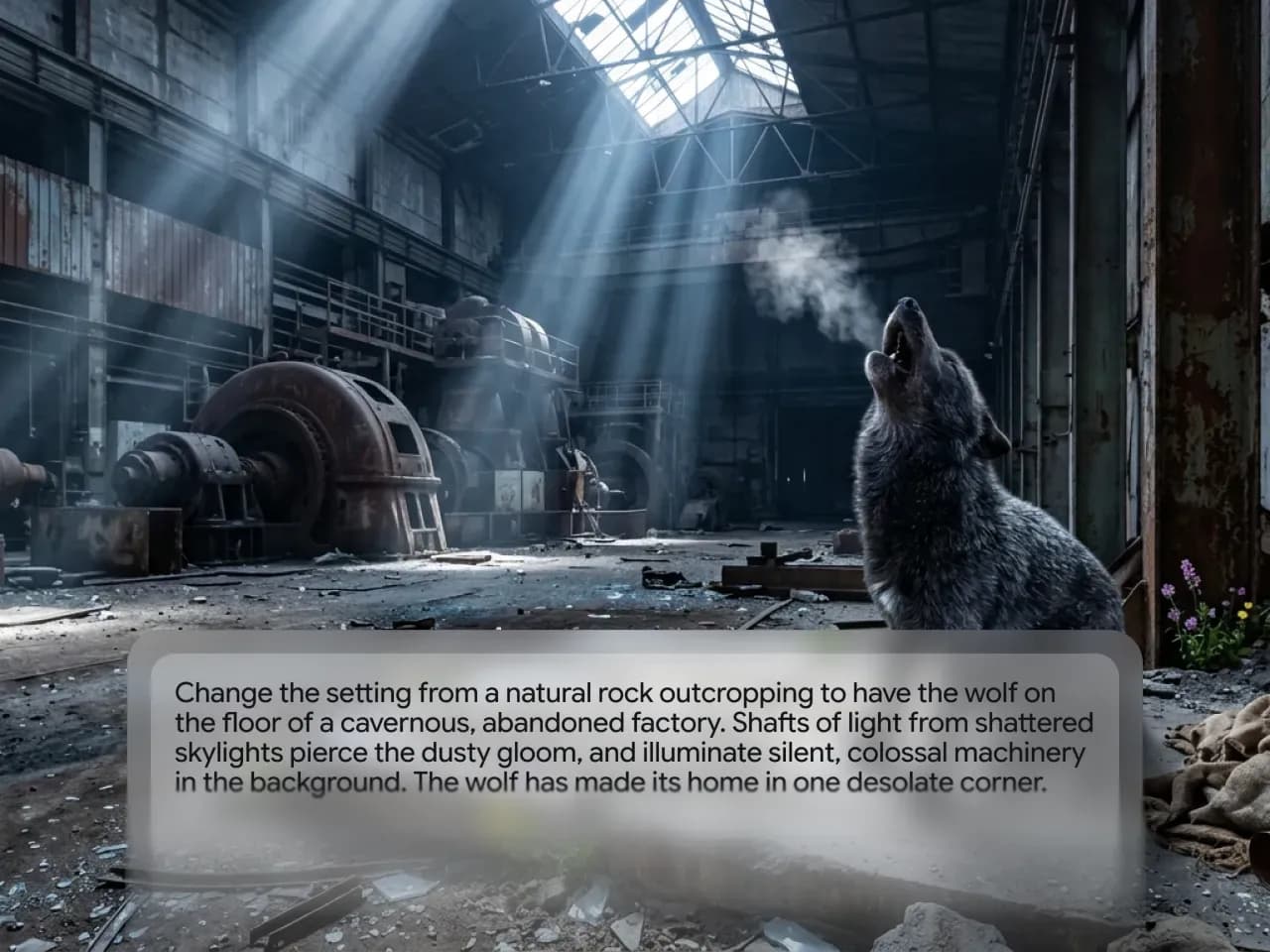
After generating an image, you keep editing it in the same session. You can tweak specific details, reframe the image, upscale the quality, or overhaul the entire aesthetic. This multi-turn workflow is one of Nano Banana's defining strengths — changes build on each other rather than requiring a full restart.
Text Rendering in Images
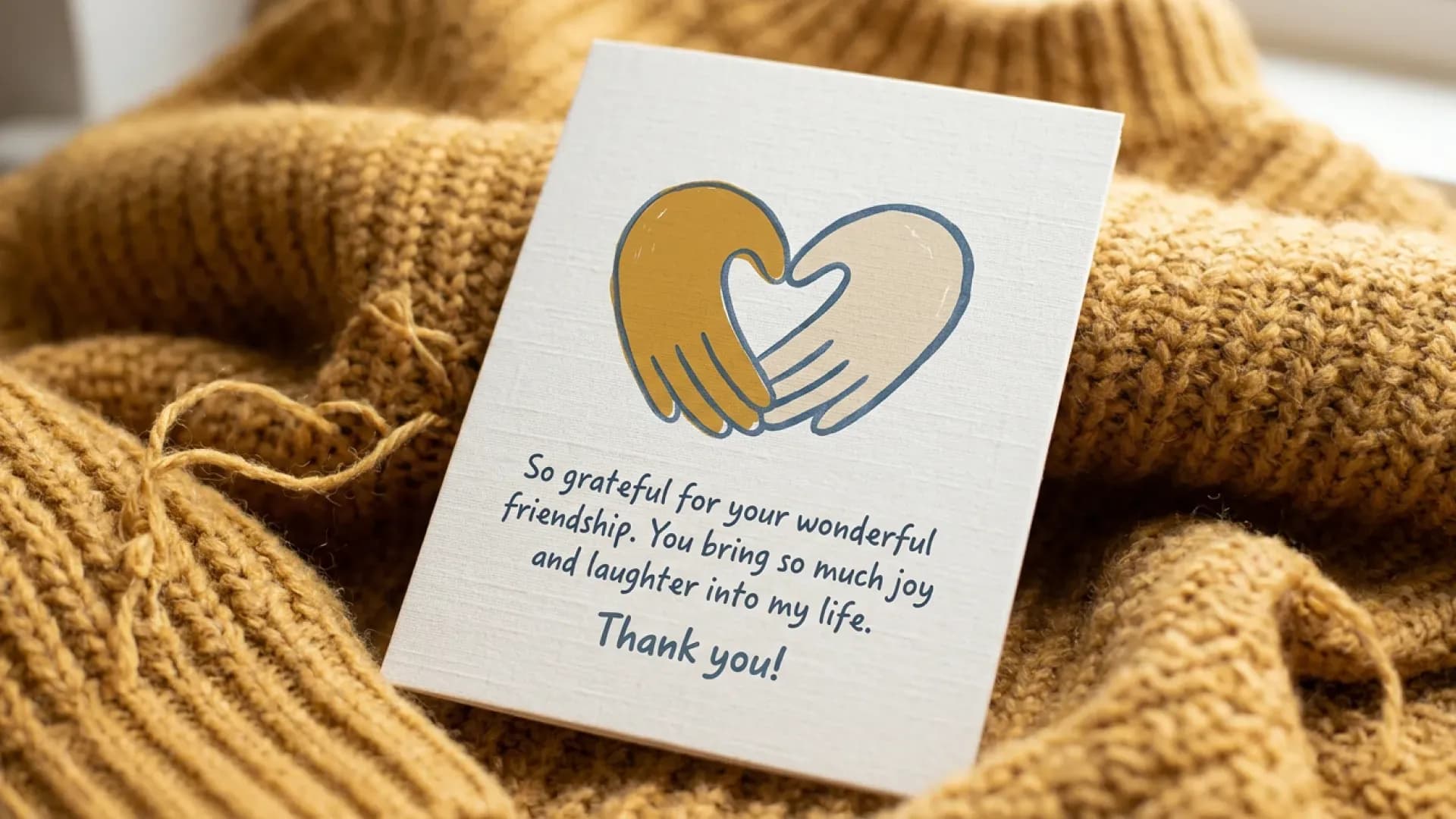
Most AI image generators have historically struggled with legible text inside images. Nano Banana Pro can generate images with accurate text in multiple languages — making it practical for mockups, posters, and international content. To get precise text output, enclose your desired words in quotation marks in the prompt (e.g., "Happy Birthday") and describe the typography style, such as "bold sans-serif font" or "neon cursive signage."
Up to 4K Resolution
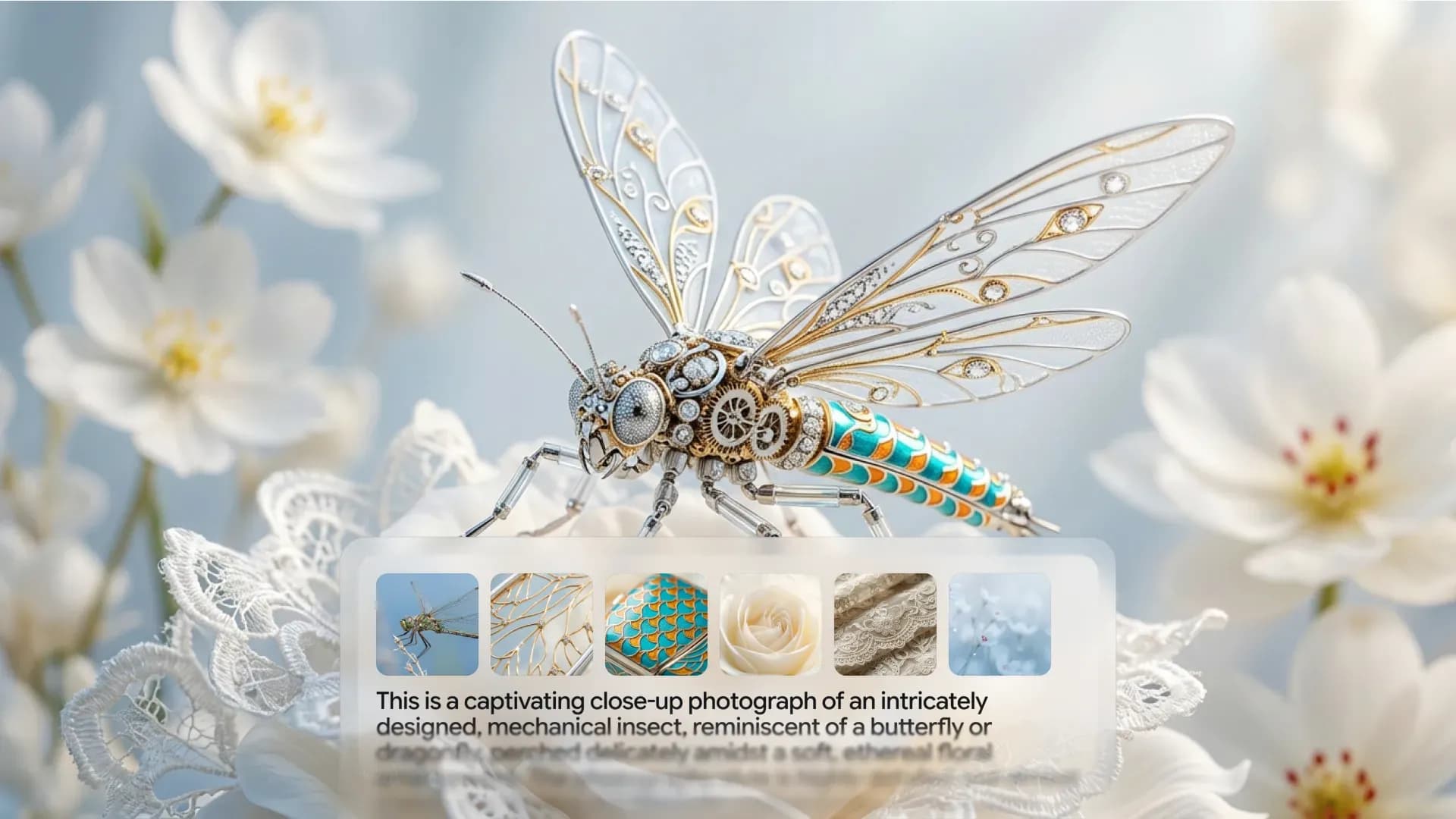
Nano Banana Pro supports generating images in various aspect ratios and at resolutions up to 4K, with advanced editing capabilities that let you adjust camera angles, change scene lighting, apply color grading, modify depth of field, and edit specific parts of an image while keeping everything else intact.
Subject Consistency Across Multiple Images
One of the most practically useful capabilities for music video creators is maintaining a character's appearance across multiple scenes. Upload clear reference images and assign a distinct name to each character or object in your prompt — the model tracks their appearance as you build out a visual sequence.
SynthID Watermarking
Nano Banana Pro embeds Google DeepMind's SynthID technology — an invisible cryptographic watermark plus a visible AI attribution marker — into every generated image. No other free-to-access AI image tool does this by default as of early 2026.
Personalized Generation via Google Integrations
Google has added Nano Banana-powered image generation to Gemini's Personal Intelligence feature, meaning AI images can be created using Gemini's understanding of your likes and interests — including labels in Google Photos — without those having to be explicitly noted in your prompt.
Is Nano Banana Free?
Yes — with meaningful limits that vary by model tier and access surface.
Through the Gemini app, free users get approximately 20 Nano Banana 2 images per day at 1K resolution, plus 2 Nano Banana Pro images daily with a visible watermark. Google AI Studio offers 50 free requests per day at up to 2K resolution with no watermark.
Here's how each free access option compares:
- Gemini App (free account): ~20 Nano Banana 2 images/day at 1K; 2 Nano Banana Pro images/day with SynthID watermark. Best for casual use with no technical setup required.
- Google AI Studio (free tier): Up to 50 requests/day at 2K resolution, no watermark. More generous output but requires slightly more navigation to set up.
- Google Search: Zero-setup image generation directly from search results; lowest barrier to entry but limited editing and controls.
- Nano Banana Pro (paid): Full 2K and 4K output, higher daily limits, and "Redo with Pro" access in the Gemini app require a paid Google AI Pro or Ultra plan, or API billing.
Note that Google reduced free tier quotas significantly on December 7, 2025, with some models seeing 50–80% cuts in daily allowances. The limits above reflect post-reduction quotas as documented in official Google AI documentation.
For most indie musicians and content creators, the Gemini App free tier is sufficient to prototype reference images. For commercial-grade assets intended for music video production — where resolution and character consistency matter — the Gemini AI Studio free tier or a paid plan will deliver meaningfully better results.
How to Use Nano Banana: Step-by-Step
Choose your access point
Start in Gemini, Google AI Studio, or the Gemini API depending on how much control you need.
Open image generation
Select the image tool, choose the available model, and add a prompt or image reference.
Write your prompt
Describe the subject, action, scene, style, composition, aspect ratio, and exact text when needed.
Iterate conversationally
Stay in the same chat and request focused changes instead of regenerating from scratch.
Upload references
Use clear reference images to improve character, object, location, and style consistency.
Export your image
Download the final image at the resolution and aspect ratio needed for your VidMuse workflow.
Step 1: Choose Your Access Point
Go to gemini.google.com and sign in with your Google account. For a higher free daily limit, open Google AI Studio at aistudio.google.com instead.
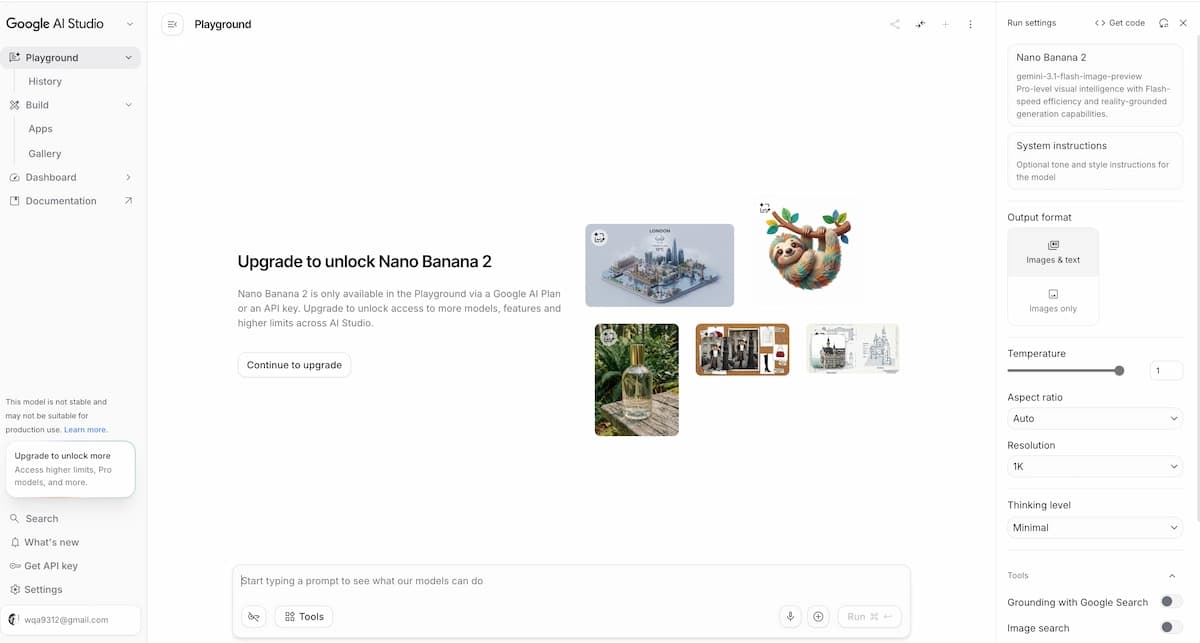
Step 2: Open the Image Generation Tool
In the Gemini app, select "🍌 Create images" from the tools menu. You can choose the "Fast," "Thinking," or "Pro" model from the model selector. Then add a prompt or upload an image to edit. Google AI Pro, Plus, and Ultra users can regenerate images using Nano Banana Pro by selecting the three-dot menu and then "Redo with Pro."
Step 3: Write Your Prompt
Start with the simple formula: Create/generate an image of [subject] [action] [scene] — then build from there. For example: "Create an image of a musician performing on a rain-slicked rooftop at golden hour, warm amber and deep teal tones, shallow depth of field, 35mm film grain."
The more detail you add about style, subject, setting, action, and composition, the closer the output will be to what you envisioned.
Step 4: Iterate Conversationally
Stay in the same chat session and request specific adjustments: "Change the lighting to deep magenta neon," "Add a second figure in the background," or "Reframe to a wide shot." Nano Banana's multi-turn workflow means each adjustment builds on the previous output without starting over.
Step 5: Upload Reference Images for Consistency
For character-based work, upload a reference image of the person or object and assign it a name in your prompt. The model will maintain their appearance across subsequent generations in the same session.
Step 6: Specify Resolution and Aspect Ratio
In the Gemini app and AI Studio, use the resolution dropdowns to upscale to 2K or 4K. Specify your desired aspect ratio in the prompt — for example, "9:16 vertical social post" or "16:9 widescreen backdrop."
Step 7: Export Your Image
Download the completed image. On paid tiers and AI Studio, output is delivered without watermarks. Free-tier Nano Banana Pro outputs include SynthID watermarking by default.
How to Write Effective Nano Banana Prompts
Strong prompting is the difference between a generic output and a production-ready visual. Google's official guidance breaks prompt construction into five components, all of which apply directly to music video reference creation.
Style: Define the visual language — illustration, photograph, watercolor, retro-futuristic, abstract, cinematic. This single parameter shapes the entire output.
Subject: Describe your main character, object, or focal point precisely. Include appearance details — hair, clothing, expression — especially if you're building a consistent character across multiple images.
Setting: Where is this taking place? Interior or exterior, urban or natural, historical or futuristic. The more specific the environment, the more grounded the result.
Action: What is the subject doing? Even small behavioral details ("holds a guitar loosely at her side") elevate compositional quality.
Composition: Camera angle, focal length, framing. Terms like "Dutch angle," "extreme close-up," "bird's-eye view," or "rule of thirds" work directly in prompts.
For music video production specifically, a strong Nano Banana AI prompt might look like: "A wide shot of a young woman in a silver jacket standing in an empty subway station at 3am, neon signs reflected in puddles, deep purple and cyan color grading, cinematic grain, 35mm analog photography style, low angle looking up." This gives the model a complete visual brief — which is exactly what you need when the output will serve as a reference frame for video generation.
Nano Banana vs the Competition
Choosing the right image generator depends on your specific workflow goals. Here's a grounded comparison across the tools creators most frequently ask about.
Nano Banana
Best for
- Conversational editing
- Character consistency
- Gemini ecosystem access
Watch out
- May be less stylized on the first generation than Midjourney
Midjourney
Best for
- Strong visual taste
- Excellent style exploration
- High first-image impact
Watch out
- Less practical for precise iterative editing
Seedream
Best for
- Video-oriented reference generation
- Good for VidMuse production pipelines
Watch out
- Less general-purpose than Nano Banana for Gemini-centered workflows
Nano Banana vs Nano Banana Pro
The original Nano Banana prioritizes speed and accessibility. Nano Banana Pro adds 4K output, up to 8 simultaneous reference images, multilingual text rendering, and Gemini 3 Pro's advanced reasoning — at the cost of slower generation and paid-tier access for full capability. Use the original for fast ideation; use Pro for production-ready, commercial-grade assets.
Nano Banana vs Nano Banana 2
Nano Banana 2 combines the advanced features of Nano Banana Pro with the speed of Gemini Flash, delivering enhanced creative control with subject consistency and precise instruction following. For most creators who want quality without the Pro tier's price point, Nano Banana 2 is the better default — faster, more capable than the original, and available on the free tier with daily limits.
Nano Banana vs Midjourney
Midjourney is the better choice for style, visual taste, and artistic output; Nano Banana is stronger for controllable editing, character consistency, multi-image workflows, and production-oriented tasks. Midjourney often wins on first-image wow factor, while Nano Banana wins when you need to keep working on the image after generation. For music video reference frames where you need to iterate precisely on a consistent visual identity, Nano Banana's conversational workflow is the practical choice. For discovering unexpected visual directions before you've committed to an aesthetic, Midjourney remains valuable.
Nano Banana vs GPT Images 2.0
GPT Images 2.0 excels at infographics, diagrams, text-heavy content, and multilingual visual documents. Nano Banana Pro matches it on text rendering and adds the advantage of Google account integration, Google Search grounding for real-world accuracy, and a more iterative editing workflow. The choice often comes down to which AI ecosystem you're already working in. Both models are available inside VidMuse's image generation suite.
Nano Banana vs Seedream
Seedream (available in VidMuse as Seedream 4.5 and Seedream 5.0 Lite) is optimized for generating image references that feed into video generation pipelines. If your end goal is AI music video production rather than standalone imagery, Seedream's training is more purpose-built for that task. Nano Banana is the better choice for portrait-style reference generation, scene-setting, and general-purpose creative work that may extend beyond a single MV project.
Nano Banana vs Grok Imagine
In direct comparisons, Nano Banana Pro edges ahead of Grok Imagine on realism and anatomical accuracy, while Grok Imagine delivers more dramatic, cinematic visuals. For image editing tasks, Nano Banana Pro demonstrates superior identity preservation and background consistency. Grok Imagine is also available in VidMuse's image generation suite, making both accessible within a single platform.
How to Use Nano Banana Images in VidMuse for Music Video Production
VidMuse is an AI music video creation platform built around agent-based logic — it plans your full MV rather than executing one-shot prompts. Nano Banana images plug directly into this workflow at multiple stages.
Create Your AI Video in Minutes
Turn your idea into a video with VidMuse.
Reference Generation stage: After generating scene concepts in Nano Banana, import the images into VidMuse's Asset Library. VidMuse treats these as visual anchors during storyboard generation — maintaining your chosen aesthetic (color palette, character design, environment) across multiple shots.
Character and location consistency: Nano Banana Pro's multi-reference input (up to 8 simultaneous reference images) lets you define a character's look before bringing it into VidMuse. Upload those references at the Creative Brief stage to give VidMuse's AI Director a strong visual brief with minimal ambiguity.
Storyboard panels: Use Nano Banana to generate one image per scene concept — a rough visual storyboard. In VidMuse, these become reference inputs during the Scene & Shots List phase, giving the system concrete visual direction rather than relying on text description alone.
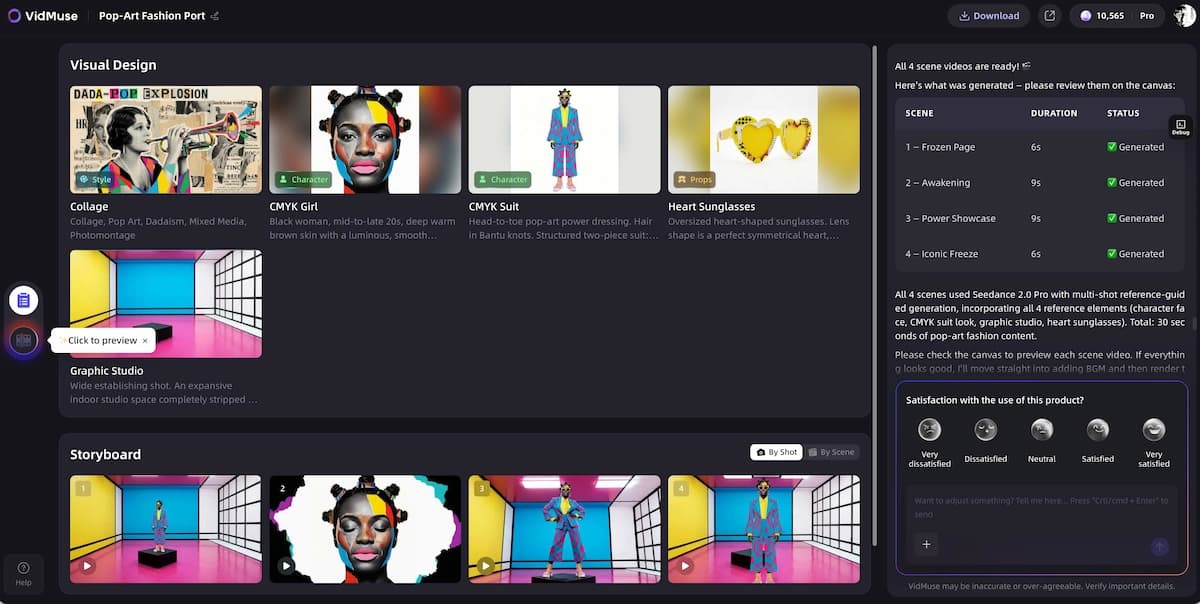
Template alignment: VidMuse's Story MV, Performance MV, and Abstract MV templates all benefit from strong visual references at the input stage. Nano Banana-generated images help align generated video style with your creative vision before the video generation models are invoked.
The practical value for indie musicians is significant. If you have a finished Suno AI track inside VidMuse and want to produce a full music video, Nano Banana closes the gap between "I have a sound" and "I have a visual identity." It builds the reference layer that makes VidMuse's video generation output more consistent, more personalized, and more aligned with your artistic intent.
Common Mistakes and How to Avoid Them
- Regenerating instead of iterating.
- The most common mistake is treating Nano Banana like a one-shot generator. When results aren't quite right, stay in the same chat session and request specific changes. Conversational editing is the model's core advantage — use it.
- Underspecifying the prompt.
- Vague prompts produce generic outputs. Include style, subject, setting, action, and composition in every prompt. "A musician at sunset" is a starting point. "A close-up portrait of a woman with braided hair in a silver jacket, standing in front of a graffiti wall at dusk, warm amber and violet tones, shallow depth of field, analog film texture" gives the model a complete visual brief.
- Expecting Pro output on the free tier.
- Free-tier Nano Banana at 1K resolution is a prototyping tool, not a final-asset tool. If you need production-ready references for a music video, work within AI Studio's free 2K tier or access Nano Banana Pro through a paid plan.
- Ignoring reference image inputs.
- Most users prompt from text only. Uploading a reference image dramatically improves character consistency, art style matching, and lighting replication. Nano Banana 2 and Pro both support multi-reference workflows — use them.
- Using Nano Banana when Seedream fits better.
- If your primary goal is generating image references specifically for AI video generation inside VidMuse, Seedream is purpose-built for that pipeline. Nano Banana is the stronger choice for general-purpose image creation, portrait references, and any visual work that extends beyond a single production.
FAQ
What is Nano Banana exactly?
Nano Banana is the name for Gemini's native image generation capabilities, including the original Nano Banana, Nano Banana 2, and Nano Banana Pro.
Is Nano Banana free to use?
Yes, Nano Banana is free with limits. Higher resolution, higher limits, and Pro access may require a paid Gemini plan or API billing.
What is Nano Banana Pro and how is it different from the original?
Nano Banana Pro is built on Gemini 3 Pro for professional-grade images, up to 4K resolution, multilingual text rendering, and stronger reasoning.
Is Nano Banana part of Gemini?
Yes. Nano Banana is a capability layer within Google's Gemini multimodal model family.
Can Nano Banana make videos?
No. Nano Banana generates still images, but those images can be used as visual references for VidMuse AI music video production.
How do I use a Nano Banana image as a reference in VidMuse?
Generate and download your image, upload it to VidMuse's Asset Library, then reference it during Creative Brief or Scene and Shots List planning.
What is Nano Banana exactly?
Nano Banana is the name for Gemini's native image generation capabilities. It refers to three distinct models: the original Nano Banana (Gemini 2.5 Flash Image), Nano Banana 2 (Gemini 3.1 Flash Image Preview), and Nano Banana Pro (Gemini 3 Pro Image Preview). It is not a standalone application — it's a capability layer built into Google's Gemini ecosystem, accessible via the Gemini app, Google AI Studio, and the Gemini API.
Is Nano Banana free to use?
Yes — Nano Banana is free with limits. Through the Gemini app, free users get approximately 20 Nano Banana 2 images per day at 1K resolution, plus 2 Nano Banana Pro images daily. Google AI Studio offers 50 free requests per day at up to 2K resolution with no watermark. Full 4K output and higher daily limits require a paid Gemini plan or API billing.
What is Nano Banana Pro and how is it different from the original?
Nano Banana Pro is built on Gemini 3 Pro and uses advanced reasoning and real-world knowledge to generate professional-grade images. It supports up to 4K resolution, accurate multilingual text rendering, and advanced creative controls. The original Nano Banana trades some of that capability for speed and free-tier accessibility. Most creators doing production work will want Nano Banana 2 or Pro.
Is Nano Banana part of Gemini?
Yes. Nano Banana is a capability layer within Google's Gemini multimodal model family, inheriting universal language support, Google account integration, and cross-platform access across gemini.google.com, the Gemini mobile app, and the Gemini Developer API. Accessing Gemini's image generation is, by definition, accessing Nano Banana.
Can Nano Banana make videos?
No — Nano Banana generates and edits still images only. For AI video generation, Google offers separate models including Veo 3 and Veo 3.1. However, Nano Banana images function effectively as visual references and input frames for video generation platforms. Inside VidMuse, Nano Banana-generated images can anchor the visual style of AI-generated music video sequences across multiple shots.
How do I use Nano Banana in Google AI Studio?
Go to aistudio.google.com, sign in with your Google account, and select a Nano Banana model from the image generation options. The platform offers multiple image generation models — including Nano Banana, Nano Banana Pro, and Nano Banana 2 — each with different capabilities and free tier allowances. The free tier offers up to 50 requests per day at 2K resolution. Nano Banana Pro requires an active billing account at minimum Tier 1 to access via the API.
What is the difference between Nano Banana 2 and Nano Banana Pro?
Nano Banana 2 combines the advanced features of Nano Banana Pro with the speed of Gemini Flash, enabling rapid edits and enhanced creative control with subject consistency and precise instruction following. Nano Banana Pro prioritizes maximum quality, reasoning depth, and professional-grade output at the cost of slower generation and paid-tier access. For most creators, Nano Banana 2 offers the better speed-to-quality ratio for iterative work. Choose Pro when you need the absolute highest fidelity for commercial or print-quality assets.
How do I use a Nano Banana image as a reference in VidMuse?
Generate your scene concept or character reference in Nano Banana using detailed prompts and multi-turn editing until it matches your vision. Download the completed image, then upload it to VidMuse's Asset Library. At the Creative Brief or Scene & Shots List stages of VidMuse's workflow, reference that image to give the AI Director a visual anchor for color palette, character appearance, and environment — ensuring consistency across the generated video sequence.
Final Thoughts
Nano Banana is Google's most accessible entry into native AI image generation in 2026 — and it's become a meaningful part of the creative toolkit for musicians, marketers, and independent visual creators. The Nano Banana family has grown from a viral AI community sensation into a serious creative infrastructure layer rolling out across Google products including Gemini, Search, and Ads.
For creators building music videos, the workflow opportunity is tangible. Nano Banana handles the visual language — generating scene concepts, character references, and aesthetic anchors through conversational iteration. VidMuse handles the motion — sequencing those visual ideas into a complete music video through its agent-based AI Director workflow. Together, they replace a process that once required a visual director, photographer, and post-production team with something a solo artist can run from a laptop.
If you're ready to turn a finished Suno AI track into a high-quality music video, start by building your visual reference library in Nano Banana — then bring those references into VidMuse to plan and generate the full visual story.
Create Your AI Video in Minutes
Turn your idea into a video with VidMuse.

Written By
VidMuse Team
Continue Reading
Latest blog posts related to AI video creation.
Free Music Visualizer: 10 Best Free Tools in 2026
Compare 10 best free music visualizers in 2026. Waveform tools, AI music video makers, watermark policies, export limits, and which tool fits your workflow.
How to Make Product Video Ads with AI (Step-by-Step)
Learn how to make product video ads with AI step by step. Full 6-phase VidMuse tutorial, input tips, ad type guide, and alternative approaches compared.
Best AI Clone Video Generator 2026: 7 Tools Compared
Compare the 7 best AI clone video generators in 2026. Avatar clones, viral ad clones, pricing, features, and how to pick the right tool for your workflow.