

Seedream 5.0 Lite x VidMuse: Smarter AI Image Generation
Seedream 5.0 Lite is ByteDance's latest AI image generation model — and it changes the core experience of generating visuals from writing better prompts to communicating clearer intent. Released in February 2026, it builds on the Seedream 4.5 foundation with a unified multimodal architecture, live web search capability, and multi-step visual reasoning. For creators using VidMuse AI, this means the image generation stage of your music video workflow just became significantly more precise and far less iterative.
Create Your AI Video with Seedream 5.0 Lite in Minutes
Turn your idea into a video with VidMuse AI x Seedream 5.0 Lite.
Key Takeaways
- Seedream 5.0 Lite moves beyond keyword-matching prompts — it interprets creative intent, so shorter and more natural language inputs produce usable results faster.
- The model includes real-time web search, allowing it to generate visuals connected to current events, trends, and breaking news without relying solely on training data.
- Its unified multimodal architecture handles both text-to-image generation and image editing in a single model, reducing tool-switching in production workflows.
- Benchmarks on ByteDance's internal MagicBench platform show meaningful gains over Seedream 4.5 in instruction following, editing consistency, and knowledge reasoning — particularly in office, study, and marketing scenarios.
- In VidMuse, Seedream 5.0 Lite is available as part of the image generation model matrix, supporting the Reference Generation and Storyboard stages of the AI Director workflow.
What Is Seedream 5.0 Lite?
Seedream 5.0 Lite is a unified multimodal image generation model developed by ByteDance's Seed research team. It was publicly announced on February 13, 2026, and is positioned as an intelligent step up from its predecessor, Seedream 4.5.
Where earlier versions of the Seedream model family focused on improving resolution, speed, or instruction fidelity, Seedream 5.0 Lite's primary upgrade is in understanding — the ability to read between the lines of a user's prompt, apply logical reasoning, integrate real-world knowledge, and produce an image that reflects intent rather than just literal description.
ByteDance describes this shift as moving from "executing instructions" to "understanding intent." The model is built with a cross-modal reasoning layer, meaning it processes language and visual inputs in a unified way rather than treating them as separate pipelines. That enables capabilities like style transfer from a single reference image, precise editing from vague instructions, and visual reasoning tasks that earlier generative models could not handle reliably.
Seedream 5.0 Lite is a relatively small model by ByteDance's own admission — ByteDance notes there is still room for improvement in structural stability, realism, and aesthetics. That honesty about its current ceiling is worth keeping in mind when evaluating it against larger flagship models in specific use cases.
Seedream 5.0 Lite vs. Seedream 4.5: What Changed
Comparing Seedream 5.0 Lite vs Seedream 4.5 helps clarify when to reach for the newer model and when continuity with an existing workflow matters more than capability upgrades.
Prompt Understanding
Seedream 4.5 brought improved keyword adherence and better spatial awareness over earlier models. Seedream 5.0 Lite replaces that instruction-matching approach with genuine intent interpretation — the model infers your creative goal rather than parsing your words literally. This is meaningful for creators who think visually but struggle to describe what they want in structured prompt language.
Logical Reasoning
Seedream 4.5 had no dedicated reasoning layer. Seedream 5.0 Lite introduces multi-step reasoning, enabling it to handle tasks that require understanding physical logic — like assembling scattered parts into a coherent object, or completing a game-board scenario based on rules it has internalized. This extends to domain knowledge: biology, architecture, geography, and data visualization are areas where the reasoning improvement translates into noticeably better outputs.
Real-Time Search
This is entirely new to the Seedream series. Seedream 4.5 was limited to its training data. Seedream 5.0 Lite can toggle on live web retrieval, pulling current information to inform generation. This is useful for topical marketing content, trend-based social visuals, or anything time-sensitive.
Editing Controllability
Both models support image editing, but Seedream 5.0 Lite's local editing is more stable — non-edited regions maintain consistency more reliably, making targeted modifications like lighting changes, background swaps, and focal shifts cleaner and more predictable.
Typography
Seedream 5.0 Lite handles bilingual (English and Chinese) text rendering with improved spacing and small-text readability, making it more suitable for poster-style compositions and marketing materials that include legible copy.
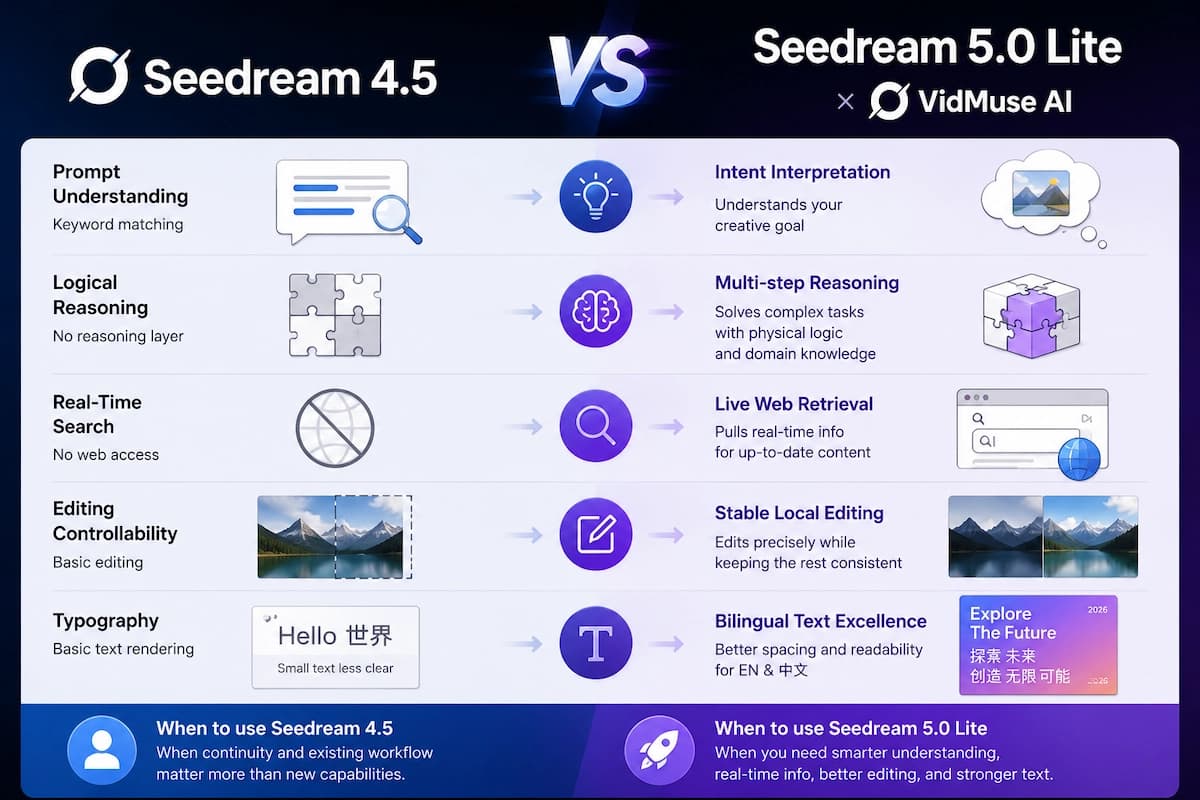
The honest summary: Seedream 5.0 Lite is the better choice when your project involves natural-language prompting, knowledge-heavy visuals, current-event references, or image editing that needs to respect unchanged areas. Seedream 4.5 remains a capable option when workflow stability and predictability matter more than expanded capabilities.
Six Core Capabilities You Need to Know
1. Intent-Aware Prompt Interpretation
Seedream 5.0 Lite reads the goal behind your words, not just the words themselves. Even brief or loosely phrased prompts are processed against the broader creative context — mood, spatial relationships, emotional atmosphere, and compositional logic — before the model generates. The practical result is fewer failed generations, less time spent refining prompt language, and more consistent output on the first or second attempt.
2. Real-Time Web Search Integration
The model can pull live information during generation when search mode is enabled. This means a prompt referencing a recent sporting event, a trending design aesthetic, or a breaking news story can incorporate accurate, current context rather than defaulting to stale training data. The search function is flexible — it can be toggled off when stability and reproducibility matter more than real-time relevance.

3. Visual Reasoning
Multi-step logical thinking is applied before the image is drawn. Seedream 5.0 Lite can complete visual inference tasks that standard generative models fail on — inferring the identity of scattered parts, reasoning about cause and effect within a scene, or following rule-based logic (such as a Go board scenario). This enables richer, more internally consistent images without requiring exhaustive prompt engineering.
4. Advanced Style Transfer
A single reference image is enough to transfer a visual style across new subjects. Seedream 5.0 Lite's enhanced cross-modal understanding can extract the essential characteristics of a style — brushwork, color palette, texture, lighting — and apply them accurately to a new image. This reduces the need for lengthy written style descriptions and makes creative remixing faster.
5. Precise Image Editing from Natural Language
Vague editing instructions now produce targeted, consistent results. Where earlier models required very specific language to execute local changes, Seedream 5.0 Lite infers editing intent. Instructions like "change the focus" or "adjust the lighting" produce accurate results while leaving untouched areas unchanged. This stability during partial edits is one of the most practically significant improvements over Seedream 4.5.
6. Complex Multi-Subject Generation
The model maintains accuracy across scenes with up to nine distinct subjects. Precise rendering of letters, numbers, times, colors, and spatial arrangements within dense compositions is significantly improved. This benefits product layouts, infographic-style images, and multi-element marketing visuals.
How to Use Seedream 5.0 Lite in VidMuse
VidMuse is an AI Director platform for music video production, and its workflow moves through five structured stages: Creative Brief → Reference Generation → Scene & Shots List → Storyboard → Video Generation. If you are new to the platform, the VidMuse guide explains the full workflow from brief to final render. Seedream 5.0 Lite integrates into the image generation layer, making it most relevant to the Reference Generation and Storyboard stages — the two points where visual accuracy, stylistic consistency, and creative intent alignment matter most.
Create Your AI Video with Seedream 5.0 Lite in Minutes
Turn your idea into a video with VidMuse AI x Seedream 5.0 Lite.
Here is how to put Seedream 5.0 Lite to work inside VidMuse:
Open VidMuse and start a new project
Begin with your Creative Brief, track mood, visual direction, and audience context.
Use natural language prompts
Describe the feeling, lighting atmosphere, and color story instead of writing a technical prompt specification.
Upload a reference image
Use a film still, album artwork, or mood board image to transfer style across new visual frames.
Refine in VidMuse
Use Shot Refine by Quoting, the Timeline Editor, and Asset Library & Memory to iterate and preserve decisions.
Toggle real-time search
Enable search for trend-reactive content and disable it when stable, reproducible outputs matter more.
Generate the final video
Use the reference images and storyboard frames to guide VidMuse's video generation stage.
Step 1: Open VidMuse and start a new project
Begin with your Creative Brief. Describe the track's mood, the visual direction you want, and the audience you're targeting. The more clearly you can articulate intent here, the better Seedream's intent-interpretation layer will serve you in later stages.
Step 2: Use natural language for your reference image prompts
Because Seedream 5.0 Lite is designed to interpret intent rather than match keywords, you don't need to engineer elaborate prompts. Describe what you're trying to convey — the feeling of the scene, the lighting atmosphere, the color story — rather than a precise technical specification. The model will infer compositional and stylistic logic from that input.
Step 3: Use a reference image for style transfer (optional but recommended)
If you have a visual reference — a film still, an album artwork, a mood board image — upload it alongside your prompt. Seedream 5.0 Lite can extract its style and apply it to a new subject, which is particularly useful when building a consistent aesthetic across multiple reference frames for a music video.
Step 4: Refine in VidMuse's Shot Refine and Timeline Editor
Once your reference images and storyboard frames are generated, use VidMuse 2.0's Shot Refine by Quoting feature to iterate on specific frames. The Timeline Editor lets you arrange, adjust, and sequence the visuals before passing them into the video generation stage. The Asset Library & Memory preserves your reference images and style decisions across sessions.
Step 5: Toggle real-time search for trend-reactive content
If your music video or marketing asset needs to reflect a current event, trending visual style, or time-sensitive reference, enable Seedream's web search mode during the Reference Generation stage. Disable it when you need stable, reproducible outputs across multiple generation attempts.
Best Use Cases for Creators and SMBs
Indie Musicians Turning AI Tracks into Visual Stories
Indie musicians using Suno AI inside VidMuse to generate original tracks can now pair those tracks with reference visuals built in Seedream 5.0 Lite — without needing to write technically precise prompts. Describe the mood of the song, upload an aesthetic reference, and the model generates consistent, stylistically coherent frames to anchor the storyboard. This is especially useful inside an AI music video generator workflow where reference frames need to match the sound, lyrics, and visual mood.
Social Media Marketers Working on Tight Timelines
The real-time web search capability makes Seedream 5.0 Lite directly useful for social media content that needs to reflect trending topics, recent events, or seasonal moments. Marketing teams can generate contextually relevant visuals the same day a trend breaks — without waiting for a model retrain or relying on generic stock imagery.
SMB Marketing and Campaign Visuals
Small businesses producing TVCs, explainer videos, or product-showcase content inside VidMuse benefit from Seedream 5.0 Lite's improvements in multi-subject generation and typography. Promotional materials with headline copy, product placements, and branded color schemes can be generated more reliably without repeated prompt iterations. For audio-led campaigns, the same planning layer can support a Music to Video AI workflow where visuals are shaped around an existing track.
Educational and Technical Content Creators
The model's reasoning capabilities extend into scientific, architectural, and data-driven domains. Creators producing explainer videos with annotated diagrams, infographic-style frames, or process illustrations will find that Seedream 5.0 Lite's knowledge-grounded generation is meaningfully more accurate than what Seedream 4.5 delivered in these areas.
Limitations and When to Use a Different Approach
Seedream 5.0 Lite is a capable model with real, documented improvements — but it is also a relatively small model by ByteDance's own characterization. Here is where it reaches its current ceiling:
- Structural stability: Complex architectural or mechanical subjects with precise physical geometry may still show inconsistencies. If structural accuracy is critical, review generated outputs carefully before committing them to a storyboard.
- Photorealistic detail: The model is not optimized for extreme photorealism. For projects requiring hyperrealistic rendering, consider pairing Seedream 5.0 Lite with VidMuse's other image models — Flux.2-Pro or Midjourney V7 — for final asset polish.
- Interactive editing depth: While local editing is improved, the model currently supports a limited number of iterative editing rounds. For complex multi-round edits, VidMuse's Shot Refine feature provides a better-controlled environment.
- Real-time search accuracy: Live web data improves topical relevance but introduces a dependency on external information quality. If the content category is sensitive or factual accuracy is critical, verify search-augmented outputs before publication.
If your project sits primarily in photorealistic video generation, the Seedance and Kling model families within VidMuse are better matched to that output type. For image-first projects, adjacent tools such as ChatGPT Images 2.0 and Nano Banana Pro can also fit different stages of visual development.
Common Mistakes to Avoid
Over-engineering prompts.
Seedream 5.0 Lite is designed to interpret intent from natural language. Writing exhaustively detailed, technically structured prompts often doesn't improve output — and can actually constrain the model's ability to infer the creative goal you're after. Start with a clear intent statement, not a specification.
Leaving real-time search enabled for reproducible workflows.
The search toggle is flexible for good reason. If you're trying to generate consistent outputs across multiple storyboard frames, disable search — live data introduces variation that can break visual consistency within a project.
Ignoring the reference image option.
Seedream 5.0 Lite's style transfer is one of its strongest practical features. Creators who only use text prompts are leaving half the capability unused. A single reference image can anchor the entire visual language of a project.
Expecting Seedream 5.0 Lite to replace video generation models.
It generates still images. Its role in VidMuse is to support the Reference Generation and Storyboard stages — the visual planning layer — not to produce the final video output. Video generation still runs through the separate model matrix (Seedance, Kling, Sora, Veo, and others).
Skipping the Asset Library.
VidMuse's Asset Library & Memory is specifically built to preserve style decisions and reference images across sessions. Not using it means repeating work between projects and losing the consistency advantage that Seedream 5.0 Lite's intent-matching provides.
FAQ
What is Seedream 5.0 Lite and how is it different from Seedream 4.5?
Seedream 5.0 Lite is ByteDance's latest AI image generation model, built on a unified multimodal architecture that interprets the creative intent behind prompts rather than matching keywords literally. The key differences from Seedream 4.5 are the addition of a multi-step logical reasoning layer, real-time web search capability, significantly improved image editing stability, and better handling of complex multi-subject compositions and bilingual typography. Seedream 4.5 remains capable for structured instruction-based tasks; Seedream 5.0 Lite is the better choice when natural language, knowledge-heavy content, or current-event references are involved.
Can I use Seedream 5.0 Lite to generate images for a music video?
Yes. Inside VidMuse, Seedream 5.0 Lite is available as an image generation model and is best used during the Reference Generation and Storyboard stages of the AI Director workflow. You can describe a scene's mood or upload a reference image, and the model generates consistent visual frames to build your storyboard. Those frames then feed into VidMuse's video generation stage, where models like Seedance, Kling, Sora, or Veo produce the final footage.
How does the real-time web search feature in Seedream 5.0 Lite work?
When enabled, Seedream 5.0 Lite accesses current information from the web during the generation process, allowing it to produce images that reflect recent events, trending topics, or time-sensitive visual references. The feature can be toggled on or off — enabling it improves topical relevance, while disabling it produces more stable, reproducible results. It's particularly useful for social media marketing content that needs to feel current and contextually relevant.
What are the current limitations of Seedream 5.0 Lite?
ByteDance has acknowledged that Seedream 5.0 Lite is a relatively small model with room to improve in structural stability, photorealistic rendering, and aesthetic refinement. It currently supports a limited number of iterative editing rounds per session, and live web search can introduce variability that affects consistency across multiple generation attempts. For projects requiring extreme photorealism or highly precise architectural detail, complementary models within VidMuse's image generation matrix may be better suited.
How does Seedream 5.0 Lite compare to other AI image models available in VidMuse?
VidMuse's image generation model matrix includes Flux.2-Pro, Flux.2, GPT Images 2.0, Seedream 5.0 Lite, Seedream 4.5, Midjourney V7, Nano Banana Pro, Nano Banana 2, Nano Banana, Grok Imagine Image, and Wan 2.7 Image Pro. Seedream 5.0 Lite is the strongest option when intent interpretation, knowledge reasoning, and real-time web context are priorities. For maximum photorealistic output quality, Flux.2-Pro and Midjourney V7 are competitive alternatives. The right choice depends on your specific project stage and visual requirements.
Is Seedream 5.0 Lite suitable for beginners with no prompt engineering experience?
Yes — and that's explicitly part of its design intent. ByteDance built Seedream 5.0 Lite to reduce the need for complex prompt engineering by having the model infer what the user is trying to achieve from natural, conversational descriptions. Creators who think visually but struggle with precise prompt language will find this model significantly more accessible than earlier Seedream versions.
What types of content benefit most from the Seedream 5.0 Lite reasoning layer?
The reasoning layer is most impactful for content that involves internal logic, physical laws, knowledge-grounded information, or complex compositions — including educational diagrams, scientific illustrations, annotated infographics, multi-character scenes, data visualizations, and product layouts with precise attribute specifications. Standard portrait and landscape photography prompts will see more modest improvements from this specific feature.
Conclusion
Seedream 5.0 Lite marks a genuine shift in what AI image generation can do for creative workflows — not by chasing resolution benchmarks, but by building a model that actually understands what you're trying to make. The combination of intent-aware prompting, real-time web search, logical reasoning, and stable editing makes it one of the most practically useful image models available today for creators who work in natural language rather than technical prompt syntax.
For VidMuse users, Seedream 5.0 Lite integrates directly into the image generation layer of the AI Director workflow, supporting Reference Generation and Storyboard stages with a level of visual reasoning and stylistic consistency that earlier models couldn't reliably deliver. Whether you're an indie musician producing a music video, an SMB building marketing assets, or a content creator working at the speed of social media trends, this model is worth making part of your regular stack.
Ready to try it? Open VidMuse, start a new project, and select Seedream 5.0 Lite from the image generation model matrix. Your next creative brief deserves a model that understands it.
Create Your AI Video with Seedream 5.0 Lite in Minutes
Turn your idea into a video with VidMuse AI x Seedream 5.0 Lite.

Written By
VidMuse Team
Continue Reading
Latest blog posts related to AI video creation.
Free Music Visualizer: 10 Best Free Tools in 2026
Compare 10 best free music visualizers in 2026. Waveform tools, AI music video makers, watermark policies, export limits, and which tool fits your workflow.
How to Make Product Video Ads with AI (Step-by-Step)
Learn how to make product video ads with AI step by step. Full 6-phase VidMuse tutorial, input tips, ad type guide, and alternative approaches compared.
Best AI Clone Video Generator 2026: 7 Tools Compared
Compare the 7 best AI clone video generators in 2026. Avatar clones, viral ad clones, pricing, features, and how to pick the right tool for your workflow.