

ChatGPT Image Prompts: The Complete 2026 Guide
The best ChatGPT image prompts share one quality: they describe a shot, not just a subject. If you've been typing "make a cool image of X" and feeling disappointed, this guide gives you the exact framework to write prompts that produce cinematic, publication-ready results — plus 50+ copy-paste examples for portraits, couples, marketing, editing, and more.
Key Takeaways
- A structured 10-part framework (subject, action, environment, mood, style, lighting, camera, texture, quality, negatives) produces consistently better results than freeform descriptions.
- ChatGPT Images 2.0 (model: gpt-image-2) renders dense, legible text inside images — making it the strongest free option for posters, infographics, and ad creative.
- Always put literal text you want rendered in quotes inside your prompt; unquoted text becomes a suggestion, not a hard requirement.
- Photo editing prompts work best when you explicitly state what to preserve ("keep facial features exactly as in the uploaded photo") alongside what to change.
- VidMuse users can feed ChatGPT-generated reference images directly into the Scene & Shots workflow to ground video generation in a consistent visual style.
Create Your AI Video in Minutes with ChatGPT Image inside VidMuse AI
Turn your idea into a video with VidMuse AI and the ChatGPT Image Prompts.
What Are ChatGPT Image Prompts?
ChatGPT image prompts are natural-language instructions sent to OpenAI's image generation model (gpt-image-2) to produce or edit a visual output. Unlike a simple search query, a good prompt functions like a director's brief: it communicates subject, environment, camera position, lighting mood, and what to avoid.
The underlying model — gpt-image-2 — is designed for production-quality visuals. It supports native 2K resolution (up to 2048px), roughly 99% accuracy on text rendered inside images, and flexible aspect ratios from 3:1 ultra-wide to 1:3 ultra-tall. It is accessible on all ChatGPT plans including Free.
Two generation modes exist:
- Instant — available on all plans; single image, fast turnaround.
- Thinking — available on Plus, Pro, and Business; reasons about composition, can search the web for current references, and outputs up to 8 consistent images from one prompt.
Understanding which mode you're using matters before you start writing prompts. Thinking mode is not the default — you have to toggle a thinking-capable model first.
Using ChatGPT Image Prompts Inside VidMuse AI
VidMuse users can use ChatGPT image prompts to generate reference images that anchor the visual identity of an entire music video before a single video frame is generated.
Create Your AI Video in Minutes with ChatGPT Image inside VidMuse AI
Turn your idea into a video with VidMuse AI and the ChatGPT Image Prompts.
Here's how it fits into the VidMuse workflow:
- Creative Brief stage — define the visual world: color palette, era, mood, subject treatment.
- Reference Generation — use ChatGPT image prompts (via the GPT Images 2.0 model available inside VidMuse's image generation matrix) to produce reference frames for each scene.
- Scene & Shots List — your reference images become the visual anchors for each shot description.
- Storyboard — VidMuse's agent-based logic maps those reference frames into a coherent storyboard with cinematic continuity.
- Video Generation — generate using Seedance 2.0 Pro, Kling V3.0 Pro, Veo 3.1, or another model from the VidMuse matrix, using your reference images as style locks.
This matters for indie musicians in particular. If you've built a track in Suno AI and want a music video that looks like a real production — not a random AI hallucination — reference images generated from well-structured ChatGPT image prompts give VidMuse's agent a visual contract to honor across every shot.
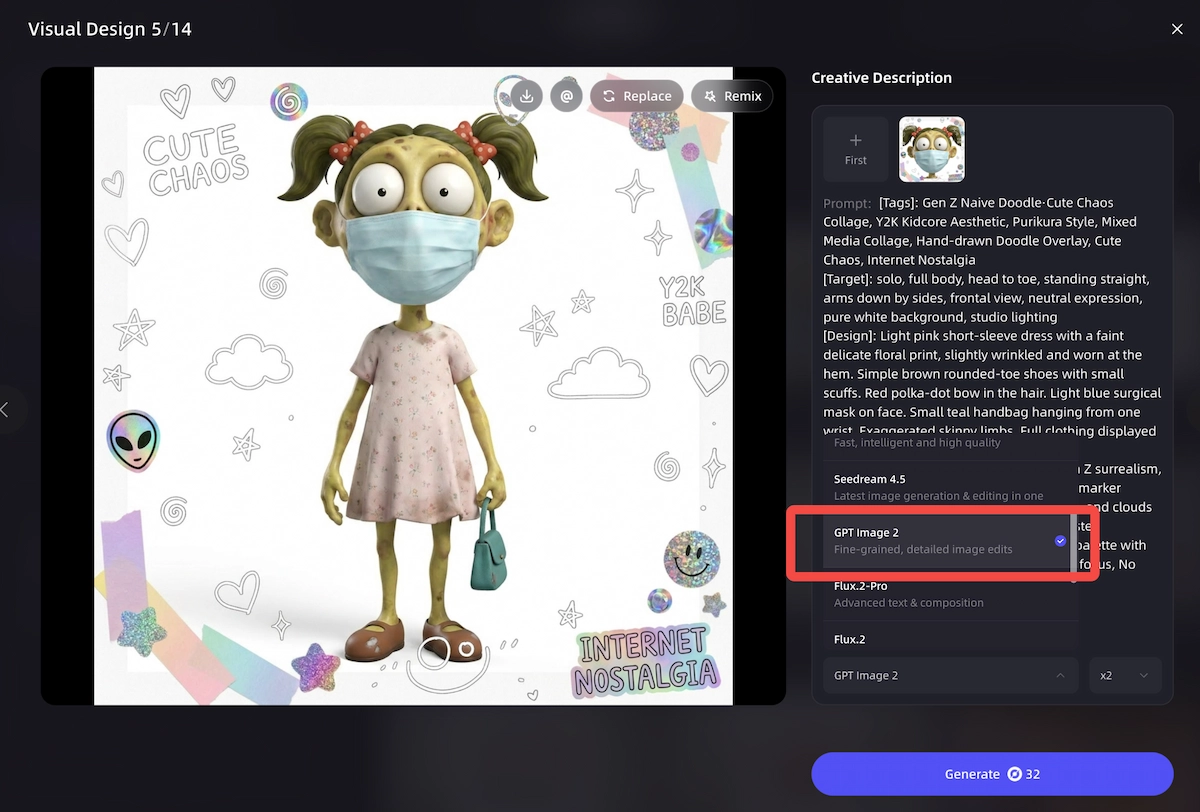
The Seedream 4.5 and Nano Banana Pro models in VidMuse's image generation matrix are especially useful for generating reference frames in specific aesthetic directions (stylized illustration and high-fidelity photorealism respectively) before handing off to video generation.
For users starting from zero, VidMuse's Studio mode (flagship quality) paired with the Performance MV or Story MV template provides the most structured path from a reference image to a finished video.
The 10-Part ChatGPT Image Prompt Framework
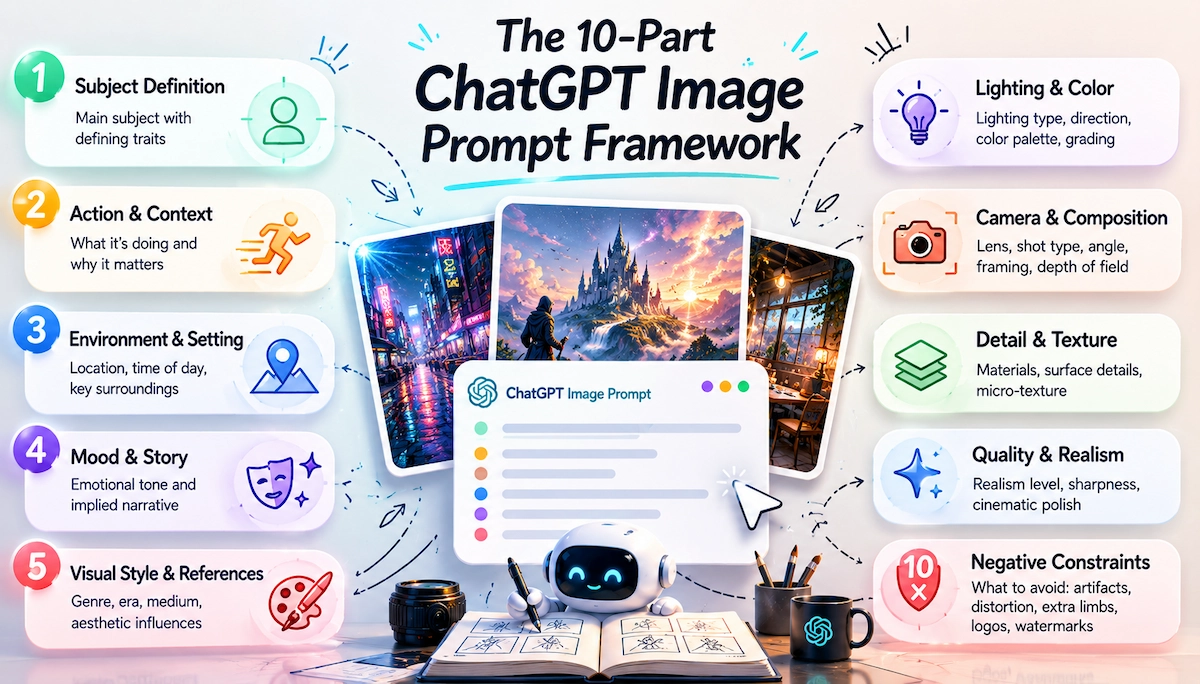
The single biggest reason ChatGPT image prompts fail is that they describe a thing, not a scene. The framework below mirrors how a photographer or cinematographer briefs a shot. Fill each line, then iterate one block at a time.
Subject Definition
Define the main subject with two to four clear traits.
Action and Context
Explain what the subject is doing and why the moment matters.
Environment and Setting
Set the location, time of day, and important surroundings.
Mood and Story
Add the emotional tone and implied narrative beat.
Visual Style and References
Name the style, era, medium, genre, or aesthetic influence.
Lighting and Color
Specify lighting type, direction, color palette, and grade.
Camera and Composition
Control lens, shot type, angle, framing, and depth of field.
Detail and Texture Control
Describe materials, surface details, micro texture, and realism cues.
Quality and Realism Control
State realism level, sharpness, high fidelity, and cinematic polish.
Negative Constraints
List what to prevent, including watermarks, extra limbs, distortion, blur, and unwanted text.
The 10 blocks:
- Subject Definition — the main subject with two to four defining traits
- Action and Context — what the subject is doing and why it matters
- Environment and Setting — location, time of day, key surroundings
- Mood and Story — the emotional tone and implied narrative
- Visual Style and References — genre, era, medium, aesthetic influences
- Lighting and Color — lighting type, direction, color palette, grading
- Camera and Composition — lens mm, shot type, angle, framing, depth of field
- Detail and Texture Control — materials, surface details, micro-texture
- Quality and Realism Control — realism level, sharpness, cinematic polish
- Negative Constraints — what to prevent: artifacts, distortion, extra limbs, watermarks
Copy-paste template:
Subject Definition: [main subject with 2–4 defining traits]
Action and Context: [what the subject is doing + a small purpose]
Environment and Setting: [location + time of day + key surroundings]
Mood and Story: [emotion + implied narrative beat]
Visual Style and References: [style, era, medium, genre, influences]
Lighting and Color: [lighting type + direction + color palette + grading]
Camera and Composition: [lens mm, shot type, angle, framing, depth of field]
Detail and Texture Control: [materials, surface details, micro texture, realism cues]
Quality and Realism Control: [realism level, sharpness, high fidelity, cinematic polish]
Negative Constraints: [no text, no watermark, no extra limbs, no distortion, no blur]
If you only add one thing today, add camera + lighting + negatives. That combination alone bridges the gap between flat snapshots and cinematic-looking results.
ChatGPT Image 2.0: What Changed
ChatGPT image 2.0 (gpt-image-2) is the most significant upgrade to OpenAI's image pipeline because it introduced visual reasoning, not just better pixels.
Key differences from prior versions:
- Text accuracy — dense in-image text (headlines, menus, UI labels) now renders correctly in Latin and non-Latin scripts including Japanese, Korean, and Hindi.
- 2K native resolution — 2048px natively without an upscale step; suitable for print and hero banners.
- Up to 8 consistent images per prompt — in Thinking mode, one prompt can produce eight frames with shared character design and style, unlocking storyboards, comic sequences, and multi-format ad sets.
- Multi-image compositing — upload multiple references and the model stitches them into one coherent composition.
- Knowledge cutoff: December 2025 — anything after that requires Thinking mode with web search enabled, or you must supply the reference yourself in the prompt.
For ChatGPT Image 2.0 prompts, the practical implication is that you should always specify the aspect ratio in the first sentence, put any literal text in quotes, and anchor the visual style concretely ("editorial fashion photography, Hasselblad 90mm f/2.8") rather than vaguely ("professional photo").
Prompt Templates by Use Case
ChatGPT Image Prompts for Portraits
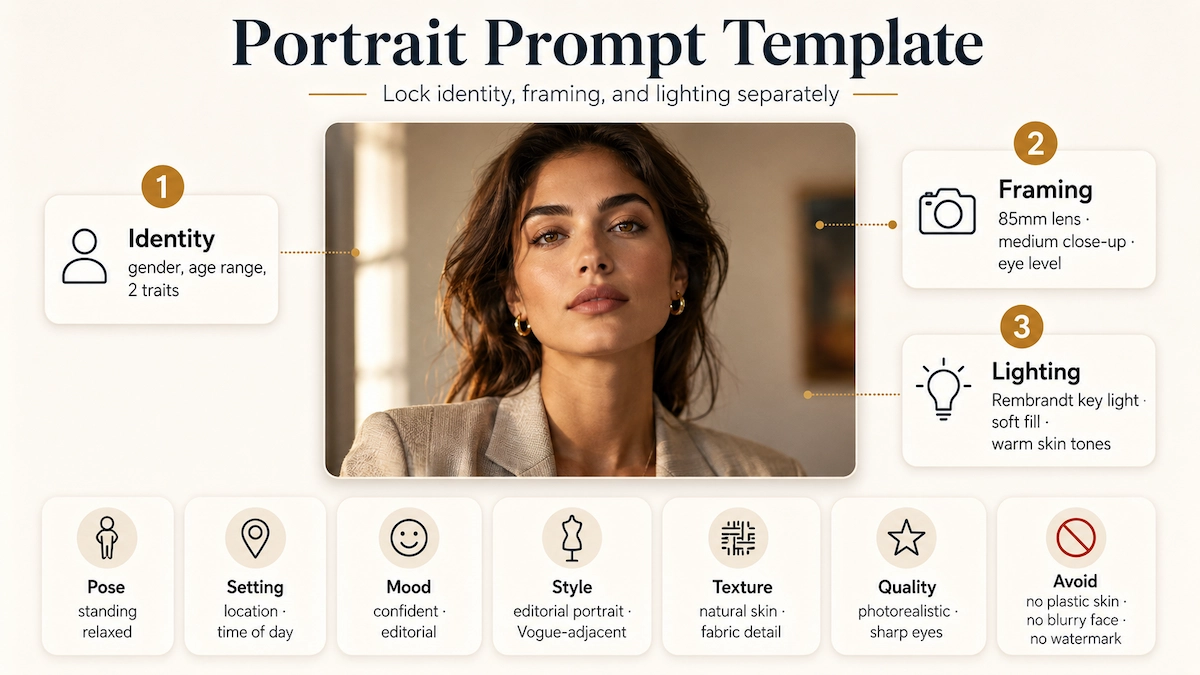
Portrait prompts produce the most consistent results when you lock identity, framing, and lighting separately. Use this template:
Subject Definition: [woman/man], [age range], [2 physical traits]
Action and Context: standing relaxed, natural posture
Environment and Setting: [location], [time of day]
Mood and Story: confident, self-assured, editorial
Visual Style and References: editorial portrait photography, Vogue-adjacent
Lighting and Color: Rembrandt key light from upper-left, soft fill from right, warm skin tones
Camera and Composition: 85mm lens, medium close-up, eye level, shallow depth of field
Detail and Texture Control: visible pores, natural skin, fabric texture on clothing
Quality and Realism Control: photorealistic, sharp eyes, cinematic polish
Negative Constraints: no over-smoothed skin, no plastic texture, no watermark, no blurry face
For women — trending photo editing prompt:
Photorealistic editorial portrait of a woman, late 20s, dark wavy hair. Standing near a floor-to-ceiling window at golden hour.
Mood: warm, quietly confident.
Style: slow-living editorial, film photography feel.
Lighting: soft diffused window light from the left, gentle shadow on the right side of the face.
Camera: 85mm, medium close-up, f/2 shallow depth of field. Skin has natural texture and pores. No retouching, no plastic skin, no extra text.
For men — trending photo editing prompt:
Photorealistic editorial portrait of a man, early 30s, short cropped beard, strong jawline. Standing in a moody urban alley at blue hour.
Mood: composed, understated.
Style: street photography, high-contrast monochrome grade.
Lighting: single streetlight from above-right, deep shadows left side.
Camera: 50mm, eye level, medium close-up. Visible fabric texture on jacket, natural skin detail. No distorted features, no watermark.
ChatGPT Image Prompts for Couples
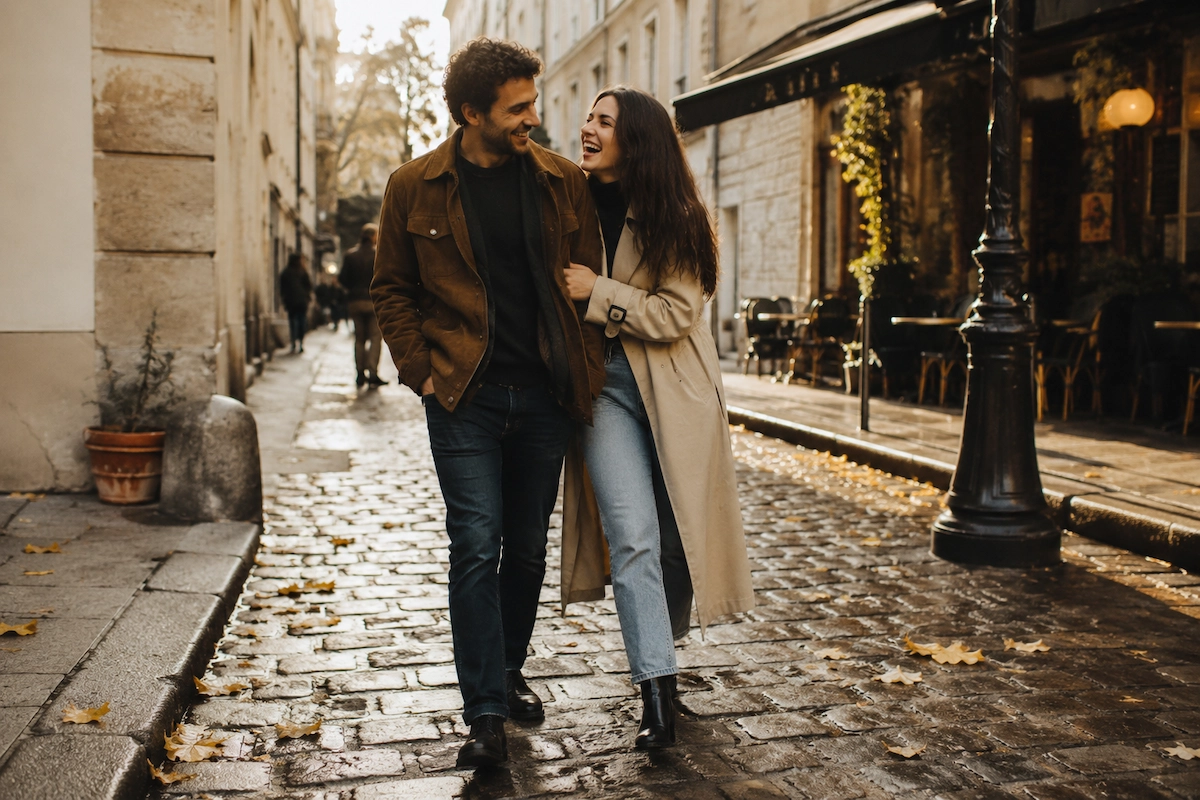
Subject Definition: a couple, late 20s, relaxed and affectionate Action and Context: walking together, laughing mid-stride
Environment and Setting: cobblestone street in a European city, early autumn afternoon
Mood and Story: effortless romance, candid moment
Visual Style and References: documentary street photography, film grain
Lighting and Color: warm afternoon sidelight, golden color grade
Camera and Composition: 35mm lens, full body, low angle, candid framing
Detail and Texture Control: natural clothing texture, fallen leaves on the ground
Quality: photorealistic, cinematic
Negatives: no posed look, no watermark, no extra people in sharp focus
Best ChatGPT Image Prompts for Marketing
For ad creative, write the prompt like a creative brief, not a photo description. Include brand positioning, target audience, exact copy in quotes, and the intended format.
Hero banner example (3:1 ratio):
3:1 hero banner.
Split composition: left — cluttered desk representing chaos; right — clean monitor with dashboard representing clarity.
Bold headline "STOP GUESSING" in 120pt clean sans-serif across the top.
Subhead "Start knowing" in medium weight below.
CTA button bottom-right: "See it work →" in white on teal.
Editorial photography, cinematic lighting. No watermarks, no logos, no extra text.
Social ad example (1:1):
1:1 square Instagram ad.
Overhead shot: perfect ceramic coffee cup on a warm linen surface, morning light from the left, soft steam rising.
Text overlay right side: "Good morning. Your briefing is ready."
Clean minimal editorial style. No blurry background, no watermark, no crowded composition.
Funny and Creative ChatGPT Image Prompts
- A pigeon in a tailored three-piece suit presenting Q4 results in a corporate boardroom, laser pointer in wing, bar chart behind him reading "Breadcrumb acquisition up 400%." Photorealistic. No watermark.
- A T-Rex waiting at the DMV, visibly irritated, holding a numbered ticket. Velociraptor clerks at the desk. Fluorescent lighting, plastic chairs, a faded safety poster on the wall. Hyperrealistic.
- Eight pieces of toast sitting in folding chairs in a church basement, each with a small expressive face, attending a support group. Warm sad lighting. Pixar aesthetic. No extra text.
ChatGPT Photo Editing Prompts: Portraits, Girls, Boys, Couples
ChatGPT photo editing prompts work on a simple principle: be explicit about what changes and what stays locked. Vague edit requests drift. Precise edit requests don't.
The preserve anchor — use this on every editing prompt:
Keep my facial features exactly as they appear in the uploaded image — same eyes, nose, mouth, face shape, skin tone, and expression.
Trending photo editing prompts for girls:
- Change the background to a Santorini cliffside at sunset. Keep all facial features, hair, and outfit exactly the same. Match lighting direction and color temperature to the new background naturally.
- Apply a soft film photography grade: add gentle grain, lower contrast slightly, warm shadows to amber, bring highlights to cream. Do not change the subject's face, pose, or clothing.
- Replace the background with a clean bokeh studio backdrop in warm cream. Keep subject, framing, and lighting angle identical.
Trending photo editing prompts for boys:
- Relight the portrait with a cinematic Rembrandt setup: key light upper-left, deep shadow on the right side, slight rim light separating from a dark background. Keep the face and clothing unchanged.
- Add a moody urban environment behind the subject — a rain-slicked street at night with neon reflections. Keep the subject's appearance, pose, and scale identical.
- Convert to a high-contrast black-and-white editorial grade. Preserve all facial detail and sharpness. No smoothing.
Pro tip: For edits where text in the original image must survive, add: "Preserve all existing text, labels, and typography exactly as they appear."
Common Mistakes and Quick Fixes
Most failed ChatGPT image prompts share five fixable problems.
Image looks flat: Add rim light, volumetric haze, and a contrast grade to the lighting block. "Flat" almost always means no separation between subject and background.
Anatomy looks wrong: Tighten your negative constraints block. Add: "no extra fingers, no fused hands, no distorted anatomy, no extra limbs." Simplify the pose description. Use "hands in pockets" or "hands not visible" if hand detail isn't critical to the shot.
Result is too generic: Add three specific details a photographer would actually notice — the exact material of the jacket, the direction of shadows, a small environmental prop. Generic prompts produce stock-photo aesthetics.
Style drifts across iterations: Strengthen your visual style line and keep references consistent across prompts. If you change the camera angle, restate the style block explicitly — the model doesn't carry it over automatically.
Background is cluttered: Specify "clean background, minimal props, controlled depth of field, subject clearly separated from background." Background mess is the most common issue with complex scenes.
Text inside the image is wrong or garbled: Move to quality="high" for text-heavy images. Put every piece of literal text in quotes. Spell unusual brand names letter by letter inside the prompt. For multi-line text, describe placement and font style as explicit constraints.
ChatGPT Image Limit: What to Know
ChatGPT image limits vary by plan, and hitting the limit is one of the most common frustrations for heavy users of chatgpt image prompts.
Key points based on available information:
- Free plan users can generate images but at a lower rate and capped to Instant mode.
- Plus, Pro, and Business plans have access to Thinking mode and higher generation limits.
- The chatgpt image limit per day is not publicly published as a fixed number — OpenAI adjusts limits dynamically. If you hit a limit, the interface will notify you and indicate when generation resets.
- For production workflows requiring high volume, the API (gpt-image-2) is the more reliable path; it bills per image at approximately $0.006 (low quality) to $0.211 (high quality) per 1024×1024 output.
- If ChatGPT image generation appears broken (loading indefinitely or returning errors), check OpenAI's status page first. Thinking mode generation can legitimately take up to two minutes on complex prompts — this is not a bug.
FAQ
What are the best ChatGPT image prompts for beginners?
Start with the 10-part framework and fill only the first five blocks: subject, action, environment, mood, and lighting. Even a partial prompt with a lighting description and one negative constraint will outperform a vague one-sentence request. The single highest-value addition for beginners is the negative constraints block — it prevents the most common visual failures.
How do I write ChatGPT image prompts for portraits that actually look like the person?
Upload a reference photo and add this line verbatim: "Keep my facial features exactly as they appear in the uploaded image — same eyes, nose, mouth, and face shape." Without this lock, the model defaults to idealized features that may not resemble the subject. This applies to both portrait generation and photo editing workflows.
What is the difference between chatgpt image 2.0 prompts and older versions?
ChatGPT image 2.0 (gpt-image-2) reasons about composition before generating pixels, supports native 2K resolution, renders text inside images with approximately 99% accuracy, and can output up to 8 consistent frames from one Thinking-mode prompt. Older prompts still work, but you can now include exact ad copy, infographic labels, and UI text directly in the prompt and expect them to render correctly.
How do I use ChatGPT image generation prompts for video production?
Generate reference images for each major scene using the 10-part framework, with particular attention to lighting and color grade. Import those references into VidMuse's Reference Generation stage. VidMuse's agent-based logic will use them as visual anchors when building the storyboard and selecting shots — giving your video a consistent aesthetic instead of frame-to-frame style drift.
Why does ChatGPT image keep generating the wrong number of fingers or distorted faces?
This is an anatomy drift issue. Add explicit negative constraints: "no extra fingers, no fused hands, no distorted anatomy, no extra limbs, no blurry face." If the pose involves hands prominently, either specify exactly what the hands are doing or use "hands in pockets" or "hands not visible" to sidestep the problem entirely. For faces, uploading a reference photo and using the identity-lock phrase produces significantly more accurate results than prompting from scratch.
Are ChatGPT image prompts free to use?
Image generation is available on the Free plan with usage limits. Thinking mode (which enables multi-image outputs and web search grounding) requires a paid plan. API access is billed per image. There is no cost to writing prompts themselves — the cost applies only at generation time.
What are the most common reasons ChatGPT image appears broken?
Three causes cover the majority of cases: (1) Thinking mode generation is running — it can take up to two minutes on complex prompts and does not freeze. (2) You've hit your plan's generation limit — the interface should indicate reset time. (3) There is an API-side incident — check status.openai.com. If none of these apply, try switching from Thinking to Instant mode, which has a shorter and more predictable generation path.
Final Words
Writing effective ChatGPT image prompts is a learnable skill, and the 10-part framework in this guide gives you a repeatable process rather than a lucky string of magic words. Start with subject and lighting. Add camera. Add negatives. Iterate one block at a time.
For musicians and video creators, the workflow extends beyond a single image. Reference frames generated from precise prompts become the visual foundation for entire productions — and that's exactly the gap VidMuse is built to bridge, turning a well-crafted image prompt into a full music video with cinematic continuity.
Try the 10-part template on your next generation, and explore the VidMuse AI platform to see how your reference images can power a complete visual production.
Create Your AI Video in Minutes with ChatGPT Image inside VidMuse AI
Turn your idea into a video with VidMuse AI and the ChatGPT Image Prompts.

Written By
VidMuse Team
Continue Reading
Latest blog posts related to AI video creation.
PixVerse V6 x VidMuse AI: Model Guide and Video Workflow
PixVerse V6 review and VidMuse integration guide. Capabilities, 15s 1080p video, prompt tips, model comparison, pricing, and how to use V6 in VidMuse workflows.
FLUX 3: What It Is, Capabilities, and How to Access It
FLUX 3 is Black Forest Labs' multimodal AI model for image, video, audio, and action. Full guide: capabilities, FLUX 3 vs FLUX 2, availability, and pricing.
Free Music Visualizer: 10 Best Free Tools in 2026
Compare 10 best free music visualizers in 2026. Waveform tools, AI music video makers, watermark policies, export limits, and which tool fits your workflow.