

Hailuo 2.3 x VidMuse AI: Model Guide and Video Workflow
Hailuo 2.3 is MiniMax's current-generation AI video model — known for realistic facial micro-expressions, physics-accurate motion, and broad stylization across anime, cinematic, and product styles. It generates 1080p video at 30FPS, up to 10 seconds per clip, from text prompts or images. VidMuse integrates all three Hailuo 2.3 tiers — Pro, Pro Fast, and Standard — as part of its 20+ model AI Director pipeline, making it one of the few platforms where you can select the right Hailuo tier per shot.
This article covers Hailuo 2.3's key capabilities, three tiers and when to use each, how it works inside VidMuse, a comparison with Hailuo 3.0, prompt tips, and limitations.
Key Takeaways
-
Hailuo 2.3 specializes in realistic character micro-expressions, physics-accurate motion, and broad stylization (anime, cinematic, product).
-
Three tiers in VidMuse: Pro (highest fidelity), Pro Fast (balanced speed), Standard (fastest, most cost-efficient).
-
1080p resolution, 30FPS, up to 10 seconds per clip. Text-to-video and image-to-video.
-
VidMuse integrates all three tiers alongside 20+ other video models — select the tier per shot based on quality vs speed needs.
-
Hailuo 3.0 is the upgrade path: 4K, 60FPS, 30s, Director Mode, native audio. For the future; 2.3 is the production-ready choice today.
What Is Hailuo 2.3?
Hailuo 2.3 is MiniMax's current-generation AI video model — known for realistic character performance, physics simulation, and style versatility at 1080p resolution.
Released in October 2025, Hailuo 2.3 was widely adopted by video generation platforms including VidMuse, InVideo, Artlist, and JXP. It remains one of the most reliable mid-tier video models for character-driven content, product demos, and stylized clips.
Hailuo 2.3 Key Capabilities
Hailuo 2.3 excels at three things competitors struggle with: facial micro-expressions, physics-accurate motion, and broad stylization range.
Micro-Expressions and Character Performance
Natural facial detail: subtle eye movement, lip curl, frown, smile transitions. Characters feel alive rather than animated. Hailuo 2.3 is among the strongest mid-tier models for human emotion rendering — particularly effective for talking-head clips, reaction shots, and character-driven narratives. Community reviewers consistently highlight this as 2.3's standout feature.
Physics-Accurate Motion
Realistic object interaction: fabric drapes naturally, liquids pour with weight, hair moves with wind, and collisions have follow-through. Physical actions feel grounded. Multiple independent reviewers (AI Search, AlgoVault, Curious Refuge) specifically call out physics as the area where Hailuo 2.3 outperforms competitors at its tier.
Stylization Range
Handles photorealism, anime, cinematic film look, product showcase, and abstract styles cleanly. Style shifts from one prompt to another without residual artifacts from previous generations. Anime output is notably strong — frequently searched as "hailuo 2.3 anime" — with clean cel-shading, vibrant colors, and consistent character shapes.
Text-to-Video and Image-to-Video
Both T2V and I2V supported. Image-to-video maintains the source image's composition, color palette, and subject appearance while adding motion. For reference-driven I2V workflows, see VidMuse's video to video maker guide.
Resolution and Duration
1080p at 30FPS, up to 10 seconds per clip. For longer sequences, chain clips on VidMuse's timeline. For 4K at 60FPS with 30-second clips, see Hailuo 3.0 — the generational successor.
Hailuo 2.3 Tiers: Pro vs Pro Fast vs Standard
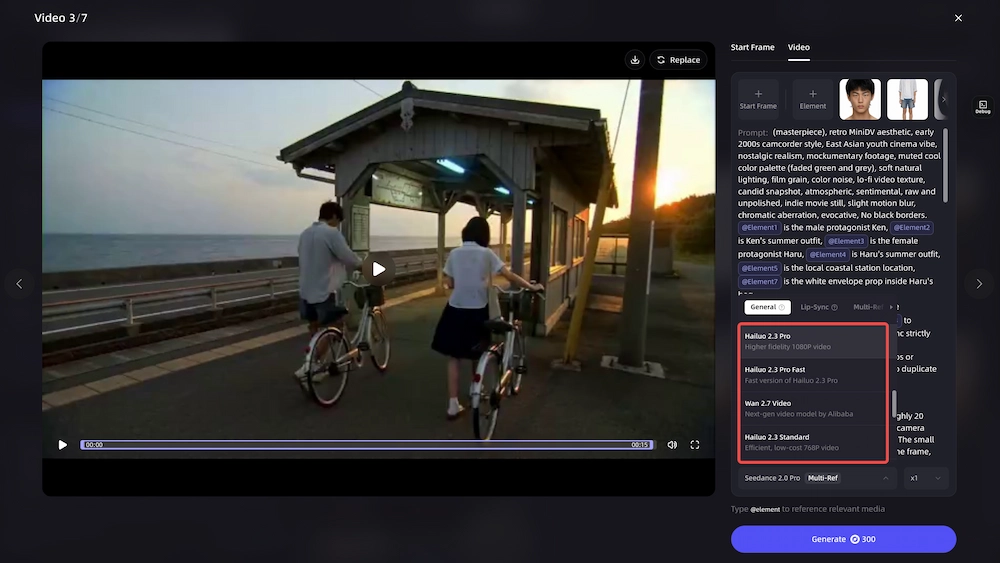
Hailuo 2.3 ships in three tiers — Pro for maximum fidelity, Pro Fast for balanced speed, and Standard for cost-efficient volume. All three are available in VidMuse.
Decision rule: Use Pro for final output that needs to impress — the hero shot in your music video, the product close-up in your ad. Use Pro Fast when you're iterating and need quality plus speed — testing hooks, trying different camera angles. Use Standard for first-pass storyboard previews and batch testing — where speed and cost matter more than pixel-perfect fidelity.
In VidMuse, you select the tier per shot. Mix a Hailuo 2.3 Pro hero shot with Standard drafts in the same storyboard — upgrade to Pro only for the shots that matter.
Hailuo 2.3 in VidMuse: How It Works
VidMuse integrates all three Hailuo 2.3 tiers — Pro, Pro Fast, and Standard — as part of its 20+ model AI Director pipeline.
VidMuse's AI Director workflow runs: Assets Upload → Creative Brief → Reference Generation → Scene & Shots → Storyboard → Video Generation. All three Hailuo 2.3 tiers operate at the Video Generation stage alongside Seedance, Kling, Veo, PixVerse V6, and others.
Model selection per shot: Choose Hailuo 2.3 Pro for an emotional character scene, Seedance 2.0 Pro for a fast-motion montage, and Hailuo 2.3 Standard for storyboard previews — all in one project. VidMuse lets you mix models and tiers within a single storyboard based on each shot's requirements.
Music video use case: Hailuo 2.3 Pro's character micro-expressions make it strong for emotional MV scenes — a singer's close-up, a narrative reaction shot. Plan storyboards with VidMuse's AI music video generator, then select Hailuo Pro for character-driven shots.
Ad video use case: Product stylization and physics-driven demos. Film-look product reveals, lifestyle footage with natural human motion. Use VidMuse's AI ad generator for script and shot planning.
VidMuse 2.0 Shot Refine by Quoting lets you iterate on any Hailuo clip — select it on the timeline, describe the revision via chat, and regenerate in place without rebuilding the full storyboard.
Use Hailuo 2.3 in VidMuse
All three Hailuo 2.3 tiers — Pro, Pro Fast, and Standard — are available in VidMuse alongside 20+ video models.
Hailuo 2.3 vs Hailuo 3.0
Hailuo 2.3 is available and integrated now; Hailuo 3.0 is the generational upgrade with 4K, 60FPS, and native audio — but has limited availability.
For production today, Hailuo 2.3 is the practical choice — integrated, stable, well-understood. For the upgrade path, see our Hailuo 3.0 guide.
Hailuo 2.3 Prompt Tips
Hailuo 2.3 responds strongly to emotion cues, physical action descriptions, and style keywords — here are five tips.
1. Lead with emotion. "A woman tears up while reading a letter, warm afternoon light" outperforms "woman reading letter." Hailuo 2.3's micro-expression strength activates on emotion-specific keywords.
2. Describe physical interactions. "He catches the ball and it bounces off his fingers" — give the model physics to simulate. The more specific the physical action, the better 2.3 renders it.
3. Name the style explicitly. "Anime, cel-shaded, vibrant colors" or "cinematic, shallow depth of field, golden hour" — 2.3 switches between styles cleanly when you name them directly.
4. Keep to one action per 10 seconds. Duration is short. Focus each clip on one clear action or emotional moment. Don't try to fit a multi-event sequence into a single generation.
5. For I2V, describe the motion. "Slow zoom into the character's face with subtle eye movement" works better than uploading an image with no motion direction. Tell the model what to animate.
Hailuo 2.3 Limitations
Hailuo 2.3 is strong for character clips but has hard limits on duration, resolution, and audio.
1. 10-second cap. Short for narrative content. Chain clips on VidMuse's timeline or use Smart Expansion when available in Hailuo 3.0.
2. 1080p ceiling. No 4K output. Sufficient for social media and web publishing, but not for broadcast or large-screen display. Hailuo 3.0 addresses this.
3. No native audio. Video only — add voiceover, music, and SFX in post-production or through VidMuse's built-in audio tools (Suno AI for music creation).
4. Closed model. No local inference, no fine-tuning, no open weights. Access only through integrated platforms.
FAQ: Hailuo 2.3
What is Hailuo 2.3?
Hailuo 2.3 is MiniMax's current-generation AI video model known for realistic micro-expressions, physics-accurate motion, and broad stylization. It generates 1080p video at 30FPS up to 10 seconds from text or image inputs. Three tiers: Pro (quality), Pro Fast (speed/quality balance), and Standard (cost-efficient).
Is Hailuo 2.3 available in VidMuse?
Yes. VidMuse integrates all three Hailuo 2.3 tiers — Pro, Pro Fast, and Standard — alongside 20+ other video models. Select the tier per shot based on your quality vs speed priority within VidMuse's AI Director workflow.
What's the difference between Hailuo 2.3 Pro, Fast, and Standard?
Pro delivers the highest fidelity for final renders and hero shots. Pro Fast balances quality and speed for iteration workflows. Standard is the fastest and most cost-efficient tier for drafts, batch testing, and storyboard previews. All three produce 1080p output.
Does Hailuo 2.3 support audio?
No. Hailuo 2.3 generates video only — no native audio. Add music, voiceover, and sound effects in post-production or through VidMuse's audio tools. Hailuo 3.0 adds native audio generation.
How does Hailuo 2.3 compare to Hailuo 3.0?
Hailuo 3.0 upgrades to native 4K, 60FPS, 30-second clips, Director Mode camera control, and native audio. Hailuo 2.3 is widely available and integrated in VidMuse today. For details, see our Hailuo 3.0 guide.
Conclusion
Hailuo 2.3 is the production-ready workhorse in MiniMax's lineup: best-in-class micro-expressions, reliable physics simulation, and clean stylization across anime, cinematic, and product styles. The three-tier system (Pro, Pro Fast, Standard) lets you match quality and speed to each shot's needs.
VidMuse integrates all three tiers alongside 20+ other video models. Select Hailuo 2.3 Pro for cinematic quality, Fast for iteration speed, or Standard for volume — then switch to Seedance, Kling, or Veo for shots where they're stronger. When Hailuo 3.0 becomes available, 4K 60FPS generation with Director Mode and native audio will add to the pipeline.
Create Videos with Hailuo 2.3
Select Hailuo 2.3 Pro for cinematic quality, Fast for speed, or Standard for volume — all inside VidMuse's AI Director workflow.

Written By
VidMuse Team
Continue Reading
Latest blog posts related to AI video creation.
Instagram Reel Ads: How to Create AI Video Ads for Reels
Learn how to create Instagram Reel ads with AI. Full guide: specs, safe zones, AI video creation with VidMuse, Meta Ads Manager setup, and best practices.

VidMuse Discord Support Guide: How to Get Help Faster
Learn how to join the official VidMuse Discord, create a private support ticket, and share the right details so our team can help you faster.
Ad Creative AI: Review and Best Alternatives (2026)
Ad Creative AI review and best alternatives for 2026. What it does, pricing, limits, and which tools to use for video ads, static creatives, and UGC content.