

Instagram Reel Ads: How to Create AI Video Ads for Reels
Instagram Reel ads are paid video placements that appear between organic Reels in the Instagram Reels feed — full-screen 9:16 vertical, sound-on, with swipe-up CTA. Running a Reel ad involves two steps: creating the video creative and setting up the campaign in Meta Ads Manager. Most guides cover only the campaign setup. This guide covers both — including how to generate Reel ad video with AI using VidMuse, which produces publish-ready 9:16 video with hook, script, voiceover, music, subtitles, and CTA from your product info.
For a broader look at AI video ad tools, see our AI video ad generator guide.
Key Takeaways
-
Instagram Reel ads are paid 9:16 vertical videos in the Reels feed — up to 90 seconds with sound-on and CTA overlay.
-
Specs: 1080×1920px, 9:16, MP4/MOV, max 4GB, 15-30s recommended for ads.
-
VidMuse generates Reel-ready video ads from product URLs or photos — 9:16 with hook, script, voiceover, music, and CTA included.
-
Set up the campaign in Meta Ads Manager after the creative is ready — choose Instagram Reels under placements.
-
Best Reel ads hook in the first 3 seconds, use sound, respect safe zones, and feel native to organic Reels.
What Are Instagram Reel Ads?
Instagram Reel ads are paid video ads that appear between organic Reels in the Instagram Reels feed — full-screen, vertical, sound-on, with swipe-up actions like "Shop Now" or "Learn More."
They are different from organic Reels: organic Reels have no budget and rely on algorithmic reach; Reel ads are paid placements with targeted delivery, CTA overlay, and link destination. Both appear in the same feed, which means the best Reel ads feel native — like organic content with a CTA attached.
Reel ads are set up through Meta Ads Manager (the same platform used for Facebook and Instagram Feed ads). You create the video creative separately, then upload it to Ads Manager and configure targeting, budget, and placements.
Why Reels matter for advertisers: Reels is the highest-engagement format on Instagram in 2026. Meta actively pushes Reels inventory and reports that Reels ads reach users who don't follow the advertiser — expanding audience beyond existing followers.
Instagram Reel Ad Specs
Instagram Reel ads require 9:16 vertical video at 1080×1920px — here are all specs and safe zones in one table.
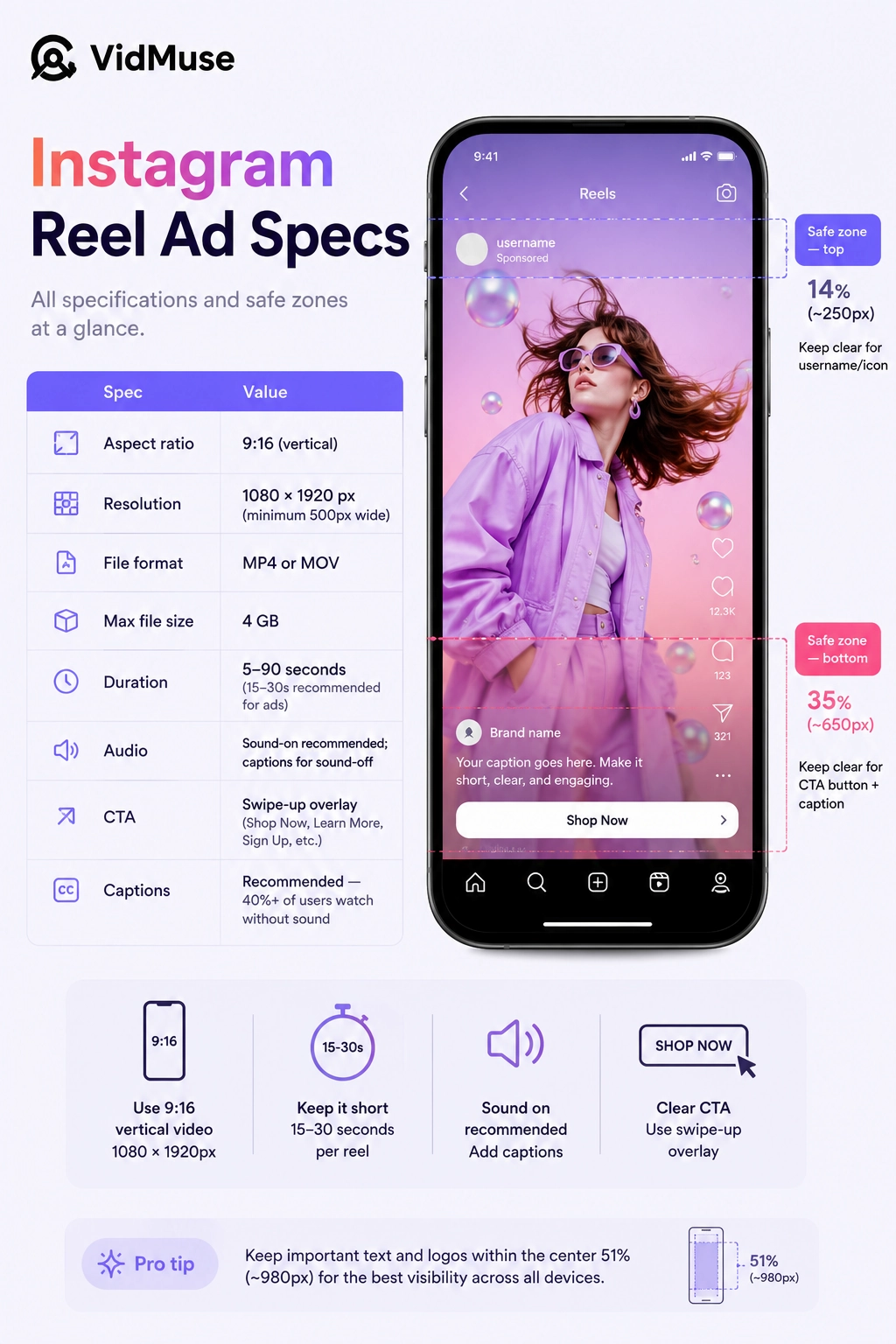
Specs as of July 2026. Meta updates frequently — check the official Meta Ads guide for any changes.
The biggest mistake: placing text or key visuals in the bottom 35% of the frame where the CTA overlay covers them. Keep your core message and product visuals in the center 50% of the frame.
How to Create Instagram Reel Ad Video with AI
VidMuse generates Instagram Reel ad video from product info — 9:16 with hook, script, voiceover, music, and CTA — ready to upload to Meta Ads Manager.
Step 1: Input Product Info and Configure Output
Open VidMuse's AI ad generator and supply your product data. Paste a product URL (Amazon, Shopify, any ecommerce listing) or upload product photos with a description. This also works with a product URL to video workflow — paste the link and VidMuse extracts everything automatically.
Configure format immediately after input: select 9:16 aspect ratio and HD quality. This ensures every generated asset — keyframes, video clips, subtitles, CTA — targets Reels specs from the start, not as an afterthought during export.
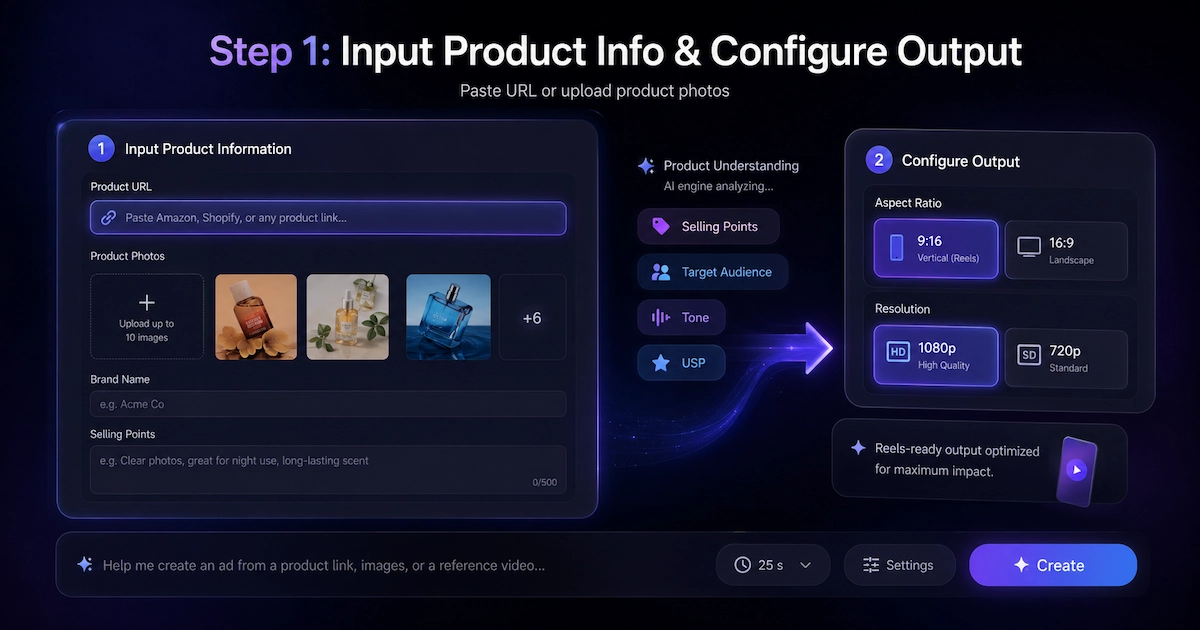
VidMuse's Product Understanding engine extracts: selling points, target audience, tone, and USP from your inputs.
Step 2: Choose Reel Ad Template
Select from templates optimized for Reel format:
- UGC-Style — first-person, authentic feel. Best for social proof and impulse purchases.
- Product Showcase — hero shots with cinematic motion. Best for brand awareness.
- Unboxing — reveal sequence with anticipation build. Best for product launches.
- Hype/Dynamic — fast cuts, bold text, urgency. Best for limited-time offers.
- Explainer — feature walkthrough with narration. Best for considered purchases.
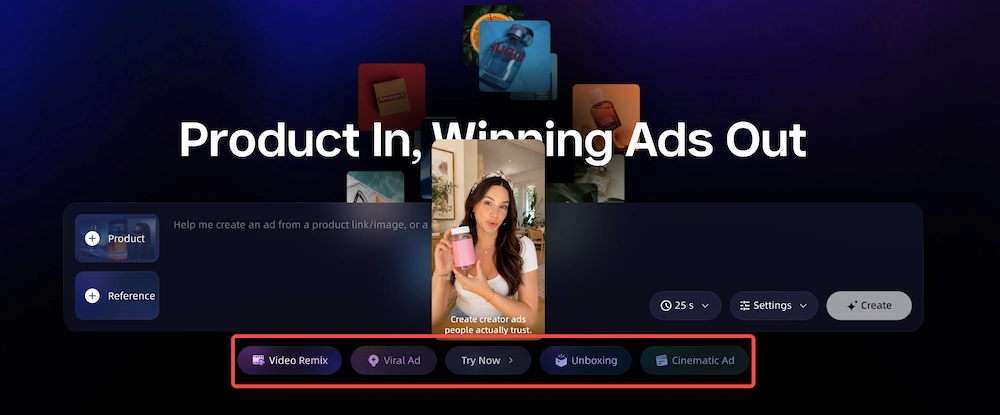
All templates output 9:16 vertical — native to Instagram Reels. VidMuse generates the hook (first 3 seconds), full script, shot list, and CTA placement based on your product and template selection.
Want to replicate a winning competitor Reel? Use the reference ad remix workflow — supply a reference video and VidMuse extracts its style, pacing, and structure to create a new ad with your product.
Step 3: Generate and Refine
VidMuse generates keyframes, video clips, voiceover, background music, and subtitles — all assembled on a timeline.
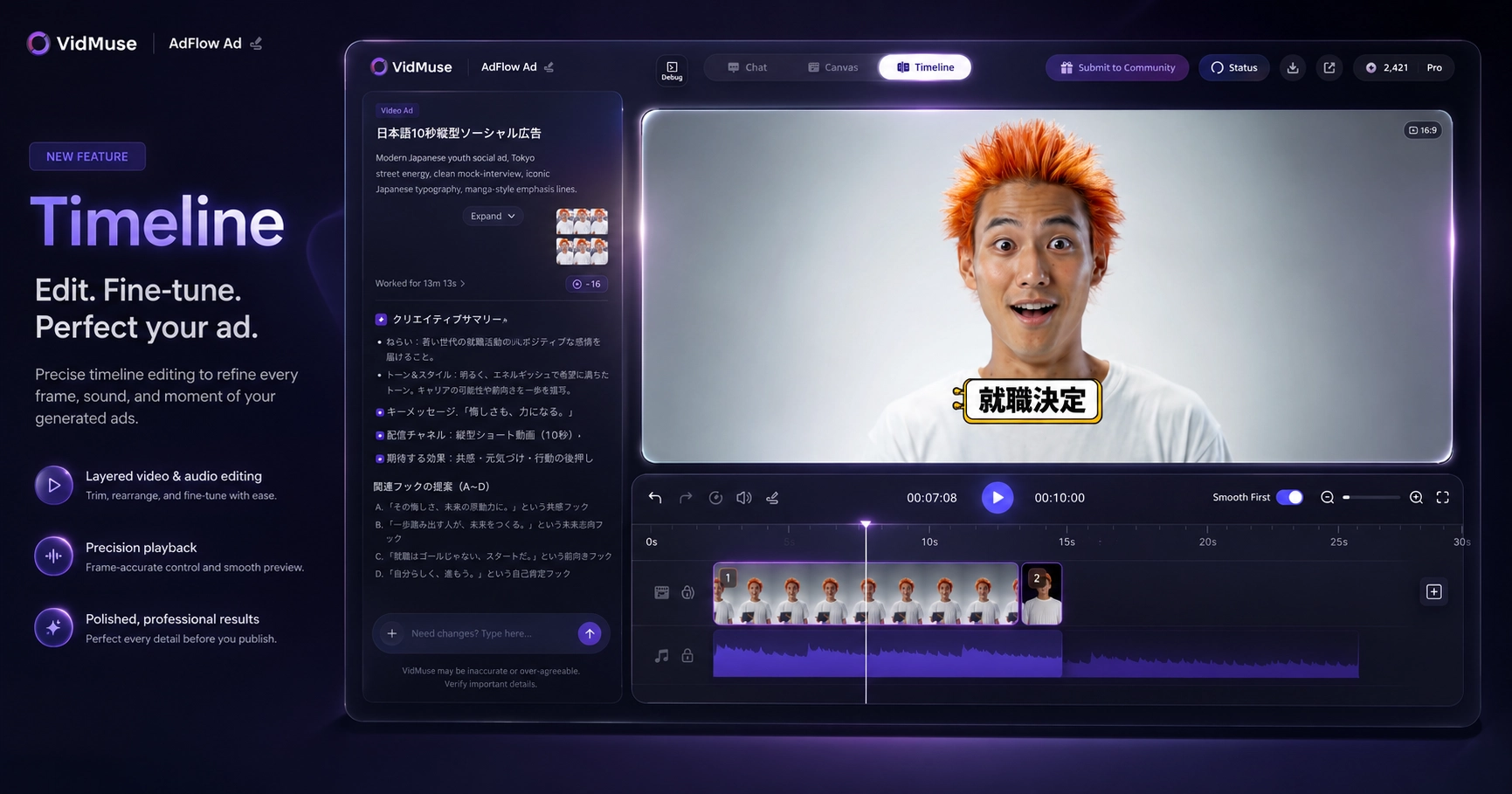
AI Refine on Timeline: not satisfied with a clip? Select it on the timeline, describe the revision in chat (e.g., "make the hook faster" or "zoom in on the product"), and VidMuse regenerates that clip in place. No need to restart the entire generation.
Review subtitles carefully — 40%+ of Reels viewers watch without sound. Subtitles are your backup messaging channel. Check timing, accuracy, and readability.
Step 4: Export and Upload
Export as MP4 — the 9:16 format and HD quality were already configured in Step 1. Choose duration: 15s, 30s, or custom. The output is ready to upload directly to Meta Ads Manager as your Reel ad creative.
For the complete step-by-step video ad creation process, see how to make product video ads with AI.
Create Instagram Reel Ads with AI
Paste a product URL or upload photos. VidMuse generates a 9:16 Reel ad with hook, script, visuals, voiceover, and CTA — ready for Meta Ads Manager.
How to Set Up Instagram Reel Ads in Meta Ads Manager
Once your Reel video is ready, set up the campaign in Meta Ads Manager in 5 steps.
-
Create campaign. Go to Meta Ads Manager → + Create → choose objective (Sales, Traffic, or Engagement depending on your goal).
-
Set budget and schedule. Daily or lifetime budget. Set start/end dates or run continuously.
-
Define audience. Target by demographics, interests, behaviors, lookalike audiences, or custom audiences (website visitors, email lists).
-
Select placement. Under manual placements, select "Instagram Reels." Or use Advantage+ placement to let Meta optimize across all placements including Reels.
-
Upload creative and publish. Upload your VidMuse-generated 9:16 MP4. Add headline text, CTA button (Shop Now, Learn More, Sign Up), and destination URL. Preview, confirm, and publish.
Meta Ads Manager handles targeting, delivery, and optimization. VidMuse handles the creative. Each tool does what it's best at. The same VidMuse creative also works for Facebook video ads — same Ads Manager, different placement.
Instagram Reel Ad Best Practices
The best Instagram Reel ads hook in 3 seconds, use sound, respect safe zones, and feel like organic content — not polished commercials.
1. Hook in the first 3 seconds. Name the product or address a pain point immediately. If viewers don't stop scrolling in 3 seconds, they never see the rest. The hook is the single highest-leverage element in any Reel ad.
2. Design for sound-on. Reels is a sound-on environment — unlike Stories where many users watch silently. Use voiceover, music, and audio cues. But always add subtitles for the 40% who do watch without sound.
3. Respect safe zones. Keep key text and visuals in the center 50% of the frame. The top 14% is covered by username and icon; the bottom 35% by the CTA button and caption text. If your product name is hidden behind "Shop Now," the ad fails.
4. Feel native. The best Reel ads look like organic Reels, not broadcast commercials. UGC-style, talking-head, and behind-the-scenes formats consistently outperform polished production on Reels placement.
5. One message per ad. 15-30 seconds = one benefit, one CTA. Don't cram multiple selling points into a single Reel. Create separate ads for different angles and A/B test.
6. Test multiple hooks. Generate 2-3 hook variants with VidMuse's AI Refine — change only the first 3 seconds while keeping the rest of the ad identical. Upload variants to Ads Manager and let Meta optimize delivery to the best performer.
Instagram Reel Ad Examples by Type
The most effective Reel ad formats in 2026 are UGC-style, product showcase, unboxing, and before/after — each serves a different stage of the funnel.
In VidMuse, these map directly to ad templates: UGC-Style, Hero Showcase, Unboxing, Explainer. Select the template before generating to ensure the right hook style, pacing, and CTA placement for your Reel ad.
The same formats work on other platforms with different specs — see our LinkedIn video ads guide for 16:9 horizontal ads from the same VidMuse workflow. For ad tool comparisons: best AI ad generator 2026. For broader strategy: AI advertising.
FAQ: Instagram Reel Ad
What size is an Instagram Reel ad?
9:16 vertical at 1080×1920 pixels. Minimum width is 500px. File format: MP4 or MOV, max file size 4GB. This is the same aspect ratio as TikTok and YouTube Shorts — one 9:16 video can be used across all three platforms.
How long can an Instagram Reel ad be?
5 to 90 seconds. Meta recommends 15-30 seconds for ads. Shorter ads (15s) typically perform better for awareness; 30s gives more room for consideration-stage messaging. Most high-performing Reel ads are under 30 seconds.
How much do Instagram Reel ads cost?
Cost depends on targeting, audience, bidding strategy, and competition. There is no fixed price — Instagram Reel ads run through Meta Ads Manager's auction system. CPM (cost per 1,000 impressions) and CPC (cost per click) vary by industry, audience, and time of year.
Can I use AI to create Instagram Reel ads?
Yes. VidMuse generates complete Reel ad video (9:16, HD) from product URLs or photos — including hook, script, voiceover, music, subtitles, and CTA. Export the MP4 and upload it to Meta Ads Manager. Other AI tools like Creatify (URL-to-clip) and HeyGen (avatar video) can also generate Reel-format clips.
What is the safe zone for Instagram Reel ads?
Keep the top 14% (~250px) and bottom 35% (~650px) of the frame clear. The top area is covered by the username and icon; the bottom by the CTA button and caption text. Place your key message, product visuals, and text in the center 50% of the frame.
Are Instagram Reel ads effective?
Reels is the highest-engagement format on Instagram as of 2026. Meta reports that Reels ads reach users who don't already follow the advertiser, expanding audience beyond existing followers. Effectiveness depends on creative quality (hook, message, production), targeting, and offer — not just the placement itself.
Conclusion
Instagram Reel ads come down to two steps: make the video and run the campaign. VidMuse handles step one — generating a 9:16 video ad with hook, script, visuals, voiceover, music, and CTA from your product info. Meta Ads Manager handles step two — targeting, delivery, and optimization.
Best results: 9:16 vertical, hook in 3 seconds, sound-on with subtitles, native feel, one message per ad. Respect the safe zones, test multiple hooks, and let Meta's algorithm optimize delivery across your variants.
Make Your First Reel Ad
Skip the production team. VidMuse creates publish-ready Instagram Reel ads from your product info in minutes.

Written By
VidMuse Team
Continue Reading
Latest blog posts related to AI video creation.
VidMuse Discord Support Guide: How to Get Help Faster
Learn how to join the official VidMuse Discord, create a private support ticket, and share the right details so our team can help you faster.
Ad Creative AI: Review and Best Alternatives (2026)
Ad Creative AI review and best alternatives for 2026. What it does, pricing, limits, and which tools to use for video ads, static creatives, and UGC content.
Hailuo 2.3 x VidMuse AI: Model Guide and Video Workflow
Hailuo 2.3 review and VidMuse guide. Three tiers (Pro, Fast, Standard), capabilities, prompt tips, comparison with Hailuo 3.0, and multi-model workflow.