

Product URL to Video Ad: Turn Any Product Link into Ads
A product URL to video ad generator is an AI tool that takes a product page link — from Amazon, Shopify, eBay, or any ecommerce store — and turns it into a publish-ready video ad. You paste the URL, and the AI extracts product images, descriptions, pricing, and selling points, then generates a scripted, edited video ad you can upload directly to TikTok, Instagram, YouTube, or Meta.
VidMuse is the most complete product URL to video ad generator available. Unlike clip-only tools that produce a single avatar clip from your link, VidMuse runs a full 6-phase AI Director workflow: it understands your product from the URL, plans the creative direction, generates visual assets, produces video clips, assembles the timeline with voiceover, music, subtitles, and CTA, and renders the final MP4.
Most tools in this category — Creatify, UrlToVideo AI, Pollo AI — take a URL and output one UGC-style clip. VidMuse takes that same URL and delivers a complete, assembled ad. This guide walks you through the full workflow, compares the top tools, covers platform compatibility, and explains when URL-to-video works best.
Key Takeaways
-
VidMuse is the only full-workflow product URL to video ad generator — it covers the entire pipeline from URL to finished MP4, including creative planning, scripting, visual generation, timeline assembly, and rendering.
-
Clip-only tools (Creatify, UrlToVideo AI, Pollo AI) generate individual avatar or UGC clips from a URL, but they don't plan the creative, assemble a timeline, or output a complete ad with voiceover, music, subtitles, and CTA.
-
Supported ecommerce platforms include Amazon, Shopify, eBay, TikTok Shop, and Etsy — but the quality of the output depends on how much product data the page contains.
-
Free tiers exist from Creatify, UrlToVideo AI, Pollo AI, and Zeely — but expect watermarks, credit caps, or limited resolution.
-
URL-to-video works best with complete product pages. Sparse pages with few images or minimal descriptions may need supplemental input (photos, text, brand assets).
What Is a Product URL to Video Ad Generator?
A product URL to video ad generator is software that converts a product page link into a video advertisement. You provide the URL, and the tool scrapes the page for product images, titles, descriptions, pricing, and key features, then uses AI to produce a video ad from that data.
There are two fundamentally different approaches:
| Approach | What happens | Result |
|---|---|---|
| Clip-only | AI extracts page data → generates one avatar or UGC-style clip with voiceover | A single talking-head clip. You still need to add music, subtitles, CTA, and assemble the final ad yourself. |
| Full-workflow | AI extracts page data → understands the product → plans creative direction → generates assets → produces video clips → assembles timeline with audio, subtitles, CTA → renders final MP4 | A complete, publish-ready video ad. No additional editing needed. |
Creatify, UrlToVideo AI, Higgsfield, Pollo AI, and Zeely operate in the clip-only category. VidMuse is the only tool that runs the full workflow from URL to assembled ad.
For a broader look at AI video ad generators — including tools that don't use URL input — see our complete guide.
Turn Your Product URL into a Video Ad
Paste a product link and get a publish-ready video ad in minutes. No filming, no editing, no production team.
How to Turn a Product URL into a Video Ad
Turning a product link into a video ad follows a structured process. Here's the complete workflow using VidMuse's AI ad generator — the only tool that covers all phases from URL input to finished ad.
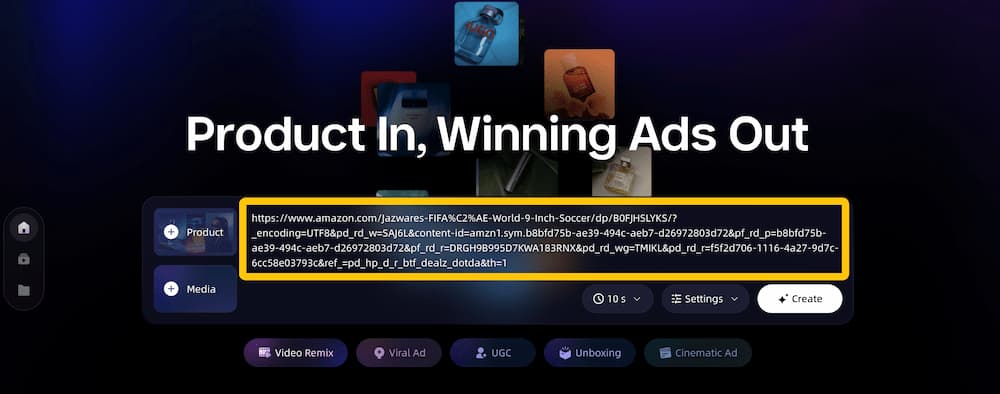
Step 1: Paste Your Product URL
Go to VidMuse and paste your product page link. VidMuse supports URLs from Amazon, Shopify, eBay, and other ecommerce platforms. The AI automatically scrapes the page and extracts:
- Product images (all available photos from the listing)
- Product title and description
- Key features and selling points
- Pricing information
- Category and audience signals
This extraction step replaces the manual briefing process. Instead of writing a creative brief from scratch, the AI builds one from your actual product data.
Step 2: Configure Video Settings
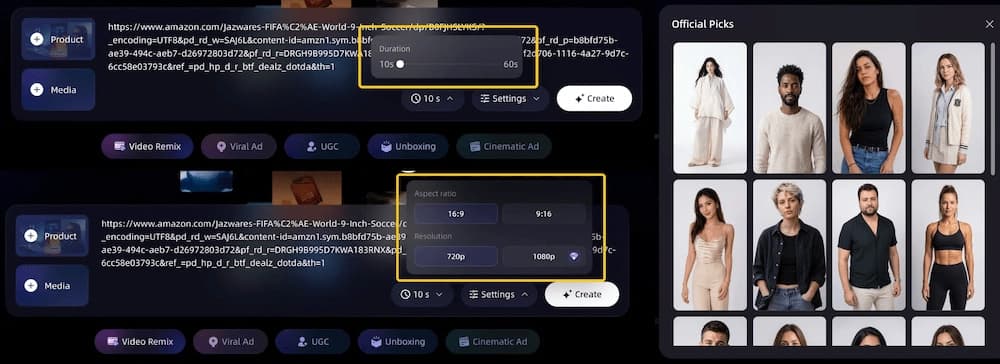
Set your output parameters:
- Duration: 10s, 15s, 30s, or 60s depending on your ad platform and goal
- Aspect ratio: 9:16 (TikTok, Reels, Shorts) or 16:9 (YouTube pre-roll, Facebook feed)
- Resolution: 720p or 1080p HD
- Avatar (optional): If you want a digital spokesperson, select from the avatar library
These settings determine the final output format. For TikTok and Instagram Reels, use 9:16 at 15–30 seconds. For YouTube and Facebook, use 16:9 at 30–60 seconds.
Step 3: Input Your Creative Direction
Provide a brief creative idea or let the AI generate one. You can:
- Describe the angle you want (e.g., "focus on the durability feature" or "UGC-style testimonial")
- Specify the tone (casual, professional, energetic, minimal)
- Reference a competitor ad you want to use as style inspiration — see the video to video maker for reference remix details
This step is optional. If you leave it blank, VidMuse infers the best creative direction from the product data it extracted in Step 1.
Step 4: Review the AI Creative Brief
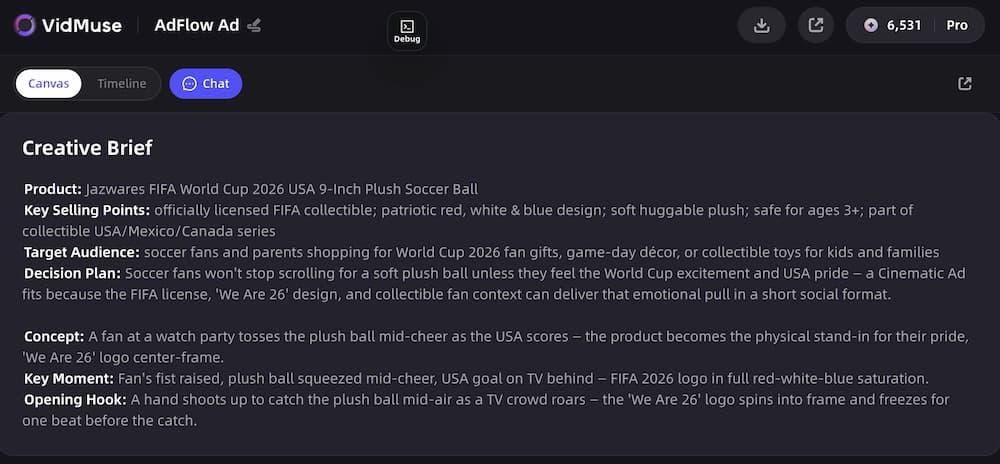
This is the phase that separates VidMuse from every clip-only tool. Before generating any visuals, the AI produces a complete creative brief:
- Ad template selection — the product is mapped to the best ad format: unboxing, UGC-style, hero product showcase, lifestyle, explainer, storytelling, hype/dynamic, or digital human presenter. See all options through VidMuse AI video templates.
- Script — a complete ad script with hook, body, and CTA
- Shot list — scene-by-scene breakdown with visual descriptions
- Voiceover plan — narration direction and pacing
You can edit every element before proceeding. Clip-only tools skip this phase entirely — they jump straight from URL to generated clip with no creative planning step.
For more on VidMuse's creative planning system, see the product ad video generator launch post.
Step 5: Generate Assets and Video Clips
VidMuse now executes two phases in parallel:
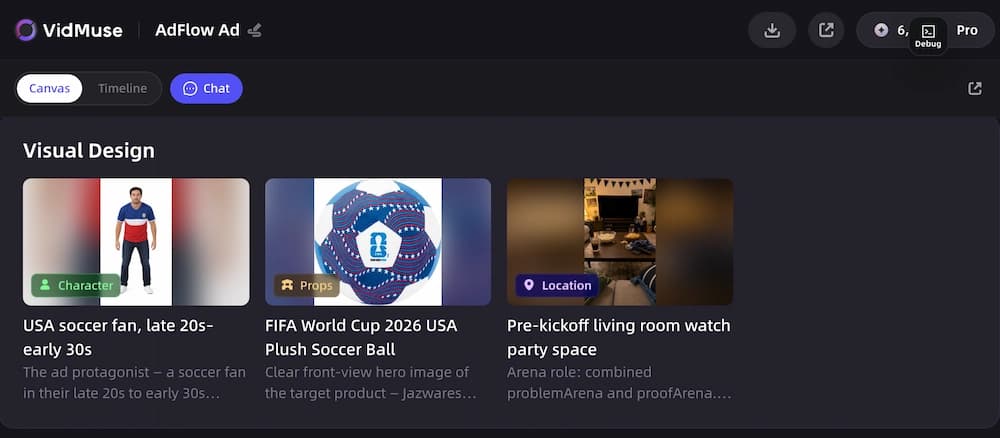
Visual asset generation: Keyframes are created for each shot in the plan, maintaining visual consistency across scenes. The AI selects from 11+ image models (Flux.2-Pro, Midjourney V7, Seedream 5.0) based on your product's visual style. AI voiceover, background music, and beat-synced timing are generated simultaneously.
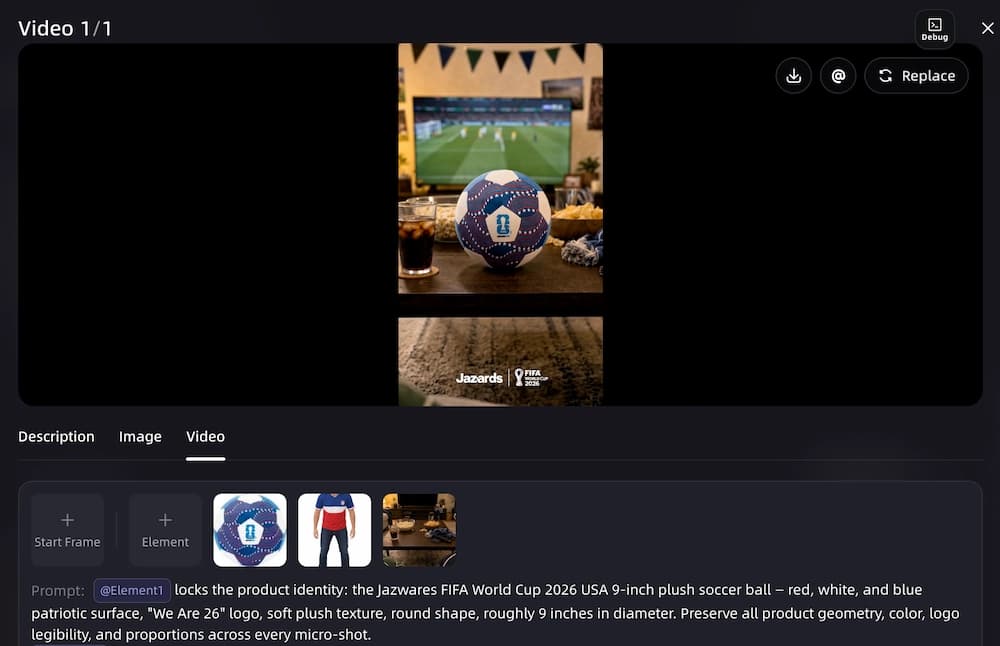
Video clip generation: Keyframes are turned into motion video clips using 20+ video generation models (Seedance 2.0, Kling V3.0, Veo 3.1, Hailuo 2.3). Camera motion, pacing, and visual energy are matched to the music tempo and ad template.
Step 6: Assemble the Timeline
The AI arranges all clips on a timeline:
- Music and voiceover are synced to scene transitions
- Subtitles are generated and positioned
- Product callouts and feature highlights are added as text overlays
- CTA text is placed on the end screen
- Total duration is checked against your target
Step 7: Render and Download
VidMuse merges all tracks, burns in subtitles, normalizes audio levels, and outputs the final MP4. The video is ready to upload directly to TikTok, Instagram Reels, YouTube Shorts, Meta Ads, Amazon, or any other platform.
Turn Your Product URL into a Video Ad
Paste a product link and get a publish-ready video ad in minutes. No filming, no editing, no production team.
Best Product URL to Video Ad Generators Compared
Not all URL-to-video tools work the same way. Here's how the top product URL to video ad generators compare:
| Tool | Workflow Depth | Supported Platforms | Output | Free Plan | Key Limitation |
|---|---|---|---|---|---|
| VidMuse | Full 6-phase (URL → creative planning → assets → clips → timeline → render) | Amazon, Shopify, eBay, Product URLs broadly | Complete MP4 with VO, music, subtitles, CTA (9:16/16:9) | Check site | Requires more input decisions than one-click tools |
| Creatify | Clip-only (URL → avatar clip) | Product URLs broadly | Avatar video clips | Yes (10 credits, watermark) | No creative planning; no timeline assembly; credits burn fast |
| UrlToVideo AI | Clip-only (URL → UGC clip with ad clone) | Amazon, Shopify, TikTok Shop, Etsy | UGC/avatar video clips | Yes (limited credits) | No full-pipeline workflow; avatar quality varies |
| Higgsfield | Clip-only (URL → ad clip, multiple formats) | Product URLs broadly | Ad clips in multiple formats | Not confirmed | Limited product data extraction depth |
| Pollo AI | Clip-only (URL → video clip) | Product URLs broadly | Video clips | Yes (free tier) | Basic quality; limited customization |
| Zeely | Clip-only (URL → video; batch mode) | Product URLs broadly | Video ads | Yes (limited) | Light on creative control; batch-focused |
| Topview AI | Clip-only (URL → video with AI scripting) | Product URLs broadly | Video ads | Not confirmed | No full creative planning or timeline assembly |
VidMuse is the only tool that covers the complete pipeline — from product URL understanding through creative planning, multi-model asset generation, timeline assembly, to final render. The other tools generate individual clips that may require additional editing, audio work, and assembly in a separate tool.
For in-depth reviews of more AI ad generators, including tools that go beyond URL input, see our best AI ad generator 2026 comparison.
See the Full Workflow in Action
VidMuse is the only product URL to video ad generator with a full AI Director workflow — from product link to published MP4.
Which Ecommerce Platforms Are Supported?
Different URL-to-video tools support different ecommerce platforms. Here's the compatibility matrix:
| Platform | VidMuse | Creatify | UrlToVideo AI | Higgsfield |
|---|---|---|---|---|
| Amazon | ✅ | ✅ | ✅ | ✅ |
| Shopify | ✅ | ✅ | ✅ | ✅ |
| eBay | ✅ | ✅ | Not confirmed | ✅ |
| TikTok Shop | ✅ | ✅ | ✅ | ✅ |
| Etsy | ✅ | Not confirmed | ✅ | Not confirmed |
Platform Notes
Amazon — Product pages are data-rich. The AI extracts multiple images, bullet points, A+ content, and pricing. Amazon URLs produce the best results across all tools because listings are standardized and information-dense. For Amazon-specific guidance, see our Amazon product video generator guide.
Shopify — Results depend on how complete the store's product page is. Well-structured Shopify pages with multiple photos, detailed descriptions, and feature lists produce strong output. Minimal pages may need supplemental input.
eBay — Similar to Amazon in data richness. Auction-style listings with fewer photos may produce weaker results than Buy It Now listings with full descriptions.
TikTok Shop — Product links work well. The AI extracts product images, descriptions, and pricing. For TikTok-specific ad creation, see our guide on creating TikTok video ads with AI.
Etsy — Handmade and vintage product listings are typically photo-rich, which helps the AI generate strong visuals. Short descriptions may require supplemental text input.
Limitations and When to Use Manual Input Instead
URL-to-video is powerful, but it has clear limits. Know when to rely on the URL alone and when to add manual input.
Sparse Product Pages
If your product page has only one photo and a two-sentence description, the AI doesn't have enough data to build a compelling ad. Supplement with additional product photos, a detailed text description, or brand assets (logo, colors, fonts).
Private or Gated Pages
Some product pages require login to view full details. If the AI can't scrape the page, it can't extract product data. Use the manual input option instead — upload photos and type a description directly.
Brand-New Products Without Listings
If your product isn't live on any ecommerce platform yet, there's no URL to paste. Use product photos and a text description as the primary input. VidMuse accepts both alongside URL input.
Brand Guidelines the AI Can't Infer
URL extraction captures product data, but it can't read your brand guidelines document. If you need specific brand colors, fonts, voice tone, or visual rules, upload brand assets manually. This is especially important for established brands with strict visual identity requirements.
Platform Compliance
AI-generated ads must still comply with each platform's advertising policies. The tool generates the creative — you're responsible for ensuring the claims, imagery, and format meet Meta's, TikTok's, Google's, and Amazon's content policies before publishing. Some platforms now require disclosure when ads are AI-generated; regulations vary by market and are evolving. Always check the latest guidelines before launching campaigns.
FAQ: Product URL to Video Ad Generator
What is a product URL to video ad generator?
A product URL to video ad generator is AI software that takes a product page link (from Amazon, Shopify, eBay, or other ecommerce stores) and automatically generates a video advertisement from the page content. The AI extracts product images, descriptions, and features, then produces a scripted, edited video ad ready for publishing.
Can I turn an Amazon product link into a video ad?
Yes. VidMuse, Creatify, and UrlToVideo AI all accept Amazon product URLs. VidMuse extracts images, bullet points, A+ content, and pricing from the listing, then runs a full 6-phase workflow to produce a complete video ad. Creatify and UrlToVideo generate avatar-based clips from the same data.
Is there a free product URL to video ad generator?
Several tools offer free tiers: Creatify (10 credits with watermark), UrlToVideo AI (limited credits), Pollo AI (free tier), and Zeely (limited). Free plans typically add watermarks, cap resolution, or limit monthly exports. Watermarked video cannot be used in paid ad campaigns.
How do I turn a Shopify product URL into a TikTok ad?
Paste your Shopify product URL into VidMuse, set the aspect ratio to 9:16 (vertical), choose 15–30 seconds duration, and select a UGC-style or hype/dynamic ad template. The AI extracts your product data, generates a front-loaded hook, fast-paced visuals, beat-synced music, and subtitles — all optimized for TikTok's native feed.
What's the difference between VidMuse and Creatify for URL-to-video?
VidMuse runs a full 6-phase AI Director workflow: URL → product understanding → creative planning → asset generation → video clips → timeline assembly → rendered MP4. Creatify follows a clip-only approach: URL → avatar clip. VidMuse outputs a complete ad with script, multi-model visuals, voiceover, music, subtitles, and CTA. Creatify outputs a single avatar-driven clip that may need additional editing and assembly.
Does URL-to-video work with any product page?
URL-to-video works best with data-rich product pages that have multiple images, detailed descriptions, and clear feature lists. Amazon, Shopify, and TikTok Shop listings typically work well. Sparse pages, private/gated pages, and pages behind login walls may not provide enough data — supplement with manual photo uploads and text descriptions in those cases.
What ad formats can I create from a product URL?
With VidMuse, a single product URL can produce multiple ad formats: UGC-style ads, unboxing sequences, hero product showcases, lifestyle ads, explainer ads, storytelling ads, hype/dynamic ads, and digital human presenter videos — in both 9:16 vertical and 16:9 horizontal. Clip-only tools typically output one format per URL.
Conclusion
For ecommerce sellers who want to turn a product link into a complete video ad — not just a clip — VidMuse is the strongest product URL to video ad generator available. It's the only tool that runs the full pipeline: product data extraction, creative planning, script generation, multi-model video production, timeline assembly with voiceover, music, subtitles, and CTA, and final MP4 rendering.
Clip-only tools like Creatify, UrlToVideo AI, and Pollo AI are useful for fast avatar clips, but they leave the creative planning, audio editing, and final assembly to you. If you need a complete, publish-ready ad from a single product URL, VidMuse handles the entire workflow.
Paste a URL. Get a Video Ad.
VidMuse turns any product link into a publish-ready video ad — no filming, no editing, no guesswork.

Written By
VidMuse Team
Continue Reading
Latest blog posts related to AI video creation.
Free Music Visualizer: 10 Best Free Tools in 2026
Compare 10 best free music visualizers in 2026. Waveform tools, AI music video makers, watermark policies, export limits, and which tool fits your workflow.
How to Make Product Video Ads with AI (Step-by-Step)
Learn how to make product video ads with AI step by step. Full 6-phase VidMuse tutorial, input tips, ad type guide, and alternative approaches compared.
Best AI Clone Video Generator 2026: 7 Tools Compared
Compare the 7 best AI clone video generators in 2026. Avatar clones, viral ad clones, pricing, features, and how to pick the right tool for your workflow.