
Seedream 4.7 Direct Answer
Seedream 4.7 is the shorthand many creators use when searching for the latest point release in ByteDance's rapidly evolving Seedream image generation series. The direct answer: ByteDance's publicly documented Seedream lineup currently centers on Seedream 4.0, Seedream 4.5, Seedream 5.0 Lite, and the forthcoming full Seedream 5.0.
If you have seen "Seedream 4.7" circulating in AI communities, it most likely refers to the post-4.5 improvement window, an internal staging label, or a community phrase for the transition from Seedream 4.5 to Seedream 5.0 Lite. This guide explains what the real Seedream models can do, how Seedream 4.5 compares with Nano Banana Pro, and how creators can use Seedream-style reference images inside a VidMuse music video workflow.
Create Your AI Video in Minutes
Turn your track, prompt, and reference images into a complete AI music video workflow with VidMuse.
Key Takeaways
- Seedream 4.7 is not a separately released public model. Public references usually point to Seedream 4.0, Seedream 4.5, Seedream 5.0 Lite, and the upcoming full Seedream 5.0.
- Seedream 4.5 is the practical production benchmark for cinematic image generation, with native 4K output, up to 14 reference images, stronger text rendering, and better editing tools.
- Seedream 5.0 Lite adds an intelligence layer with real-time web search and chain-of-thought style reasoning for knowledge-driven image briefs.
- Nano Banana Pro has an edge in world-knowledge tasks, while Seedream 4.5 is stronger for cinematic realism, material rendering, and commercial layout control.
- For VidMuse creators, Seedream-style models are most useful in the Reference Generation and Storyboard stages before AI video generation begins.
What Is the Seedream Model Series?
Seedream is ByteDance's multimodal image generation and editing platform, built by the company's SEED AI research team. The series began as a text-to-image pipeline and has evolved into a unified architecture that handles generation, editing, multi-image compositing, and, in the 5.0 Lite direction, real-time knowledge retrieval.
ByteDance positions the Seedream series within a broader generative AI push across Doubao, Jimeng/Dreamina, and developer-facing model access. The evolution across versions follows a clear path: efficiency, quality, then multimodal intelligence. Each generation targets a different production bottleneck instead of simply increasing scale.
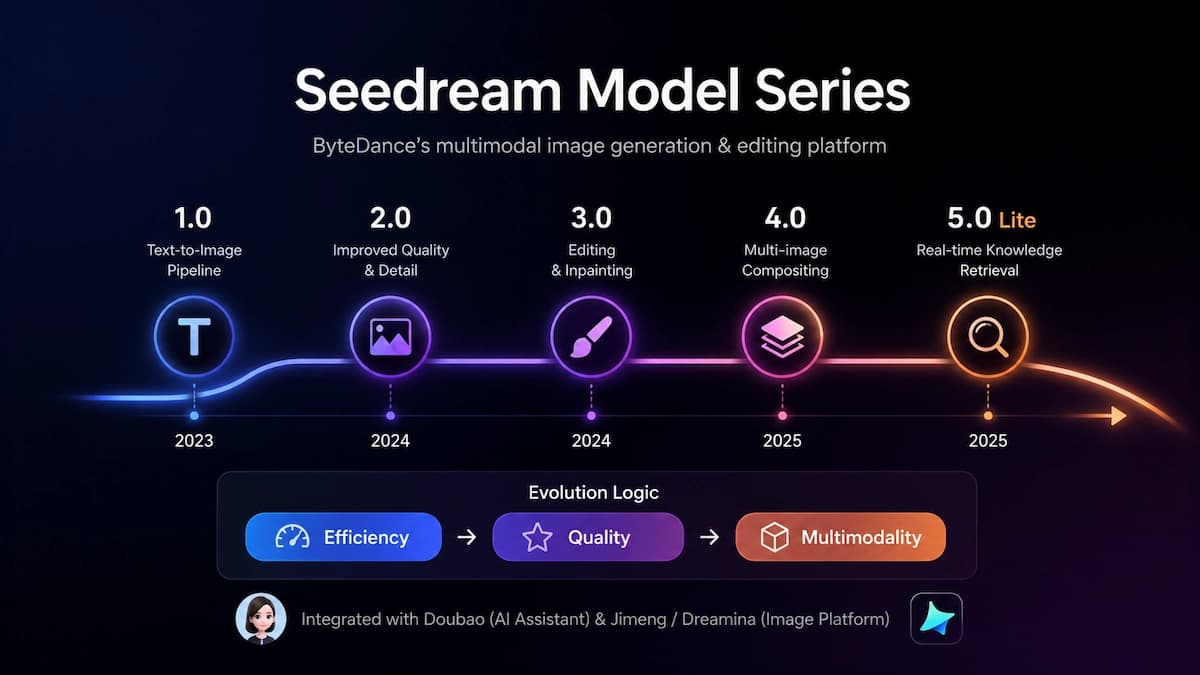
Seedream Version Breakdown: 4.0, 4.5, and 5.0 Lite
Seedream 4.0: Architecture Refactor
Seedream 4.0 introduced the unified generation-and-editing architecture that defines the modern Seedream experience. Before 4.0, generation and editing were often handled separately, which meant refinements required full regeneration. Version 4.0 addressed this with a diffusion transformer backbone and a high-compression VAE designed for both text-to-image and image-to-image editing.
Key capabilities introduced in Seedream 4.0 include native 2K to 4K output, multi-image editing with up to 10 reference images, knowledge-centric visual generation, multilingual text rendering, and integration with ByteDance creative platforms.
Seedream 4.5: Scale and Refine
Seedream 4.5 is the practical "complete form" of the 4.0 architecture: the same foundation, but scaled and refined for production use. This is the version most creators are likely trying to find when they search for Seedream 4.7.
What changed in 4.5 versus 4.0:
- Native 4K output up to 4096x4096 without depending on external upscaling.
- Reference image support expanded to 14 images per generation.
- Stronger text rendering for posters, labels, packaging, and bilingual layouts.
- Inpainting and outpainting for targeted revisions.
- Better character consistency across angles, lighting conditions, and poses.
- Improved material and lighting behavior for glass, metal, fabric, and skin.
Generate Storyboard References Faster
Use VidMuse to turn songs, artist references, and visual direction into structured AI video scenes.
Seedream 5.0 Lite: Intelligence Layer
Seedream 5.0 Lite represents a different design direction compared with the 4.x series. Where 4.5 optimizes for visual fidelity and consistency, 5.0 Lite adds real-time web search, chain-of-thought style reasoning, and more structured instruction following.
Core Seedream 5.0 Lite capabilities include trend-aware image generation, knowledge-rich outputs, professional domain understanding, improved face preservation, and support for up to 14 reference images. The tradeoff is aesthetic: for purely cinematic photorealism, Seedream 4.5 may still produce cleaner and more polished visuals.
What Makes Seedream 4.5 the Current Benchmark?
Seedream 4.5 earns its production status by solving several professional pain points in one model. Most AI image generators force creators to choose between photorealism and text accuracy, or between editing flexibility and generation quality. Seedream 4.5 covers all of those needs while offering a resolution ceiling that reduces reliance on third-party upscaling.
For commercial creative teams, the impact is practical. Inpainting, outpainting, and object replacement mean a poster concept does not need to be regenerated from scratch every time a headline, background, or wardrobe detail changes. Character consistency helps a brand mascot, artist identity, or recurring character survive across multiple scenes.
Seedream 4.5 vs Nano Banana Pro
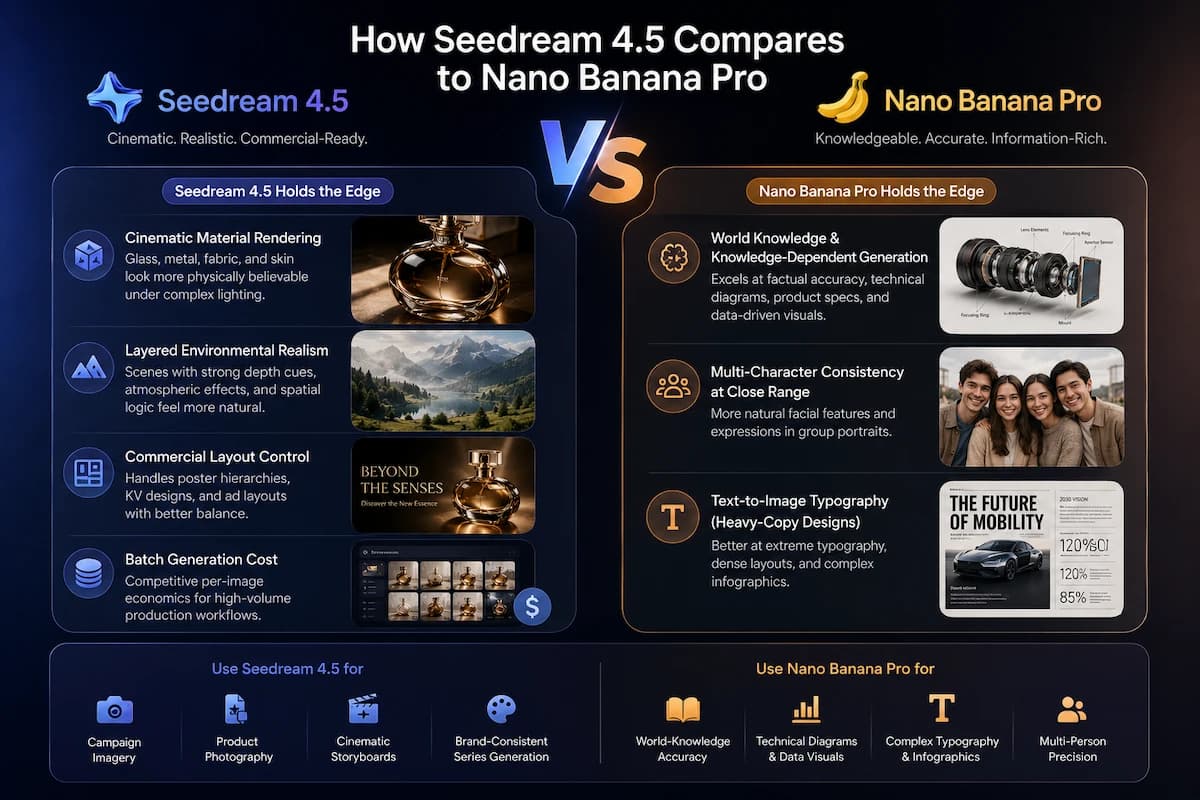
Nano Banana Pro, Google's Gemini-backed image model, and Seedream 4.5 trade advantages depending on the job. Neither model wins every category.
Seedream 4.5
Best for
- Cinematic material rendering for glass, metal, fabric, and skin
- Layered environmental realism for storyboards and campaign visuals
- Strong commercial layout control for posters and key visuals
- Cost-effective fit for high-volume reference generation
Watch out
- Can struggle with knowledge-heavy diagrams
- Multi-character close-up scenes may need careful review
Nano Banana Pro
Best for
- Stronger world-knowledge and factual visual reasoning
- Better fit for dense technical diagrams and information layouts
- Competitive multi-character consistency in close scenes
Watch out
- Less cinematic for some material and lighting-heavy scenes
- May be overkill for simple storyboard reference generation
The practical recommendation: use Seedream 4.5 for campaign imagery, product photography, cinematic storyboards, and brand-consistent image series. Use Nano Banana Pro when factual accuracy, technical annotation, or complex information density is the primary deliverable.
Seedream 5.0 Lite: What Changed After 4.5?
Seedream 5.0 Lite is not only a visual quality update. It is a workflow intelligence update. The model shifts prompting from dense style formulas toward more natural creative briefs.
Where Seedream 4.5 responds well to subject, lighting, lens, mood, and layout instructions, Seedream 5.0 Lite can process more conversational briefs that depend on current trends or external context. This matters for social media campaigns, data visualization, technical illustration, and rapid creative direction.
Seedream 4.5
Best for
- Best for cinematic photorealism
- Strong choice for album art, product photography, and storyboard frames
- Cleaner aesthetic polish for music video reference images
Watch out
- Less suited to current-event or knowledge-grounded prompts
Seedream 5.0 Lite
Best for
- Best for trend-responsive and knowledge-driven briefs
- Useful real-time search and reasoning layer
- Natural fit for infographics and technical visuals
Watch out
- May look less cinematic than Seedream 4.5 in purely aesthetic tasks
How to Use Seedream Models Step by Step
The following workflow applies across platforms that offer Seedream access, including Doubao, Jimeng/Dreamina, ImagineArt, Artlist, WaveSpeedAI, and related integrations.
Define the generation type
Decide whether you need text-to-image, image-to-image editing, or batch generation with consistent references.
Choose the right Seedream version
Use Seedream 4.5 for photorealism, brand consistency, typography, and cinematic imagery. Use Seedream 5.0 Lite for knowledge-driven or trend-responsive briefs.
Write a specific prompt
Combine subject, action, environment, lighting, camera feel, and any exact on-image text in double quotes.
Upload reference images
For character or product consistency, upload multiple views so the model has clear visual anchors.
Set resolution and aspect ratio
Use 4K for print and campaign assets, 16:9 for storyboards, 9:16 for vertical video, and 1:1 for social posts.
Refine with editing
Use inpainting or outpainting to change backgrounds, wardrobe, lighting, or text without regenerating the entire image.
Export into production
Move final reference images into storyboards, asset libraries, or downstream video generation workflows.
Prompt Formula for Seedream 4.5
Use this structure for reliable cinematic outputs:
[Subject] + [Action or pose] + [Environment] + [Lighting style] + [Camera or lens feel] + [Text content in double quotes if needed]
Example: "A woman in her 30s wearing an off-shoulder dress, standing on a rooftop garden at golden hour, shallow depth of field, 85mm lens aesthetic, city skyline background, warm diffused light."
Common Mistakes When Prompting Seedream
Vague prompts waste generations. "A cool product photo" creates too much variance. A better prompt defines the product, surface, lighting direction, background, and composition.
Skipping reference images weakens consistency. For a recurring character, upload 3 to 4 reference images from the start. Seedream's cross-image consistency works best when identity is anchored early.
Forgetting quotation marks breaks text rendering. Any phrase that must appear inside the image should be wrapped in double quotes.
Using Seedream 5.0 Lite for purely aesthetic tasks can be the wrong tradeoff. If you need a polished album cover or cinematic storyboard frame, Seedream 4.5 is usually the cleaner choice.
Generating huge 4K batches too early slows iteration. Draft at a lower resolution first, then export final frames at 4K once the composition is approved.
VidMuse and the Seedream Series
For music video creators, the Seedream series addresses one of the most painful parts of MV production: generating consistent, high-quality storyboard reference images before committing to video generation.
VidMuse's agent-based workflow moves through Creative Brief, Reference Generation, Scene and Shots List, Storyboard, and Video Generation. Seedream-style image models fit naturally into the Reference Generation and Storyboard stages because they help define character identity, lighting direction, scene mood, and visual continuity before video rendering begins.
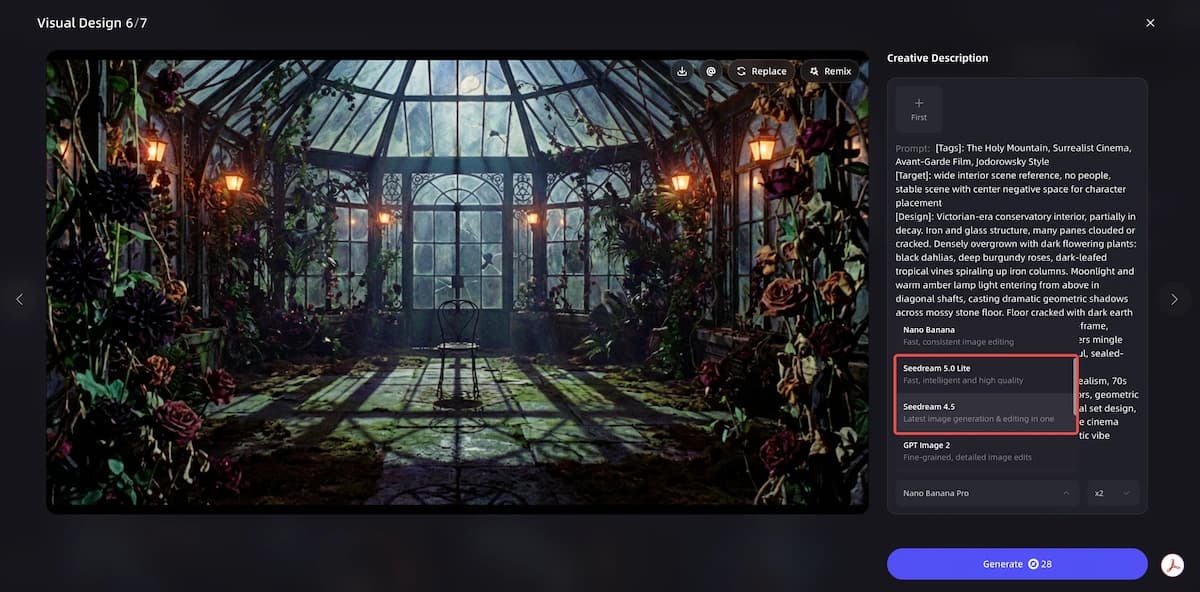
Where Seedream 4.5 fits in a VidMuse-style pipeline:
- Reference Generation: Upload artist photos or mood boards, then create character-consistent reference stills across different moods and lighting setups.
- Storyboard stage: Generate scene-specific frames such as a golden-hour outdoor performance, a neon-lit urban environment, or a minimalist studio setup.
- Asset Library: Save approved reference frames so the same artist or brand identity can carry into future projects.
The key advantage for indie musicians is simple: studio-level visual planning no longer requires a photoshoot budget. A song, a visual brief, Seedream-quality references, and VidMuse's AI Director workflow can become the foundation for a full AI music video.
Plan Your AI Music Video with VidMuse
Build a creative brief, generate references, review storyboards, and produce video clips in one workflow.
Related Reading
- Seedance 2.0 AI video model
- Nano Banana Pro image model
- ChatGPT Image 2.0 release
- AI music video generator
FAQ
What is Seedream 4.7 and does it exist as a public release?
Seedream 4.7 does not appear in ByteDance's publicly documented model lineup. It is likely a community shorthand for improvements around the Seedream 4.5 cycle or a reference to an unreleased internal version.
How does Seedream 4.5 differ from Seedream 4.0?
Seedream 4.5 expands reference image support, improves native 4K output, adds stronger text rendering, supports targeted editing workflows, and improves character consistency compared with Seedream 4.0.
What is Seedream 5.0 Lite and how does it compare to Seedream 4.5?
Seedream 5.0 Lite adds real-time web search and reasoning-oriented instruction following. Choose it for knowledge-driven or trend-responsive content, while Seedream 4.5 remains stronger for cinematic photorealism.
How does Seedream 4.5 compare to Nano Banana Pro?
Nano Banana Pro is stronger for world-knowledge tasks, technical diagrams, and information-heavy designs. Seedream 4.5 is stronger for cinematic rendering, commercial layouts, product visuals, and storyboard references.
Can Seedream 4.5 render accurate text inside images?
Yes. Seedream 4.5 can render more reliable English and Chinese text than many earlier image models, especially when exact text is wrapped in double quotes and placement is clearly specified.
How does Seedream 4.5 fit into a music video production workflow?
Seedream 4.5 is useful for Reference Generation and Storyboard stages. It creates consistent character, product, and scene images that downstream AI video models can use as visual anchors.
Where can I access Seedream 4.5 today?
Access depends on platform availability. Seedream-series models are associated with ByteDance platforms and third-party integrations such as creative tools or API providers, so check the current provider terms before production use.
Final Words
The search for Seedream 4.7 points to a real creative need: understanding where ByteDance's image series stands right now and which model is the right tool for professional visual work. The practical answer is that Seedream 4.5 is the current production standard for cinematic image generation, while Seedream 5.0 Lite extends the series toward knowledge-grounded creative workflows.
For music video creators, brand teams, and content studios, Seedream-style reference imagery closes the gap between a written creative brief and production-ready visual direction. Paired with VidMuse's Creative Brief to Storyboard to Video Generation workflow, these images become the foundation for consistent AI music video production.
Create Your AI Video in Minutes
Turn your music, prompts, and references into a complete AI Director workflow.

Written By
VidMuse Team
Continue Reading
Latest blog posts related to AI video creation.
Nano Banana Pro: The New Standard for AI Album Art & Visual Storytelling
Nano Banana Pro (Gemini 3 Pro Image) is Google's advanced AI image model. Learn what it is, how to use it, and how VidMuse integrates it for AI music video creation.
Seedance 2.0: The AI Video Model Inside VidMuse
Seedance 2.0 is ByteDance's multimodal AI video model. Discover how VidMuse uses it for cinematic music video production at studio-level quality.
Wan 2.7: Features, Release & How to Use It
Wan 2.7 is Alibaba's new AI video model with first-and-last-frame control, video editing, and subject referencing. Here's what creators need to know.