

Vidu AI is a legitimate, web-based AI video generation platform that lets you create short videos from text prompts, still images, or multiple reference assets — no software download required. It is safe to use, operated by a China-based company, and offers a free tier with off-peak unlimited generation.
As of 2026, Vidu's flagship model, Vidu Q3, can generate synchronized audio and video in a single 16-second shot, placing it among the top-ranked AI video tools globally.
Create Your AI Video with Vidu Q3
Turn your idea into a video with Vidu Q3 inside VidMuse.
Key Takeaways
- Vidu AI is free to start — the free tier includes bonus starter credits and unlimited off-peak generation, making it one of the most accessible AI video tools available.
- Vidu Q3 is the first model to natively generate audio and video together in a single 16-second generation, including synchronized dialogue, lip movement, and atmosphere.
- Vidu Q2 Pro ranked second globally on the Artificial Analysis AI video leaderboard, above Runway Gen-4.5, Google Veo 3.1, and OpenAI Sora 2 Pro at the time of review.
- Multi-reference consistency — uploading up to seven reference images — is Vidu's clearest differentiator for creators building content around recurring characters or brand visuals.
- Paid plans start at $8/month, making commercial-use video generation accessible to independent creators and small teams.
What Is Vidu AI?
Vidu AI is an all-in-one AI image and video creation platform designed for creators who want to produce short-form video content without professional production resources. Founded in China and trusted by millions of users worldwide, Vidu lets you generate videos from a text description, a still image, or a combination of multiple visual references.
The platform operates entirely in a web browser — vidu.com — meaning there's no GPU requirement, no local software to install, and no compatibility headaches. You sign in, upload your assets or type a prompt, choose a model, and generate.
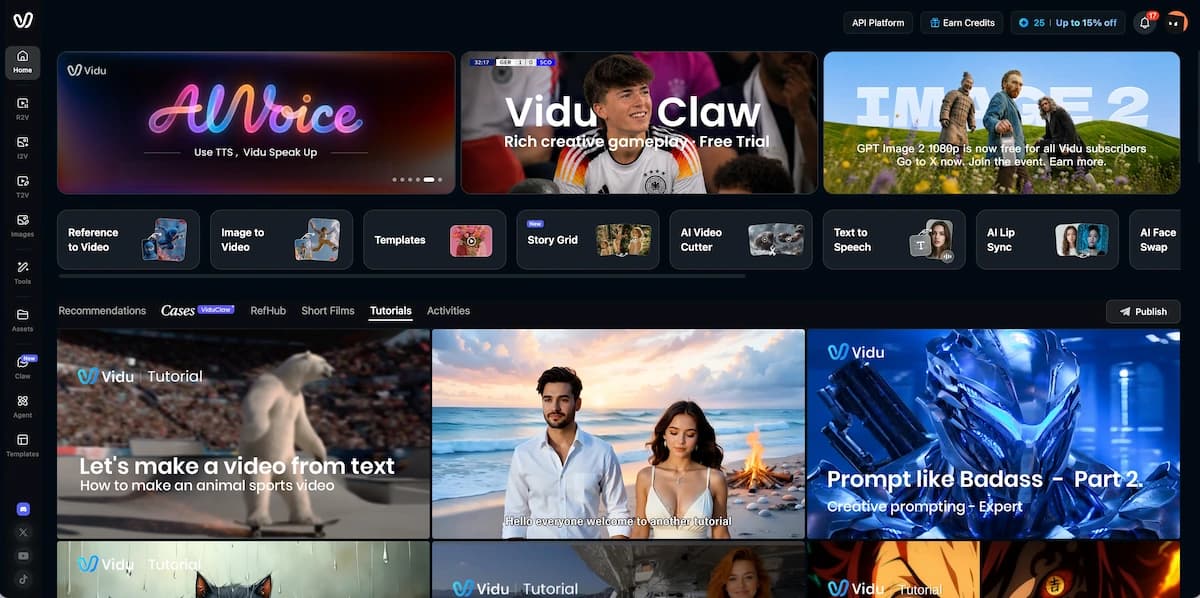
Vidu's three core creation modes are:
- Text-to-Video — generate a video purely from a written prompt
- Image-to-Video — animate a still image with motion you describe
- Reference-to-Video — upload up to seven reference images (characters, scenes, objects) and generate a consistent video that blends them all
Beyond these, Vidu also includes an AI Image Generator, an AI Sound Effect Generator, a template library for viral video formats, a mobile app for iOS and Android, and an enterprise API for developers.
Vidu's generation quality ranges from fast, cost-efficient outputs (Vidu Q1, Q2 Standard) to cinema-grade results with audio synchronization (Vidu Q3). The platform is particularly recognized for its anime and 2D animation output, which is consistently rated best-in-class by the creator community.
VidMuse + Vidu: Turning AI Video Into a Full Music Video
If you're producing music video content, combining Vidu's generation capabilities with VidMuse's AI Director workflow delivers results that neither tool achieves alone.
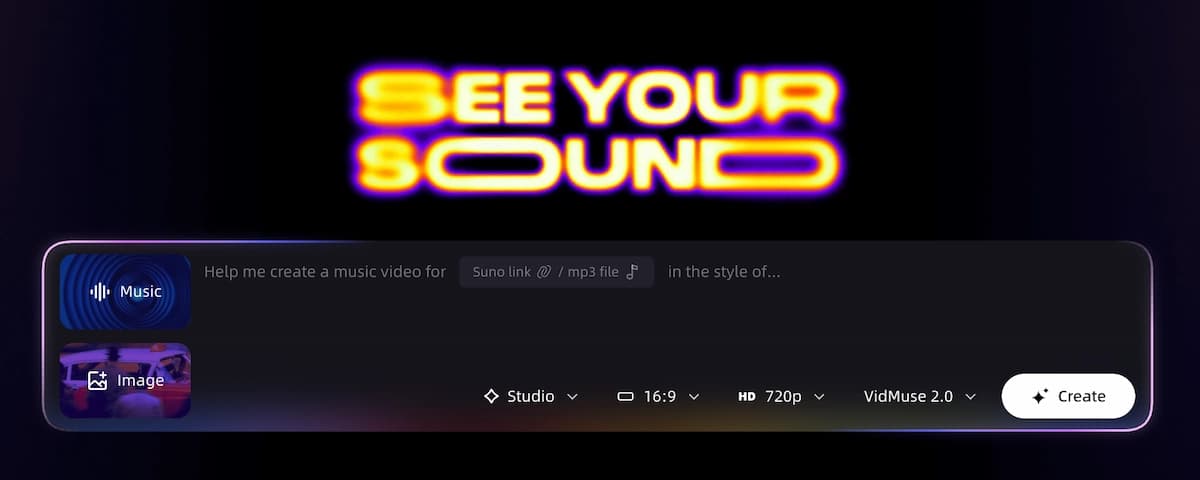
VidMuse is an AI music video generator that approaches MV creation as a complete production system — not a one-shot prompt. Its core workflow runs from Creative Brief through Reference Generation, Scene & Shot List, Storyboard, and into Video Generation. Vidu Q3 is one of the video generation models available within VidMuse's model matrix, alongside Kling V3.0 Pro, Veo 3.1, Hailuo 2.3 Pro, Seedance 2.0, and others.
For indie musicians who have created tracks using Suno AI and want to produce a full music video, the VidMuse workflow provides the structural scaffolding — scene planning, shot sequencing, storyboard — while Vidu's Reference-to-Video and Q3 audio-visual sync capabilities deliver the cinematic output.
VidMuse's Shot Refine by Quoting feature, Timeline Editor, and Asset Library & Memory (introduced in VidMuse 2.0) give you persistent creative control across the full MV — solving the character consistency challenge that makes multi-scene music video production difficult in Vidu alone.
If you're using Vidu for music video work, VidMuse is the natural complement for turning individual AI-generated shots into a complete, cohesive visual production.
Create Your AI Video with Vidu Q3
Turn your idea into a video with Vidu Q3 inside VidMuse.
Core Features: Image to Video, Anime, and More
Vidu's feature set extends well beyond its headline models, covering the full range of video creation tasks that most independent creators and marketing teams encounter.
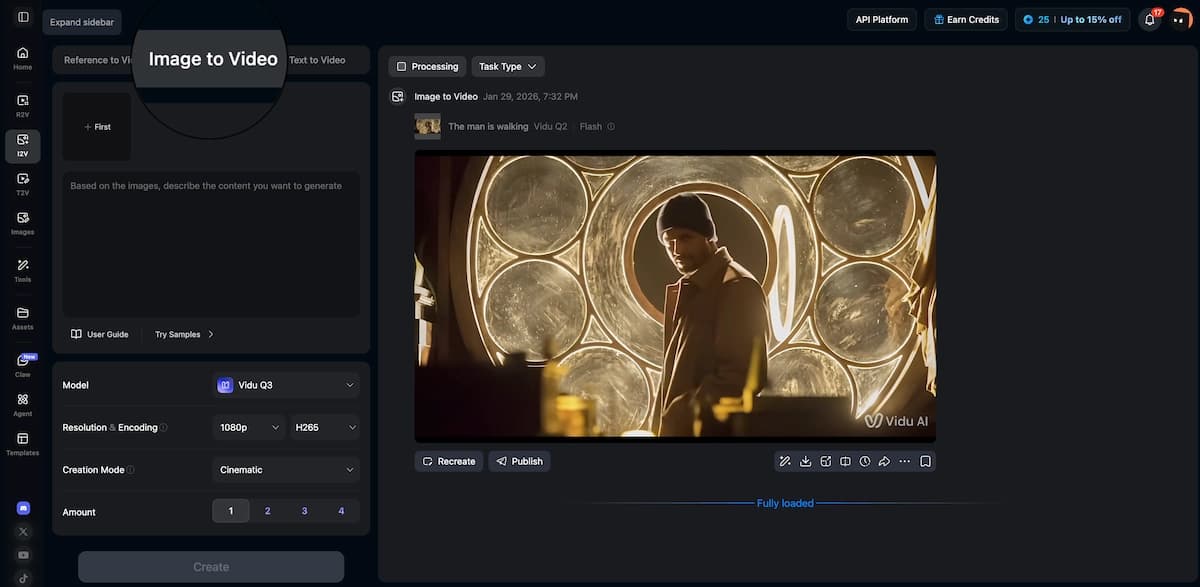
Image to Video
Upload any still image and describe the motion you want. Vidu animates it with natural, physically coherent movement. The First & Last Frame Control feature lets you specify the exact visual state at the beginning and end of the clip — Vidu generates a smooth transition between them. This is particularly useful for:
- Product animation and 360-degree reveals
- Character portraits brought to life
- Scene transitions in longer video projects
Anime Art to Video
Vidu's anime generation is the platform's most widely recognized capability within the creator community. Uploading anime-style artwork — original characters, scene illustrations, panel art — produces fluid animations with natural character motion, expressive facial movement, and style-accurate visual rendering.
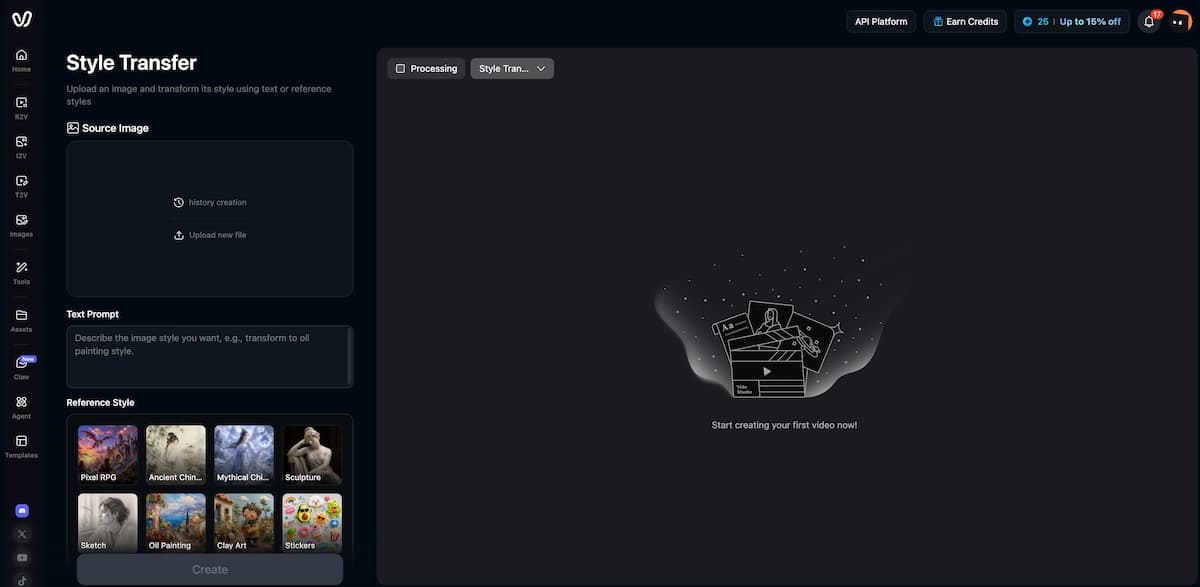
For indie anime creators producing original content without a studio team, this capability is practically transformative. Character animation that would traditionally require professional animators and multiple production passes can be achieved from static artwork in a single generation.
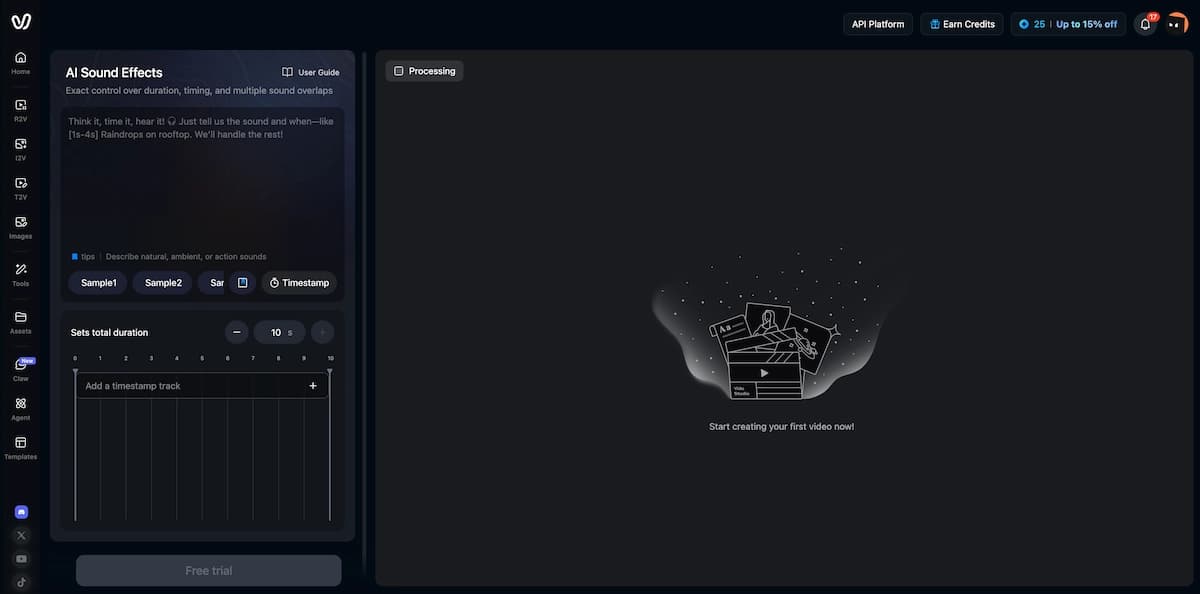
AI Sound Effect Generator
Vidu includes a built-in AI Sound Effect Generator for adding custom audio to generated videos. While not as deeply featured as dedicated audio tools, its integration directly into the platform reduces the need to jump between applications during the production workflow.
Templates
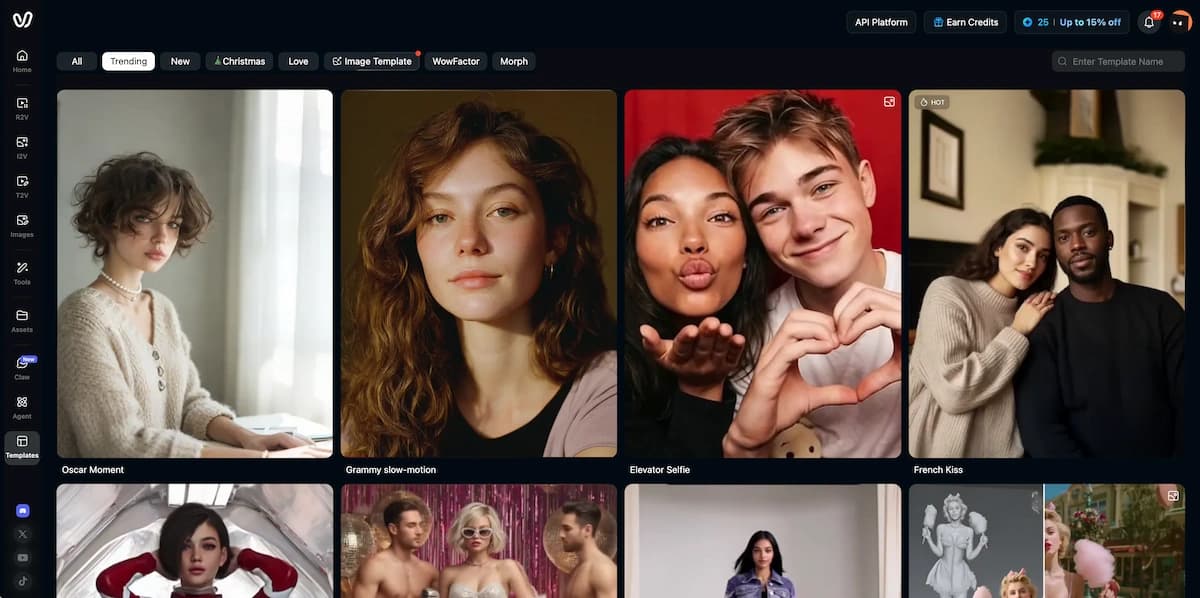
Vidu's template library provides instant access to popular viral video formats — dancing effects, kissing clips, hugging scenes, outfit changes, blossom transitions. Templates generate directly from your uploaded photos or images. For social media creators who need to ride content trends quickly, the template library is a practical shortcut to shareable output.
How to Get Started with Vidu Studio
Getting started with Vidu Studio takes under five minutes for a new user.
Create an account
Go to vidu.com, click Get Started Free, verify your email, and log in.
Choose a mode
Select Text-to-Video, Image-to-Video, or Reference-to-Video from the left panel.
Add prompt or assets
Upload your image or references, then describe the motion, camera, lighting, and tone.
Select model and duration
Use Q3 for audio-visual storytelling or Q2 for reference consistency.
Generate and review
Review multiple output variants, download your favorite, and save reusable assets to My References.
- Go to vidu.com and click "Get Started Free" to create an account.
- Verify your email and log in. You'll receive bonus starter credits automatically.
- Choose a creation mode from the left panel: Text-to-Video, Image-to-Video, or Reference-to-Video.
- For Image-to-Video: Upload your image, write a description of the motion you want, select your model (Q3 for audio-visual storytelling, Q2 for reference consistency), and set your duration.
- For Text-to-Video: Write a detailed prompt — include the camera movement, lighting, character action, atmosphere, and any audio cues if using Q3.
- Click Generate. Multiple output variants are typically returned for each generation, giving you creative options.
- Review and download your preferred output. Save assets to My References if you plan to reuse them.
For first-time users, Vidu's built-in Help Center and tutorial library at vidu.com/home/tutorial cover each mode in detail. The Discord community is also active and useful for troubleshooting and creative inspiration.
Vidu Pricing: Free, Standard, Premium, Ultimate
Vidu's pricing starts at $0 and scales to $79/month for professional-volume users.
| Plan | Price | Credits | Generation | Key features | Best for |
|---|---|---|---|---|---|
| Free | $0/month | Bonus starter credits on signup | Unlimited during off-peak hours | Free testing, browser-based generation, access to core workflows | Beginners, casual experimenters, anyone evaluating the platform |
| Standard | $8/month ($96/year) | 800/month (~200 videos) | Paid monthly credit pool | No watermark, commercial use rights | Independent creators producing moderate content volume |
| Premium | $28/month ($336/year) | 4,000/month (~1,000 videos) | Priority generation | Early access to new features, priority generation | Active creators and small professional teams |
| Ultimate | $79/month ($948/year) | 8,000/month (~2,000 videos) | Maximum throughput | Maximum throughput, all features | High-volume professional users and agencies |
Vidu uses Stripe for all payment processing. Subscriptions auto-renew, and the platform enforces a strict no-refund policy. Enterprise API pricing is not publicly listed and requires direct contact with the Vidu team.
The off-peak unlimited generation in the free tier is genuinely useful — not a token gesture. It means a solo creator can produce a substantial volume of test generations, learn the platform, and validate quality before spending anything.
Vidu Q3: The Model Built for Storytelling
Vidu Q3 is the most capable model in Vidu's lineup, and it represents a genuine technical leap: it is the first model to generate native audio and video together in a single output — no separate audio generation step, no manual sync work.
A single Vidu Q3 generation can produce:
- Up to 16 seconds of video in one shot
- Synchronized dialogue with accurate lip movement and natural speech delivery
- Multi-shot camera control — specify distinct camera angles in sequence within one prompt
- Multilingual output — English, Japanese, and Chinese
- Atmospheric audio — background score, ambient sound, and sound effects matched to the visual tone
This matters because, before tools like Q3 existed, producing a character saying a specific line of dialogue required separate voice acting, lip-sync software, and manual post-production. Q3 handles all of that in a single generation pass.
Multi-Shot Camera Control
One of Q3's most practically useful features is its ability to interpret multi-shot prompts — where you describe multiple camera angles in sequence and the model executes them as a continuous video with smooth transitions. For a creator building a short narrative film, a branded content piece, or a music video with changing perspectives, this capability eliminates hours of manual editing work.
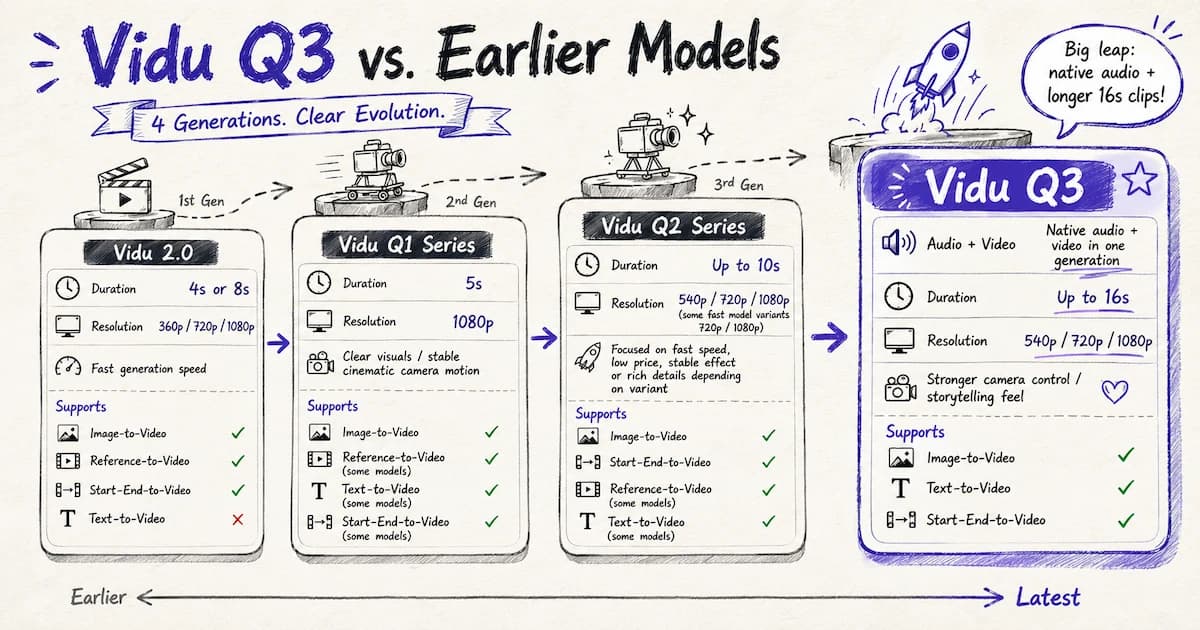
Vidu Q3 vs. Earlier Models
Vidu Q3 is the right choice when your video requires:
- Dialogue with synchronized lip movement
- Multiple camera angles in one generation
- Combined audio and visual storytelling
- 16-second shot length
Vidu Q1 or Q2 Standard are still useful for quick generations, image-to-video animation, and cost-efficient outputs where audio sync is not the priority.
Vidu Q2 Pro and ViduClaw: Reference-Based Creation
Vidu Q2 Pro is built for visual consistency and style control, using a six-slot multimodal input system that accepts up to four reference images and up to two reference videos simultaneously. This gives you granular control over character appearance, scene environment, object placement, and motion style — all within a single generation.
Key Q2 Pro capabilities:
- Character reference — maintain a specific character's look across multiple shots
- Environment reference — lock a background or location across scenes
- Motion reference — use a reference video to define the type of camera movement or action
- Style reference — render the same scene in a specific visual style (black-and-white film, Wes Anderson aesthetic, anime, sci-fi cinematic) by uploading a style sample
Vidu Q2 Pro held the second global ranking on the Artificial Analysis AI video generation leaderboard at the time of this review — above Runway Gen-4.5, Google Veo 3.1, and OpenAI Sora 2 Pro.
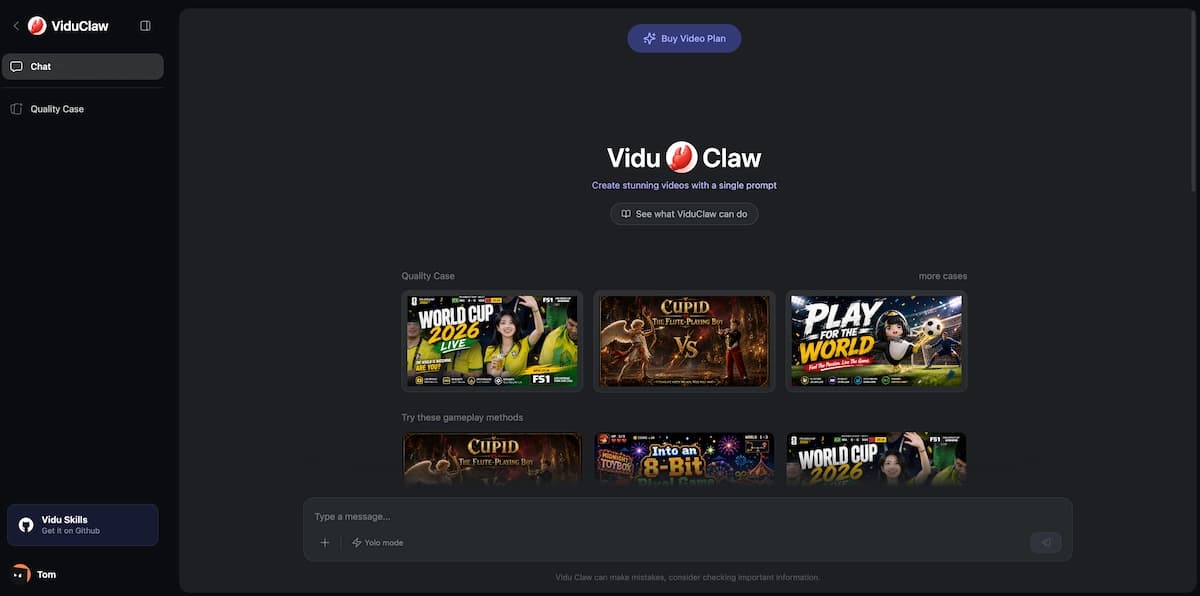
ViduClaw
ViduClaw is Vidu's dedicated marketing content creation mode. It allows you to upload a reference — a product, character, or scene — and generate marketing-ready video content aligned to that reference. Key ViduClaw features include:
- Reference to Video — generate video content anchored to a specific subject
- Multi-Reference Consistency — keep people, objects, and scenes consistent across a generation using up to seven uploaded images
- My References — save characters, props, and scenes to your account for reuse across multiple projects without re-uploading
For brand teams, SMBs, and indie creators who need to produce consistent visual content around a recurring character or product, ViduClaw and the My References library together form one of the most practically useful toolsets in the current AI video landscape.
Vidu vs. the Competition
Vidu competes directly with Runway, Kling, Pika, Hailuo, Google Veo, OpenAI Sora, and VidMuse in the AI video generation space. The right choice depends less on a single leaderboard position and more on your production goal: one-shot cinematic clips, recurring-character consistency, stylized animation, music video assembly, or full workflow control.
| Tool | Best fit | Main strength | Tradeoff | Music video workflow fit |
|---|---|---|---|---|
| Vidu | Creators who need image-to-video, anime, multi-reference consistency, and Q3 audio-video shots | Reference-to-video, Vidu Q3 audio-video sync, anime output, low entry price | No deep third-party editing integrations; strict no-refund policy; shorter single-shot duration | Strong for individual shots; stronger when paired with VidMuse for full MV structure |
| Runway | Filmmakers and creators who want polished live-action clips and manual direction | Cinematic clip quality, broad creator adoption, strong shot-level control | Full music videos still require external timeline assembly and separate audio workflow | Good for individual cinematic shots, less complete for audio-reactive MV production |
| Kling | Character, product, and commercial video creators who need strong motion and identity control | High-motion shots, character control, commercial-style generation | Pricing and availability vary by platform; prompt complexity matters | Strong shot generator inside model-matrix workflows such as VidMuse |
| Google Veo | Teams prioritizing high-fidelity realism and Google ecosystem access | Realistic motion, strong temporal consistency, strong text-to-video/image-to-video quality | Access, pricing, and duration limits vary by product surface | Excellent for premium shots, but still needs structure and assembly for full MV output |
| OpenAI Sora | Creators exploring broad cinematic text-to-video concepts | Flexible prompt interpretation and cinematic scene construction | Workflow details and access can vary; not music-video-specific by default | Useful for concept shots, less direct for complete track-to-MV production |
| Pika | Social creators and fast experimental video makers | Fast iteration, playful effects, accessible short-form outputs | Less suitable for complex long-form narrative continuity | Good for short effects and social clips, weaker for full music video planning |
| Hailuo | Creators who want fast, expressive motion and stylized video alternatives | Strong motion dynamics and creative look development | May need additional tools for scene planning and final assembly | Useful for selected high-energy shots inside a multi-model MV pipeline |
| VidMuse | Musicians and creators turning tracks into complete music videos | Creative Brief → Reference Generation → Scene & Shot List → Storyboard → Video Generation, with Vidu Q3 in the model matrix | It is a workflow platform rather than a single standalone video model | Best fit when the output is a full MV rather than isolated Vidu clips |
Multi-reference consistency: Vidu's ability to maintain visual consistency across multiple characters and scene elements using up to seven reference inputs is not closely matched by most competitors. Runway has strong cinematic output, but granular character consistency control at this level requires additional workflow steps. Kling also performs well for character and product continuity, especially in commercial-style use cases, but Vidu's My References and ViduClaw workflow make recurring assets easier to reuse inside Vidu itself.
Native audio-video generation: Vidu Q3's ability to generate synchronized dialogue, lip movement, and atmospheric audio in a single output is a clear differentiator as of 2026. Most competing platforms still require separate audio generation and manual synchronization, especially when the goal is a character speaking a line inside the generated shot. Veo and Sora can be strong for cinematic visuals, but Vidu's Q3 positioning is especially practical for short story beats with dialogue.
Anime quality: Vidu's anime and 2D animation output is consistently rated best-in-class by creators who have tested across platforms. Tools like Sora and Veo focus primarily on photorealistic output; Vidu serves the stylized animation niche more effectively. Pika can be useful for playful effects and quick social formats, but Vidu is better aligned with creators bringing still anime art or character images to life.
Pricing and access: At $8/month for commercial use with no watermark, Vidu's Standard plan is among the most competitive entry-level offers in the AI video space. Runway, Veo, Sora, and Kling access can be more fragmented depending on whether you use first-party platforms, API providers, or third-party creative tools. Vidu's free tier and off-peak generation make it easier to test before committing, though the no-refund policy makes that testing step important.
Benchmark ranking: Vidu Q2 Pro's second-place global ranking on the Artificial Analysis leaderboard — above Runway Gen-4.5, Veo 3.1, and Sora 2 Pro — is a meaningful signal of generation quality, though real-world output varies by use case and prompt specificity. Leaderboards also change quickly, so the practical question is whether a model solves your actual job: reference consistency, audio sync, anime motion, product visuals, or full music video assembly.
Workflow completeness: Vidu is strongest when the job is generating high-quality short clips from prompts, images, or references. It is less complete when the job is planning a full 30-second to 2-minute music video, aligning shots to a song, preserving assets across scenes, and editing the final sequence. That is where VidMuse complements Vidu: VidMuse handles Creative Brief, Scene & Shot List, Storyboard, Timeline Editor, Shot Refine by Quoting, and Asset Library & Memory, while Vidu Q3 can serve as one of the generation engines inside the workflow.
Where Vidu has less advantage: For creators who primarily need photorealistic live-action output at very long durations, or who require deep integrations with professional editing suites like Adobe Premiere or DaVinci Resolve, dedicated tools may serve better. Vidu currently has no documented third-party editing integrations outside of its own platform and API.
Is Vidu AI Safe and Legit?
Vidu AI is a legitimate platform with millions of active users, a public pricing page, a documented API, a Discord community, and a Creator Partner Program. It uses Stripe for payment processing and operates standard subscription billing with auto-renewal.
A few things worth knowing before you sign up:
- Is Vidu Chinese? Yes. Vidu is developed by a China-based AI company. For most creators, this makes no practical difference to day-to-day use. Enterprises with data residency requirements may want to review Vidu's privacy policy in detail before committing.
- Is Vidu free? Yes, partially. There is a genuine free tier that includes bonus starter credits and unlimited video generation during off-peak hours — not just a time-limited trial.
- Does Vidu watermark free videos? Free-tier outputs may include a watermark. Paid plans starting at $8/month include commercial use rights with no watermark.
- Is Vidu Studio AI different from Vidu? No — Vidu Studio and Vidu Studio AI refer to the same platform, vidu.com.
The main caution: Vidu operates a strict no-refund policy. There is no money-back guarantee on paid plans. Given the generous free tier and unlimited off-peak mode, there's no strong reason to pay before you've thoroughly tested the free version.
Who Should Use Vidu AI — and Who Shouldn't
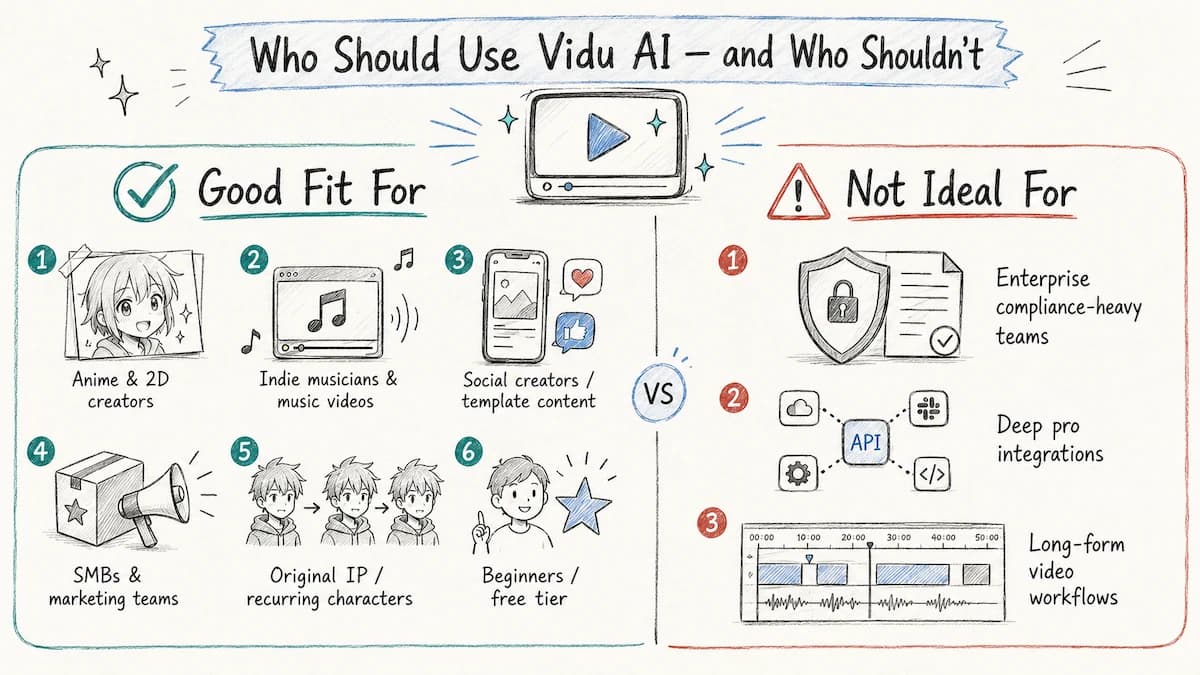
Vidu is well-suited for:
- Anime and 2D animation creators who want to produce original animated content at scale without a full production team
- Indie musicians and music video producers who need cinematic, character-consistent video for tracks created with tools like Suno AI
- Social media creators who want fast, on-trend video content from the template library
- SMBs and marketing teams who need to animate product imagery or create ad content at volume
- Original IP creators building content around recurring characters who need multi-reference consistency across a body of work
- Beginners who want to experiment risk-free using the free tier and off-peak unlimited mode
Vidu may not be the best fit for:
- Enterprises that require formal SLA documentation, GDPR/CCPA compliance records, or granular data retention policies — Vidu's public security documentation is general rather than technical
- Creators who need deep third-party integrations with professional editing platforms
- Users who require very long video outputs (beyond 16 seconds per shot) as a primary workflow need
Common Mistakes When Using Vidu AI
Most quality issues in Vidu-generated video come down to prompt specificity, not model limitations. These are the most common errors:
-
Writing vague prompts: "A person walking in a city" will produce generic output. Specify the camera movement, lighting quality, time of day, character appearance, and emotional tone. The more precise your prompt, the more predictable the output.
-
Skipping reference images when consistency matters: If your video features a specific character, always upload a reference image. Text descriptions alone cannot reliably maintain character appearance across multiple generations.
-
Choosing the wrong model for the task: Q3 is designed for audio-visual storytelling and multi-shot sequences. For simple image animation without audio, Q1 or Q2 Standard is faster and more credit-efficient.
-
Not using First & Last Frame Control for transitions: If you have a specific start and end state for an animation, use First & Last Frame Control instead of hoping the model infers the right trajectory. This eliminates the most common motion-direction errors.
-
Generating only one output: Vidu typically returns multiple output variants per generation. Always review all variants before downloading — the second or third output frequently outperforms the first.
-
Not saving assets to My References: If you're building a multi-video project around the same characters or environments, save them to My References immediately. Recreating reference consistency from scratch across multiple sessions is time-consuming and produces less consistent results.
Take Home
Vidu AI has earned its position among the top-tier AI video generation platforms in 2026. Its combination of Vidu Q3's audio-visual storytelling, Q2 Pro's reference-based consistency, and ViduClaw's marketing-focused creation tools covers a wider range of practical creator needs than most single-platform competitors.
For indie musicians, anime creators, social media producers, and marketing teams alike, Vidu offers a credible path to professional-quality video output at a price point that's genuinely accessible — starting free, scaling affordably.
If you're producing music video content, pair Vidu with VidMuse for the complete workflow: VidMuse handles the creative brief, scene structure, and storyboard; Vidu handles the generation. Together, they bring studio-level music video production within reach of any creator with a track and a vision.
Create Your AI Video with Vidu Q3
Turn your idea into a video with Vidu Q3 inside VidMuse.

Written By
VidMuse Team
Continue Reading
Latest blog posts related to AI video creation.
Free Music Visualizer: 10 Best Free Tools in 2026
Compare 10 best free music visualizers in 2026. Waveform tools, AI music video makers, watermark policies, export limits, and which tool fits your workflow.
How to Make Product Video Ads with AI (Step-by-Step)
Learn how to make product video ads with AI step by step. Full 6-phase VidMuse tutorial, input tips, ad type guide, and alternative approaches compared.
Best AI Clone Video Generator 2026: 7 Tools Compared
Compare the 7 best AI clone video generators in 2026. Avatar clones, viral ad clones, pricing, features, and how to pick the right tool for your workflow.