

How to Find the Tempo of a Song
Finding the tempo of a song means determining how many beats occur per minute — a value known as BPM (beats per minute). You can find it in four main ways: tap along to the beat and count, use a free online analyzer like Tunebat, detect it inside a DAW like Ableton or Logic Pro, or read it from sheet music notation. For most people, an online BPM tool takes under 10 seconds and gives a precise reading. If you're also creating music videos, platforms like VidMuse AI go a step further — analyzing your uploaded track for BPM, key, lyrics, song structure, beats, downbeats, and phrases, then using all of that data to plan and generate your scenes automatically.
Key Takeaways
- Tempo = BPM (beats per minute). It measures how fast or slow a song moves and directly shapes its mood and energy.
- The fastest method: upload your audio file to Tunebat's free Analyzer — it detects key and BPM in seconds, runs entirely in your browser, and never sends your file to an external server.
- Manual tap method works without any tools: tap your finger to the beat for 15 seconds, count the taps, and multiply by 4 to estimate BPM.
- DAWs like Ableton, Logic Pro, and FL Studio include built-in tempo detection for precise grid alignment — essential for remixing and editing.
- For music video creators, knowing BPM isn't just trivia — it determines cut timing, scene transitions, and visual rhythm. VidMuse AI reads all of this automatically when you upload a track.
What Is Tempo and Why Does It Matter?
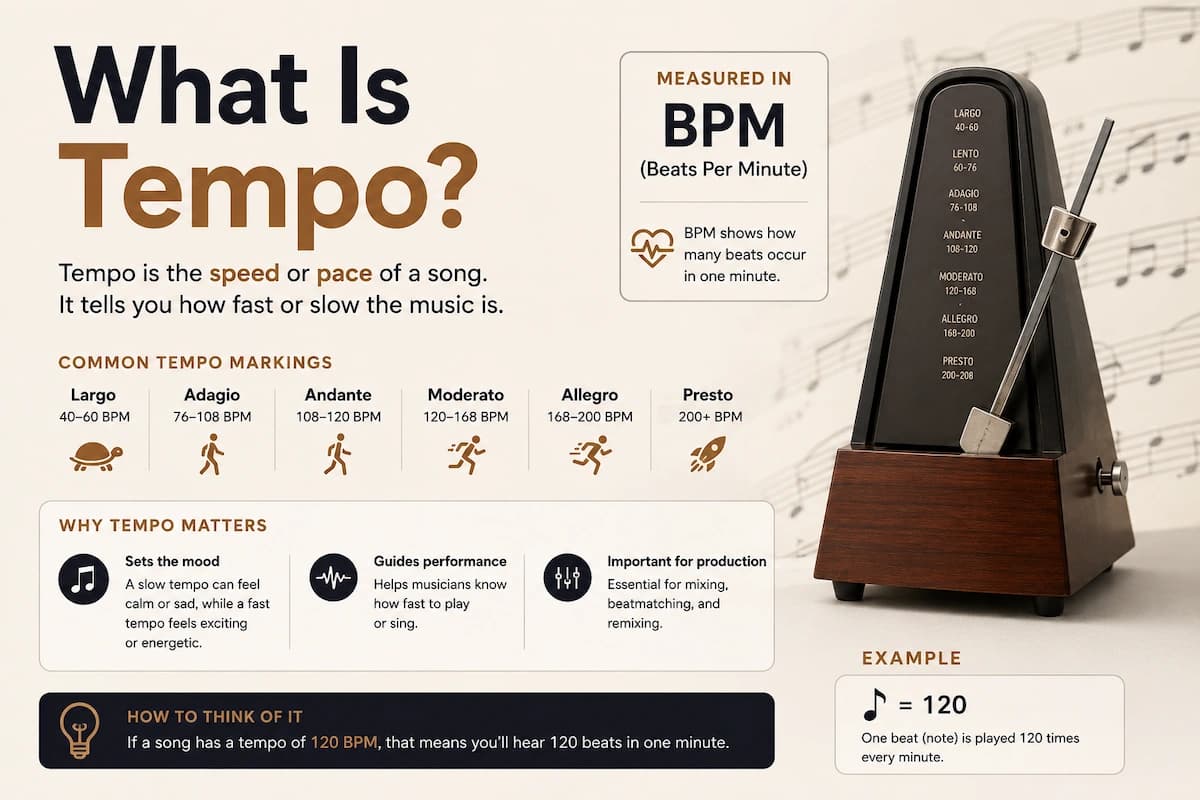
Tempo is the speed of a song, expressed as beats per minute (BPM). A song at 60 BPM has one beat per second; a track at 140 BPM feels nearly twice as fast. The word "tempo" comes from the Italian for "time," and it has been a core element of musical notation for centuries.
Tempo does much more than set speed. It determines:
- Mood and energy — faster tempos (140+ BPM) convey excitement or urgency; slower tempos (60–80 BPM) suggest calm, melancholy, or intimacy.
- Genre identity — hip-hop typically runs 85–100 BPM; house music around 120–130; drum and bass upward of 160.
- Synchronization — musicians playing together, dancers choreographing routines, and video editors cutting to music all need an accurate BPM to stay in sync.
- Remixing and production — matching or adjusting tempo is the first step when layering tracks, creating mashups, or building a DJ set.
Understanding tempo is a prerequisite for almost any creative decision involving music.
How to Use BPM When Making a Music Video
BPM directly determines how a music video should be edited, paced, and structured. Once you know the tempo of a song, every creative decision downstream — cut timing, scene length, transition style — can be anchored to it.
Here's how producers use BPM in video:
- Cut on the beat. At 120 BPM, one beat occurs every 0.5 seconds. A hard cut every two beats = one cut per second — creating a high-energy, rhythmically tight edit.
- Align scene changes to phrases. Most songs are built on 4- or 8-bar phrases. A new scene at the top of each phrase keeps visual structure coherent with musical structure.
- Match visual energy to tempo. Slow songs (60–80 BPM) suit wide, lingering shots and slow dissolves. Fast songs (140+ BPM) suit quick cuts, flash edits, and motion.
- Use downbeats for impact moments. The first beat of each bar is the strongest. Place the visual "hit" — a key lyric reveal, a chorus kick, a character close-up — on the downbeat.
Manual calculation of all this from a BPM number is feasible but time-consuming. The more efficient approach is to use a platform that reads the song's structure automatically and maps it to visuals.
VidMuse AI: Automatic Tempo Analysis for Music Video Creation
VidMuse AI is an AI Director platform that analyzes your uploaded audio track and uses it to generate a full music video automatically — handling the BPM detection, key analysis, lyric parsing, beat mapping, and scene planning for you.
Find the Tempo of a Song in Minutes
Analyze the song track and turn your music track into a video with VidMuse AI.
When you upload a track to VidMuse, the platform analyzes:
- BPM and tempo — to pace cuts and transitions correctly
- Musical key — to inform color grading and visual tone
- Lyrics — to generate visuals that match the song's narrative
- Song structure — verse, chorus, bridge breakdowns
- Beats and downbeats — for frame-accurate cut placement
- Phrases — to group scenes coherently
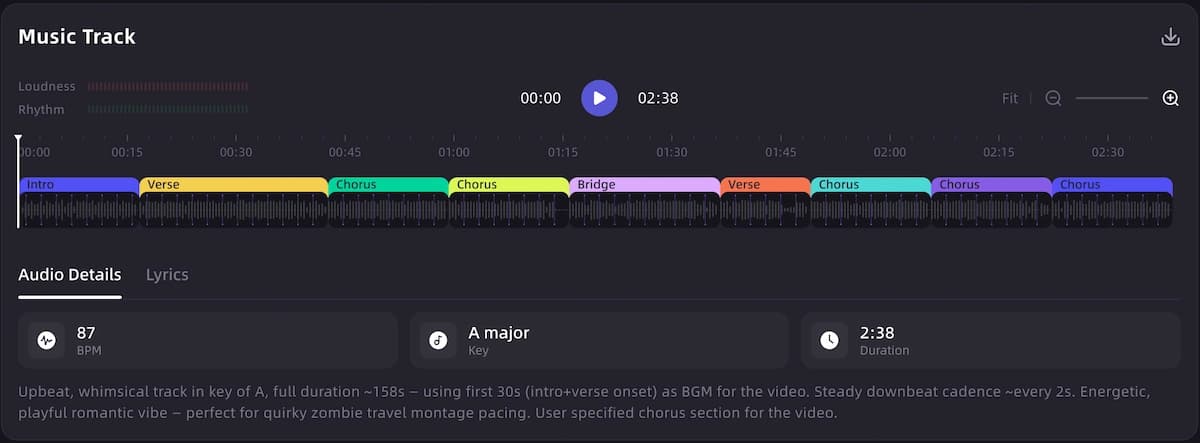
This analysis feeds directly into VidMuse's agent-based workflow: Creative Brief → Reference Generation → Scene & Shot List → Storyboard → Video Generation. Rather than generating one-shot clips from a prompt, VidMuse plans the entire video around the song's actual musical DNA.
Generation modes: The Studio mode (flagship quality) uses the full model matrix including Seedance 2.0 Pro, Kling V3.0 Pro, Veo 3.1, Sora 2 Pro, and others for cinematic output. The Lite mode (Seed series) runs faster and more cost-efficiently for quick previews and iteration.
Template types available: Story MV, Abstract MV, Performance MV, Viral Short, TVC, and Explainer — each designed around different use cases and rhythmic demands.
For indie musicians who have produced a track in Suno AI or similar tools: VidMuse can accept that audio file, analyze its tempo and structure, and produce a studio-quality music video without requiring video editing skills or a production budget.
The Shot Refine by Quoting feature (VidMuse 2.0) lets you quote specific sections of a generated video and regenerate only those shots — useful when one scene doesn't match the rhythmic energy of a particular passage.
For more on the full workflow, see the VidMuse AI guide and AI music video generator documentation.
How to Find the Tempo of a Song: 4 Core Methods
You can find the tempo of a song using listening and counting, digital tools, DAWs, or musical notation. Each approach suits a different level of precision and a different workflow. Here's how each one works.
Use the tap method
Tap to the main pulse for 15 seconds, count the taps, and multiply by 4 to estimate BPM.
Upload to an online BPM analyzer
Use a browser-based tool like Tunebat to analyze the audio file and return BPM and key.
Detect tempo inside a DAW
Use Ableton, Logic Pro, or FL Studio when you need precise grid alignment for production.
Read the score
If sheet music exists, check the metronome mark, Italian tempo term, or descriptive tempo note.
Method 1: The Tap Method (No Tools Required)
The tap method is the fastest way to estimate the tempo of a song without any software. It requires nothing except your finger and a clock.
Steps:
- Play the song and listen for the main pulse — the steady beat you'd nod your head or tap your foot to.
- Start a timer for 15 seconds.
- Tap your finger on a surface once per beat throughout the full 15 seconds.
- Count the total number of taps.
- Multiply by 4 to get the approximate BPM.
Example: If you counted 30 taps in 15 seconds, 30 × 4 = 120 BPM.
For a more accurate result, use a 30-second window and multiply your tap count by 2. Many online tools (including Tunebat's BPM Tapper) let you tap directly on a button or keyboard and calculate the average for you — removing the need to do the math manually.
Limitation: The tap method is an estimate. Human timing is imperfect, and complex rhythms or songs with shifting tempos can throw off the count. For production work, always verify with a digital tool.
Method 2: Online BPM Analyzer Tools
Online tempo analyzers are the most accessible way to find the exact BPM of a song, requiring no software installation and no music theory knowledge.
The workflow is the same across most tools:
- Download or locate your audio file (MP3, WAV, FLAC, or AAC).
- Go to the tool's website.
- Upload or drag-and-drop your file.
- Wait a few seconds while the algorithm analyzes the audio.
- Read the BPM (and often the musical key) from the results.
The top free tools are covered in the dedicated section below.
Method 3: DAW Tempo Detection
DAWs (Digital Audio Workstations) like Ableton Live, Logic Pro, and FL Studio include built-in tempo detection that can analyze an audio file and snap it to a project grid. This is the preferred method for producers who plan to remix, edit, or sync other elements to the track.
In Ableton Live, for example, you can right-click a clip and select "Warp" to let the software detect the tempo automatically. Logic Pro's "Smart Tempo" feature continuously analyzes an imported file and maps every beat to the timeline.
When to use DAW detection:
- You're building a remix and need precise grid alignment.
- You're editing vocals or instruments and need cuts to fall on exact beats.
- The song has tempo changes or rubato sections that a simple BPM number won't capture.
Limitation: DAW detection is overkill for casual use. It requires owning or subscribing to the software and a steeper learning curve.
Method 4: Reading Musical Notation
If the song has a published score, the tempo is usually written directly on the page. Common notation formats include:
- Metronome marks — a note value followed by an equals sign and a number (e.g., ♩= 120), indicating exactly 120 quarter-note beats per minute.
- Italian tempo terms — Largo (~40–60 BPM), Andante (~76–108 BPM), Allegro (~120–156 BPM), Presto (~168–200 BPM). These are approximate ranges, not fixed numbers.
- Descriptive phrases — "with a lively feel" or "slow and steady" — which require interpretation.
Sheet music is the most authoritative source when it exists. For pop, electronic, or indie tracks that were never formally published, this method won't apply.
Best Free Tools to Find the BPM of Any Song
Several free online tools can identify the tempo of a song in seconds — the right choice depends on whether you want to upload a file, tap manually, or look up a known track.
Tunebat Analyzer
Tunebat's Analyzer lets you drag and drop audio files — MP3, WAV, FLAC, and more — and receive key and BPM results automatically within seconds. The analysis runs entirely inside your browser, so your files are never sent to an external server. Tunebat's algorithms were developed and tuned by audio experts and PhD holders to maximize accuracy, and the platform also includes a BPM Tapper for manual tap-based detection.
The free tier covers BPM and key. Tunebat's Pro plan also surfaces sentiment analysis metrics like energy, danceability, and happiness — useful for producers trying to fine-tune the emotional character of a set.
Best for: Musicians, DJs, and producers who want fast, accurate file-based analysis without installing software.
SongBPM.com
SongBPM.com lets you search any song by name and returns BPM and key data instantly — useful when you don't have the audio file locally but know the track name. It's particularly popular with runners looking to match playlist energy to workout pace.
Best for: Looking up the BPM of a commercially released song by name.
VocalRemover Key & BPM Finder
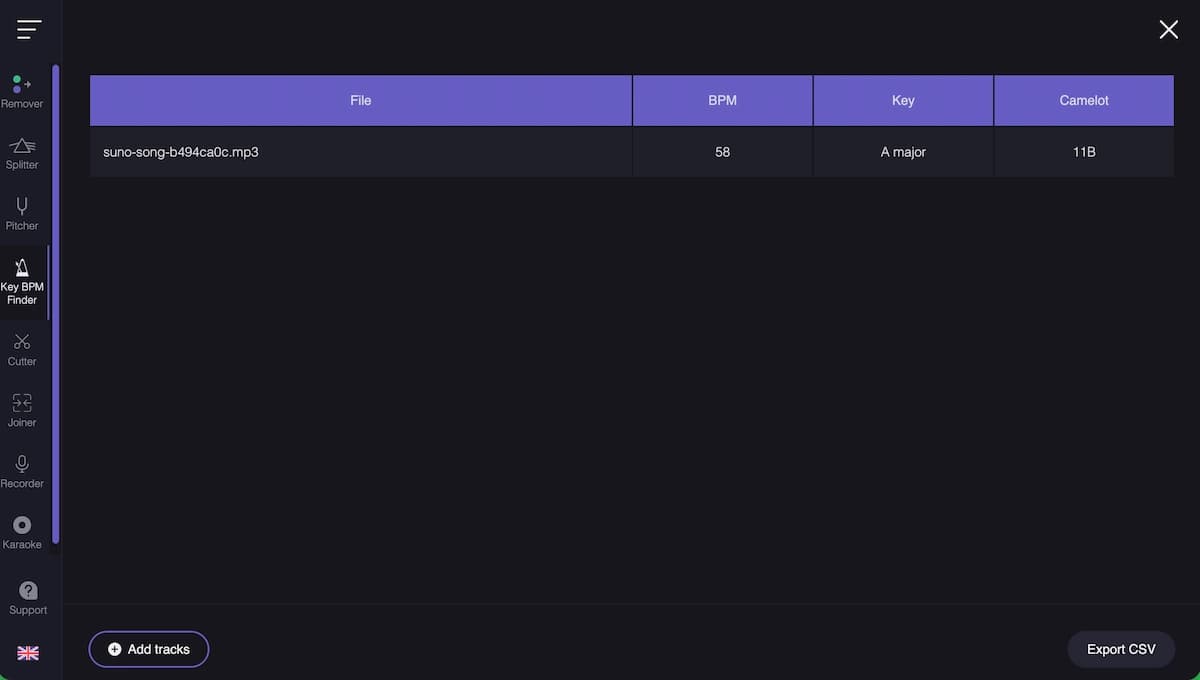
VocalRemover's Key & BPM Finder analyzes uploaded audio and estimates pitch and tempo — it also includes a tap tempo tool and a pitch-shifting feature that lets you transpose songs to a different key and BPM. It's a serverless app, meaning no data leaves your device.
Best for: Users who also need pitch-shifting or vocal removal alongside BPM detection.
Tap BPM Tools (Metronome Online, Tunebat BPM Tapper)
Multiple free tap-based counters exist for situations where you want to measure a live performance, a song playing in a room, or a track you're listening to on streaming without having the file. You tap along; the tool averages your taps and returns a BPM estimate.
Best for: Quick estimates on the fly, live performances, or tracks you can't download.
How to Find the Rhythm of a Song (Beyond BPM)
Rhythm and tempo are related but not the same thing. Understanding this distinction helps you work with music more precisely.
Tempo is the speed — one number, measured in BPM.
Rhythm is the pattern of how beats are grouped and accented within that speed. Two songs can share an identical tempo of 120 BPM but feel completely different because of their rhythmic patterns.
To find the rhythm of a song, listen for:
- Time signature — how many beats are in each measure. Common time (4/4) means four beats per bar; waltz time (3/4) means three. Most pop music uses 4/4.
- Downbeats and upbeats — the downbeat (beat 1) is the strongest pulse; knowing where it falls tells you the "one" of the bar.
- Subdivision — whether the beat divides into straight eighth notes (giving a tighter, more electronic feel) or swung/triplet patterns (giving a jazz or funk feel).
- Syncopation — accents that fall off the main beats, common in funk, reggae, and hip-hop.
To train your ear for rhythm:
- Find the tempo using one of the methods above.
- Count "1-2-3-4" over the music and locate where beat 1 consistently lands.
- Notice where the snare or clap falls — in most pop and rock it lands on beats 2 and 4.
- Listen to whether the groove feels "straight" or "swung."
This deeper analysis matters most when you're choreographing movement, editing video to music, or building a remix that needs to honor the original rhythmic feel.
Common Mistakes When Finding Song Tempo
Most errors in tempo detection come from one of four causes: listening to the wrong rhythmic layer, using too short a sample window, confusing half-time/double-time feels, or treating a tempo-variable song as if it were static.
- Tapping to the melody instead of the beat. The melody often moves faster or slower than the underlying pulse. Always tap to the kick drum, bass line, or the "groove" pulse — not the vocal rhythm.
- Using too short a counting window. Counting for 5 seconds and multiplying by 12 amplifies any timing error significantly. Use at least 15 seconds; 30 seconds is more reliable.
- Confusing half-time and double-time. A track might feel like it's at 70 BPM when it's actually 140 BPM with a half-time drum feel (snare on beat 3 only). If your tap result seems unusually slow or fast for the genre, try doubling or halving it.
- Assuming a constant tempo. Live recordings, jazz, classical, and some indie tracks have a rubato feel — the tempo breathes and shifts. A single BPM number is an average in these cases, not an exact value.
- Relying on streaming metadata blindly. BPM data displayed in apps like Spotify comes from automated algorithms and can occasionally be off by half-time/double-time errors. Always verify against a tap or file-based analyzer if precision matters.
FAQ
How do I find the tempo of a song without any tools?
Use the tap method: play the song, tap your finger to the beat for 15 seconds, count the taps, and multiply by 4. For example, 32 taps × 4 = 128 BPM. It's an estimate rather than an exact reading, but it's accurate enough for most practical purposes. For anything requiring precision — remixing, video editing, live performance sync — use a digital BPM analyzer.
What is the easiest free website to find the BPM of a song?
Tunebat's Analyzer (tunebat.com/Analyzer) is one of the most widely used free options. You upload an audio file, and it returns BPM and key results in seconds. All analysis runs inside your browser, so your files are never sent to an external server. SongBPM.com is useful if you only know the song name and don't have the audio file.
What is the difference between tempo and rhythm in music?
Tempo is a single number — the speed of the beat in BPM. Rhythm is the pattern of how beats are grouped, accented, and subdivided within that tempo. Two songs can share a BPM of 120 but feel completely different because their rhythmic patterns, time signatures, and syncopation differ. Knowing both tempo and rhythm is important for dancing, editing video to music, and arranging compositions.
How do I find the tempo of a song in Ableton, Logic Pro, or FL Studio?
Each major DAW includes built-in tempo detection. In Ableton Live, enable Warp on an audio clip and the software analyzes and maps the tempo. Logic Pro's Smart Tempo feature continuously reads tempo from an imported file. FL Studio's Beat Detection function is available under the audio tools menu. These methods are most useful when you plan to edit, remix, or layer additional elements over the original track, since they align everything to the project's BPM grid.
How do I find the tempo of a song on Spotify?
Spotify doesn't display BPM natively in its standard interface. The most straightforward workaround is to search the song on SongBPM.com (which uses Spotify data) or download the track and analyze it in Tunebat. Spotify provides BPM values in its music database using its own estimation algorithms, and Tunebat surfaces this data alongside its own in-browser analysis.
Can AI tools analyze the tempo of a song automatically?
Yes. Platforms like VidMuse AI go beyond simple BPM detection — when you upload a track, the system analyzes BPM, key, song structure, beats and downbeats, phrases, and lyrics simultaneously. This data is then used to automatically generate a music video with scene timing and transitions anchored to the actual musical structure of the track, without requiring manual input from the creator.
What BPM ranges correspond to common music genres?
While tempo varies widely within any genre, rough reference ranges include: hip-hop 85–100 BPM, pop 100–130 BPM, house 120–130 BPM, techno 130–150 BPM, drum and bass 160–180 BPM, ballads 60–80 BPM, and reggaeton 85–100 BPM. These are starting points for orientation, not fixed rules.
How does knowing a song's tempo help when creating a music video?
BPM determines cut timing and visual pacing. At 120 BPM, each beat is 0.5 seconds — so a cut every two beats creates an edit every second. Knowing the downbeat positions helps you place visual impact moments on the strongest beats. Phrase structure (usually every 4 or 8 bars) guides scene changes. Most professional music video editors work directly from a BPM-mapped timeline to keep the edit rhythmically coherent with the track.
Conclusion
Finding the tempo of a song is one of the most fundamental skills in music — and also one of the most practical. Whether you're a musician preparing to play with others, a dancer syncing choreography, a DJ building a seamless set, or a creator making a music video, knowing the BPM of a track gives you a precise handle on its rhythmic identity.
For quick, casual use, the tap method requires nothing but your finger. For accurate, reliable results, a free online analyzer like Tunebat delivers a precise BPM and key reading in seconds. For production-level work, your DAW of choice handles tempo detection and grid alignment natively.
If you're taking the next step from audio to visual — turning your track into a music video — VidMuse AI removes the need to manually translate BPM into edit decisions. It reads your song's musical structure automatically and builds a complete visual production around it. The same workflow can support a music visualizer, Music to video AI, or a free AI music video generator entry point, depending on how far you want to take the track.
Upload your track to VidMuse AI and let it handle the tempo analysis, scene planning, and video generation for you. If you are publishing commercially, review the AI music video copyright guide before release.
Find the Tempo of a Song in Minutes
Analyze the song track and turn your music track into a video with VidMuse AI.

Written By
VidMuse Team
Continue Reading
Latest blog posts related to AI video creation.
Free Music Visualizer: 10 Best Free Tools in 2026
Compare 10 best free music visualizers in 2026. Waveform tools, AI music video makers, watermark policies, export limits, and which tool fits your workflow.

How to Make Product Video Ads with AI (Step-by-Step)
Learn how to make product video ads with AI step by step. Full 6-phase VidMuse tutorial, input tips, ad type guide, and alternative approaches compared.

Best AI Clone Video Generator 2026: 7 Tools Compared
Compare the 7 best AI clone video generators in 2026. Avatar clones, viral ad clones, pricing, features, and how to pick the right tool for your workflow.