

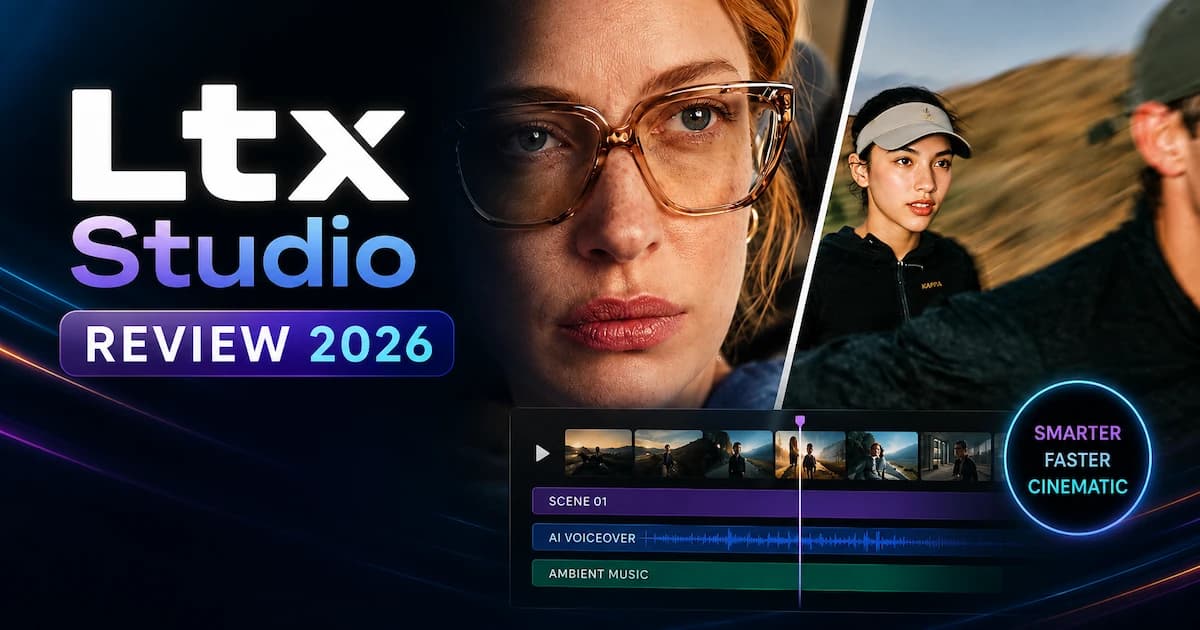
LTX Studio is a browser-based AI video production platform built by Lightricks, designed for filmmakers, creative agencies, and marketing teams. In this review, we cover what LTX Studio actually does, how its pricing tiers work, where its LTX AI model fits the broader landscape, and — critically — when a specialized tool like VidMuse is a stronger choice for music video creators and indie musicians.
If you're here because you searched "ltx studio review" or you're comparing AI video platforms before committing to a plan, you're in the right place. This guide covers everything from the free tier to the Pro plan, the LTX-2.3 model, and an honest look at the platform's tradeoffs.
Create Your AI Video in Minutes
Turn your idea into a video with VidMuse.
Key Takeaways
- LTX Studio is a professional-grade AI video production suite aimed at filmmakers, agencies, and brand studios — not primarily music video creators.
- LTX-2.3 is its flagship model, offering native portrait video (up to 1080×1920), HDR output, audio-to-video generation, and clips up to 20 seconds.
- Pricing starts free (800 one-time credits) and scales to $35/month (Standard, billed monthly) and $125/month (Pro) — commercial use requires Standard or above.
- LTX Studio lacks native AI music generation, which limits its utility for indie musicians who need a seamless audio-visual creation pipeline.
- VidMuse fills that gap directly: its agent-based workflow plans full music videos, integrates Suno AI for original track creation, and supports 20+ video generation models including Kling V3.0 Pro, Veo 3.1, and Seedance 2.0.
What Is LTX Studio?
LTX Studio is a web-based AI creative suite developed by Lightricks, a company also known for Facetune and Videoleap. The platform positions itself as an all-in-one production environment for professional video creation — from scripting and storyboarding through to final editing and delivery.
Its stated audience includes filmmakers, advertising agencies, TV and media networks, and in-house brand studios. That professional focus shapes every design decision on the platform: the workflow is built around structured production pipelines rather than quick one-shot generation.
The platform is desktop-only. LTX Studio is not available as a mobile app, which matters if you work across devices. No download is required; everything runs in a browser at ltx.studio.
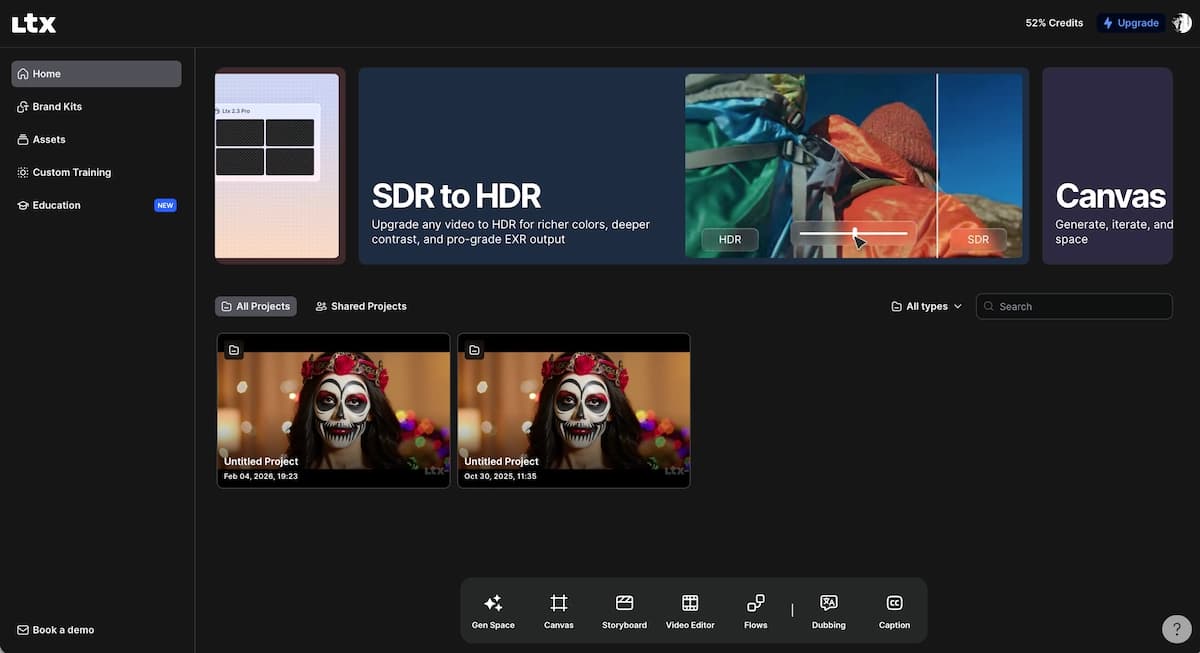
LTX AI Model: What Is LTX-2.3?
LTX-2.3 is Lightricks' latest proprietary video generation engine, and it is the technological foundation powering LTX Studio AI. Understanding the model helps you understand what the platform can and cannot do.
LTX-2.3 introduces several production-relevant capabilities:
- Native portrait video up to 1080×1920, trained on portrait-orientation data rather than cropped from landscape footage
- HDR output, delivered as an IC-LoRA integration — useful for color grading in professional finishing pipelines
- Audio-to-video generation, where voice, music, and sound effects drive the pacing and motion of generated clips
- Up to 20-second clips in a single generation, which is a meaningful step up for long-form storytelling
- Open source availability: model weights are publicly available on HuggingFace, and the GitHub repository is open for inspection, fine-tuning, and self-hosting
The model is also available via a standalone API (ltx.io/model/api) for developers who want to integrate LTX video generation into their own products — with pricing separate from the LTX Studio subscription.
LTX-2.3 is what distinguishes LTX AI from older LTXV and LTX-2 iterations. It is designed for production workloads: consistent outputs across runs, stable motion, and fidelity that holds up at scale.
Core Features of LTX Studio in 2026
LTX Studio covers the entire production pipeline, from first draft to final export, within a single browser-based workspace. Here is what the platform actually offers:
Generation Space (Gen Space)
The generative workspace supports text-to-video, text-to-image, image-to-video, and video-to-video operations. You can mix text prompts with image references, control camera movement, define motion through keyframes, and apply preset visual styles — from cinematic to branded to sketch aesthetics.
Dynamic Storyboard
LTX Studio generates structured storyboards from scripts or concept descriptions. You can start from a text prompt, an uploaded script, an image, or an existing video clip. The storyboard locks your narrative structure before generation, reducing wasted credits on shots that don't fit the story.
Timeline Editor
A post-generation editing layer lets you arrange and trim shots, add sound design, and manage the pacing of your final video — all within the platform.
Elements (Consistent Characters, Objects, Locations)
One of LTX Studio's genuine differentiators is its Elements system. You can save and reuse consistent characters, objects, and locations across scenes in a project, which addresses the chronic consistency problem in AI-generated video.
Team Collaboration
Standard plan users can share projects and manage feedback collaboratively. Pro plan includes up to 3 collaborators per project. Enterprise plans support unlimited team members.
Partner Models
Beyond the native LTX-2.3 model, the platform integrates partner models at various subscription tiers:
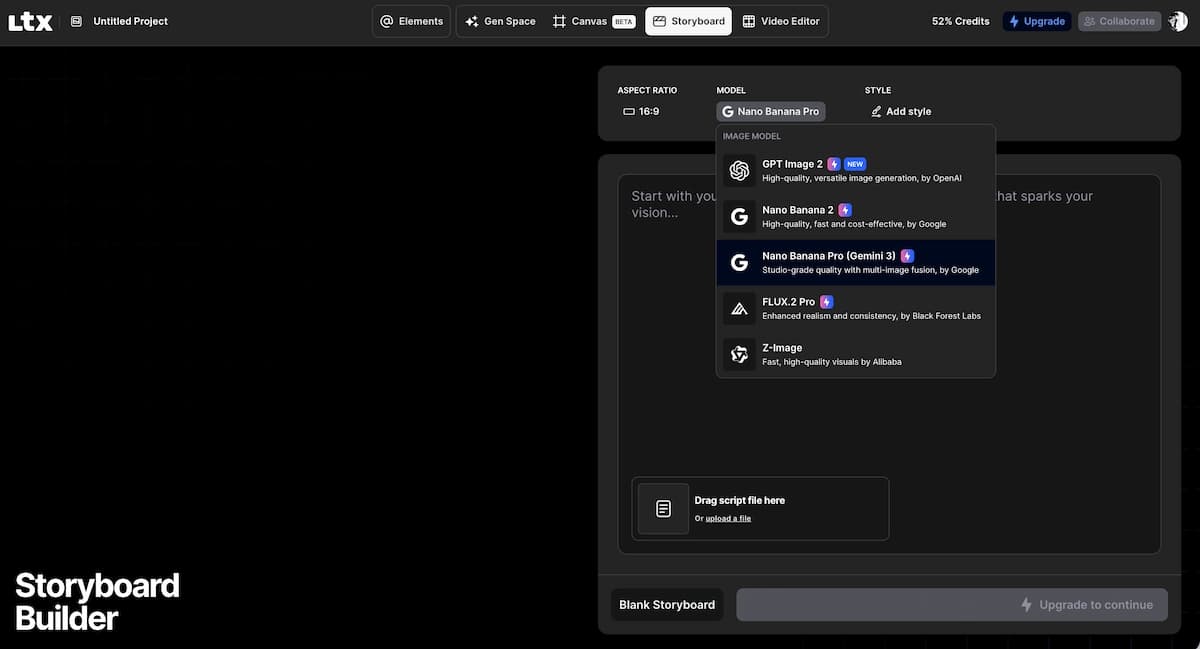
- Image models: FLUX.2 Pro, Nano Banana 2, Z-Image, ChatGPT Images 2.0
- Video models: Kling 2.6 Pro, Kling 3.0 Pro, Seedance 2.0, Veo 3.1 (Pro plan)
- The highest-tier partner models require a Standard or Pro subscription
Flows (Node-Based Automation)
A relatively advanced feature, Flows lets you build node-based automation pipelines — useful for agencies running repeatable production tasks at scale.
Pitch Deck Generator
An outlier feature: LTX Studio can generate visual pitch decks for film projects, which has clear appeal for filmmakers pitching to commissioners or studios.
LTX Studio Pricing: Plans Explained
LTX Studio price ranges from free to $125/month (billed monthly), with annual billing offering a 20% discount across paid tiers. Here is a breakdown of what each plan includes:
Free — $0 forever
- 800 one-time credits
- Access to LTX-2 and LTX-2.3 video models, Z-Image, basic camera controls, Blank Storyboards, Audio-to-Video generation, and Flows
- Personal use license only — no commercial use
Lite — $15/month (monthly) or $12/month (annual)
- 8,000 credits per month
- Adds image and video upscales, editing tools, LTX-2 4K resolution, no watermarks
- Still personal use only
Standard — $35/month (monthly) or $28/month (annual)
- 28,000 credits per month
- Unlocks commercial use license
- Adds FLUX.2 Pro, Nano Banana 2, Kling 2.6 Pro, Kling 3.0 Pro, Seedance 2.0, ChatGPT Images 2.0, AI Storyboards, Pitch Decks, and Elements consistency tools
Pro — $125/month (monthly) or $100/month (annual)
- 110,000 credits per month
- Adds Veo 3.1, Veo 3.1 Fast, Veo 3.1 Lite, maximum quality controls, 3 project collaborators, and on-demand credit top-ups
Enterprise — Custom pricing
- Custom credit volumes, unlimited collaborators, centralized brand management, SSO, SLA support, SOC2/ISO/GDPR compliance, enhanced data privacy
One note on the credits system: LTX Studio recently renamed "computing seconds" to "credits" for clarity — different generation actions consume different amounts. Check the in-app balance tracker to manage usage.
The Free and Lite plans are personal-use only. If you plan to use generated content for any business, marketing, or paid purpose, you need Standard ($35/month) or above. That is a meaningful jump for creators just starting out.
How to Use LTX Studio: Step-by-Step Workflow
LTX Studio's workflow follows a structured production pipeline: define → storyboard → generate → edit. Here is how to move through it efficiently:
Choose your starting point
Start from a text concept, uploaded script, reference image, or existing video depending on the project.
Generate a storyboard
Describe the concept or paste the script, then review and edit shot descriptions before generation.
Define your Elements
Create consistent characters, key objects, or recurring locations before generating footage.
Select your model and style
Choose LTX-2.3, Kling 3.0 Pro, Seedance 2.0, or another model, then set style and camera controls.
Generate shots individually
Generate shot by shot so missed outputs can be regenerated without affecting the whole storyboard.
Assemble in the Timeline Editor
Trim approved shots, arrange pacing, add sound design, and export from the platform.
Use Flows for repetitive tasks
Build node-based automations for repeated ad, social cut, or versioning workflows.
- Choose your starting point.
LTX Studio offers four entry points: a text concept, an uploaded script, a reference image, or an existing video. Pick whichever matches your project.
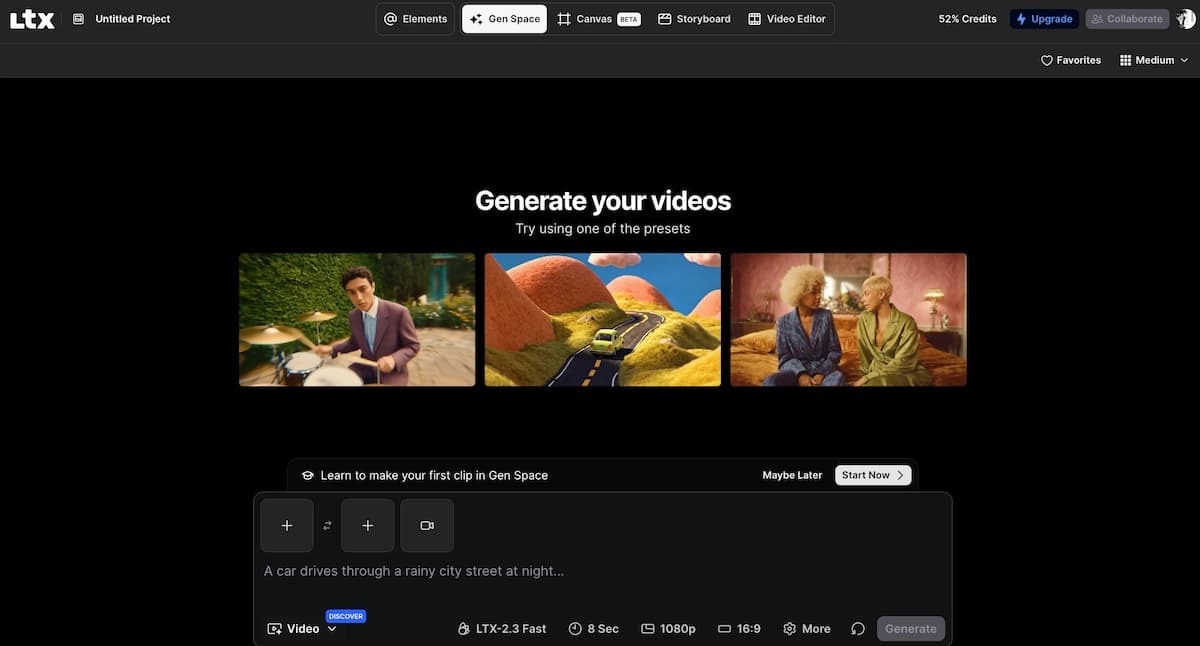
- Generate a storyboard.
Describe your concept or paste your script. The platform generates a scene breakdown with shot descriptions. Review and edit shot descriptions before moving to generation to save credits.
- Define your Elements.
Before generating footage, create and save your consistent characters, key objects, or recurring locations in the Elements panel. This step significantly improves cross-shot visual coherence.
- Select your model and style.
Choose your generation model (LTX-2.3, Kling 3.0 Pro, Seedance 2.0, etc.) and apply a visual style preset. Use the camera controls and keyframe tools for shots requiring specific motion.
- Generate shots individually.
LTX Studio generates shot by shot rather than all at once. Review each output; shots that miss the brief can be regenerated without affecting the rest of your storyboard.
- Assemble in the Timeline Editor.
Drag approved shots into the timeline, trim pacing, and add sound design. Export your final video directly from the platform.
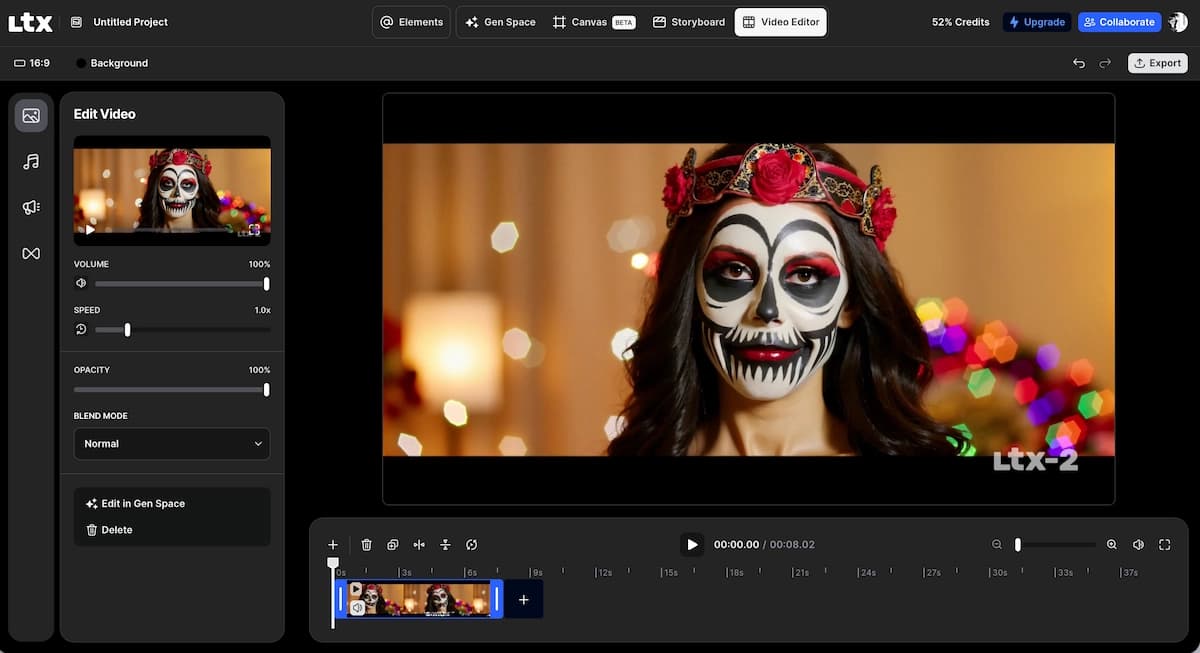
- Use Flows for repetitive tasks.
If you're producing multiple videos in a similar format (ads, social cuts, versioning), build a Flow to automate the repetitive parts of your workflow.
LTX Studio for Music Video Production: Honest Assessment
LTX Studio includes a Music Video Maker use case, but it is primarily a film and advertising tool — and that distinction matters for indie musicians and music producers. Here is an honest breakdown of where it performs well and where it falls short:
Where LTX Studio works for music videos:
- The storyboard and scene planning tools are genuinely useful for pre-visualizing a music video narrative
- The Elements consistency system helps maintain visual character continuity across scenes
- The Timeline Editor supports basic video assembly
- Multiple generation models (Kling 3.0 Pro, Seedance 2.0) can produce high-quality footage when prompted well
Where LTX Studio falls short for musicians:
- No native AI music generation. LTX Studio does not include any music creation tools. If you produce a track on Suno or Udio, you are importing it externally — there is no integrated audio-first workflow.
- Audio-to-video requires LTX-2.3, which is the proprietary model. The audio-reactive generation is promising, but the platform's music video workflow is not purpose-built around the musician's pipeline.
- Credit consumption. For an indie artist generating a 2-minute music video, the credit cost across multiple shot regenerations on a Standard plan can add up quickly.
- No music-specific templates. LTX Studio does not offer dedicated Music MV template types (Story MV, Abstract MV, Performance MV) built around the conventions of music video production.
For professional film and ad production, LTX Studio is a serious contender. For independent musicians who want to turn a Suno track into a polished 90-second visual — it is not built with you as the primary user.
LTX Studio vs. VidMuse: Which Is Right for You?
The key difference is workflow intent: LTX Studio is built for professional film and agency production; VidMuse is purpose-built as an AI Director for music video creation. Here is how the two platforms compare on the dimensions that matter most for music content creators:
Create Your AI Video in Minutes
Turn your idea into a video with VidMuse.
LTX Studio
Best for
- Scripted video workflows
- Storyboard and Elements system
- Agency collaboration tools
Watch out
- No native AI music generation
- Not built around MV templates
- Commercial use starts at Standard
VidMuse
Best for
- Suno AI integration
- Agent-based MV workflow
- Story, Abstract, Performance, and Viral Short templates
Watch out
- Less focused on agency pitch-deck workflows
Music-native workflow
VidMuse integrates Suno AI directly — you can generate an original track and a full music video within the same platform, without switching tools. LTX Studio requires you to bring your own audio from external sources.
Agent-based planning
VidMuse uses agent-based logic to plan a complete music video: it generates a Creative Brief, creates reference images, builds a Scene and Shots List, constructs a Storyboard, and then executes video generation across that full plan. LTX Studio operates on a similar structured workflow but is optimized for scripted film and ad formats rather than MV structures.
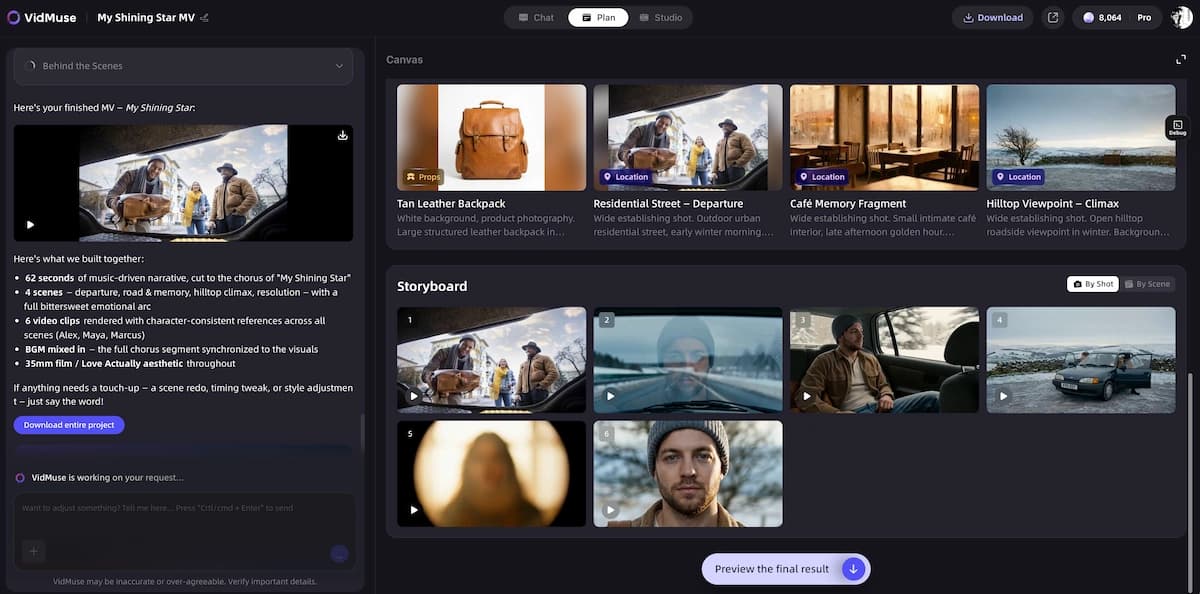
Music video templates
VidMuse offers dedicated template types — Story MV, Abstract MV, Performance MV, Viral Short, TVC, Explainer — built around the conventions of how music videos are actually structured. LTX Studio offers general production tool categories (movie maker, ad generator, storyboard) without MV-specific templates.
Model breadth
VidMuse's generation roster includes Seedance 2.0 Fast and Pro, Kling V3.0 Pro, Veo 3.1, Sora 2 Pro, Hailuo 2.3 Pro, Happy Horse 1.0, and more — alongside AI Avatar models (Omnihuman V1.5, Kling AI Avatar V2 Pro) and image generation from Midjourney V7, Flux.2-Pro, and GPT Images 2.0. LTX Studio integrates Kling 3.0 Pro and Seedance 2.0 on its Standard plan, with Veo 3.1 restricted to Pro.
Shot Refine by Quoting (VidMuse 2.0)
VidMuse 2.0's Shot Refine by Quoting feature lets you reference specific moments from generated shots to guide refinement — a workflow tool specifically designed for the iterative nature of music video production, where a visual idea needs to evolve across multiple shots.
When LTX Studio is the right choice:
- You are a filmmaker, advertiser, or agency producing scripted video content
- You need team collaboration tools and brand management at scale
- You want a platform with an open-source model you can self-host or fine-tune
- Your use case involves film narrative, pitch decks, or TV-format content
When VidMuse is the right choice:
- You are an indie musician or music producer who wants studio-quality MVs without a production team
- You need a single platform that handles both music generation (Suno AI) and video production
- You want MV-specific templates and an AI Director that plans the full visual narrative around your track
- You are working with AI-generated tracks from Suno or Udio and want to maximize their visual potential
Explore VidMuse's AI music video generator to see how its agent-based MV workflow compares to LTX Studio's general production approach. For a broader product walkthrough, read the VidMuse guide.
Common Mistakes When Using LTX Studio
Most wasted credits on LTX Studio come from skipping the storyboard phase and jumping straight to generation. Here are the errors to avoid:
-
Generating without locking the storyboard first. Every regenerated shot costs credits. Spend time refining shot descriptions before hitting generate — it is cheaper and faster.
-
Ignoring the Elements system. If you generate characters ad hoc without saving them as Elements, you will get inconsistent faces and costumes across shots. Set up Elements before your first generation.
-
Underestimating credit consumption on partner models. Kling 3.0 Pro and Veo 3.1 consume significantly more credits than LTX-2.3 native generation. Check the credit cost per action before running batch generations.
-
Using the Free plan for commercial content. The Free and Lite plans carry a personal-use-only license. Using generated content for business or paid work without the Standard plan or above violates the terms of use.
-
Treating LTX Studio as a one-shot prompt tool. The platform is designed for structured, iterative production. Users who approach it like a simple text-to-video generator will consistently get worse results than those who follow the full workflow.
FAQ
What is LTX Studio used for?
LTX Studio is an AI-powered video production platform used by filmmakers, advertising agencies, brand studios, and content creators. It supports text-to-video, image-to-video, script-to-video, storyboard generation, and timeline editing. Its primary audience is professional video production teams rather than individual musicians or casual creators.
What are LTX Studio reviews saying in 2026?
LTX Studio holds a 4.4 rating on G2 and reports over 135,000 users on its platform. Users commonly highlight the storyboard tools, consistent character Elements system, and multi-model generation options as strengths. Recurring limitations noted include the credit-heavy cost of partner model generation and the desktop-only interface.
How much does LTX Studio cost?
LTX Studio price ranges from free (800 one-time credits, personal use) to $15/month (Lite), $35/month (Standard, with commercial use), and $125/month (Pro). Annual billing reduces the Standard plan to $28/month and Pro to $100/month. Enterprise plans are custom-priced. The free plan does not include a commercial use license.
Can I use LTX Studio as a music video generator?
LTX Studio includes a Music Video Maker feature and supports audio-to-video generation via its LTX-2.3 model. However, it does not include native music creation tools. For a fully integrated LTX studio AI music video generator workflow — where you generate original music and sync visuals in one platform — a dedicated tool like VidMuse offers purpose-built MV templates, Suno AI music integration, and agent-based video planning built around music production.
What is LTX-2.3 and how does it differ from LTX 2.3 (ltx studio)?
LTX-2.3 is Lightricks' latest open-source multimodal video generation model, available on HuggingFace and accessible via the LTX API. It supports native portrait video up to 1080×1920, HDR output, audio-driven generation, and 20-second clip lengths. Within LTX Studio, LTX-2.3 is available on all plans including the Free tier — it is the platform's foundational model, with premium partner models (Kling, Veo, Seedance) layered on top at higher subscription tiers.
Is LTX Studio AI better than competitors for creative professionals?
LTX Studio is a strong option for structured, script-driven video production — particularly for film, advertising, and brand studio use cases. Its consistent character system, multi-model integration, and open-source LTX-2.3 model are genuine differentiators. However, for music video production specifically, it lacks the purpose-built MV templates, native music generation, and audio-first planning that specialist platforms provide.
Does LTX Studio have a free plan?
Yes. LTX Studio offers a free plan with 800 one-time credits, access to LTX-2.3 video models, Z-Image, audio-to-video generation, camera controls, and Flows. The free plan is limited to personal use and does not include partner models like Kling or Seedance, upscaling tools, or commercial rights.
Final Words
LTX Studio is a legitimate, well-built AI video production platform — but it is designed for professional film and agency workflows, not for the indie musician trying to turn a two-minute track into a viral visual. Its strengths — the structured storyboard pipeline, the Elements consistency system, the open-source LTX-2.3 model, and the multi-model generation roster — are real and meaningful for the audience it serves.
If you are a filmmaker, brand creative, or agency producer working on scripted content, LTX Studio deserves a serious look. Start with the free plan to test the interface, then evaluate whether the Standard plan ($35/month) fits your commercial production volume.
If you are an indie musician, a Suno or Udio producer, or a creator whose primary goal is making high-quality music videos without a production team, the workflow mismatch is significant. VidMuse AI was built specifically for that creative brief: a single platform that handles AI music generation via Suno AI, plans your full MV through agent-based logic, offers Music MV-specific templates (Story, Abstract, Performance, Viral Short), and gives you access to 20+ generation models — including Kling V3.0 Pro, Veo 3.1, Hailuo 2.3 Pro, Sora 2 Pro, and Seedance 2.0 — within a workflow designed around how music videos are actually made.
Ready to see what a purpose-built AI music video generator looks like? Explore VidMuse AI and try the AI Director workflow on your next track.
Create Your AI Video in Minutes
Turn your idea into a video with VidMuse.

Written By
VidMuse Team
Continue Reading
Latest blog posts related to AI video creation.
Free Music Visualizer: 10 Best Free Tools in 2026
Compare 10 best free music visualizers in 2026. Waveform tools, AI music video makers, watermark policies, export limits, and which tool fits your workflow.

How to Make Product Video Ads with AI (Step-by-Step)
Learn how to make product video ads with AI step by step. Full 6-phase VidMuse tutorial, input tips, ad type guide, and alternative approaches compared.

Best AI Clone Video Generator 2026: 7 Tools Compared
Compare the 7 best AI clone video generators in 2026. Avatar clones, viral ad clones, pricing, features, and how to pick the right tool for your workflow.