

VidMuse AI integrates MiniMax H3 — MiniMax's next-generation open-weight multimodal video model — on Day One, available on the free plan with unlimited planner. MiniMax H3, also known as Hailuo 3.0, generates native 2K video at 24 FPS with stereo audio, clips up to 15 seconds, omni-reference input, and instruction-based editing. This guide covers what MiniMax H3 brings to VidMuse's multi-model workflow, how to use it, model specs, comparison with Seedance 2.0 and other models, and practical prompting tips.
Key Takeaways
- VidMuse integrates MiniMax H3 on the free plan with unlimited planner — use it alongside Seedance, Kling, Veo, and 17 other video models in VidMuse's AI Director workflow.
- H3 fills specific gaps in a multi-model pipeline: native 2K resolution, stereo audio, omni-reference input (9 images + 3 videos + 3 audio), and instruction-based editing.
- H3 generates 5–15 second clips at 24 FPS — a direct upgrade over Hailuo 2.3's 1080p / ~10s in the same VidMuse model selector.
- H3's instruction editing complements VidMuse 2.0's Shot Refine by Quoting — iterate on visuals, audio, and dialogue without regenerating the full storyboard.
- MiniMax plans to release H3 as open weights — making it the first frontier video model with an open-weight promise (weights not yet available as of July 2026).
VidMuse Integrated MiniMax H3 on Day One
VidMuse added MiniMax H3 to its workflow on launch day because H3 fills five specific gaps that no other single model in VidMuse's lineup covers simultaneously.
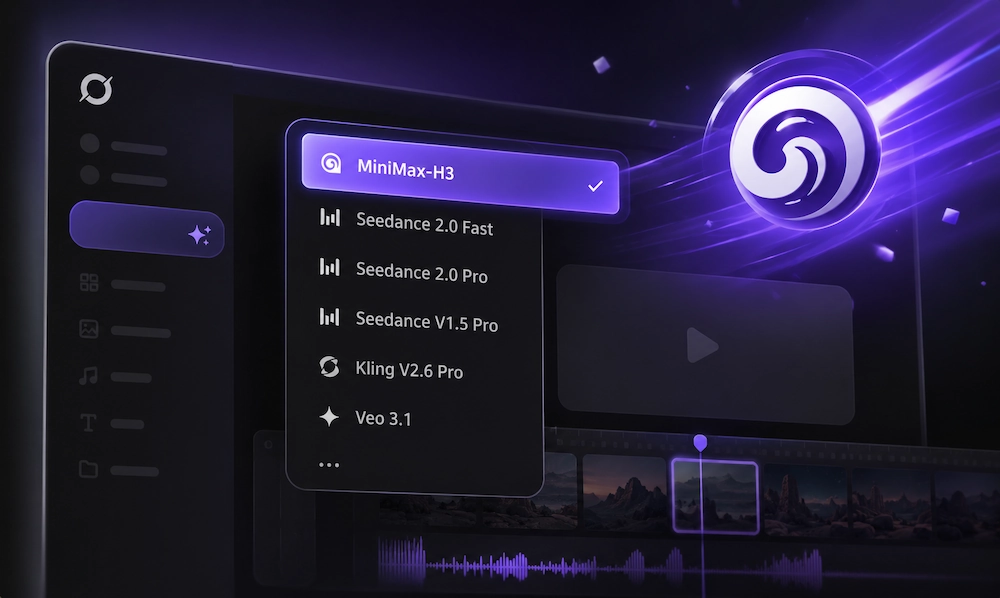
Native 2K Closes the Resolution Gap
Before H3, most video models in VidMuse output at 1080p. H3's native 2K (1440p short edge) means no upscaling step for large-screen deliverables and premium ads.
Omni-Reference Maps to VidMuse's Asset Library
H3 accepts up to 12 reference files — 9 images, 3 videos, and 3 audio clips — in a single generation. VidMuse's Asset Library & Memory already manages these assets across projects, so character references, style boards, and voice clips feed directly into H3.
Native Audio Reduces Post-Production
H3 generates dialogue, SFX, and ambient sound alongside video in one pass. For short-form ads and social content, this eliminates the separate audio step. The output is closer to a first cut than a silent clip.
Instruction Editing Pairs with Shot Refine
VidMuse 2.0's Shot Refine by Quoting lets users flag a specific shot for revision. H3's instruction-based editing processes that revision on the existing clip — no regeneration from scratch.
Open Weights Signal Long-Term Viability
MiniMax's plan to release H3 as open weights gives VidMuse's H3 integration long-term runway — community improvements, fine-tuning, and self-hosting will follow.
Note: VidMuse's value is model choice, not model lock-in. H3 fills specific pipeline gaps. For shots where Seedance 2.0 or Kling 3.0 excel, switch models shot-by-shot within the same project.
Try MiniMax H3 in VidMuse
VidMuse integrates MiniMax H3 alongside 20+ video and image models in its AI Director workflow. Plan scenes, generate storyboards, and render video — all starting from the free plan.
How to Use MiniMax H3 in VidMuse
Select MiniMax H3 for any shot in VidMuse's AI Director workflow — here is the step-by-step process from brief to rendered 2K video.
MiniMax H3 operates at the Video Generation stage of VidMuse's AI Director pipeline: Assets Upload → Creative Brief → Reference Generation → Scene & Shots → Storyboard → Video Generation.
- Open VidMuse AI and start a new project.
- Upload assets or describe your creative brief.
- Let VidMuse's AI Director plan your scenes and shots.
- At the Video Generation stage, select MiniMax H3 as your model.
- Generate — H3 returns native 2K video with stereo audio.
- Refine with VidMuse 2.0's Shot Refine by Quoting — iterate on specific shots without regenerating the full storyboard.
For the full VidMuse workflow, see the VidMuse guide.
When to Choose MiniMax H3 in VidMuse
Try MiniMax H3 in VidMuse
VidMuse integrates MiniMax H3 alongside 20+ video and image models in its AI Director workflow. Plan scenes, generate storyboards, and render video — all starting from the free plan.
What VidMuse + MiniMax H3 Unlocks
Combining VidMuse's multi-model AI Director with MiniMax H3's native 2K audio-visual output unlocks five production workflows that were harder to achieve before this integration.
Product Ads with Native Audio
VidMuse's AI ad generator workflow plans product ads from a URL or brief. With H3, the video output includes stereo audio in one pass — no separate audio step. Instruction editing supports B2B review cycles where a client asks to swap a background or adjust a product color.
Music Videos with Omni-Reference
VidMuse's AI music video generator plans storyboards from music and lyrics. H3's omni-reference lets you feed artist face images, motion reference videos, and voice clips — all managed in VidMuse's Asset Library — so character identity and voice stay consistent across scenes.
Cinematic Social Content at 2K
Plan a 3–5 shot social video in VidMuse, generate each shot with H3 at native 2K, and assemble on VidMuse's timeline. No upscaling step — output is ready for premium feeds, Reels, and Shorts.
Short Narrative with Multi-Shot
H3 generates multiple shot transitions within one 15-second clip. Combined with VidMuse's scene planner, a short narrative arc can be planned and generated faster than assembling separate single-shot clips.
Pre-Visualization for Agencies
VidMuse's storyboard-first approach paired with H3's 2K + audio produces pre-viz that sounds and looks closer to a final cut — useful for client pitches before committing to production costs.
Try MiniMax H3 in VidMuse
VidMuse integrates MiniMax H3 alongside 20+ video and image models in its AI Director workflow. Plan scenes, generate storyboards, and render video — all starting from the free plan.
What Is MiniMax H3?
MiniMax H3 is a general-purpose multimodal video model by MiniMax that generates native 2K video with synchronized stereo audio, clips up to 15 seconds, and accepts text, image, video, and audio as unified input.
H3 launched in July 2026 as the successor to Hailuo 2.3. MiniMax H3 is the model name under MiniMax's corporate branding; Hailuo 3.0 is the product-side name via Hailuo AI — same model, two labels. Do not confuse it with MiniMax M3 (language model). For a deeper feature breakdown, see our Hailuo 3.0 guide.
MiniMax H3 Key Features
MiniMax H3's four headline capabilities — native 2K, audio-visual generation, omni-reference, and instruction editing — are what make it a strong addition to a multi-model workflow.
Native 2K at 24 FPS
H3 outputs at 1440p mode: short edge 1440 pixels for standard ratios (16:9 through 9:16), with approximately 3.7 million total pixels for wider ratios like 21:9 at 2976 × 1248. The fixed 24 FPS matches film cadence, so clips cut into real timelines without frame-rate conversion.
15-Second Clips with Stereo Audio
H3 generates 5–15 seconds per clip — roughly three times Hailuo 2.3's limit. Dialogue, SFX, ambient sound, and music are produced alongside video in one pass. H3 can generate multiple shot transitions within a single clip. Audio quality is strong for environmental sounds and music; dialogue accuracy and lip sync should be tested per project.
Omni-Reference and Instruction Editing
Omni-reference accepts up to 9 images, 3 videos (≤15s total), and 3 audio clips per generation — 12 files max. References guide character, style, motion, and voice without forcing rigid keyframes. Instruction editing lets you revise an existing clip by describing the change in words — no regeneration from scratch. Voice timbre cloning is also supported for consistent character voice across shots.
Open Weights (Upcoming)
MiniMax announced H3 as open-weight — the first frontier video model to make this commitment. Weights have not been released as of July 2026. When available, they will enable self-hosting, fine-tuning, and community improvements.
MiniMax H3 vs Hailuo 2.3 and Other Models
MiniMax H3 is a generational upgrade over Hailuo 2.3 and competes head-to-head with Seedance 2.0, Kling 3.0, Veo 3.1, and PixVerse V6.
H3 vs Hailuo 2.3
For existing VidMuse users who have worked with Hailuo 2.3, H3 is a direct upgrade path within the same platform.
H3 vs Seedance, Kling, Veo, and PixVerse
H3 leads on resolution, reference flexibility, and editing. Seedance 2.0 and Kling 3.0 compete on visual fidelity and motion quality. All five are available in VidMuse — compare outputs shot-by-shot in the same workflow. Early reports indicate H3 API pricing is roughly 30% of Seedance 2.0's cost. Verify current pricing on platform.minimax.io.
Specs as of July 2026. All models update frequently.
Prompting Tips for MiniMax H3 in VidMuse
Write MiniMax H3 prompts like compact production briefs — subject, scene, action, camera, audio — and use VidMuse's creative brief as the starting point.
- Start from VidMuse's creative brief. VidMuse's AI Director breaks your project into scenes and shots — H3 prompts inherit that structured context instead of starting from blank.
- Name your camera move. "Slow orbit to the right," "handheld tracking shot," "crane shot rising" — H3 follows professional camera language.
- Separate visual from audio instructions. Scene description and audio direction are two distinct layers. Keeping them separate helps H3 process each one.
- Limit major actions per clip. Fifteen seconds holds two to three beats. Don't overload.
- Upload clean references via VidMuse's Asset Library. Even lighting, direct face angle, clear voice clip. Quality inputs produce quality consistency.
- Use edit instructions instead of reprompting. When a generation is 90% right, use VidMuse's Shot Refine + H3's instruction editing to fix the specific issue.
Example prompt:
A luxury silver watch on a dark stone pedestal inside a modern gallery. Camera slowly pushes forward as light moves across the metal surface. Fine dust in the air. Cinematic commercial style, controlled movement, high contrast. Audio: subtle mechanical ticking and deep ambient sound.
MiniMax H3 Limitations
MiniMax H3 is a day-one launch with promising specs, but several areas need wider testing before full production commitment.
- Brand new — no independent benchmarks. H3 launched in July 2026. Community testing has just started. No standardized quality comparisons or reproducibility studies exist yet.
- Open weights not yet released. MiniMax has announced open weights, but they are not available as of July 2026. Self-hosting and fine-tuning are not yet possible.
- Long-sequence consistency untested. Fifteen seconds is longer than most video models generate, which gives H3 more room to introduce drift in character appearance, lighting, and spatial logic.
- Dialogue reliability varies. Native audio is strong for ambient sounds, music, and SFX. Dialogue accuracy, emotional delivery, and lip synchronization need per-project testing before using H3 audio in a final deliverable.
- Text and branding accuracy. Like most generative video models, H3 may struggle with exact text rendering, logos, UI elements, and fine packaging details. Add critical brand elements in post-production.
- Pricing and access may shift. Early-access pricing and availability can change as H3 moves from launch to general availability. Verify current costs on platform.minimax.io or through VidMuse's credit system.
Frequently Asked Questions
What is MiniMax H3?
MiniMax H3 (Hailuo 3.0) is a multimodal video model by MiniMax. It generates native 2K video at 24 FPS with stereo audio, clips up to 15 seconds, omni-reference input (9 images, 3 videos, 3 audio clips), instruction-based editing, and voice timbre cloning. Open weights are announced but not yet released.
Is MiniMax H3 free?
MiniMax H3 is available on VidMuse AI's free plan with unlimited planner. MiniMax Hub also offers limited free generations. API pricing through platform.minimax.io is approximately 30% of Seedance 2.0's cost based on early reports.
What is the difference between MiniMax H3 and Hailuo 2.3?
H3 upgrades resolution from 1080p to native 2K, extends max duration from ~10s to 15s, adds native stereo audio, supports omni-reference input (12 files), and introduces instruction-based editing and voice cloning. VidMuse users can access both H3 and Hailuo 2.3 in the same workflow.
Does MiniMax H3 generate audio?
Yes. H3 generates dialogue, SFX, ambient sound, and music alongside video in one pass, synchronized to on-screen action. Quality is strongest for environmental sounds and music; dialogue accuracy should be tested per project.
When will MiniMax H3 open weights be available?
MiniMax has announced open weights but they have not been released as of July 2026. Check minimax.io for updates. When available, open weights will enable self-hosting and fine-tuning.
Can I use MiniMax H3 in VidMuse?
Yes. MiniMax H3 is one of 20+ video models in VidMuse's AI Director workflow. Select H3 for specific shots, use it alongside Seedance, Kling, Veo, and Hailuo 2.3, and iterate with Shot Refine by Quoting. Available on the free plan.
Conclusion
VidMuse's Day-One integration of MiniMax H3 adds native 2K resolution, stereo audio, omni-reference input, and instruction editing to a workflow that already includes Seedance, Kling, Veo, and 17 other models. H3 does not replace those models — it fills the specific gaps where higher resolution, richer reference input, and built-in audio make the difference.
H3 is day-one new. Production reliability will become clearer as more creators test it across different project types. The best way to evaluate MiniMax H3 is to test it against your actual creative brief — VidMuse's AI Director makes that straightforward, starting from the free plan.
From Prompt to Video with MiniMax H3
Use MiniMax H3's native 2K video and stereo audio inside VidMuse's AI Director. Unlimited free planner, real workflow control, and 20+ models to choose from.

Written By
VidMuse Team
Continue Reading
Latest blog posts related to AI video creation.
AI Product Video Generator: VidMuse Guide for 2026
Create product videos from images, URLs, and descriptions with VidMuse AI. Plan scenes, generate clips, refine CTAs, and export product videos for ecommerce.
AI Marketing Video Generator: VidMuse Campaign Guide
VidMuse is the AI marketing video generator built to turn product inputs into campaign-ready promo videos, product demos, UGC-style ads, and social ads.
AI Ad Generator Free: Best Tools and Video Workflow
Compare AI ad generator free tools, check free-plan limits, and learn how VidMuse helps create product video ads with scripts, clips, subtitles, and CTAs.