

Seedream 5.0 Pro Guide: What It Does and How It Compares to Seedream 5.0 Lite
Seedream 5.0 Pro is ByteDance's professional-tier image generation and editing model, officially launched on July 8, 2026 as the top tier above Seedream 5.0 and Seedream 5.0 Lite. It's built around four upgrades: dense infographic and layout generation, interactive precision editing (point, lasso, sketch, color, material, and layer-level control), more realistic lighting and portrait detail, and native multilingual text rendering across ten-plus languages. It targets commercial and production work — infographics, ad creative, product photography — rather than the fast, casual generation that Seedream 5.0 Lite still handles well.
Key Takeaways
-
Seedream 5.0 Pro launched July 8, 2026 as ByteDance's professional-tier image model, sitting above the earlier Seedream 5.0 and Seedream 5.0 Lite releases.
-
Its four core upgrades are complex infographic generation, interactive precision editing (point/lasso/sketch selection, color and material swaps, layer separation, multi-image fusion), more realistic lighting and portrait textures, and native generation in ten-plus languages.
-
Pro trades some of Lite's speed and built-in reasoning for deeper spatial editing control — reach for Pro when you need to change one region of an image without regenerating the whole frame.
-
ByteDance's own launch post flags remaining gaps in fine-grained text rendering and pixel-level editing consistency, so production work still needs a human review pass.
-
VidMuse's AI Director workflow includes Seedream 5.0 Pro as one of its image-generation models, so creators can pull Pro-quality keyframes and infographic panels straight into a storyboard-based video pipeline.
Turn AI Keyframes into Finished Videos
Use VidMuse to transform Seedream-style visuals, product shots, and creative ideas into structured scenes, storyboards, and polished AI videos.
What Is Seedream 5.0 Pro?
Seedream 5.0 Pro is ByteDance's newest multimodal image creation model, positioned as the professional tier of the Seedream family above Seedream 5.0 and Seedream 5.0 Lite. Where Seedream 5.0 Lite is described by ByteDance as fast, reasoning-driven, general-purpose generation, Seedream 5.0 Pro is aimed at commercial and design work: product photography, ad creative, branding, editorial layouts, and information-dense graphics that need to be usable straight out of the model rather than touched up afterward.
ByteDance frames the release around across-the-board gains in image-text alignment, structural coherence, text rendering, and visual aesthetics, plus four specific capability breakthroughs: complex information visualization, interactive precision editing, realistic imagery and portrait textures, and native multilingual input and generation. The rest of this guide walks through each of those, then compares Pro to Lite so you can decide which one actually fits your workflow.
Seedream 5.0 Pro Key Features
Complex Information Visualization
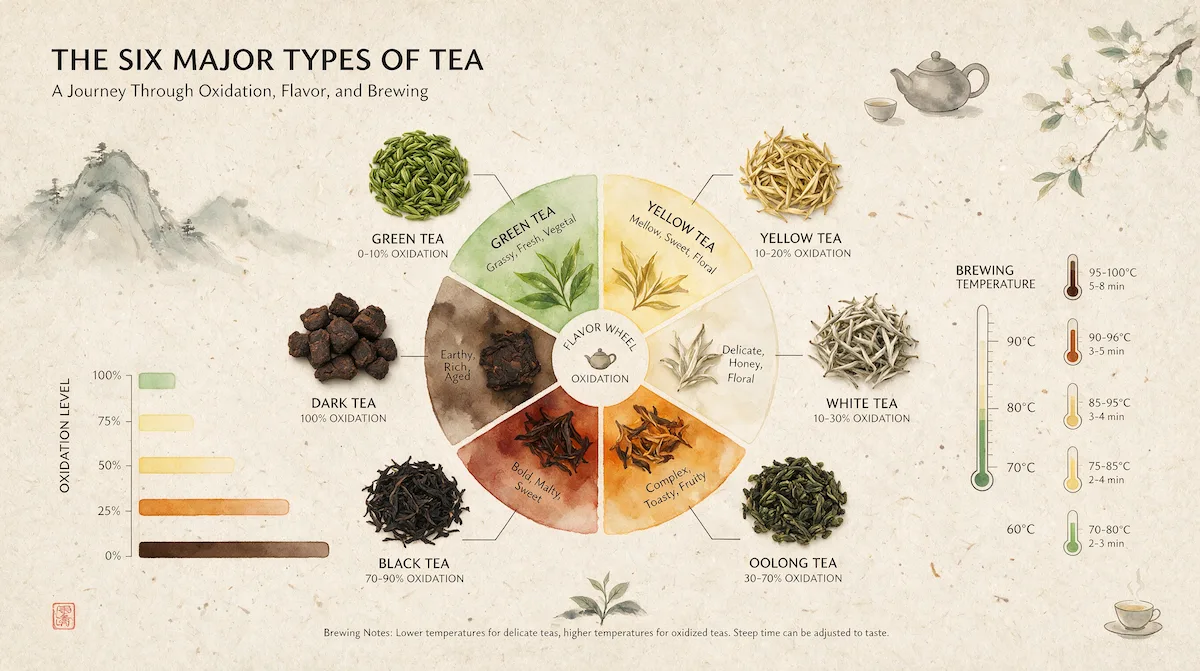
Seedream 5.0 Pro is built to handle infographic generation — one of the harder problems in AI image generation, since the model has to keep data accurate, render dense text without dropping words, arrange a logical layout, and hold a professional look all in one pass. ByteDance's launch examples include a research-station infographic that combines a timeline, a bar chart, a pie chart, and a line chart around a central photo-style illustration, and a six-category tea infographic that pairs a flavor wheel with oxidation and brew-temperature data. The model is also shown handling dense commercial layouts, like a multi-tier holiday sale poster with a headline, discount terms, and event dates, and interface mockups where elements need to interact correctly across layers, such as a product image that visually overlaps a UI button.
Interactive Precision Editing
This is the feature ByteDance leans on hardest to differentiate Pro from earlier Seedream versions. Text prompts are good at describing what to generate but weak at pinpointing where to edit — and design work is mostly repeated, localized tweaks, not one-shot generation. Seedream 5.0 Pro addresses that with a grounded understanding of spatial position and regional semantics, which unlocks several concrete editing modes:
-
Point, lasso, and box selection to isolate a specific object or region and remove, replace, or modify it without touching the rest of the image.
-
Color and material replacement, including matching a Hex code or an external color swatch while swapping an object's material at the same time.
-
Sketch-driven rendering, where a rough, casually drawn layout — like a hand-sketched event poster — gets turned into a finished, styled design that respects the original block placement.
-
Layer separation, where a finished poster can be split into ten or more independent, transparent layers (text, main subject, background, decorative elements), with any areas the subject was covering automatically filled back in. Creators can then drag, scale, or swap individual layers, including replacing the main subject entirely.
-
Multi-image fusion, where several reference images plus a target base image get combined into one coherent scene — useful for early-stage visual collages and concepting.
ByteDance also shows these modes stacking together in a single edit — for example, changing an object's color and material while adding an embroidered texture to nearby typography in the same pass.
Realistic Imagery and Portrait Textures
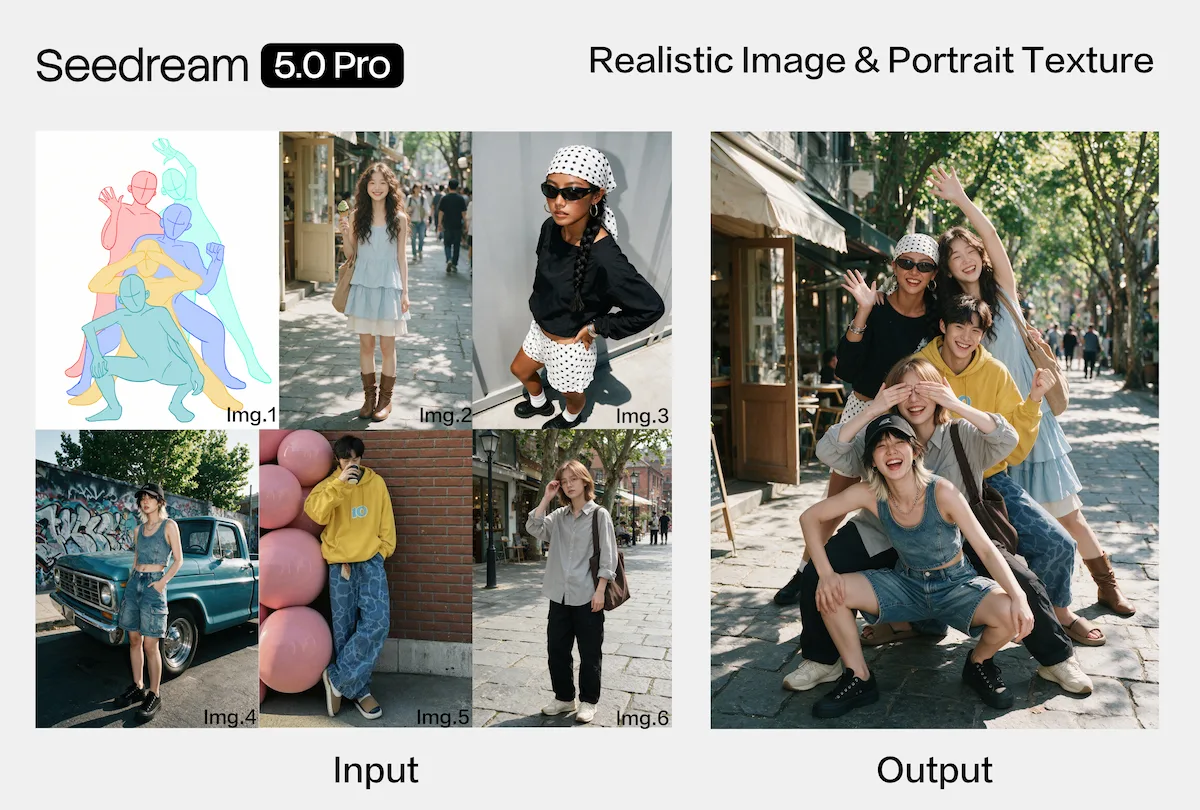
Seedream 5.0 Pro is built to reproduce real-world lighting, materials, and skin texture more convincingly than earlier versions. ByteDance's examples cover fine lighting detail — light beams through blinds, food particles frozen mid-air, water splashes — along with physically accurate reflection and refraction on glass and metal surfaces, and portraits where facial texture and expression carry more nuance. The model also handles panning-shot motion blur (a sharp subject against a horizontally blurred background) and multi-photo compositing, where separate portraits of different people are merged into a single group photo with matching lighting.
Native Multilingual Input and Generation
Beyond Chinese and English, Seedream 5.0 Pro natively supports prompt input and high-quality text rendering in more than ten widely used languages, including French, German, Russian, Japanese, Korean, Spanish, and Arabic. It's built to adapt typography rules per language automatically — correctly rendering right-to-left Arabic script, Spanish accent marks, and locale-appropriate visual styling, rather than just translating the words and keeping a Western layout.
Seedream 5.0 Pro vs. Seedream 5.0 Lite
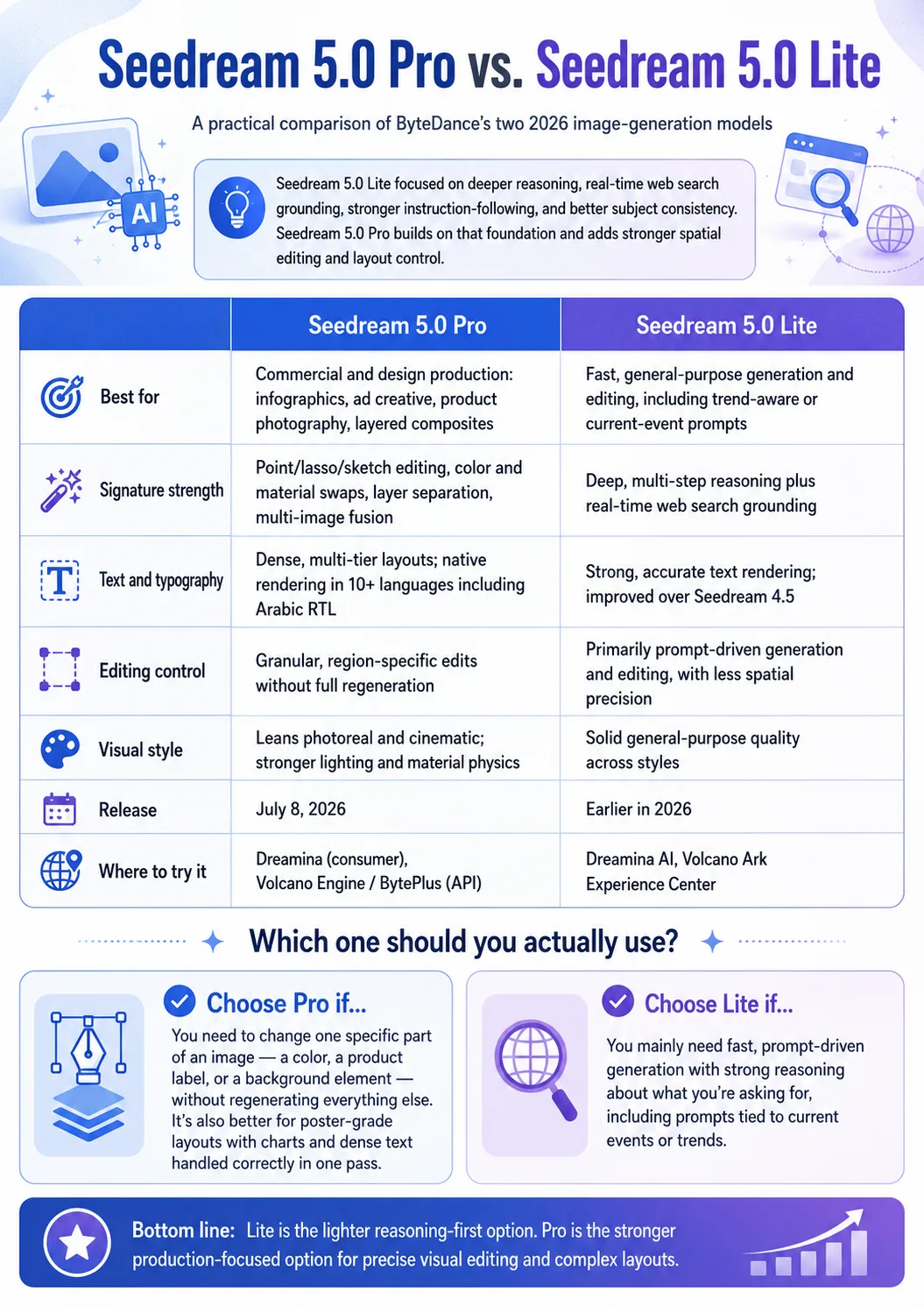
Seedream 5.0 Lite, which ByteDance released earlier in 2026, was built around a different upgrade: not higher resolution or faster output, but deeper reasoning underneath "reading, seeing, drawing, and writing" a prompt. Lite added real-time web search grounding, stronger instruction-following, and better subject consistency, and ByteDance reported it beating Seedream 4.5 on internal Elo evaluations. Pro builds on that same reasoning foundation but adds the spatial-editing and layout layer that Lite doesn't focus on.
| Seedream 5.0 Pro | Seedream 5.0 Lite | |
|---|---|---|
| Best for | Commercial and design production: infographics, ad creative, product photography, layered composites | Fast, general-purpose generation and editing, including trend-aware or current-event prompts |
| Signature strength | Point/lasso/sketch editing, color and material swaps, layer separation, multi-image fusion | Deep, multi-step reasoning plus real-time web search grounding |
| Text and typography | Dense, multi-tier layouts; native rendering in 10+ languages including Arabic RTL | Strong, accurate text rendering; improved over Seedream 4.5 |
| Editing control | Granular, region-specific edits without full regeneration | Primarily prompt-driven generation and editing, with less spatial precision |
| Visual style | Leans photoreal and cinematic; stronger lighting and material physics | Solid general-purpose quality across styles |
| Release | July 8, 2026 | Earlier in 2026 |
| Where to try it | Dreamina (consumer), Volcano Engine / BytePlus (API) | Dreamina AI, Volcano Ark Experience Center |
Which one should you actually use? If your work involves changing one specific part of an image — a color, a product label, a background element — without regenerating everything else, or you need a poster-grade layout with charts and dense text handled correctly in a single pass, Pro is built for that. If you mainly need fast, prompt-driven generation with strong reasoning about what you're asking for, including prompts tied to current events or trends, Seedream 5.0 Lite already covers that and is the lighter option.
How to Access Seedream 5.0 Pro
On the consumer side, Seedream 5.0 Pro is live in Dreamina, ByteDance's consumer creative app, following the same access pattern ByteDance used for Seedream 5.0 Lite's rollout. On the developer side, API access opens through Volcano Engine for the China market and through BytePlus internationally.
Both routes went live alongside the July 8, 2026 launch, though per-request API pricing and full documentation were still being finalized as the model rolled out — so it's worth checking the current Volcano Engine or BytePlus pricing pages directly before you budget a project around it, rather than relying on early third-party estimates.
Where Seedream 5.0 Pro Fits in a Video Production Workflow
An image model like Seedream 5.0 Pro doesn't generate video on its own — but it's a natural fit for the reference and keyframe stage that comes before video generation. VidMuse, an AI Director platform for structured video generation, is built around exactly that stage: turning assets, prompts, and references into scenes, shots, and a storyboard before anything gets generated as video. Seedream 5.0 Pro is included among VidMuse's image-generation models, so creators can generate Pro-quality keyframes, infographic panels, or edited reference images without leaving that workflow.
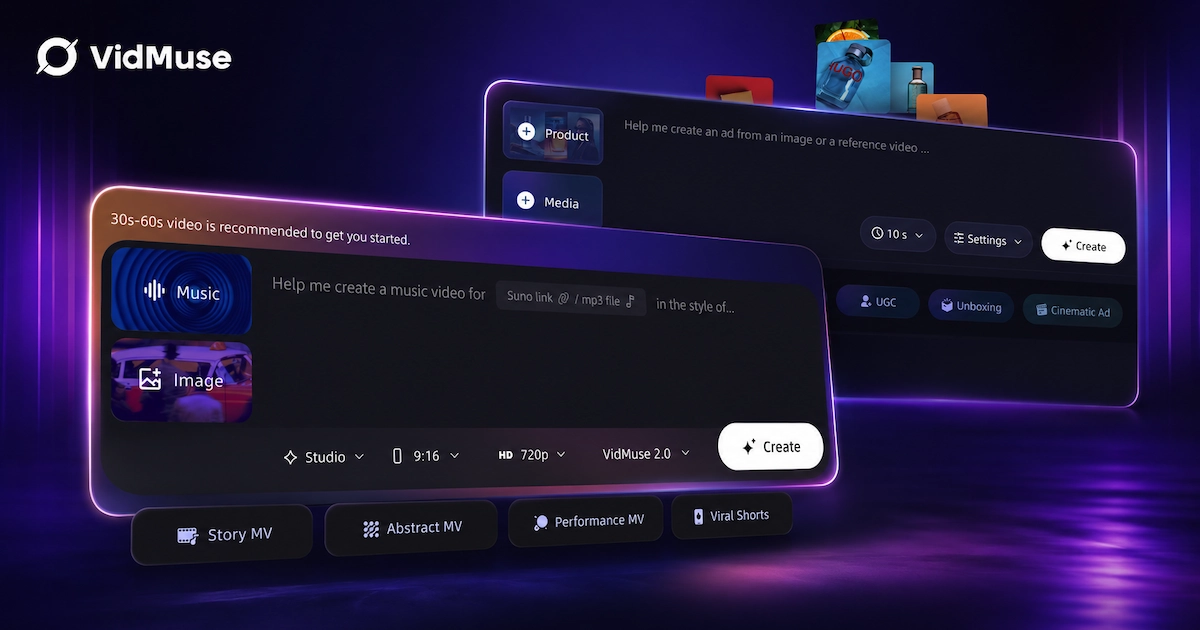
Turn AI Keyframes into Finished Videos
Use VidMuse to transform Seedream-style visuals, product shots, and creative ideas into structured scenes, storyboards, and polished AI videos.
A few ways this plays out in practice:
- AI Director workflow.
VidMuse's pipeline runs Assets Upload → Creative Brief → Reference Generation → Scene & Shots List → Storyboard → Video Generation. Seedream 5.0 Pro slots naturally into the Reference Generation step, where a precisely edited product shot or a layout-accurate infographic panel becomes the visual anchor for a later shot. See the full VidMuse workflow guide for how the stages connect.
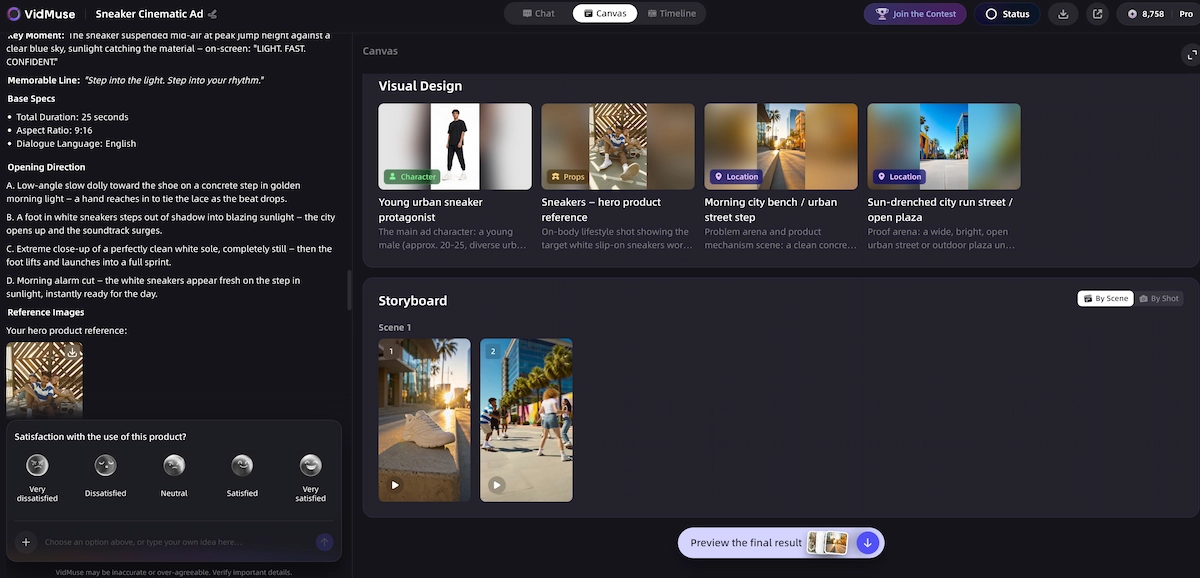
- Multi-input creation.
Because VidMuse accepts text prompts, images, and existing assets as generation inputs, a Seedream 5.0 Pro edit — a recolored product, a layer-separated design element — can be dropped straight in as a reference for image-to-video or video-to-video generation. The VidMuse video-to-video maker covers how reference-driven generation works in more depth.
- Production control.
VidMuse's 2.0 controls — Shot Refine by Quoting, Timeline Editor, and Asset Library & Memory — let creators reuse a Seedream-generated keyframe across multiple shots for visual consistency instead of regenerating it each time. Details are in the VidMuse 2.0 release notes.
- Ad and product workflows.
Seedream 5.0 Pro's product-photography and infographic strengths line up well with VidMuse's AI ad generator module, which turns product photos, links, and briefs into ad-ready video with voiceover, subtitles, and CTA text.
- Music video workflows.
For projects that lean more visual and stylized, Seedream-generated keyframes can also feed VidMuse's AI music video generator module, which turns music, lyrics, and reference imagery into scenes and shots with beat-aware pacing.
If you're planning a shoot or campaign around reusable templates rather than one-off generations, the VidMuse AI video templates guide covers how to structure that.
Limitations and What to Verify Before You Rely on It
ByteDance is upfront about this: its own launch post states that Seedream 5.0 Pro still has room to improve in finer-grained text rendering and pixel-level editing consistency, even after the upgrades. A few practical points to keep in mind before you build a workflow around it:
- It's brand new.
Seedream 5.0 Pro launched July 8, 2026. Independent, side-by-side benchmarks against models like Nano Banana Pro or GPT Image 2 weren't available yet at launch, so treat early comparisons — including this guide's — as provisional until more hands-on testing accumulates.
- Pricing and licensing were still finalizing.
Per-image API pricing, resolution ceilings, and commercial usage rights weren't fully published across every access point at launch. Confirm current terms on the official Volcano Engine or BytePlus documentation before committing to a production budget.
- It's an image model, not a video model.
Seedream 5.0 Pro generates and edits still images. Turning its output into motion still requires a separate video generation step or a workflow layer like VidMuse's AI Director pipeline built around it.
- Edited regions still need a human check.
ByteDance's own acknowledgment of editing-consistency gaps means locally edited areas — especially fine text and small details — are worth a manual review pass before shipping to a client or a campaign.
FAQ
What is Seedream 5.0 Pro used for?
Seedream 5.0 Pro is used for professional and commercial image work: dense infographics, ad creative, product photography, and design layouts that need precise, region-specific editing rather than full regeneration for every small change.
Is Seedream 5.0 Pro free to use?
Consumer access through Dreamina includes free daily credits, similar to earlier Seedream releases. Developer API access through Volcano Engine and BytePlus is usage-based, though exact per-request pricing was still being finalized at launch — check the official platform pages for current rates.
What's the difference between Seedream 5.0 Pro and Seedream 5.0 Lite?
Seedream 5.0 Lite is built around fast, reasoning-driven generation with real-time web search grounding. Seedream 5.0 Pro adds granular spatial editing — point, lasso, and sketch-based selection, color and material swaps, and layer separation — aimed at commercial production work rather than quick, casual generation.
Does Seedream 5.0 Pro support languages other than English and Chinese?
Yes. It natively supports prompt input and text rendering in more than ten languages, including French, German, Russian, Japanese, Korean, Spanish, and Arabic, with automatic adaptation to each language's typography rules, including right-to-left Arabic script.
Can Seedream 5.0 Pro generate video?
No. Seedream 5.0 Pro is an image generation and editing model. Turning its output into video requires a separate video generation step, such as image-to-video generation inside a workflow like VidMuse's AI Director pipeline.
Where can I access Seedream 5.0 Pro?
Consumer access is available through Dreamina, ByteDance's creative app. Developer access is available through the Volcano Engine API for the China market and through BytePlus internationally.
How does Seedream 5.0 Pro handle image editing compared to typical prompt-only models?
Instead of relying purely on text prompts to describe changes, Seedream 5.0 Pro accepts spatial input — point selection, lasso selection, box selection, and sketching — so you can indicate exactly where an edit should happen. The model then applies the change to that region while keeping the rest of the image, including lighting and perspective, consistent.
Conclusion
Seedream 5.0 Pro moves the Seedream line further into professional production territory: dense infographics, precise region-level editing, layer separation, and multilingual layouts that hold up in commercial work. It's a meaningful step up from Seedream 5.0 Lite for anyone doing design-heavy or editing-heavy work, though it's worth remembering the model launched July 8, 2026 and some details — pricing, licensing, and independent benchmarks — are still settling. If your work already involves turning images like these into finished video, VidMuse's AI Director workflow includes Seedream 5.0 Pro among its image-generation models, so you can move from a precisely edited keyframe straight into a storyboard-based video pipeline without switching tools.
Turn AI Keyframes into Finished Videos
Use VidMuse to transform Seedream-style visuals, product shots, and creative ideas into structured scenes, storyboards, and polished AI videos.
Sources: ByteDance Seed team, "Beyond Generation, It Understands Design | Introducing Seedream 5.0 Pro", July 8, 2026; Seedream 5.0 Pro project page; ByteDance Seed team, "Deeper Thinking, More Accurate Generation | Introducing Seedream 5.0 Lite".

Written By
VidMuse Team
Continue Reading
Latest blog posts related to AI video creation.
PixVerse V6 x VidMuse AI: Model Guide and Video Workflow
PixVerse V6 review and VidMuse integration guide. Capabilities, 15s 1080p video, prompt tips, model comparison, pricing, and how to use V6 in VidMuse workflows.
FLUX 3: What It Is, Capabilities, and How to Access It
FLUX 3 is Black Forest Labs' multimodal AI model for image, video, audio, and action. Full guide: capabilities, FLUX 3 vs FLUX 2, availability, and pricing.
Free Music Visualizer: 10 Best Free Tools in 2026
Compare 10 best free music visualizers in 2026. Waveform tools, AI music video makers, watermark policies, export limits, and which tool fits your workflow.