

Flux.2 — the second-generation image model from Black Forest Labs — is a production-grade AI image generation and editing system capable of outputting photorealistic images up to 4MP, referencing up to 10 input images simultaneously, and rendering complex typography reliably.
If you want to understand what Flux.2 is, how its variants ([pro], [flex], [dev], and [klein]) differ from each other, and how Flux AI fits inside a platform like VidMuse to power music video visuals, this guide covers all of it.
Create Your AI Video in Minutes
Turn your idea into a reference image from Flux.2 and a video with VidMuse AI.
Key Takeaways
- Flux.2 is Black Forest Labs' second-generation image model family, released in late 2025, with four variants:
[max],[pro],[flex], and[dev]. - It supports multi-reference image input (up to 10 images), outputs up to 4MP resolution, and handles complex text rendering reliably — capabilities its predecessor lacked.
- Flux.2
[dev]is a 32-billion-parameter open-weights model available on Hugging Face under a non-commercial license, runnable locally on consumer GPUs like an RTX 4090 via ComfyUI or Diffusers. - In VidMuse, Flux.2 is available as one of the image generation models in the platform's model matrix, used at the Reference Generation and Storyboard stages to build scene-consistent visuals before video generation begins.
- For indie musicians, combining Flux.2's character-consistent image generation with VidMuse's agent-based MV workflow reduces the cost and effort of producing studio-quality music video frames to near zero.
What Is Flux.2?
Flux.2 is the second generation of the FLUX model family, developed by Black Forest Labs and announced in November 2025. It is a latent flow matching architecture that unifies text-to-image generation and image editing inside a single model checkpoint — meaning you don't need separate models for creating and editing visuals.
At its core, Flux.2 couples a Mistral-3 24B vision-language model with a rectified flow transformer. The VLM brings real-world knowledge and contextual understanding; the transformer handles spatial relationships, material properties, lighting coherence, and compositional logic. This architecture is why Flux.2 can understand a prompt like "place the product in a sunlit kitchen" and produce an image where the shadows and reflections behave realistically — not just correctly positioned, but physically plausible.
Flux.2 is positioned across a spectrum: fully managed API endpoints for production teams, and open-weight checkpoints for developers, researchers, and creators who want to run and fine-tune the model themselves.
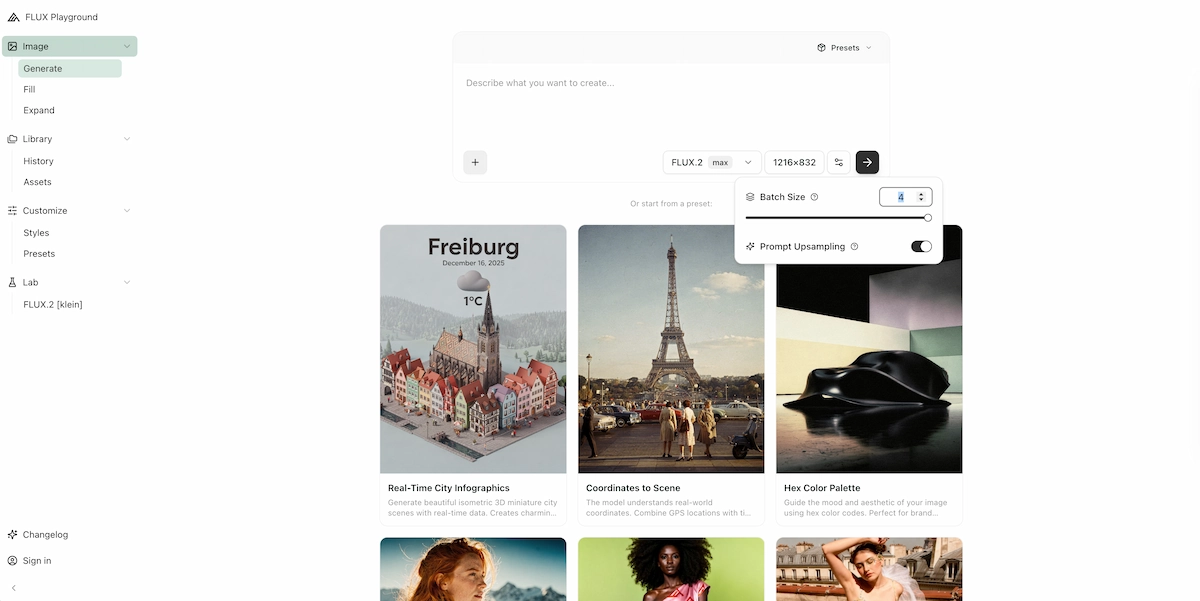
Flux.2 Model Variants Explained
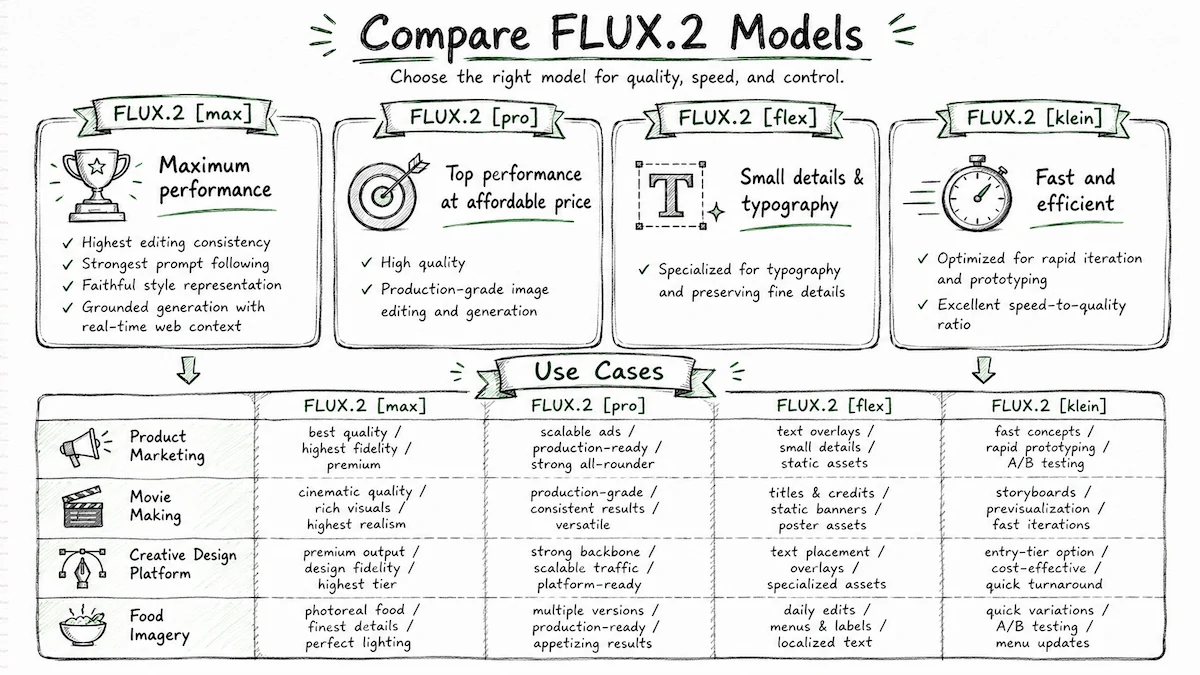
Flux.2 comes in four variants, each with a distinct performance and control profile.
Understanding which variant to use is the first practical decision any Flux AI user needs to make.
Flux.2 [max]
Best for
- Highest-capability variant
- Maximum prompt adherence
- Strongest style fidelity
- Grounded generation with real-time web context
Watch out
- Best reserved for quality-critical production work
Flux.2 [pro]
Best for
- Production workhorse
- High-quality output at production volume
- Faster and lower cost than max
Watch out
- Less direct inference control than flex
Flux.2 [flex]
Best for
- Step and guidance control
- Strong typography and detail tuning
- Useful for automated pipelines
Watch out
- Requires parameter tuning for best results
Flux.2 [dev]
Best for
- Open weights
- Local deployment and research
- ComfyUI and Diffusers workflows
Watch out
- Non-commercial license and filtering requirements
Flux.2 [max]
Flux.2 [max] is the highest-capability variant. It delivers maximum prompt adherence, the strongest style fidelity, and supports grounded generation with real-time web context. It's designed for use cases where quality is non-negotiable: high-end marketing campaigns, brand-consistent product photography at scale, character continuity across dozens of generated frames.
Use [max] when: output accuracy, faithful style reproduction, and coherent multi-reference composition all matter at once.
Flux.2 [pro] — Flux Pro 2
Flux.2 [pro], also referred to informally as Flux Pro 2, is the production workhorse. It matches closed-model benchmarks for prompt adherence and visual fidelity while generating faster and at lower cost than [max]. Black Forest Labs describes it as "state-of-the-art quality at maximum speed — both, not either."
Use [pro] when: you need reliable, high-quality output at production volume without paying [max] pricing.
Flux.2 [flex]
Flux.2 [flex] gives developers direct control over inference parameters — specifically the number of denoising steps and the guidance scale. More steps produce sharper typography and finer detail; fewer steps trade quality for speed. [flex] excels at text rendering, infographic generation, and UI mockup production.
Key parameters:
- Steps: 1–50 (50 = maximum detail)
- Guidance scale: 1.5–10 (higher = tighter prompt adherence)
Use [flex] when: your output must include readable text, precise brand typography, or you need fine-grained control over the quality/speed tradeoff in an automated pipeline.
Flux.2 [dev] — Open Weights
Flux.2 [dev] is a 32-billion-parameter open-weights model derived from the Flux.2 base. It is available on Hugging Face under the FLUX Non-Commercial License. It supports text-to-image generation, single-reference editing, and multi-reference editing — all in one checkpoint.
Deployment options for [dev]:
- ComfyUI with an optimized fp8 implementation (built in collaboration with NVIDIA)
- Diffusers (Python library) — see the HuggingFace model card for code examples
- API endpoints via fal, Replicate, Runware, TogetherAI, Cloudflare, DeepInfra
- Commercial use requires a separate license from Black Forest Labs
Use [dev] when: you're a researcher or developer who needs to fine-tune, audit, or self-host the model.
Flux.2 [klein] — Coming Soon
Flux.2 [klein] is an open-source, Apache 2.0 model that is size-distilled from the Flux.2 base. It is smaller and faster than [dev] while inheriting many of the base model's capabilities. It is optimized for rapid iteration and prototyping. As of publish date, [klein] is in beta. It's the variant most relevant to workflows requiring sub-second generation, local deployment on limited hardware, or Flux 2 ComfyUI integration on modest consumer GPUs.
Key Capabilities of Flux AI
Flux.2 introduces five major capabilities that set it apart from FLUX.1 and most competing models.
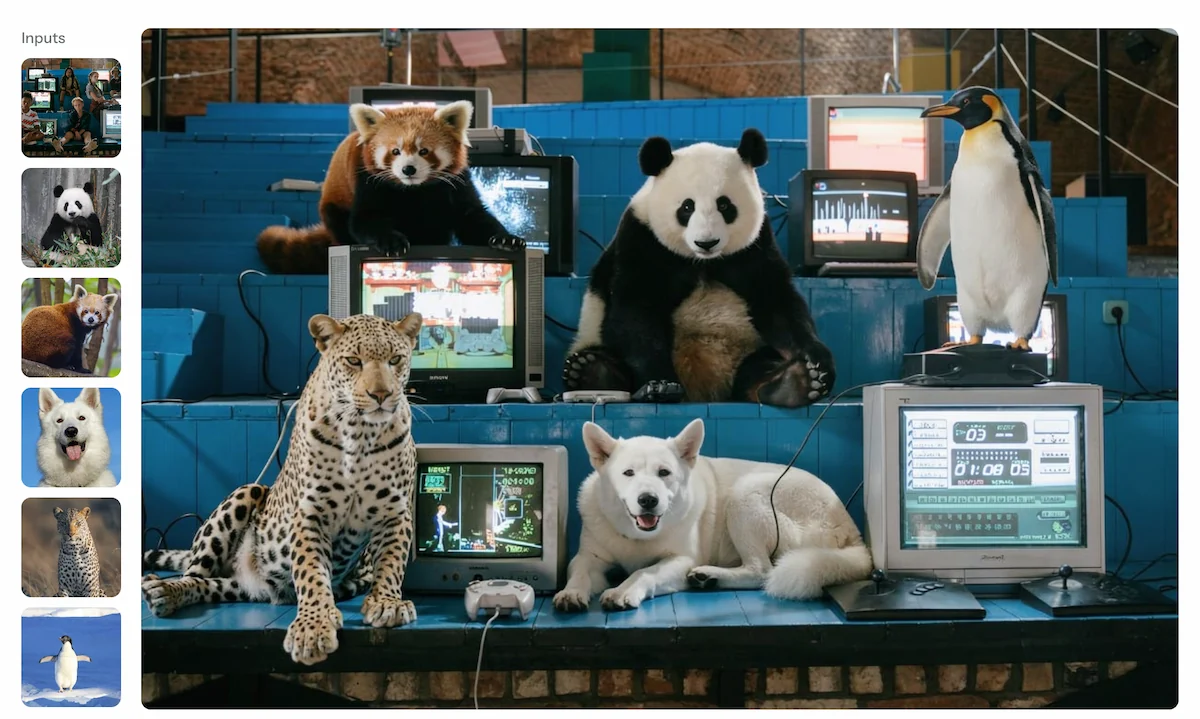
Multi-Reference Support
Flux.2 accepts up to 10 reference images simultaneously — the most of any publicly available model as of late 2025. [pro] supports up to 8–9 references depending on output resolution; [flex] and [dev] support up to 10. This is the feature that enables production-grade character consistency: feed it 10 images of a character or product, and the output preserves identity across scenes without any fine-tuning.
4MP Output Resolution
Flux.2 supports output up to 4 megapixels (e.g., 2048×2048). The practical working range for most use cases is up to 2MP, but the 4MP ceiling matters for print, large-format display, and detailed product photography. Minimum resolution is 64×64; all output dimensions must be multiples of 16.
Reliable Text Rendering
Earlier image models — including FLUX.1 — struggled with complex typography. Flux.2 renders complex text, infographics, UI mockups, and multi-language copy reliably in production. Using [flex] with 50 steps produces the sharpest text results; [max] and [pro] also handle typography well.

Enhanced Prompt Following
Flux.2 processes 32,000 text input tokens and follows complex, multi-part, compositionally structured prompts with significantly improved accuracy over FLUX.1. JSON-structured prompting is supported natively (see the Prompting Guide section below), and the model interprets hex color codes for brand-accurate color matching.
Sub-10-Second Generation
All managed API variants of Flux.2 target sub-10-second generation speeds for typical outputs. This is fast enough for interactive workflows, real-time prototyping, and high-throughput production pipelines.
Flux.2 vs Flux.1: What Changed?
Flux.2 is a generational upgrade over FLUX.1 across every capability dimension, not an incremental update.
The architectural change is foundational: Flux.2 retrained its latent space from scratch using a new VAE (variational autoencoder), which Black Forest Labs describes as a step toward solving the "Learnability-Quality-Compression" trilemma. The new VAE provides better learnability and higher image quality simultaneously — something the FLUX.1 latent space could not achieve.
In practical terms:
- Multi-reference: FLUX.1 supported single-reference editing; Flux.2 supports up to 10 references.
- Text rendering: Unreliable in FLUX.1
[dev]; production-ready in Flux.2[flex]and[pro]. - Photorealism: Flux.2 closes the gap with real photography on fabric texture, architectural detail, and product surfaces.
- World knowledge: Flux.2 is significantly more grounded — ask it to render "realistic kitchen lighting at golden hour" and it understands what that means spatially and physically.
- Resolution ceiling: FLUX.1 topped out lower; Flux.2 goes to 4MP.
FLUX.1 [dev] remains the most popular open image model globally, and it is still a valid choice for many workflows. The right answer depends on your use case, budget, and whether you need the [dev] open-weights option or can use managed APIs.
How Flux.2 Works in VidMuse
VidMuse integrates Flux.2 as part of its image generation model matrix, specifically at the stages where visual consistency matters most before video generation begins.
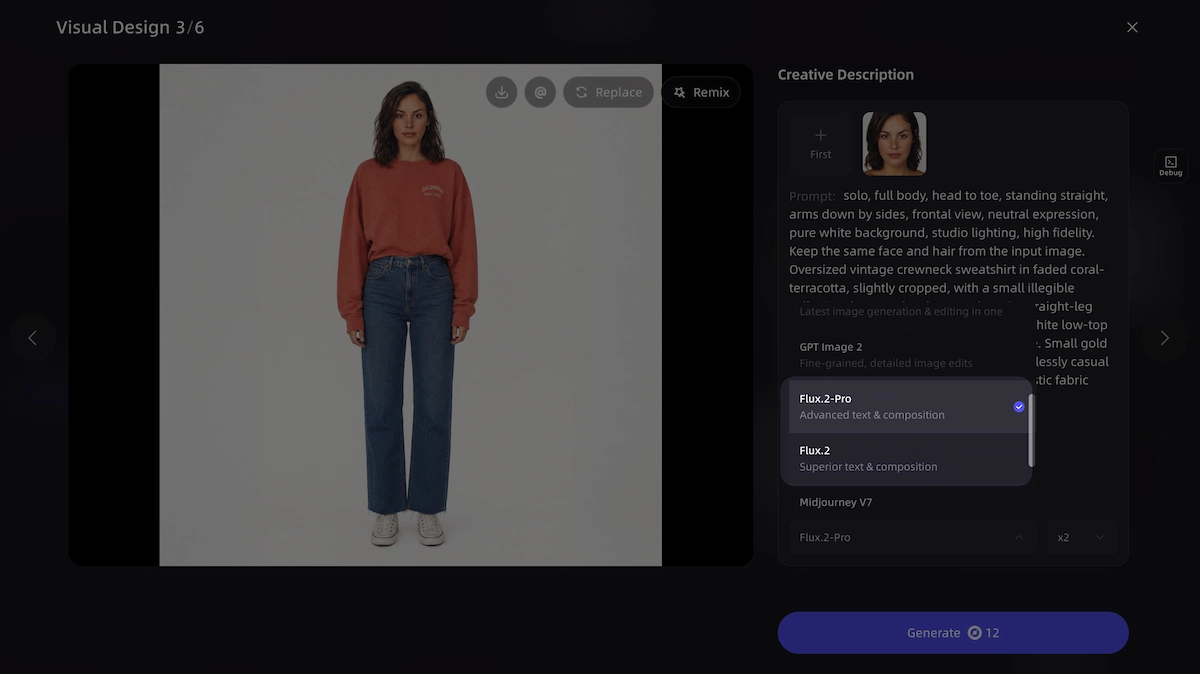
VidMuse is built around an agent-based workflow: rather than generating a single video from a one-shot prompt, it plans the full music video — creative brief, reference images, shot list, storyboard — before any video frames are generated. Flux.2 slots into the Reference Generation and Storyboard stages of this workflow.
Here is where each stage intersects with Flux.2:
- Creative Brief → The VidMuse agent parses the track, mood, and visual direction.
- Reference Generation → Flux.2 generates scene reference images based on the brief. Its multi-reference capability means character, costume, and environment can stay consistent across dozens of reference frames without fine-tuning.
- Scene & Shots List → The agent outlines individual shots based on the references.
- Storyboard → Flux.2 (or other image models in the matrix) populates each storyboard panel with a visual.
- Video Generation → Models like Seedance 2.0, Kling V3.0, or Veo 3.1 animate the storyboard frames into video.
For musicians who've generated a track in Suno AI (available natively inside VidMuse) and need a cohesive visual aesthetic across an entire 60-second MV, this is the workflow that makes it possible without a design team. Flux.2's character consistency across multiple reference images is what makes the storyboard look like a planned production rather than a collection of unrelated frames.
Create Your AI Video in Minutes
Turn your idea into a reference image from Flux.2 and a video with VidMuse AI.
Step-by-Step: Using Flux.2 in VidMuse
Here is how to use Flux.2 inside VidMuse for a music video production workflow, from creative brief to storyboard.
Start a new project in VidMuse
Complete the Creative Brief, include the track name or upload your Suno AI track, select a template type, and describe the visual mood.
Select your image generation model
In the Reference Generation stage, open the model selector and choose Flux.2 or Flux.2 [pro] for high-fidelity references.
Set up your reference images
Upload existing photos of yourself, your artist persona, or specific locations, using up to 10 reference inputs.
Write your scene prompts
Use the Subject + Action + Style + Context structure and put your most important elements first.
Generate reference images
VidMuse sends the prompts to Flux.2 and returns scene reference images for storyboard review.
Populate the storyboard
Once references are approved, the VidMuse agent fills storyboard panels and you can adjust timing in the Timeline Editor.
Move to video generation
Select a video model such as Seedance 2.0 Pro, Kling V3.0 Pro, or Veo 3.1 and generate final video segments.
Assemble in the Timeline Editor
Combine video segments, adjust transitions, and review the full MV before export.
-
Start a new project in VidMuse and complete the Creative Brief. Include the track name or upload your Suno AI track, select a template type (Story MV, Performance MV, Abstract MV, etc.), and describe the visual mood.
-
Select your image generation model. In the Reference Generation stage, open the model selector and choose Flux.2 (or Flux.2
[pro]if your project requires the highest-fidelity references). Flux.2 is listed under the Image Generation section of VidMuse's model matrix. -
Set up your reference images. If you have existing photos of yourself, your artist persona, or specific locations, upload up to 10 as reference inputs. Flux.2's multi-reference control will preserve that identity across all generated frames.
-
Write your scene prompts. Use the Subject + Action + Style + Context structure from Black Forest Labs' prompting guide. Put your most important elements first — Flux.2 pays more attention to the beginning of a prompt. Example: "Indie artist performing in neon-lit Tokyo alley, rain, 35mm film grain, cinematic." Aim for 30–80 words per scene prompt for most cases.
-
Generate reference images. VidMuse sends the prompts to Flux.2 and returns scene reference images. Review these against your storyboard. Use Shot Refine by Quoting (VidMuse 2.0) to select specific frames and request targeted re-generations without rebuilding the full storyboard.
-
Populate the storyboard. Once references are approved, the VidMuse agent fills storyboard panels. You can use the Timeline Editor to adjust shot duration and sequence.
-
Move to video generation. Select a video model from the matrix (Seedance 2.0 Pro, Kling V3.0 Pro, Veo 3.1, or others) and generate the final video segments. The storyboard frames serve as visual anchors.
-
Assemble in the Timeline Editor. Combine video segments, adjust transitions, and review the full MV before export.
Prompting Flux.2 Effectively
Better prompts produce better outputs — Flux.2 rewards specificity and penalizes vagueness.
The Black Forest Labs prompting framework:
Subject + Action + Style + Context
- Put the most important element first — Flux.2 weights earlier tokens more heavily.
- No negative prompts — Flux.2 does not support them. Describe what you want, not what you don't.
- For photorealism, specify camera models and lenses: "shot on Sony A7IV, 35mm f/1.8, golden hour."
- For brand-accurate colors, use hex codes directly in the prompt: "the jacket in color #2D5A8E."
- For complex text, use
[flex]with 50 steps. - For JSON-structured prompting, use the base schema:
{"scene": "...", "subjects": [...], "style": "...", "lighting": "...", "camera": {...}}— Flux.2 interprets this natively.
Prompt length guidance:
- 10–30 words: quick style exploration
- 30–80 words: most production projects
- 80+ words: complex multi-element scenes requiring detailed specification
When Flux.2 Is (and Isn't) the Right Choice
Flux.2 is well-suited to production image workflows but is not always the right tool for every creative task.
Use Flux.2 when:
- You need character or product identity to hold across many generated images
- Your output requires reliable text rendering (infographics, product labels, UI mockups)
- You're building photorealistic marketing or e-commerce assets
- You need 4MP resolution output
- You want to run an open-weights model locally (
[dev]on RTX 4090 via ComfyUI or Diffusers)
Consider other options when:
- You need video output — Flux.2 is an image model; use the video generation models in VidMuse's matrix (Seedance, Kling, Veo, Hailuo) for animation
- You need a fully open-source, commercially licensed small model — wait for Flux.2
[klein](Apache 2.0, in beta) - Your workflow needs to run at very high speed on minimal hardware —
[klein]will serve this better than[dev]once available - You're generating AI avatars — VidMuse's Omnihuman V1.5 or Kling AI Avatar V2 Pro are specialized for that use case
Common Mistakes and How to Avoid Them
Most Flux.2 quality issues come from prompting errors, not model limitations.
- Vague prompts. "A cool musician" is not a prompt. "Indie singer-songwriter performing in candlelit underground venue, medium shot, desaturated film grain, late 1990s aesthetic" is.
- Trying to use negative prompts. Flux.2 does not support them. Attempting to add "no blurry backgrounds" or similar negative instructions has no effect and may confuse the model.
- Using hex colors without associating them to an object. "Use #FF0000 somewhere" is vague. "The neon sign glows in color #FF0000" is specific. Attach hex codes to specific subjects.
- Choosing
[dev]for production without adding filters. The Flux.2[dev]Non-Commercial License requires inference filters for NSFW content. If you're deploying[dev]in any production-facing context, filters are mandatory under the terms of use. - Expecting
[flex]at 6 steps to render clean text. Steps directly control typography accuracy in[flex]. Run at 20–50 steps when legible text matters. - Over-referencing. Feeding 10 loosely related images with competing styles will confuse the multi-reference system. For character consistency, use 5–8 images of the same subject under varied conditions; for style transfer, use 2–3 strong style references.
- Skipping the storyboard stage in VidMuse. Jumping straight to video generation without Flux.2-generated reference images means the video models have no visual anchor. The full Creative Brief → Reference → Storyboard → Video workflow produces significantly more consistent results.
FAQ
What is Flux.2 and how is it different from Flux 1?
Flux.2 is the second-generation image model from Black Forest Labs, released in November 2025. It introduces multi-reference support (up to 10 input images), 4MP output, reliable text rendering, and a retrained latent space that delivers better photorealism and prompt adherence than FLUX.1. FLUX.1 [dev] remains widely used, but Flux.2 represents a generational improvement in every measured capability.
What are the differences between Flux.2 [pro], [flex], [dev], and [klein]?
[pro] is the production API optimized for quality and speed. [flex] gives developers step and guidance control, making it best for typography and fine detail. [dev] is a 32B open-weights model (non-commercial license) runnable locally via ComfyUI or Diffusers. [klein] is a smaller, faster, Apache 2.0 open-source model currently in beta — not yet publicly released as of this article.
Can I use Flux.2 in ComfyUI?
Yes. Flux.2 [dev] is supported in ComfyUI via an optimized fp8 implementation developed in collaboration with NVIDIA. This makes it practical to run locally on consumer GPUs such as the GeForce RTX 4090 or RTX 5090. For the official setup, refer to the diffusers documentation on the Black Forest Labs GitHub.
What is Flux.2 [klein] and when does it release?
Flux.2 [klein] is an open-source, Apache 2.0 model distilled from the Flux.2 base model. It is smaller than [dev] and designed for rapid iteration, local deployment, and prototyping. It inherits many capabilities from its larger teacher model. It is currently in beta with a public release date not yet announced.
Does Flux.2 support LoRA fine-tuning?
Flux.2 [dev] is the open-weights variant that developers can fine-tune. While the official documentation covers multi-reference control as the primary way to achieve character consistency without fine-tuning, community fine-tuning workflows (including LoRA) are active on Hugging Face and in the ComfyUI ecosystem. Check the official licensing terms before deploying fine-tuned checkpoints commercially.
How does Flux.2 work inside VidMuse?
Inside VidMuse, Flux.2 is available as an image generation model at the Reference Generation and Storyboard stages. The platform's agent-based workflow uses it to produce scene-consistent reference images from a creative brief before any video generation begins. This is particularly useful for indie musicians who want a coherent visual identity across an entire music video without a design team.
What is the maximum resolution for Flux.2 image generation?
Flux.2 supports output up to 4 megapixels (for example, 2048×2048 pixels). Output dimensions must be multiples of 16. For most production use cases, Black Forest Labs recommends working at up to 2MP; 4MP is available for print and large-format applications.
Conclusion
Flux.2 is the clearest evidence yet that AI image generation has crossed from a creative novelty into a production-grade tool. Its multi-reference control, 4MP output, reliable typography, and sub-10-second generation speeds make it a legitimate alternative to traditional creative production pipelines — for product photography, marketing campaigns, and, increasingly, music video production.
For musicians and creators using VidMuse, Flux.2 is the image model that handles the frames before the cameras roll. Use it at the Reference Generation and Storyboard stages to establish a consistent visual identity for your track, then let VidMuse's video generation models — Seedance 2.0, Kling V3.0, Veo 3.1, and others — bring those frames to life.
Start with your next Suno AI track, run it through VidMuse's full agent workflow with Flux.2 at the reference stage, and see how close the output gets to what you imagined.
Create Your AI Video in Minutes
Turn your idea into a reference image from Flux.2 and a video with VidMuse AI.

Written By
VidMuse Team
Continue Reading
Latest blog posts related to AI video creation.
PixVerse V6 x VidMuse AI: Model Guide and Video Workflow
PixVerse V6 review and VidMuse integration guide. Capabilities, 15s 1080p video, prompt tips, model comparison, pricing, and how to use V6 in VidMuse workflows.
FLUX 3: What It Is, Capabilities, and How to Access It
FLUX 3 is Black Forest Labs' multimodal AI model for image, video, audio, and action. Full guide: capabilities, FLUX 3 vs FLUX 2, availability, and pricing.
Free Music Visualizer: 10 Best Free Tools in 2026
Compare 10 best free music visualizers in 2026. Waveform tools, AI music video makers, watermark policies, export limits, and which tool fits your workflow.