

A music video maker is any tool or workflow that turns a song — plus lyrics, footage, photos, or AI-generated visuals — into a finished video you can publish. The right one depends on what you're making: a quick lyric video, an audio-reactive visualizer, or a full story-driven MV with scenes and shots planned around the song itself. This guide walks through the tool categories, a step-by-step workflow for turning any track into a video, and how a storyboard-first approach like VidMuse differs from a template editor or a one-click generator.
Key Takeaways
- A music video maker's job isn't just "add music to video" — it needs to help you go from song to concept, scenes, pacing, lyric moments, and a finished export.
- There isn't one best music video maker; template editors, visualizers, lyric video tools, AI music video generators, and mobile apps solve different problems.
- The strongest MVs are planned around the song's structure — verse, chorus, bridge, drop — not just cut to a beat after the fact.
- A free music video maker or free AI music video maker can be enough for a simple lyric video or visualizer, but story-driven MVs usually need more creative planning.
- VidMuse's MV workflow (Assets Upload → Creative Brief → Reference Generation → Scene & Shots List → Storyboard → Video Generation) is built for creators who want a planned, story-first MV rather than a template.
- Always check current export, watermark, and commercial-use terms for any tool — and confirm you have the rights to use your track — before publishing.
Turn Your Song into a Storyboarded MV
Use VidMuse to turn music, lyrics, and references into a creative brief, scenes, shots, storyboard, and final music video.
Start with the Song, Not the Software
BLUF: Before you open any tool, the song itself should tell you what kind of video it needs — the software choice comes second.
It's tempting to search for "the best music video maker" first and figure out the concept later. That order usually produces a video that feels bolted onto the song instead of built from it. The song already contains most of the creative brief:
- Mood and genre point you toward a visual style — gritty and handheld for lo-fi rap, glossy and colorful for pop, minimal and cinematic for singer-songwriter work.
- Lyrics suggest a narrative, a setting, or recurring imagery worth repeating visually.
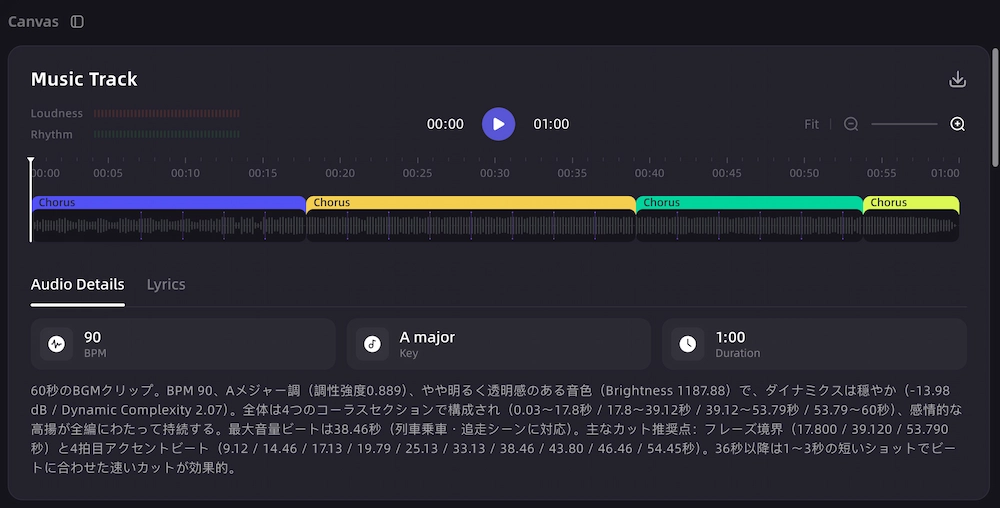
- Tempo and structure (verse, chorus, bridge, drop) set the pacing — how often cuts happen and where the visual "hook" should land.
- Hook or chorus line often becomes the visual anchor — the shot or scene you return to.
- Audience and platform (YouTube long-form, TikTok, Reels, Shorts) affect aspect ratio, length, and how fast the video needs to grab attention.
Once you've pulled a mood, a rough narrative or visual theme, and a sense of pacing from the song, you're in a much better position to choose whether you need a simple music visualizer, a lyric video maker, or a full AI music video generator built around scenes and shots.
What a Music Video Maker Actually Needs to Do
BLUF: A music video maker earns its name by handling five jobs — concept, scenes, lyric moments, visuals, and export — not just one of them.
Online pages for "music video maker" include a wide mix of tools: template editors, mobile apps, AI generators, and visualizer sites. Underneath the branding, a genuinely useful music video maker should help with:
- Concept and direction — turning the song's mood and lyrics into a visual idea, even a rough one.
- Scene and shot planning — breaking the song into sections and deciding what's on screen for each one.
- Lyric or subtitle handling — timing text to the vocal if the video needs a lyric or caption layer.
- Visual generation or editing — producing or assembling the actual footage, animation, or AI-generated clips.
- Pacing and assembly — cutting and timing everything to the track, then exporting in a usable format.
Most tools are strong at one or two of these and weak at the rest. A template editor is fast at step 5 but does little for step 1 or 2. A one-click AI music video generator can produce visuals quickly but may skip real scene planning. Knowing which jobs a tool actually covers — rather than judging it by the "music video maker" label alone — is the fastest way to pick the right one for a specific song.
Five MV Directions You Can Build from One Song
BLUF: The same track can become five different kinds of music video, and picking the right direction matters more than picking the right software.
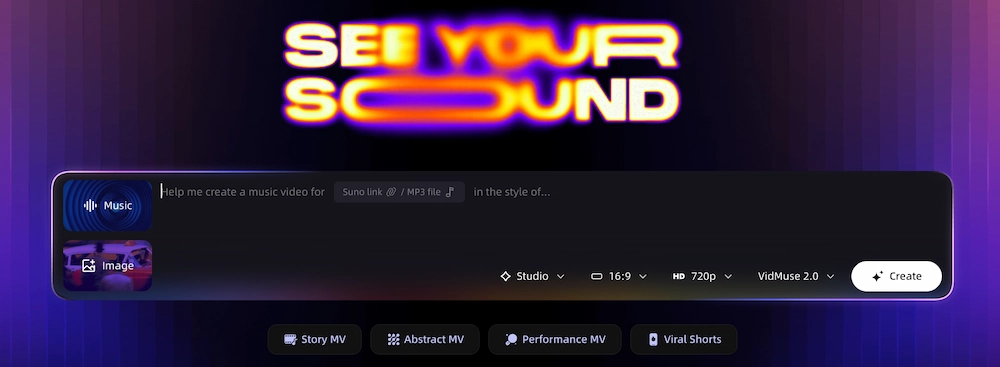
- Story MV — a narrative that runs alongside the song, with characters, settings, and an arc. Best for songs with a clear lyrical story or emotional throughline.
- Performance MV — footage or AI-generated visuals of the artist performing, often intercut with b-roll. Common for pop, hip-hop, and live-oriented genres.
- Lyric MV — text-forward, built around timed lyrics with supporting background visuals. Works well for songwriter-focused tracks or quick turnaround releases.
- Visualizer MV — audio-reactive shapes, particles, or motion graphics that respond to the track. Fast to produce and popular for instrumental or electronic music, or as a placeholder before a full video exists.
- Abstract/cinematic MV — mood-driven visuals without a literal narrative, leaning on color, texture, and atmosphere to match the song's feeling.
A single song could support more than one of these — a lyric video for a quick release, followed later by a full story MV for the official single. Deciding the direction up front keeps the rest of the workflow focused.
Music Video Maker Options by Creative Control
BLUF: Music video tools sit on a spectrum from fast-and-templated to planned-and-story-driven, and the right pick depends on how much creative control the song needs.
No category is "wrong" — a free music video creator or visualizer can be exactly right for a lyric lyric drop or a quick social teaser. The mismatch happens when a song that needs a real narrative gets forced into a template, or a simple lyric video gets over-engineered with a full production pipeline. Match the tool's creative control to what the song actually needs.
How to Make a Music Video from Your Song
BLUF: Making a music video is a five-stage workflow — upload, plan, storyboard, generate, and refine — whether you're using a simple editor or a full AI MV tool.
- Upload or select your audio. Start with your finished track, a rough mix, or an AI-generated song. Make sure you have the rights to use it — a track you don't own or license can get a finished video taken down regardless of how good it looks.
- Define the creative brief. Write down the mood, genre, key lyrics, visual references, and target platform in a sentence or two. This becomes the anchor for every visual decision that follows.
- Map the song structure. Break the track into verse, chorus, bridge, and any drop or instrumental section, and note the approximate timestamps.
- Build a scene and shot list. For each section, decide what's on screen — a location, an action, a lyric moment, or a visual motif — so the video has a plan before you generate or shoot anything.
- Create or gather visuals. Depending on the tool, this might mean AI-generated clips, stock footage, your own photos and video, or a mix.
- Add lyric or subtitle treatment if needed. Time text to the vocal, keeping it readable and consistent with the song's pacing.
- Assemble and pace the edit. Cut visuals to match tempo changes, hooks, and transitions — the chorus usually needs a stronger visual beat than a verse.
- Refine specific shots. Revisit any scene that doesn't match the concept and adjust it before finalizing.
- Export and check platform specs. Confirm resolution, aspect ratio, and format against the platform you're publishing to, and double-check the tool's current export and commercial-use terms.
This same sequence works whether you're cutting a lyric video in a free tool over an afternoon or producing a full story MV over several sessions — only the depth of steps 4 through 8 changes.
How VidMuse Turns Music into a Storyboarded MV
BLUF: VidMuse is relevant if you want a music video built from a planned creative brief and storyboard rather than a template or a single prompt.
Create a Story-First Music Video
Plan your song as scenes and shots before generation, then refine clips and assemble a finished MV workflow.
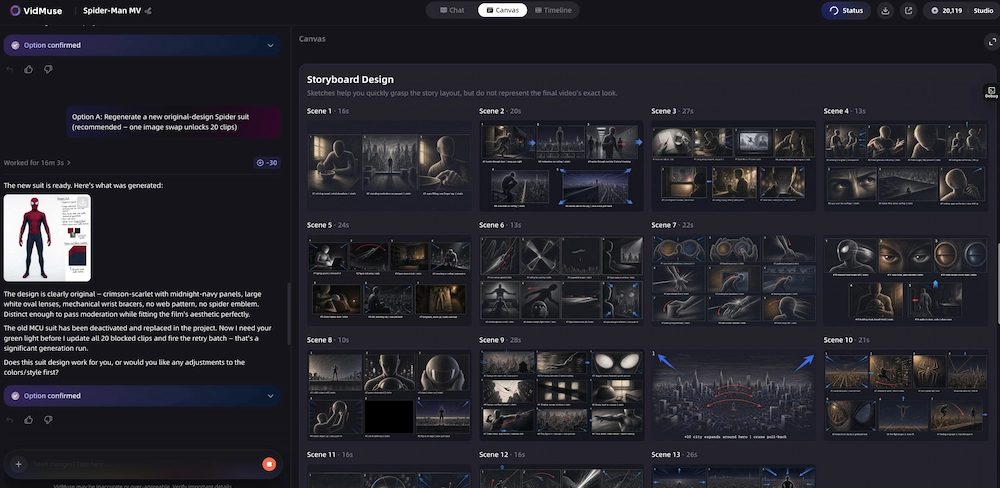
Most of the workflow above is easy to describe and harder to execute manually — mapping song structure, planning scenes, and keeping visuals consistent across a whole track takes real production thinking. VidMuse AI music video generator is built around that exact process, using a structured MV pipeline: Assets Upload → Creative Brief → Reference Generation → Scene & Shots List → Storyboard → Video Generation.
A few parts of that pipeline map directly onto the workflow above:
- Music-native creative brief. Instead of starting from a blank template, VidMuse's AI music video generator interprets the song's mood, lyrics, and any reference material you provide to shape a starting concept.
- Song-to-story planning. The music to video AI workflow turns that concept into a narrative arc and scene list, rather than jumping straight to finished clips.
- Storyboard-first generation. Scenes and shots are laid out before video generation happens, which is the main difference between VidMuse and a template editor or a single-prompt visualizer — the plan exists before the pixels do.
- Beat-aware pacing. Scene and shot timing can be aligned to tempo, chorus and drop changes, and hooks, so cuts land with the music instead of against it.
- Lyric and subtitle treatment. For lyric-driven sections, text timing can be planned alongside the visual scenes rather than bolted on afterward — see the lyric video generator workflow for that use case specifically.
- Studio and Lite modes. Studio mode is oriented toward higher quality and visual continuity across scenes; Lite mode is built for faster, more cost-efficient generation when you need a quicker turnaround.
- Suno-to-video workflow. If your track started as an AI-generated song, the Suno to video workflow lets you carry that track directly into MV planning.
- Production control. Features like Shot Refine by Quoting, a Timeline Editor, and Asset Library & Memory (introduced in VidMuse 2.0) support the refinement step in the workflow above — adjusting individual shots without redoing the whole video.
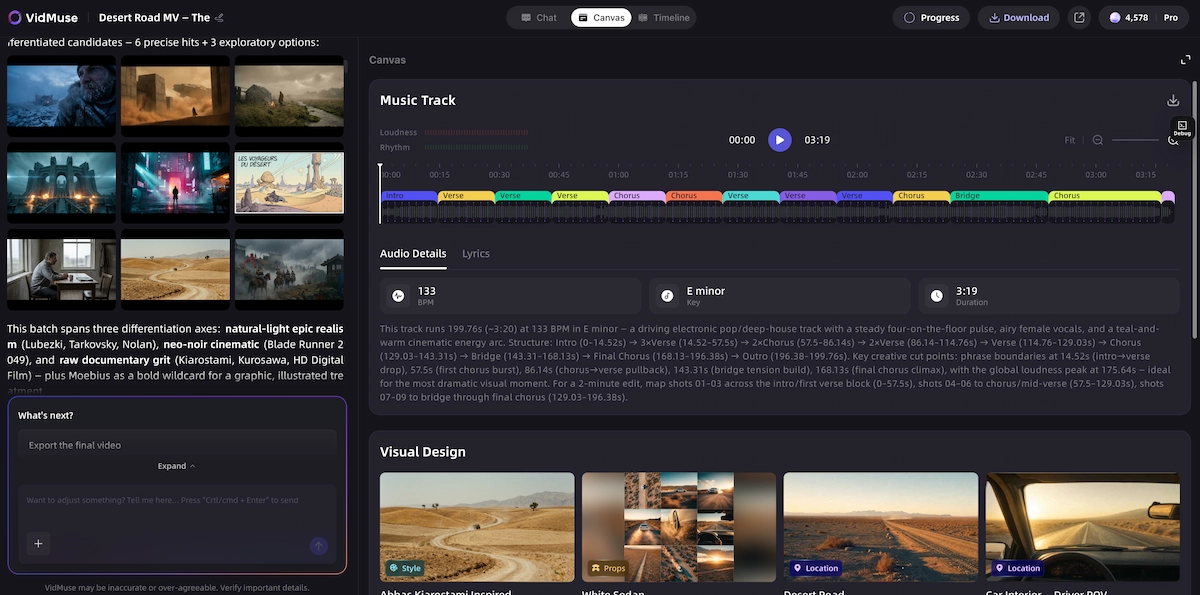
VidMuse doesn't clear music rights, guarantee platform performance, or grant ownership over third-party tracks — you're still responsible for confirming you can legally use your music before publishing. What it's built for is the planning-heavy middle of the workflow: turning a song into a structured set of scenes and shots instead of a single generated clip or a filled-in template.
Music Video Maker vs Music Visualizer vs Lyric Video Maker
BLUF: These three terms get used interchangeably, but they solve different problems and often need different tools.
- Music video maker is the broadest term — it covers any tool that produces a finished video synced to a song, from a template editor to a full AI MV generator.
- Music visualizer specifically means audio-reactive graphics — waveforms, particles, shapes — that move in response to the track. It's fast to produce and works well for instrumental music, but it doesn't build a narrative or scenes. If that's genuinely all you need, tools built specifically for this — see our music visualizer comparison — are usually faster than a full MV workflow.
- Lyric video maker focuses on timing text to the vocal over a background visual, static or looping. It's the right choice for a quick release video where the lyrics themselves are the main content, not a full story.
A music video maker in the story or performance sense — the kind this guide focuses on — needs to do more than either of those: plan scenes, direct visuals, and pace an edit around the whole song rather than reacting to audio frame by frame or displaying text on a loop. If you're unsure which one your song needs, the "Five MV Directions" section above is a good starting filter — visualizer and lyric MVs sit at the simpler end, while story and performance MVs need the scene-planning approach this article covers in depth.
Build More Than a Visualizer
Move from simple audio-reactive graphics to planned scenes, lyric moments, and storyboarded music-video production.
How to Plan Scenes for Verse, Chorus, Bridge, and Drop
BLUF: Mapping visuals to song structure — not just to the beat — is what separates a paced music video from a randomly cut one.
- Intro. Set the tone and location before vocals start. This is often the establishing shot of the whole video.
- Verse. Slower pacing and more narrative detail — this is where story or character moments usually live, since the lyrics are carrying more specific information.
- Pre-chorus. A visual build-up — tighter cuts, rising energy, or a shift in framing that signals the chorus is coming.
- Chorus. The strongest visual moment of the video. This is usually where the "hook" shot lives — the image you want viewers to remember and that repeats each time the chorus returns.
- Bridge. A good place for a visual break from the established pattern — a different location, a slower moment, or a shift in color and tone before the final chorus.
- Drop or instrumental section. If the song has one, this section can carry more visually intense or abstract cuts since there's no lyric to follow, especially in electronic or hip-hop tracks.
- Outro. A resolution shot — often a return to the intro's setting or image, which gives the video a sense of closure.
Treating each section differently, rather than applying one visual template to the whole song, is often the single biggest quality jump between an amateur-feeling MV and a paced, intentional one — regardless of which music video maker or music video generator you're using to build it.
Common Mistakes When Making Music Videos Online
BLUF: Most weak music videos fail for the same handful of avoidable reasons, not because the tool wasn't powerful enough.
- Disconnected clips. Visuals that don't relate to each other or to the song's mood, often from grabbing whatever stock footage or generated clips are available instead of planning scenes first.
- Poor lyric timing. Text that lags behind or rushes ahead of the vocal is one of the fastest ways to make a lyric video feel unpolished.
- Ignoring rights. Using a track, sample, or footage without confirming you're allowed to — this can get a finished video taken down or demonetized after the work is already done. Always verify licensing on your audio and any third-party footage before publishing.
- No concept before production. Opening an editor before deciding on mood, story, or visual references usually produces a video that feels assembled rather than directed.
- Weak pacing. Cutting on a fixed rhythm regardless of the song's actual structure, instead of giving the chorus or hook more visual weight than a verse.
- Style drift. Visuals that shift in tone, color, or quality partway through, especially common when mixing footage from multiple sources or AI generations without a consistent reference.
Most of these are planning problems, not software problems — which is why the workflow and scene-mapping sections above matter as much as the tool you eventually choose.
FAQ: Music Video Maker
What is the best free music video maker?
There isn't a single best option — it depends on the video type. A free visualizer suits instrumental tracks, a free lyric video maker suits text-forward releases, and a free tier of an AI music video generator may work for a short, simple story MV. Check each tool's current free-plan limits, since they change and often cap length, resolution, or watermarking.
How do I make a music video with pictures and music?
Upload your photos and audio track into an editor or AI music video maker, arrange the images in an order that follows the song's structure (verse, chorus, bridge), add transitions timed to the beat, and export. Tools with a scene-planning step will help you decide which photos go where based on the lyrics or mood, rather than just placing them in upload order.
Is there a free AI music video maker?
Several AI music video generators offer a free tier or trial, typically with limits on video length, resolution, or the number of generations. Confirm current limits directly with the tool before relying on them for a release, since free-tier terms are updated frequently.
What's the difference between a music video maker and a music visualizer?
A music video maker can include narrative, performance footage, or planned scenes, while a music visualizer specifically generates audio-reactive graphics that respond to the track. A visualizer is a subset of what a full music video maker can do.
Can I make a lyric video and a full music video from the same song?
Yes. Many artists release a lyric video quickly around a song's release date and follow up later with a full story or performance MV once there's more time for production. The same creative brief — mood, lyrics, references — can inform both.
Do I need footage, or can AI generate the whole video?
It depends on the tool and the look you want. Some AI music video generators can produce full scenes from a prompt or reference images without any original footage, while others are built for combining your own clips and photos with AI-assisted editing. Check what each tool actually generates versus what it expects you to upload.
Does a music video maker handle music rights or copyright clearance?
No. Video tools, including AI music video generators, do not clear music rights or confirm you're allowed to use a track — that responsibility stays with the creator. Always confirm you own or have licensed the music (and any sampled or reference footage) before publishing.
What video length or format works best for platforms like YouTube, TikTok, and Reels?
Full YouTube music videos typically match the song's full runtime in landscape format, while TikTok and Reels favor vertical or square formats, often as trimmed highlights or full short-form tracks. Check each platform's current recommended specs, since ideal length and aspect ratio shift over time.
How is VidMuse different from a template-based music video maker?
VidMuse plans a creative brief and scene-and-shot storyboard before generating video, rather than filling clips into a pre-built template. That makes it more suited to story or performance MVs that need scene-level planning, while a template editor is often faster for simple, straightforward edits.
Conclusion
A good music video starts with the song — its mood, lyrics, structure, and hook — and the tool you choose should match the kind of video that song actually needs, whether that's a quick visualizer, a lyric video, or a fully planned story MV. If you're working on a track that needs real scene and shot planning rather than a template, VidMuse's AI music video generator is built around that exact workflow — from creative brief through storyboard to a finished, paced video. Explore the best AI music video generator comparison to see how different tools stack up for your next release.
Make Your Next Music Video with VidMuse
Start with the song, plan the storyboard, generate visuals, and refine the final MV for your release.
Suggested schema: BlogPosting, FAQPage, HowTo, SoftwareApplication, ItemList. Add VideoObject only if an actual video is embedded on the page, and ImageObject only for the specific image assets used in the final layout.

Written By
VidMuse Team
Continue Reading
Latest blog posts related to AI video creation.
AI Product Video Generator: VidMuse Guide for 2026
Create product videos from images, URLs, and descriptions with VidMuse AI. Plan scenes, generate clips, refine CTAs, and export product videos for ecommerce.
AI Marketing Video Generator: VidMuse Campaign Guide
VidMuse is the AI marketing video generator built to turn product inputs into campaign-ready promo videos, product demos, UGC-style ads, and social ads.
AI Ad Generator Free: Best Tools and Video Workflow
Compare AI ad generator free tools, check free-plan limits, and learn how VidMuse helps create product video ads with scripts, clips, subtitles, and CTAs.