

Wan 3.0 is attracting attention as a possible next major Wan-family AI video model, but creators should separate confirmed Wan / Alibaba model facts from third-party Wan 3.0 generator and pricing claims. Many public pages promise 4K video, longer clips, audio sync, and subscription plans, while official Alibaba and Wan-Video sources more clearly document Wan-family models such as Wanx 2.1, Wan2.1, and Wan2.2. This guide explains what is known, what needs verification, how Wan 3.0 compares with alternatives, and how to plan Wan-style video generation inside VidMuse AI.
What Is Wan 3.0?
Wan 3.0 is often discussed as the next major generation of the Wan AI video model family, but the safest definition is still conditional: it is a model topic associated with Alibaba’s Wan / Tongyi Wanxiang video-generation ecosystem, not a set of official specifications that should be copied from any single third-party landing page.
The confusion comes from the number of public pages using the Wan 3.0 name. Some pages present Wan 3.0 as a cinematic AI video generator for text-to-video, image-to-video, multi-shot video, audio sync, and high-resolution output. Some use exact-match domains or product-style copy that sounds official. Others are model directories, pricing pages, speculative articles, or generator front ends. Those pages may be useful for understanding what creators expect, but they are not automatically official Alibaba model documentation.
The confirmed context is broader: Wan is part of Alibaba’s visual-generation ecosystem. Official and high-confidence sources include Alibaba Cloud coverage of Wanx 2.1 / Tongyi Wanxiang, Alibaba Group material around open video models, and GitHub repositories such as Wan-Video/Wan2.1 and Wan-Video/Wan2.2. Those sources establish a real Wan-family lineage for AI video generation, including text-to-video and image-to-video directions in published Wan2.x materials. They do not, by themselves, confirm every Wan 3.0 claim found on third-party pages.
For creators, the practical question is not only “Does Wan 3.0 exist?” It is “Which provider gives me a verified model version, what can that model do, what does it cost, and how do I fit it into a reliable production workflow?” That matters for music videos, product ads, short cinematic clips, social videos, and storyboard-to-video production. A video model can generate motion, but creators still need a brief, shot plan, visual references, iteration process, and final Timeline assembly.
Turn Model Research into a Video Workflow
Use VidMuse to plan briefs, references, model choices, generated clips, and Timeline assembly before committing production credits.
Is Wan 3.0 Officially Released?
The safest answer is: do not treat Wan 3.0 as officially released solely because a third-party page says so. Official-looking sources clearly support the Wan family and Wan2.x lineage, while many Wan 3.0 pages are third-party landing pages, directories, pricing pages, or speculative posts.
At the time of review, I could not confirm a clean Alibaba Group launch announcement for Wan 3.0 or a clear official Wan3.0 repository under the Wan-Video GitHub organization. Public Wan 3.0 pages include domains and directories such as wan30ai.com, OpenArt’s Wan 3 page, AI Agents Directory, Flowith, image2video.org, StackShare, and WaveSpeedAI. Treat those pages as third-party evidence until matched with official documentation.
Use this source hierarchy before you accept a Wan 3.0 claim:
This distinction is important because model names often move faster than official documentation. A third-party platform may use a Wan-family model, a modified backend, a private wrapper, or a speculative “Wan 3.0” label. Use wording such as “third-party pages claim,” “provider pages list,” and “verify through official or provider documentation” instead of assuming that “Wan 3.0 officially supports” every listed feature.
Wan 3.0 Features: Confirmed vs Claimed
Wan 3.0 features should be treated as a verification checklist unless official documentation confirms exact specs. Public pages suggest what creators want — 4K output, longer clips, image-to-video, video-to-video, audio, and multi-shot control — but production teams should verify each capability before committing to a model.
The safest writing approach is to present Wan 3.0 as a model to evaluate, not as a guaranteed feature bundle. For example, a product team should not assume that a “4K” landing page means native 4K on every plan. A filmmaker should not assume that “multi-shot” means reliable character consistency across a full sequence. A marketer should not assume that “commercial rights” apply to all uploads, references, or generated outputs.
This is also why a structured workflow matters. If you plan scenes first, generate or approve references, compare clips, and assemble the final result in a Timeline, you are less dependent on one model producing a perfect full video in a single attempt.
Wan 3.0 Pricing and Access
Wan 3.0 pricing shown on third-party platforms is mostly platform pricing, not necessarily official model pricing. A page may sell credits for a Wan-labeled generator, but that does not automatically reveal Alibaba’s official pricing, the exact model version, or the true cost per usable clip.
Public pricing or plan-style pages appear on domains such as wan30.net, wan-3.art, create.wan.video, wan30.video, and wan-3.io. Some mention starter plans, monthly credits, annual credits, watermarks, commercial rights, private creation, or “no expiry” credit packs. These details are useful for understanding what creators may encounter, but no third-party table should be presented as official Wan 3.0 pricing unless the provider can verify the backend model and terms.
Use this checklist before comparing Wan 3.0 pricing:
The practical recommendation is to evaluate price per approved output, not price per generation. If a model produces ten clips and only two are usable, the real cost is five times higher than the listed generation price. Teams should also include editing time, revision time, and the cost of alternative models when comparing options.
Wan 3.0 vs Wan 2.x, Veo, Kling, Hailuo, and PixVerse
Wan 3.0 should be compared by availability and workflow fit rather than unsupported benchmark claims. The right AI video model depends on the shot: a product close-up, a music-video dance scene, a cinematic establishing shot, a talking-head moment, and a fast social ad may each need different strengths.
The strongest comparison article does not need to declare a universal winner. Instead, it should ask production questions:
- Is the model actually available to your team?
- Can it use your reference images or keyframes?
- Does it support the aspect ratio and duration you need?
- Can it preserve a product, face, character, or logo across shots?
- Does it support audio, dialogue, or lip-sync if the scene requires it?
- Does the provider allow commercial use and private generation?
- Can you regenerate weak clips without breaking the budget?
For example, a music-video creator may prioritize motion style, rhythm, scene variety, and reference-image support. A product marketer may prioritize product fidelity, readable text, brand safety, and CTA timing. A filmmaker may prioritize camera language, cinematic continuity, and shot control. Wan 3.0 alternatives should be evaluated against the project, not against a generic leaderboard.
How to Use Wan 3.0 or Wan-Style Video Generation in VidMuse
VidMuse helps creators use Wan-style video generation as part of a structured production workflow: brief, storyboard, references, model selection, clip iteration, and Timeline assembly. If Wan 3.0 is available through a chosen provider or future integration, it should be treated as one execution model inside a broader creative system, not as the whole workflow.
1. Start with the project goal
Define the deliverable first: music video, product ad, cinematic short, product launch, social clip, explainer, or UGC-style video. Choose aspect ratio, duration, audience, visual tone, and the job of each scene. A model prompt is more reliable when it has a production target.
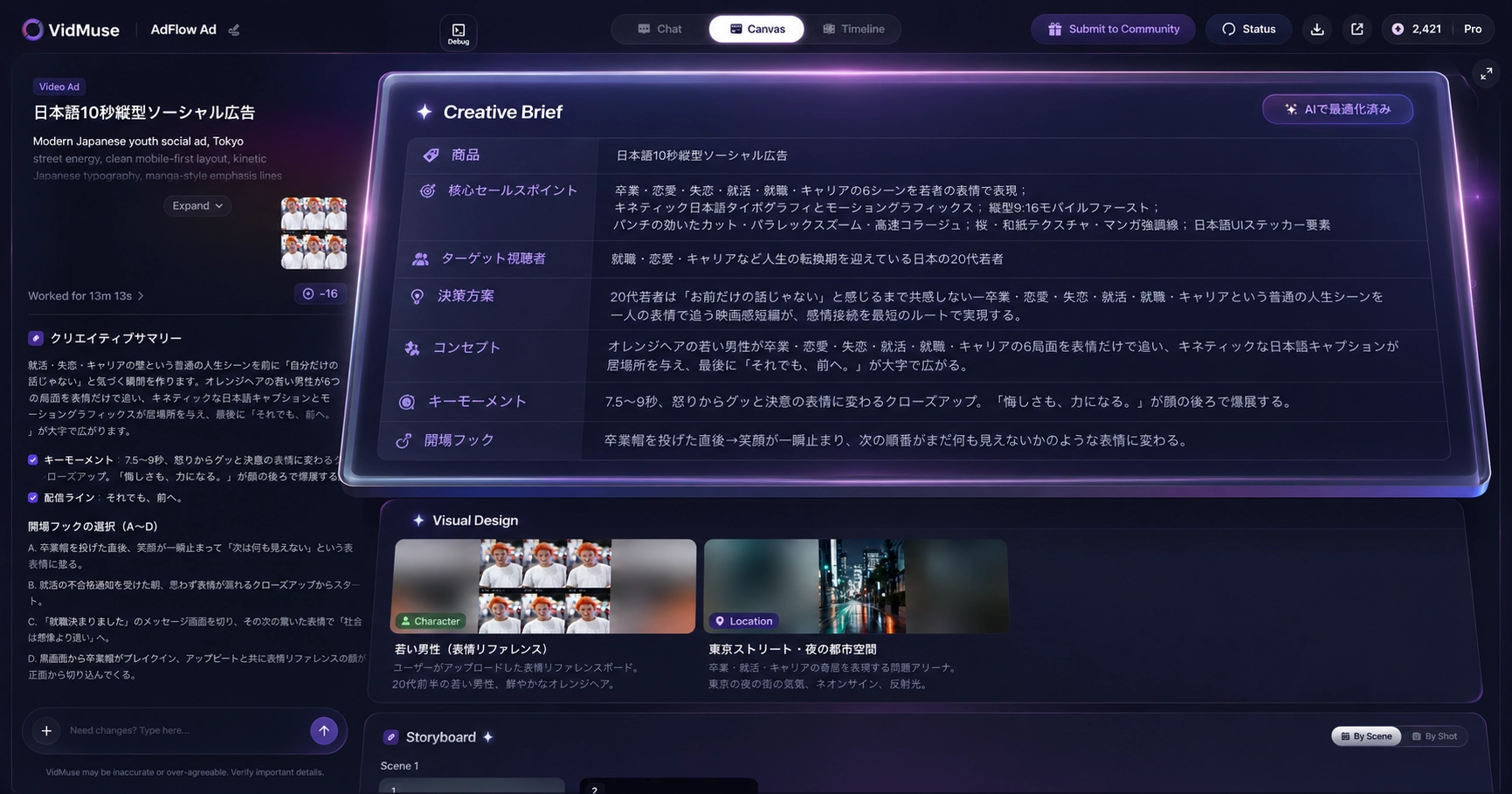
2. Write the creative brief
Use the brief to define the story, subject, style, pacing, references, required objects, brand constraints, and success criteria. In VidMuse Freeform Canvas guide, the same principle appears as structured visual planning: assets, text, audio, images, and video nodes work better when connected to a clear creative direction.
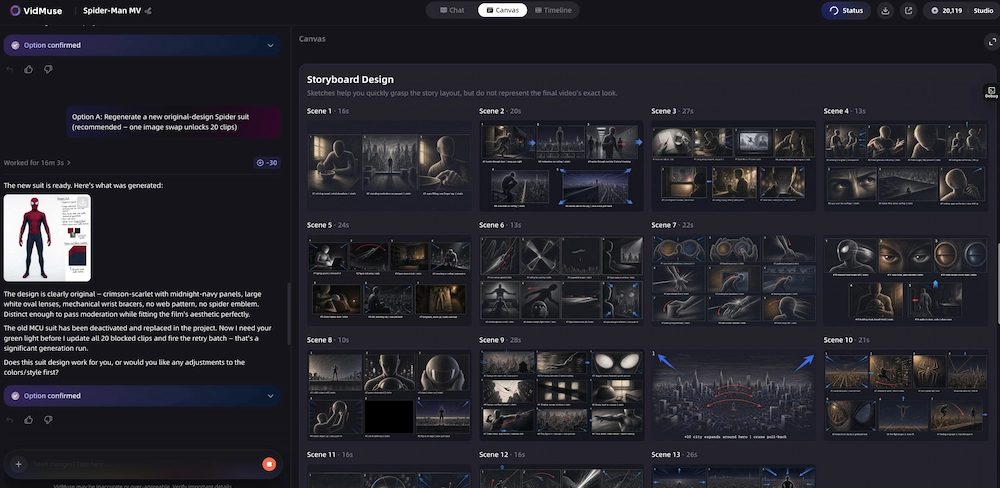
3. Plan scenes and shots
Break the video into scenes and shots. For each shot, specify subject, action, environment, camera motion, lighting, and continuity requirements. This is where many one-shot AI video prompts fail: they ask for a finished film instead of a controllable sequence.
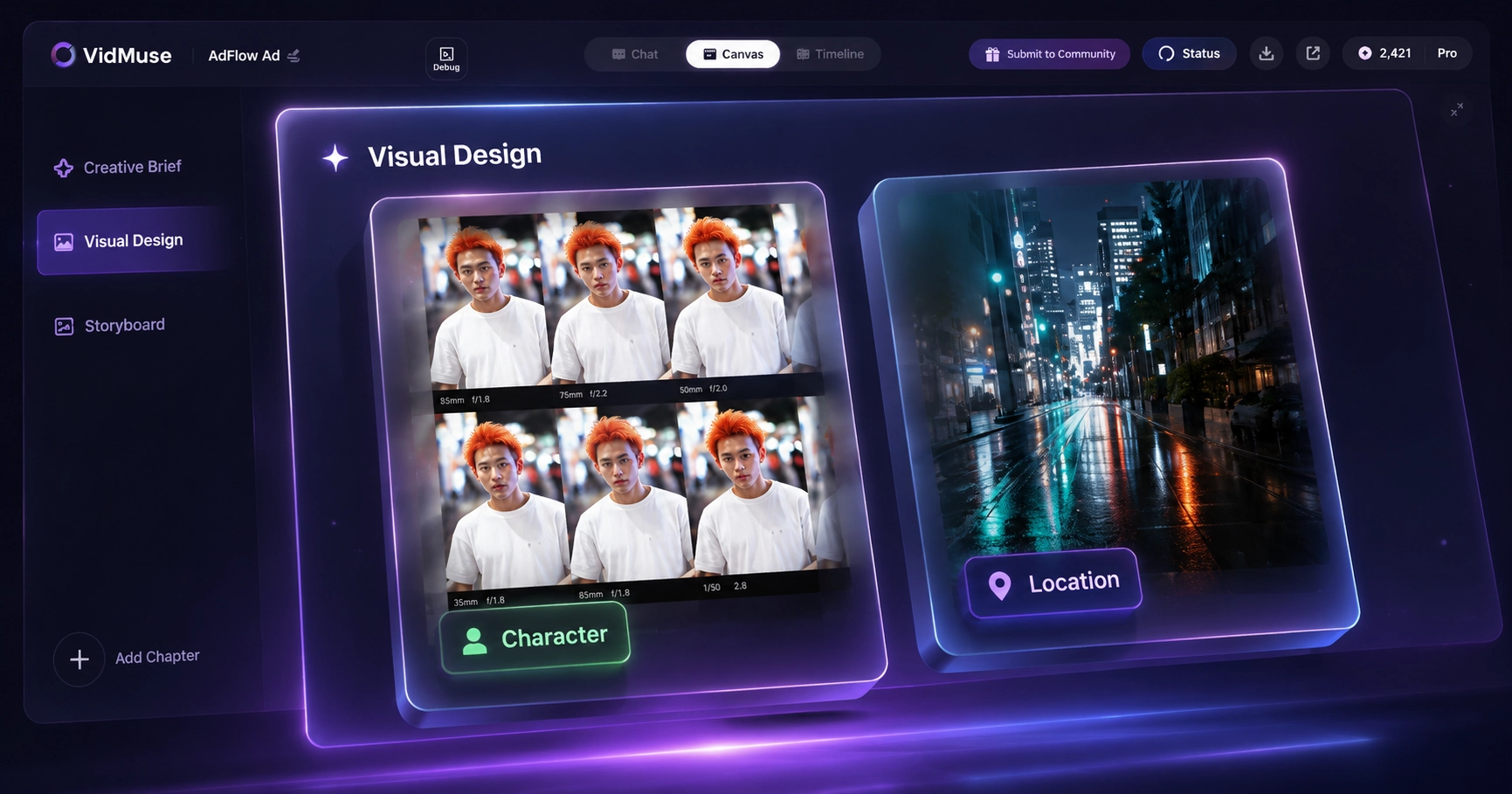
4. Prepare keyframes or references
If character, product, or style consistency matters, prepare approved stills before video generation. References make the generation target clearer and reduce the risk of visual drift. For ads, this can include product photos, packaging, hero frames, or reference commercials. For music videos, this can include character looks, scene palettes, symbolic objects, or album-art-inspired frames.
5. Choose the model per shot
Use Wan 3.0 if it is available, verified, and appropriate for the shot. Otherwise, compare compatible models by the actual requirement: image-to-video, cinematic movement, product fidelity, long duration, audio, or fast iteration. VidMuse’s model-selection layer is valuable because one model rarely fits every shot equally well.
6. Generate and compare clips
Generate multiple candidates for important shots. Compare motion, prompt adherence, subject consistency, artifacts, camera behavior, and brand safety. A visually strong single frame does not always produce the strongest motion. Keep the best clips and regenerate weak ones with narrower instructions.
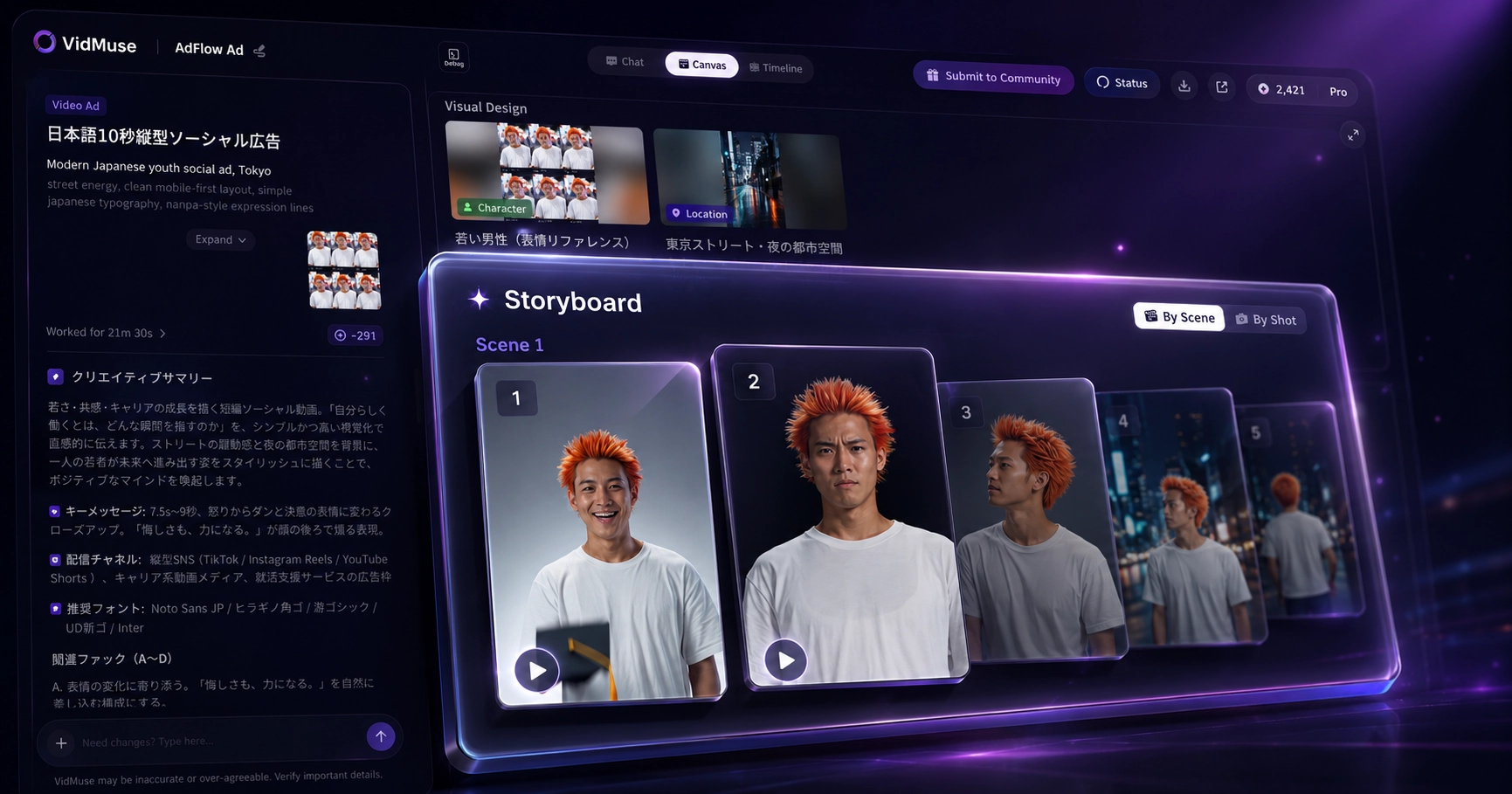
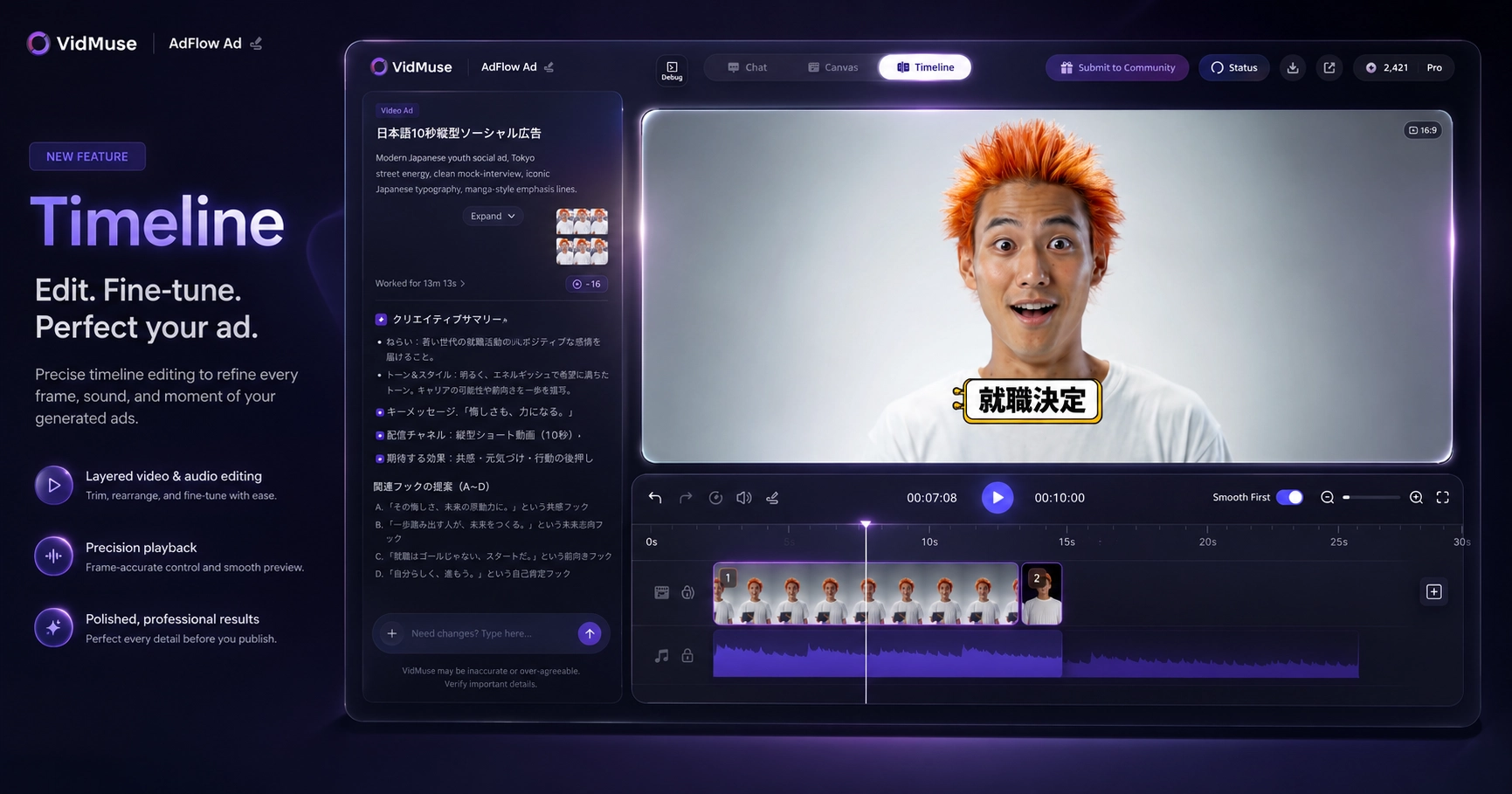
7. Assemble the Timeline
Arrange approved clips into the final sequence. Add music, voiceover, subtitles, transitions, pacing adjustments, product callouts, and CTA elements. This final Timeline stage is where a collection of model outputs becomes a coherent video.
Plan AI Video Before You Generate
Use VidMuse to turn prompts, references, scenes, and model outputs into a structured video workflow with clip review and Timeline assembly.
Best Use Cases for Wan 3.0
Wan 3.0 is most relevant for creators evaluating cinematic or multi-shot AI video generation, but the best use case depends on verified access and model limits. Treat Wan 3.0 as a candidate model for specific shots, not as a guaranteed full-production solution.
For music videos, Wan-style generation may help create atmosphere, transitions, abstract visual sequences, lyric-driven scenes, or stylized performance environments. The key is to connect the model to song structure instead of generating random visuals. A VidMuse AI music video generator workflow can start from lyrics, story, mood, and visual references before moving into clip generation.
For product ads, Wan-style generation may help with lifestyle shots, product-in-context scenes, hook visuals, or cinematic transitions. However, product fidelity and readable text must be checked carefully. A VidMuse AI ad generator workflow can combine product understanding, script planning, keyframes, video clips, subtitles, and CTA timing.
Other practical use cases include:
- Cinematic concept trailers for pitch decks or mood exploration.
- Social video variations for fast creative testing.
- Storyboard-to-video production where each scene has a clear purpose.
- Background motion plates or atmospheric inserts.
- Creator experiments comparing Wan 3.0 alternatives before final production.
The best projects are specific. “Make a beautiful sci-fi video” is less controllable than “Generate a five-second wide shot of a lone courier walking through a rain-lit neon alley, slow dolly forward, blue-magenta palette, no text, no face close-up.”
Create Product Video Ads with AI
Turn product inputs, hooks, visual references, and generated clips into structured ad videos for social platforms.
Limitations and Risks to Check Before Production
The biggest Wan 3.0 risk is not only output quality; it is version ambiguity, pricing ambiguity, and rights ambiguity. A beautiful sample clip does not answer whether the model is official, what plan generated it, whether commercial usage is allowed, or whether the same result can be repeated in a production pipeline.
Check these risks before production:
A cautious workflow does not slow creators down; it prevents expensive revisions. Start with one or two test scenes, verify output quality and terms, then expand into a full sequence only after the model proves suitable for the project.
FAQ: Wan 3.0
What is Wan 3.0?
Wan 3.0 is a search term and model topic associated with the Wan / Alibaba AI video model ecosystem. Many pages present it as a next-generation AI video generator, but creators should verify official release status, exact specs, pricing, and access through Alibaba, Wan, GitHub, Hugging Face, or trusted provider documentation before using it in production.
Is Wan 3.0 officially released?
Do not assume Wan 3.0 is officially released just because a third-party generator page presents it that way. Official Wan-family sources clearly document Wanx 2.1, Wan2.1, and Wan2.2, while many Wan 3.0 pages online are third-party landing pages, directories, pricing pages, or speculative articles.
Is Wan 3.0 from Alibaba?
Wan is associated with Alibaba’s visual-generation ecosystem, including Tongyi Wanxiang / Wan-family models. However, a page using the phrase “Wan 3.0” is not automatically an official Alibaba page. Verify the exact model through Alibaba Group, Alibaba Cloud, official Wan pages, GitHub Wan-Video repositories, or official model cards.
Is Wan 3.0 free?
Wan 3.0 should not be described as free unless the specific provider and plan are verified. Third-party pages include credit plans, subscription pages, and generator front ends. Those may offer free trials or paid tiers, but platform pricing is not the same as official model pricing or universal free access.
Does Wan 3.0 support image-to-video?
Many Wan 3.0 pages claim image-to-video support, and related Wan-family models have been associated with text-to-video and image-to-video workflows. Still, verify whether the exact Wan 3.0 provider supports uploaded images, first-frame input, start/end frames, or reference controls before relying on it.
Does Wan 3.0 support video-to-video?
Some Wan-related provider pages lead to video-to-video APIs, but those may reference Wan 2.x or provider-specific endpoints rather than Wan 3.0. Check the model version, input requirements, output limits, and terms before describing Wan 3.0 as a video-to-video model.
Can Wan 3.0 generate 4K or 30-second videos?
Several third-party pages claim 4K output or 30-second clips for Wan 3.0, but those claims should be verified with official model documentation or trusted provider docs. Also check whether the output is native 4K or upscaled, whether longer clips cost more credits, and whether quality remains stable.
What is the best Wan 3.0 alternative?
The best Wan 3.0 alternative depends on the task. Veo, Kling, Hailuo, PixVerse, Seedance, Vidu, MiniMax H3, and Wan 2.x variants may fit different shots. Compare availability, reference-image support, motion quality, audio, duration, product or character consistency, API access, and commercial terms instead of choosing by hype.
How can I use Wan-style generation in VidMuse?
Use Wan-style generation in VidMuse as part of a structured workflow: define the goal, write a brief, plan scenes, prepare references or keyframes, choose the right model per shot, generate alternatives, and assemble approved clips in the Timeline. If Wan 3.0 availability is unconfirmed, use conditional wording and compare other compatible models.
Final Verdict
Wan 3.0 is worth watching because creator interest is real and the Wan family is a meaningful part of the AI video model landscape. But production teams should not build a workflow on unverified landing-page claims. The smarter approach is to separate official Wan-family facts from third-party Wan 3.0 claims, verify pricing and rights, test the exact provider, and compare alternatives by shot requirements.
For creators, the model is only one part of the process. A reliable AI video workflow still needs a creative brief, scene plan, references, clip review, and Timeline assembly. That is where VidMuse can help: it gives you a structured way to move from idea to planned shots to generated clips to a finished video, whether the selected model is Wan 3.0, another Wan-family model, or a different video model that better fits the scene.
Build Music Videos with a Structured AI Workflow
Plan lyrics, scenes, references, generated clips, and final assembly in VidMuse instead of depending on one model output.

Written By
VidMuse Team
Continue Reading
Latest blog posts related to AI video creation.
AI Product Video Generator: VidMuse Guide for 2026
Create product videos from images, URLs, and descriptions with VidMuse AI. Plan scenes, generate clips, refine CTAs, and export product videos for ecommerce.
AI Marketing Video Generator: VidMuse Campaign Guide
VidMuse is the AI marketing video generator built to turn product inputs into campaign-ready promo videos, product demos, UGC-style ads, and social ads.

AI Ad Generator Free: Best Tools and Video Workflow
Compare AI ad generator free tools, check free-plan limits, and learn how VidMuse helps create product video ads with scripts, clips, subtitles, and CTAs.