

Freebeat AI is a freemium AI music video generator that lets you turn a song into a structured music video using an agent-based workflow — but its free plan does add a watermark, and removing it requires a paid subscription starting at $4.99 per week. The platform works by analyzing your track's rhythm and energy, then planning scenes, storyboard frames, and video clips in sequence. Before you pay, there are serious user-reported concerns around credit consumption, billing transparency, and customer support responsiveness that are worth understanding in full.
Key Takeaways
- Freebeat AI is an AI music video generator that uses an agent-based workflow — it plans, storyboards, and generates video clips from your uploaded track, rather than producing a single one-shot output.
- The free plan includes a watermark; watermark removal requires a paid subscription (Basic plan starts at $4.99/week or Pro at $26.99/month as of mid-2026).
- Generation consumes credits at every stage, including regeneration of individual clips — a full MV can cost substantially more credits than initially quoted, according to multiple Trustpilot reviewers.
- Cancellation is reportedly difficult: the cancel button is hidden in the billing panel and support response times are slow. Multiple verified users recommend changing your payment method to surface the cancel option if the button doesn't appear.
- VidMuse is a strong freebeat AI alternative for creators who want a full creative brief → storyboard → video pipeline with a wider model selection and no hidden credit consumption at the revision stage.
Create Your AI Video in Minutes
Turn your idea into a video with Freebeat alternative.
What Is Freebeat AI?
Freebeat AI (freebeat.ai) is an AI-powered music video creation platform that positions itself as an "AI Director." Rather than asking you to generate one prompt-to-video clip at a time, its core product — the Agent workflow — takes your uploaded track and moves it through a structured production pipeline: music analysis, creative brief, style selection, scene planning, shot planning, storyboard generation, clip generation, and final merge.
The platform also includes a broader toolbox beyond music video creation: AI image generation (via models including GPT-Image 2, Flux 2 Pro, Nano Banana Pro, Seedream 5.0 Lite, and Kling Image V3), AI video tools (SeedDance 2.0, Kling V3 4K, Veo 3.1, Hailuo 2.3 Pro, Pixverse V6, and others), lip sync, face swap, video upscaling, and a music generator module running ACE STEP 1.5 V3 as its own model alongside integrations for MiniMax Music, Suno V5, and Mureka V8.
Its primary audience is independent musicians, social media creators, and small businesses who want music video output without a production team.
How Freebeat AI Works: The Freebeat AI Music Video Generator Explained
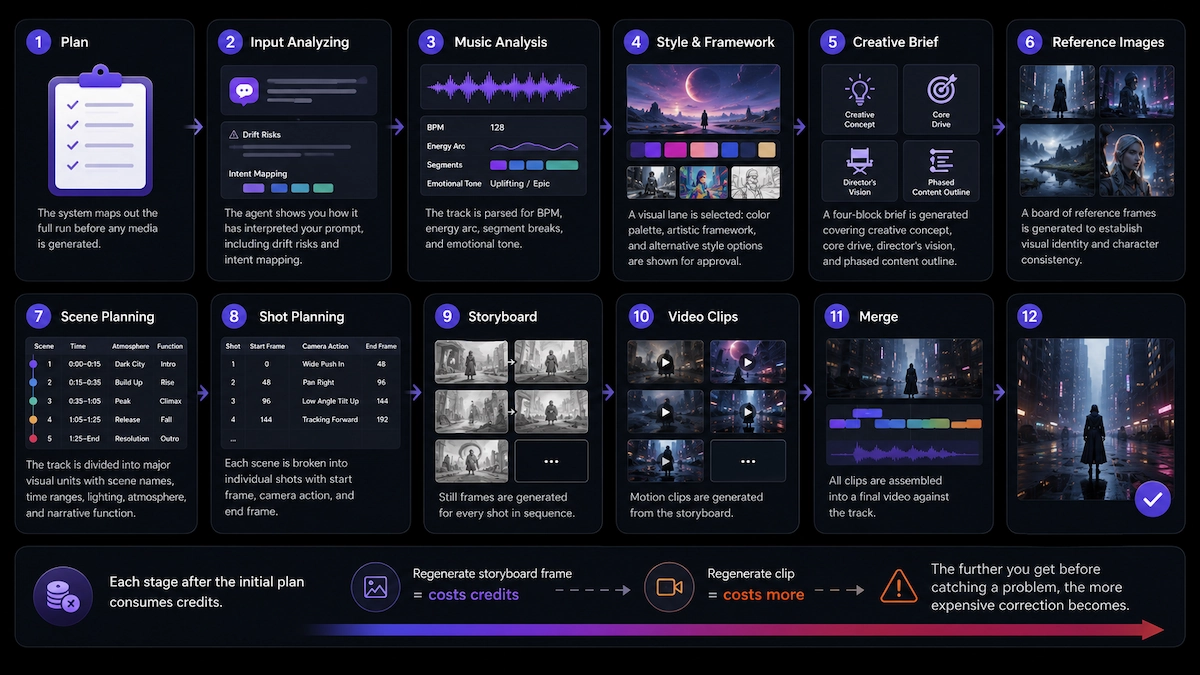
Freebeat AI's agent workflow runs through eleven distinct stages, each building on the last — which is both its strength and its credit risk.
Here is the sequence the Agent follows once you create a session:
- Plan — The system maps out the full run before any media is generated. This is the cheapest moment to catch a direction problem.
- Input Analyzing — The agent shows you how it has interpreted your prompt, including drift risks and intent mapping.
- Music Analysis — The track is parsed for BPM, energy arc, segment breaks, and emotional tone. Visuals will be structured around this read.
- Style & Framework — A visual lane is selected: color palette, artistic framework, and alternative style options are shown for approval.
- Creative Brief — A four-block brief is generated covering creative concept, core drive, director's vision, and phased content outline.
- Reference Images — A board of reference frames is generated to establish visual identity and character consistency before any clips are made.
- Scene Planning — The track is divided into major visual units with scene names, time ranges, lighting, atmosphere, and narrative function.
- Shot Planning — Each scene is broken into individual shots with start frame, camera action, and end frame.
- Storyboard — Still frames are generated for every shot in sequence.
- Video Clips — Motion clips are generated from the storyboard.
- Merge — All clips are assembled into a final video against the track.
Each stage after the initial plan consumes credits. If you regenerate a storyboard frame, that costs credits. If you regenerate a clip, that costs more. The further you get before catching a problem, the more expensive correction becomes.
Freebeat AI Features Breakdown
Freebeat AI offers several distinct creation modes under its music video umbrella:
- Singing MV — Artist-forward videos where the performer stays center frame, with lip-sync and stage energy as the visual priority.
- Storytelling MV — Narrative-driven output with setup, development, and payoff structure.
- Abstract MV — Texture and atmosphere-led visuals, not scene-by-scene story.
- Viral Short — Compact, fast-paced output designed for short-form platforms where the hook must arrive early.
- OnBeat Effects — Rhythm-synced effects where beat reaction and motion impact are the priority.
- Realtime Music Video — A real-time clip generation mode for faster output.
- Lyric Video — Beat-synced lyric display with karaoke-style timing and animated captions.
- Dance Video — AI-choreographed dance sequences with customizable characters and style choices such as K-Pop or Hip-Hop.
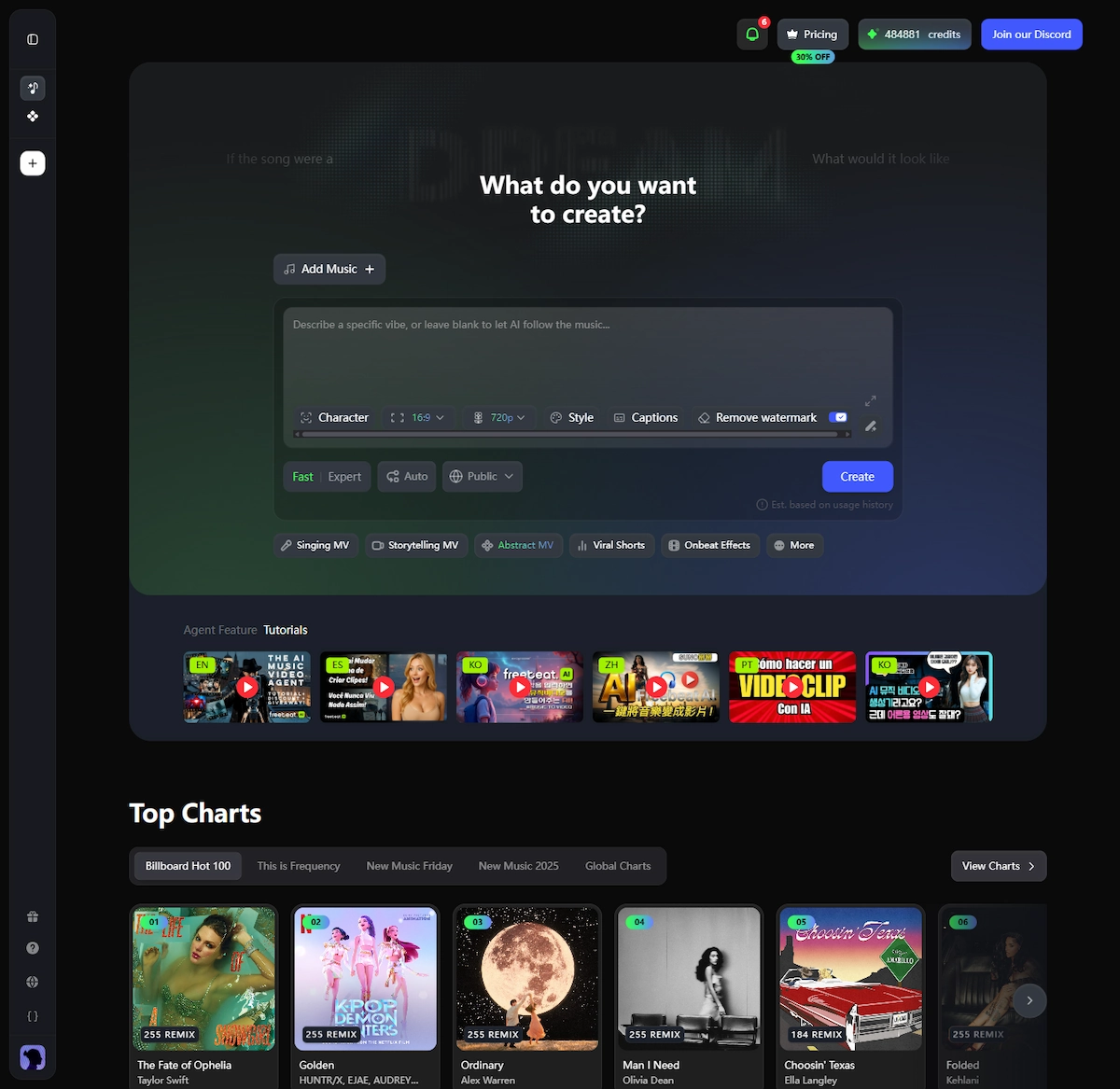
Beyond the core MV product, the toolbox includes AI image generation, video upscaling, motion transfer, face swap, video extension, AI effects, stock footage, and a music creation suite.
Freebeat AI Pricing: What Each Plan Actually Covers
Freebeat AI pricing runs on a credit-based subscription model with three main tiers as of mid-2026 (30% off promotional pricing shown):
| Plan | Promotional price | Regular price | Credits | Resolution | Watermark removal | Music generation benefits |
|---|---|---|---|---|---|---|
| Basic | $4.99/week | $6.99/week | 1,990 credits/week | Up to 720p | Included | 10 free MiniMax Music V2.5 and V2.6 generations per week; unlimited ACE STEP 1.5 V3 music generations |
| Pro | $26.99/month | $34.99/month | 10,000 credits/month | Up to 720p | Included | 20 free MiniMax Music V2.5 and 50 free MiniMax Music V2.6 per month |
| Ultimate | $39.99/month | $49.99/month | 19,000 credits/month | Up to 1080p | Included | Unlimited Sonauto V3, Mureka V8, Mureka V9, and ACE STEP 1.5 V3; 30 free Suno V5 generations per month; unlimited Mureka music generations |
A free tier exists for testing, but it runs on slower generation queues, caps credits heavily, and outputs videos with a watermark.
One credit consumption reality reported by real users: one reviewer was told by the platform that a single video would require approximately 99,828 credits — far beyond what most plans provide in a billing cycle. Credit costs per model vary significantly, and the agent workflow's multi-stage structure means credits are drawn at multiple points during a single project.
Does the Freebeat AI Free Plan Have a Watermark?
Yes — the freebeat AI free plan includes a watermark on all exported videos. Watermark removal is listed as a feature of all paid tiers, including the entry-level Basic plan at $4.99/week.
This applies to the free version regardless of which video mode you use: Singing MV, Abstract MV, Storytelling MV, or any other template. If you need clean, watermark-free output, you must be on a paid subscription.
How to Use Freebeat AI: A Step-by-Step Tutorial
If you are starting your first freebeat AI music video, follow this sequence to minimize credit waste:
Go to freebeat.ai
Click Make Free Videos or navigate to the music video generator directly.
Choose your mode
For a first run, use the main Agent entry rather than a specialist mode.
Add your music
Upload audio, use the built-in library, or paste a supported URL.
Write your prompt
Describe the focus, world, mood, and energy shift in clear language.
Set session controls
Choose aspect ratio, resolution, watermark, captions, speed, and visibility before starting.
Review confirmation
Read the preflight summary before proceeding because core settings lock after this point.
Follow the workflow
Review every stage before approving to reduce credit waste.
Watch clips in the Editor
Use the timeline view before approving Video Clips.
Merge and preview
Watch the complete result as a single piece before downloading.
- Go to freebeat.ai and click "Make Free Videos" or navigate to the music video generator directly.
- Choose your mode. For a first run, use the main Agent entry rather than a specialist mode like Singing MV or Abstract MV. This gives you the full workflow and the clearest picture of what the platform can do.
- Add your music. Click "Add Music" and either upload your audio file, use the built-in library, or paste a supported URL (YouTube, Spotify, SoundCloud, Suno, Udio, and others are supported). Play the track back and confirm this is the correct version — swapping music later changes the logic of every stage that follows.
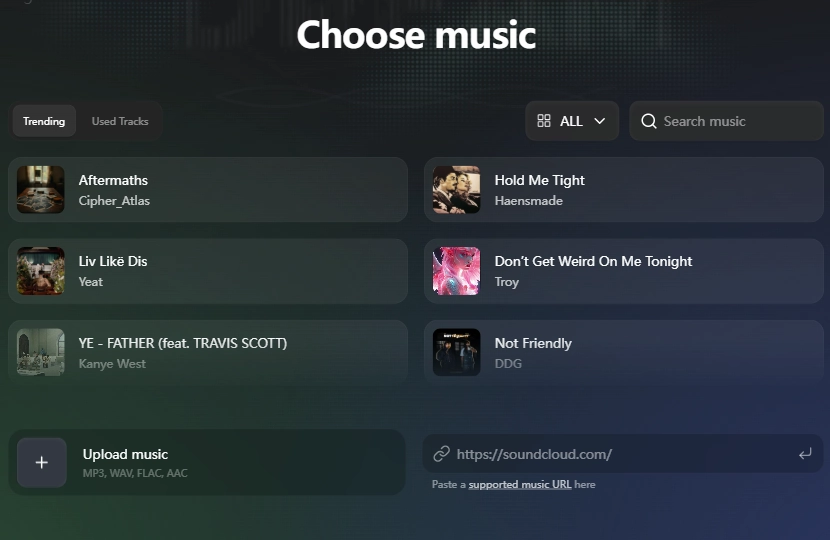
- Write your prompt. Answer four practical questions in your prompt: who or what should the viewer focus on, what world or setting the MV belongs to, what visual mood it should carry, and how the energy should shift when the track opens up. A clear, concise direction produces more consistent output than abstract or poetic language.
- Set your session controls. Choose your aspect ratio (16:9 for YouTube, 9:16 for TikTok/Reels), resolution, and style bias if you have one. Decide now whether you want watermark removal, captions, Fast or Expert mode, and Public or private visibility. These settings lock once the session starts.
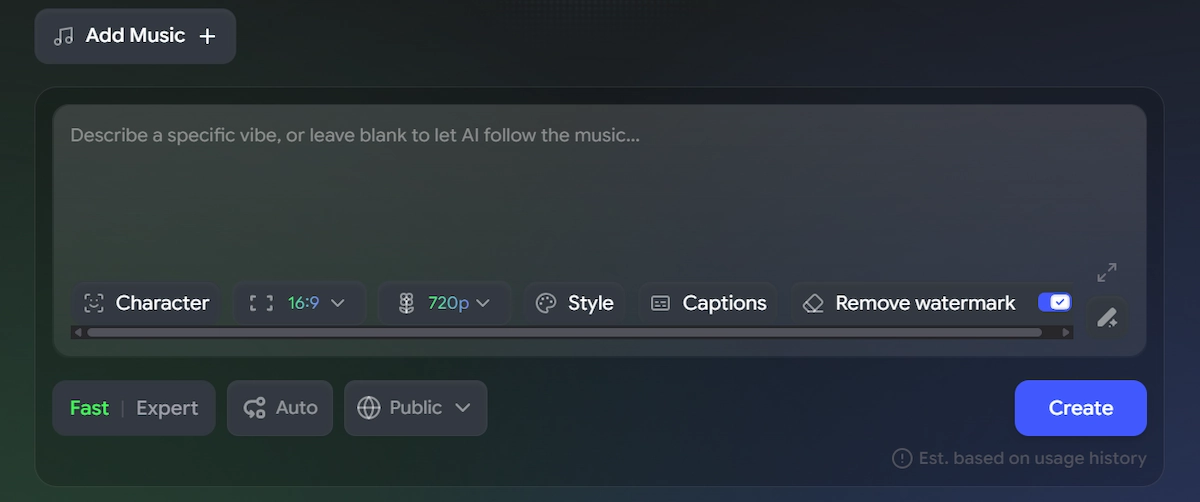
- Click Create and review the confirmation modal. Read the preflight summary before proceeding. Aspect ratio and resolution cannot be changed after this point.
- Follow the workflow in order. Review each stage — Plan, Input Analyzing, Music Analysis, Style & Framework, Creative Brief, Reference Images, Scene Planning, Shot Planning, Storyboard — before approving. Problems are cheapest to fix at the earliest stage where they appear.
- Watch clips in the Editor, not just the grid. A clip that looks fine as a thumbnail can feel rhythmically wrong in sequence. Switch to the Editor timeline view before approving Video Clips.
- Merge and preview the full video before downloading. Watch the complete result as a single piece, not as a checklist.
Create Your AI Video in Minutes
Turn your idea into a video with Freebeat alternative.
Freebeat AI Review: What Real Users Are Saying in 2026
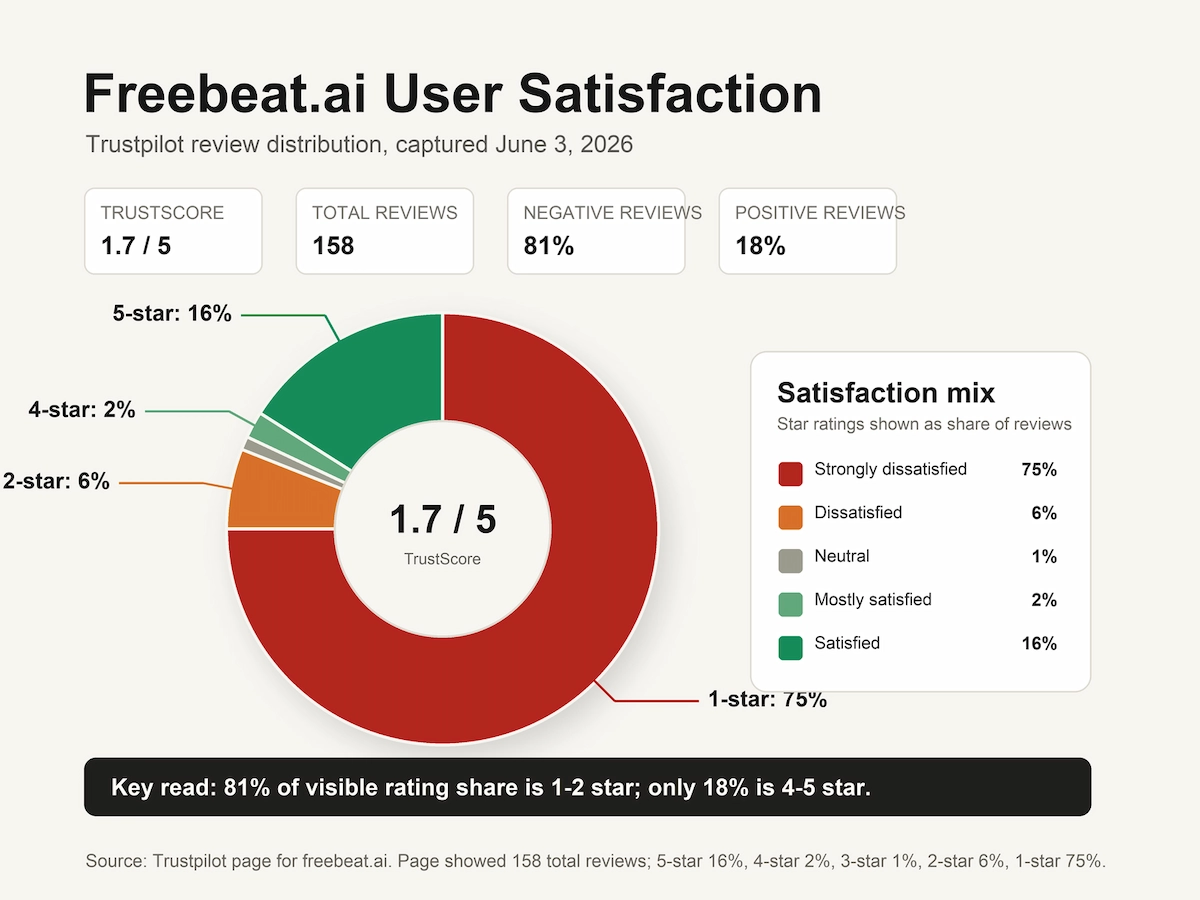
Freebeat AI occupies an unusual position in user feedback: the creative concept is genuinely appreciated by a subset of users who get good results, but the volume of billing-related complaints on Trustpilot as of May–June 2026 is significant and specific enough to warrant serious attention before subscribing.
What users report going well:
Some creators who understand AI prompting and have patience for the multi-stage workflow describe getting strong visual output, particularly for short-form social content. One user noted that if you know what you are doing and have access to complementary AI tools, the images and video can represent good value — the caveat being the significant time investment and credit management required.
What users report going wrong:
The most consistent complaints across recent Trustpilot reviews cluster around four themes:
- Credits consumed with no output. Multiple reviewers describe generation failures at the clip or merge stage after credits have already been spent across earlier stages, with partial or zero refunds.
- Hidden cancellation. The "Cancel subscription" button is reportedly not visible in the billing panel for some accounts. One reviewer documented that the button appeared only after changing their card details to a card with no funds — suggesting it may be surfaced by payment failure rather than user request.
- Support non-responsiveness. Email support responses are slow to non-existent according to multiple reviewers, with some reporting 5–15 days of silence on active disputes. A live support line is not available.
- Continued charges after cancellation attempts. Several users report being charged after contacting support to cancel, with at least one account of a platform banning a user from its Discord server for requesting a refund.
One reviewer's summary from May 2026 captures the split experience accurately: the technical capability exists and results can be good if you know how to prompt, but the credit system is designed in a way that casual users will spend heavily while iterating, and support does not catch you when something fails.
How to Cancel Freebeat AI Subscription
Cancelling a freebeat AI subscription is not as straightforward as most SaaS products. Based on documented user experiences, here is the most reliable approach:
- Log in and navigate to the billing panel. Look for the Cancel subscription option on the far right side of the panel, not the main account settings page.
- If the cancel button is not visible, multiple users report that changing your card details to a card with insufficient funds causes the button to appear. This appears to be a platform behavior rather than an intentional UX choice.
- Email support at the address listed in your subscription confirmation. Send a written cancellation request with your account email and date. Keep the confirmation email as documentation.
- Do not rely on Discord for support escalation. Multiple users report being banned from the freebeat Discord server after requesting refunds publicly.
- If charges continue after cancellation, contact your bank or card issuer to block the merchant. Several users report this as the only method that reliably stopped billing after support failed to respond.
If you have not yet subscribed and are researching before committing, the cancellation difficulty reported by users is a practical risk worth weighing against the platform's creative features.
Freebeat AI Alternatives Worth Considering
If freebeat AI's credit model, support track record, or cancellation friction give you pause, these alternatives address specific gaps:
VidMuse AI is an AI music video platform built around an agent-based workflow that closely parallels freebeat's pipeline — Creative Brief → Reference Generation → Scene & Shots List → Storyboard → Video Generation — but with a significantly wider video model selection.
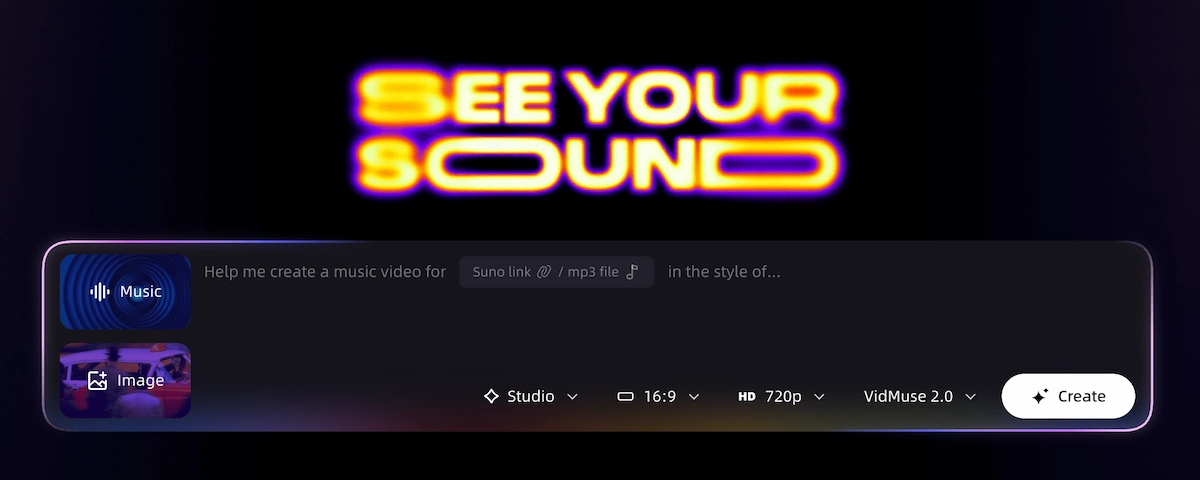
VidMuse's AI music video generator supports Seedance 2.0 Fast and Pro, Kling V3.0 Pro, Kling V2.6 Pro, Veo 3.1, Hailuo 2.3 Pro, Pixverse v6, Happy Horse 1.0, Wan 2.7, Grok Imagine Video, and others. For image generation, the platform runs Seedream 4.5, Seedream 5.0 Lite, Nano Banana Pro, Nano Banana 2, GPT Images 2.0, Flux.2-Pro, and Midjourney V7. The VidMuse 2.0 release added Shot Refine by Quoting, a Timeline Editor, and an Asset Library with memory — making targeted clip revisions more precise without restarting the full pipeline. For indie musicians working from Suno AI tracks, VidMuse positions itself as a direct bridge between AI-generated audio and studio-quality MV output.
Create Your AI Video in Minutes
Turn your idea into a video with Freebeat alternative.
Udio and Suno are music creation tools, not music video tools — but they are relevant as audio source platforms. Both integrate naturally with video generators as the first step in a music-to-video workflow. If you are generating your tracks on Suno AI or Udio, the next question is which video tool handles the visual side most reliably.
Runway offers more granular control over individual video clips and is better suited to creators who want to direct each shot precisely rather than work through an automated agent pipeline. It has no music-specific workflow but is widely used by filmmakers and VFX artists.
LTX Studio has been mentioned by frustrated freebeat users as an alternative they switched to. It offers a structured scene-based video pipeline and is worth evaluating for longer-form narrative content.
For anyone primarily looking for a free AI music video generator, the free tiers across these platforms vary significantly in what they actually produce without payment.
Common Mistakes When Using Freebeat AI
Avoiding these errors will save both time and credits:
- Approving stages too quickly. Each stage of the Agent workflow inherits errors from the one before it. A weak music analysis compounds into weak scene planning, which compounds into weak storyboard frames. Review carefully before clicking Continue.
- Changing a single image and not anticipating full regeneration. The platform reportedly regenerates the full set when one element is changed, charging credits for the entire run rather than a targeted fix. Know this before making adjustments mid-workflow.
- Assuming the credit estimate is final. Multiple users report the actual credit consumption exceeding initial estimates significantly. Treat early credit quotes as minimums, not ceilings.
- Trying to cancel by emailing without checking the billing panel first. The cancel option exists in the billing panel. Email support as a backup, not as the primary method.
- Running Expert mode without a clear brief. Expert mode is more deliberate and uses more processing capacity. Without a tight prompt, the added depth amplifies vagueness rather than producing better output.
FAQ
Is freebeat AI free?
Freebeat AI has a free plan with limited credits and slower generation speeds, but it is not fully free for usable output. The free tier places users in a slower queue and adds a watermark to all exported videos. To remove the watermark and access faster processing, you need a paid plan starting at $4.99 per week (Basic) as of mid-2026. A free account is sufficient for testing the workflow, but not for production-ready content.
Does the freebeat AI free version have a watermark?
Yes. The freebeat AI free plan adds a watermark to all video exports. Watermark removal is only available on paid tiers (Basic, Pro, and Ultimate). This applies across all video modes including Singing MV, Abstract MV, Storytelling MV, Viral Short, and Lyric Video.
How does freebeat AI work?
Freebeat AI works through an agent-based pipeline that analyzes your uploaded music, creates a creative brief, plans scenes and shots, generates storyboard images, produces video clips, and merges everything into a final music video. You input a track and an optional text prompt; the system builds the MV structure around the song's rhythm, energy arc, and your creative direction. Each stage consumes credits, and you can review and regenerate at any stage before proceeding.
How to cancel freebeat AI subscription?
To cancel, log into your account and go to the billing panel — the Cancel subscription button is reportedly located on the far right side. If the button is not visible, some users have found it appears after updating payment details to a card with no available balance. Email support with a written cancellation request and keep the confirmation email. If charges continue, contacting your bank to block the merchant has been the resolution method for several users whose cancellation requests went unanswered.
What is the best freebeat AI alternative for music videos?
For creators who want a full MV pipeline with agent-based planning, **VidMuse** is the closest structural alternative — it runs a Creative Brief → Scene & Shots List → Storyboard → Video Generation workflow with a wide model matrix including Kling V3.0 Pro, Veo 3.1, Seedance 2.0, and Hailuo 2.3 Pro for video, plus Suno AI integration for music creation. VidMuse 2.0 adds Shot Refine by Quoting and a Timeline Editor for targeted revisions. For creators focused on short-form social content, Runway and LTX Studio are also worth evaluating depending on how much manual creative control you want over individual clips.
What is freebeat AI pricing in 2026?
As of mid-2026, freebeat AI pricing includes a Basic plan at $4.99 per week (1,990 credits/week), a Pro plan at $26.99 per month (10,000 credits/month), and an Ultimate plan at $39.99 per month (19,000 credits/month), with a 30% promotional discount applied to all tiers at the time of writing. A free plan exists with heavily capped credits and a watermark. Pricing is subject to change; check the official pricing page before subscribing.
Does freebeat AI support WAV file uploads?
Freebeat AI lists local audio file upload as a supported input method. However, at least one verified Trustpilot reviewer reported in 2026 that a WAV file was rejected despite the platform advertising WAV support. If you are working with WAV source files, convert to a widely supported format such as MP3 before uploading as a precaution.
In The End
Freebeat AI is a genuinely novel approach to AI music video creation — the agent workflow that plans an entire MV rather than generating one-shot clips is meaningfully different from basic text-to-video tools. The model matrix is broad, the creative modes cover a useful range of use cases, and the concept of structuring visuals around a track's actual energy arc rather than just dropping clips over audio is the right direction for the category.
The problems are real, however, and not minor. The credit system makes production costs unpredictable. The free plan watermark is expected but worth confirming before you invest time in a project. The cancellation process requires workarounds that no paid product should need. And the support responsiveness issues documented across multiple verified reviews in 2026 represent a meaningful operational risk, particularly for creators who need resolution when something goes wrong mid-project.
If you are exploring options before committing, the right next step is to run a single test session on the free plan before subscribing, understand exactly what the credits for your intended project will realistically cost at your preferred model tier, and have a clear plan for cancellation before entering your payment details.
For a full-pipeline alternative with a comparable agent-based approach and a wider model selection, explore the VidMuse AI platform — particularly the VidMuse guide for understanding how the Creative Brief → Storyboard → Video Generation workflow maps to different MV types. Creators working from Suno or Udio tracks will find the music to video AI workflow directly relevant to their production setup.
Create Your AI Video in Minutes
Turn your idea into a video with Freebeat alternative.

Written By
VidMuse Team
Continue Reading
Latest blog posts related to AI video creation.
PixVerse V6 x VidMuse AI: Model Guide and Video Workflow
PixVerse V6 review and VidMuse integration guide. Capabilities, 15s 1080p video, prompt tips, model comparison, pricing, and how to use V6 in VidMuse workflows.
FLUX 3: What It Is, Capabilities, and How to Access It
FLUX 3 is Black Forest Labs' multimodal AI model for image, video, audio, and action. Full guide: capabilities, FLUX 3 vs FLUX 2, availability, and pricing.
Free Music Visualizer: 10 Best Free Tools in 2026
Compare 10 best free music visualizers in 2026. Waveform tools, AI music video makers, watermark policies, export limits, and which tool fits your workflow.