

Product Launch Video: Create Launch Videos with AI
A product launch video is a short video that introduces a new product to your audience — showing what it is, what it does, and why it matters. It's the centerpiece of any launch campaign, used on landing pages, social media, Product Hunt, email, and paid ads.
VidMuse creates product launch videos with AI. Upload your product photos or paste a URL, and VidMuse generates a complete launch video — script, visuals, voiceover, music, subtitles, and CTA — ready to publish. No filming, no editing team, no production delays.
This guide covers what makes a great product launch video, the main types, VidMuse's AI features for launch videos, a step-by-step creation tutorial, and best practices. Whether you're launching a SaaS product, a new ecommerce item, or a DTC brand, this is everything you need to create a launch video with AI. For a broader look at AI video ad generators, see our complete guide.
Key Takeaways
-
A great product launch video follows a clear structure: hook → product reveal → key features → benefit/proof → CTA.
-
VidMuse creates product launch videos with AI — from product photos or URL to finished MP4 with script, visuals, music, subtitles, and CTA.
-
Launch video types: hero showcase, explainer, teaser/hype, UGC-style, demo walkthrough, and social-first vertical. Pick the type that matches your launch context.
-
AI Refine on Timeline lets you revise individual clips via chat — ideal for the multiple review rounds before launch day.
-
Keep launch videos 15–60 seconds for social, up to 90 seconds for landing page hero or product demos.
What Makes a Great Product Launch Video?
The best product launch videos follow a proven structure. Whether you're Apple revealing a new iPhone or a solo founder launching on Product Hunt, the underlying framework is the same:
| Phase | Timing | What it does |
|---|---|---|
| Hook | 0–3s | Stop the scroll. State the problem, tease the product, or open with a surprising visual. |
| Product Reveal | 3–10s | Show the product for the first time. Name it. Make the first impression count. |
| Key Features | 10–20s | Highlight 2–3 standout features with visuals. Don't list everything — pick the ones that matter most. |
| Benefit / Proof | 20–30s | Show the result, outcome, or transformation. Social proof, demo results, or before/after works. |
| CTA | Last 5s | Tell viewers what to do: pre-order, sign up, learn more, visit the page. |
This framework scales to any length. A 15-second TikTok launch clip uses the same structure compressed. A 60-second landing page hero expands each phase. The structure stays — the timing flexes.
The key mistake: skipping the hook and starting with your logo. On social, you have 2–3 seconds before the viewer scrolls. Lead with the problem or the product — not your brand name.
Types of Product Launch Videos
Different launch contexts need different video formats. Here are the six main types:
| Type | Best for | Format |
|---|---|---|
| Hero Showcase | Landing page hero, website embed, YouTube pre-roll | Cinematic product shots, dramatic lighting, 16:9, 30–60s |
| Explainer | SaaS launches, complex products | Problem → solution → benefit structure, voiceover-driven, 30–60s |
| Teaser / Hype | Pre-launch buzz, social countdown campaigns | Fast cuts, bold text, countdown energy, beat-synced, 15–30s |
| UGC-Style Launch | TikTok/Reels launch campaigns | Casual, authentic, talking-head or reaction style, 9:16, 15–30s |
| Demo Walkthrough | Product Hunt, developer audiences, B2B | Screen recording + voiceover, feature walkthrough, 60–90s |
| Social-First Vertical | TikTok, Reels, Shorts launch day | Hook-first, vertical 9:16, subtitles mandatory, 15–30s |
For product reveal and unboxing-style launches, the hero showcase format works strongest — it builds anticipation and delivers a cinematic first impression. For social-first launches targeting TikTok and Reels, UGC-style and teaser/hype formats perform best because they blend into the organic feed.
Most successful launches create multiple versions: a 60-second hero for the landing page, a 30-second explainer for ads, and a 15-second teaser for social. VidMuse generates all three from the same product input.
Best Product Launch Video Maker 2026 — VidMuse AI
VidMuse's AI ad generator includes features built for the specific demands of product launch videos:
| Feature | What it does for launch videos |
|---|---|
| AI Script Planning | Generates a launch-ready script following the hook → reveal → features → benefit → CTA structure. Adapts tone to your product category — SaaS professional, DTC energetic, ecommerce direct. |
| Ad Templates for Launch | Hero showcase, explainer, teaser/hype, storytelling formats — pick the one that matches your launch context. See all options at VidMuse AI video templates. |
| Product Understanding | Upload product photos or paste a URL → AI extracts selling points, USP, audience, and tone. No manual creative brief needed — the AI builds it from your product data. |
| Voiceover + Music + Subtitles | Professional voiceover, launch-energy background music with beat-synced pacing, auto-subtitles (critical for social platforms), and CTA text overlay. |
| AI Refine on Timeline | Not happy with a specific shot? Select the clip on the timeline, describe revision via chat ("make the opening more dramatic" or "zoom in on the product feature"), and VidMuse regenerates that clip in place. Perfect for the 3–4 review rounds between stakeholders before launch day. |
| Multi-Platform Output | Render in 9:16 vertical (TikTok, Reels, Shorts) or 16:9 landscape (landing page, YouTube), 15–60 seconds, MP4. One project, multiple formats. |
These features are built into VidMuse's standard workflow. The next section walks through creation step by step.
Create Your Product Launch Video with AI
VidMuse builds launch-ready videos from your product photos — script, visuals, music, subtitles, CTA, all in one workflow.
How to Create a Product Launch Video with VidMuse AI
Creating a product launch video with VidMuse takes four steps.
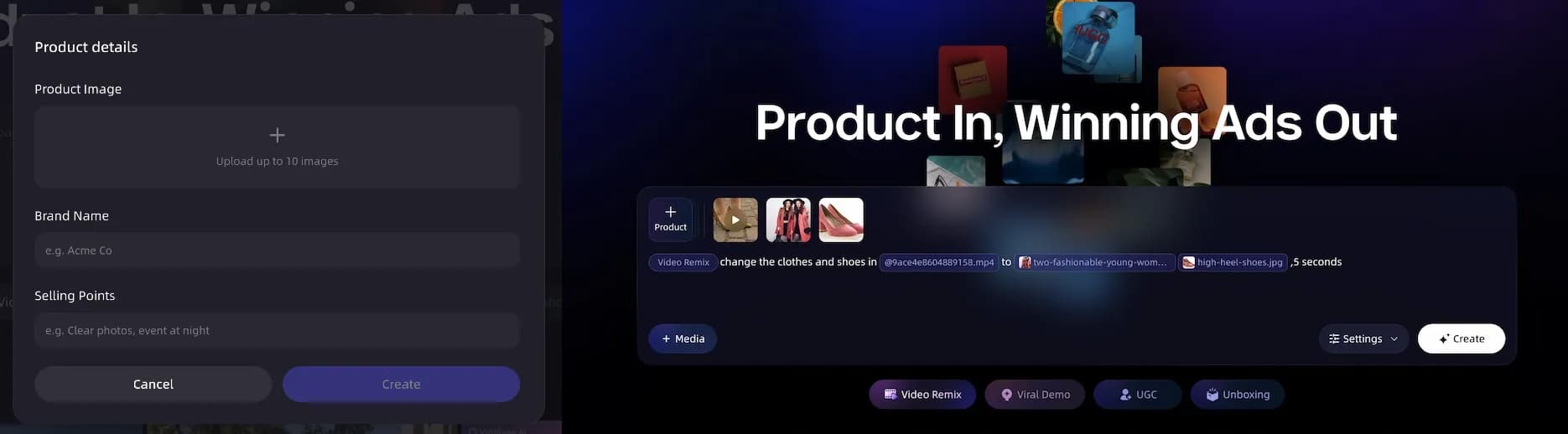
Step 1: Input Product Info and Assets
Upload your product photos, paste a product URL (Amazon, Shopify, eBay), type a description, or load brand assets (logo, colors, fonts). VidMuse extracts your product's selling points, target audience, tone, and USP automatically.
For URL-to-video workflow details, see our product URL to video ad guide.
Step 2: Generate Creative Brief, Storyboard, and Video
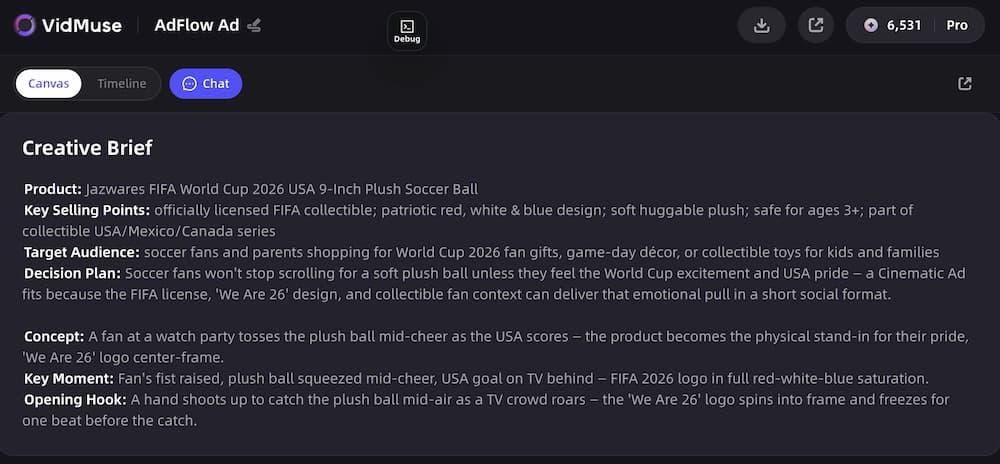
VidMuse generates a complete launch video plan: script (hook → reveal → features → benefit → CTA), shot list, and template selection (hero showcase, explainer, teaser, or storytelling). You can review and edit every element.
Then the AI generates keyframes and video clips using 20+ video models. Subtitles, CTA overlay, and product callouts are added automatically on the timeline. For more on VidMuse's creative planning system, see the product ad video generator launch post.
Step 3: Generate Background Music
AI creates background music matched to the launch video's energy and pacing — upbeat for hype/teaser formats, polished for hero showcases, conversational for explainers. Voiceover is generated in your chosen language and voice style, then synced to the timeline.
Step 4: Render, Refine, and Share
Render the final MP4 — 9:16 vertical or 16:9 landscape, 15–60 seconds.
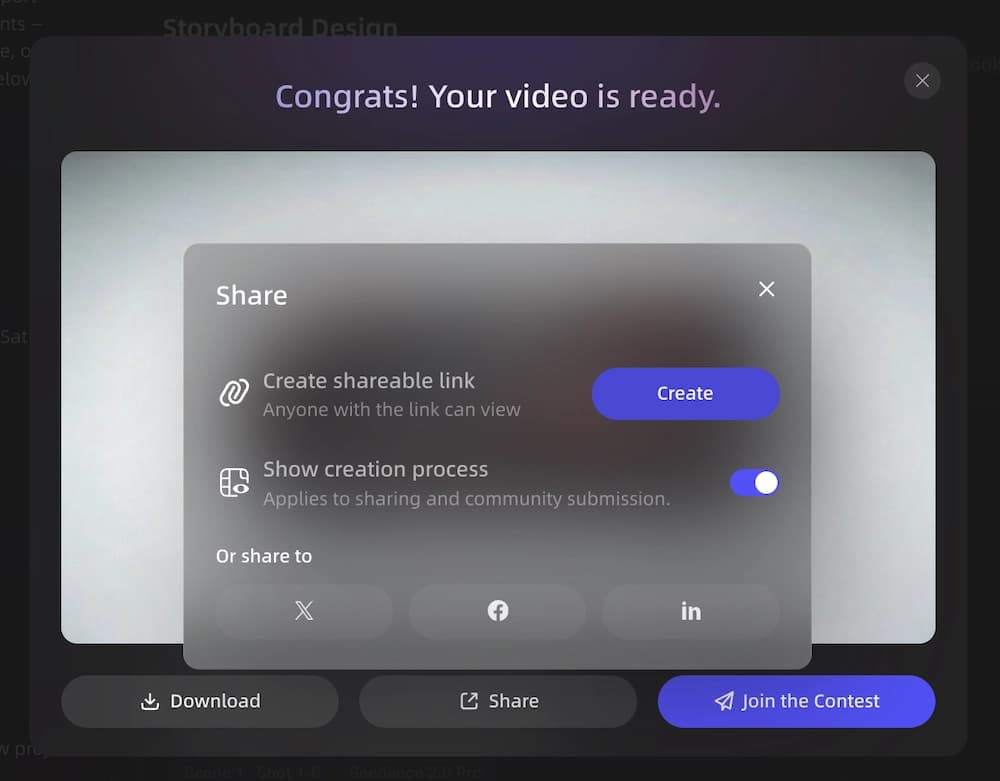
Use AI Refine to polish: select any clip on the timeline, describe your revision via chat, and VidMuse regenerates that clip in place. No full rebuild. Iterate until every frame is launch-ready.
Upload to your landing page, Product Hunt, TikTok, Instagram Reels, YouTube, Facebook, or any ad platform. The video is spec-compliant and publish-ready.
Launch Your Product with AI Video
Go from product photos to a launch-ready video in four steps. No production team needed.
Product Launch Video Best Practices
Follow these practices to make your launch video as effective as possible:
-
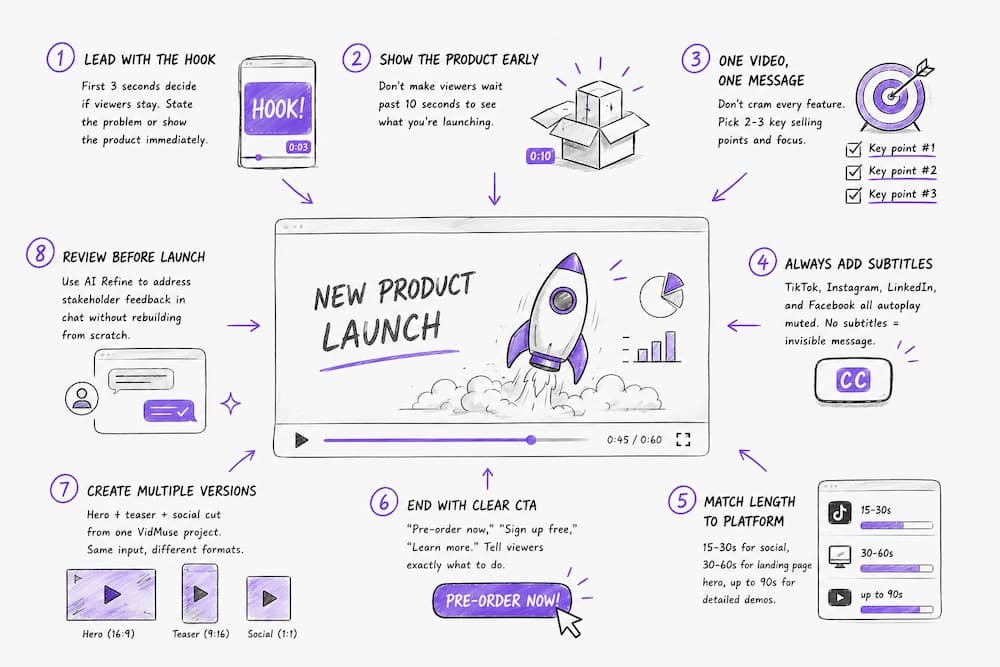
Lead with the hook — first 3 seconds decide if viewers stay. State the problem or show the product immediately.
-
Show the product early — don't make viewers wait past 10 seconds to see what you're launching.
-
One video, one message — don't cram every feature. Pick 2–3 key selling points and focus.
-
Always add subtitles — TikTok, Instagram, LinkedIn, and Facebook all autoplay muted. No subtitles = invisible message.
-
Match length to platform — 15–30s for social, 30–60s for landing page hero, up to 90s for detailed demos.
-
End with clear CTA — "Pre-order now," "Sign up free," "Learn more." Tell viewers exactly what to do.
-
Create multiple versions — hero + teaser + social cut from one VidMuse project. Same input, different formats.
-
Review before launch — use AI Refine to address stakeholder feedback in chat without rebuilding from scratch.
Limitations
Product launch videos created with AI have real limits.
No physical product-in-hand footage. AI generates simulated product visuals — not footage of a real person holding or using your product. For hardware launches where physical demonstration matters, real video still wins for certain shots.
Script may need brand-voice editing. AI-generated scripts follow proven structures but may not match your exact brand voice. Edit the script in VidMuse before generating for best results.
Stakeholder review still takes time. AI Refine speeds up revisions, but the 3–4 rounds of stakeholder feedback before launch day are a process issue, not a production issue. Plan review time into your launch timeline.
AI output is a strong first draft. For brand-critical launches (major product reveals, IPO-adjacent announcements), run AI output past your brand team before publishing.
Won't replace live-action for every format. Keynote-style launch presentations, founder talking-head videos, and live demo recordings need real cameras. AI handles the polished, asset-based formats best.
FAQ: Product Launch Video
What is a product launch video?
A product launch video is a short video that introduces a new product to an audience. It showcases what the product is, its key features, and why it matters — typically used on landing pages, social media, Product Hunt, email campaigns, and paid ads. The best launch videos follow a hook → reveal → features → benefit → CTA structure.
How long should a product launch video be?
15–30 seconds for social platforms (TikTok, Reels, Shorts). 30–60 seconds for landing page hero videos and YouTube pre-roll. Up to 90 seconds for detailed product demos or Product Hunt launches. Longer is not better — attention drops sharply after 30 seconds on social, so front-load your most important message.
Can I create a product launch video with AI?
Yes. VidMuse creates product launch videos with AI — from product photos or URL to a finished MP4 with professional script, visuals, voiceover, music, subtitles, and CTA. The workflow covers creative planning, asset generation, timeline assembly, and rendering. Output is ready to upload to any platform without additional editing.
What's the best structure for a product launch video?
Hook (0–3s) → Product Reveal (3–10s) → Key Features (10–20s) → Benefit/Proof (20–30s) → CTA (last 5s). This structure works for any length — compress for 15-second social clips, expand for 60-second landing page videos. Lead with the problem or product, not your logo.
What's the best product launch video maker?
VidMuse is the best AI-powered product launch video maker. It generates complete launch videos from product input — including script, visuals, voiceover, music, subtitles, and CTA — using a full AI Director workflow. For other AI ad tools, see our best AI ad generator 2026 comparison.
How much does a product launch video cost?
Traditional production costs $2,000–$20,000+ depending on length, quality, and team. Agency-produced hero videos for major launches can exceed $50,000. AI tools like VidMuse reduce this to a fraction by handling scripting, visual generation, and assembly automatically. Check VidMuse's site for current pricing.
What platforms should I post my product launch video on?
Post your launch video on every platform where your audience is active: landing page (hero), Product Hunt (demo), TikTok and Instagram Reels (vertical teaser), YouTube (pre-roll or Shorts), Facebook/Meta (feed ads), LinkedIn (B2B launches), and email (embedded or linked). Create platform-specific versions — 9:16 vertical for social, 16:9 for web and YouTube.
Conclusion
A product launch video follows a simple structure — hook → reveal → features → benefit → CTA — and VidMuse builds it with AI in four steps. Upload your product info, generate the creative brief and video, add music, and render. AI Refine handles the pre-launch review rounds without full rebuilds.
The same VidMuse workflow creates launch videos for TikTok, landing pages, Product Hunt, and paid social — adjust the format and length, and you have multi-platform launch creative from one input.
Ready to Launch?
VidMuse creates launch-ready product videos from your product photos — script, visuals, music, subtitles, CTA, all in one workflow.

Written By
VidMuse Team
Continue Reading
Latest blog posts related to AI video creation.
Free Music Visualizer: 10 Best Free Tools in 2026
Compare 10 best free music visualizers in 2026. Waveform tools, AI music video makers, watermark policies, export limits, and which tool fits your workflow.
How to Make Product Video Ads with AI (Step-by-Step)
Learn how to make product video ads with AI step by step. Full 6-phase VidMuse tutorial, input tips, ad type guide, and alternative approaches compared.
Best AI Clone Video Generator 2026: 7 Tools Compared
Compare the 7 best AI clone video generators in 2026. Avatar clones, viral ad clones, pricing, features, and how to pick the right tool for your workflow.