
You can make an AI brainrot video in under 10 minutes — no editing skills, no timeline dragging, no studio budget. Brainrot videos are the overstimulating, chaotic short-form clips dominating TikTok and YouTube Shorts right now: fast cuts, AI voiceover reading absurd scripts, bold caption subtitles, and phonk music layered underneath surreal visuals. This guide covers exactly what brainrot content is, why it works, which styles you can create, and how to produce one from scratch using an AI video generator like VidMuse.
Key Takeaways
- AI brainrot videos combine fast cuts, AI narration, bold captions, and chaotic visuals — all producible without manual editing.
- The five core styles are Reddit Narration, Surreal Absurdist, Meme Compilation, Sigma Motivation, and Split-Screen — each targets a different audience niche.
- VidMuse's agent-based workflow (Brief → Storyboard → Video Generation) is built for short-form chaos: 9:16 vertical format, AI-generated phonk music via Suno AI, and AI avatar narrators via Omnihuman V1.5.
- The most common beginner mistake is making clips too long — brainrot videos live and die at the 30–60 second mark with cuts every 2–4 seconds.
- You don't need to upload assets; a text prompt is enough to generate a complete brainrot video end-to-end.
What Is an AI Brainrot Video?
AI brainrot videos are short-form clips engineered for maximum overstimulation — layered visuals, rapid scene changes, AI-generated voiceover, oversized bold captions, and high-energy background music, all compressed into 30 to 60 seconds.
The term "brainrot" comes from Gen Alpha and Gen Z internet culture, used (ironically) to describe content so chaotic and addictive it feels like it's rotting your brain. Think: Subway Surfers gameplay running at the bottom of the screen while an AI voice reads an absurd Reddit post at the top, captions flashing in real time, phonk music thumping underneath. That combination — unrelated but stimulating elements stacked together — is the brainrot formula.
What makes the current wave different is the AI part. Creators no longer need to source gameplay footage, record voiceovers, or manually sync captions. An AI brainrot generator handles script, voice, visuals, music, and captions from a single prompt. The barrier to entry has essentially collapsed, which is why the format is exploding.
The 5 Core AI Brainrot Video Styles
There are five primary brainrot video styles, each with a distinct tone, visual approach, and target audience niche.
1. Reddit Story / AI Narration Style An AI voice reads an absurd Reddit post ("AITA for feeding my cat spaghetti every day…") over chaotic background footage — nature, city streets, or abstract visuals. Bold caption subtitles sync with the narration. Phonk or sigma music runs underneath. This is the most common format and the easiest to produce with a text prompt alone.
2. Surreal / Absurdist AI Visual Completely unhinged AI-generated imagery — weird creatures, impossible physics, Skibidi-style scenarios — cut every 2–3 seconds. Minimal narration; the visuals carry the chaos. Dark ambient or electronic music. This style works especially well with video generation models that handle surreal scenes, like Kling V3.0 Pro or Seedance 2.0 Pro.
3. Meme Compilation Style A rapid sequence of AI-generated meme visuals — absurd scenarios, reaction-style captions, comedic timing built into the pacing. Feels like a highlight reel of internet humor. Loud meme music or viral audio energy. Each visual gets 1–3 seconds on screen before cutting.
4. Sigma / Motivational Brainrot Dark cinematic imagery, lone wolf aesthetics, dramatic slow motion — paired with a deep AI voiceover delivering pseudo-profound quotes ("The sigma never explains himself…"). Phonk or dark ambient music. This style targets the motivational content niche and performs well with older Gen Z and younger Millennial audiences.
5. Split-Screen Style The classic dual-stimulation format: one visual layer carries the main content, a second layer (satisfying clips, endless runner gameplay, slime ASMR) runs simultaneously. AI narration and captions tie the two together. Note: true split-screen requires a post-edit step or a platform with multi-track support — but each half can be generated separately with AI.
How to Make a Brainrot Video with VidMuse (Step-by-Step)
VidMuse produces AI brainrot videos through a six-stage agent workflow — from brief to final render — without requiring manual editing or timeline assembly.
Step 1 — Choose Your Content Input
Start with one of the following:
- A Reddit post or absurd story to narrate
- An original script or chaotic concept
- A meme theme or visual idea
- Sigma/motivational quote series
- Or simply: "make it chaotic" — VidMuse's AI creates the script from scratch
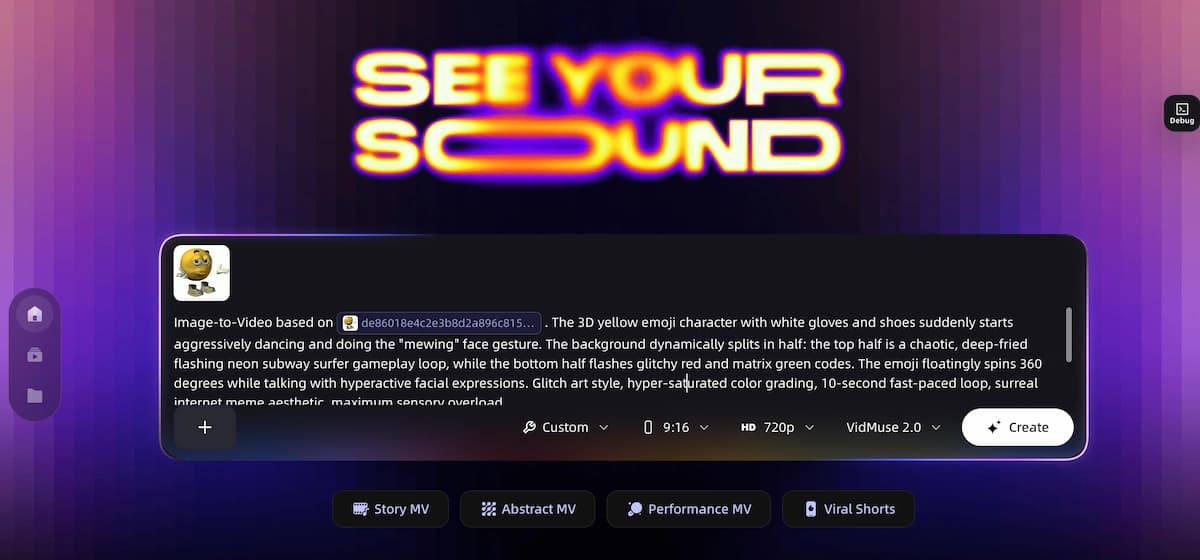
Step 2 — Set Your Creative Brief
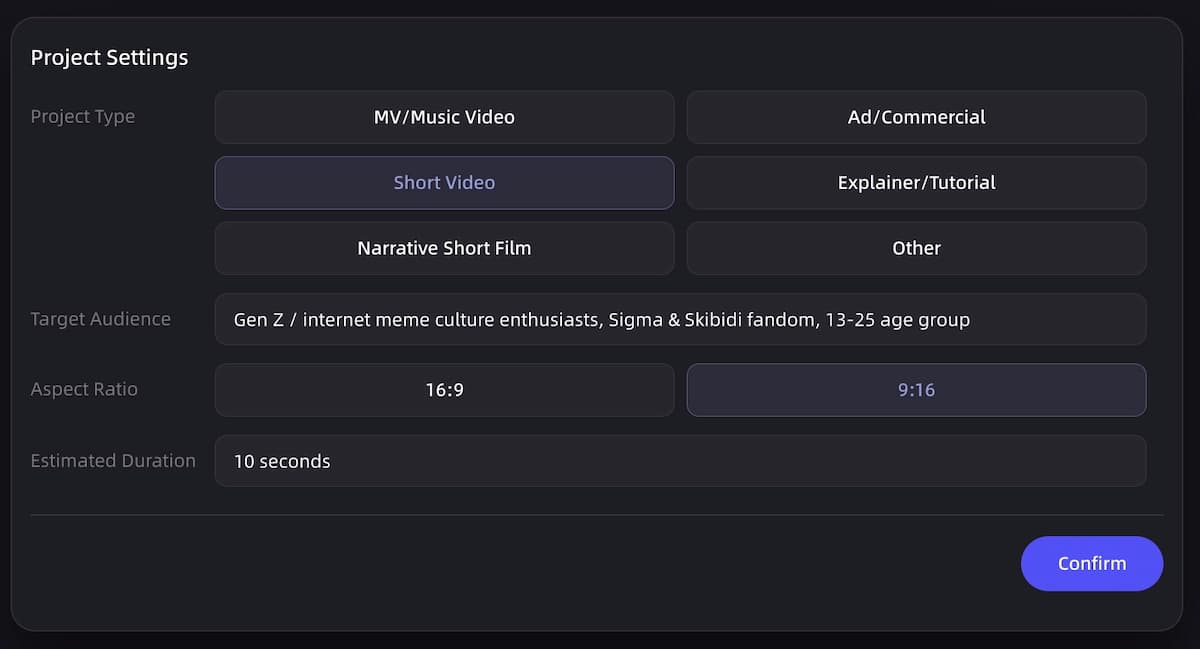
In VidMuse's Creative Brief stage, define:
- Video style: Reddit narration / surreal absurdist / meme compilation / sigma motivation
- Visual aesthetic: City chaos / nature surreal / abstract glitch / dark sigma / AI creature
- Tone: Comedic / ironic / cinematic / unhinged
- Duration: 30 or 60 seconds (brainrot standard)
- Format: 9:16 vertical (Shorts/TikTok ready)
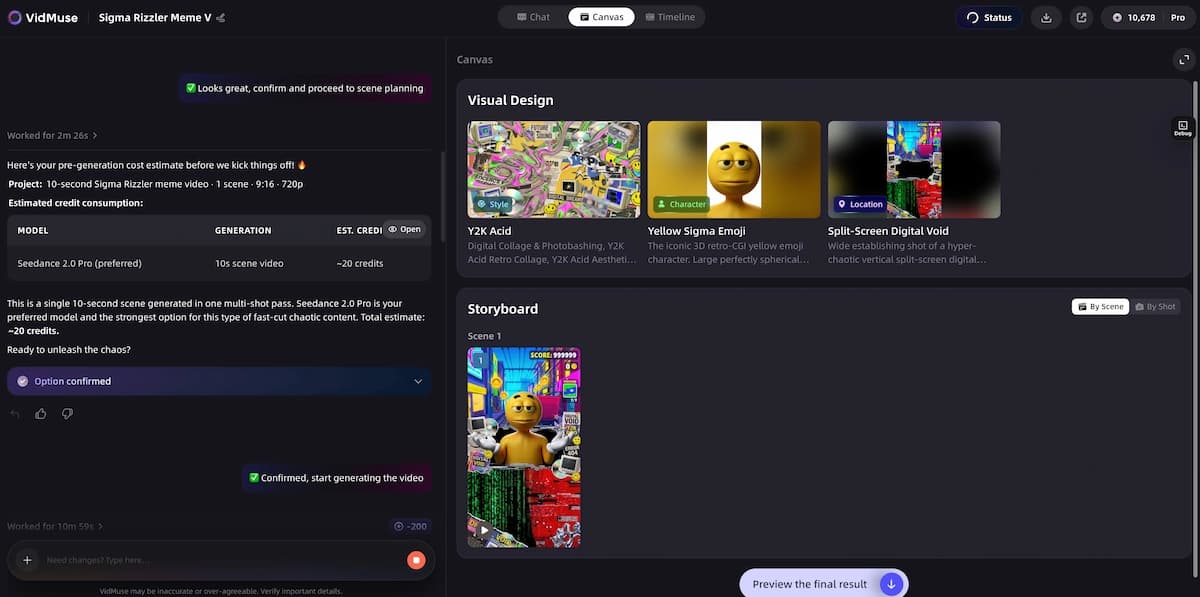
Step 3 — Generate Reference and Storyboard
VidMuse's agent generates a Scene & Shots List and a visual Storyboard based on your brief. For brainrot content, this typically means 8–20 rapid-cut scenes across a 60-second video, each 2–4 seconds long. Review and adjust scene descriptions before generation begins.
Step 4 — Add AI Voiceover and Music
VidMuse supports:
- AI Avatar narrators via Omnihuman V1.5 or Kling AI Avatar V2 Pro for on-screen narrator style
- AI voiceover without avatar for Reddit narration style
- AI-generated music via Suno AI integration — generate original phonk, sigma, dark ambient, or meme music tracks without leaving the platform
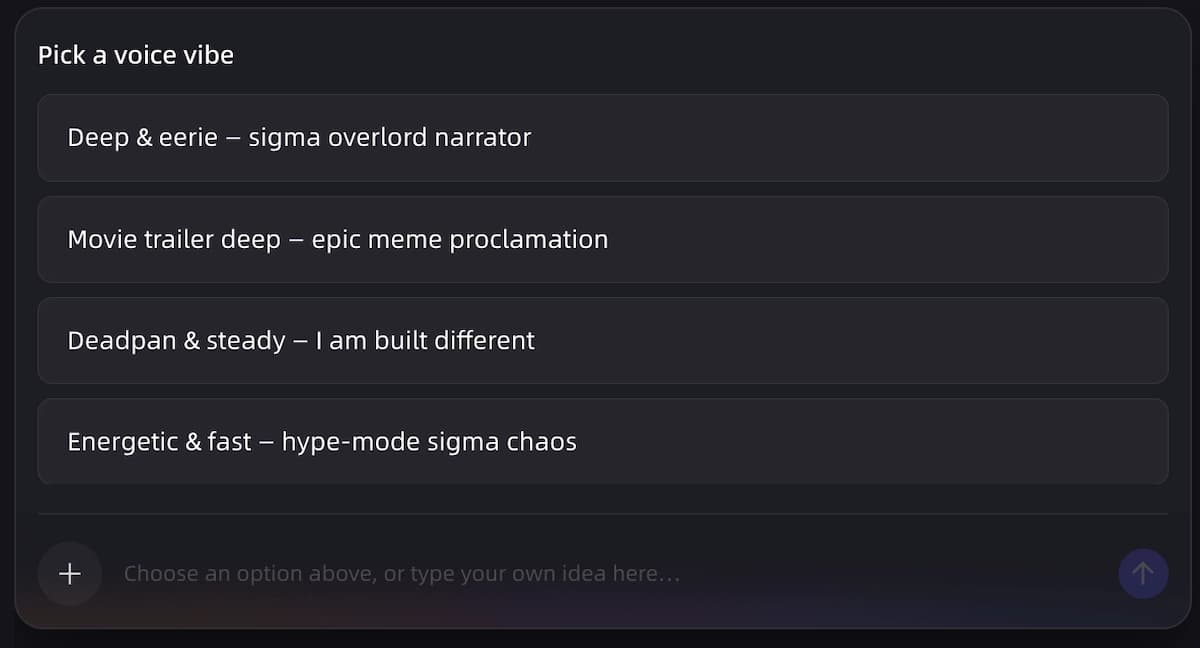
Step 6 — Generate, Refine, and Export
Video generation runs across the storyboard. VidMuse 2.0's Shot Refine by Quoting feature lets you flag and regenerate specific scenes that don't land without redoing the whole video. Final export is MP4, 9:16 format, ready to upload directly to TikTok or YouTube Shorts.
Ready to Make Your First Brainrot Video?
VidMuse Studio Mode uses Seedance 2.0 Pro and Kling V3.0 Pro for cinematic-quality visuals. Lite Mode gets you a fast draft in minutes.
Recommended Settings for Brainrot Videos
These settings consistently produce brainrot-style content that performs on short-form platforms:
- Aspect ratio: 9:16 vertical only — horizontal brainrot doesn't work on mobile feeds
- Duration: 30–60 seconds — longer brainrot loses the overstimulation effect
- Cut frequency: Every 2–4 seconds — anything slower breaks the format
- Subtitles: Large, bold, high-contrast — white text with black stroke, or yellow on dark backgrounds
- Music volume: High relative to ambient — the music should be felt, not heard in the background
- Voiceover pace: Fast — brainrot narration speaks faster than standard video narration
- Visual density: Multiple elements per frame where possible — empty compositions feel "un-brainrot"
VidMuse vs Other AI Brainrot Generators
VidMuse is differentiated from single-format brainrot tools by its agent-based planning layer and multi-model video generation pipeline.
Most dedicated brainrot generators (Opus Agent, Imagine Shorts, Raena AI) are optimized for one specific workflow — Raena AI for PDF-to-brainrot for students, Opus Agent for script-to-video with Subway Surfers overlay logic, Imagine Shorts for quick-turn meme content. These are fast and accessible for their specific use case.
VidMuse operates differently: it plans the full video as a director would — brief, storyboard, shot list, multi-model generation — which means more control over the final output and better results for complex visual styles (surreal absurdist, sigma cinematic, split-concept brainrot). The trade-off is that the workflow has more steps than a single-prompt tool.
If you want to paste one sentence and get a generic brainrot video in 30 seconds, single-purpose tools are faster. If you want a specific aesthetic, consistent visual style, and the ability to refine individual scenes, VidMuse's agent workflow gives you that control.
For indie musicians and music-first creators, VidMuse also has a meaningful advantage: the Suno AI integration means you can generate an original phonk or sigma track alongside your brainrot visuals in the same session, rather than sourcing music separately.
Common Mistakes to Avoid
Most first-time brainrot videos fail for one of five predictable reasons:
- Too long. A 2-minute "brainrot" video is just a regular video with chaotic editing. The format demands 30–60 seconds maximum.
- Cuts too slow. Scene changes every 8–10 seconds kill the overstimulation effect. 2–4 seconds per shot is non-negotiable.
- Quiet music. Brainrot audio should feel slightly too loud. Music that politely sits in the background signals "not brainrot."
- Small captions. If viewers have to squint to read subtitles, the format fails. Bold, oversized, high-contrast text is part of the aesthetic — not decoration.
- Coherent visuals only. If every visual makes perfect sense in context, you've made a normal video. Brainrot requires at least some visual non-sequiturs — scenes that are stimulating but don't directly illustrate the narration.
Why Brainrot Content Goes Viral
Brainrot videos exploit short attention span behavior to maximize watch time and shares. The format works not in spite of being chaotic, but because of it. Multiple stimuli competing for attention at once make it harder for the viewer to look away — each element is individually interesting enough to hold focus even when the main content hasn't grabbed them yet.
Algorithmically, this translates to high completion rates and strong rewatch behavior — two signals that push short-form content to wider audiences on TikTok and YouTube Shorts. The surreal, absurdist humor layer also makes brainrot videos highly shareable, since they consistently produce reactions of "what am I watching and why can't I stop."
For creators and brands, the practical upside is production speed. A brainrot video that performs at the same engagement level as a polished, expensive production takes a fraction of the time and budget to make — especially with AI video generation tools.
FAQ
What is an AI brainrot video?
An AI brainrot video is a short-form clip (typically 30–60 seconds) characterized by rapid cuts, AI-generated or AI-narrated content, bold caption subtitles, and high-energy music — all designed to maximize overstimulation and keep viewers watching. The format dominates TikTok, YouTube Shorts, and Instagram Reels and can be produced entirely with an AI brainrot generator from a single text prompt.
What is an AI brainrot generator?
An AI brainrot generator is a tool that takes a text prompt or input script and automatically produces a brainrot-style video — including script, voiceover, visuals, captions, and music — without manual editing. Examples include VidMuse, Opus Agent, Imagine Shorts, and Raena AI. They differ in the styles and formats they support.
How do I make a brainrot video with AI?
Write a brief describing your content type (Reddit story, sigma motivation, absurdist concept), visual aesthetic, and music vibe. Feed that into an AI brainrot video generator like VidMuse, review the generated storyboard, select a generation mode, and export your final 9:16 MP4. Total time ranges from a few minutes to under an hour depending on the tool and how much you refine individual scenes.
What is the Italian AI brainrot style?
Italian brainrot is a specific internet meme format featuring AI-generated hybrid creature characters with Italian names and phrases — Tralalero Tralala, Bombardiro Crocodilo, and similar surreal mashup entities. It originated from AI-generated character images and spawned a wave of video content featuring these characters in absurdist scenarios. To make Italian brainrot videos, use a surreal/absurdist visual style with AI character generation and comedic voiceover.
What AI brainrot animals are popular?
AI brainrot animal content features surreal hybrid creatures — part-animal, part-object mashups with absurd traits and behaviors. Popular examples from the Italian brainrot wave include characters like Bombardiro Crocodilo (a crocodile-bomber plane hybrid) and similar AI-generated creatures. These are best produced with image generation models that handle surreal character design, then animated in short sequences with comedic AI narration.
Can I use VidMuse for AI brainrot study videos?
VidMuse is primarily designed for music video production and product ads, with strong support for the full range of brainrot video styles. For the specific use case of converting study notes or PDFs into brainrot-style revision content, tools like Raena AI are purpose-built for that workflow. VidMuse is the better fit for music-driven brainrot, creative short-form content, and any format that benefits from cinematic visual quality and multi-model generation.
What music works best for AI brainrot videos?
Phonk is the dominant brainrot music genre — dark, aggressive, viral. Sigma/dark ambient works for motivational and cinematic styles. Meme music (comedic, recognizable audio memes) suits compilation formats. Trap and hype beats work for energetic content. VidMuse users can generate original tracks in any of these genres via the built-in Suno AI integration without leaving the platform.
What is the best AI brainrot voice generator?
Most AI brainrot voice generators use fast-paced, neutral-to-dramatic text-to-speech voices. The "best" depends on format: Reddit narration style works with a neutral, slightly robotic voice; sigma motivation benefits from a deeper, slower delivery. VidMuse supports AI avatar narrators (Omnihuman V1.5, Kling AI Avatar V2 Pro) for on-screen presenter formats, and standard AI voiceover for narration-only styles.
Your Next Viral Brainrot Video Starts Here
Script. Visuals. Phonk music. AI avatar narration. 9:16 Shorts-ready export — all from one prompt. No editing. No timeline. No sourcing music separately.

Written By
VidMuse Team
Continue Reading
Latest blog posts related to AI video creation.
AIVA AI Review 2026: Features, Pricing & Verdict
Is AIVA AI the right music generator for you? This 2026 review covers features, pricing, pros, cons, and when to choose a better alternative.
How to Create Ads for TikTok Video with AI
Learn how to create ads for TikTok video with AI in minutes — pick your ad type, generate scenes, add voiceover, and export vertical-ready MP4.
Midjourney V8.1 Review: Faster, Smarter, HD Default
Midjourney V8.1 is now the default model. Here's what changed: native 2K HD, 4–5x faster generation, Draft Mode, and better prompt adherence.