
Midjourney V8.1 is the current default image model as of June 2026 — and it is the most significant upgrade the platform has shipped in over a year. Standard jobs now render 4–5x faster than earlier versions, native 2K HD images generate without a separate upscaling step, and the model finally makes style references and moodboards behave consistently across a project. If you are still running prompts the way you did in V7, this guide covers exactly what changed, what still has gaps, and how to put high-quality source frames to work inside a full video workflow.
Key Takeaways
- Midjourney V8.1 became the default model on June 10, 2026, replacing V7, with standard jobs rendering about 4–5x faster than earlier versions and SD images appearing in just 4 seconds.
- HD mode is now the default setting for V8.1: 3x faster and 3x cheaper than in V8, generating natively at 2K resolution without a separate upscale step.
- Omni Reference (--oref) is still V7-only — the improved V8 version is in training. For character-locked series work, V7 remains the right choice for that specific task.
- Draft Mode for V8.1 generates 24 images at lower resolution using half the GPU hours of a standard V8.1 SD job. The new --sref random flag (added June 25) creates 24 different styles in a single draft run.
- Midjourney V8.1 wins on aesthetic output and mood; tools like Nano Banana Pro and ChatGPT Images 2.0 win on instruction-following, text rendering, and precise editing. Most high-output workflows now use both.
Plan Your Video Before You Generate It
VidMuse acts as your AI Director — creative brief, storyboard, shot list, and video generation in one workflow.
What Is Midjourney V8.1?
Midjourney V8.1 is the latest image generation model from Midjourney, the self-funded AI research company. The V8 series is a complete from-scratch rewrite of Midjourney's image model, built on GPU-native PyTorch infrastructure after years on TPUs — a migration Midjourney's founder David Holz acknowledged had set research back. V8.1 entered alpha testing on April 14, 2026, and became available broadly on April 30 before being named the platform default on June 10, 2026.
When Midjourney announced V8.1 on X, the message was direct: "Our iconic aesthetics are back with native 2K HD rendering — 3x faster and 3x cheaper vs V8. Full quality V8.1 1K mode is faster than V7 draft mode. Image prompts are back. New Describe is live — and you'll love our new moodboards and srefs."
That announcement captured what had been the core complaint about V8.0 alpha: it was fast but had lost the aesthetic character that made Midjourney's output instantly recognizable. V8.1 was the correction.
V8.1 Release Timeline
Understanding the sequence of releases helps explain why behavior varies depending on when you last used the platform.
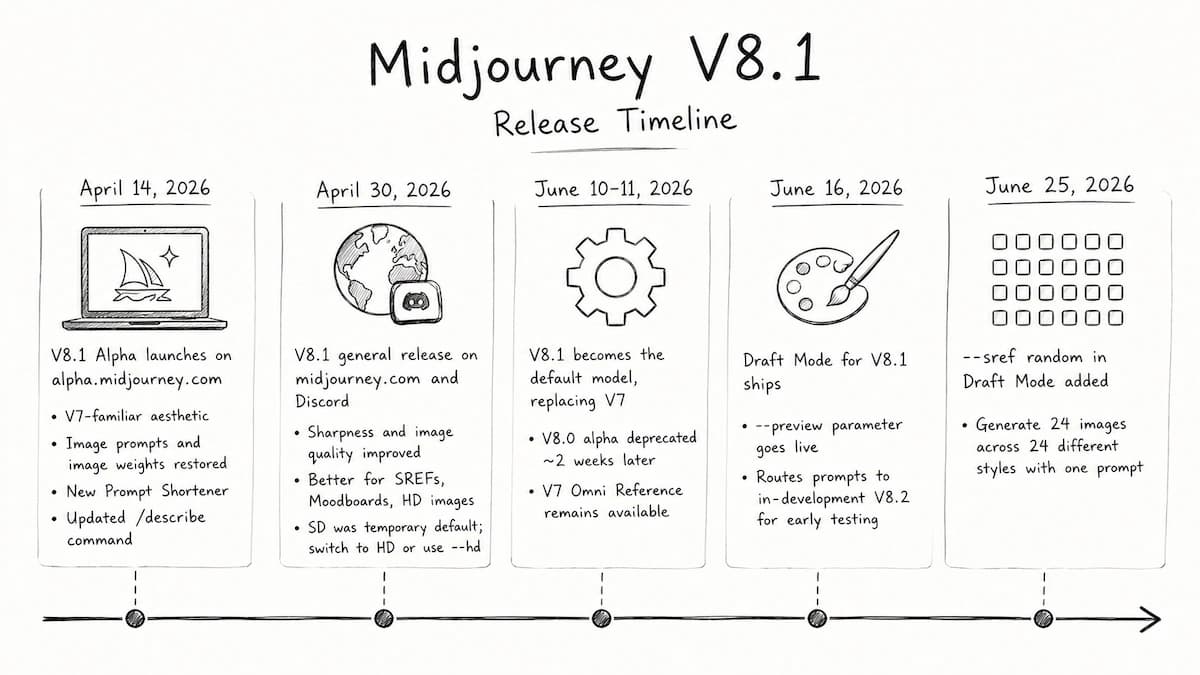
April 14, 2026 — V8.1 Alpha launches on alpha.midjourney.com. Highlights: V7-familiar aesthetic, image prompts and image weights restored, new Prompt Shortener, and updated /describe command. Community reaction on r/midjourney was split — "text finally works" against "you killed V7's soul" — with the shared complaint that V8.0 alpha had an over-polished "AI sheen" that felt too clean. V8.1 was Midjourney's direct response to that feedback.
April 30, 2026 — V8.1 general release on midjourney.com and Discord. Sharpness and image quality improved further, most noticeably for SREFs, Moodboards, and HD images. During a server transition, Midjourney temporarily made SD the default; you can still switch to HD under settings or add --hd after any prompt.
June 10–11, 2026 — V8.1 becomes the default model, replacing V7. V8.0 alpha was deprecated approximately two weeks later. Midjourney V7 remains available with Omni Reference while the team finishes training the improved version for V8.
June 16, 2026 — Draft Mode for V8.1 ships. A --preview parameter also goes live, routing prompts to the in-development V8.2 build for early aesthetic testing.
June 25, 2026 — --sref random in Draft Mode added, allowing a single prompt to generate 24 images across 24 different styles simultaneously.
What Changed: Core Improvements
Speed, Resolution, and Cost
The most immediately practical change is generation speed. Standard jobs render about 4–5 times faster than earlier versions. Images appear in 4 seconds in SD and 12 seconds in HD. Standard resolution is now 50% faster and 25% cheaper than in the original V8 alpha. HD is 3x faster and 3x cheaper, and Midjourney has made HD the default for V8.1.
With HD mode enabled, V8.1 renders at twice the size and 4x the resolution of V7 images — natively at 2048px, eliminating the dedicated upscaling step that V7 required. For creators generating large image batches for moodboards, storyboards, or campaign visuals, jobs that previously required a separate Upscale (Subtle) or Upscale (Creative) pass now deliver 2K output in the initial generation.
Prompt Adherence and Aesthetic Coherence
V8.1 reads prompts differently from earlier versions, holding small details more aggressively and rewarding specific phrasing over keyword stacking. The same prompt that gave you a strong result in V7 may now produce a flatter or more generic result if you haven't updated your habits — the model interprets intent differently at this layer. For creators making the switch, updating your prompting style rather than just your model version is the most important practical step.
The model is smarter, more coherent, better at adhering to detailed prompts, and renders text better than any previous version. Style references, personalization, and aesthetics carry over consistently from V7.
Style References and Moodboards
One of the most-requested fixes from the V8.0 alpha phase has landed. In V7, SREFs and moodboards drifted across a project — you would lock in a look on one image, then the next image in the same project would shift color palette or lighting style. V8.1 stabilizes this, and Midjourney's own update notes call out moodboard and SREF stability as the headline improvement.
The practical use case: build a moodboard for a client brand or project once, then run every prompt with that moodboard attached. You stop re-describing the aesthetic in every prompt, and output stays consistent across 50–100 images.
Raw Mode
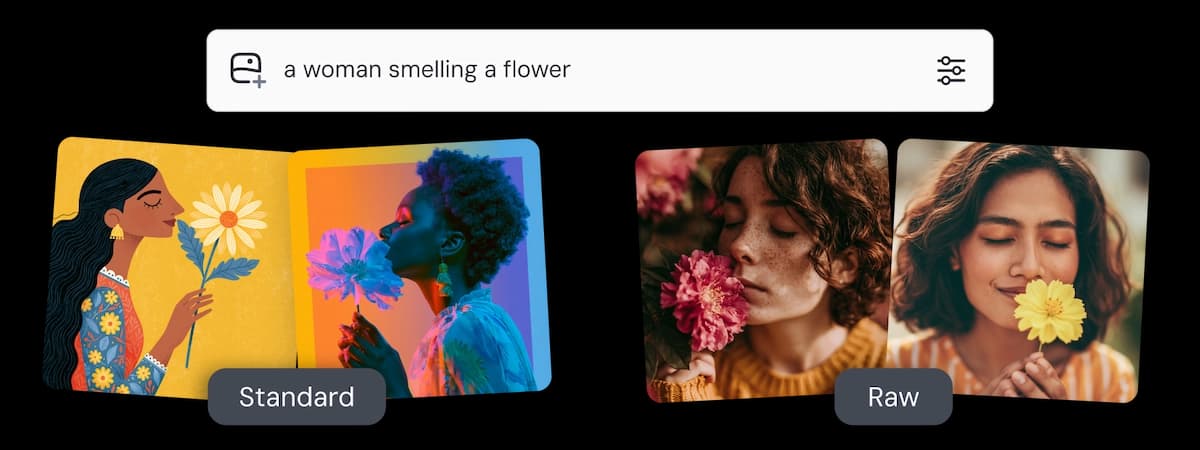
Raw mode strips out Midjourney's default aesthetic styling so the model follows your prompt more literally. Without Raw, Midjourney biases output toward a cinematic, slightly stylized look even when you ask for a flat product shot or neutral reference frame. Add --raw to any prompt, or toggle it in the web interface. This is especially useful when generating source frames intended for product ads, neutral storyboard references, or video sequences where you need more controllable starting images.
HD Mode and Draft Mode Explained
HD Mode
HD mode generates native 2K resolution images (roughly 2048×2048 pixels) without a separate upscale step. HD jobs cost roughly 1.33 GPU minutes; standard SD jobs cost under 1 GPU minute. The difference shows up in skin texture, fabric weave, and fine environmental details that V7 had to reconstruct during the upscaling pass.
Use HD as the default for any image going into a client deck, a campaign layout, a landing page, or a video production pipeline. Turn it off during ideation when you are testing many variations and need only thumbnail-sized compositions to compare direction.
The Run as HD button lets you rerun any SD V8.1 job at full resolution without re-entering the prompt — a simple draft-first, upgrade-when-ready workflow.
Draft Mode
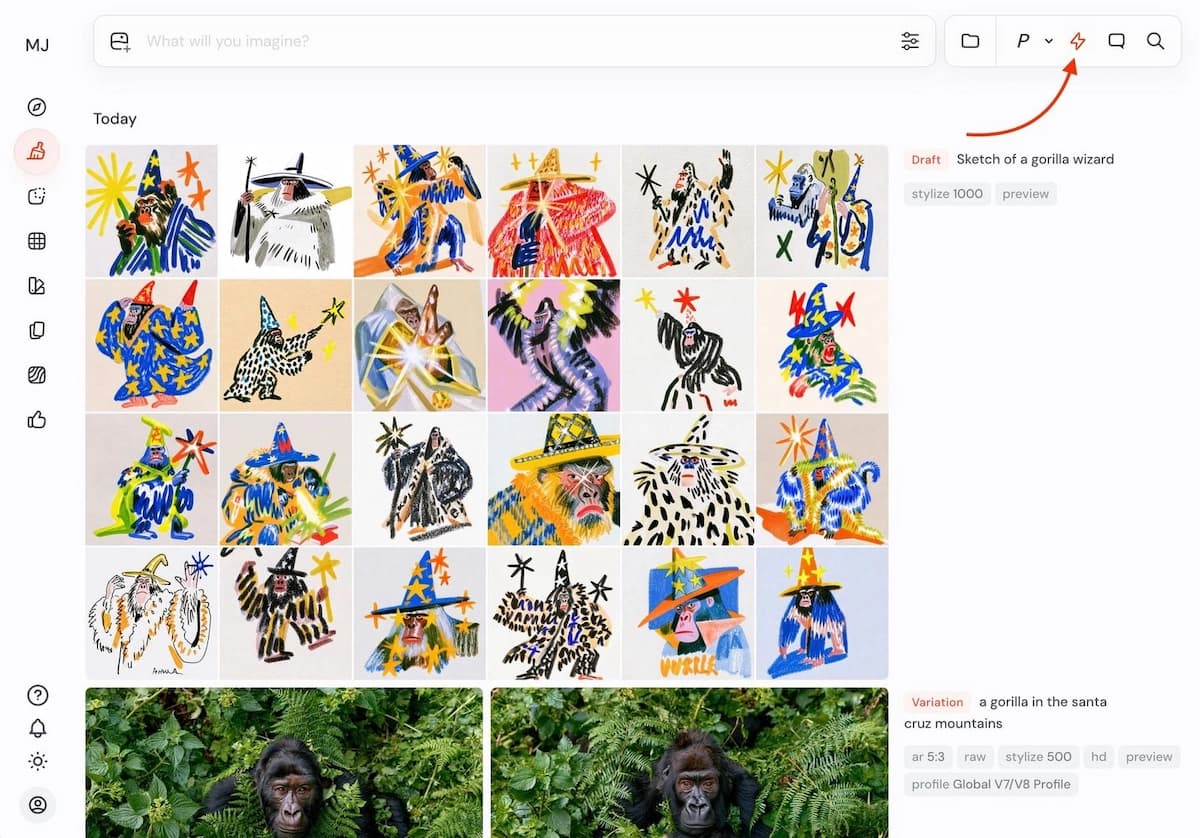
Draft Mode generates 24 images at lower resolution and quality in a single job, using half as many fast GPU hours as V8.1 SD jobs — even though they produce 24 images. Click "Vary" on any image to render it at full quality and full resolution. Activate it by clicking the ⚡ button in the menubar, or add --draft to any prompt.
The most recent addition, as of June 25, 2026, is --sref random inside Draft Mode. Adding --sref random to a draft-mode prompt generates 24 images each with a different style in a single run. For creators building visual identities, exploring aesthetic directions, or finding a style code to lock down for a project, this is the most efficient exploration tool Midjourney has shipped.
Midjourney V8.1 vs Nano Banana Pro vs ChatGPT Images 2.0
The broader creator conversation in 2026 is not "which model should I use" — it is "which models serve different parts of my workflow." Independent comparisons, community discussion on r/midjourney, and testing published at the time of writing consistently land on the same split.
| Midjourney V8.1 | Nano Banana Pro | ChatGPT Images 2.0 | |
|---|---|---|---|
| Aesthetic / Mood | Best in class | Functional | Improving |
| Speed / Volume | 4s SD, 24-image drafts | Fast | 1 image, slower |
| Text rendering | Improved, short strings | Strong | Best |
| Character consistency | V7 --oref only | Identity locking | Moderate |
| Precise editing | V7 editor for now | Surgical edits | Strong |
| Price entry point | $10/month | ~$7.49/month (NightCafe) | ChatGPT Plus ($20/month) |
Where Midjourney V8.1 wins:
Midjourney is still the default choice for aesthetic output — cinematic lighting, rich textures, dramatic composition, and the model's instinct to add mood and visual weight that wasn't explicitly asked for. For concept art, editorial visuals, campaign hero shots, and any brief where "feel" matters more than technical precision, Midjourney generally produces the strongest first result. It also wins on iteration speed and volume: Draft Mode gives you 24 variations cheaply, and standard generation at 4 seconds per image makes exploration fast.
Where Nano Banana Pro wins:
Nano Banana Pro (built on Google's Gemini multimodal architecture) is the stronger choice for editing, character consistency, and text rendering. For Nano Banana Pro specifically, it processes up to 14 reference images simultaneously and builds a more robust understanding of a subject — allowing the same person to appear in different scenes without facial drift. Text rendering is also noticeably more reliable: where Midjourney V8.1 handles short strings well but struggles with longer sentences or specific layouts, Nano Banana Pro can generate legible, correctly spelled text in proper layouts. For storyboarding with a locked character, posters, mockups, or infographics, Nano Banana Pro is the more precise instrument.
NightCafe's comparison of Midjourney V8 and Nano Banana Pro summarized it clearly: Midjourney sets the standard for artistic texture and surreal aesthetics, while Nano Banana Pro is the superior option for editing, character consistency, and control. Nano Banana Pro on NightCafe starts at $7.49/month; verify current pricing at the time you're reading this.
Where ChatGPT Images 2.0 wins:
According to a chatgpt image 2.0 comparison across seven use cases, ChatGPT Images 2.0 is stronger for instruction-following, spatial composition, and text-dense outputs like UI mockups, infographics, and posters. Midjourney V8.1 is still the better tool for realism, mood, and fast multi-option iteration — but ChatGPT Images 2.0 has closed the photorealism gap meaningfully. The practical takeaway from that comparison: both tools cover different strengths, and many high-volume creators now use them in combination rather than choosing one.
What V8.1 Still Does Not Support
Knowing the current gaps is as important as knowing the improvements.
Omni Reference (--oref): V7 Omni Reference remains available while Midjourney finishes training the improved version for V8. As of June 2026, --oref is V7-only. If character consistency across multiple images is central to your workflow — for a storyboard series, comic, or brand mascot — V7 remains the right choice for that specific task.
Quality parameter (--q): The Quality parameter is not supported in V8.1. Use V7 for --q 2 prompts.
Upscalers: V8.1 does not support Midjourney upscalers. Use HD generation natively instead.
Editing model: V8.1 still uses the V7 editing model for inpainting and outpainting workflows. Midjourney has confirmed that V8 edit, inpainting, and outpainting upgrades are on the roadmap — described as the next major development after V8 upscalers.
Midjourney V8.1 vs V7: Which Should You Use?
Both models are available and selectable. The choice depends on your specific use case.
| Use Case | Better Choice | Reason |
|---|---|---|
| High-volume brand visuals | V8.1 | Faster, cheaper HD, stable moodboards |
| Complex natural language prompts | V8.1 | Stronger prompt adherence |
| Text in images | V8.1 | Best text rendering in Midjourney history |
| Product shots / neutral reference frames | V8.1 + Raw Mode | Less default stylization |
| Character consistency across scenes | V7 | Omni Reference (--oref) is V7-only |
| Quality parameter (--q 2) | V7 | Not supported in V8.1 |
| Ideation / fast style exploration | V8.1 Draft Mode | 24 images at half GPU cost, --sref random |
| Inpainting / outpainting | V7 | V8.1 uses the V7 editing model |
The practical answer for most creators: use V8.1 as your default. Switch to V7 only when a specific workflow requires Omni Reference or the --q parameter.
Midjourney V8.1 Pricing in 2026
Here is a concise and straightforward English summary of the Midjourney V8.1 pricing structure:
Midjourney V8.1 Pricing Breakdown (As of June 2026)
| Plan | Monthly Price | Annual Price (Billed Yearly) | Fast GPU Hours | Unlimited Relax Mode? | Stealth Mode (Private)? |
|---|---|---|---|---|---|
| Basic | $10/mo | $8/mo | 3.3 hours | No | No (Public) |
| Standard | $30/mo | $24/mo | 15 hours | Yes | No (Public) |
| Pro | $60/mo | $48/mo | 30 hours | Yes | Yes |
| Mega | $120/mo | $96/mo | 60 hours | Yes | Yes |
Key Takeaways
-
No Free Tier: Entry starts at $10/month.
-
Billing Metric: Midjourney charges by Fast GPU hours, not image count. Extra hours cost $4/hour and never expire.
-
The "Standard" Recommendation: The Basic plan stops completely once you run out of Fast hours. The Standard plan ($30/mo) is the best mainstream choice because it includes unlimited generation under "Relax Mode" after your Fast hours are used up.
-
Privacy Controls: Images on Basic and Standard are public by default. If you need Stealth Mode (privacy for client or pre-release commercial work), you must choose the Pro ($60/mo) or Mega plan.
Note: Verify current terms on Midjourney's official pricing page before subscribing, as plan details and commercial rights thresholds can change.
From Still Images to Full Video: Why Source Frame Quality Matters
Getting a great Midjourney V8.1 image is a milestone — not a finish line. The real deliverable for most creators, marketers, and producers is a video: a music video, a product ad, a short-form reel, or a branded content piece. A single great frame solves only one part of that problem.
The Problem: Great Images Don't Automatically Become Great Videos
One-shot video prompting — dropping a Midjourney frame into a video model and generating — breaks down in predictable ways:
- Inconsistent motion across shots with different energy levels
- Mismatched scene aesthetics when frames weren't planned together
- No shot continuity — cuts feel random rather than intentional
- No audio layer — music, voiceover, and timing have to be solved separately
V8.1 raises the image quality ceiling. It does not solve scene structure, shot continuity, timing, or audio. That gap is where most AI video attempts fall apart.
The Fix: Plan the Video Before You Generate It
A structured approach treats Midjourney V8.1 outputs as raw assets inside a planned system — not as final deliverables. The key is coordinating creative brief, reference generation, scene planning, shot list, storyboard, and multi-model video generation in sequence, before any video clip is rendered.
This is the difference between one-shot prompting and an AI music video generator workflow.
How VidMuse Closes the Gap
VidMuse is built as an AI Director — it structures the full video workflow from uploaded assets through to final output, rather than executing a single prompt.
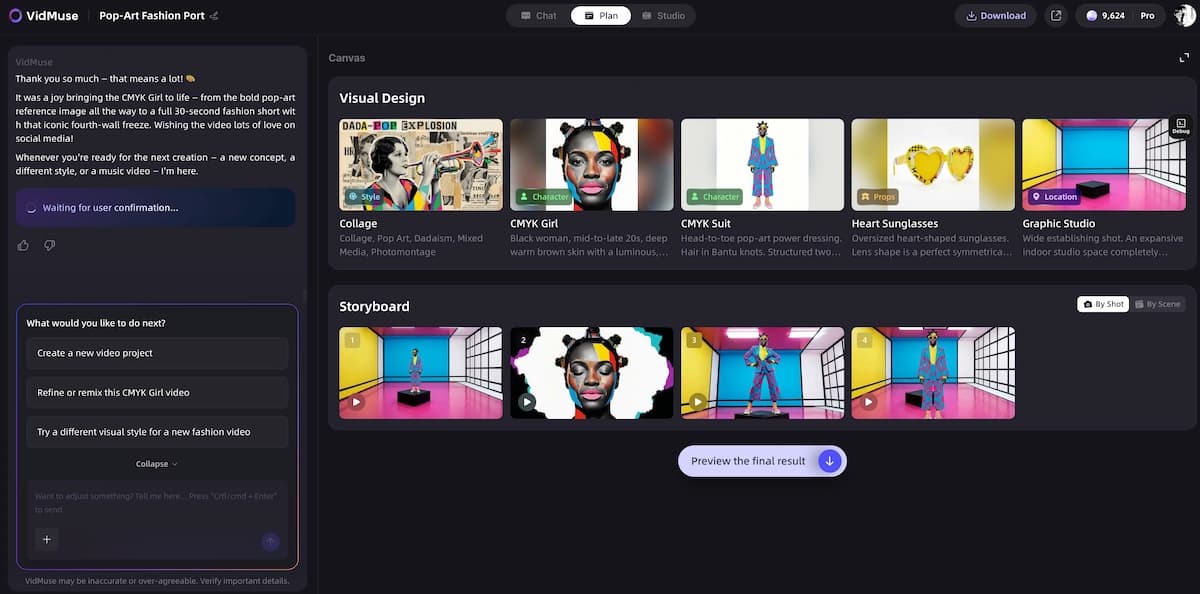
The core workflow:
- Assets Upload — bring in your Midjourney V8.1 frames, reference images, or brand assets
- Creative Brief — define the video's direction, tone, and objective
- Reference Generation — build visual references that anchor the aesthetic
- Scene & Shot List — plan every scene and shot before generation begins
- Storyboard — visualize the full video structure
- Video Generation — generate with consistency across scenes, not shot by shot in isolation
Assets generated in Midjourney V8.1 (or keyframes created within VidMuse using Nano Banana Pro) become building blocks in this planned structure — not isolated one-off generations.
VidMuse 2.0 adds Shot Refine by Quoting and a Timeline Editor for granular control over individual shots once the storyboard is built — so you're not stuck with the first pass on any scene.
Plan your AI video workflow in VidMuse instead of relying on one-shot prompts.
Turn Midjourney Images Into a Complete Video
Upload your frames, plan your scenes, and generate a structured multi-shot video — no one-shot prompting.
FAQ
What is Midjourney V8.1?
Midjourney V8.1 is Midjourney's current default image generation model as of June 2026. It is the fastest model in the V8 series — standard jobs render in about 4 seconds, and it generates native 2K HD images without a separate upscaling step. It is the first V8 model to restore the familiar aesthetic character from V7, after the V8.0 alpha was widely criticized for an over-polished, generic look.
Is Midjourney V8.1 the default model now?
Yes. Midjourney updated the default model from V7 to V8.1 on June 10, 2026, following the alpha launch on April 14 and the general release on April 30. V7 remains fully selectable for workflows that require Omni Reference or the --q quality parameter, both of which are not yet supported in V8.1.
Does Midjourney V8.1 support Omni Reference (--oref)?
Not yet. V7 Omni Reference remains available while Midjourney finishes training the improved V8 version. As of June 2026, --oref is V7-only. If cross-image character consistency is central to your workflow — for a storyboard series, comic, or brand character — use V7 for that specific task and V8.1 for everything else.
What is Midjourney Draft Mode?
Draft Mode generates 24 images at lower resolution and quality in a single job, using half the fast GPU hours of a standard V8.1 SD job. Click "Vary" on any result to render it at full quality and full resolution. Activate it by clicking the ⚡ button in the menubar or by adding --draft to any prompt. The newest addition is --sref random, which assigns a different style to each of the 24 draft images for rapid visual exploration.
Is Midjourney V8.1 free?
No. Midjourney removed its free trial in March 2023 and has been subscription-only since. The cheapest entry point is the Basic plan at $10/month ($8/month billed annually). There is no free tier in 2026.
What is Midjourney V8.2 and how do I try it?
Midjourney V8.2 is the next model update after V8.1, currently in development. It focuses on a stronger aesthetic distinct from V7, improved SREF and moodboard consistency, and refined image quality. As of June 2026, V8.2 has not been released but is accessible in its current preview state via the --preview parameter added to any V8.1 prompt on midjourney.com. Preview output is explicitly unpolished and not guaranteed to be consistent over time.
How does Midjourney V8.1 compare to Nano Banana Pro?
Midjourney V8.1 is stronger for aesthetic quality, cinematic mood, and fast multi-image exploration. Nano Banana Pro is stronger for character consistency across multiple images, precise editing and instruction-following, and text rendering. NightCafe's comparison summary: Midjourney wins on artistic texture and surreal aesthetics; Nano Banana Pro wins on editing, consistency, and control. Most high-output workflows now use both rather than choosing one.
How do I turn Midjourney V8.1 images into a video?
Midjourney V8.1 generates source frames. To turn them into a structured video, you need a workflow that handles scene planning, shot continuity, motion, audio, and timeline assembly. VidMuse accepts uploaded image assets as part of its Assets Upload → Creative Brief → Scene & Shot List → Storyboard → Video Generation pipeline, turning your Midjourney frames into a multi-shot video with proper structure — rather than a single animated clip.
Conclusion
Midjourney V8.1 is a genuine, well-rounded upgrade. The speed improvements are real: 4-second SD generation and 12-second HD generation change the daily creative rhythm. HD as the default removes a workflow step that used to require a separate decision. Draft Mode makes ideation significantly cheaper, and --sref random opens style exploration in a way that wasn't possible before. Moodboard and SREF stability finally delivers on the promise of brand-consistent image sets across large projects.
The remaining gaps are real too. Omni Reference is still V7-only. The editing model hasn't caught up to the generation model yet. And for any workflow that needs text-dense images, precise instruction-following, or surgical editing, tools like Nano Banana Pro, Nano Banana 2, and ChatGPT Images 2.0 remain stronger for those specific tasks.
The practical 2026 answer: V8.1 as your image generation default, V7 when you need --oref, and a dedicated video workflow when the deliverable is motion. If you generate images for an AI music video generator workflow, product ads, or branded content, V8.1 raises the quality of your source material. Use VidMuse and the VidMuse guide to build the scenes, shot list, and storyboard that turn those images into a complete video — not just a single animated clip.
Your Images Deserve a Better Video Workflow
VidMuse turns AI-generated frames into storyboarded, multi-shot videos — for music videos, ads, and branded content.

Written By
VidMuse Team
Continue Reading
Latest blog posts related to AI video creation.
AIVA AI Review 2026: Features, Pricing & Verdict
Is AIVA AI the right music generator for you? This 2026 review covers features, pricing, pros, cons, and when to choose a better alternative.
How to Create Ads for TikTok Video with AI
Learn how to create ads for TikTok video with AI in minutes — pick your ad type, generate scenes, add voiceover, and export vertical-ready MP4.
How to Make an AI Brainrot Video (2026 Guide)
Learn how to make an AI brainrot video fast — chaotic visuals, AI voiceover, bold captions & phonk music. Full step-by-step guide with VidMuse AI.