
AIVA AI is a legitimate, well-established AI music generator — but it is not the right tool for every creator. If you need cinematic instrumentals, orchestral scores, or MIDI-editable compositions for film, games, or background video content, AIVA is one of the strongest options available in 2026. If you need full vocal songs, modern pop production, or visual content paired with your music, you will hit its limits quickly. This review covers what the AIVA music generator does well, where it falls short, how pricing actually works, and what to use instead when your workflow outgrows it.
Key Takeaways
- AIVA AI is best for instrumental music — cinematic, orchestral, ambient, and classical compositions across 250+ styles. It is not built for vocal-forward pop songs.
- Copyright ownership matters: the free plan keeps copyright with AIVA; only the Pro plan gives you full commercial ownership of generated tracks.
- MIDI export is a major differentiator — you can take AIVA's output into Logic Pro, Ableton, or FL Studio for deep editing, which most AI music tools don't allow.
- AIVA is a composition tool, not a video tool — once you have your track, you still need a separate workflow to create the music video, ad, or visual content around it.
- Indie musicians and content creators who generate tracks with tools like Suno or AIVA and then want high-quality music videos should look at VidMuse AI music video generator, which pairs AI audio creation with professional-grade visual production.
What Is AIVA AI?
AIVA — short for Artificial Intelligence Virtual Artist — is an AI music generation assistant developed by Aiva Technologies, a Luxembourg-based company founded in 2016. It is widely recognized as the first AI composer to be officially registered with SACEM, the French copyright management society, giving it a unique legal standing in the AI music space.
The platform was built to help composers, content creators, game developers, and filmmakers generate original music without hiring a studio musician or knowing music theory. Unlike text-to-song tools such as Suno AI or Udio, AIVA focuses on structured, editable composition — generating full instrumental arrangements that users can refine in a built-in editor or export as MIDI for further production.
AIVA's training data draws on thousands of classical compositions from composers like Mozart, Beethoven, and Bach, which is why its strengths lean toward orchestral, cinematic, and neoclassical styles — even though it now supports over 250 genres including electronic, jazz, folk rock, and ambient.
How the AIVA Music Generator Works
The AIVA music generator uses a deep neural network trained on structured musical compositions. Rather than generating audio from scratch via a diffusion model (like Suno), AIVA predicts musical sequences — melody, harmony, rhythm, and instrumentation — based on patterns learned during training. This gives its output a sense of compositional logic that pure audio-generation tools sometimes lack.
Here is how a typical AIVA generation session works:
- Choose a style or mood — select from 250+ presets, or upload your own audio or MIDI reference file to guide the AI's creative direction.
- Set parameters — specify tempo, key, instrumentation, and track duration (up to 5:30 on Pro).
- Generate — AIVA produces a full arrangement in seconds to a few minutes depending on complexity.
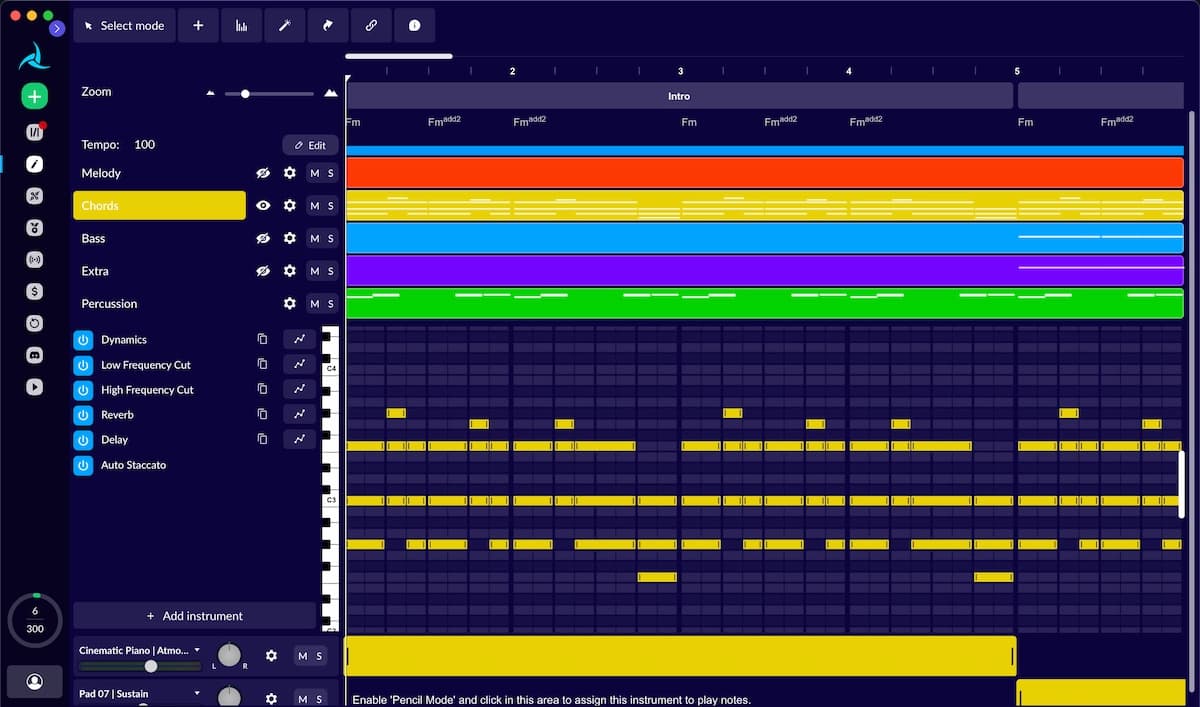
- Edit in the built-in timeline and piano roll — swap instruments, adjust tempo, restructure sections, or tweak individual notes.
- Export — download as MP3, MIDI, WAV (Pro plan), or stems depending on your plan tier.
The MIDI export step is particularly powerful: it lets you bring AIVA's compositional output into professional DAWs and replace its built-in samples with higher-quality libraries. One common workflow is to generate a cinematic cue in AIVA, export the MIDI, then re-render it using Spitfire Audio or EastWest libraries inside Logic Pro.
AIVA Features Breakdown
Style Range and Genre Coverage
AIVA supports over 250 musical styles, from Modern Cinematic and Fantasy to Jazz Lounge, Sea Shanty, Tango, Electronic, and Chinese music. In practice, the cinematic and orchestral presets are the most polished. Some genre categories overlap — "Cinematic," "Epic," and "Dramatic" can produce similar results — so expect some trial and error when exploring adjacent styles.
Built-In Editor
Unlike most AI music tools that deliver a finished audio file and nothing else, AIVA gives you a timeline editor and piano roll where you can edit notes, swap instruments, change tempo, and restructure sections. This is one of the most significant differentiators between AIVA and tools like Suno or Udio.
Custom Style Models
Users can upload audio or MIDI reference files and have AIVA learn from them to generate new tracks in a similar sonic identity. This is valuable for studios or content brands that want a consistent musical signature across projects.
MIDI and Multi-Format Export
AIVA exports in MP3, MIDI, WAV (16-bit, 48kHz on Pro), and stems. MIDI export enables full DAW integration, making it a genuine production tool rather than a novelty generator.
Copyright and Licensing
This is where plan tier matters most:
- Free plan: copyright owned by AIVA; non-commercial use only; must credit AIVA
- Standard plan: copyright still owned by AIVA; limited monetization on YouTube, Twitch, Instagram, TikTok; no credit required
- Pro plan: copyright owned by YOU; full commercial monetization with no platform restrictions; up to 300 downloads per month
Suno AI Integration via VidMuse
If you already create music in Suno AI and want to pair your tracks with professional visuals, the VidMuse AI music video generator supports direct Suno to video workflows — handling the full production pipeline from audio to visual without requiring any video editing experience.
Create Your AI Video in Minutes
Turn your idea into a video with VidMuse.
AIVA Pricing: Free vs Standard vs Pro
AIVA offers three plans for individual users. Prices are listed in EUR; USD equivalents vary and VAT is added at checkout for EU-based users.
| Plan | Monthly Cost | Downloads/Month | Copyright | Commercial Use |
|---|---|---|---|---|
| Free | €0 | 3 | AIVA | Non-commercial only |
| Standard | ~€11/month (annual) | 15 | AIVA | Limited (YouTube, Twitch, TikTok, IG) |
| Pro | ~€33/month (annual) | 300 | You | Full, unrestricted |
Important caveats to know before subscribing:
- EU users should add 20–25% VAT to all listed prices — the Pro plan becomes approximately €39–40/month in most EU countries.
- Download limits apply to final exports, not to track generation. You can generate unlimited tracks but are capped on how many you download.
- WAV export and stems are only available on the Pro plan.
- Students and educators can request a 15–30% discount via AIVA's contact form.
For creators doing commercial work — ad music, client video scores, or content monetized beyond the four platforms listed in the Standard tier — the Pro plan is the only tier that provides clean legal footing.
AIVA AI Pros and Cons
Pros
- MIDI export enables real DAW integration — a rare capability among AI music tools
- 250+ styles cover a wide creative range, with particularly strong orchestral and cinematic output
- Built-in editor gives meaningful post-generation control
- Custom style models via audio/MIDI reference upload
- Cleanest copyright terms in its class: Pro plan delivers full ownership
- First AI composer registered with SACEM — adds legal credibility
- Free plan is genuinely usable for non-commercial testing
Cons
- No vocal generation — AIVA does not produce songs with lyrics or singing
- Download caps are restrictive, especially on Free (3/month) and Standard (15/month)
- Full copyright ownership requires the Pro tier at ~€33/month
- Interface has a learning curve — not as beginner-friendly as Suno
- Some style presets overlap and produce near-identical results
- Browser-only — no mobile or tablet app
- Support response times can be slow (reported as 3–5 days by multiple users)
- Generation times vary from under a minute to several minutes with no queue visibility
Who Should Use AIVA — and Who Should Not
AIVA Is the Right Choice If You Are:
- A filmmaker or video producer needing royalty-free cinematic or orchestral music
- A game developer who wants background scores with MIDI export for dynamic audio systems
- A composer looking for AI-assisted prototyping that feeds into a DAW workflow
- A YouTube or podcast creator needing professional background music that won't compete with narration
- A music educator exploring AI composition in classroom settings
Skip AIVA If You Are:
- A musician who needs full songs with vocals and lyrics — use Suno or Udio instead
- A social media creator who needs trending, vocally driven sounds for TikTok or Reels
- A high-volume producer for whom 300 downloads per month is a bottleneck
- A complete beginner expecting a one-prompt, instant-song experience
- A creator who wants the music to be the starting point for a visual content pipeline without adding separate video production tools
AIVA vs Suno vs Udio: Which AI Music Tool Wins?
These three tools are frequently compared, but they serve meaningfully different use cases. Here is a direct comparison:
| Criteria | AIVA | Suno | Udio |
|---|---|---|---|
| Best for | Instrumental / cinematic | Full songs with vocals | Vocal songs, modern styles |
| Vocal output | No | Yes | Yes |
| MIDI export | Yes | No | No |
| Built-in editor | Yes | No | Limited |
| Copyright (paid) | Full ownership (Pro) | Owned by you (paid plans) | Owned by you (paid plans) |
| Free tier | 3 downloads/month | ~10 songs/day | ~10 songs/month |
| Starting paid price | ~€11/month | ~$10/month | ~$10/month |
| Interface ease | Moderate learning curve | Very beginner-friendly | Beginner-friendly |
| Strengths | Editable, licensable, instrumental | Fast, vocal, expressive | Modern, stylistically diverse |
The honest summary: if your goal is to generate a full song with a singer and lyrics, Suno and Udio will get you there faster. If you need instrumental music you can legally own, edit at the note level, and export to a professional DAW, AIVA is the better production tool.
Neither tool, however, handles what comes after the music is created: turning that track into a music video, product ad, or social content. That requires a separate visual production step.
What to Do After You Generate Music with AIVA
Generating the track is only half the workflow. For most creators — especially indie musicians, content brands, and SMB marketers — the music needs to become a visual product: a music video, an ad, a lyric video, or a social reel.
This is where the AIVA workflow typically stalls. AIVA is a composition tool, not a visual one. Once you export your track, you are left with an audio file and no path to the video.
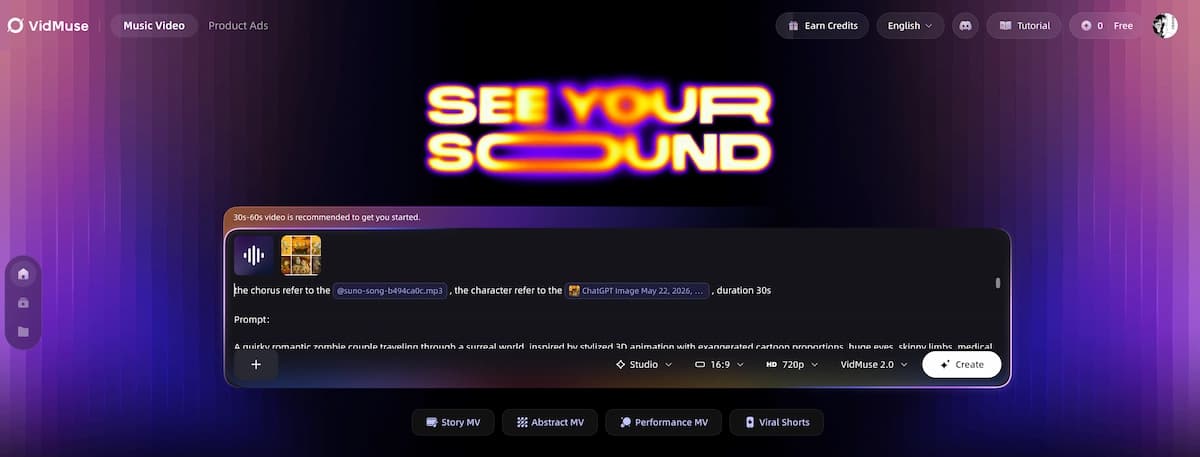
VidMuse fills that gap as an AI Director for music video and ad production. Its core workflow — Assets Upload → Creative Brief → Reference Generation → Scene & Shots List → Storyboard → Video Generation — is built specifically around audio-first creation. Rather than requiring you to build a video prompt from scratch, VidMuse uses agent-based logic to plan the full video around your music, generating a storyboard before a single frame is rendered.
Create Your AI Video in Minutes
Turn your idea into a video with VidMuse.
For indie musicians who generate tracks in AIVA, Suno, or Udio and want studio-quality visuals:
- VidMuse Studio mode uses Nano Banana Pro for image generation and Seedance 2.0 Pro / Kling V3.0 Pro / Omnihuman V1.5 for video — the highest-quality output for music video production.
- VidMuse Lite mode uses Seedream 5.0 Lite and Seedance 2.0 Fast for fast, cost-efficient turnaround when you need to move quickly.
- Template types like Story MV, Abstract MV, Performance MV, and Viral Short map directly to how music video styles work in practice.
- The VidMuse 2.0 Shot Refine by Quoting and Timeline Editor features let you refine individual shots without regenerating the entire video — a workflow advantage that mirrors what AIVA's editor offers for music.
If you use Suno to generate vocal tracks, VidMuse's Suno to video workflow is the most direct path from generated audio to shareable visual content.
FAQ
What is AIVA AI used for?
AIVA AI is used to generate original instrumental music for film scores, game soundtracks, YouTube videos, podcasts, advertisements, and creative projects. It specializes in cinematic, orchestral, ambient, and classical styles across 250+ genre presets. Unlike vocal AI music tools, AIVA focuses on structured, editable composition with MIDI export for DAW integration.
Is AIVA free to use?
Yes, AIVA has a free plan that allows up to 3 downloads per month. The free tier is limited to non-commercial use, requires attribution to AIVA, and copyright remains with the platform. For content monetization or full copyright ownership, paid plans starting at approximately €11/month (Standard, billed annually) are required.
How does the AIVA music generator compare to Suno?
AIVA and Suno serve different use cases. Suno generates full songs with vocals and lyrics from text prompts and is easier for beginners. AIVA generates instrumental compositions with a built-in editor and MIDI export, making it better for composers and creators who need editable, professionally licensable output. For vocal-driven pop or social content, Suno is the stronger tool. For cinematic instrumentals, AIVA leads.
Does AIVA AI own my music?
It depends on your plan. On the Free and Standard plans, copyright is owned by AIVA. The Pro plan (approximately €33/month billed annually, before VAT) transfers full copyright to the creator, allowing unrestricted commercial use. Always confirm licensing terms on AIVA's official site before using generated tracks in commercial or client work.
Can I use AIVA music for YouTube monetization?
Yes, with conditions. The Standard plan allows monetization on YouTube, Twitch, TikTok, and Instagram, but copyright remains with AIVA. The Pro plan provides full copyright ownership and unrestricted monetization on any platform. The Free plan does not allow monetization and requires crediting AIVA.
What are the best AIVA alternatives for indie musicians?
For **vocal songs and full tracks**, Suno and Udio are the strongest alternatives. For **high-volume royalty-free background music**, Soundraw offers unlimited downloads at a flat monthly rate. For **indie musicians who want to turn AI-generated tracks into music videos**, VidMuse is the dedicated AI music video platform — supporting tracks from AIVA, Suno, Udio, and original uploads through a full agent-based visual production workflow.
Does AIVA work on mobile?
No. As of mid-2026, AIVA is a browser-only platform and does not have a dedicated mobile or tablet app. The interface is not optimized for mobile use. If mobile music creation is a priority, other tools with native apps may be a better fit.
Conclusion
AIVA AI is one of the most musically capable AI generators available for instrumental composition in 2026. Its strengths — a built-in editor, MIDI export, custom style models, 250+ genre presets, and the cleanest copyright terms in its class at the Pro tier — make it a genuine production tool for filmmakers, game developers, and content creators who need editable, licensable instrumental music.
Its limits are also clear: no vocal output, restrictive download caps on lower tiers, a moderate learning curve, and a browser-only interface that does not serve mobile creators well.
If your goal is cinematic background music you can edit and legally own, AIVA is worth the Pro subscription. If you need vocal pop songs for social media, start with Suno or Udio. And if your workflow extends beyond the music itself — into music videos, lyric videos, product ads, or branded content — VidMuse is the AI Director that picks up where every music generation tool leaves off, turning your audio into studio-quality visual content without requiring a video production background.
Start with AIVA's free plan to test whether its style range fits your project. And when the track is ready, bring it into VidMuse to give it the visual production it deserves.
Create Your AI Video in Minutes
Turn your idea into a video with VidMuse.

Written By
VidMuse Team
Continue Reading
Latest blog posts related to AI video creation.

How to Create Ads for TikTok Video with AI
Learn how to create ads for TikTok video with AI in minutes — pick your ad type, generate scenes, add voiceover, and export vertical-ready MP4.
Midjourney V8.1 Review: Faster, Smarter, HD Default
Midjourney V8.1 is now the default model. Here's what changed: native 2K HD, 4–5x faster generation, Draft Mode, and better prompt adherence.
How to Make an AI Brainrot Video (2026 Guide)
Learn how to make an AI brainrot video fast — chaotic visuals, AI voiceover, bold captions & phonk music. Full step-by-step guide with VidMuse AI.