

Neural Frames is the leading audio-reactive AI music video generator — the best tool available for creating visualizers and abstract animations that sync directly to your track's BPM, beats, and stems. If you want AI visuals that pulse, zoom, and shift with every kick drum and vocal phrase, Neural Frames does this better than any other platform. Trustpilot rates it 3.5 out of 5 based on 80 reviews.
But Neural Frames is not built for narrative music videos. It generates audio-reactive clips and abstract visuals — not planned scenes, scripted shots, or story-driven MVs. If you need a music video with a visual concept, a narrative arc, and cinematic production, VidMuse is the stronger alternative. VidMuse runs a storyboard-first workflow: it analyzes your song, plans scenes and shots, and generates a complete music video with beat-aware pacing.
This review covers Neural Frames' features, pricing (from $26/mo), honest pros and cons, and the best alternative for musicians who need more than visualizers.
Key Takeaways
-
Neural Frames is the best audio-reactive AI music video tool — Autopilot mode generates full music-synced videos from an uploaded track in minutes.
-
Pricing starts at $26/mo (Knight plan, 2,400 credits). Actual cost works out to roughly $10+ per minute of finished video, which makes it expensive for longer projects.
-
Strengths: fast Autopilot generation, strong BPM/stem sync, chat-based editing, musician-focused UX, fewer content restrictions than generic video tools.
-
Weaknesses: limited narrative/cinematic control, high credit burn rate, Trustpilot 3.5/5 with mixed reviews, no storyboard or scene planning.
-
For story-driven, cinematic music videos, VidMuse is the strongest alternative — it offers song-to-story planning, storyboard-first generation, and multi-model video production.
What Is Neural Frames?
Neural Frames is an AI platform that creates music videos, visualizers, and animations by syncing AI-generated visuals to your music. You upload a track, and the AI analyzes the audio — extracting BPM, beats, stems (vocals, drums, bass) — then generates visuals that react to the music in real time.
The platform is built specifically for musicians and music creators. Over 10,000 artists use Neural Frames, according to their site. The core approach is audio-reactive: visuals are driven by the music's rhythm and energy, not by a scripted narrative or storyboard.
Neural Frames works best for abstract visualizers, psychedelic animations, and audio-reactive social clips — the kind of content you see on YouTube music channels and Spotify Canvas loops. It's not designed for concept-driven or cinematic music videos where you need planned scenes, characters, or a story arc. For that type of MV, you'll need a different tool — more on that below.
Create Story-Driven Music Videos with AI
VidMuse plans your scenes, writes your shot list, and generates a complete music video — not just visualizer clips.
Neural Frames Key Features
Neural Frames offers a focused set of features built around audio-reactive music video generation. Here's what each one does.
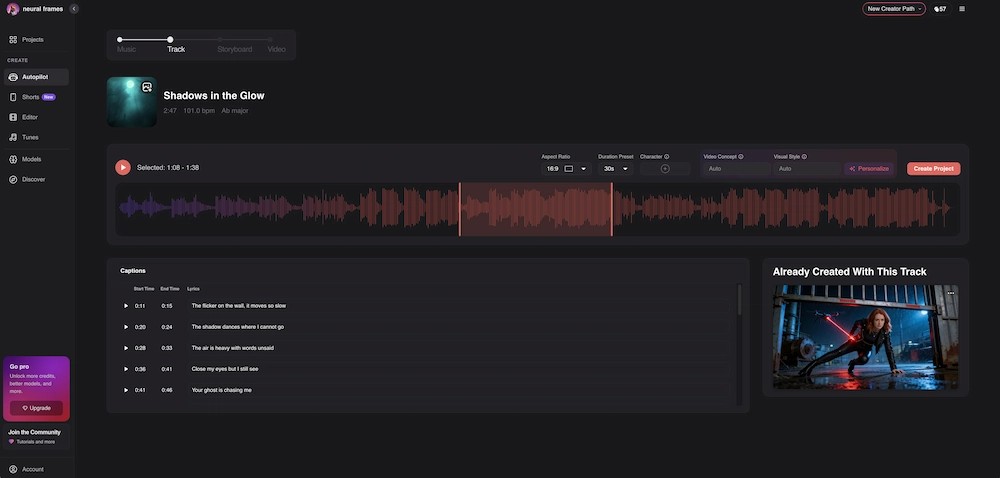
Autopilot Mode
Autopilot is Neural Frames' flagship feature. Upload your track, and Autopilot automatically generates a full music-synced storyboard and video — typically in just a few clicks. It analyzes song structure, identifies sections (intro, verse, chorus, bridge, outro), and maps visual transitions to musical changes.
Available on all paid tiers, but Neural Frames recommends the Ninja plan ($66/mo) or higher for optimal Autopilot results. The quality and length of output depend on your credit balance.
Audio-Reactive Visuals
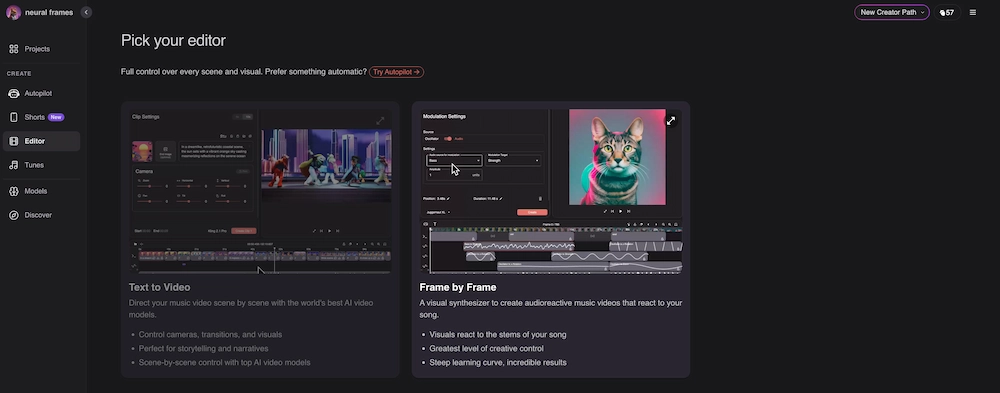
This is Neural Frames' core differentiator. The platform extracts audio stems — vocals, drums, bass, melody — and maps each stem to specific visual parameters. A kick drum can trigger a camera zoom. A vocal phrase can shift the color palette. A bass drop can change the entire visual environment.
The result is visuals that feel genuinely synchronized to the music, not just placed alongside it. For music visualizers and audio-reactive content, this level of stem-level sync is unmatched.
Chat-Based Editing
Instead of complex prompt engineering, Neural Frames lets you describe changes in natural language. Type "make the colors warmer during the chorus" or "add more movement to the drums section" and the AI adjusts accordingly. This lowers the learning curve compared to manual prompt-by-prompt workflows.
Custom Models
Users can train and upload custom visual models for character or style consistency across scenes. This is useful for artists who want a recognizable visual identity across multiple videos — for example, a recurring character or a signature color palette that carries through every release. Custom model training takes time upfront but pays off for artists building a visual brand across multiple singles or an album cycle.
Upscaling
All paid plans include 1080p upscaling. The Ninja ($66/mo) and Nirvana ($199/mo) plans add 4K upscaling. Neural Frames notes that HD output is included at no extra cost — unlike some competitors that charge separately for higher resolution.
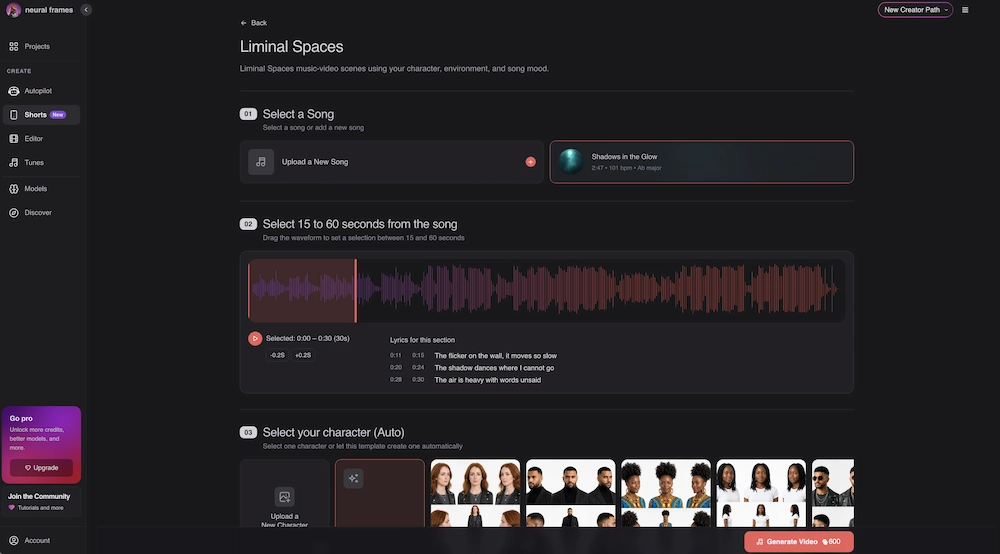
Short-Form Studio
A dedicated mode for creating vertical social clips (TikTok, Instagram Reels, YouTube Shorts) from your track. Useful for promotional clips derived from a longer music video.
Neural Frames Pricing
Neural Frames uses a credit-based subscription model with three paid tiers and a free plan.
Pricing verified from Neural Frames official pricing page and cross-referenced with Stage and Cinema, August 2026. Annual billing available.
The Real Cost: Credit Math
The sticker price doesn't tell the full story. What matters is cost per minute of finished video.
Stage and Cinema reports the Knight plan ($26/mo, 2,400 credits) produces roughly 2–3 minutes of video, depending on complexity and resolution. That works out to approximately $9–13 per minute of finished video.
For a standard 3-minute music video, you'd need at minimum the Ninja plan ($66/mo) — and complex visuals or 4K output may require additional credits purchased separately. A full-length MV at high quality can cost $50–100+ in credits alone.
This makes Neural Frames significantly more expensive per minute than tools that charge flat subscription fees with unlimited generation. Budget accordingly — especially if you're an independent artist producing multiple videos per month on a limited budget.
Neural Frames Pros and Cons
Pros
-
Best-in-class audio reactivity. No other AI video tool matches Neural Frames' stem-level synchronization. Visuals genuinely respond to individual instruments and vocal patterns.
-
Autopilot saves hours. Upload a track and get a complete music-synced video without manual scene-by-scene prompting. For visualizers and abstract MVs, Autopilot delivers usable output in minutes.
-
Musician-focused UX. The platform is designed for music creators, not generic video production. The interface, terminology, and workflow assume you're starting with a song.
-
Fewer content restrictions. Multiple reviewers (YouTube, Reddit) note Neural Frames allows more creative freedom in prompts compared to generic AI video platforms that aggressively filter content.
-
Chat-based iteration. Natural language editing is faster and more intuitive than rewriting prompts from scratch. Useful for non-technical musicians.
Cons
-
Expensive per minute of video. At ~$9–13 per minute on the Knight plan, costs add up fast. A 3-minute MV can cost $30–40+ in credits — on top of the subscription.
-
Limited narrative control. Neural Frames doesn't support scripted scenes, shot lists, storyboards, or narrative arcs. You get abstract, audio-reactive visuals — not a story-driven MV.
-
Trustpilot 3.5/5 (80 reviews). Mixed sentiment. Positive reviews praise the audio sync and Autopilot. Negative reviews cite billing issues, credit burn rate, and quality inconsistency on complex prompts.
-
High credit burn on complex visuals. Detailed prompts with custom models consume credits faster than expected. Failed generations still cost credits.
-
Fine-grained control is limited. Pro Mode offers more control, but achieving specific cinematic looks requires patience and experimentation. The platform is optimized for abstract/generative art, not precise visual direction.
Best Neural Frames Alternative for Music Videos
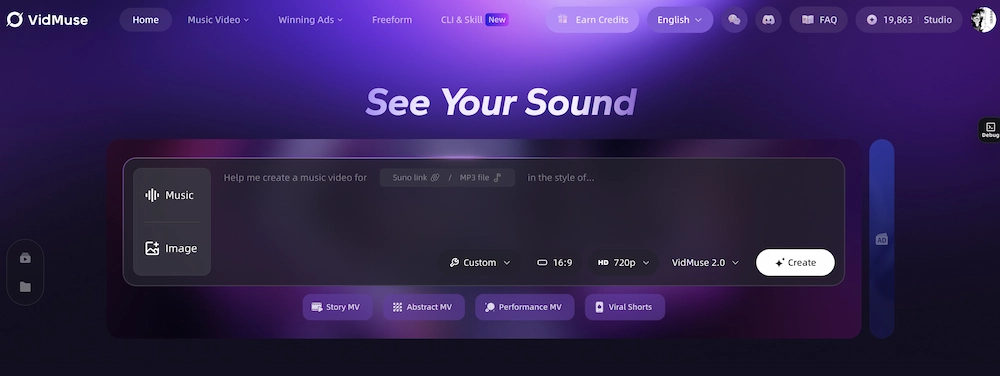
For musicians who need more than visualizers — planned scenes, narrative structure, cinematic quality, and full production control — VidMuse is the strongest Neural Frames alternative.
Why VidMuse Is the Best Alternative
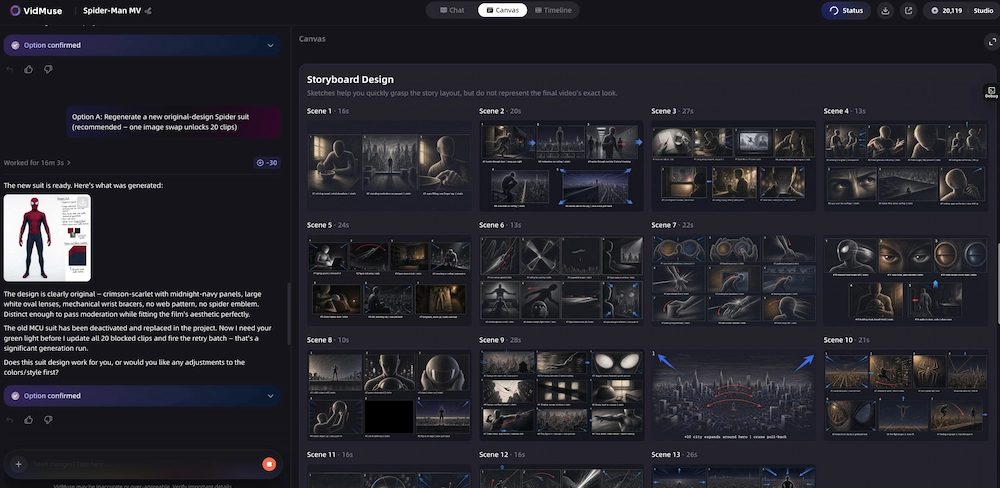
VidMuse approaches music video creation fundamentally differently from Neural Frames. Instead of generating audio-reactive clips, VidMuse runs a storyboard-first workflow:
- Song analysis — the AI analyzes your track's structure, lyrics, emotion, tempo, and theme.
- Creative brief — generates a visual concept, narrative arc, and mood direction based on the song.
- Scene and shot planning — produces a scene list with shot descriptions, camera directions, and timing before any visuals are generated.
- Storyboard generation — creates visual keyframes for each planned shot, maintaining consistency.
- Video generation — renders clips using 20+ video models (Seedance 2.0, Kling V3.0, Veo 3.1) with beat-aware pacing.
- Production control — VidMuse 2.0 adds Shot Refine by Quoting, Timeline Editor, and Asset Library for iteration and continuity.
VidMuse also offers Studio mode (highest quality, models like Nano Banana Pro + Seedance 2.0 Pro) and Lite mode (faster, cost-efficient, Seedream 5.0 Lite + Seedance 2.0 Fast). Built-in Suno AI integration lets you generate a track and turn it into an MV without leaving the platform.
Comparison Table
For a broader comparison of all AI music video generators, see our best AI music video generator roundup.
Create Story-Driven Music Videos with AI
VidMuse plans your scenes, writes your shot list, and generates a complete music video — not just visualizer clips.
Neural Frames vs. VidMuse: Which Should You Choose?
The choice between Neural Frames and VidMuse depends on what kind of music video you want to make.
Choose Neural Frames When:
- You want audio-reactive visualizers — abstract, generative art that pulses with your track
- You need frame-level BPM sync — visuals that respond to individual stems (drums, vocals, bass)
- You're making social clips — quick TikTok/Reels visualizers to promote a new release or upcoming show
- You want abstract AI art set to music — psychedelic, surreal, or experimental visuals for your ambient, electronic, or experimental genre
- Your video doesn't need a narrative, scenes, or characters — the music itself is the story
Choose VidMuse When:
- You want a story-driven music video with a visual concept, scenes, and a narrative arc
- You need planned storyboards before generation — shot lists, scripts, camera directions
- You want cinematic quality with multi-model selection (Seedance, Kling, Veo, etc.)
- You need production control — refine individual shots, edit the timeline, reuse visual assets
- You want lyric video treatment — timed lyrics, subtitle design, text overlays
- You need to generate your track and MV in one place — built-in Suno AI integration
If your goal is a mesmerizing visualizer that pulses with your track, Neural Frames does this better than any other tool. If your goal is a music video that tells a story — with planned scenes, scripted shots, and cinematic production — VidMuse handles the planning and production that Neural Frames doesn't attempt.
Many artists use both: Neural Frames for quick promotional visualizers on social media, and VidMuse for the official music video release that needs narrative depth and visual consistency across a full 3–4 minute track.
Ready to Plan Your Music Video?
VidMuse analyzes your song, plans your scenes, and generates a complete MV with beat-aware pacing.
FAQ: Neural Frames Review
Is Neural Frames worth it?
Neural Frames is worth it if you specifically need audio-reactive visualizers or abstract animations synced to your music. It's the best tool for that use case. It's less worth it if you need narrative music videos with planned scenes and cinematic production — for that, VidMuse or Kaiber are better choices. Consider the credit cost: at ~$9–13 per minute of video, it's expensive for longer projects.
Is Neural Frames free?
Neural Frames offers a free tier with limited credits. You can create an account, upload a track, and generate short clips without a credit card. However, the free tier has significant limitations — lower resolution, watermarks, and very few credits. For usable music video output, you'll need at least the Knight plan ($26/mo). See our free AI music video generator guide for more free options.
How much does Neural Frames cost?
Neural Frames has three paid plans: Knight at $26/mo (2,400 credits, 7 AI models, 1080p), Ninja at $66/mo (7,200 credits, 10 models, 4K), and Nirvana at $199/mo (24,000 credits, priority upscaling). Annual billing is available. The real cost depends on credit consumption — expect roughly $9–13 per minute of finished video on the Knight plan.
What is Neural Frames Autopilot?
Autopilot is Neural Frames' one-click video generation mode. Upload your track, and Autopilot analyzes the song structure, identifies sections (verse, chorus, bridge), and automatically generates a full music-synced video with transitions mapped to musical changes. It's the fastest way to get a complete visualizer-style music video from Neural Frames. Available on all paid tiers; best results on Ninja plan or higher.
What is the best Neural Frames alternative?
VidMuse is the best Neural Frames alternative for musicians who need story-driven, cinematic music videos. While Neural Frames excels at audio-reactive visualizers, VidMuse offers storyboard-first planning, song-to-story workflows, 20+ video generation models, and production tools like Shot Refine and Timeline Editor. Kaiber is another alternative for stylized, artistic music videos with style transfer capabilities.
Neural Frames vs. Kaiber: which is better?
Neural Frames is better for audio-reactive visualizers with stem-level sync — visuals that respond to individual instruments. Kaiber is better for stylized, artistic music videos using style transfer and animation. Neural Frames' Autopilot is faster for full-video generation. Kaiber offers more visual style variety. Both are limited in narrative control compared to VidMuse.
Can I make a full music video with Neural Frames?
Yes, but with caveats. Autopilot can generate a full-length music video synced to your track. The output will be audio-reactive abstract visuals — not a story-driven MV with characters, scenes, and narrative. For abstract/visualizer music videos, Neural Frames delivers excellent results. For concept-driven MVs with planned shots and storyboards, use VidMuse instead.
Conclusion
Neural Frames is the best AI tool for audio-reactive music visualizers and abstract animations synced to your track. Autopilot mode, stem-level BPM sync, and chat-based editing make it the go-to platform for musicians who want visuals that genuinely respond to their music. Pricing starts at $26/mo, but credit costs mean a full MV can run $50–100+.
For musicians who need more — a visual concept, planned scenes, scripted shots, cinematic quality, and production control — VidMuse handles the complete MV production workflow. It doesn't replace Neural Frames for visualizers. It picks up where Neural Frames stops: at the point where you need a story, not just a sync.
Turn Your Song into a Music Video
VidMuse plans your scenes, syncs to your beats, and renders a complete music video — story, visuals, and all.

Written By
VidMuse Team
Continue Reading
Latest blog posts related to AI video creation.
AI Product Video Generator: VidMuse Guide for 2026
Create product videos from images, URLs, and descriptions with VidMuse AI. Plan scenes, generate clips, refine CTAs, and export product videos for ecommerce.
AI Marketing Video Generator: VidMuse Campaign Guide
VidMuse is the AI marketing video generator built to turn product inputs into campaign-ready promo videos, product demos, UGC-style ads, and social ads.

AI Ad Generator Free: Best Tools and Video Workflow
Compare AI ad generator free tools, check free-plan limits, and learn how VidMuse helps create product video ads with scripts, clips, subtitles, and CTAs.