

Runway is one of the most capable AI video generators available today — a platform built for filmmakers, visual artists, and video teams who need serious creative control rather than a quick one-shot clip.
Powered by its Gen-4.5 model alongside a growing library of third-party video models, the Runway AI video generator offers text-to-video, image-to-video, video-to-video, lip sync, upscaling, and much more in a single browser-based workspace. If you want cinematic output and are willing to invest time in learning the platform, Runway is a genuinely powerful choice. But the steep learning curve, credit-based pricing, and relatively complex interface mean it is not the right fit for everyone.
Key Takeaways
- Runway's current flagship is Gen-4.5, described by the company as its most visually faithful and controllable video model to date.
- Plans run from Free (125 one-time credits) through Standard ($12/month), Pro ($28/month), and Max ($76/month) when billed annually.
- The platform includes 30+ tools: text-to-video, image-to-video, video-to-video, lip sync, green screen, upscaling, generative audio, and more.
- Runway also aggregates third-party models including Kling 3.0, Veo 3.1, Nano Banana Pro, and Seedance 2.0 on higher-tier plans.
- Its interface is powerful but genuinely complex — expect a learning curve.
- Runway is best suited to creators who think visually and want fine-grained control over their output.
- If you need a structured, multi-scene video workflow rather than individual clip generation, a planned AI Director approach like VidMuse is worth considering alongside Runway.
What Is the Runway AI Video Generator?
Runway is a browser-based AI video creation platform founded in New York with roots in computational arts. It has been used in professional film and television production, and its annual AI Film Festival reflects the company's positioning as a tool for serious visual creators rather than a simple marketing clip generator.
The platform's current flagship video model, Gen-4.5, is designed to deliver high visual fidelity and precise prompt adherence. In addition to its own models, Runway has built an aggregated model library that lets paid subscribers access Kling 3.0, Veo 3.1, Nano Banana Pro, and Seedance 2.0 from within the same workspace. The company has also launched Agent 2.0, a more directed AI workflow product, alongside GWM-1, a General World Model designed to simulate interactive environments and robotic behaviors.
This breadth is a genuine differentiator. Most standalone AI video tools give you one model and a prompt box. Runway gives you a full production environment — at the cost of significant complexity.
Runway AI Video Generator: Key Features
Every Runway plan unlocks a broad set of tools, not just a single video model. As of mid-2026, the platform includes:
Text to Video: Write a prompt or a scene description and generate a clip using Gen-4.5, Gen-4 Turbo, or other available models. Prompt adherence and visual coherence have improved significantly across Runway's model generations.
Image to Video: Upload a still image — a product photo, a keyframe, a character reference — and animate it into motion. This is particularly useful for creators who want to maintain visual consistency across shots.
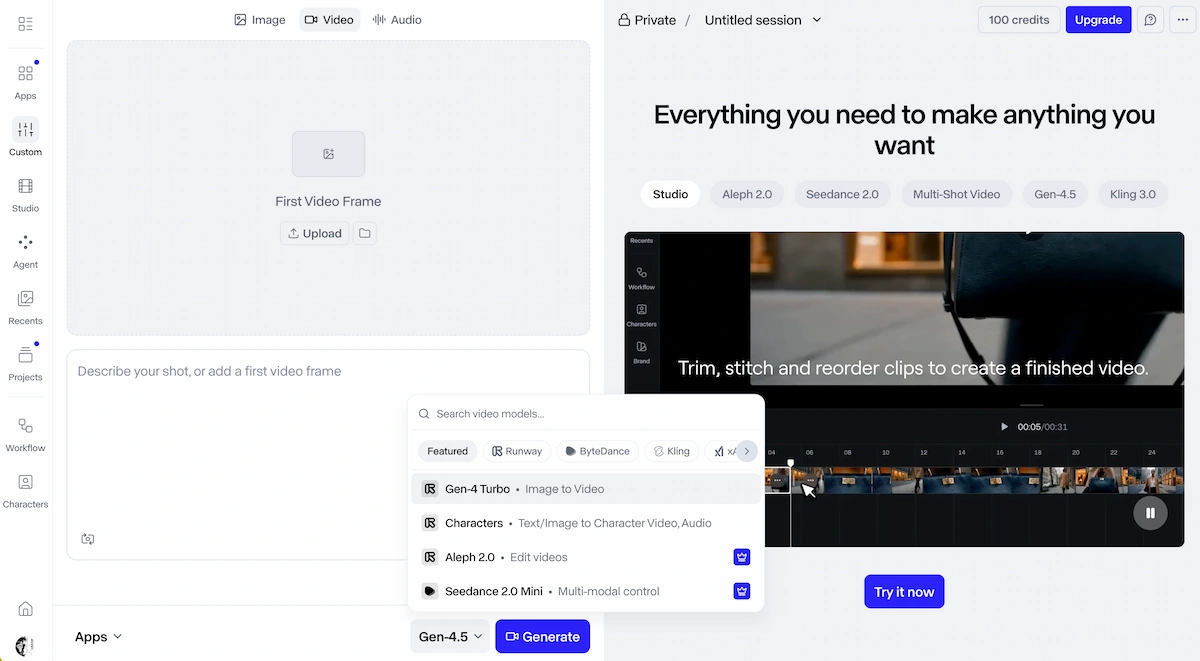
Video to Video: Use an existing video clip as a structural or stylistic reference, then apply AI transformation on top of it. This is one of Runway's most distinctive features for creators who want to restyle, remix, or extend existing footage.
Lip Sync: Match a video clip to a voiceover or audio track. Runway's lip sync tool is well-regarded and can produce convincing results relatively quickly.
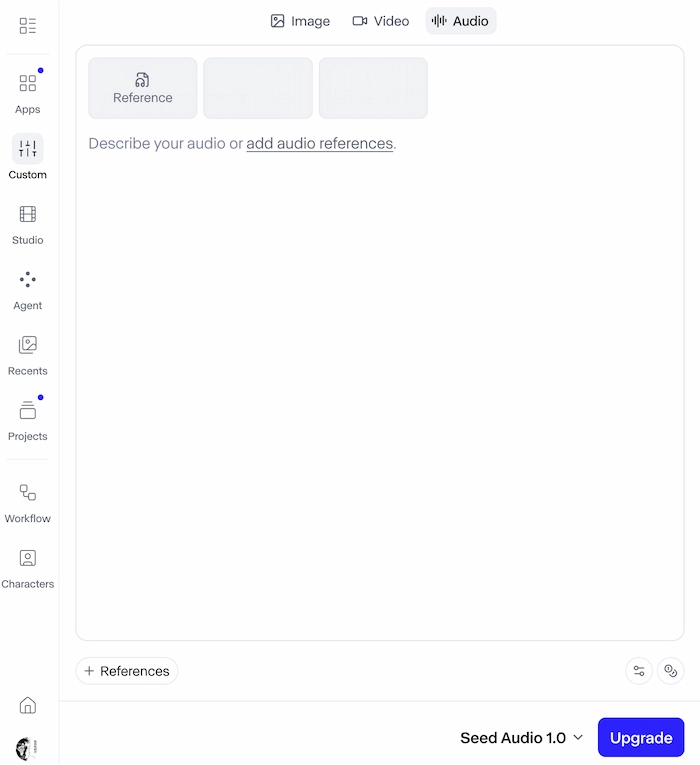
Generative Audio and Text-to-Speech: Produce or customize audio to accompany generated video.
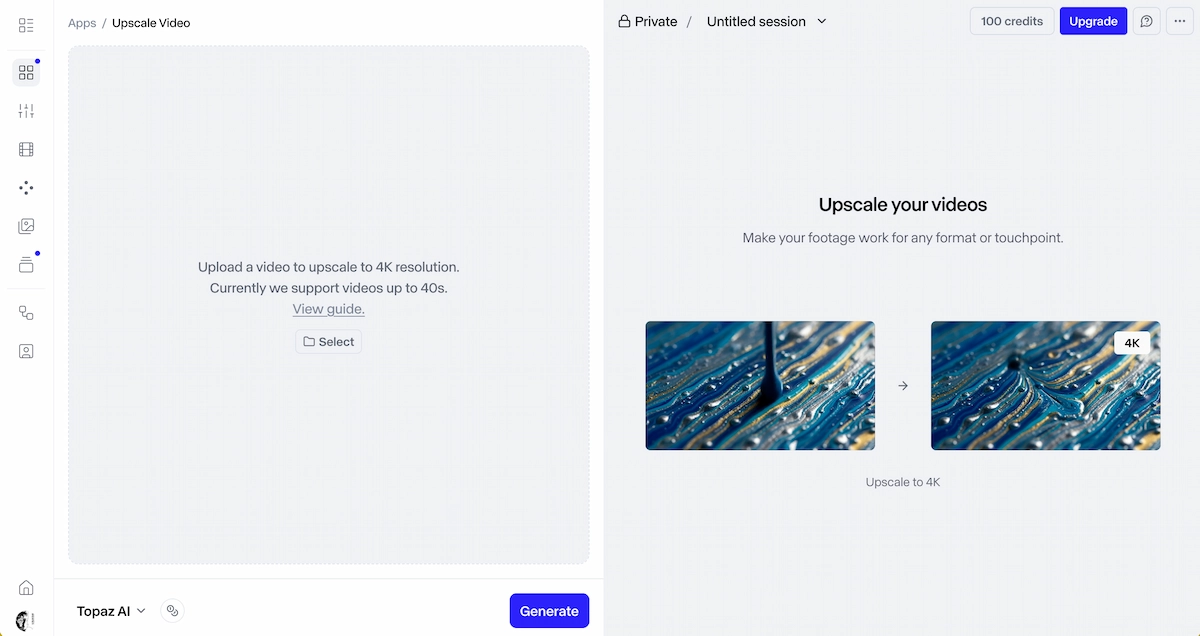
4K Upscaling: Enhance the resolution of generated or uploaded clips.
Frame Interpolation and Slow Motion: Smooth out motion or create slow-motion effects.
Timeline Editor and Projects: Combine multiple clips, edit pacing, and assemble a final cut in Runway's project-level video editor — more like a lightweight video editor than a simple output viewer.
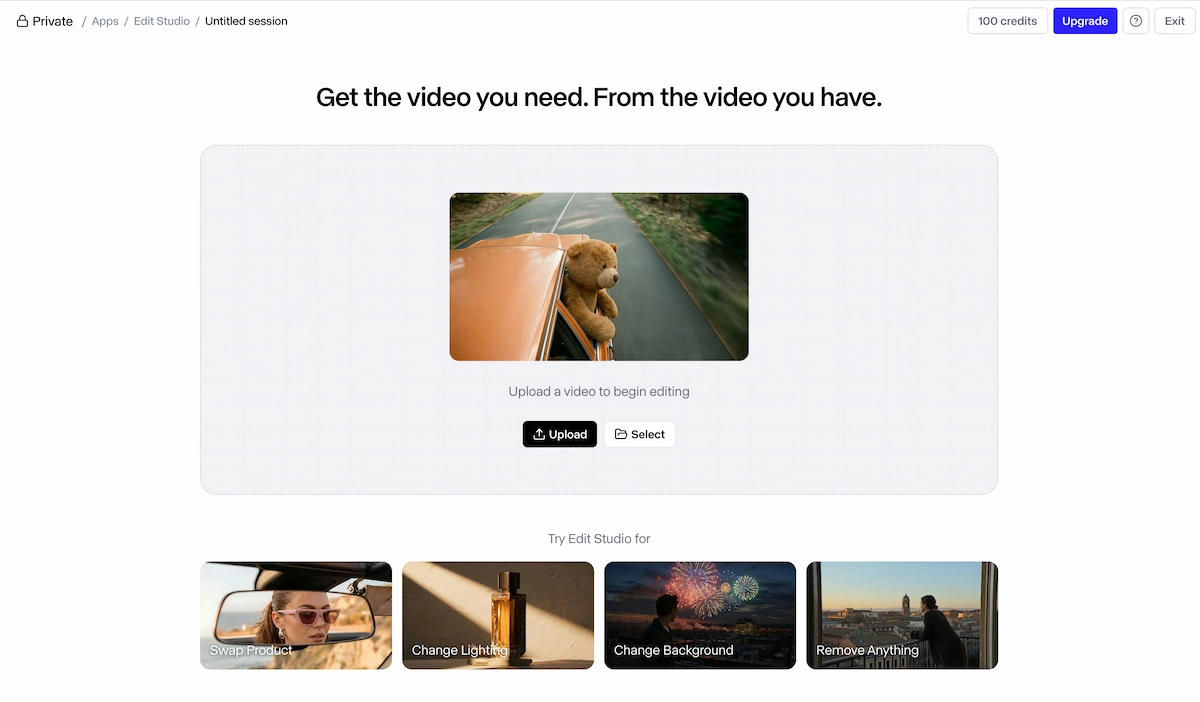
Asset Workspace: Organize, tag, and reuse assets across projects, which is particularly valuable for teams working on ongoing campaigns.
Create Your AI Video in Minutes
Turn your idea into a video with VidMuse.
How to Use the Runway AI Video Generator
Runway's core generation workflow is straightforward, though mastering its full toolkit takes time. Here is a practical starting point:
Step 1 — Choose your generation mode.
Open Runway and select from the homepage dashboard: Text to Video, Image to Video, or Video to Video. Most new users begin with Text to Video using Gen-4.5 or Gen-4 Turbo.
Step 2 — Write your prompt.
Be specific about the scene, camera motion, subject, lighting, and visual style. Runway responds well to cinematic language — "slow tracking shot," "golden hour lighting," "shallow depth of field" — rather than generic descriptions.
Step 3 — Select your model.
Depending on your plan, you can switch between Gen-4.5 (for highest fidelity), Gen-4 Turbo (faster and more credit-efficient), Kling 3.0, Veo 3.1, or Seedance 2.0. Different models suit different content types, so experimenting across them is worthwhile.
Step 4 — Review and refine.
Inspect the output. If a specific element is off — motion, framing, subject detail — you can re-prompt or adjust parameters and regenerate. Runway does not yet offer a shot-level refinement tool that lets you target exactly one element of a clip without regenerating the whole thing; iteration typically means running new generations.
Step 5 — Edit in Projects.
For multi-clip content, bring your clips into a Runway Project to arrange, trim, and layer them on a timeline alongside audio, effects, and transitions.
Step 6 — Export.
Export your final cut for distribution. Watermarks appear on Free plan outputs; paid plans remove them.
Runway AI Pricing Plans
Runway's credit-based pricing gives you flexibility but requires attention to how quickly credits are consumed. All pricing below is verified from runwayml.com as of July 2026.
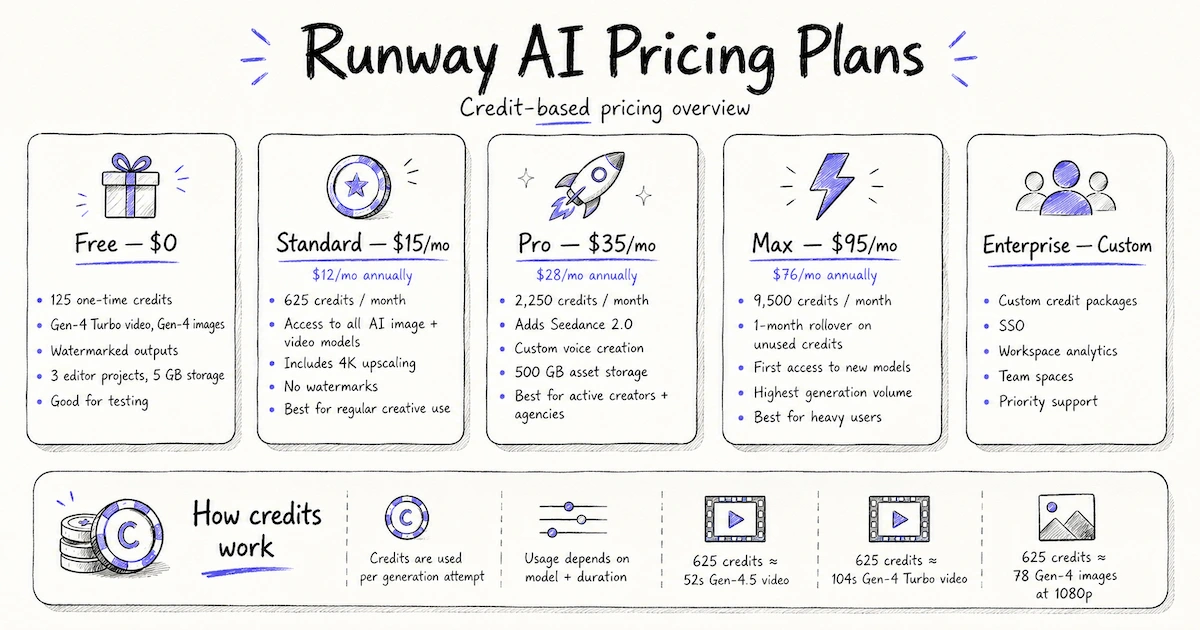
- Free — $0 One-time allocation of 125 credits. Access to Gen-4 Turbo for video and Gen-4 for images. Outputs include watermarks. Limited to 3 video editor projects and 5 GB of storage. Good for initial testing; credits do not renew.
- Standard — $15/month ($12/month billed annually) 625 credits per month. Access to all AI image and video models including Gen-4.5, Nano Banana Pro, Kling 3.0, Veo 3.1, and more. 4K upscaling included. No watermarks. This is the entry point for regular creative use.
- Pro — $35/month ($28/month billed annually) 2,250 credits per month. Adds Seedance 2.0, custom voice creation for lip sync and text-to-speech, 500 GB asset storage, and access to the best-tier models. Best for active creators and agencies generating consistent volume.
- Max — $95/month ($76/month billed annually) 9,500 credits per month. Unused credits roll over for one month. First access to newest model releases and the highest generation volume. Best for heavy users and production teams.
- Enterprise — Custom pricing For organizations requiring custom credit packages, single sign-on, workspace analytics, configurable team spaces, and priority support. Contact Runway's sales team directly.
How do credits work?
Each generation consumes credits based on the model and output duration. As a reference point, 625 Standard-tier credits translates to approximately 52 seconds of Gen-4.5 video, 104 seconds of Gen-4 Turbo, or 78 Gen-4 images at 1080p. Credits are consumed per generation attempt, including ones you discard.
What Runway AI Does Well
Runway's core strength is the depth and integration of its toolset — and the visual quality its Gen-4.5 model can produce. Several areas stand out:
Visual quality and cinematic realism.
Gen-4.5 is a genuine step forward in motion coherence, prompt adherence, and visual fidelity. When given well-crafted prompts, it produces clips with convincing lighting, natural motion, and strong subject clarity.
Model breadth in one workspace.
Being able to run Kling 3.0, Veo 3.1, and Seedance 2.0 alongside Gen-4.5 — without switching platforms — is a meaningful productivity advantage. Different models excel at different content types, and access to all of them from a single subscription reduces friction.
Professional-grade editing integration.
The timeline editor, green screen, motion tracking, upscaling, and frame interpolation tools are genuinely sophisticated. Runway is not just a generation box; it is a production environment.
Asset workspace and team support.
Project-level organization, shared workspaces, and reusable asset folders make Runway practical for teams and agencies, not just individual creators.
Artistic positioning.
Runway has a creative heritage — its founders met at an arts school, and the platform has been used in professional film and television. This is not marketing copy: it is reflected in the depth of control the platform offers to creators who want to push beyond generic AI output.
Runway AI: Limitations and Tradeoffs
Runway is powerful, but it comes with real constraints that matter depending on your use case.
The interface is complex and not self-explanatory.
Multiple reviewers and users have noted that Runway's UI spreads tools across inconsistent layouts. Navigation requires familiarity, and getting the most from the platform typically means working through Runway Academy's tutorials. This is not the right starting point for creators who need results in an afternoon without a learning investment.
Credit consumption adds up quickly.
At Standard tier, 625 credits per month provides limited runway (no pun intended) for iteration-heavy workflows. If you plan to test multiple models, refine shots, and experiment with prompts, the Pro tier is more practical — but at $28/month billed annually, the cost is real.
Iteration requires full regeneration.
Unlike purpose-built AI directors, Runway does not currently offer a way to surgically refine a single shot element without regenerating the full clip. If one part of a 5-second clip is wrong, you re-run the whole generation and spend the credits again.
Image generation quality is inconsistent.
While Runway's video output has matured significantly, image generation within the platform — particularly faces — has historically produced more variable results compared to dedicated image generation tools.
It is optimized for single-clip creation, not multi-scene continuity.
Runway makes it easy to generate individual strong clips. Maintaining consistent characters, visual style, and narrative logic across a 10-shot video sequence is harder and requires deliberate workflow management from the user.
Not ideal for quick turnaround with non-technical creators.
The platform rewards creators with a cinematographic sensibility and time to develop prompt craft. For marketers or business users who need fast, repeatable, structured video production, the upfront cost in time is significant.
Runway AI vs. Other AI Video Generators
Runway occupies a specific niche in the AI video landscape — closer to a professional post-production suite than a quick content tool.
Compared to tools like Kling 3.0 or Veo 3.1 used standalone, Runway's advantage is the breadth of its toolkit and the editing layer it wraps around generation. Kling and Veo can both be accessed within Runway anyway, on Pro and above plans.
Compared to Luma AI, Runway offers a more complete production environment but with greater complexity and higher platform cost.
Compared to Sora, Runway is currently more accessible and better integrated with a real editing workflow, though model comparisons shift quickly as each platform updates.
Where Runway is clearly differentiated is for creators who want to blend AI generation with real video editing — green screen, motion tracking, sound, and timeline assembly — in a single workspace.
What Runway is not, and what no current single-prompt video generator is, is a tool that plans a video for you. It generates strong clips when given strong prompts. But organizing those clips into a structured, consistent, multi-scene video — with a defined brief, scene logic, reference consistency, and storyboard — is work the user still has to do manually.
From Clip Generation to Planned Video Production: Where VidMuse Comes In
If Runway gives you the clips, VidMuse helps you plan what those clips should be before you generate them.
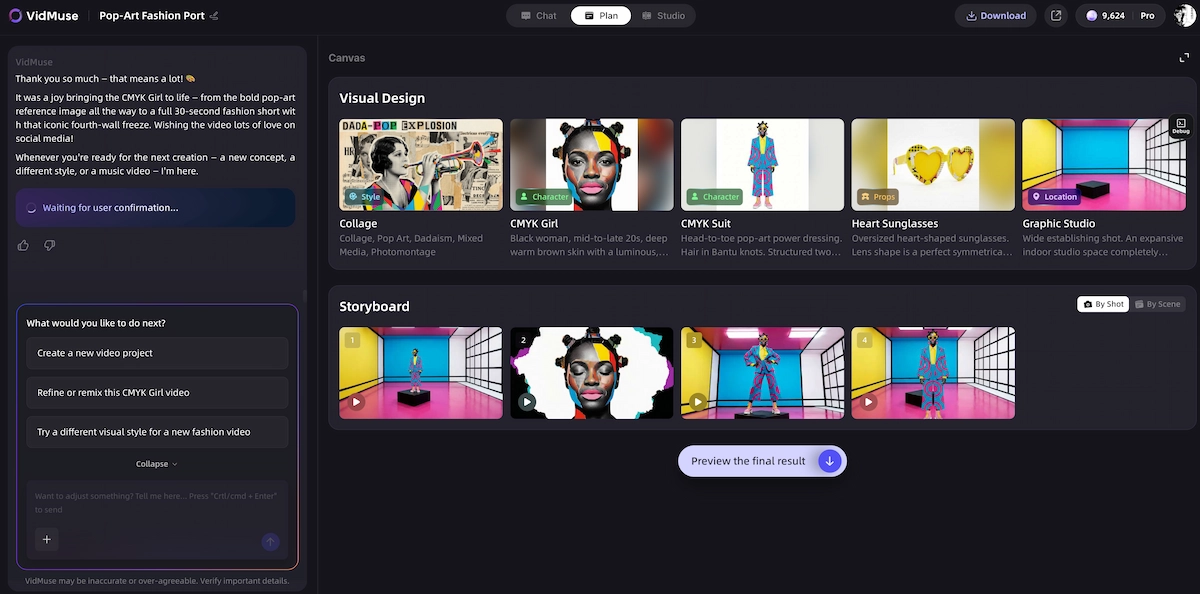
Runway is built around the generation step. VidMuse is built around the direction step that comes before it. Rather than beginning with a prompt and hoping for the right output, VidMuse acts as an AI Director that structures the whole project first:
Assets Upload → Creative Brief → Reference Generation → Scene & Shots List → Storyboard → Video Generation
This workflow matters most when you need more than one clip. A 30-second product demo might require five coherent shots with consistent style, a clear narrative arc, and on-brand visuals. A single prompt box — even a great one — struggles to plan that for you. VidMuse's agent-based logic takes your assets, your creative direction, and your visual references, then generates a structured scene-and-shot plan before any video is produced.
VidMuse 2.0 also adds Shot Refine by Quoting, which lets you point to a specific moment in a generated shot and revise it without restarting. The Timeline Editor makes it easier to arrange and pace your scenes like a real production. The Asset Library & Memory helps you reuse references, maintain visual consistency, and avoid starting from zero on follow-up videos.
For creators, marketers, and agencies who use Runway (or models like Gen-4.5, Kling 3.0, or Veo 3.1) to generate clips, VidMuse can serve as the planning and directing layer that makes those clips part of a complete, coherent video rather than a set of disconnected outputs.
Create Your AI Video in Minutes
Turn your idea into a video with VidMuse.
Frequently Asked Questions
Is Runway AI video generator free to use?
Runway offers a free plan with 125 one-time credits — enough to generate and test a small number of clips using Gen-4 Turbo and Gen-4 image tools. Free outputs include watermarks, and the credits do not renew. It is a useful starting point to evaluate the platform before committing to a paid subscription.
How does Runway AI pricing work, and which plan is right for me?
Runway uses a credit system where each generation consumes credits based on the model and output length. Plans range from $12/month (Standard, 625 credits/month) to $76/month (Max, 9,500 credits/month) when billed annually. Casual creators exploring the platform can start with Standard. Active creators and agencies generating consistent video volume will typically need Pro or Max to avoid running out of credits mid-workflow.
What is Runway Gen-4.5, and how does it compare to earlier models?
Gen-4.5 is Runway's current flagship video generation model, offering improved visual fidelity, motion coherence, and prompt adherence compared to its predecessors. Runway describes it as their most capable model for cinematic and realistic output. Earlier models like Gen-4 Turbo remain available and are more credit-efficient, making them useful for drafts and fast iterations.
Can I use Runway AI to generate videos from images or existing footage?
Yes. Runway supports image-to-video — uploading a still image and animating it into motion — and video-to-video, which applies AI transformation to an existing clip. These tools make it well-suited for product visuals, character animation, and style transfer workflows where you already have visual assets to build from.
What are the main limitations of the Runway AI video generator?
Runway's primary limitations are its interface complexity, credit cost at scale, and the fact that it does not plan multi-scene video structure for you. Generating individual high-quality clips is achievable, but creating a cohesive multi-shot video requires the user to manage narrative logic, visual consistency, and shot sequencing manually. Credits also add up quickly for iteration-heavy workflows, and the platform has a meaningful learning curve for new users.
How does Runway compare to planning-first AI video tools?
Runway excels at generating individual clips from prompts and visual assets. Tools like VidMuse take a different approach: they plan the brief, scenes, and shots before generation begins, which produces more structured and consistent multi-scene video output. Both have a place in a serious AI video workflow — Runway for generation depth and editing power, a planning-first tool for project structure and creative direction.
Stop Prompting. Start Directing.
Plan your scenes, shots, and storyboard before you generate — with VidMuse AI Director.

Written By
VidMuse Team
Continue Reading
Latest blog posts related to AI video creation.
PixVerse V6 x VidMuse AI: Model Guide and Video Workflow
PixVerse V6 review and VidMuse integration guide. Capabilities, 15s 1080p video, prompt tips, model comparison, pricing, and how to use V6 in VidMuse workflows.
FLUX 3: What It Is, Capabilities, and How to Access It
FLUX 3 is Black Forest Labs' multimodal AI model for image, video, audio, and action. Full guide: capabilities, FLUX 3 vs FLUX 2, availability, and pricing.
Free Music Visualizer: 10 Best Free Tools in 2026
Compare 10 best free music visualizers in 2026. Waveform tools, AI music video makers, watermark policies, export limits, and which tool fits your workflow.