

Happy Horse 1.1 is Alibaba's upgraded AI video generation model, built to deliver more dynamic motion, stronger subject consistency, and higher visual fidelity than its predecessor. If you create short-form ads, social clips, product demos, or short dramas and want a faster path from concept to polished video, this upgrade makes a meaningful difference to your real creative workflow — not just a benchmark spec sheet.
This guide covers everything you need to evaluate and use Happy Horse 1.1: what changed from version 1.0, the full capability breakdown, how to write prompts that unlock its strengths, pricing details, how it compares against rival models, and where it fits inside a professional AI video workflow.
Key Takeaways
- Happy Horse 1.1 introduces five targeted upgrades over 1.0: motion expressiveness, subject consistency, instruction following, visual quality, and audio-visual sync.
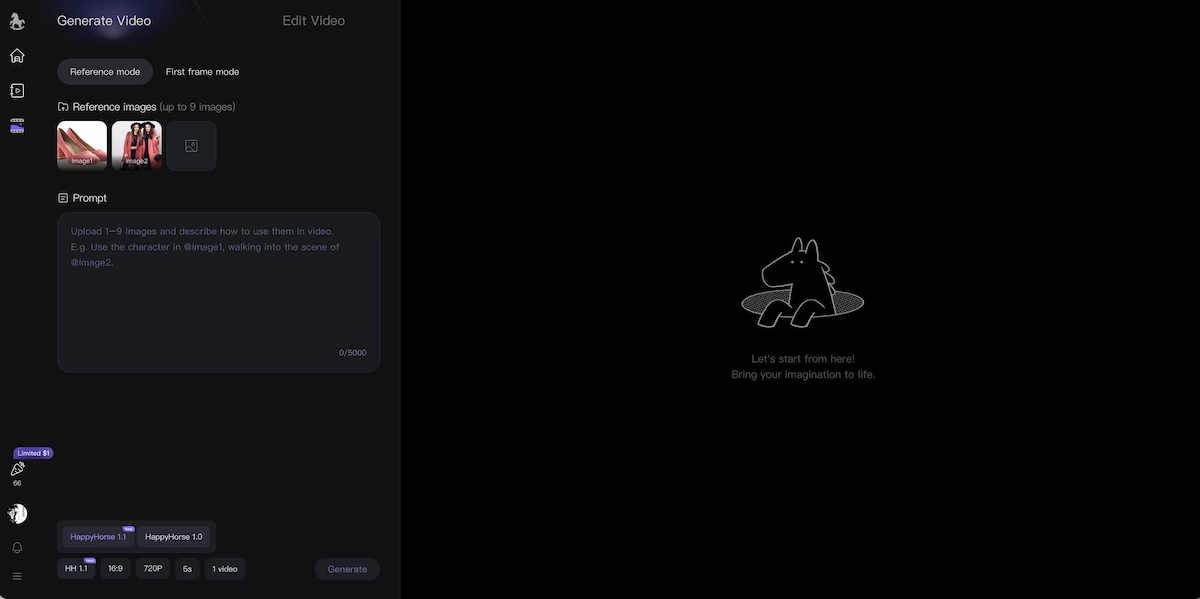
- The model supports both text-to-video (T2V) and image-to-video (I2V) generation, with up to 9 reference images for consistent multi-character scenes.
- Pricing uses one-time credit packs with no monthly subscription — plans range from $9.90 (99 credits) to $99.90 (1,250 credits), with 720p at 2 credits/second and 1080p at 3 credits/second.
- Happy Horse 1.1 is available to try free in the browser with no sign-up required.
- The model is positioned particularly well for e-commerce ads, social short-form, short drama, and brand campaigns where motion quality and multi-reference subject consistency are priorities.
What Is Happy Horse 1.1?
Happy Horse 1.1 is the current release of Alibaba's AI video generation model, developed by the ATH innovation team. It takes a text prompt or a reference image as input and produces a short video clip — up to approximately 15 seconds — with native audio generated in the same pass.
The model is built on a 15-billion-parameter unified self-attention Transformer architecture. Its core differentiator is joint audio-video generation: rather than producing a silent clip and adding sound separately, Happy Horse generates the visual and audio layers together, which produces more natural audio-visual sync and reduces drift between dialogue, ambient sound, and on-screen action.
Happy Horse 1.0 first gained attention in early 2026 when it appeared anonymously on the Artificial Analysis Video Arena — a leaderboard that ranks AI video tools through blind human voting — and climbed to the top position before Alibaba confirmed their authorship. Version 1.1 is the refined evolution of that same foundation.
For creators, the practical profile is: a fast, audio-aware video generator optimized for short-form professional content, available on a browser with no setup required.
Happy Horse 1.1 vs 1.0: What Actually Changed
Happy Horse 1.1 improves on Happy Horse 1.0 across five concrete dimensions rather than rebuilding the model from scratch. Understanding what changed helps you decide whether the upgrade matters for your specific use case.
Motion.
Version 1.0 could produce sluggish or physically inconsistent movement in complex action scenes. Version 1.1 addresses this directly — fast actions, particle effects, and dramatic sequences hold together with cleaner physical logic and clearer force.
Camera language.
The new model reads shot direction better: tracking shots, crane moves, dolly forwards, and shot-reverse-shot dialogue sequences all come out more as described. This is a real quality-of-life improvement for anyone writing detailed cinematic prompts.
Multi-shot continuity.
Cuts between shots feel more connected, which matters for ads, trailers, and short dramas that need more than a single angle.
Audio sync.
Dialogue pacing sounds more natural, background sound integrates better with scene rhythm, and lip-sync drifts less than in the previous version.
Subject stability.
Characters, products, and visual concepts hold their identity throughout the clip, reducing the morphing or drift that sometimes appeared in 1.0 outputs during longer motion sequences.
If you tested version 1.0 and found the motion shaky or the audio uneven, the 1.1 upgrade is worth re-evaluating with your actual use cases.
The Five Core Capability Upgrades
Happy Horse 1.1 frames its improvement around five specific capability pillars. Each is worth examining in detail.
1. Significantly Improved Motion Expressiveness
Happy Horse 1.1 handles complex dynamic scenes with stronger physical coherence. Cause-and-effect chains — where one character's movement creates a reaction in another — read as more grounded. Action beats are more readable, camera travel is cleaner, and the pacing suits fast short-form content better.
The key change is that motion no longer stops or floats arbitrarily. Deceleration, weight shifts, and object physics behave more consistently, which makes fast-cut action sequences and high-energy product reveals feel more directed.
2. Stronger Subject Consistency and Multi-Reference Fusion
When you feed multiple reference images into an image-to-video workflow — for example, two characters from separate photos placed in the same scene — version 1.1 holds their distinct identities more reliably. Product details, facial features, and clothing attributes stay stable as the shot evolves.
This upgrade is directly relevant for e-commerce workflows (animating a specific product without it morphing), short drama production (multi-character scenes from reference stills), and any use case where source-image fidelity is non-negotiable.
3. Improved Instruction Following
Complex, multi-step prompts perform significantly better in 1.1. Narrative planning — character relationships, scene sequencing, camera movement sequences, and temporal phrasing like "in the first 4 seconds" or "then cut to" — gets executed with less deviation from what was written.
This opens the model to more structured workflows where creators write precise storyboard-style prompts rather than single-sentence descriptions.
4. Upgraded Visual Quality
Version 1.1 focuses on richer surface detail, more natural lighting gradients, better texture rendering on skin, fabric, and materials, and more realistic cinematic framing. The result is that first-draft outputs look closer to commercial-ready quality, reducing the number of regenerations needed before a clip is usable.
Lighting specifically sees the clearest improvement: atmospheric effects, shadow direction, and lens characteristics respond more accurately to prompts.
5. Upgraded Audio Expression
The audio layer in 1.1 produces more natural timing: sound effects land on the right frame, ambient noise fits the scene's physical space, and dialogue rhythm matches on-screen pacing. For narrative content — anything involving characters speaking or interacting — this upgrade makes a tangible difference to the final perceived quality without any additional editing steps.
Generation Modes: Text-to-Video and Image-to-Video
Happy Horse 1.1 supports two main generation pathways, each suited to a different creative starting point.
Text-to-Video (T2V)
T2V is the fastest path from idea to clip. You describe the scene — action, camera, lighting, atmosphere, and audio direction — and the model generates video directly from language. This mode works best when you're building from scratch: concept testing, ad hooks, social media B-roll, or cinematic previews.
Effective T2V prompts name the movement first, specify the camera type, and include at least one fidelity cue for lighting or texture. Generic one-line prompts produce generic results; detailed scene descriptions get detailed outputs.
Best for: ads, storyboard drafts, social clips, concept previews, trend-style short-form content.
Image-to-Video (I2V)
I2V starts from a still — a product photo, a character illustration, a brand asset — and adds motion while keeping the source subject recognizable. Up to 9 reference images can be included, enabling multi-character or multi-product scenes where each element needs to maintain visual identity across the clip.
This is the mode to reach for when consistency matters more than creative freedom: you know what the subject should look like, and you need the generated video to respect that.
Best for: product animation, e-commerce clips, portrait animation, concept demos, short drama with established characters.
How to Use Happy Horse 1.1: Step-by-Step Workflow
Getting strong results from Happy Horse 1.1 follows a consistent six-step pattern. The steps below apply whether you're working in T2V or I2V mode.
Step 1: Start with the action.
Name the primary movement before anything else. Running, rotating, drifting, zooming, revealing, lifting, transforming — the motion verb anchors the rest of the prompt and signals to the model what kind of energy the clip needs.
Step 2: Lock the subject.
Describe the product, character, outfit, or source-image details that must remain consistent throughout the clip. Be specific: "a navy trench coat with silver buttons" holds better than "a coat." For I2V, upload the reference image at this step.
Step 3: Direct the camera.
Add shot-type language: tracking shot, dolly forward, orbit, crane up, handheld, macro close-up. Camera terms are not decorative — they directly influence the model's spatial planning for the clip.
Step 4: Add fidelity cues.
Specify lighting type (golden hour, studio three-point, neon city), texture detail (worn leather, matte concrete, glossy product surface), lens character (anamorphic, telephoto compression, wide-angle distortion), and color grade (warm, desaturated, high-contrast). These cues activate the visual quality upgrade in 1.1.
Step 5: Generate a first draft.
Run the initial generation at 720p to conserve credits. Review motion quality, subject consistency, camera execution, and audio sync.
Step 6: Iterate with intent.
Change one variable per iteration — tighten a camera note, add a pacing instruction, adjust a lighting cue. Multi-variable changes make it harder to identify what improved the output. Systematic iteration is the fastest path to a final-quality clip.
Happy Horse 1.1 Pricing and Credit Tiers
Happy Horse 1.1 uses a one-time credit pack model with no monthly subscription. Credits purchased never expire, and commercial use is included in every tier.
Generation costs: 720p clips use 2 credits per second; 1080p clips use 3 credits per second.
| Plan | Price | Credits | Per-Credit Rate | Notable Features |
|---|---|---|---|---|
| Starter | $9.90 | 99 | $0.10 | 720p export, standard queue, email support |
| Basic | $29.90 | 330 | $0.085 | 1080p export, priority queue, priority email support |
| Plus | $49.90 | 600 | $0.083 | 1080p, faster priority queue, up to 5 concurrent jobs |
| Professional | $99.90 | 1,250 | $0.079 | 1080p, fastest queue, 10 concurrent jobs, API access (coming soon), full effects pack |
Practical math: A 10-second clip at 1080p costs 30 credits. At the Plus tier ($0.083/credit), that's roughly $2.49 per 10-second finished clip including sound. At the Professional tier, the same clip costs approximately $1.98.
The no-subscription structure makes Happy Horse 1.1 accessible for creators who produce video in bursts rather than on a fixed monthly schedule. You buy what you need, when you need it, with no idle subscription cost.
A free browser trial is available at happyhorse1.co with no sign-up required.
Happy Horse 1.1 vs Competing Models
Happy Horse 1.1 competes directly in a crowded field. Here is how it compares against the other major models available in 2026, including several that are also available inside VidMuse.
| Capability | Happy Horse 1.1 | Seedance 2.0 Pro | Kling V3.0 Pro | Veo 3.1 |
|---|---|---|---|---|
| Motion expressiveness | Strong, especially action | High — excellent physics | Very strong | Strong |
| Subject consistency | Improved in 1.1, strong | Strong | Strong | Strong |
| Visual resolution | Up to 1080p | Up to 2K | 1080p+ | 1080p+ |
| Native audio generation | Yes — joint in one pass | Limited | Limited | Yes |
| Instruction following | Improved in 1.1 | Strong | Strong | Strong |
| Open source | Yes | No | No | No |
| Best fit | Action, short-form, audio | High-res commercial | Realistic motion, ads | Cinematic audio-visual |
Against Seedance 2.0 Pro: Seedance has a resolution edge (up to 2K) and strong physics-driven motion. Happy Horse 1.1 counters with joint audio generation and open-source accessibility at a lower per-credit cost. The practical choice depends on whether resolution ceiling or audio integration matters more for your project.
Against Kling V3.0 Pro: Kling is highly capable for realistic human motion and has a strong track record for commercial ad production. Happy Horse's audio-first architecture gives it an edge in any content that relies on synchronized sound.
Against Veo 3.1: Google's Veo 3.1 is among the strongest models for audio-visual realism. It's a closed model with access primarily through Google's ecosystem. Happy Horse 1.1 offers a more accessible, open-source alternative for teams not already in Google's infrastructure.
No single model wins every use case. The clearest position for Happy Horse 1.1 is audio-aware short-form content — especially where budget predictability and open-source access matter.
Where Happy Horse 1.1 Fits Best (and Where It Doesn't)
Strong fit:
- E-commerce product ads: Animate a product photo with motion and sound in a single generation pass.
- Social short-form content: Vertical clips for TikTok, Reels, and YouTube Shorts with strong motion tempo and no silent-clip step.
- Short drama production: Multi-reference scene consistency makes character-driven clips viable without a production team.
- Brand campaign teasers: Cinematic framing and improved visual quality produce launch-ready drafts quickly.
- Multi-market content: Built-in lip-sync for seven languages (English, Mandarin, Cantonese, Japanese, Korean, German, French) supports regional content without separate dubbing workflows.
Less ideal for:
- Long-form video: Clip length tops out around 15 seconds per generation. For longer pieces you'll need to stitch clips in an editor.
- Broadcast-resolution masters: 1080p is the ceiling. If the deliverable requires 2K or 4K, Seedance 2.0 Pro or similar high-resolution models are better suited.
- Highly abstract generative visuals: Happy Horse 1.1 is optimized for motion and narrative coherence. Pure abstract or motion-art use cases may be better served by models designed for visual abstraction.
Using Happy Horse 1.1 Inside a Full Video Production Workflow
Individual clip generation is one part of a larger production process. For creators building full music videos, product ad campaigns, or serialized social content, Happy Horse 1.1 works most powerfully when embedded inside a structured workflow rather than used in isolation.
Turn Happy Horse 1.1 Into a Full Video
VidMuse orchestrates Happy Horse 1.1 and 20+ top models inside one AI Director workflow — from storyboard to final cut, no studio needed.
VidMuse AI integrates Happy Horse 1.1 as part of its multi-model video generation stack — alongside Seedance 2.0 Pro, Kling 3.0, Kling 3.0 Omni, Veo 3.1, and others — through an agent-based workflow that plans full videos rather than executing single-shot prompts. The core workflow runs: Assets Upload → Creative Brief → Reference Generation → Scene & Shots List → Storyboard → Video Generation.
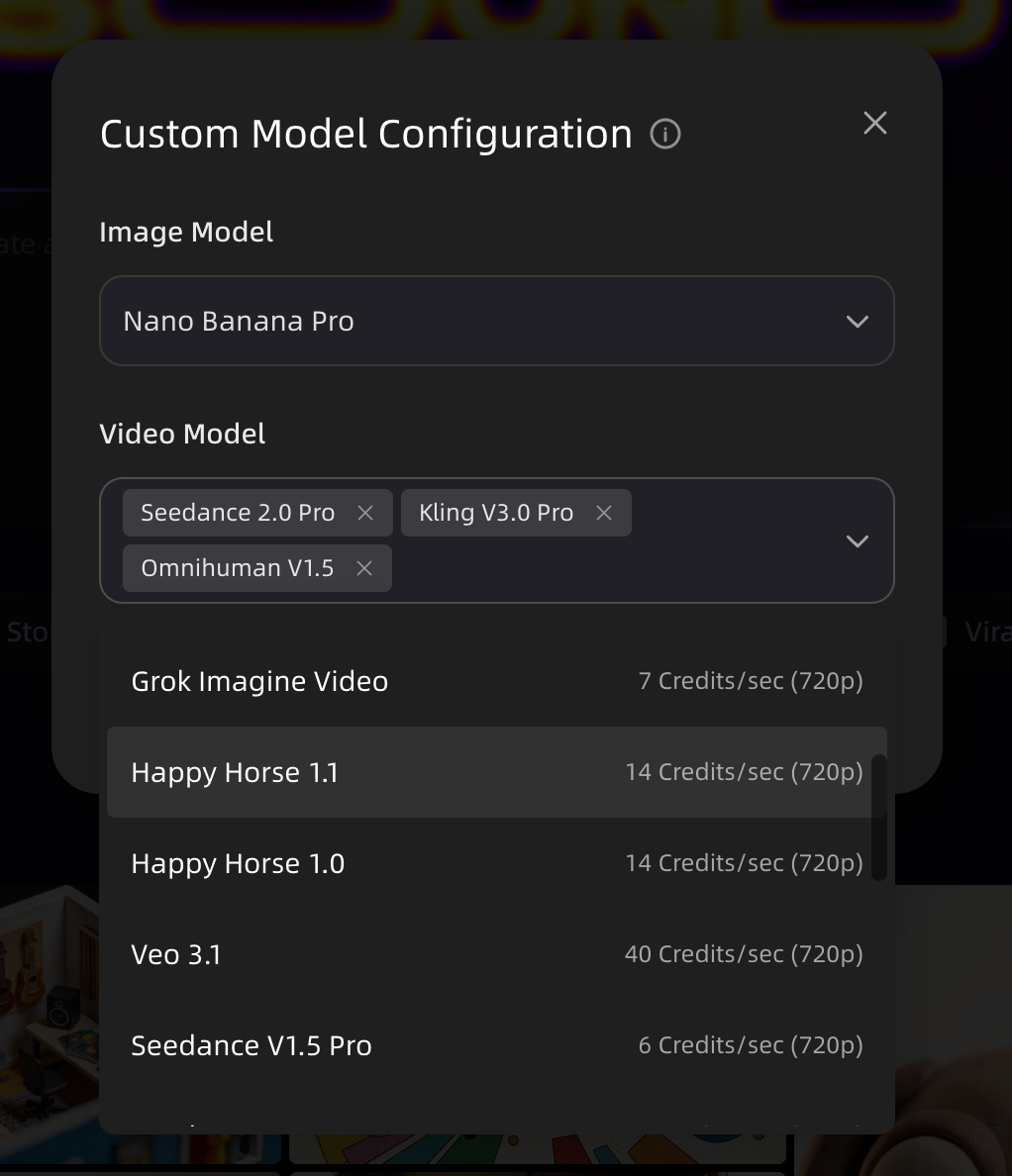
For AI music video generator production specifically, this matters: a 60-second MV requires roughly 8–12 distinct shots, each with its own motion logic, camera angle, and audio consideration. Attempting this through individual one-off generations without a structured scene plan produces inconsistent results. VidMuse's Studio Mode (which pairs Nano Banana Pro for image generation with Seedance 2.0 Pro, Kling V3.0 Pro, and Omnihuman 1.5 for video) and Lite Mode (Seedream 5.0 Lite + Seedance 2.0 Fast) both reflect the reality that multi-model orchestration produces better full-video quality than any single model running alone.
If you're producing individual short clips — a single product ad, a standalone social post, a concept preview — Happy Horse 1.1 works well as a standalone tool. If you're producing structured video at scale, a workflow platform that handles scene planning, model routing, and storyboard consistency will produce better outcomes at lower per-clip cost.
Common Mistakes When Prompting Happy Horse 1.1
Even strong models produce weak outputs when prompted poorly. These are the most common errors to avoid.
Starting with description instead of action.
"A product sitting on a table" tells the model a static scene. "A product rotates slowly on a matte surface as a lighting rig sweeps left to right" gives the model motion to work with. Lead with the movement, not the setting.
Omitting camera direction.
Not specifying a shot type means the model chooses one for you. For predictable, professional outputs, always include a camera term: handheld, tracking shot, dolly forward, crane up, or macro close-up.
Ignoring fidelity cues.
Skipping lighting and texture specifics in I2V mode often produces flat, over-lit outputs. Even a brief note — "warm golden backlight, matte finish surface, shallow depth of field" — activates the visual quality layer.
Changing multiple variables per iteration.
If you adjust the subject, camera, and lighting simultaneously between generations, you won't know what produced the improvement. Iterate one change at a time.
Drafting at 1080p from the start.
Generate at 720p for concept validation. Only render at 1080p once you've confirmed the motion, framing, and subject consistency are working. This can meaningfully extend your credit budget.
Vague subject descriptions in I2V.
If you upload a reference image but write a vague text description, the model may drift from the reference. Reinforce the source image with specific text: color, texture, shape, and any details that must remain consistent.
Frequently Asked Questions
What is Happy Horse 1.1 and how is it different from 1.0?
Happy Horse 1.1 is Alibaba's updated AI video generation model, focused on three headline improvements over version 1.0: more dynamic motion, stronger subject consistency, and higher visual fidelity. In practice, version 1.1 handles complex action scenes better, holds multi-reference subject identity more reliably in I2V workflows, and produces more natural audio-visual sync. If you tested 1.0 and found motion sluggish or audio drifting, the 1.1 upgrade addresses both.
Is Happy Horse 1.1 free to use?
Happy Horse 1.1 is free to try in the browser at happyhorse1.co with no sign-up required. Paid generation uses a one-time credit pack model — no monthly subscription. Plans start at $9.90 for 99 credits, and credits never expire. 720p generation costs 2 credits per second; 1080p costs 3 credits per second.
How do I write a good prompt for Happy Horse 1.1?
Start with the action verb (running, rotating, revealing), then lock the subject with specific visual details, add a named camera move (tracking shot, dolly forward, crane up), and finish with fidelity cues for lighting, texture, and atmosphere. For image-to-video, reinforce your reference image with matching text to prevent the model from drifting from the source. Generate at 720p first and iterate one variable at a time until the motion and consistency meet your standard.
What generation modes does Happy Horse 1.1 support?
Happy Horse 1.1 supports text-to-video (T2V) for generating clips from written prompts, and image-to-video (I2V) for animating a reference image while keeping the subject visually consistent. I2V accepts up to 9 reference images, which makes multi-character and multi-product scenes possible from still references.
How does Happy Horse 1.1 compare to Seedance 2.0 or Kling V3.0?
Happy Horse 1.1's primary advantage over both is native audio generation — video and sound are produced together in one pass rather than added separately. Seedance 2.0 Pro has a resolution edge (up to 2K) and strong physics-driven motion, making it better for high-resolution commercial deliverables. Kling V3.0 Pro excels at realistic human motion for ad production. Happy Horse 1.1 is positioned best for audio-aware short-form content, especially when open-source access and per-second credit pricing are priorities. The right choice depends on your resolution requirements and whether built-in audio matters for your use case.
What video resolution and length does Happy Horse 1.1 support?
Happy Horse 1.1 exports at 720p and 1080p, with no watermark and a commercial use license included in all paid tiers. Individual clip length runs up to approximately 15 seconds per generation. For longer videos, multiple clips are generated and assembled in an editor.
What are the best use cases for Happy Horse 1.1?
Happy Horse 1.1 is well-suited for e-commerce product animation, social short-form content (TikTok, Reels, Shorts), short drama production, brand campaign teasers, and multi-market content requiring lip-sync across languages. It is less ideal for broadcast-resolution masters above 1080p or single-take long-form video.
Can I use Happy Horse 1.1 for commercial projects?
Yes. A commercial use license is included in every paid credit tier, from the $9.90 Starter pack to the $99.90 Professional plan. 720p Starter pack is the entry point for commercial use; all higher tiers include 1080p export and commercial rights.
Final Words
Happy Horse 1.1 is a focused, meaningful upgrade over its predecessor. The five capability improvements — motion expressiveness, subject consistency, instruction following, visual quality, and audio-visual sync — are not marketing abstractions. They address real friction points that showed up in actual creative workflows with version 1.0.
The recommended starting point is the free trial: run three or four prompts representing your actual use cases, evaluate motion quality and audio sync against your standard, then decide whether the credit economics work for your production volume.
If you're building full music videos or product ad campaigns at scale — where structured scene planning, storyboard consistency, and multi-model orchestration make a difference — VidMuse AI provides the agent-based workflow layer that turns individual model generations like Happy Horse 1.1 into cohesive, directed video productions.
Turn Happy Horse 1.1 Into a Full Video
VidMuse orchestrates Happy Horse 1.1 and 20+ top models inside one AI Director workflow — from storyboard to final cut, no studio needed.

Written By
VidMuse Team
Continue Reading
Latest blog posts related to AI video creation.
PixVerse V6 x VidMuse AI: Model Guide and Video Workflow
PixVerse V6 review and VidMuse integration guide. Capabilities, 15s 1080p video, prompt tips, model comparison, pricing, and how to use V6 in VidMuse workflows.
FLUX 3: What It Is, Capabilities, and How to Access It
FLUX 3 is Black Forest Labs' multimodal AI model for image, video, audio, and action. Full guide: capabilities, FLUX 3 vs FLUX 2, availability, and pricing.
Free Music Visualizer: 10 Best Free Tools in 2026
Compare 10 best free music visualizers in 2026. Waveform tools, AI music video makers, watermark policies, export limits, and which tool fits your workflow.