

In 2026, with AI tools and advanced video models like Seedance 2.0 or something like that, you can make a music video with pictures and a music track in under an hour — no camera crew, no studio, no video editing degree required. The approach works for indie musicians on a budget, content creators building lifestyle content, and small businesses producing marketing videos.
This guide walks you through the full process: from choosing images and writing a concept, to syncing visuals with your audio and publishing a finished music video. For creators who want to go further, VidMuse AI uses an agent-based workflow to turn your track and reference images into a fully structured music video automatically.
Key Takeaways
- A music video with pictures requires three things: a music track, a set of visual assets, and a clear concept — everything else is execution.
- Storyboarding before you edit saves time and prevents mismatched visuals mid-project.
- AI tools like VidMuse can generate, animate, and sequence visuals from a track and a brief — reducing a multi-day edit to under an hour.
- Short-form platforms (Instagram Reels, TikTok) favor vertical 9:16 video; YouTube prefers 16:9 — choose your format before building.
- The biggest mistake beginners make is collecting images without a narrative plan, resulting in a slideshow that feels random rather than directed.
What You Actually Need Before You Start
Making a music video with pictures requires three core ingredients, and skipping any one of them is the most common reason amateur MVs look unfinished.
1. A finalized audio track
Do not start visual work until the audio is locked. Editing to an in-progress mix means every visual timing decision may need to be redone. If you're still working on your track, tools like Suno AI let you generate and finalize original music before beginning production.
2. A set of images (or a plan to generate them)
You need enough visual material to cover the full runtime. A 90-second video at 3–4 seconds per image requires roughly 22–30 distinct visuals. Your options:
- Original photography — highest authenticity, highest effort
- Licensed stock images — fast, but risks generic feel
- AI-generated images — fully custom, scalable, and increasingly indistinguishable from photography when prompted well
For AI image generation, models like Seedream 4.5, Nano Banana Pro, or GPT Images 2.0 inside VidMuse give you art-directed visuals that match a visual style — not just stock photo alternatives.
Create Your Music Video with Track & Image
Turn your idea into a music video with your song track and pictures inside VidMuse AI video agent.
3. A concept — not just a mood
"Dark and cinematic" is a mood. "A couple separating in slow-motion vignettes across different seasons" is a concept. Concepts give your image selection and editing decisions a logic. Without a concept, you're building a slideshow. With one, you're directing.
How to Storyboard a Music Video (Even Without Film School)
Storyboarding a music video professionally means building a shot-by-shot visual plan before touching your editing timeline. It sounds advanced — it isn't.
The simplest professional storyboard format:
Each storyboard "card" contains:
- Scene number
- Timestamp range (e.g., 0:00–0:14)
- Visual description (what's in frame)
- Any motion (pan left, zoom in, static)
- Mood notes (cold, intimate, euphoric)
You need one card per distinct visual beat, not one per second. A 90-second video might have 15–25 storyboard cards.
How to storyboard for an emotional arc: Map the emotional shape of the song. Most tracks move: neutral → tension → release → resolution. Your visuals should mirror this. Opening images tend toward stillness or ambiguity. Chorus images go wider, brighter, or more abstract. The bridge often inverts expectation — a single tight close-up where the chorus was wide and sweeping, for example.
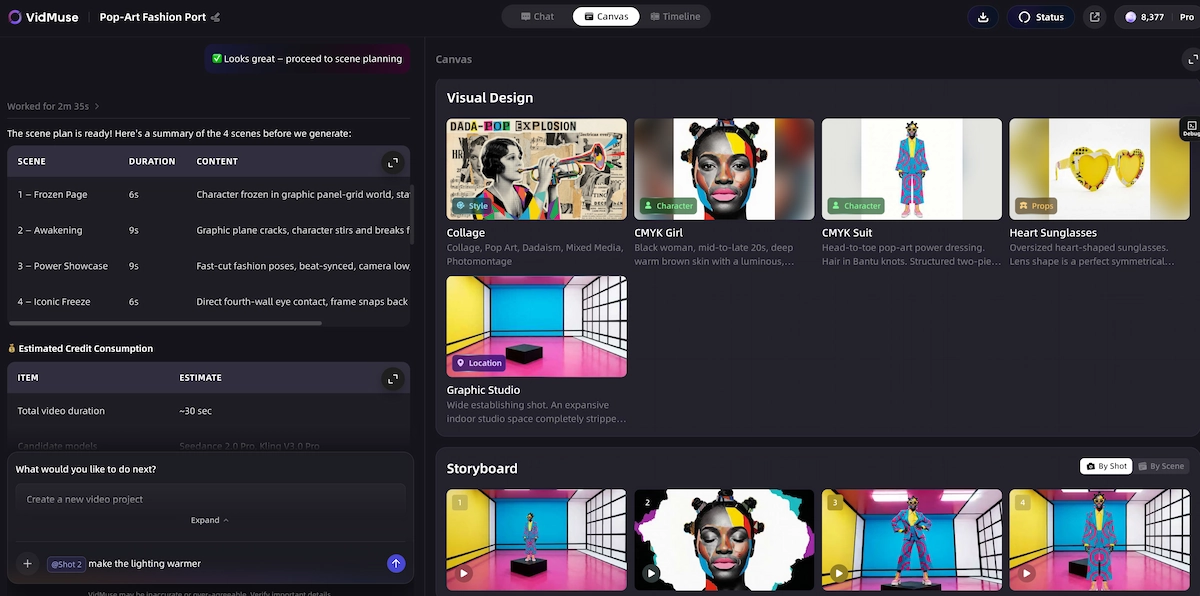
Where AI simplifies the storyboard process: VidMuse's core workflow — Creative Brief → Reference Generation → Scene & Shots List → Storyboard → Video Generation — automates the translation from brief to storyboard. You input your track, describe your concept, and the agent generates a scene list and shot structure you can approve, adjust, and build from. This is the closest available equivalent to having a professional director map out your video — without the cost.
How to Make a Music Video with AI: Where VidMuse Fits
Making a music video with AI is now a practical option for independent creators, not a novelty. The question is which part of the workflow AI handles well and which parts still need human direction.
What AI does well in MV production:
- Generating visually consistent image sets from a style brief
- Animating static images with realistic motion
- Pacing cuts to audio beats automatically
- Producing multiple visual variations quickly for A/B testing concepts
What still requires human judgment:
- Defining the emotional arc and narrative intent
- Approving or rejecting generated shots that don't match the concept
- Final color grading decisions and brand alignment
VidMuse is built around this split. Rather than asking you to prompt individual frames, VidMuse uses an agent-based workflow: you provide a Creative Brief and your audio track, and the platform plans the full MV — generating a scene list, building a storyboard, creating visual assets, and sequencing them into a timeline. You review and refine at each stage.
Create Your Music Video with Track & Image
Turn your idea into a music video with your song track and pictures inside VidMuse AI video agent.
The available model matrix gives you real production flexibility:
- Video generation: Kling V3.0 Pro, Veo 3.1, Seedance 2.0 Pro, Hailuo 2.3 Pro, and more — across both Studio (best quality) and Lite (fast, cost-efficient) modes
- Image generation: Midjourney V7, Seedream 5.0 Lite, Flux.2-Pro, GPT Images 2.0, and others for consistent visual asset creation
- AI Avatar: Omnihuman V1.5 and Kling AI Avatar V2 Pro for performance-style videos without a camera
- AI Music Creation: Suno AI is integrated directly — generate your track and your video in the same platform
The VidMuse 2.0 feature set adds three production-grade tools:
- Shot Refine by Quoting — highlight a specific section of a generated shot and give targeted feedback to regenerate just that element
- Timeline Editor — non-destructive edit of the generated sequence
- Asset Library & Memory — store approved visual elements so the AI maintains style consistency across scenes
How to Make a Music Video with Pictures: The 7-Step Process
This is the core workflow whether you're working manually in a video editor or using an AI platform.
Define your concept and tone
Write 2–3 sentences describing what the video is about, not just what it looks like.
Break the track into sections
Mark the intro, verses, chorus, bridge, and outro to build the skeleton of your storyboard.
Storyboard your shots
Describe what the viewer should see for each major song section.
Gather or generate your images
Collect or create visually consistent images for each storyboard scene.
Import audio and images into your editor
Import locked audio first, then layer images according to your section map.
Add motion, transitions, and pacing
Use pan, zoom, beat-synced cuts, crossfades, and text overlays where needed.
Export in the right format
Export for YouTube, Instagram Reels, TikTok, or feed placement.
Step 1: Define your concept and tone
Write 2–3 sentences describing what the video is about, not just what it looks like. Reference a mood, a narrative arc, or a visual metaphor. This becomes your creative brief.
Step 2: Break the track into sections
Listen to your song with a stopwatch open. Mark the intro, verse 1, pre-chorus, chorus, verse 2, bridge, and outro. Each section often warrants a visual shift — new color palette, new location, new character state. This map is the skeleton of your storyboard.
Step 3: Storyboard your shots
For each major section, sketch or describe what the viewer should see. You don't need artistic skill — rough thumbnails and written descriptions work. The goal is to decide: what image, how long, any motion effect, any text overlay. (See the full storyboard section below.)
Step 4: Gather or generate your images
Collect or create images to match each storyboard scene. Aim for visual consistency — similar color grading, similar aspect ratio, similar style. If you're mixing photography and AI-generated images, use an image model with style-locking features to keep cohesion.
Step 5: Import audio and images into your editor
Whether you're using a desktop editor (DaVinci Resolve, CapCut, iMovie) or an AI platform like VidMuse 2.0, import your locked audio first. Layer images on top, aligned to your section map from Step 2.
Step 6: Add motion, transitions, and pacing Static images alone feel flat. Add:
- Ken Burns effect (slow pan or zoom) to create motion without video footage
- Cut-on-beat transitions synced to the kick drum or snare
- Crossfades during emotional or slower sections
- Text overlays if you're creating a lyric video
Step 7: Export in the right format for your target platform
- YouTube: 1920×1080 (16:9), H.264, 24fps minimum
- Instagram Reels / TikTok: 1080×1920 (9:16)
- Instagram Feed: 1080×1080 (1:1) or 1080×1350 (4:5)
Export at the highest quality setting your platform supports, then let the platform compress on its end. Never upload pre-compressed video.
Music Video Concept Ideas for Independent Artists
Music video concepts for independent artists don't require elaborate sets or large budgets. The strongest low-budget MVs use creative constraints as a design decision.
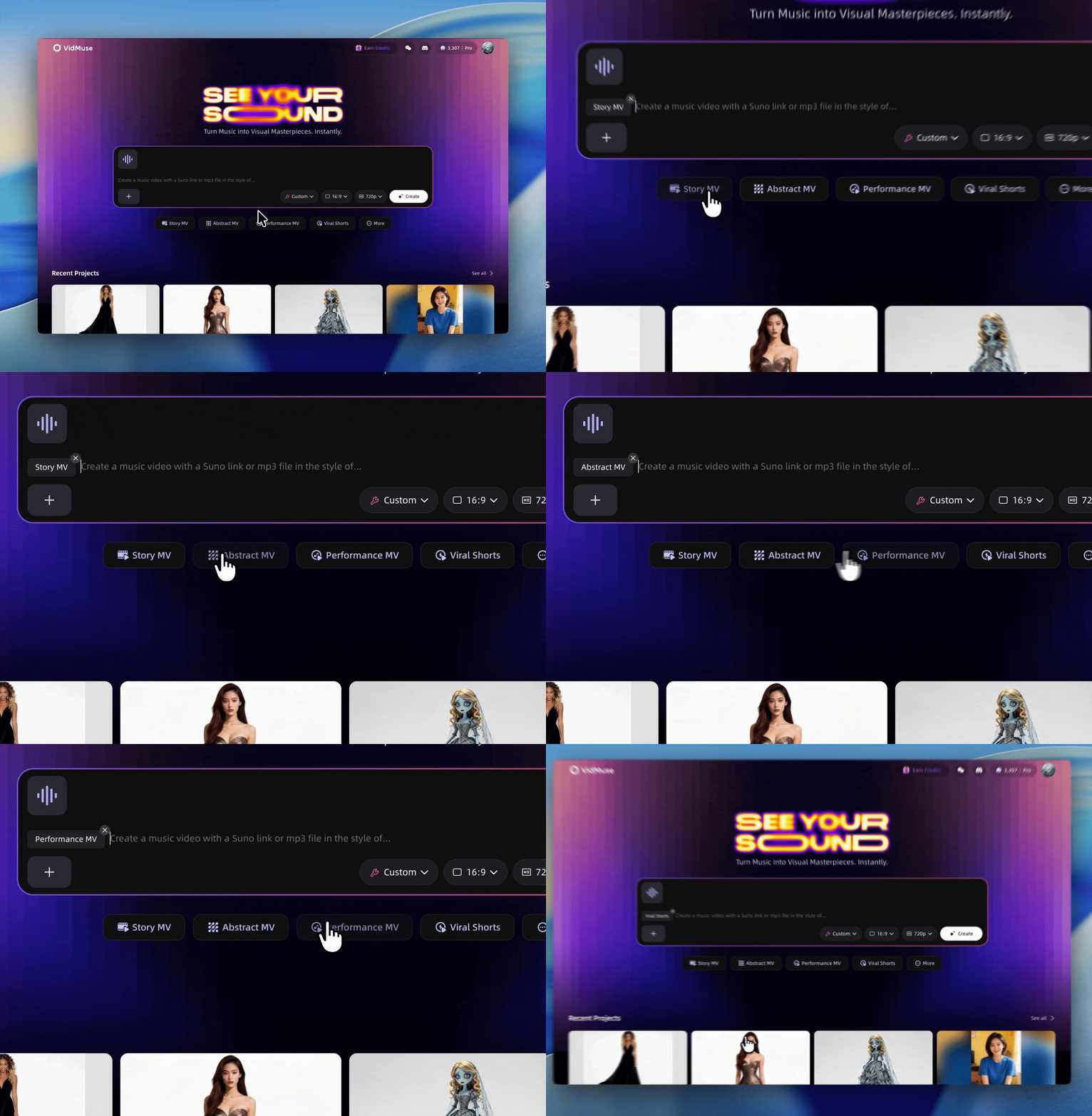
Performance MV
The artist lip-syncs or performs against a single backdrop or series of minimal locations. Focus shifts entirely to expressiveness. Best for: singer-songwriters, R&B, pop.
Abstract / Visual MV
No narrative — pure visual metaphor. Flowing textures, color washes, light leaks, and AI-generated imagery that evokes the track's mood without literally illustrating lyrics. Best for: electronic, ambient, experimental.
Story MV
A 60–90 second short film with a beginning, middle, and end. Requires the most planning but delivers the highest emotional payoff when executed well. Best for: ballads, hip-hop narratives, indie folk.
Lyric Video
Kinetic text on a styled visual background. Extremely popular for independent artists because lyrics drive engagement and retention. Best for: any genre. VidMuse supports lyric video creation with text overlays during the generation phase.
Lifestyle / Documentary MV
Behind-the-scenes footage, city walks, candid moments, time-lapses. Works when the artist's daily life is part of their brand. Best for: vlogger-style artists, lo-fi hip-hop, acoustic artists.
AI-Generated Concept MV
Fully generative: you input a prompt and a track; the AI builds visuals from scratch. Increasingly viable for indie artists who want high-production aesthetics without a production budget. VidMuse's Studio mode is designed specifically for this output tier.
How to Make a Music Video for Instagram
Instagram has specific technical and behavioral requirements that change how you build a music video for the platform.
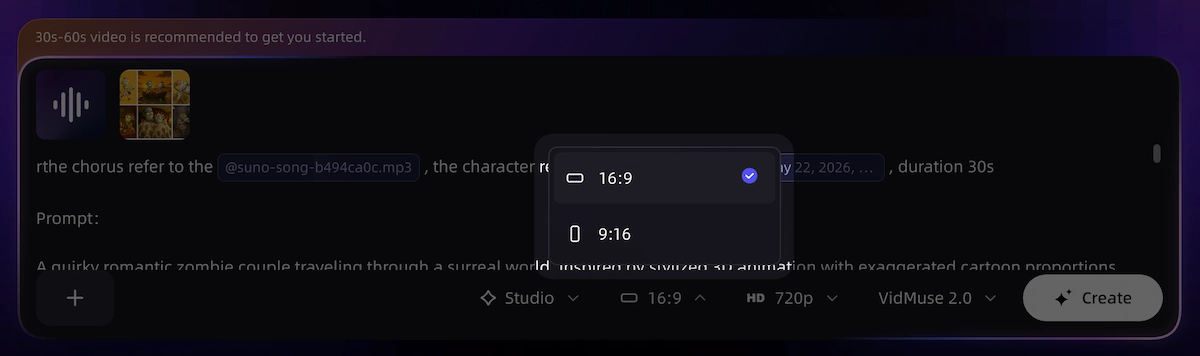
Format first: Instagram Reels performs best at 9:16 (1080×1920). If you're building for feed placement too, render a secondary 4:5 crop (1080×1350). Never upload a 16:9 landscape video to Reels — it will be letterboxed and perform poorly.
Duration: Reels up to 90 seconds are supported but 30–60 seconds drives the strongest completion rate for music content. Design your video to front-load the visual hook in the first 2–3 seconds — the scroll stop moment.
Audio considerations: If you're uploading original music, include the track as the native audio track in your export — not added via Instagram's music library. This protects your rights and ensures the track plays correctly across regions.
Text and subtitles: Instagram audiences often watch on mute first. Burned-in lyrics or key lyric overlays significantly improve engagement for music videos on the platform. This overlaps with the lyric video format — a strong reason to default to lyric video when building for Instagram specifically.
VidMuse's Viral Short template is configured for this format: 9:16, under 60 seconds, with built-in motion and text overlay options designed for social platforms.
Common Mistakes to Avoid
Even technically competent music videos fail for predictable reasons. These are the most common:
- No concept, just images. A music video that collects nice visuals with no visual logic is a slideshow. The viewer feels it even if they can't name the problem. Always start with a written concept.
- Mismatched visual styles. Mixing color photography, black-and-white stills, and AI-generated images without a unifying treatment creates visual chaos. Choose one visual language and apply it consistently.
- Ignoring the beat. Cuts that land between beats feel wrong to the ear even when the viewer doesn't consciously notice. Edit on the beat — especially on the kick drum on choruses.
- Over-transition. Wipes, spins, and flashy transitions draw attention to the edit, not the music. Crossfades and hard cuts are usually right. Transitions should be invisible.
- Wrong export settings. Uploading a compressed-then-compressed video looks terrible on high-resolution displays. Export at maximum quality, let the platform compress once.
- Too many images, too fast. Rapid-fire cuts work for specific genres (hyperpop, certain EDM). For most music, holding an image for 3–5 seconds lets it breathe and land emotionally.
- Skipping the storyboard. Even a rough 15-card storyboard prevents the most common mid-edit crisis: running out of images or realizing your visuals don't match the song's emotional arc.
FAQ
How do I make a video with pictures and music for free?
You can make a video with pictures and music for free using tools like CapCut (desktop or mobile), DaVinci Resolve, or iMovie. Import your images and audio track, arrange your images on the timeline, add transitions and motion effects, and export. For AI-assisted production, VidMuse offers a free entry point where you can test the workflow before committing to a paid plan.
How long does it take to make a music video with pictures?
A simple 60-second picture music video built manually takes 2–5 hours for a beginner, including image selection, editing, and export. With an AI platform like VidMuse, the same output can be produced in under an hour because the agent handles scene planning, image generation, and sequencing automatically. The time investment depends primarily on how much revision you do at each stage.
How do I make a music video with lyrics?
A lyric video uses the song's text as a primary visual element — usually kinetic typography on a styled background. To make one, transcribe your lyrics, time-stamp each line to the audio, and create text animations that appear on cue. In VidMuse, lyric video is available as a template type with text overlay support built into the generation workflow. For standalone tools, CapCut and After Effects both have strong text animation capabilities.
How do I make a music video for Instagram using pictures?
Build your video in 9:16 vertical format (1080×1920), keep the runtime under 60 seconds, and front-load your strongest visual in the first 2–3 seconds to capture attention before a scroll. Include burned-in lyrics or text overlays because a large portion of Instagram viewers watch without sound initially. Export with your original audio embedded — do not rely on Instagram's music library for your own original tracks.
What is the best AI tool for making a music video?
The right AI tool depends on what you're generating. For a full music video — track, visuals, sequencing, and timeline — VidMuse is purpose-built for the end-to-end workflow, including integrated Suno AI for music creation. For standalone image generation feeding into a manual edit, Midjourney V7 and Flux.2-Pro produce high-quality visual assets. For video generation of individual shots, Kling V3.0 Pro and Veo 3.1 currently produce the strongest motion quality among publicly accessible models.
How do I make a slideshow with music and pictures for free?
For a basic slideshow with music, use Google Photos (automatic slideshow tool, free), Canva (drag-and-drop with music upload), or iMovie on Mac/iOS. These are the fastest zero-cost options. For a more polished result with beat-synced cuts and visual effects, CapCut's free tier is the strongest mobile option, and DaVinci Resolve is the strongest free desktop option.
Do I need to own the rights to the music in my music video?
Yes. If you upload a video using a song you don't own the rights to — on YouTube, Instagram, or TikTok — the platform's Content ID or rights management systems will likely flag it, mute the audio, or prevent monetization. Use original music you created, license tracks from royalty-free libraries, or generate original music using tools like Suno AI where you control the output rights. Always check the specific licensing terms of any AI music platform before commercial use.
Final Words
Making a music video with pictures is one of the most accessible forms of visual music production available today. The workflow is straightforward: finalize your track, build a concept, storyboard your scenes, gather your visuals, edit to the beat, and export for your target platform. The hard part has never been the technical execution — it's the planning and creative direction that separates a music video from a slideshow.
AI tools have made the production gap smaller. Platforms like VidMuse handle the scene planning, image generation, and sequencing work that previously required a production team — giving independent artists access to structured, art-directed MVs at minimal cost. If you're working from a Suno AI track and want a finished visual in under an hour, VidMuse's agent-based workflow is the most direct path from idea to upload.
Start with a written concept. Storyboard before you edit. Build for the platform you're publishing to. The rest is iteration.
Create Your Music Video with Track & Image
Turn your idea into a music video with your song track and pictures inside VidMuse AI video agent.

Written By
VidMuse Team
Continue Reading
Latest blog posts related to AI video creation.
PixVerse V6 x VidMuse AI: Model Guide and Video Workflow
PixVerse V6 review and VidMuse integration guide. Capabilities, 15s 1080p video, prompt tips, model comparison, pricing, and how to use V6 in VidMuse workflows.
FLUX 3: What It Is, Capabilities, and How to Access It
FLUX 3 is Black Forest Labs' multimodal AI model for image, video, audio, and action. Full guide: capabilities, FLUX 3 vs FLUX 2, availability, and pricing.
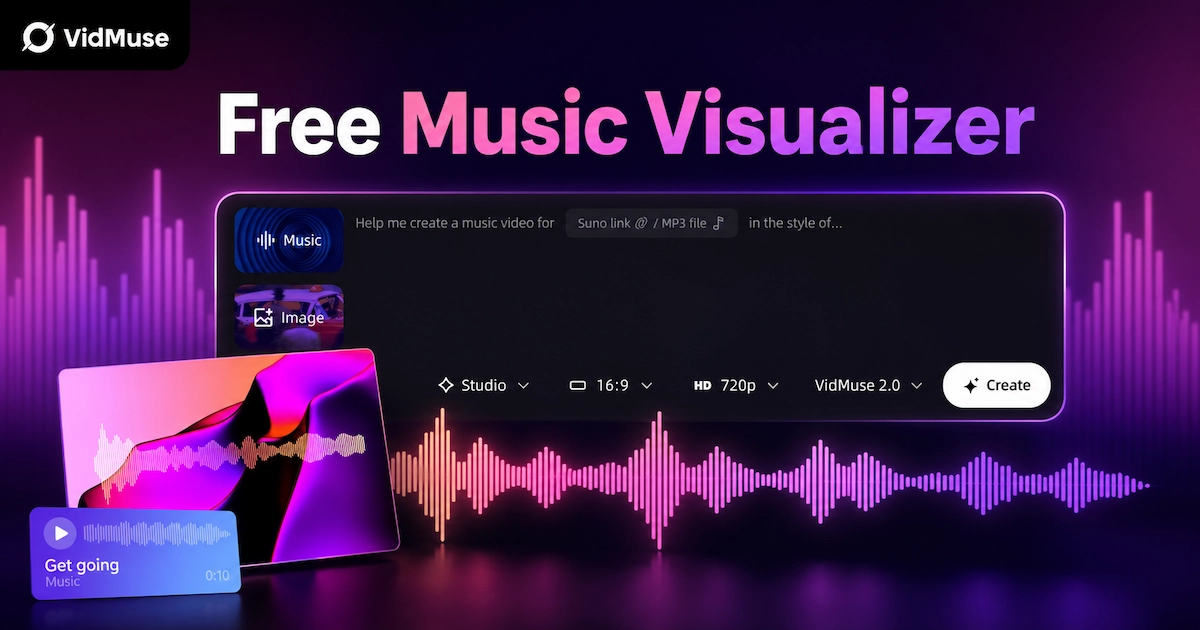
Free Music Visualizer: 10 Best Free Tools in 2026
Compare 10 best free music visualizers in 2026. Waveform tools, AI music video makers, watermark policies, export limits, and which tool fits your workflow.