
The best music video ideas don't require a Hollywood budget — they require the right concept matched to your resources. Whether you're a rapper filming in your bedroom, a singer-songwriter with a phone and a ring light, a student working on a school project, or an indie artist using AI to generate visuals, this guide gives you 50 concrete, executable ideas organized by style, setting, and approach. We'll also cover how to pick the right concept for your song, the most common beginner mistakes, and where AI tools like VidMuse fit into your creative process.
Turn a Music Video Idea Into a Finished Video
Use VidMuse to turn a concept, song, or prompt into a storyboarded AI music video.
Table of Contents
- Key Takeaways
- What Makes a Music Video Idea "Work"
- Performance-Based Music Video Ideas
- Narrative & Story-Driven Music Video Ideas
- Low Budget Music Video Ideas at Home
- Music Video Ideas for School Projects
- Music Video Ideas for Rap & Hip-Hop
- Music Video Ideas for 2 People
- AI Music Video Prompt Ideas
- How to Turn Any Idea Into a Finished Video (Step-by-Step)
- Choosing the Right Style: A Decision Framework
- How VidMuse Helps You Execute Your Idea
- Common Mistakes to Avoid
- FAQ
- Conclusion
Key Takeaways
- Concept is everything on a low budget. A simple, well-executed idea outperforms a poorly planned expensive shoot. The viral "Here It Goes Again" treadmill video by OK Go reportedly cost almost nothing but won a Grammy.
- Your location and lighting can do the heavy lifting. A single great location — rooftop, empty warehouse, sunlit kitchen — can anchor an entire music video without additional props or crew.
- AI tools have changed the floor price for quality visuals. Platforms like VidMuse AI let artists generate storyboarded, scene-by-scene music videos using models like Seedance 2.0 Pro, Kling V3.0 Pro, and Veo 3.1 — without a camera or crew.
- The concept should serve the song, not the other way around. Match your visual idea to the song's emotional tone, tempo, and lyrical theme before choosing a shooting approach.
- Lyric videos and AI-generated visuals are legitimate formats. They are widely used by professional artists on a budget and are especially effective for social sharing.
What Makes a Music Video Idea "Work"
A music video idea works when it has three things: a clear visual hook, a feasible execution path, and a fit with the song's emotion.
The visual hook is the one thing a viewer would describe to a friend — "it's the one where she performs upside down" or "it's all shot on a Ring camera." Without a hook, the video becomes forgettable even if technically well-made.
Feasibility means you can actually pull it off with your time, gear, location access, and budget. Great low budget music video ideas acknowledge constraints and build around them rather than fighting against them.
Emotional fit means the visuals don't fight the song. An upbeat pop track works differently from a moody ambient piece. Before you pick an idea, identify your song's emotional core: is it joyful, melancholic, defiant, vulnerable? Let that answer narrow your concept list.
Performance-Based Music Video Ideas
Performance videos are the most versatile and accessible format — they put the artist front and center and let strong energy carry the video.
- Single-location, one-take shot. Pick one compelling location — an empty parking garage, a field, a rooftop — and film a continuous take. The constraint forces focus and the result feels raw and authentic.
- Evolving backdrop. Perform in front of a series of changing backgrounds (projected slides, painted sheets, different rooms) to create visual variety without leaving one building.
- Silhouette performance. Position yourself between a strong backlight and the camera. The silhouette style works especially well for atmospheric, moody, or electronic tracks.
- Moving performance (driving, walking, public transit). Film yourself performing inside a moving car, on a train, or walking through a city. The motion creates inherent visual interest.
- Underwater performance. Any swimming pool and a waterproof housing for a smartphone opens up a dreamlike visual world at minimal cost.
- Multi-angle single room. Set up three or four camera positions in one room and cut between angles. Varied framing makes even simple footage feel dynamic.
Narrative & Story-Driven Music Video Ideas
Story-driven videos are the highest-effort format but often the most memorable — they give audiences something to follow.
- Non-linear flashback structure. Show a relationship, memory, or event across three timelines — past, present, and aftermath. This works especially well for introspective or emotional pop and R&B.
- Day-in-the-life documentary style. Film a genuine day — waking up, commuting, working, coming home — and cut it to the music. Authenticity is the point; no acting required.
- Single-character journey. Follow one person walking from point A to B through an emotionally significant space. Simple to shoot, powerful when edited well.
- Role reversal. Swap typical roles between two characters — a worker and their boss, a teacher and student, a parent and child. Works well for socially conscious or ironic tracks.
- Letter to the past or future self. Intercut between a younger and older version of the same character using two actors or archival home footage.
- One continuous night. Document everything that happens between sunset and sunrise — parties, quiet moments, conversations, city streets. Works well for late-night and atmospheric tracks.
Low Budget Music Video Ideas at Home
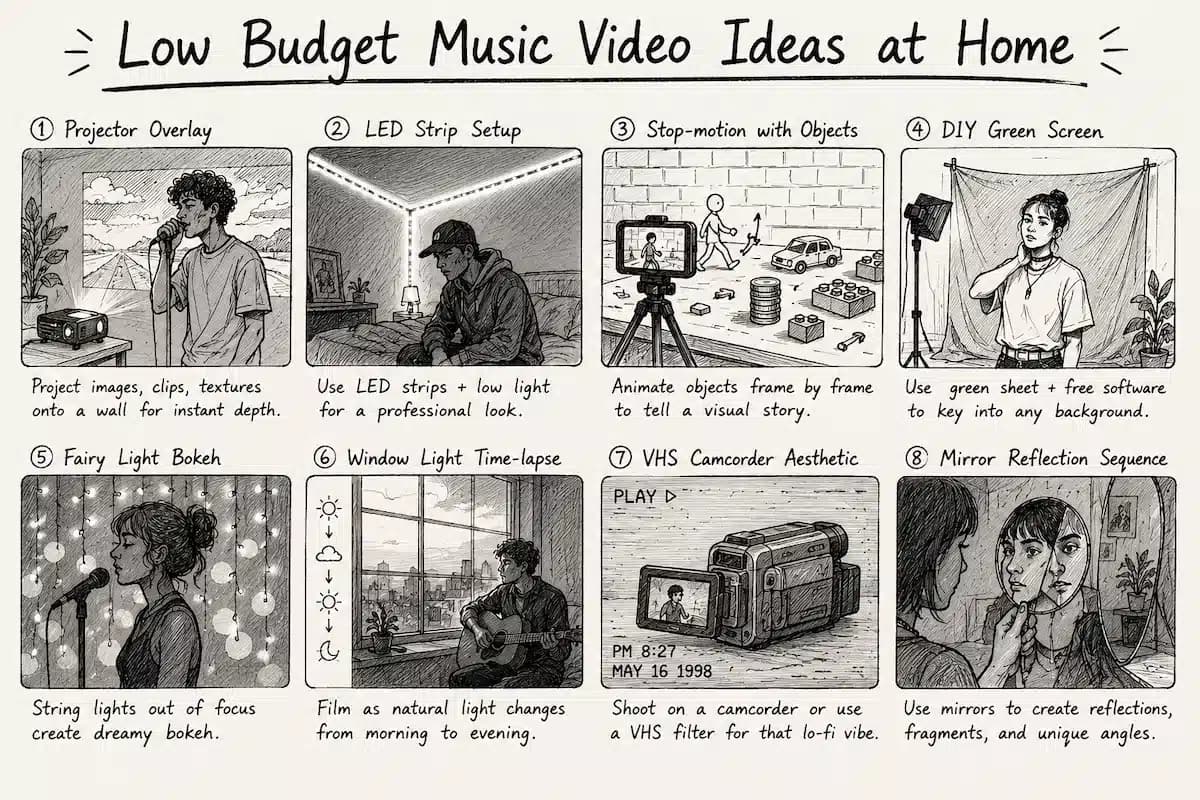
Low budget music video ideas at home work best when the home is treated as a set, not just a backdrop. The key is intentional design — clear it, light it deliberately, and dress it with props that serve the concept.
- Projector overlay. Shine a projector onto a plain wall behind you while performing. The overlaid images — clips, photos, textures, colors — create visual depth without any editing. A small portable projector (available for under $50 online) is all you need.
- LED strip setup. Line your room with LED strips set to a single color and film in low light. The result looks like a professional shoot. Works especially well for hip-hop, electronic, and R&B.
- Stop-motion with objects. Use coins, food, paper cutouts, or LEGO to animate a story frame by frame. Time-consuming but striking, and entirely achievable with a phone and a tripod.
- DIY green screen. Hang a green bed sheet behind yourself and use free software like DaVinci Resolve to key yourself into any location — a city, a galaxy, a painting.
- Fairy light bokeh. Hang string lights behind you and shoot slightly out-of-focus to create dreamy bokeh balls of light. Incredibly simple, very effective for pop and indie tracks.
- Window light time-lapse. Position yourself in front of a window and film as the light shifts from morning to evening. The changing natural light tells a story with no additional setup.
- VHS camcorder aesthetic. Shoot on an old camcorder or apply a VHS filter in editing. The grainy, lo-fi look is intentional and widely popular for indie, alternative, and hip-hop acts.
- Mirror reflection sequence. Use a hand mirror or a large wall mirror to create multiple reflections, fractured perspectives, or abstract framings of yourself performing.
Music Video Ideas for School
Music video ideas for school work best when they combine a clear concept with props and locations already available on campus. The goal is creativity, not production value.
- Lip-sync through the school day. Follow a character lip-syncing through hallways, cafeteria, classrooms, and the parking lot. Cameos from classmates make it feel communal.
- Classroom performance. Set up a straightforward performance in an empty classroom. Use chalkboards, desks, or books as visual props for the song's theme.
- Sports facility concept video. Film in the gym, on the track, or in the pool. Athletic settings pair well with motivational, energetic, or coming-of-age tracks.
- Time-lapse of the school day. Speed up a full day's footage — students arriving, classes shifting, lunch, dismissal — and sync it to music. Very achievable with a single tripod and phone.
- Collaborative class video. Each classmate films their own 10-second contribution from home or school. Edited together, the result is a communal, patchwork visual that feels intentionally participatory.
- Behind-the-scenes of making the video. Meta-concept: document the process of planning and filming a music video as the video itself. Works as both a school project and a social media piece.
Music Video Ideas for Rap & Hip-Hop
Rap music video ideas benefit most from authenticity of environment and strong visual storytelling — the location, the crew, and the energy matter more than production budget.
- Long-take walking shot. The videographer walks backward or alongside the artist for an extended unbroken take while they rap. Popularized by artists like Kendrick Lamar, this style pairs well with lyric-heavy, storytelling rap.
- Block/neighborhood documentary. Film in the locations the song references — the block, the corner store, the park. Authenticity of setting carries enormous weight in hip-hop.
- Cipher or freestyle setup. Film a circle of artists trading bars in a raw setting. No scripting needed — the energy is the content.
- Projector image overlay. Film the artist rapping while clips related to the lyrics are projected onto their body and the wall behind them. Simple projector setup; dramatic visual result.
- VHS nostalgia reel. Alternate between grainy camcorder footage of everyday moments and performance shots. Common in underground and alternative hip-hop and immediately recognizable as a stylistic choice.
- Split-screen duality. Show two contrasting worlds simultaneously — past vs. present, street vs. success, day vs. night. The visual metaphor amplifies thematic content without needing expensive production.
- Lyric visualization. Animate the lyrics on screen as they're delivered. Dynamic text with strong typography can be a complete visual concept without any filmed footage.
Music Video Ideas for 2 People
Music video ideas for 2 people are naturally suited to relationship, conflict, or contrast narratives — the dynamic between two subjects does the visual work.
- Back-to-back performance. Two artists face away from each other at the center of frame and perform. Cut between close-ups to show contrast or connection.
- Chase and catch. One person pursues the other through a series of locations. Shot loosely and handheld, this creates inherent energy and movement without complex choreography.
- Dialogue without words. Two characters pass objects, gestures, or notes back and forth without speaking, telling the song's story entirely through action.
- Same song, different worlds. Both people perform the same song from separate locations simultaneously, inter-cut tightly. The contrast in setting — one indoors, one outdoors, one day, one night — underscores the emotional theme.
- Mirror duet. Both people perform in perfectly mirrored movements in a symmetrical frame. Works beautifully for pop, indie, and electronic music.
- Letter exchange. One person writes a letter at the start of the video; the other receives it at the end. The body of the video shows the emotion in between.
AI Music Video Prompt Ideas
AI music video prompts give you a visual starting point when you have a concept but no camera or crew. The key is writing prompts that specify emotion, setting, lighting, and action rather than describing finished results.
- "Cinematic close-up of a singer's face in golden hour light, shallow depth of field, emotions of longing" — ideal for ballads and emotional pop.
- "Abstract particle wave synced to a beat drop, neon purple and cyan, fluid motion on black" — works for electronic and ambient music.
- "A lone figure walking through a foggy forest at dusk, slow camera push, melancholic atmosphere" — suited to indie folk, ambient, or singer-songwriter tracks.
- "Retro 1980s fashion, neon-lit diner, two characters in slow motion, grainy film stock" — perfect for synthwave, retrowave, or nostalgic pop.
- "Hyperrealistic product ad: a sneaker rotating against a clean white background, hard light and dramatic shadows" — ideal for brand or lifestyle music content.
- "Underwater slow-motion hair and fabric movement, turquoise light diffusion, dreamy and surreal" — suited to ethereal or introspective tracks.
- "Street-level documentary, black and white, handheld camera movement, urban traffic at night" — works for rap, spoken word, and urban pop.
- "Extreme slow-motion paint splash in complementary colors on a black canvas" — visual and standalone enough to pair with almost any genre.
- "3D animated character in a stylized cityscape, cel-shaded, pop art color palette" — suited for alternative, hyperpop, or animated persona artists.
- "Time-lapse of flowers blooming and wilting against a warm studio backdrop, lyrical and symbolic" — works for acoustic, folk, or introspective pop.
- "Two silhouettes dancing in front of a massive sunset, handheld and naturalistic, intimate energy" — adaptable to almost any emotional genre.
How to Turn Any Idea Into a Finished Video (Step-by-Step)
Identify your constraints first
List your budget, available locations, helpers, equipment, and time before choosing the idea.
Write a one-sentence logline
Define the video in one sentence so the concept is clear enough to shoot or generate.
Create a shot list or storyboard
Map the key moments before production so gaps and impossible shots appear early.
Choose your shooting mode
Decide whether you are filming yourself, working with a friend, or generating AI visuals.
Shoot more than you need
Capture extra coverage so the edit has options when matching the music.
Edit to the music
Import the track first and cut visuals to the beat, lyrics, and energy arc.
Color grade intentionally
Use a consistent grade or LUT so different shots feel like one video.
Export for each platform
Prepare separate aspect ratios for YouTube, Reels, TikTok, and square feeds.
Execution is where most music video ideas stall — the concept exists but the path from idea to finished video is unclear. Here's a repeatable process.
Step 1 — Identify your constraints first.
Budget, locations available, number of people who can help, and time available. Your idea needs to live within these.
Step 2 — Write a one-sentence logline for the video.
"A solo performance filmed in one take through five rooms of an apartment." If you can't write one sentence, the concept isn't defined enough to shoot.
Step 3 — Create a shot list or storyboard.
Even a rough sketch of each key moment tells you what you need to capture and in what order. It surfaces problems before shoot day.
Step 4 — Choose your shooting mode.
Are you filming yourself? With a friend as cinematographer? Or generating AI visuals? Each has a different workflow.
Step 5 — Shoot more than you think you need.
Coverage gives you options in editing. Plan for 3× the footage you expect to use.
Step 6 — Edit to the music, not the other way around.
Import your track first and cut picture to match energy, beat, and lyrical content. Let the music drive pacing decisions.
Step 7 — Color grade intentionally.
A consistent color grade unifies disparate shots. Most editing apps (CapCut, DaVinci Resolve, Premiere) include free preset LUTs that can establish a visual tone quickly.
Step 8 — Export for each platform separately.
YouTube (16:9), Instagram Reels (9:16), TikTok (9:16), and Instagram feed (1:1) all have different optimal aspect ratios.
Choosing the Right Style: A Decision Framework
Use the table below to match your situation to the right type of music video idea.
| Your Situation | Best Approach | Why |
|---|---|---|
| No budget, shooting solo | Single-location performance or lyric video | Minimal logistics; concept carries the video |
| No budget, two people | Story/narrative concept or duet format | Natural dynamic reduces need for complex production |
| School project | Lip-sync through campus or collaborative class video | Achievable with existing spaces and people |
| Rap / hip-hop track | Walking shot, cipher, or neighborhood documentary | Authenticity of environment is the production value |
| Ambient / electronic track | AI-generated visuals or abstract animation | Genre suits non-literal visual treatment |
| Song on Suno or AI-generated audio | AI video workflow start to finish | Already in the AI creation space; natural extension |
| SMB or brand music content | Product ad template or Explainer format | Needs clarity and message alignment, not artistry |
Create Your AI Video in Minutes
Turn your idea into a video with VidMuse.
How VidMuse Helps You Execute Your Music Video Idea
VidMuse is built specifically for artists who have a great music video idea but lack a production crew — its agent-based workflow plans the full video rather than generating one-shot clips.
The core workflow maps directly onto the steps above: you upload your assets, fill out a creative brief (your concept and references), and VidMuse generates a full scene-by-scene storyboard before a single frame of video is generated. This planning stage is where VidMuse differs from single-prompt video tools.
For Studio Mode — VidMuse's flagship quality tier — the platform pairs Nano Banana Pro for image generation with Seedance 2.0 Pro, Kling V3.0 Pro, and Omnihuman V1.5 for video generation. For faster, cost-efficient production, Lite Mode uses Seedream 5.0 Lite for images and Seedance 2.0 Fast for video.
If you're working with a track made in Suno AI — one of the most popular AI music creation tools — VidMuse integrates Suno directly so you can generate original music and produce a complete music video without leaving the platform.
For indie musicians specifically, VidMuse's template library includes formats directly relevant to the ideas in this guide: Story MV, Performance MV, Abstract MV, Viral Short, and UGC-Style Ads. VidMuse 2.0 also introduced Shot Refine by Quoting (iterate on specific shots without regenerating the whole video), a Timeline Editor, and an Asset Library so your visual identity stays consistent across multiple releases.
If your music video idea is in categories 40–50 above (AI music video prompts), VidMuse's AI music video generator workflow is a direct execution path: your prompt becomes a creative brief, becomes a storyboard, becomes a finished video.
FAQ
What are some good music video ideas for beginners?
The best beginner music video ideas are single-location performance videos, lyric videos, and day-in-the-life documentary style concepts. They require minimal crew, can be shot with a smartphone, and succeed based on concept and energy rather than technical production value. If you have access to AI tools, generating visuals with an AI music video generator is also a legitimate and increasingly popular starting point that requires no camera at all.
What are low budget music video ideas I can film at home?
Strong low budget music video ideas at home include projector overlay performances (project clips or imagery onto a plain wall behind you), LED strip setups to control mood and color, stop-motion with everyday objects, DIY green screen with a green bedsheet, and VHS-aesthetic videos shot on a cheap camcorder or filtered in post. The key is treating your home as a deliberate set rather than a background — clear the space, light it intentionally, and pick one strong visual concept to anchor the video.
How do I use an AI music video prompt generator?
An AI music video prompt describes the visual scene you want to generate — including setting, lighting, character action, emotional tone, and camera style. Rather than describing a finished video ("make a music video for my song"), effective prompts specify individual scenes: "cinematic wide shot of a performer on a foggy rooftop at golden hour, slow camera push." Tools like VidMuse's AI music video generator take your creative brief through a storyboard stage before generating any video, which means you review the scene plan before committing to generation.
What are good music video ideas for school projects?
For school music video projects, the most achievable concepts are lip-sync walkthroughs of campus locations, classroom performance videos, collaborative class videos where each student contributes a short clip, and time-lapses of the school day synced to music. These formats work with existing locations and involve classmates naturally. The assessment criteria for school music video projects usually rewards concept clarity and intentionality over technical polish, so a well-defined idea matters more than expensive equipment.
What are good music video ideas for rap songs?
Effective rap music video ideas include the long-take walking shot (the videographer follows or walks ahead of the artist while they perform), neighborhood documentary style that films in the locations referenced in the song, cipher or freestyle setups, VHS-aesthetic nostalgia reels, and projector overlay shots where clips are projected onto the artist's body. Authenticity of location and energy matter more in hip-hop video production than in most other genres, so filming in real environments connected to the song's subject matter usually outperforms studio setups.
Can 2 people make a music video by themselves?
Yes — some of the most effective low budget music video concepts are built specifically for two people. Duet performance formats, story-driven narrative concepts, mirror choreography, and "same song different worlds" inter-cut edits all work well with just two people and a phone on a tripod. The dynamic between two subjects creates inherent visual interest and reduces the need for complex production. One person can operate the camera while the other performs, and roles can switch between shots.
What is the easiest type of music video to make?
The easiest music video to produce is either a lyric video or an AI-generated video. Lyric videos require only the track, the lyrics, and video editing software (or a lyric video generator tool). AI-generated videos require no camera, crew, or filming at all — you provide a creative brief and the platform generates storyboarded, scene-by-scene visuals. Both formats are widely used by professional artists and are considered legitimate release formats on all major platforms.
Final Words
The best music video ideas aren't the most expensive — they're the most clearly defined. Whether you're filming yourself at home with a ring light, shooting a rap walkthrough through your neighborhood, making a collaborative video with a class of students, or generating a fully AI-produced visual from a Suno track, the process starts the same way: one clear concept, matched to your song's emotion, and executed within your actual constraints.
If you're ready to move from idea to finished video without a camera or crew, VidMuse AI gives you a full production workflow — from creative brief to storyboard to generated video — using models like Seedance 2.0 Pro, Kling V3.0 Pro, and Veo 3.1. The free AI music video generator is a direct starting point if you want to see your concept rendered before committing to a full production.
Pick one idea from this guide. Write the one-sentence logline. Start there.
Create Your AI Video in Minutes
Turn your idea into a video with VidMuse.

Written By
VidMuse Team
Continue Reading
Latest blog posts related to AI video creation.
How to Use Kling O3 in VidMuse to Make AI Videos
Kling O3 powers VidMuse Studio with 15s multi-shot generation, voice-persistent characters, native audio, and a practical AI video workflow.
OmniHuman 1.5: The AI Avatar Model Explained
Discover what OmniHuman 1.5 can do — realistic lip-sync, emotional performances, and multi-person scenes — and how to use it inside VidMuse AI.
AI UGC: Complete Guide to AI UGC Video Ads in 2026
Learn what AI UGC is, how to make AI UGC video ads, and which tools help brands create storyboarded product ads for TikTok, Reels, and Shorts in 2026.