

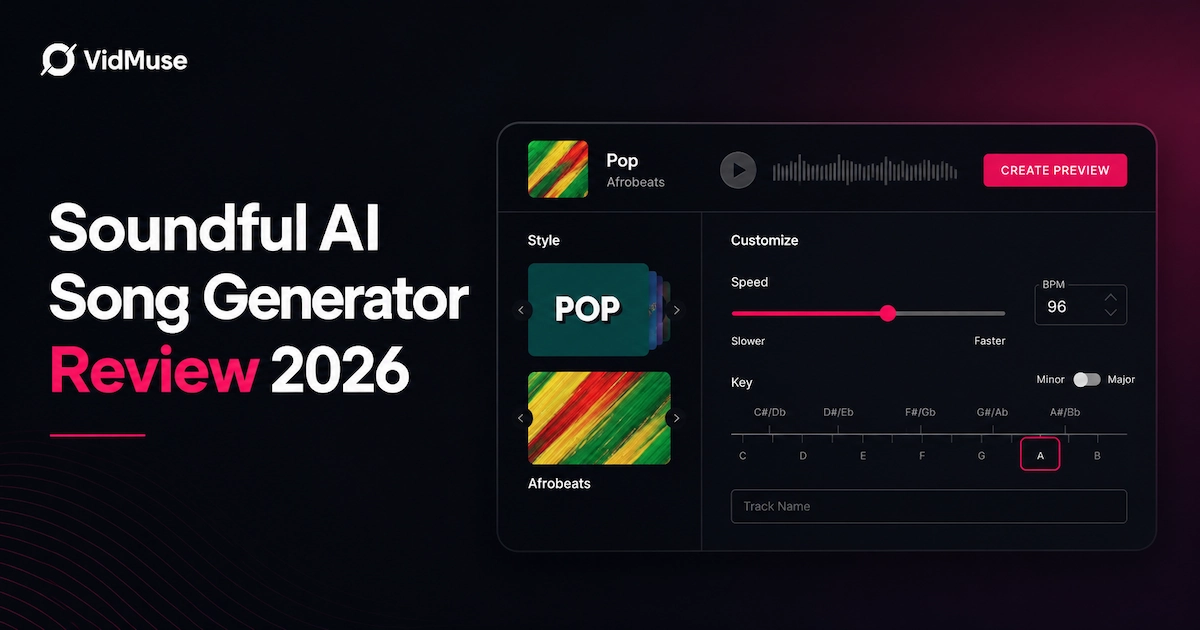
Soundful is an AI music generator that lets anyone create royalty-free, studio-quality background tracks in seconds — no music production experience required. You pick a genre, choose a template, adjust tempo and key, and the platform's human-aided AI engine builds a unique track every time.
This Soundful AI review covers everything you need to know in 2026: how it works, what it costs, how its licensing really works, where it falls short, and whether it belongs in your creative workflow.
Key Takeaways
- Soundful generates unique, non-repeating tracks using a genre-and-template model rather than open-ended text prompts, making it particularly well-suited for background music.
- The free plan allows unlimited track generation but limits downloads to one MP3 per month; paid plans start at $4.99/month and scale up to enterprise custom pricing.
- All tracks are royalty-free based on your subscription tier, but commercial rights — including film, TV, and revenue-generating products — require a paid Music Creator or Business plan.
- Soundful is built for background music (BGM) for video, podcasts, and ads; it is not designed to generate full songs with lyrics the way Suno or Udio are.
- If you need to take AI-generated music a step further and pair it with visuals, VidMuse's agent-based workflow turns audio into full music video productions without requiring separate editing software.
What Is Soundful and How Does It Work?
Soundful is an AI-powered music generator that produces original, studio-quality audio tracks based on genre templates, mood selections, and tempo/key settings. Unlike prompt-based generators that start from a blank text description, Soundful combines AI speed with producer-guided templates — which is why the tracks tend to feel more composed and less randomly generated.
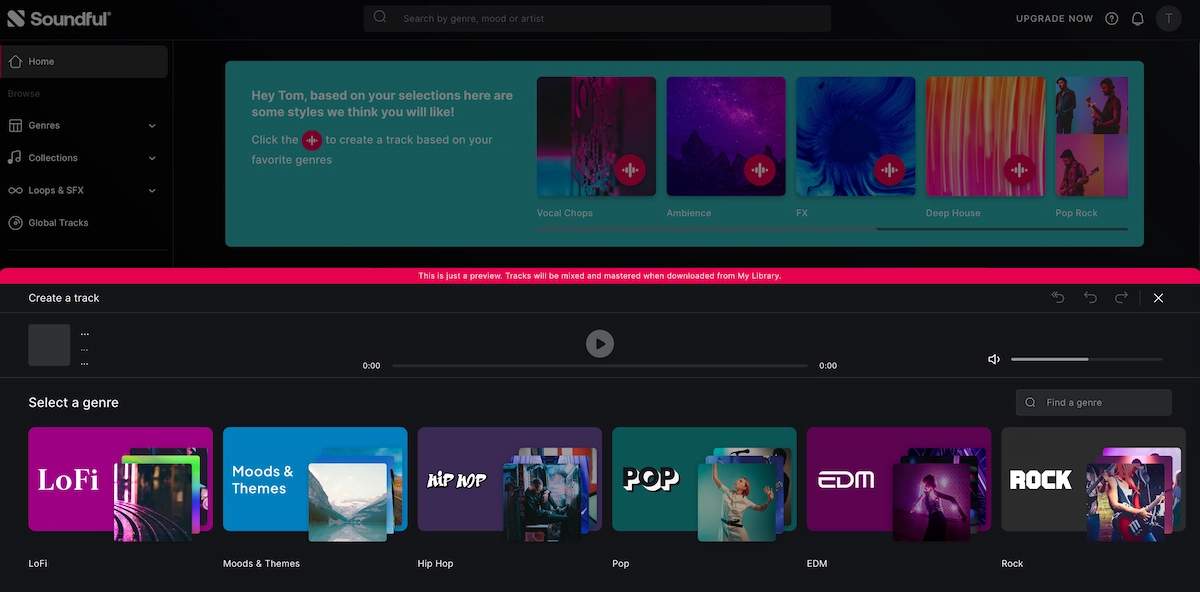
The core process works like this:
- You select a genre and template (there are 50+ templates across 14 genres).
- You set the tempo and key, then name your track.
- The AI generates a unique track — Soundful states that the same track is never created twice.
- The result is saved to your library for preview, editing, and download.
The tracks are built from original, ethically sourced audio patterns rather than scraped content, which is central to Soundful's copyright-safe positioning. Soundful describes its approach as "producer-led" — real producers contribute to shaping the templates and styles so the output has musical intentionality behind it rather than pure algorithmic randomness.
This makes Soundful particularly strong for one specific use case: background music for video content. It is not designed to write lyrics, generate full vocal performances, or follow open-ended creative prompts the way Suno or Udio do.
Key Features of the Soundful AI Music Generator
Soundful's feature set is focused rather than sprawling. Every major feature is aimed at making track creation and integration fast for non-musicians.
Genre-Specific Templates
Soundful offers 50+ templates across 14 genres, covering everything from lo-fi and cinematic to hip-hop and electronic. Templates are informed by styles developed in collaboration with global producers and songwriters, which gives them a level of musical nuance that purely algorithmic tools often miss. You can adjust tempo and key within each template, giving basic but functional creative control.
Unique Track Generation
One of Soundful's clearest commitments is that the same track is never generated twice. Each output is genuinely unique. This matters for commercial use — if you're creating branded content, you don't want your background track to show up in a competitor's ad. Because of this, Soundful warns users to save any track they want to revisit, since unsaved tracks cannot be regenerated.
High-Fidelity STEM Downloads (Pro and Above)
For producers who need more than a finished MP3, Soundful's STEM download feature separates individual elements — drums, bass, melody, and more — into individual files. The export package also includes MIDI, pre-master, and master files. This makes Soundful usable as a starting point for professional production work in DAWs like Ableton Live. STEM downloads are available on the Pro plan and above.
Royalty-Free Licensing Built In
Every track comes with a license attached to your subscription tier. Personal use is covered by the free plan; commercial use requires a paid plan. The license travels with your subscription, which means if you cancel, you may need to evaluate your ongoing use of published tracks. More on this in the licensing section.
Co-Creation with Producers
Soundful's Business and Enterprise tiers include hands-on collaboration with human producers for sonic branding projects. This is distinct from typical AI music tools and positions Soundful as a platform for brand audio identity — not just background track generation.
Soundful Pricing 2026: Plans Compared
Soundful offers five plan tiers. Here is what each covers for individual creators:
| Plan | Price | Track Generations | Styles | Downloads | Usage Rights / License | Additional Features |
|---|---|---|---|---|---|---|
| Free | $0/month | Unlimited | 25+ free styles | 1 MP3 download per month | Personal use only | — |
| Plus | $4.99/month | Unlimited | 150+ styles unlocked | 100 MP3 and WAV downloads per month | Commercial use included | — |
| Pro | $9.99/month | Unlimited | 150+ styles unlocked | 400 MP3 and WAV downloads per month | Commercial use included | STEM pack access |
| Business | $45.99/month | Unlimited | 150+ styles unlocked | 750 MP3 and WAV downloads per month | Business license included; suitable for teams and enterprises under $1M in revenue | 35 STEM packs per month |
| Enterprise | Custom pricing | Unlimited | Customized styles | Custom / not specified | Full Business License; TV and film ad coverage | Dedicated team and white-glove production |
Is upgrading worth it?
If you're creating content for YouTube, social media, client projects, or any commercial platform, the Plus or Pro plan is cost-effective. The free plan is adequate for learning the tool but practically limited to one finished track per month.
Soundful Copyright and Licensing Explained
Soundful's licensing model gives creators clear usage rights tied to their subscription tier — and understanding the differences matters before you publish anything commercially.
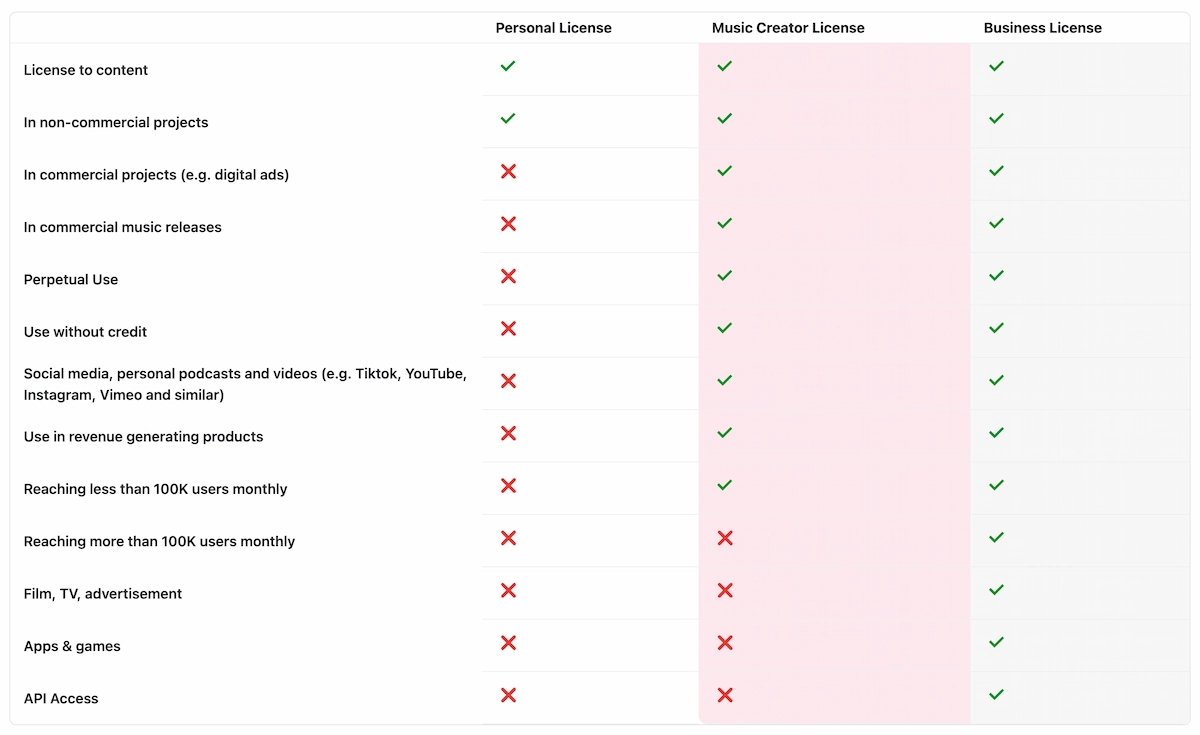
There are three license types:
Personal License (Free plan)
Covers non-commercial use only. Suitable for personal experimentation, practice projects, and content where no revenue is generated or sought. Not for YouTube monetization, client work, or ads.
Music Creator License (Plus and Pro plans)
Covers commercial projects including digital ads, social media with revenue generation, and commercial music releases. This is the tier most independent creators and video producers need. It covers platforms like YouTube, TikTok, Instagram, and Vimeo.
Business License (Business and Enterprise plans)
Covers broader commercial applications including apps, games, film, TV, and advertisements reaching more than 100K users monthly. Required for large-scale brand campaigns and enterprise deployments.
A few important nuances on Soundful copyright:
- Tracks under the Standard (free) plan and global tracks are non-exclusive — other users can generate similar sounds, though your specific track is unique.
- Tracks created under active Music Creator Plus accounts can qualify for an exclusive license.
- If you cancel a paid subscription, you should review which tracks remain covered under your downgraded license tier.
The key differentiator from many AI music tools is Soundful's explicit statement that its audio is ethically sourced — not scraped from existing artists' work. For creators worried about copyright disputes from AI-generated content, this matters.
How to Use Soundful: Step-by-Step Tutorial
This walkthrough covers generating and exporting a track on the Soundful AI music generator from start to finish.
Create an Account
Visit soundful.com and sign up for a free account. No credit card is required to start.
Browse Genres and Templates
Explore genres and select a template that fits your project's mood.
Customize and Generate
Set tempo and key, name your track, then click Create Preview.
Preview in Your Library
Preview the full track in My Library and adjust settings if needed.
Export the Track
Click Get, then select your download format based on your plan.
Import to Your Video Workflow
Bring the downloaded track into your video editing or VidMuse workflow.
Step 1: Create an Account
Visit soundful.com and sign up for a free account. No credit card is required to start.
Step 2: Browse Genres and Templates
On the homepage, explore genres and select a template that fits your project's mood. Consider the tempo — faster for energetic content, slower for cinematic or ambient pieces.
Step 3: Customize and Generate
Set the tempo and key. Name your track, then click Create Preview. The AI generates your unique track within seconds.
Step 4: Preview in Your Library
Your track is saved to My Library. Use the play button to preview the full track. If you want adjustments, click the edit icon to modify settings and regenerate.
Step 5: Export the Track
Click Get, then select your download format. Free users export one MP3 per month. Pro users can also select STEMs Download for individual instrument files.
Step 6: Import to Your Video Workflow
Take the downloaded track into your video editing software. If you are pairing music with visuals for a music video or branded content, see the section on VidMuse below.
Soundful vs. Suno vs. Udio vs. Beatoven: Which Is Best?
Each of these tools solves a different problem. Here is how they compare for common creator use cases.
Soundful
Best for: Background music for video, branded audio, producer workflows Approach: Genre and template selection, unique non-repeating track generation
Strengths: Royalty-free clarity, STEM exports, consistent quality, ethical sourcing
Limitations: Not designed for vocal songs with lyrics; limited instrument-level editing within the platform
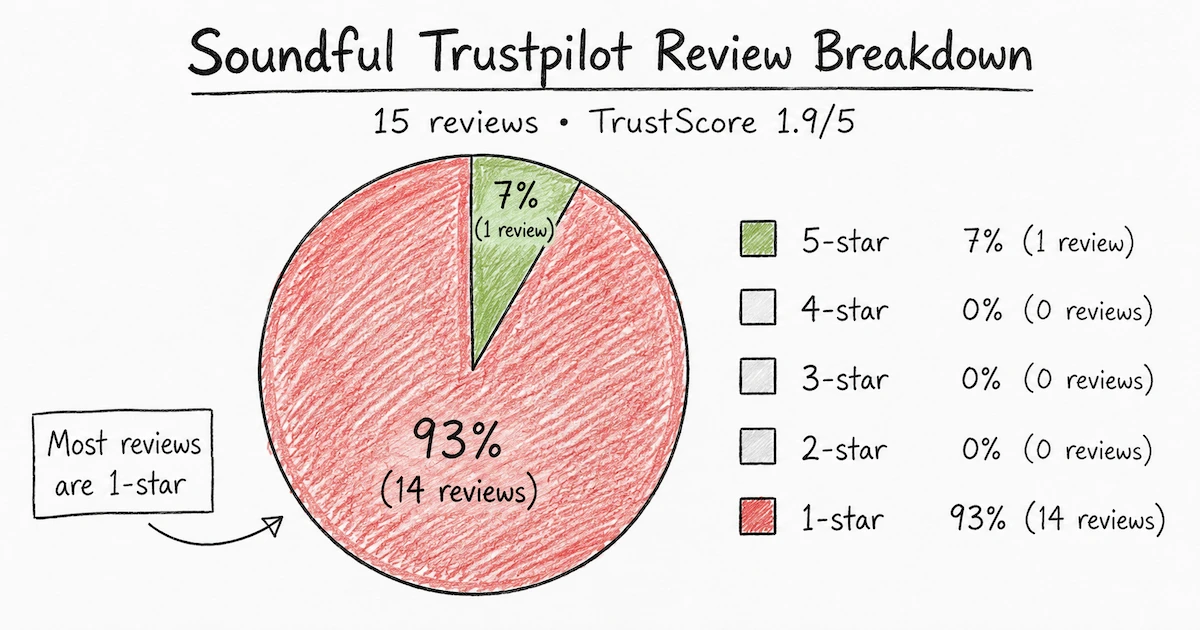
Suno AI
Best for: Full song creation with lyrics and vocals from a text prompt
Approach: Text-to-song generation; describe a song and Suno writes and performs it
Strengths: Fast generation, generous free tier (up to 10 songs per day), highly accessible
Limitations: You cannot edit individual elements — changing one lyric or instrument requires full regeneration; tracks can sound structurally similar across outputs
Udio
Best for: Detailed, customizable song creation with editing capability
Approach: Prompt-based song generation with the option to provide your own lyrics
Strengths: Editing tools let you fix specific sections without starting over; trending tracks dashboard for inspiration
Limitations: Generation takes longer than Suno or Soundful; steeper learning curve for new users
Beatoven (Maestro AI)
Best for: Quick background music generation matched to video mood
Approach: Describe the music's mood, era, duration, and occasion; upload video to match audio
Strengths: Four variations per generation for easy comparison; wide genre and mood range; sound effects included
Limitations: No built-in video editing; interface can be confusing for beginners
The short version:
Use Soundful for BGM.
Use Suno for generating full tracks with vocals quickly.
Use Udio when you need more editorial control over the song.
Use Beatoven when you want to match audio to a video upload directly.
How VidMuse Pairs with AI-Generated Music
Once you have a track from Soundful, the next challenge for music video creators is translating audio into a compelling visual. This is where VidMuse fits naturally.
VidMuse is an AI Director for music video production — a platform that plans the full MV rather than executing isolated one-shot prompts. Instead of describing a single clip and hoping it matches your audio, VidMuse's agent-based logic works through a complete workflow: Creative Brief → Reference Generation → Scene and Shots List → Storyboard → Video Generation. The result is a coherent visual narrative built around your music.
For independent musicians who use Suno or Soundful to generate original tracks, VidMuse solves the visual side of the equation. You bring the audio; VidMuse plans the production.
Key features include:
- Studio and Lite generation modes — Studio for flagship quality, Lite (Seed series) for speed and cost efficiency
- Shot Refine by Quoting (VidMuse 2.0) — select and refine specific shots without regenerating the full video
- Timeline Editor — arrange and edit scenes after generation
- Asset Library and Memory — maintain consistent characters and visual elements across shots
- Template types including Story MV, Abstract MV, Performance MV, Viral Short, and TVC
If your goal is to turn a Soundful-generated background track or a Suno AI original into a shareable music video — without a production budget — VidMuse is the most direct workflow available. Start with an AI music video generator, or use the dedicated music to video AI workflow when the track is already finished.
For model-specific visual direction, compare Seedance 2.0, Kling 3.0, and Veo 3.1. For tool selection, see the best AI music video generator guide or start with a free AI music video generator workflow.
Create Your Music Video in Minutes
Turn your Soundful music track into a video with VidMuse.
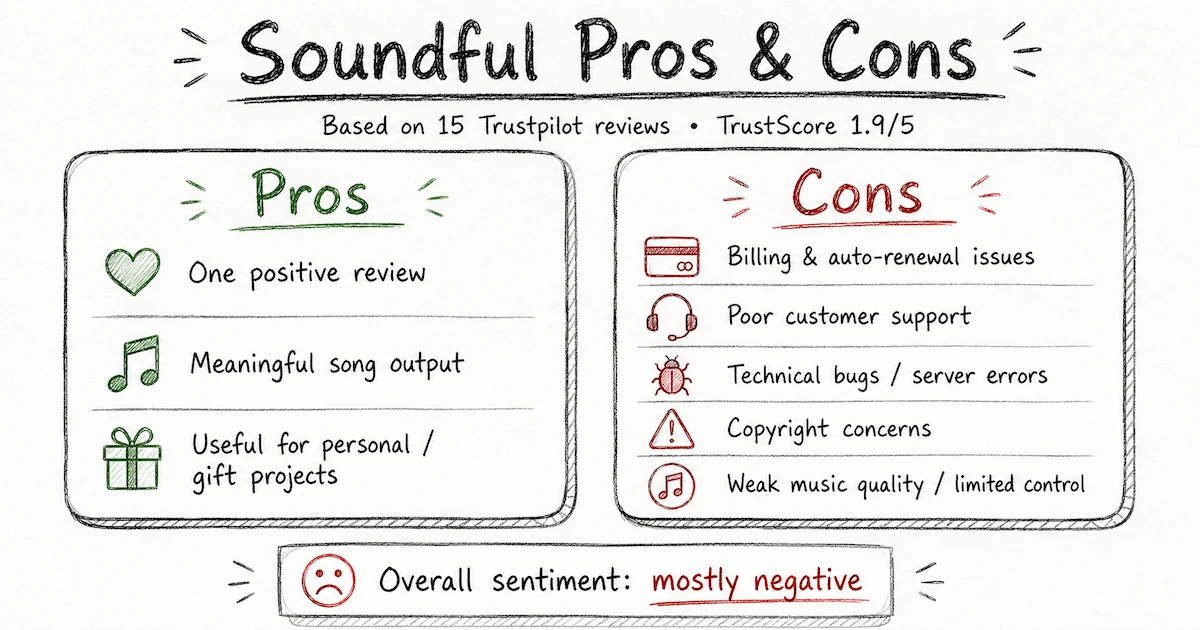
Pros and Cons of Soundful
Pros
- Simple to use with no music knowledge required. The template-and-parameter approach removes the blank-page problem and produces listenable results immediately.
- Unlimited track generations on all plans. You can experiment freely; the restriction is on downloads, not creation.
- Unique track guarantee. No two outputs are identical, which matters for brand differentiation.
- Ethical AI sourcing. Tracks are built from original, producer-contributed audio — not scraped from existing artists.
- STEM export for producers. Pro users get individual instrument stems, MIDI files, and pre-master files for DAW integration.
- Clear, tiered licensing. You know exactly what commercial rights you have at each plan level.
Cons
- Limited in-platform customization. You can adjust tempo and key, but you cannot edit individual instruments or mix elements within Soundful itself. For that, you need a separate DAW.
- No vocal or lyric generation. Soundful generates instrumental background music; it is not designed to write or perform songs.
- One download per month on the free plan. Generous for exploration, limiting for production.
- License tied to active subscription. If you cancel, review your obligations for previously published tracks.
- Templates within the same genre can feel structurally familiar over time, especially for high-volume creators.
Common Mistakes to Avoid
Forgetting to save tracks before closing.
Soundful's unique track system means an unsaved track is gone forever. Save anything promising to your library before navigating away.
Using the free plan for commercial content.
The Personal License covers non-commercial use only. Publishing monetized YouTube videos, client ads, or branded content on the free plan violates the license terms. Upgrade before publishing commercially.
Assuming exclusivity on standard plans.
Unless you are on a Music Creator Plus plan with exclusive rights purchased, your track is non-exclusive. Another user could create similar-sounding output. For brand campaigns where audio identity matters, review the exclusivity terms.
Treating STEM exports as the final product.
STEM files are starting points. They are designed to be imported into a DAW like Ableton Live and processed further. If you export stems and upload them raw, you are leaving quality and customization on the table.
Skipping the genre-template exploration phase.
Many users pick the first template that fits and generate once. Soundful has 50+ templates — spending 10 minutes exploring different styles before committing often yields significantly better-fitting results for your project.
FAQ
What is the Soundful AI song generator and how does it work?
Soundful is an AI-powered music creation platform that generates original, royalty-free tracks based on genre templates, tempo, and key settings. You select a musical style, customize basic parameters, and the platform's human-aided AI produces a unique track in seconds. Every track generated is unique — the same output is never created twice.
Is Soundful free to use?
Yes, Soundful has a permanently free plan. It allows unlimited track generation and access to 25+ styles, but limits downloads to one MP3 per month and restricts use to non-commercial personal projects. Paid plans start at $4.99/month and include commercial licensing and significantly higher download limits.
Can Soundful be used for commercial music projects?
Yes, but not on the free plan. Commercial use requires the Plus ($4.99/month), Pro ($9.99/month), or Business ($45.99/month) plan. These plans include a Music Creator or Business License, which covers commercial releases, digital ads, YouTube monetization, and social media content. Film, TV, and large-scale brand campaigns require the Business or Enterprise tier.
Does Soundful have a copyright issue with AI-generated music?
Soundful is built on ethically sourced, original audio contributed by real producers — it does not scrape or train on existing artists' copyrighted music. All tracks come with royalty-free licenses corresponding to your plan tier, meaning you can use them without paying additional royalties. The key variable is commercial scope: check which license tier covers your intended use before publishing.
How does Soundful compare to Suno AI for music generation?
The tools serve different purposes. Soundful is optimized for background music — instrumental tracks for video, podcasts, and branded content — using a template-and-genre approach. Suno AI generates full songs with vocals and lyrics from text prompts. If you need BGM for a video project, Soundful is the stronger fit. If you want to generate a complete song you can release, Suno is more appropriate. Many creators use both.
What is the Soundful app and is there a desktop download?
Soundful is a web-based platform accessible at soundful.com. There is no dedicated desktop application to download — the full experience runs in a browser. This makes it platform-agnostic and accessible from any device without installation.
Can producers use Soundful with a DAW like Ableton?
Yes. Pro plan users can download STEM files — individual instrument tracks — along with MIDI, pre-master, and master files. These can be imported directly into Ableton Live or any other DAW for further editing, processing, and arrangement. Soundful's own tutorials cover cross-genre remixing, custom drum machine building, and live performance set creation using its AI-generated samples as a foundation.
Final Words
Soundful is a solid, purpose-built tool for a specific problem: creating royalty-free background music for video content, quickly and without music production expertise. The template-driven approach, unique track guarantee, ethical sourcing, and clear licensing structure make it genuinely trustworthy in a space where copyright ambiguity is a real concern.
It is not the right tool if you want full vocal songs, lyric writing, or deep in-platform mixing. For those needs, Suno and Udio are better fits. But for BGM — the work of finding the right-feeling audio to sit under a YouTube video, a branded short, or a social ad — Soundful is efficient, reliable, and appropriately priced.
If your next step is pairing that music with visuals, VidMuse picks up exactly where Soundful leaves off. Its agent-based Creative Brief → Storyboard → Video Generation workflow is designed for independent creators who want music video quality without a production team. Start with your track, bring it into VidMuse, and let the AI Director handle the rest.
Create Your Music Video in Minutes
Turn your Soundful music track into a video with VidMuse.

Written By
VidMuse Team
Continue Reading
Latest blog posts related to AI video creation.
PixVerse V6 x VidMuse AI: Model Guide and Video Workflow
PixVerse V6 review and VidMuse integration guide. Capabilities, 15s 1080p video, prompt tips, model comparison, pricing, and how to use V6 in VidMuse workflows.
FLUX 3: What It Is, Capabilities, and How to Access It
FLUX 3 is Black Forest Labs' multimodal AI model for image, video, audio, and action. Full guide: capabilities, FLUX 3 vs FLUX 2, availability, and pricing.
Free Music Visualizer: 10 Best Free Tools in 2026
Compare 10 best free music visualizers in 2026. Waveform tools, AI music video makers, watermark policies, export limits, and which tool fits your workflow.