

Ideogram 4.0 is Ideogram AI's first open-weight text-to-image model, released on June 3, 2026. It is a 9.3B parameter single-stream Diffusion Transformer that delivers industry-leading text rendering inside images, bounding-box layout control, structured JSON prompting, and native transparency support — all from open weights developers can download, fine-tune, and self-host.
In simple terms: it is the most capable open image model currently available for design-grade, brand-ready visual work.
Create Your AI Video in Minutes
Turn still images, music, and visual ideas into complete video stories with VidMuse.
Key Takeaways
- Ideogram 4.0 is open-weight, meaning the model weights are publicly available on Hugging Face and GitHub, unlike most competing image generators.
- Text rendering is its strongest suit — it scores 0.97 on X-Omni English OCR accuracy, the highest among all open-weight image models at its parameter scale.
- Bounding-box layout control allows prompts to specify exact placement of every object and text element, enabling precise design work that other models can't reliably reproduce.
- Three quality tiers via API (Turbo at $0.03/image, Default at $0.06/image, Quality at $0.10/image) make it cost-accessible for both prototyping and production.
- Structured JSON prompting is the native input format — the more structure you provide, the more grounded and controllable the output becomes.
What Is Ideogram 4.0?
Ideogram 4.0 is the fourth major release of the Ideogram AI image generator and the company's first open-weight foundation model. Before 4.0, Ideogram was known as a closed, design-focused platform with strong typography capabilities but limited accessibility for developers. The 4.0 release changed that entirely.
The model was announced on June 3, 2026, the same day as Reve 2.0 — a coincidence that the AI research community noted as a signal that layout-aware image generation has become a mainstream priority. Ideogram 4.0 was described by its creators as "the best open image model in the world" at launch, and independent designer-preference evaluations placed it second overall among all image models (open and closed), behind only GPT Image 2.
What separates Ideogram 4.0 from earlier versions of the model, and from peers like FLUX.2 or Hunyuan Image v3, is its emphasis on dependability: consistent typography, precise layout adherence, and editable outputs that are usable in real production workflows — not just impressive in demos.
Ideogram 4.0 Architecture: How the Model Works
Ideogram 4.0 is a 9.3B parameter single-stream Diffusion Transformer (DiT) trained from scratch with a vision-language text encoder and structured JSON captions.
The inference pipeline has four stages:
- Text Encoder (Qwen3-VL-8B-Instruct, frozen) — A vision-language model used in text-only mode. The DiT consumes hidden states from 13 of its intermediate layers, concatenated along the feature dimension. This gives the model richer language understanding than models using a single hidden slice.
- Backbone — Ideogram 4 single-stream DiT (9.3B, trained) — 34 transformer layers where text tokens and image latent tokens share one attention sequence. Uses QK-RMSNorm and 3D Multimodal RoPE (MRoPE), placing text and image tokens in a shared positional frame.
- Sampler — Euler flow-matching with asymmetric CFG (runtime) — The unconditional pass drops text tokens entirely rather than replacing them with padding, allowing prompt adherence and image quality to be tuned independently across the sampling trajectory.
- Decoder — KL VAE (frozen) — Decodes latents to pixels at 8× spatial compression.
Text Encoder
Qwen3-VL-8B-Instruct provides richer language understanding through intermediate hidden states.
Backbone
A 9.3B single-stream DiT places text and image tokens in one shared attention sequence.
Sampler
Euler flow-matching with asymmetric CFG tunes prompt adherence and image quality separately.
Decoder
A frozen KL VAE decodes the final latent representation into pixels.
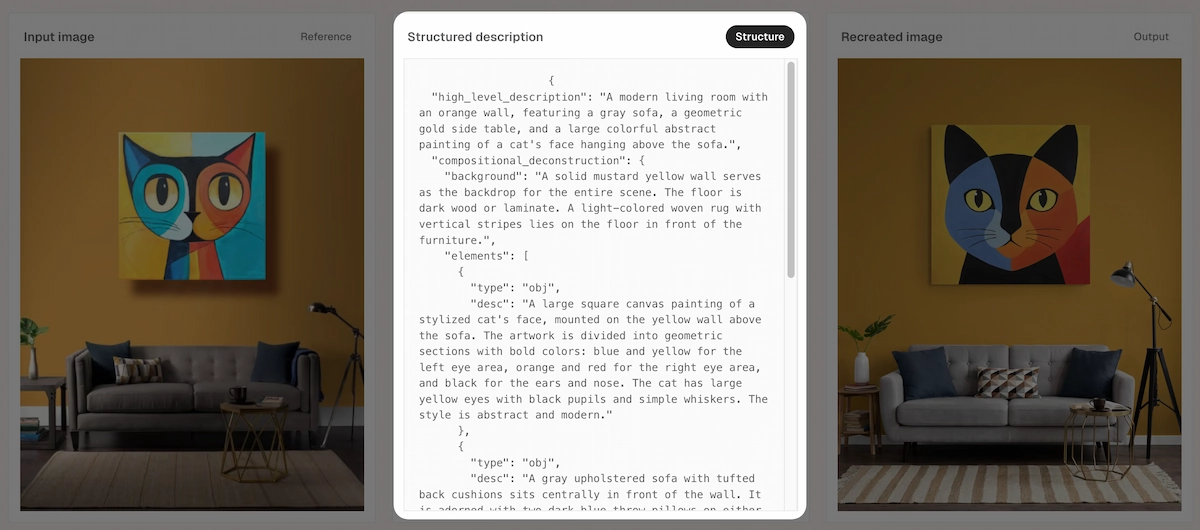
The key architectural insight is the describe-to-structure-to-recreate training approach: the model was trained to first read scenes as structured data (backgrounds, objects, text regions, bounding boxes), then learn to rebuild images from that structured representation. This is why its layout accuracy and text rendering are so unusually strong relative to its 9.3B parameter count.
Model specifications at a glance:
- Parameters: 9.3B
- Embedding dimension: 4,608
- Transformer layers: 34
- Max text tokens: 2,048
- Resolution range: 256–2,048 px per side
- Aspect ratios: flexible
- Quantization: nf4 (fits a 24 GB GPU) and fp8
- Sampler: Euler flow-matching, asymmetric CFG
Key Features of Ideogram 4.0
Text Rendering Inside Images
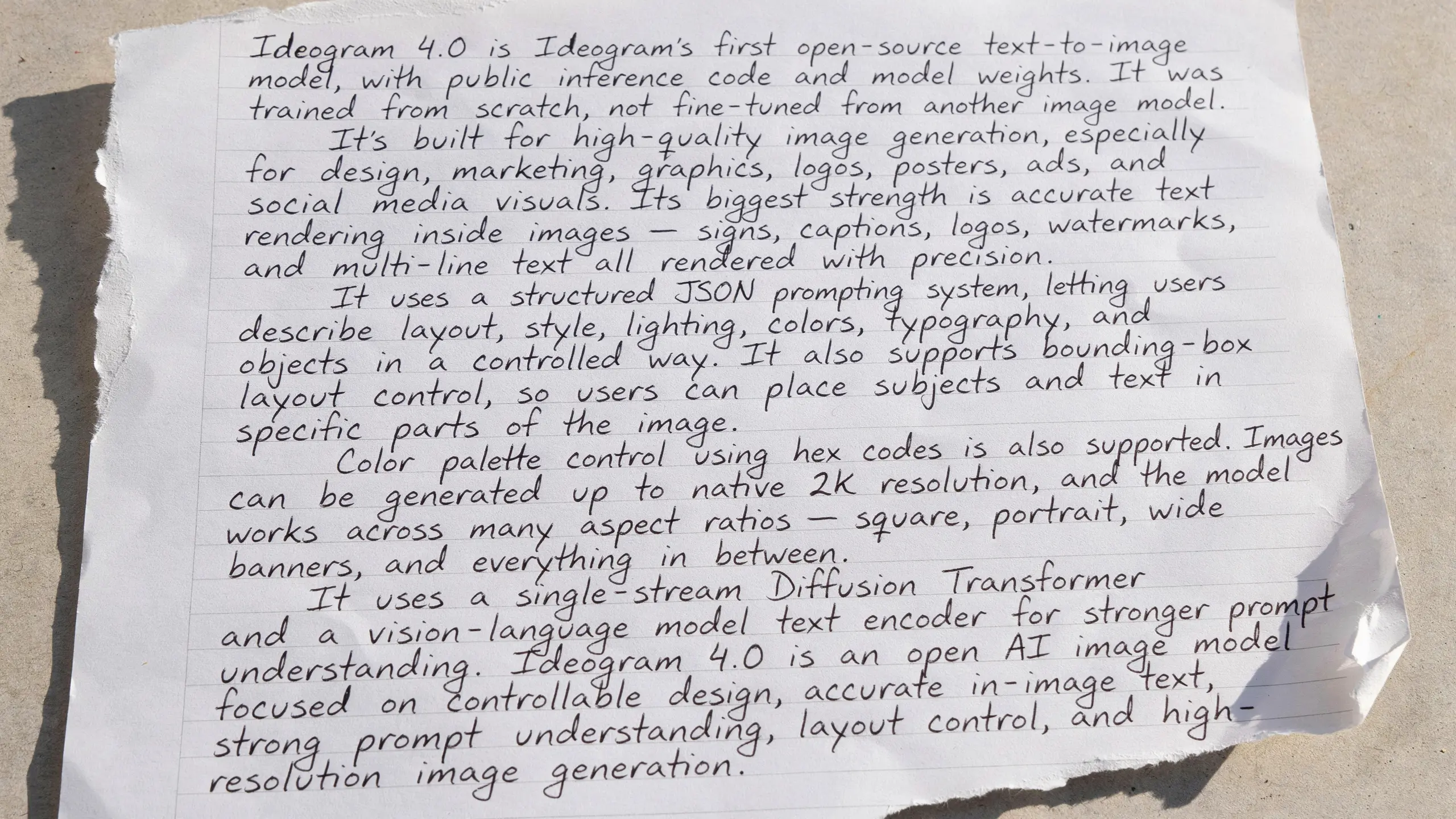
Ideogram AI has led on in-image typography since its earliest release. With 4.0, text rendering reaches a 0.97 accuracy score on X-Omni English OCR benchmarks — the best of any open-weight image model at the 9.3B parameter scale, and competitive with closed models. The distinction matters: text in Ideogram 4.0 generations is not fragile overlay; it is structurally part of the image composition and is placed using typed text elements in the JSON prompt, each carrying the literal string to render alongside a separate visual description for styling.
Bounding-Box Layout Control
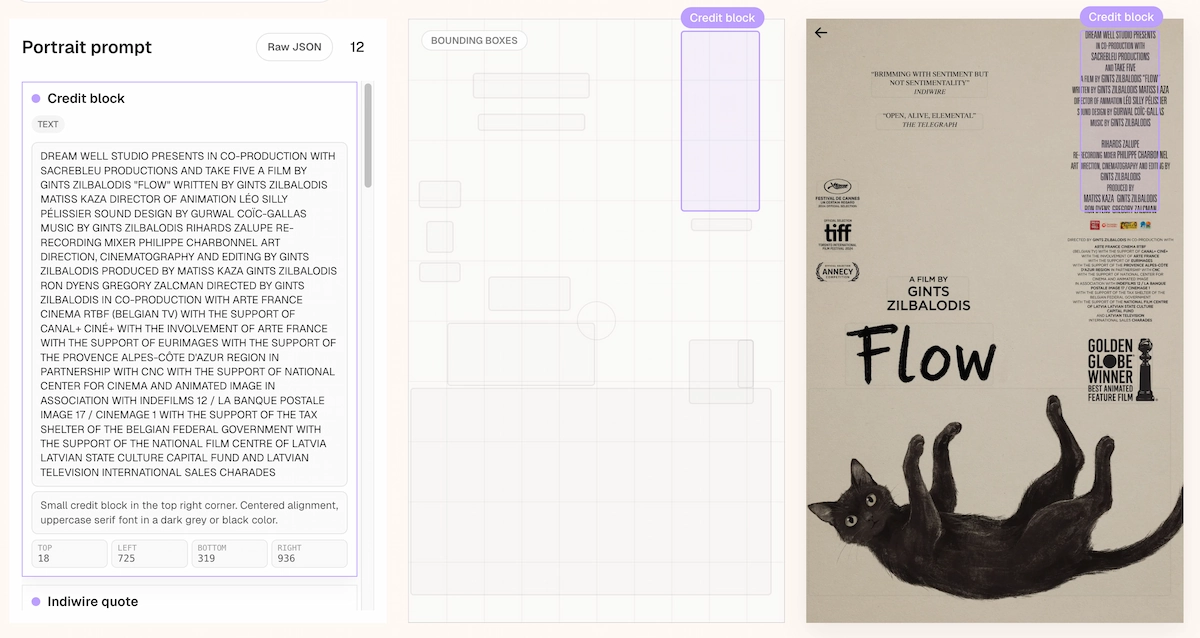
Every element in a prompt — objects, text regions, decorative assets — can be assigned a bounding box specified as [y_min, x_min, y_max, x_max] in 0–1000 normalized coordinates. The model was trained with bounding boxes coupled to plain-language descriptions, so it learns where each element belongs before generating the image. This means multi-column posters, film credit blocks, and product layout grids are achievable with far more accuracy than standard text-prompt models.
Structured JSON Prompting
Ideogram 4.0's native prompt format is JSON, not free-form prose. A well-structured prompt includes a high-level description, a style block (aesthetics, lighting, medium, color palette as hex codes), and a compositional deconstruction listing each element with optional bounding boxes. The reference inference pipeline validates every prompt against the JSON schema before generation and rejects inputs that don't parse. Three things this enables that a plain prompt doesn't:
- Color palette conditioning — Up to 16 hex colors per image, 5 per element, steering dominant colors directly
- Bounding-box layout — Precise placement of every element via MRoPE positional space
- Typed text elements — Multi-line, multi-font text generation with separate string and styling fields
Native Transparency
Ideogram 4.0 includes a Background Remover that produces a clean alpha cutout, and the next model release will return alpha channels and editable text layers directly from inference — no masking step or second pass required. For production design workflows, this is significant: the generated image becomes the editable file, not a flat render requiring cleanup.
Open Weights
The weights are available on Hugging Face with both fp8 and nf4 checkpoints. The nf4 variant fits on a single 24 GB GPU. The GitHub repository includes the full inference code, prompting guide, sampler presets, and commercial license documentation.
Ideogram 4.0 Benchmarks and Performance
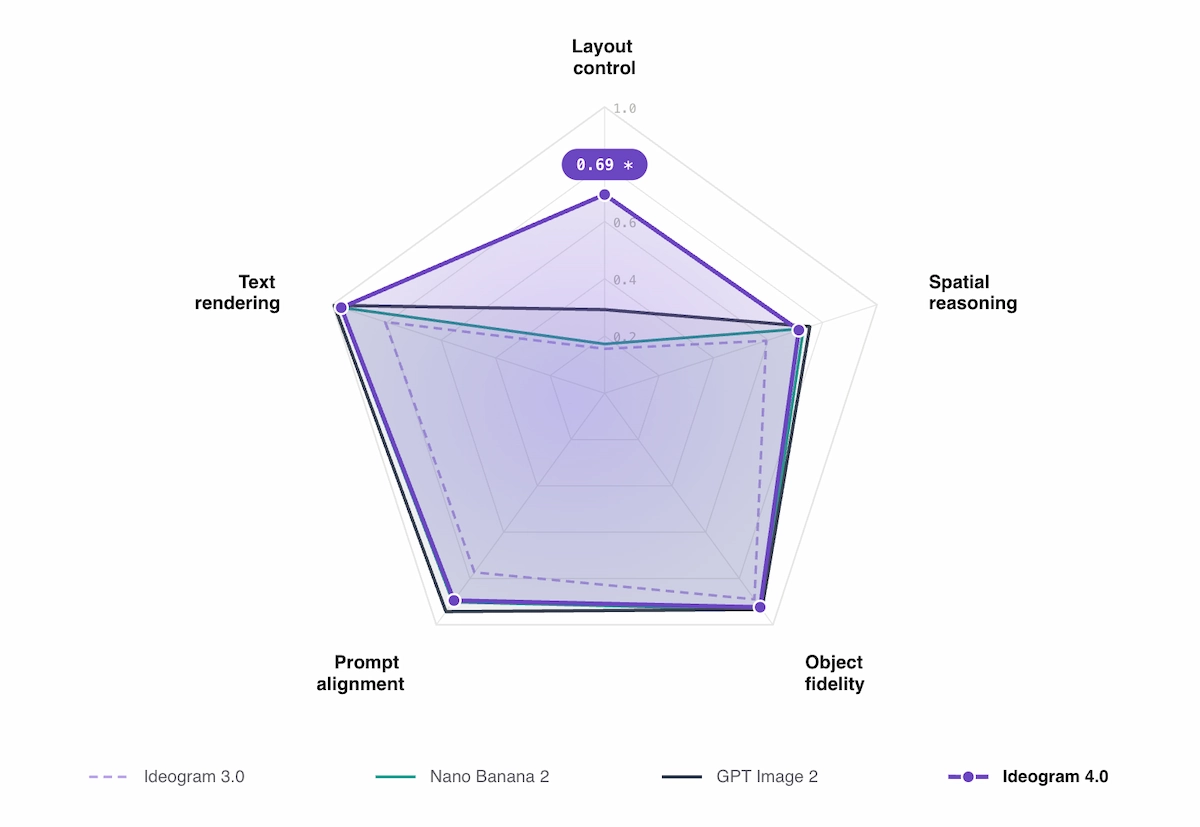
Ideogram 4.0 was evaluated across five capability dimensions against both closed-source leaders (GPT Image 2, Nano Banana 2) and all major open-weight releases.
Benchmark results:
- Text rendering (X-Omni English OCR): 0.97 — highest among all open-weight models tested
- Layout control (7Bench mIoU): 0.69 — measures how tightly generated objects sit inside requested bounding boxes
- Spatial reasoning (SpatialGenEval): 0.76
- Prompt alignment (Prism-bench): 0.89
- Object fidelity (SpatialGenEval basic accuracy): competitive with closed models
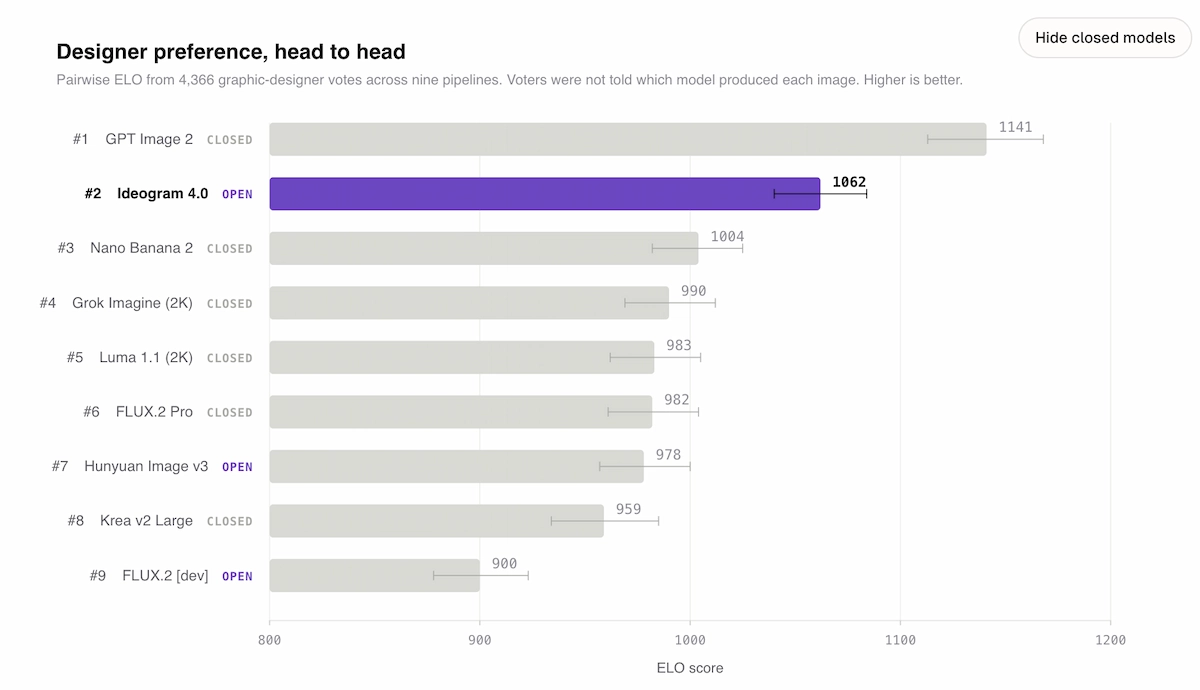
Designer preference ELO (4,366 graphic-designer votes, blind pairwise evaluation):
- #1 GPT Image 2 (closed) — 1141 ELO
- #2 Ideogram 4.0 (open) — 1062 ELO
- #3 Nano Banana 2 (closed) — 1004 ELO
- #4 Grok Imagine (closed) — 990 ELO
For open-weight models specifically, Ideogram 4.0 is first by a clear margin. FLUX.2 [dev] (32B parameters) scores 900 ELO — 162 points lower — despite being more than three times larger. This parameter efficiency is the headline number: Ideogram 4.0 achieves more design-grade output at 9.3B than open competitors achieve at 80B.
How to Use Ideogram 4.0: Step-by-Step
Ideogram 4.0 is accessible through three surfaces, depending on how your workflow is structured.
Via the Ideogram App
- Go to ideogram.ai and sign in or create an account.
- Type your prompt in the prompt box (desktop) or tap the + button (mobile) to open the generation panel.
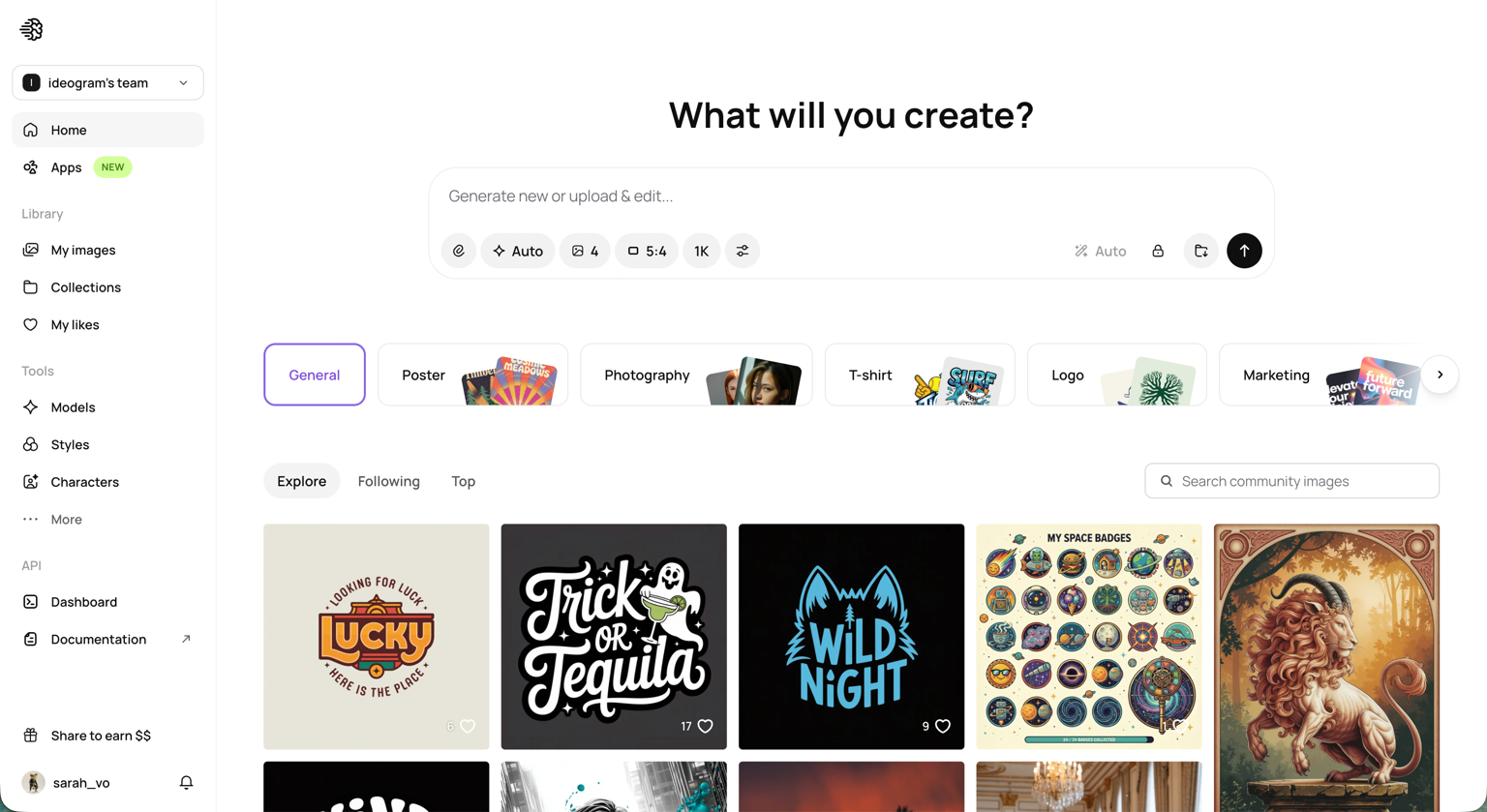
- Choose the number of outputs (1–4 where supported) — credit usage scales with output count and selected render speed.
- Submit. Results appear in the image grid within seconds.
- Click a generated image to access the action panel: download, remix, upscale (up to 2×), remove background, open in Canvas, replace background, or layerize text.
For best results, structure your prompt as a JSON object with a high-level description, a style block (aesthetics, lighting, medium, hex color palette), and a compositional deconstruction listing each element. The more relationships you specify — including bounding boxes — the more precisely the model follows your intent.
Via the API
Ideogram 4.0 is available through the hosted API with three quality tiers:
- Turbo — $0.03/image, fastest
- Default — $0.06/image, balanced
- Quality — $0.10/image, highest fidelity
Per-image pricing with no subscription required. Integrate image generation, editing, upscaling, and visual workflows directly into products you're building.
Example API request:
{
  "model": "ideogram-4.0",
  "prompt": "campaign poster with clean type",
  "render_text": true,
  "style": "brand-grade"
}
Via MCP (Agent Layer)
Ideogram now offers an MCP server, allowing you to connect the model to agents and internal tools. This enables visual creation to happen inside AI workflows without switching surfaces.
Ideogram 4.0 ComfyUI and Open-Weight Deployment
For developers and researchers who want to self-host, Ideogram 4.0's open weights unlock local and on-premise deployment. The weights are available at huggingface.co/collections/ideogram-ai/ideogram-4, and the full inference code, sampler presets, and prompting guide are on GitHub at github.com/ideogram-oss/ideogram-4.
Hardware requirements:
- The nf4 quantized checkpoint fits on a single 24 GB GPU — accessible on a single RTX 3090, RTX 4090, or equivalent.
- The fp8 checkpoint provides higher fidelity and is suited to A100/H100 setups.
- ComfyUI integration is community-driven; the standard DiT pipeline structure is compatible with ComfyUI's diffusion node architecture, and community nodes for Ideogram 4.0 ComfyUI workflows are actively developing at the time of this writing.
Commercial licensing is tiered by scale — download the weights for research and prototyping, and purchase a commercial license that matches your deployment volume. Details are at ideogram.ai/licensing/.
Safety layers ship with the open weights: pre-training data is filtered through NSFW classifiers before the model sees it, post-training procedures further reduce unsafe generation probability, and the reference pipeline screens every prompt and output through Hive moderation. Any redistributed deployment must use equivalent or stronger filtering.
Ideogram 4.0 vs. Ideogram 3.0 vs. GPT Image 2: How They Compare
The decision between models depends on what you need to optimize for.
Ideogram 4.0
Best for
- Open weights
- Bounding-box layout control
- Structured JSON prompting
- Enterprise deployment flexibility
Watch out
- Still-image only
- Commercial scale requires license review
Ideogram 3.0
Best for
- Strong closed-platform typography
- App-focused creative workflow
Watch out
- No open weights
- No native bounding-box workflow
GPT Image 2
Best for
- Higher overall designer preference score
- Strong unconstrained creative output
Watch out
- Closed source
- No self-hosting or private fine-tuning
FLUX.2
Best for
- Useful for some photorealism scenarios
- Open model ecosystem
Watch out
- Lower designer ELO in the cited comparison
- Less typography-focused
Ideogram 4.0 vs. Ideogram 3.0
Ideogram 3.0 was a closed, app-only model with strong text rendering for its time. Ideogram 4.0 offers open weights (a fundamental shift), bounding-box layout control (unavailable in 3.0), structured JSON prompting as a native format, and significantly higher benchmark scores across all five evaluated capability dimensions. If you were using Ideogram 3.0 for design work, 4.0 is a strict upgrade — both in quality and in accessibility.
Ideogram 4.0 vs. GPT Image 2
GPT Image 2 leads the overall ELO ranking at 1141 vs. Ideogram 4.0's 1062. For pure output quality on unconstrained creative prompts, GPT Image 2 has an edge. However, GPT Image 2 is closed-source: you cannot self-host, fine-tune on your own brand assets, or deploy behind your own firewall. For enterprises with data residency requirements, brand-specific fine-tuning needs, or infrastructure cost controls, Ideogram 4.0 is the more practical choice.
Ideogram 4.0 vs. FLUX.2
FLUX.2 [dev] is 32B parameters and scores 900 ELO in designer preference — 162 points lower than Ideogram 4.0 despite being 3.4× larger. Ideogram 4.0 wins on text rendering (0.97 vs. lower), bounding-box layout control, and designer ELO. FLUX.2 may have advantages in specific photorealism scenarios, but for typography-heavy, layout-precise design work, Ideogram 4.0 is the stronger open-weight choice.
When Ideogram 4.0 is not the right tool: If you need video generation, real-time generative animation, or audio-reactive visuals, Ideogram 4.0 is a still-image model and cannot fulfill those use cases. You would need to pair it with a video model or choose a platform that handles both.
Use Cases: Who Should Use Ideogram 4.0?
Brand and marketing teams producing posters, campaign assets, and social graphics benefit most from the bounding-box layout control and text rendering precision. Headlines stay readable, copy lands in the right position, and the model can be fine-tuned on historical campaigns to default toward your visual identity.
Print-on-demand creators need reliable text placement on product mockups — t-shirts, mugs, and tote designs where a misread word costs a physical print run. Ideogram 4.0's 0.97 text rendering accuracy is particularly valuable here.
Developers and product teams integrating image generation into products benefit from the API's per-image pricing (no subscription), three quality tiers, and the ability to embed visual workflows without lock-in.
Enterprises with compliance constraints can deploy the nf4 weights on their own hardware, behind their own firewall, with fine-tuning on proprietary brand assets. This is not possible with GPT Image 2 or Midjourney.
Indie musicians and content creators can use Ideogram 4.0 to generate high-quality still visuals for thumbnails, cover art, lyric overlays, and social assets — and then take those images into a video platform to bring them to life.
From Images to Full Videos with VidMuse
Generating a great still image is only the beginning. For musicians, content creators, and marketers, the more powerful workflow is turning those images into a full visual narrative — a music video, a branded short, or a social campaign reel.
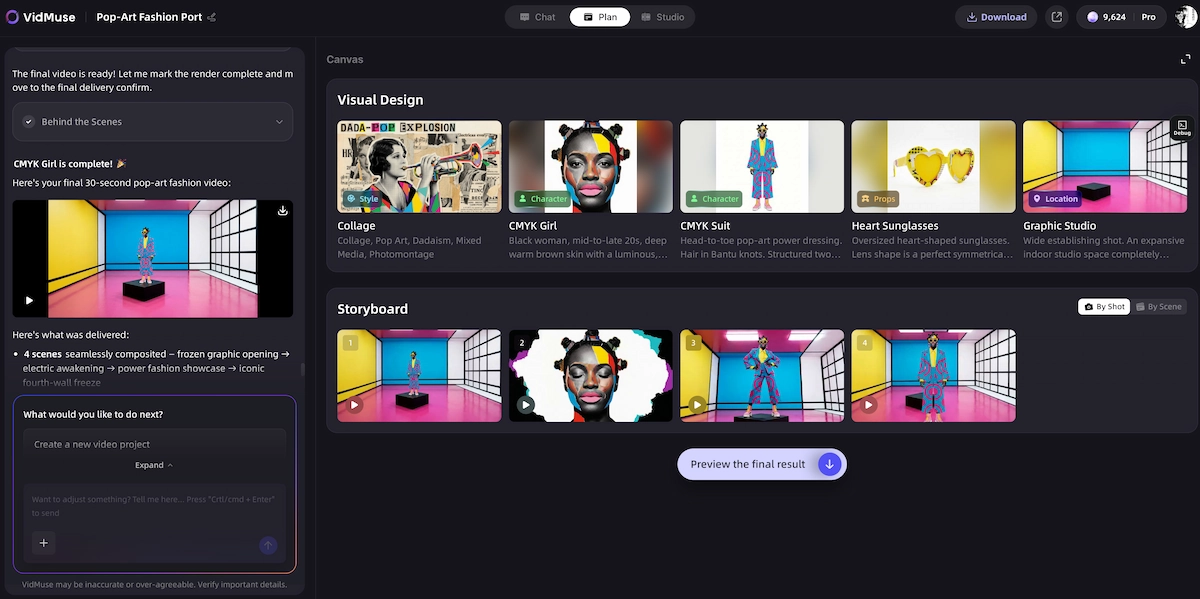
This is where VidMuse fills the gap that Ideogram 4.0 leaves open. VidMuse has no direct integration with Ideogram, but it operates as a full AI Director platform: its agent-based logic plans an entire music video — scenes, shots, storyboards — rather than executing one-shot prompts.
VidMuse generates both images and video simultaneously as part of a structured creative workflow, which means you get the full visual production pipeline in one place.
The core VidMuse workflow maps directly onto what creative professionals need after image generation:
- Creative Brief → define the visual language and mood
- Reference Generation → generate reference frames using VidMuse's built-in image models (including Seedream 4.5, Nano Banana Pro, Seedream 5.0 Lite, Flux.2-Pro, GPT Images 2.0, and Midjourney V7)
- Scene & Shots List → the agent breaks your concept into a structured shot list
- Storyboard → visual frames for each shot, generated and editable
- Video Generation → rendered using models like Kling V3.0 Pro, Veo 3.1, Seedance 2.0 Pro, or Hailuo 2.3 Pro
For indie musicians working with Suno AI tracks (which VidMuse supports natively, allowing original music creation without leaving the platform), this means going from a generated track to a full music video — styled, shot-listed, and rendered — entirely within one platform.
VidMuse 2.0 adds Shot Refine by Quoting, a Timeline Editor, and an Asset Library & Memory — tools that let you refine individual shots, manage visual consistency across scenes, and maintain a reusable asset library. These are the features that distinguish a complete MV production workflow from a single-image generator.
If you're an artist who uses Ideogram 4.0 for cover art, lyric graphics, or poster assets, VidMuse is the natural next step for turning those assets into motion.
→ Learn more about the AI music video generator and how VidMuse handles the full Music to video ai pipeline.
Create Your AI Video in Minutes
Turn your idea into a video with VidMuse.
Common Mistakes When Prompting Ideogram AI
Using plain prose instead of structured prompts.
Ideogram 4.0 is trained on JSON captions. Free-form prose works, but structured prompts with a style block and compositional breakdown give significantly better layout adherence. Take time to specify lighting, medium, color palette, and element placement separately.
Skipping bounding boxes for text-heavy layouts.
If you're generating a poster, packaging, or anything with multiple text elements, bounding boxes are not optional — they're the mechanism that keeps text in the right place. Without them, the model uses learned layout heuristics that may not match your brief.
Over-specifying styles in natural language.
Color palettes are more reliably controlled via hex codes in the JSON style block than through descriptive language like "muted earth tones." Use both — hex codes for precision, prose for atmosphere.
Assuming open weights means production-ready without filtering.
The open weights ship with safety mitigations, but any redistribution or custom deployment requires equivalent screening. Do not assume the base weights alone are sufficient for consumer-facing products without adding your own moderation layer.
Expecting the same text layout every generation without seeds.
Results vary across generations even with identical prompts. For reproducible outputs, specify the seed parameter. Benchmarks from Ideogram's team use seed = 0 as a baseline.
Requesting video from a still-image model.
Ideogram 4.0 generates still images only. If your end goal is motion content — a music video, a social reel, an animated logo — you need a dedicated video generation platform downstream of Ideogram.
FAQ
What is Ideogram 4.0?
Ideogram 4.0 is a 9.3B parameter open-weight text-to-image model released by Ideogram AI on June 3, 2026. It is the company's first open-weight foundation model, available on Hugging Face and GitHub. It is designed for design-grade image generation with strong text rendering, bounding-box layout control, and structured JSON prompting.
How does the Ideogram AI image generator handle text in images?
Ideogram AI image generator has been the benchmark for in-image typography since launch. In Ideogram 4.0, text is placed using typed text elements in the JSON prompt — each carrying the literal string and a separate visual description for styling. The model scores 0.97 on X-Omni English OCR accuracy, making it the best open-weight model for legible, correctly rendered in-image text at its parameter size.
Is Ideogram 4.0 free to use?
The Ideogram app has a free tier for basic generations. The API uses per-image pricing with no subscription: Turbo at $0.03/image, Default at $0.06/image, and Quality at $0.10/image. The open weights can be downloaded for free from Hugging Face, though commercial deployment at scale requires a commercial license from Ideogram.
How do I use Ideogram 4.0 in ComfyUI?
Ideogram 4.0 open weights (fp8 and nf4 checkpoints) are available on Hugging Face. The nf4 checkpoint fits on a single 24 GB GPU. ComfyUI integration is community-developed and based on the standard single-stream DiT pipeline structure. Check the GitHub repository at github.com/ideogram-oss/ideogram-4 for the latest inference code and community node updates.
How does Ideogram 4.0 compare to Ideogram 2?
Ideogram 2 was an earlier closed model iteration. Ideogram 4.0 represents a generational leap: open weights (a first for the platform), bounding-box layout control, structured JSON prompting as a native input format, native transparency support, and significantly higher scores across text rendering, layout control, spatial reasoning, and prompt alignment benchmarks.
What is the difference between Ideogram 4.0 and GPT Image 2?
GPT Image 2 ranks higher in overall designer preference (1141 vs. 1062 ELO) but is closed-source and cannot be self-hosted, fine-tuned on proprietary data, or deployed behind a private firewall. Ideogram 4.0 offers open weights, a commercial license, and enterprise deployment flexibility — making it the better choice for teams with brand consistency, data privacy, or infrastructure cost requirements.
Can Ideogram 4.0 generate video?
No. Ideogram 4.0 is a still-image generation model. It does not produce video, animation, or motion content. For workflows that need both high-quality stills and video generation — such as music video production — you would need a platform like VidMuse that handles image and video generation simultaneously within a structured creative workflow.
In The End
Ideogram 4.0 is the most capable open-weight image model available as of mid-2026. Its combination of near-perfect text rendering (0.97 OCR accuracy), bounding-box layout control, structured JSON prompting, flexible resolution, and open weights makes it the clear choice for design professionals, brand teams, developers, and enterprises who need image generation they can actually depend on — not just demo.
For creators whose work goes beyond still images — musicians producing MVs, marketers building video campaigns, indie artists turning Suno tracks into visual stories — the pipeline starts with image generation and ends with motion. VidMuse connects those two ends: an AI Director platform that plans, generates, and renders full music videos using its own suite of image and video models, with Suno AI music creation built in.
Start with Ideogram 4.0 for your stills. Build the rest of your visual story with VidMuse AI.
Create Your AI Video in Minutes
Turn your idea into a video with VidMuse.

Written By
VidMuse Team
Continue Reading
Latest blog posts related to AI video creation.
PixVerse V6 x VidMuse AI: Model Guide and Video Workflow
PixVerse V6 review and VidMuse integration guide. Capabilities, 15s 1080p video, prompt tips, model comparison, pricing, and how to use V6 in VidMuse workflows.
FLUX 3: What It Is, Capabilities, and How to Access It
FLUX 3 is Black Forest Labs' multimodal AI model for image, video, audio, and action. Full guide: capabilities, FLUX 3 vs FLUX 2, availability, and pricing.
Free Music Visualizer: 10 Best Free Tools in 2026
Compare 10 best free music visualizers in 2026. Waveform tools, AI music video makers, watermark policies, export limits, and which tool fits your workflow.