
Kling O1 helps creators use text, images, elements, and video references to generate or modify short video shots, while VidMuse AI turns that capability into a planned music-video workflow: creative brief, references, shot list, storyboard, generation, and refinement.
In practical terms, Kling O1 is useful for reference-led AI music video generator workflows, and VidMuse helps creators use it with more structure than a one-shot prompt. Kling AI describes O1 as a unified multimodal video model based on Multi-modal Visual Language, while the VidMuse brief positions VidMuse as an “AI Director” for audio-visual creation.
Key Takeaways
Kling O1 x VidMuse AI gives creators a structured path from song concept to shot-based music video production.
- Kling O1 is best understood as a multimodal video model, not just a text-to-video tool. It can work with text, images, elements, and video references in workflows that include generation and modification.
- VidMuse adds planning around generation. Its core workflow moves from Creative Brief to Reference Generation, Scene & Shots List, Storyboard, and Video Generation, which helps creators avoid random prompting.
- The strongest use case is reference-led music video creation. Indie musicians can use character, scene, outfit, mood, or performance references to keep visual ideas more consistent across short shots.
- Kling O1 is not automatically the right model for every shot. Fast social edits, low-risk variations, or cost-sensitive drafts may fit faster VidMuse options, while complex continuity shots benefit from more controlled planning.
- Prompt quality still matters. Strong results depend on clear subject, action, environment, camera, lighting, duration, and continuity instructions.
What Kling O1 Means for AI Video Creation
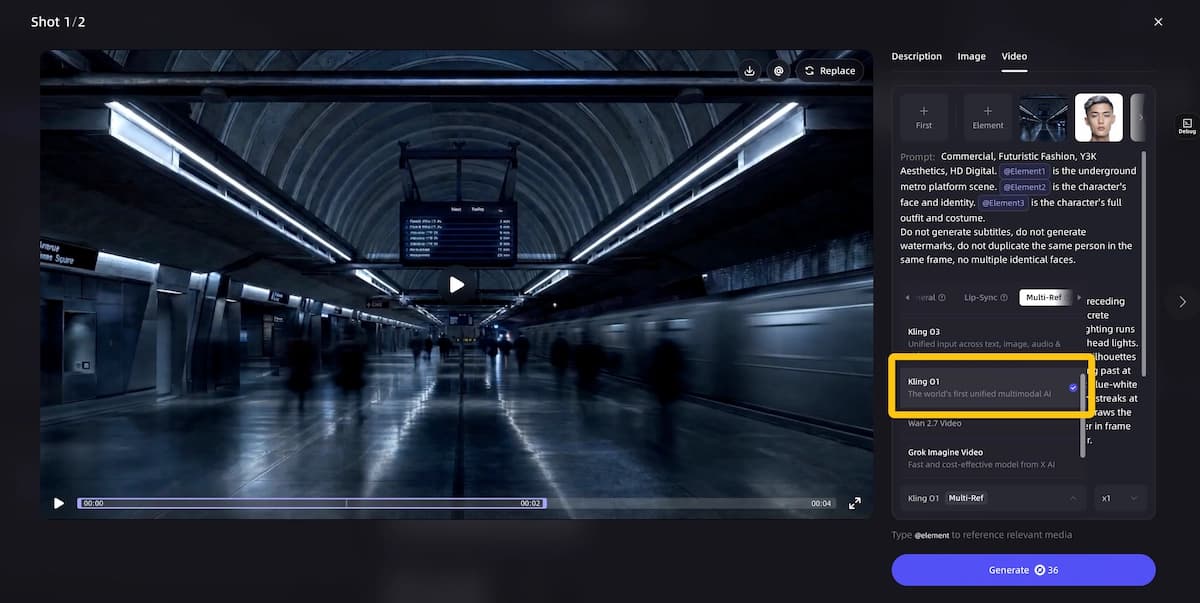
Kling O1 combines multimodal inputs and video editing tasks into a single creative model for short-form visual generation.
Kling AI’s official O1 guide describes Kling AI Video O1 as a unified multimodal video model that uses natural language to combine videos, images, elements, and other descriptions. The same guide lists capabilities such as reference-based generation, text-to-video, start/end frame interpolation, video inpainting, transformation, stylization, and video extension.
For creators, the important shift is not only “better prompts.” The shift is that the creative input can become more like a production board:
- A still image can define a character, outfit, prop, or environment.
- A video clip can guide motion, camera movement, or previous/next shot context.
- Text can explain the emotion, action, style, lighting, and edit request.
- Elements can help preserve recurring subjects across shots.
This matters because music videos are rarely one isolated clip. Even a 30-second MV usually needs a visual hook, repeated motifs, performance moments, transitions, and a coherent mood. A model that accepts multiple input types can support that kind of structure more naturally than a prompt-only workflow.
Kling O1 also supports short shot durations. Kling’s official documentation states that O1 supports 3–10 second generations, which maps well to music-video pacing: intro shots, beat drops, chorus cuts, close-ups, and transition clips.
That does not mean O1 replaces editing, storyboarding, or creative direction. It means the model can become one strong generation and modification layer inside a broader workflow.
Why Kling O1 Matters for VidMuse AI Workflows
Kling O1 matters to VidMuse AI because VidMuse is built around directing a complete audiovisual project rather than firing one isolated prompt.
VidMuse is positioned as an AI Director for music video production. Its workflow starts with a Creative Brief, then moves through Reference Generation, Scene & Shots List, Storyboard, and Video Generation. That structure is important because AI video quality often depends less on one “magic prompt” and more on consistent planning.
For example, a creator making a music video from a Suno or Udio track may need to answer several questions before generating any clip:
- What is the story or emotional arc?
- Is the video a Story MV, Abstract MV, Performance MV, Viral Short, TVC, or Explainer?
- Which shots need a recurring character or environment?
- Which moments need performance energy, surreal imagery, or product focus?
- Which assets should be reused across the timeline?
Kling O1 can support those decisions because it works with references and video transformations. Kling’s guide says O1 supports image/element reference, input-based modification, video reference, text-to-video, and start/end frames.
VidMuse adds another layer: it helps creators organize these capabilities into a music-video plan. In other words, Kling O1 can generate or modify shots; VidMuse helps decide what those shots should be, where they belong, and how they connect to the song.
How to Use Kling O1 with VidMuse AI
Create Your AI Video in Minutes
Turn your idea into a video with VidMuse.
A reliable Kling O1 workflow starts with the song concept, not the prompt.
Start with the Creative Brief
Define the song, genre, platform, audience, visual style, length, and must-keep references before selecting a model.
Build Reference Assets
Create artist, outfit, prop, scene, color, and performance references that should stay consistent across shots.
Create a Scene and Shot List
Break the song into short visual units with clear duration, role, and emotional purpose.
Storyboard Before Generation
Clarify subject, action, camera movement, lighting, references, and refinement notes for each planned shot.
Generate and Refine
Test high-risk shots first, then use Shot Refine by Quoting to fix one visual problem at a time.
Assemble in the Timeline Editor
Arrange clips around intros, verses, choruses, drops, hooks, and final accents so the video feels music-first.
The best way to use Kling O1 inside VidMuse AI is to treat each generated clip as a planned shot in a larger music video. This is especially useful for indie musicians, lifestyle creators, and SMB marketers who need polished visuals but do not have a full production team.
Step 1: Start with the Creative Brief
The Creative Brief should define the video before any model is selected.
Include:
- Song title or campaign theme
- Genre and emotional tone
- Target platform, such as YouTube, TikTok, Instagram Reels, or Shorts
- Primary audience
- Visual style, such as cinematic, dreamy, cyberpunk, documentary, fashion, abstract, or performance-led
- Length target, usually 30 seconds to 2 minutes for VidMuse music video production
- Must-keep references, such as artist identity, logo, product, prop, location, or color palette
A weak brief says: “Make a cool video for this song.”
A stronger brief says: “Create a 45-second neon-night performance MV for an indie synth-pop track. The artist appears as a reflective city wanderer. Use rain, glass reflections, slow push-ins, and quick chorus cuts. Keep the jacket, hairstyle, and blue-magenta palette consistent.”
Step 2: Build Reference Assets
Reference assets should define what must remain consistent.
Kling O1’s official guide says the model supports uploading reference images or elements such as characters, items, outfits, and scenes. It also describes multi-angle element building as a way to provide more reference information.
For VidMuse users, this means reference generation should not be treated as decoration. It should create the visual anchor for the MV.
Useful references include:
- Artist portrait or avatar
- Outfit and styling sheet
- Key prop, such as guitar, microphone, car, flower, phone, or product
- Main scene, such as rooftop, bedroom, studio, desert road, club, or street
- Color and lighting board
- Album-cover-inspired image
- Performance pose or camera-framing reference
- Image-reference assets from tools such as Nano Banana Pro
For music videos, the most important reference decision is usually the subject anchor: who or what must remain recognizable across the video.
Step 3: Create a Scene and Shot List
The Scene & Shots List turns the song into short visual units.
Because Kling O1 supports 3–10 second video generations, each shot should have a clear job.
A simple 45-second MV might use:
- Opening atmosphere shot, 5 seconds
- Artist close-up, 5 seconds
- Performance wide shot, 6 seconds
- Symbolic cutaway, 4 seconds
- Chorus hero shot, 8 seconds
- Motion transition, 4 seconds
- Emotional bridge shot, 6 seconds
- Final hook shot, 7 seconds
This structure gives VidMuse a better basis for storyboarding and gives Kling O1 more precise generation targets.
Step 4: Storyboard Before Generation
The storyboard should clarify camera, mood, and continuity.
A useful storyboard entry includes:
- Shot number
- Duration
- Lyric or timestamp
- Subject
- Action
- Camera movement
- Environment
- Lighting
- Reference assets
- Model choice
- Notes for refinement
For example:
Shot 05 — Chorus Hero Shot
Duration: 8 seconds
Subject: artist in silver jacket
Action: walking toward camera through rain-lit alley
Camera: slow dolly backward, slight handheld motion
Environment: neon city street, wet pavement, reflections
Lighting: blue and magenta backlight
Reference: artist portrait, jacket element, alley mood board
Generation model: Kling O1
Refinement note: preserve face, jacket shape, and color palette
This kind of shot instruction is easier for humans to review and easier for AI systems to execute consistently.
Step 5: Generate the First Pass
The first generation pass should test visual direction before scaling the full music video.
Do not generate every shot immediately. Start with the highest-risk shots:
- Main character shot
- Chorus hero shot
- Any shot requiring product, outfit, or prop consistency
- Any shot using a complex camera move
- Any shot that defines the visual language for the rest of the MV
This first pass helps determine whether Kling O1 is the right model for the entire sequence or only for selected shots.
Step 6: Refine by Quoting Specific Shot Issues
Shot refinement should focus on one visual problem at a time.
VidMuse 2.0 includes Shot Refine by Quoting, which is useful when a generated shot is close but not final. Instead of rewriting the whole prompt, the creator can quote the part of the shot that needs revision and refine it.
Good refinement requests are narrow:
- “Keep the same camera move, but make the jacket closer to the reference.”
- “Preserve the neon alley, but remove the extra background figures.”
- “Keep the pose and timing, but change the lighting from harsh red to soft blue.”
- “Make the final two seconds feel more like a chorus payoff.”
Kling O1’s own transformation examples include editing actions such as removing content, changing subjects, modifying backgrounds, restyling video, recoloring elements, and changing weather or environment.
Step 7: Assemble in the Timeline Editor
The Timeline Editor should turn generated clips into a music-first sequence.
A music video is judged by how well it feels synced to the track. After generation, arrange clips around:
- Intro
- Verse
- Pre-chorus
- Chorus
- Beat drops
- Lyric hooks
- Instrumental breaks
- Final visual button
VidMuse 2.0’s Timeline Editor fits this step because it gives creators a place to evaluate pacing, continuity, and shot order after generation.
Kling O1 Prompt Framework for Music Videos
Kling O1 prompts work best when they describe the shot as a cinematic instruction rather than a vague style request.
A strong Kling O1 prompt for VidMuse should include seven parts:
- Subject
- Action
- Scene
- Camera
- Lighting
- Style
- Continuity constraint
A practical structure:
“Use [reference/element] as the main subject. Generate a [duration] music video shot where [subject] [action] in [environment]. Camera: [movement and framing]. Lighting: [lighting]. Style: [visual style]. Keep [identity, outfit, prop, color, or scene detail] consistent with [reference].”
Kling O1 Prompt Template for a Performance MV
Kling O1 can support performance-led shots when the prompt clearly separates subject, movement, and camera.
Template:
“Use the artist reference as the lead performer. Generate a 6-second performance MV shot where the artist sings directly to camera in a dim studio with moving light beams. Camera starts as a medium shot and slowly pushes into a close-up. Use soft cinematic contrast, subtle haze, and blue rim light. Keep the artist’s hairstyle, jacket, and facial structure consistent with the reference.”
Use this when the artist identity matters more than abstract visuals.
Kling O1 Prompt Template for an Abstract MV
Kling O1 can support abstract music videos when visual metaphors are tied to musical moments.
Template:
“Generate a 5-second abstract MV shot for an emotional electronic chorus. A glass heart floats above a black ocean, pulsing gently to the rhythm. Camera circles slowly around the object. Lighting is silver-blue, reflective, and dreamlike. Keep the scene minimal, elegant, and cinematic.”
Use this when the song’s mood matters more than literal storytelling.
Kling O1 Prompt Template for a Story MV
Kling O1 can support narrative music videos when each shot has a clear before-and-after relationship.
Template:
“Based on the previous shot reference, generate the next 7-second shot: the main character exits the subway station into heavy rain, pauses under a flickering streetlight, and looks across the road as if recognizing someone. Camera follows from behind, then shifts to a side close-up. Keep the same coat, hair, and lonely nighttime mood.”
This approach works especially well when VidMuse has already created a scene list and storyboard.
Kling O1 Prompt Template for SMB Marketing
Kling O1 can support commercial visuals when product and scene references are explicit.
Template:
“Use the product image as the hero object. Generate a 5-second lifestyle ad shot where the product sits on a cafe table beside a notebook and headphones. Morning sunlight moves across the table. Camera begins in a close-up and slowly pulls back to reveal a young creator writing lyrics. Keep the product shape, logo placement, and color accurate to the reference.”
Use this for creator brands, music tools, merch, local businesses, or campaign clips where recognizability matters.
Use Cases: When Kling O1 x VidMuse AI Fits
Kling O1 x VidMuse AI fits projects that need visual consistency, music timing, and planned shot variation.
Indie Musicians
Indie musicians can use VidMuse and Kling O1 to turn a track into a visual story without starting from a blank prompt.
Good fits include:
- Suno to video concepts
- Udio track visualizers
- Single-release teasers
- 30-second chorus clips
- Lyric-driven short videos
- Artist avatar or persona videos
- Low-budget cinematic MV drafts
VidMuse is especially relevant when the musician needs a complete creative direction, not only isolated clips.
Lifestyle Creators
Lifestyle creators can use Kling O1 x VidMuse AI to create mood-led short videos around identity, movement, and visual consistency.
Good fits include:
- Fashion reels
- travel-style montages
- wellness clips
- day-in-the-life cinematic shorts
- creator intro videos
- personal brand trailers
Kling O1 is useful when the creator wants a recurring look, outfit, prop, or setting across multiple clips.
SMB Marketing Teams
Small businesses can use VidMuse to plan a campaign and Kling O1 to generate short product, lifestyle, or explainer shots.
Good fits include:
- product showcase videos
- brand music videos
- launch teasers
- short TVC-style clips
- social ads
- event promos
- local service explainers
This workflow works best when the business has clear product images, brand colors, and a defined campaign message.
When This Is Not the Right Approach
Kling O1 x VidMuse AI is not the right approach when speed matters more than continuity.
Consider a faster or simpler model when:
- You only need rough ideation
- The shot does not need recurring character consistency
- You are testing many low-risk variations
- You need a quick vertical background loop
- You are making a simple lyric video
- You do not have reference assets yet
- The concept is still too vague to storyboard
In those cases, VidMuse Lite or other fast model options may be more practical for early exploration.
Decision Framework: Kling O1, Studio Mode, and Lite Mode
The right VidMuse workflow depends on consistency needs, production risk, and how polished the final video must feel.
VidMuse includes Studio as its flagship, quality-focused generation mode and Lite as a Seed-series option for faster, cost-efficient work. The model matrix in the product brief includes Kling O1 among VidMuse’s video generation options, alongside other models such as Seedance, Kling, Veo, Hailuo, Vidu, Wan, Grok Imagine Video, Pixverse, and others.
Use Kling O1 in a Studio-style workflow when:
- The MV needs consistent subjects across shots
- The same character, outfit, prop, or environment appears repeatedly
- The clip is part of a chorus, hero moment, or final deliverable
- The shot requires reference images or video input
- You need transformation or modification, not only generation
- The scene has multiple visual requirements in one prompt
Use Lite or faster draft workflows when:
- You are brainstorming visual directions
- The shot is a background texture or filler transition
- The video is for rough review
- You need multiple low-stakes options quickly
- Consistency is less important than speed
A practical hybrid workflow is often strongest:
- Use Lite for early visual exploration.
- Use VidMuse reference generation to lock the style.
- Use Studio with Kling O1 for key shots.
- Use Shot Refine by Quoting to fix targeted issues.
- Use the Timeline Editor to evaluate the complete MV.
This keeps the workflow efficient without treating every shot as equally complex. For a broader buyer-intent comparison, see the best AI music video generator for Suno workflow.
VidMuse Recommendation for Kling O1 Music Videos
VidMuse works best as the planning layer around Kling O1 when a project needs more than one impressive clip.
For music videos, the recommended VidMuse workflow is:
- Start with the song. Define genre, tempo, emotion, lyrics, and target platform.
- Choose a template type. Story MV, Abstract MV, Performance MV, Viral Short, TVC, or Explainer.
- Create references. Build artist, character, prop, scene, and color references before generating final clips.
- Plan the shot list. Assign each clip a duration, role, and visual purpose.
- Select Kling O1 for continuity-sensitive shots. Use it where references, transformations, or previous/next shot context matter.
- Refine by quoting. Fix specific issues without losing the whole shot direction.
- Assemble in the Timeline Editor. Review pacing against the music.
- Store reusable assets. Use the Asset Library & Memory for future visuals, campaigns, or follow-up releases.
This is the core difference between prompting and directing. Prompting asks for a clip. Directing builds a system of decisions that makes the full MV easier to control.
Before adding a demo video, show the viewer how the same song moves from Creative Brief to references, shot list, storyboard, Kling O1 generation, and timeline refinement. The most useful demo is not only the final result; it is the decision path that produced it.
The key takeaway from the demo should be simple: Kling O1 generates or modifies visual shots, while VidMuse organizes those shots into a coherent music-video production workflow.
Common Mistakes and Troubleshooting
Most Kling O1 music video problems come from unclear references, overloaded prompts, or missing shot intent.
Mistake 1: Starting with a Vague Prompt
A vague prompt gives the model too much creative responsibility.
Weak prompt:
“Make an emotional music video with a singer in the city.”
Better prompt:
“Generate a 6-second close-up performance shot of the artist walking through a rain-lit city street at night. Camera slowly tracks backward. Keep the silver jacket and blue-magenta lighting consistent with the reference. Mood is lonely but cinematic.”
Mistake 2: Asking One Shot to Do Too Much
Kling O1 can support combined tasks, but a music video shot still needs focus. Kling’s guide notes that O1 supports combinations such as adding a subject while modifying the background or changing style while using elements.
That does not mean every prompt should include five major changes. For production reliability, split complex ideas into staged refinements:
- Generate the base shot.
- Refine subject consistency.
- Adjust background or weather.
- Restyle only if the structure works.
- Assemble and evaluate in the timeline.
Mistake 3: Treating References as Optional
References are not optional when identity matters.
Use references when the video needs:
- a recognizable artist
- a recurring avatar
- consistent outfit
- product accuracy
- repeated prop
- stable environment
- brand colors
Without references, each shot may drift visually.
Mistake 4: Ignoring Music Timing
A visually strong shot can still fail if it ignores the music.
Before generating, mark:
- beat drop
- chorus start
- lyric hook
- emotional turn
- transition point
- final accent
Then decide which visual action belongs at each timestamp.
Mistake 5: Refining Everything at Once
Broad revisions often erase what worked.
Instead of saying, “Make it better and more cinematic,” quote the problem:
- “The face changed too much in the final two seconds.”
- “The camera move is good, but the background is too bright.”
- “Keep the same pose, but make the lighting softer.”
- “The prop should stay in the right hand.”
Small refinements are easier to evaluate and less likely to disrupt the whole shot.
FAQ
This FAQ answers the conversational questions creators ask before using Kling O1 with VidMuse AI.
How do I use Kling O1 with VidMuse AI for a music video?
Use VidMuse AI to plan the music video first: creative brief, references, scene list, storyboard, and shot timing. Then use Kling O1 for shots that need multimodal input, such as artist references, props, previous/next shot context, or video transformation. Finish by refining selected clips and arranging them in the VidMuse Timeline Editor.
Is Kling O1 good for turning Suno songs into videos?
Kling O1 can be useful for turning Suno songs into videos when the project needs short, reference-led visual shots. VidMuse adds the missing production layer by helping convert the song’s mood, lyrics, and structure into a storyboard and shot list. The strongest results come from pairing the audio concept with clear references and shot-level prompts.
What is the best Kling O1 prompt structure for AI music videos?
A strong Kling O1 prompt for AI music videos includes subject, action, scene, camera movement, lighting, style, duration, and continuity constraints. For example, define who appears, what they do, where they are, how the camera moves, and which reference details must stay consistent. Avoid relying on style words alone.
Can Kling O1 keep characters consistent across multiple music video shots?
Kling O1 is designed to support reference-led consistency using images, elements, and video inputs, according to Kling’s official guide. For a music video, consistency still depends on the quality of the references and the clarity of the prompts. Use multi-angle references and repeat the key continuity requirements in each important shot.
When should I use Kling O1 instead of a faster AI video model in VidMuse?
Use Kling O1 when the shot requires reference images, subject continuity, video transformation, previous/next shot context, or precise visual modification. Use faster options for rough ideation, background clips, simple lyric visuals, or low-risk social variations. A hybrid workflow often gives the best balance: draft quickly, then reserve Kling O1 for hero shots.
Can VidMuse create a complete music video workflow before Kling O1 generation?
Yes. VidMuse is designed around a staged workflow: Creative Brief, Reference Generation, Scene & Shots List, Storyboard, and Video Generation. That structure helps creators decide which shots should use Kling O1 and which can use faster or simpler models. It also makes review easier because each shot has a defined role.
What are the limits of Kling O1 for music-to-video AI workflows?
Kling O1 is still a generation and modification model, so it should not replace creative direction, music timing, rights review, or human quality control. Some shots may require multiple passes, especially when identity, product accuracy, hand details, or complex interactions matter. VidMuse helps reduce waste by planning shots before generation and refining specific problems afterward.
Conclusion
Kling O1 x VidMuse AI is strongest when creators treat AI video as direction, not guessing.
Kling O1 gives creators a multimodal way to generate and modify short visual shots using text, images, elements, and video references. VidMuse turns that capability into a complete production flow for music videos, lifestyle content, and SMB marketing: brief, references, shot list, storyboard, generation, refinement, and timeline assembly.
For indie musicians, the practical value is clear. A track made with Suno, Udio, or another music tool can become a structured visual project instead of a random set of clips. For creators and small teams, the benefit is control: clearer references, better shot intent, and a repeatable way to move from idea to publishable video.
Start with the song. Plan the visual arc. Use Kling O1 where references and continuity matter. Use VidMuse to direct the full MV.
Create Your AI Video in Minutes
Turn your idea into a video with VidMuse.

Written By
VidMuse Team
Continue Reading
Latest blog posts related to AI video creation.
Video to Video Maker: VidMuse AI Is Now Live
VidMuse's video to video maker lets you remix, recreate, and transform any video into a polished ad or MV using AI—no editing skills required.
Music AI: Best Tools & How They Work in 2026
Discover the best music AI tools of 2026—from free generators to pro platforms—and how to turn your AI tracks into stunning music videos with VidMuse.
VidMuse Launches AI Ad Generator for Product Video Ads — From One Image to a Finished Video Ad
VidMuse's new Product Ad Video feature turns a single product image into a storyboarded, music-synced, remix-ready ad for TikTok, Reels, and Shorts.