

Vidu Q3 is a native audio-video AI model for creating short narrative clips, and inside VidMuse AI it is best used as a shot-generation option after the MV concept, references, scene list, and storyboard are already planned.
Use Vidu Q3 when your music video needs expressive motion, synchronized sound, dialogue or ambience, and a complete short scene rather than a silent visual draft; Vidu’s official page says Q3 can generate visuals, dialogue or voiceover, sound effects, and music together, with up to 16 seconds per generation.
Create Your AI Video in Minutes
Turn your idea into a video with VidMuse.
Key Takeaways
- Vidu Q3 is strongest when a clip needs audio and picture together. It is designed for native audio-video generation, including dialogue, voiceover, sound effects, and music in one output.
- VidMuse AI should handle the music video plan before Vidu Q3 renders the shot. A better workflow is Creative Brief → Reference Generation → Scene & Shots List → Storyboard → Video Generation, instead of asking one prompt to create a complete MV from scratch.
- Vidu Q3 vs Seedance 2.0 is not a single winner question. Seedance 2.0 emphasizes unified multimodal audio-video generation, four input modalities, and complex motion control, while Vidu Q3 is especially relevant for short narrative shots where synchronized sound and emotional timing matter.
- Vidu Q3 vs Kling 3.0 depends on control needs. Kling 3.0 supports native audio, multi-shot output, element consistency, multilingual support, and up to 15-second output, making it a strong choice for structured multi-character or multilingual scenes.
- Vidu Q3 is not a replacement for editing. For a 30-second to 2-minute MV, creators still need shot selection, continuity checks, timeline assembly, lyric pacing, and final polish.
What Is Vidu Q3?
Vidu Q3 is an AI video generation model built for native audio-video storytelling. In plain language, it can generate a short clip where the visuals and sound are created together, rather than producing a silent video that needs separate audio work afterward. Vidu’s FAQ says Q3 can output visuals plus dialogue or voiceover, sound effects, and music in a single generation, with a maximum length of 16 seconds.
That matters because many AI video workflows still feel like animation tests. They look interesting, but they do not yet feel like a complete scene. A music video creator often needs a shot to carry mood, rhythm, camera motion, performance energy, and sound design at the same time.
For VidMuse users, Vidu Q3 should be understood as a scene-level generation model, not a full MV strategy by itself. The model can create compelling clips, but the creative value comes from using it inside a planned workflow: define the song concept, build references, decide shot order, then generate scenes that support the music.
Vidu’s official API platform also lists core creation modes such as Image to Video, Reference to Video, Start End to Video, and Text to Video, which makes Q3 relevant for both prompt-based and asset-led workflows. For broader context on Vidu’s platform, see the Vidu AI review.
2026 AI Video Model Comparison Table: Where Vidu Q3 Fits
The 2026 AI video model landscape should be evaluated by shot type, not by brand alone. As of June 2026, leading AI video models differ in native audio, multimodal input support, image-to-video quality, narrative control, editing depth, commercial readiness, and cost-access tradeoffs. For VidMuse users, this comparison helps decide when to use Vidu Q3 and when another model may be better for a specific music video shot.
| Model | Company / Team | Core Strengths | Best Fit in a VidMuse Workflow | Source |
|---|---|---|---|---|
| Seedance 2.0 | ByteDance Seed / Dreamina / Doubao ecosystem | Unified multimodal audio-video generation model supporting text, image, audio, and video inputs; one of the strongest 2026 first-half models for broad multimodal creation. | Use for complex motion, multimodal references, video extension, and high-control music video shots. | ByteDance Seed |
| HappyHorse 1.0 | Alibaba Token Hub / ATH | Alibaba’s limited-beta cinematic video generation model, available through the HappyHorse website, Alibaba Cloud Model Studio API, and Qwen App. | Use for cinematic social videos, advertising-style clips, e-commerce videos, and short-form creative testing. | Alibaba Cloud |
| Kling 3.0 / Kling 3.0 Omni | Kuaishou Kling AI | Supports native audio, multi-shot narratives, multi-character coreference, multilingual generation, and up to 15-second output. | Use for multi-character scenes, dialogue cuts, storyboard-driven prompts, and structured narrative MV sections. | Kling AI |
| SkyReels V4 | SkyReels / Skywork AI | Unified multimodal video-audio generation, inpainting, and editing model; supports text, image, video, mask, and audio references, with up to 1080p, 32 FPS, 15-second synchronized-audio generation in the paper. | Use for research-oriented video-audio generation, repair, editing, and multimodal experiment workflows. | arXiv |
| Google Veo 3.1 / Veo 3.1 Lite | Google DeepMind | Google’s flagship video model family, focused on video plus native audio, stronger control, consistency, and access through Gemini, Flow, and API workflows. | Use for premium realism, cinematic shots, image-to-video scenes, and physics-sensitive music video moments. | Google DeepMind |
| Gemini Omni Flash | Google DeepMind | Google’s newer “any input to video” direction, emphasizing physics understanding, world knowledge, storytelling, and conversational video creation or editing. | Use for flexible input-to-video workflows, concept exploration, and reference-led scene generation. | Google DeepMind |
| Runway Gen-4.5 | Runway | Runway’s flagship model for high visual fidelity, realistic cinematic output, prompt adherence, temporal consistency, and creative control. | Use for professional creative production, cinematic previsualization, stylized scenes, and polished hero shots. | Runway |
| Luma Ray3.2 / Ray3.14 | Luma AI | Ray3.2 focuses on control, continuity, and cinematic direction; Ray3.14 emphasizes native 1080p, faster generation, lower cost, and more stable production workflows. | Use for controlled camera direction, continuity-heavy shots, product swaps, relighting, and production pipeline tests. | Luma Labs |
| Vidu Q3 / Q3 Pro | ShengShu / Vidu | Native audio-video generation for narrative clips; can generate visuals, dialogue or voiceover, sound effects, and music together, with up to 16 seconds per generation. | Use for emotional music video scenes, short narrative beats, dialogue-like moments, ambience, and expressive character shots. | Vidu |
| xAI Grok Imagine Video 1.5 Preview | xAI | Image/video-led preview model; current documentation says it supports image and video modalities and does not support text-to-video. | Use for turning existing images into motion, not as a full text-to-video music video generator. | xAI Docs |
| MiniMax Hailuo 2.3 | MiniMax / Hailuo AI | Upgrade over Hailuo 02 with stronger complex body motion, stylization, facial micro-expressions, motion-command response, and visual stability. | Use for dance shots, expressive character performance, stylized scenes, and movement-heavy short clips. | MiniMax |
| Adobe Firefly Video Model | Adobe | Commercial creative workflow model supporting text-to-video, image-to-video, and AI video editing, with Adobe positioning Firefly outputs for commercial use. | Use for brand-safe creative work, marketing assets, Adobe ecosystem workflows, and commercially cautious projects. | Adobe |
| Pika 2.5 / Pika 2.x | Pika | Short-form video and creative-effects toolset, with Pika 2.5 and features such as Pikaffects, Pikascenes, and Pikaswaps. | Use for fast social clips, visual effects, short-form experiments, and creator-friendly video edits. | Pika |
How to choose the right model for a VidMuse music video
VidMuse should route each shot to the model that best matches the creative need. A complete music video does not need to rely on one model from start to finish. A practical VidMuse workflow may use Vidu Q3 for emotional audio-video scenes, Seedance 2.0 for multimodal reference shots, Kling 3.0 for multi-character storytelling, Veo 3.1 for premium realism, and Adobe Firefly when commercial-safe creative workflows matter.
For this article, the key takeaway is simple: use Vidu Q3 when the shot needs compact narrative timing, native audio-video output, dialogue, ambience, or emotional scene continuity. Use the wider VidMuse model matrix when another model better fits the shot’s motion, control, realism, speed, editing, or compliance requirement. For model-based video generation strategy, compare the best AI music video generator guide.
Why Vidu Q3 Matters for AI Music Videos
Vidu Q3 matters because music video creation depends on timing, emotion, and continuity. A good MV is not just a sequence of beautiful clips. It needs visual rhythm, changing intensity, repeated motifs, and shots that match the structure of the song.
For indie musicians, this is where AI video can become practical. A creator may already have a Suno AI or Udio track, a cover image, a lyric idea, and a rough aesthetic. The missing piece is usually the video production system: who plans the scenes, keeps characters consistent, chooses which model to use, and assembles the shots into something that feels intentional. A lighter starting point may be a free AI music video generator, but the workflow ceiling is different.
Vidu Q3 helps when a specific shot needs:
- A short narrative beat with beginning, middle, and end
- A vocalist, dancer, or character with emotional expression
- Ambient sound or sound effects that reinforce the moment
- A stylized anime, cinematic, or short-drama feeling
- A clip that can stand alone as a TikTok, Reel, Short, teaser, or MV segment
Vidu’s own Q3 page describes the model as designed for comic or manga-style drama, cinematic shots, short-form series, and narrative ads where continuity and timing matter. That overlaps naturally with AI music video work, especially when the video needs to feel like a series of directed scenes rather than disconnected visuals.
However, the model should not be treated as a magic “make my whole music video” button. A two-minute MV may require 10 to 30 usable shots, depending on pacing. Vidu Q3 can generate individual scenes, but creators still need a director layer to decide what those scenes should be.
How Vidu Q3 Works Inside VidMuse AI
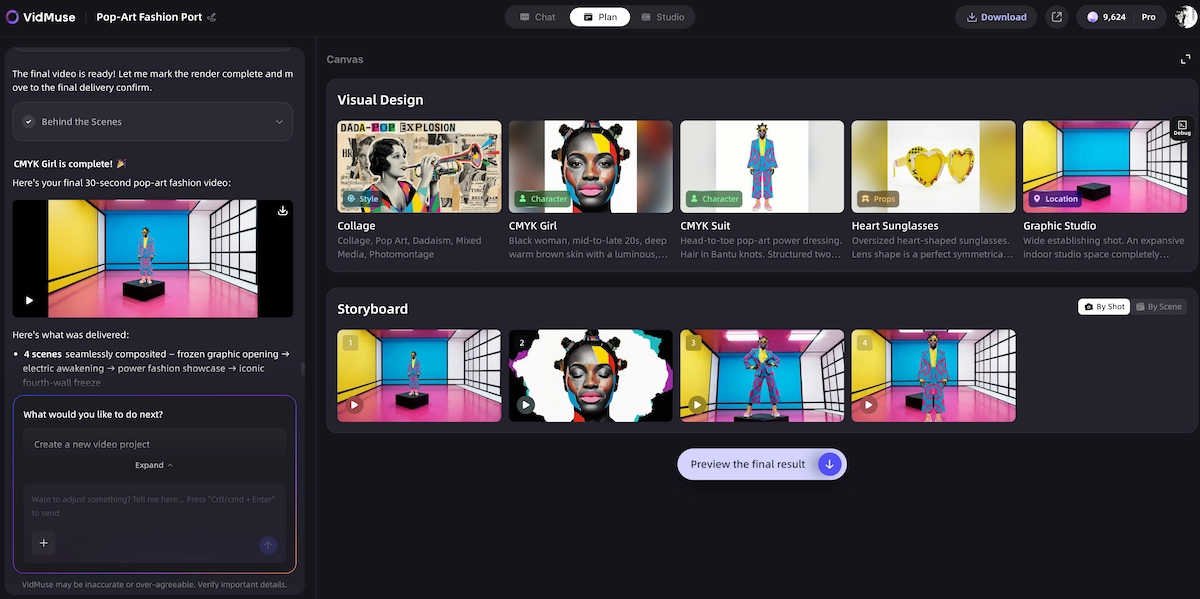
VidMuse AI uses Vidu Q3 best when VidMuse plans the full MV and Q3 renders selected shots. The core advantage is separating the creative planning layer from the model execution layer. VidMuse is positioned as an “AI Director” for music video production, with a workflow that moves from Creative Brief to Reference Generation, Scene & Shots List, Storyboard, and then Video Generation.
Create Your AI Video in Minutes
Turn your idea into a video with VidMuse.
This distinction is important for real user value: Vidu Q3 is the model; VidMuse is the production workflow around the model.
Inside a music video workflow, the roles can be divided like this:
- VidMuse defines the concept. The creator describes the song, mood, audience, visual world, story arc, and release format.
- VidMuse creates or organizes references. These may include character looks, cover art, visual style, location ideas, color mood, or scene references.
- VidMuse builds the scene and shot list. Instead of one long prompt, the MV becomes a sequence of manageable shots.
- VidMuse creates the storyboard. This gives each shot a role in the final video.
- Vidu Q3 generates selected clips. Q3 is especially useful for shots that need native audio-video timing, short narrative structure, or expressive character performance.
- VidMuse 2.0 features support iteration. Shot Refine by Quoting, Timeline Editor, and Asset Library & Memory help creators improve shots and maintain project continuity across a full MV.
This workflow is better than one-shot prompting because music videos are continuity problems. A model may generate a beautiful clip, but it may not understand where that clip belongs in the chorus, bridge, intro, or outro. VidMuse gives the shot a job before Vidu Q3 generates it.
Vidu Q3 Image to Video and Reference Workflows
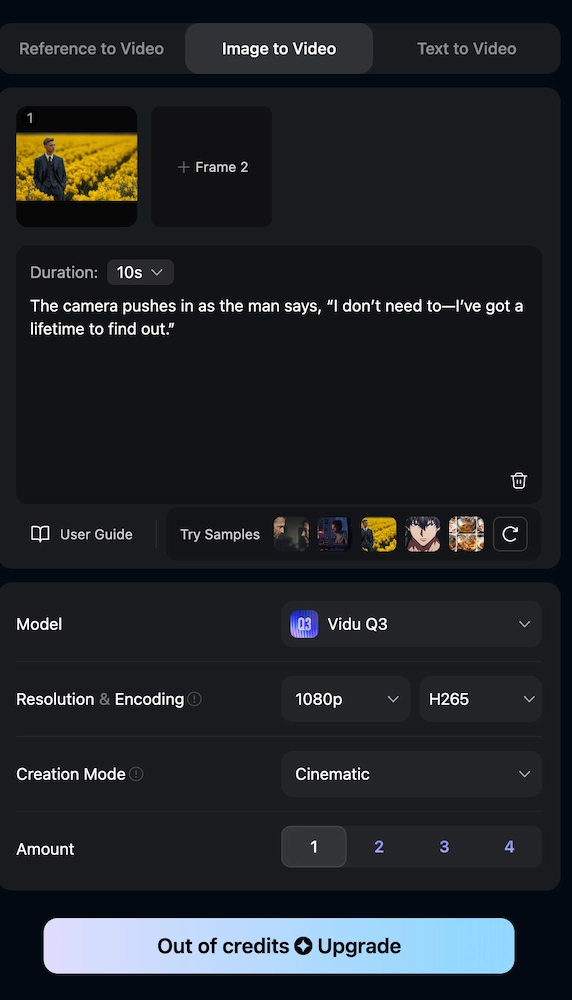
Vidu Q3 image to video works best when you already have a strong still image and need controlled motion. For a music video, that image might be a cover-art character, a performance still, a product image, a fantasy environment, or a visual motif that should recur across the MV.
The Vidu API platform describes Image to Video as a way to bring images to life through dynamic videos, while Reference to Video is positioned around aligning videos with reference subjects such as characters, objects, and environments. This is useful because many music videos begin with assets, not blank prompts.
Use vidu q3 image to video when:
- You have cover art and want to animate it into an intro shot
- You have a character portrait and want subtle singing, walking, or turning motion
- You have a band or artist visual and want movement without redesigning the subject
- You have a moodboard still that should become a cinematic scene
- You need visual continuity between multiple shots based on the same design
Use vidu q3 reference to video when the shot depends on recurring identity. A brand mascot, animated performer, product, location, or wardrobe element may need to stay recognizable across multiple clips. The more important consistency is, the more valuable references become.
In VidMuse, the best practice is to let the project memory and asset library define what should stay consistent. Then use Vidu Q3 for the scenes where the reference has to come alive. The same source image can also become cover art into a looping music visualizer, depending on release needs.
Step-by-Step: Create a Music Video Shot with Vidu Q3 and VidMuse
Creators get better Vidu Q3 results by planning the shot before writing the generation prompt. The goal is not to make the prompt longer. The goal is to make the shot clearer.
Start with the song section
Choose the exact part of the track you are generating for, such as intro, hook, chorus, drop, or outro.
Define the shot's job
Give the shot one main purpose instead of asking one generation to solve the entire music video.
Choose the right input type
Pick Text to Video, Image to Video, Reference to Video, or Start End to Video based on your assets.
Write the prompt as a director note
Include subject, action, camera, lighting, style, audio, pacing, and constraints.
Generate short, reviewable clips
Create clips that are easy to evaluate, replace, and edit into the timeline.
Use VidMuse Shot Refine by Quoting
Refine the exact issue without rewriting everything or losing the shot identity.
Place the clip in the timeline
Evaluate the shot against the beat, lyric, color, motion direction, and adjacent scenes.
Save strong assets for continuity
Keep useful frames, prompts, characters, and references for reuse across the project.
Step 1: Start with the song section
Choose the exact part of the track you are generating for. A verse, pre-chorus, chorus, bridge, and outro usually need different energy.
Ask:
- Is this shot for the intro, hook, chorus, drop, or outro?
- Should the camera feel slow, emotional, explosive, surreal, or intimate?
- Does the scene need lyrics, performance, story action, or abstract mood?
- Should the shot feel like Story MV, Abstract MV, Performance MV, Viral Short, TVC, or Explainer?
Step 2: Define the shot’s job
A shot should have one main purpose. Do not ask it to introduce the artist, show the world, deliver a lyric, change location, reveal a twist, and create a viral transition all at once.
Better shot jobs include:
- “Introduce the main performer in a rainy city at night.”
- “Show the chorus energy through fast dance movement.”
- “Create an emotional close-up for the lyric about regret.”
- “Turn the cover art into a looping visualizer-style opening.”
- “Reveal the product in a 6-second SMB marketing music ad.”
Step 3: Choose the right input type
Pick the mode based on what you already have.
- Use Text to Video if the concept is clear but no visual reference exists.
- Use Image to Video if the still image already defines the subject or style.
- Use Reference to Video if consistency matters across characters, objects, or locations.
- Use Start End to Video if the shot must move from one defined state to another.
Vidu’s API platform lists these modes as part of its feature set, which makes the model flexible for both creator and developer workflows.
Step 4: Write the prompt as a director note
A useful Vidu Q3 prompt usually includes subject, action, camera, lighting, style, audio, pacing, and constraints.
Example:
A young indie singer stands alone in a neon-lit laundromat at midnight, holding a cassette tape. Slow push-in camera. Blue and pink reflections on glass. She looks tired but hopeful. Subtle rain ambience outside. Soft synth atmosphere, no crowd noise. Emotional cinematic music video shot, 8 seconds, realistic lighting, steady facial expression.
This prompt is not just “make a music video.” It defines what the viewer sees and hears.
Step 5: Generate short, reviewable clips
Even though Vidu Q3 supports up to 16 seconds per generation, not every shot should use the maximum duration. Shorter clips are easier to evaluate, replace, and edit into a timeline.
Use longer generations when:
- A scene needs a full emotional beat
- Dialogue or voiceover must resolve naturally
- Camera movement needs time to land
- The clip should work as a standalone short
Use shorter generations when:
- You need rapid iteration
- You are testing a character, style, or camera angle
- The shot is only a transition or visual accent
- The final MV needs fast cuts
Step 6: Use VidMuse Shot Refine by Quoting
When a result is close but not final, refine the exact issue instead of rewriting everything. VidMuse 2.0 includes Shot Refine by Quoting, which is useful for targeted changes such as “keep the same pose but reduce camera shake” or “preserve the lighting, but make the expression less sad.”
This helps avoid a common AI video failure: fixing one detail while accidentally losing the entire shot identity.
Step 7: Place the clip in the timeline
Once a Vidu Q3 shot works, it should be evaluated in context. A clip can look great alone but feel wrong against the beat, lyric, or adjacent scene.
Check:
- Does the cut land on the right musical moment?
- Does the color match nearby shots?
- Does the motion direction support the edit?
- Does the audio support or conflict with the track?
- Does the shot repeat useful motifs from earlier scenes?
If lyrics, timing, and timeline are central to the edit, compare a dedicated lyric video generator workflow as a supporting layer.
Step 8: Save strong assets for continuity
Use the Asset Library & Memory concept to retain useful characters, prompts, frames, and visual references. This is especially important for MVs, because recurring symbols often make the video feel intentional.
A single strong Vidu Q3 output can become:
- A hero shot
- A cover image reference
- A style anchor
- A recurring character reference
- A teaser clip for social distribution
Vidu Q3 vs Seedance 2.0: When to Choose Each
Vidu Q3 vs Seedance 2.0 is best framed as emotional scene generation versus broad multimodal control. Seedance 2.0 is ByteDance Seed’s next-generation video creation model, built on a unified multimodal audio-video joint generation architecture that supports text, image, audio, and video input modalities.
Seedance 2.0 is a strong fit when your MV shot needs:
- Complex human motion or multi-subject interaction
- Advanced camera movement
- Physical realism and motion stability
- Multiple input references across image, video, and audio
- Video extension or editing workflows
ByteDance says Seedance 2.0 supports simultaneous input of up to 9 images, 3 video clips, 3 audio clips, plus natural language instructions, and supports 15-second high-quality multi-shot audio-video output. For creators building complex action, choreography, or highly controlled multimodal edits, that matters.
Vidu Q3 is a strong fit when your MV shot needs:
- Native audio and visual timing in one short scene
- Emotional facial expression or dialogue-like delivery
- Stylized narrative clips
- Short drama, anime-inspired, or cinematic beats
- A complete clip that feels closer to a screenable draft
Vidu’s own comparison page positions Q3 as focused on emotional realism, facial expression fidelity, and anime-style performance, while noting that Seedance 2.0 performs strongly in complex camera motion, dynamic fight choreography, and tracking shots. Because that comparison is published by Vidu, it should be treated as a useful test reference rather than a neutral benchmark.
A practical decision rule:
- Choose Vidu Q3 for emotional narrative MV shots.
- Choose Seedance 2.0 for complex motion, multimodal input control, and larger production experiments.
- Test both when the shot is central to the chorus or campaign creative.
Vidu Q3 vs Kling 3.0: When to Choose Each
Vidu Q3 vs Kling 3.0 is best decided by whether the shot needs emotional timing or structured multi-element control. Kling 3.0’s official guide says the model series supports native audio-video output, up to 15 seconds, multi-shot capability, element consistency control, multi-character coreference, and multilingual support across Chinese, English, Japanese, Korean, and Spanish.
Choose Kling 3.0 when your MV or brand video needs:
- Multi-character dialogue or role interaction
- Strong element consistency across a scene
- Multilingual voice or code-switching
- A structured multi-shot prompt
- Complex storyboard interpretation
Choose Vidu Q3 when the shot needs:
- A compact emotional beat
- Audio-video generation in one pass
- A character close-up with facial nuance
- Stylized anime or short-drama energy
- A clip that can work as a narrative ad, teaser, or MV moment
Kling’s guide emphasizes its Multi-Shot feature, which can understand scene coverage and camera angles in a prompt, including shot-reverse-shot dialogue and cross-cutting dialogue. That makes Kling 3.0 especially relevant when a creator wants a model to understand more of the scene structure directly.
For VidMuse users, the smartest approach is not to lock into only one model. Let the scene list decide. A single MV might use Vidu Q3 for emotional close-ups, Kling 3.0 for multi-character scenes, Seedance 2.0 for complex motion, and another model for stylized or cost-efficient iterations. Other model options like Veo 3.1 can also be reserved for realism-sensitive shots.
When Vidu Q3 Is Not the Right Approach
Vidu Q3 is not the right approach when the main problem is editing, not generation. If the creator already has strong footage, the work may be better handled in a timeline editor, lyric video tool, visualizer, or post-production workflow.
Vidu Q3 may be less suitable when:
- You need a full 2-minute MV in one generation
- The shot requires exact product compliance or legal review
- You need frame-perfect choreography across many cuts
- The audio must match a finished master track without any generated sound
- You need deterministic outputs for every campaign variant
- You already have live-action footage that only needs editing
It is also not the right tool when the prompt includes too many competing requirements. A model can struggle when asked to produce a realistic singer, complex choreography, fast camera movement, multiple characters, specific lyrics, exact lip-sync, brand product placement, and a dramatic lighting change in one shot.
The better approach is to split the creative task:
- Use VidMuse to plan the MV.
- Use Vidu Q3 for selected narrative clips.
- Use the timeline to assemble, trim, and pace.
- Use refinement features to fix specific shot-level issues.
- Use other models when their strengths fit the shot better.
Common Mistakes and Troubleshooting
Most Vidu Q3 problems come from asking one generation to solve planning, casting, camera, sound, and editing at the same time. The fix is usually not a more poetic prompt. The fix is a clearer shot brief.
Mistake 1: Prompting a whole MV instead of one shot
Weak prompt:
Make a viral music video for my new song, cinematic, emotional, cool lighting, lots of movement, anime style, great camera, 30 seconds.
Better prompt:
8-second chorus shot. Anime-style female vocalist on a rooftop at sunset. Wind moves her hair and jacket. Slow orbit camera. She looks directly into camera with confident expression. Bright orange sky, soft lens flare, energetic pop-rock mood, no extra characters.
Mistake 2: Mixing too many styles
A prompt that asks for “realistic anime cyberpunk documentary watercolor horror fashion commercial” gives the model too many visual priorities.
Use one dominant style, one secondary texture, and one camera direction.
Mistake 3: Ignoring audio conflicts
If the final MV already has a mastered track, generated audio should be used carefully. Vidu Q3’s native audio can help with ambience, sound effects, dialogue-style moments, or drafts, but the final music track may still need to dominate the edit.
Mistake 4: Changing references too often
Character and brand consistency depend on stable references. If every shot uses a different image, the MV may feel like a montage of unrelated outputs.
Use a small set of approved references and reuse them through the project.
Mistake 5: Treating model comparison as permanent
AI video models change quickly. Vidu Q3, Seedance 2.0, Kling 3.0, Veo, Wan, Hailuo, and other models may shift in quality, cost, speed, and access over time.
Use comparisons as decision support, not as permanent truth. For important shots, run your own prompt test.
VidMuse Recommendation for Indie Musicians and SMB Teams
VidMuse is most useful when creators need a complete MV workflow rather than isolated AI clips. The product context for VidMuse positions it as an AI Director for music video production, with use cases across Music MVs, lifestyle content, and SMB marketing.
For indie musicians, a practical workflow is:
- Generate or import the song.
- Write the creative brief around mood, genre, audience, and release goal.
- Choose a template type such as Story MV, Abstract MV, Performance MV, or Viral Short.
- Generate or upload visual references.
- Build a scene and shot list.
- Storyboard the chorus, verse, bridge, and outro.
- Use Vidu Q3 for emotional or audio-visual scenes.
- Use other models when complex motion, speed, or visual style is a better fit.
- Assemble and refine the final video in the timeline.
For SMB marketing, Vidu Q3 can support narrative ads, product-led mini-scenes, and music-backed social clips. VidMuse can help the team decide whether the output should feel like a TVC, explainer, viral short, or lifestyle brand video.
The practical recommendation is simple: use Vidu Q3 for the shots where its native audio-video storytelling matters. Use VidMuse to decide which shots those are.
Before embedding a demo video, show the workflow from song concept to final shot selection. The key thing to watch is how the same song can produce different shot types depending on whether the goal is performance, story, abstract mood, or social conversion.
Create Your AI Video in Minutes
Turn your idea into a video with VidMuse.
The takeaway from the demo should be that Vidu Q3 is not the first step. The first step is the creative brief. Better planning gives the model less guesswork and gives the final MV more continuity. For a complete MV workflow, start with the VidMuse guide. If your starting point is a Suno or Udio track, the Suno to music video workflow is a useful companion.
FAQ
What is Vidu Q3 AI?
Vidu Q3 AI is a video generation model designed to create short clips with native audio and visuals together. It can generate a clip that includes visuals, dialogue or voiceover, sound effects, and music, with up to 16 seconds per generation according to Vidu’s official FAQ.
How does vidu q3 image to video work?
Vidu Q3 image to video starts with a still image, then animates it into a moving clip based on the prompt and selected settings. It is useful for music videos when you already have cover art, a character portrait, product art, or a mood image that should become a moving scene. Vidu’s platform describes Image to Video as a way to bring images to life through dynamic videos.
What is vidu q3 reference to video good for?
Vidu Q3 reference to video is useful when the video needs to follow reference subjects such as characters, objects, or environments. It is especially relevant for recurring performers, brand mascots, product visuals, or stylized MV worlds where consistency matters across scenes. Vidu’s API platform describes Reference to Video as creating videos aligned with reference subjects.
Is vidu q3 turbo a separate model?
Vidu Q3 Turbo is commonly presented by third-party infrastructure providers as a faster variant of the Q3 series, optimized for lower latency or quicker iteration. Replicate describes Vidu Q3 Turbo as the faster variant for quick iteration, while Cloudflare’s AI docs describe it as a faster version of Vidu Q3 optimized for lower latency with audio support and up to 16-second clips.
Does a vidu q3 api exist?
Yes, Vidu has an API platform for developers and enterprises. The official platform includes documentation, pricing, templates, a debug console, and creation features such as Image to Video, Reference to Video, Start End to Video, and Text to Video.
Can I use vidu q3 comfyui?
Yes, ComfyUI documentation and workflows now reference Vidu Q3 nodes. The ComfyUI documentation describes a Vidu Q3 Image-to-Video Generation node that starts from an input image, can be guided by a text prompt, and outputs a video file.
What should I trust from vidu q3 reddit discussions?
Use vidu q3 reddit discussions as anecdotal workflow feedback, not as final evidence of model quality. Community posts can reveal common issues, prompt examples, and real creator preferences, but you should still test your own song, references, aspect ratio, and shot type before choosing a model for a serious MV.
How should I compare Vidu Q3 vs Seedance 2.0?
Compare Vidu Q3 vs Seedance 2.0 by shot purpose. Vidu Q3 is a practical choice for native audio-video narrative scenes and emotional short clips, while Seedance 2.0 is a strong choice for multimodal input control, complex motion, and physical realism. ByteDance describes Seedance 2.0 as supporting text, image, audio, and video inputs through a unified multimodal audio-video architecture.
How should I compare Vidu Q3 vs Kling 3.0?
Compare Vidu Q3 vs Kling 3.0 by whether the shot needs compact emotional timing or structured multi-shot control. Kling 3.0 supports native audio, multi-shot output, element consistency control, multilingual output, and up to 15 seconds, which makes it strong for multi-character and multilingual scenes.
Is Vidu Q3 enough to make a full music video?
Vidu Q3 can generate individual clips, but a full 30-second to 2-minute MV still needs planning, shot selection, continuity, editing, and timeline assembly. That is where VidMuse becomes useful: it helps turn a song into a creative brief, references, scene list, storyboard, and then model-based video generation.
Conclusion
Vidu Q3 is a strong fit for creators who need short, expressive, audio-visual scenes inside a larger music video workflow. It should not be treated as the whole production system. It is one model choice inside a broader creative process.
For indie musicians, the practical path is to use VidMuse as the AI Director: start with the song, define the MV concept, generate references, plan the scene list, storyboard the sequence, and then choose Vidu Q3 for the shots where synchronized sound, emotional performance, or narrative timing matters most.
For marketing teams, Vidu Q3 can support music-backed short ads, narrative clips, product scenes, and social-first creative tests. The best results will come from matching the model to the shot, not forcing every shot through the same generator.
Use Vidu Q3 when the scene needs to feel alive. Use VidMuse when the whole video needs to feel directed.
Create Your AI Video in Minutes
Turn your idea into a video with VidMuse.

Written By
VidMuse Team
Continue Reading
Latest blog posts related to AI video creation.
PixVerse V6 x VidMuse AI: Model Guide and Video Workflow
PixVerse V6 review and VidMuse integration guide. Capabilities, 15s 1080p video, prompt tips, model comparison, pricing, and how to use V6 in VidMuse workflows.
FLUX 3: What It Is, Capabilities, and How to Access It
FLUX 3 is Black Forest Labs' multimodal AI model for image, video, audio, and action. Full guide: capabilities, FLUX 3 vs FLUX 2, availability, and pricing.
Free Music Visualizer: 10 Best Free Tools in 2026
Compare 10 best free music visualizers in 2026. Waveform tools, AI music video makers, watermark policies, export limits, and which tool fits your workflow.