

If you've been searching for an easy way to turn your tracks into visual content, you've almost certainly landed on Sondo AI. This Sondo AI review breaks down exactly what the platform does well, where it falls short, and which alternative is worth trying if you need more creative control over your sondo video output.
The short answer: Sondo is a fast, accessible entry point for AI music video creation — but creators who want director-level control, multi-model quality, and structured MV production will hit its ceiling quickly.
Create Your AI Video in Minutes
Turn your idea into a video with VidMuse.
Key Takeaways
- Sondo AI is a music-to-video platform built by Singapore-based Tunesphere SG Pte. Ltd., launched in April 2025, with over 10 million global users and 15 million videos generated as of mid-2026.
- The platform handles the full workflow — audio analysis, storyboard generation, video rendering, and export — in one place, supporting 16:9 and 9:16 output for YouTube, TikTok, and Instagram Reels.
- Real user feedback highlights solid auto-direction roughly 70% of the time, but notes AI artifacts, occasional lip-sync drift, and limited customer support responsiveness.
- Sondo is best for creators who want a fast, low-friction first video — not for those building a multi-scene cinematic MV with custom shots and model flexibility.
- VidMuse fills the gap for creators who need agent-based MV planning, multi-model video generation (Kling, Veo, Hailuo, Seedance, and more), and professional-grade shot-level control.
What Is Sondo AI?
Sondo AI (sondo.ai) is an all-in-one AI music video generator. Its core proposition is simple: upload a track, write a short description, and the AI analyses the music's rhythm, melody, and mood to automatically build a synchronized cinematic video — no editing skills required.
The platform also includes an AI music generation tool, so creators who don't have an existing track can generate original audio within the same workflow. Supported output formats include 16:9 for YouTube and 9:16 for TikTok and Reels. The professional web editor, launched in May 2026, added real-time scene editing, audio synchronization tools, subtitle management, and clip reordering on a timeline.
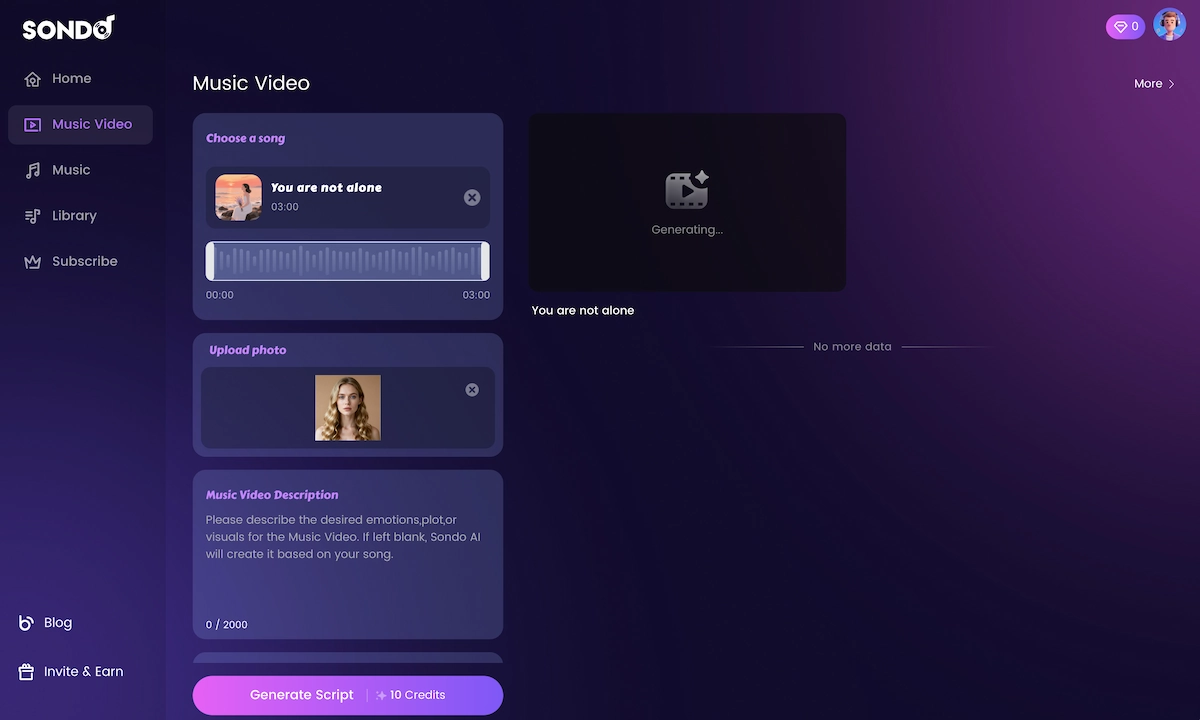
For creators comparing entry points, Sondo fits the lightweight Music to video AI category more than a full director-led production workflow.
Sondo AI Core Features
AI Music Video Generation
The platform's flagship feature is one-click music-to-video conversion. Upload an audio file, add a text prompt of up to 2,000 characters describing the visual direction, and Sondo's AI builds a beat-synced video automatically. Visual styles available include:
- Romantic
- Sci-fi / Futuristic
- Urban / City
- Abstract
- Cinematic
You can let the model auto-select a style or lock your own direction before generating.
Sondo AI Music Creation
Beyond video, Sondo includes an AI music generator. Enter keywords or select a genre — pop, electronic, rap, jazz, classical, and more — and the platform produces an original track. This makes it a closed-loop workflow: create the song, then immediately generate the sondo ai music video around it without switching tools.
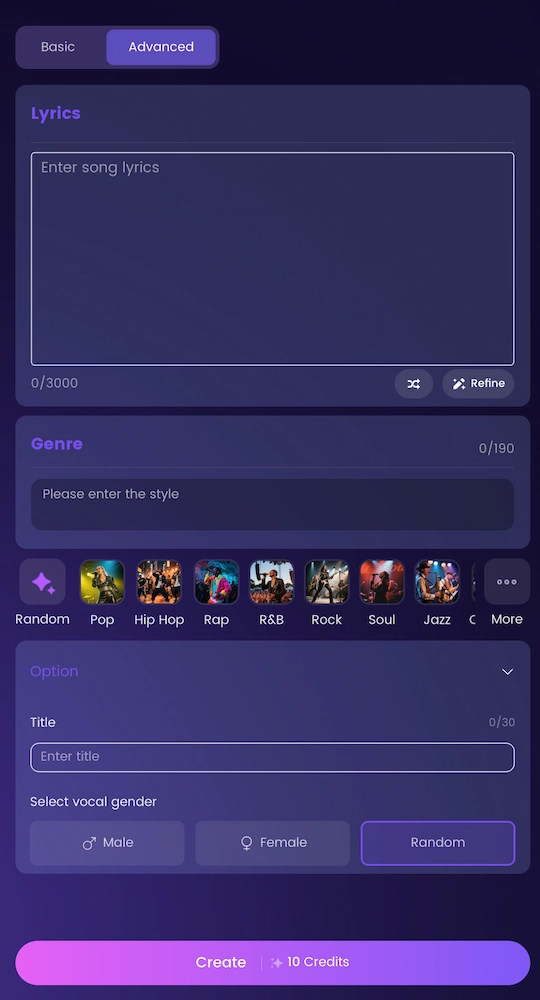
Creators who already use Suno AI or Udio can also compare whether they need a separate video layer or a native Suno to video workflow.
Professional Video Editor
Launched in May 2026, Sondo's professional web editor gives creators direct control over AI-generated outputs. Key editor capabilities:
- Drag-and-drop clip reordering on the timeline
- Real-time scene replacement by updating prompts per clip
- Lyric subtitle and title editing directly in the preview window
- Audio synchronization and timing adjustments
- Image Mode for uploading custom character references
Edits are not saved to a draft — the official guidance is to export as soon as edits are complete, because timeline layouts reset on logout.
Aspect Ratio & Platform Optimization
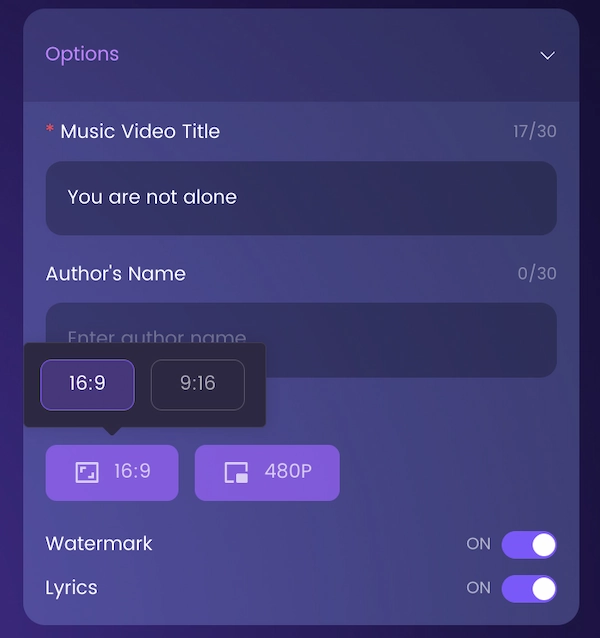
Before generation, creators select either 16:9 (YouTube, desktop, cinematic) or 9:16 (TikTok, Reels, Shorts). The aspect ratio cannot be changed after generation, so this choice needs to be deliberate.
How to Make a Sondo AI Music Video — Step by Step
This workflow applies to the Sondo AI web platform:
- Go to sondo.ai and open Music Video Lab.
- Upload your music file or paste a streaming link.
- Select your aspect ratio — 16:9 for YouTube or 9:16 for vertical platforms.
- Write a video description in the prompt field (up to 2,000 characters). Be specific: describe the visual mood, setting, character, and color palette you want.
- Choose a visual style or leave it on auto.
- Click Create. Sondo generates a storyline and scene list on the Deep Thinking page. Review and edit the storyline before proceeding.
- Review the generated video. Open the editor to reorder clips, replace scenes, adjust subtitles, or upload custom character images.
- Export. Click Export to finalize and download your sondo video. Export immediately — unsaved timeline progress resets on logout.
Sondo AI Review: What Real Users Say
Honest user feedback on Sondo AI paints a useful picture of where the platform delivers and where it frustrates.
What users appreciate:
- Speed. Creators consistently cite the ability to go from audio to a shareable video in minutes — without any video editing background.
- Beat synchronization. The auto-direction between visual pacing and music energy lands well the majority of the time, with one creator noting it works as expected around 70% of attempts.
- Social-first output. The platform's focus on TikTok, Reels, and YouTube Shorts means the exported format is ready to post without additional conversion.
- All-in-one convenience. Having music generation and video generation in one workflow removes the friction of moving files between tools.
Where users run into problems:
- AI artifacts. Reviews note recurring visual issues: extra hands, unusual angles, inconsistent character faces across clips — common pain points in the current generation of AI video.
- Lip-sync drift. On vocals-forward tracks, the synchronization between mouth movement and audio can slip, particularly on complex scenes.
- Customer support. Multiple reviews describe slow or non-existent responses to billing or credit disputes, which is a meaningful concern for paid subscribers.
- Credit system unpredictability. Some users report consuming more credits than expected when regenerating individual clips, making cost-per-video difficult to predict.
- App Store rating. The iOS/Android app currently holds a rating of approximately 3.38 out of 5 — lower than comparable AI creative tools — with reviewers citing the issues above.
The platform has a real user base and a genuine core workflow that works. The honest framing: Sondo AI delivers well on the first 70% of the job. The remaining 30% — fine-tuning, fixing artifacts, custom visual direction — is where creators feel the friction most.
Sondo AI Pricing & Credit System
Sondo AI operates on a credit-based pricing model. A free trial is available on the web platform. Paid plans include a yearly subscription option with a bulk credit allocation (reported at 8,000 credits for one annual tier).
Credits are consumed at generation and at regeneration — replacing a single clip uses credits in addition to the original generation. This can escalate costs when multiple clips need correction.
Specific current pricing tiers are subject to change; check sondo.ai directly for the most up-to-date plans before subscribing.
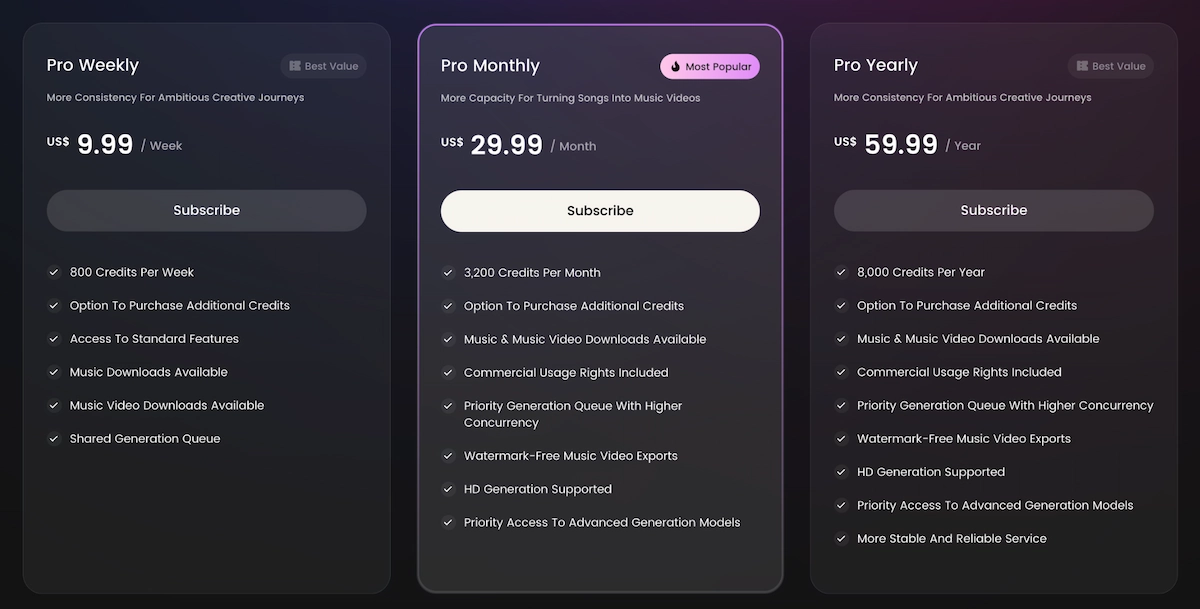
For a lower-risk starting point, compare what a free AI music video generator can realistically do before buying a large credit pack.
Sondo AI Limitations to Know Before You Subscribe
Before committing to Sondo, these constraints are worth understanding:
- No draft autosave. Timeline edits are lost on logout. Always export before leaving.
- Locked aspect ratio. You cannot change 16:9 to 9:16 (or vice versa) after generation. A wrong choice means starting over.
- Limited model selection. Sondo uses its own internal AI models. You cannot choose or swap video generation models — meaning if the output quality doesn't match your vision, your only option is to regenerate or accept the result.
- Artifact frequency. On complex scenes with human subjects, AI-generated visual errors appear at a rate users describe as notable.
- No multi-shot planning. Sondo generates video scene by scene based on a text description. There is no structured shot list, storyboard review, or director-level planning layer before generation begins.
- Support responsiveness. Multiple verified reviews describe support delays or non-response to billing issues.
When Sondo AI Is the Right Tool
Sondo AI is genuinely useful in these scenarios:
- You have a finished track and want a shareable visual for TikTok or Reels within the same day.
- You're a Suno or Udio user looking to pair your AI-generated song with auto-synced visuals without a separate video tool.
- You're new to music video production and want to test the concept before investing in a more robust workflow.
- You need a quick visual asset for social promotion — not a cinematic MV for a full release.
If any of the following describe you, you may outgrow Sondo quickly: you want to choose your AI video model, you need multi-scene storyboard control before generation, or you're building content with high production expectations.
For adjacent formats, a quick music visualizer or lyric video making workflow may be a better fit than a full AI MV.
Best Sondo AI Alternative: VidMuse AI
VidMuse is the strongest alternative to Sondo AI for creators who want more than one-click generation.
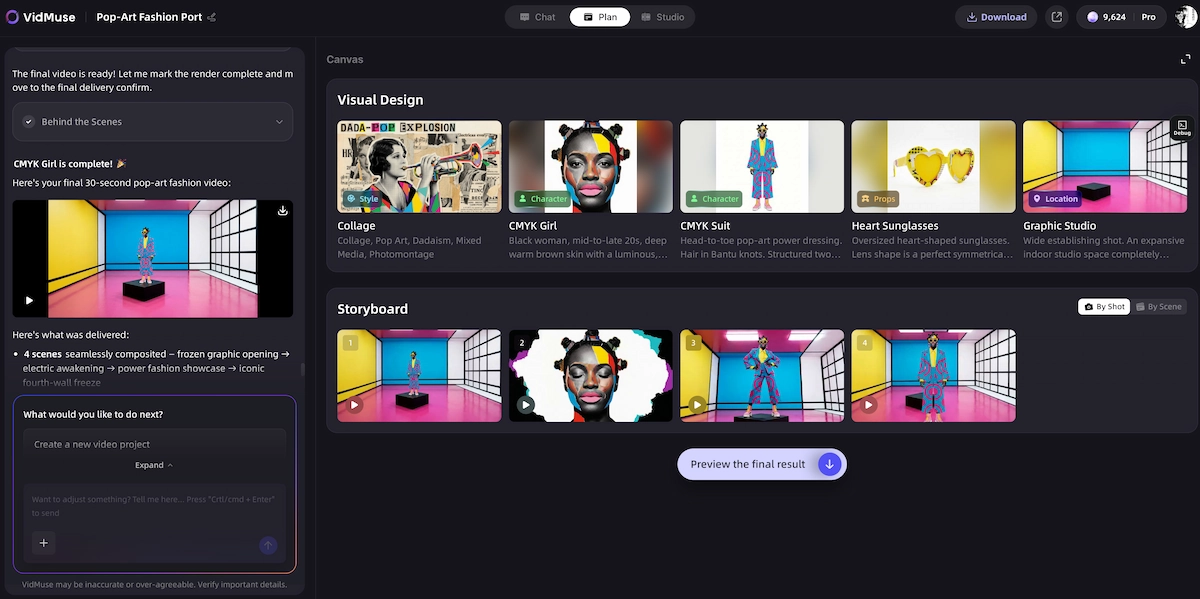
Where Sondo executes one prompt and delivers a video, VidMuse operates as an AI Director — it plans the full music video from creative brief through scene list, storyboard, and shot-by-shot generation before any video is rendered. This structural difference matters significantly for quality outcomes. For a deeper product walkthrough, start with the VidMuse guide.
Why VidMuse Stands Out
Multi-model video generation. VidMuse gives creators direct access to the industry's leading AI video models in one platform:
- Seedance 2.0 Fast, Seedance 2.0 Pro, Seedance V1.5 Pro
- Kling V3.0 Pro, Kling V2.6 Pro, Kling O3, Kling O1, and Kling 3.0 Omni
- Veo 3.1, Veo 3 Fast
- Hailuo 2.3 Pro, Hailuo 2.3 Standard
- Wan V2.6, Wan 2.7
- Pixverse v6, Happy Horse 1.0, Grok Imagine Video, Vidu Q3
No other music video platform aggregates this breadth of state-of-the-art models. If one model doesn't deliver the visual you need, you switch — without leaving the platform.
Structured MV workflow. VidMuse's creation process follows a director's pipeline:
- Creative Brief — define the concept, mood, and visual identity
- Reference Generation — build a visual reference library
- Scene & Shots List — plan every scene and shot before a single frame is generated
- Storyboard — review the visual narrative frame by frame
- Video Generation — generate with your chosen model and mode
This prevents the trial-and-error credit burn that frustrates Sondo users.
Suno AI integration. VidMuse includes direct Suno AI music generation inside the platform. If you're a Suno user looking to turn your tracks into polished MVs, VidMuse is the native pipeline — no file export and reimport required. The best AI music video generator for Suno guide covers this specific path in more detail.
AI Avatar models. For performance-style MVs, VidMuse includes Omnihuman V1.5, Kling AI Avatar V2 Pro, and Gaga Avatar — enabling realistic AI performer visuals that Sondo's workflow doesn't support at this level.
VidMuse 2.0 features. The latest version adds:
- Shot Refine by Quoting — reference a specific shot from existing footage to guide regeneration
- Timeline Editor — non-destructive editing across all generated clips
- Asset Library & Memory — store visual references, characters, and style guides for reuse across projects
Read the VidMuse 2.0 release notes if you want to understand why shot-level editing matters for music video production.
Generation modes. VidMuse Studio mode prioritizes maximum output quality; Lite mode (Seed series) prioritizes speed and cost efficiency. Creators choose the right mode for each project phase.
Template types. Story MV, Abstract MV, Performance MV, Viral Short, TVC, and Explainer templates provide structured starting points for every music video format.
For image generation, VidMuse also supports ChatGPT Image 2.0, Seedream 4.5, Nano Banana Pro, Nano Banana 2, Nano Banana, Seedream 5.0 Lite, Gemini Omini, Flux.2, and Midjourney V7.
Create Your AI Video in Minutes
Turn your idea into a video with VidMuse.
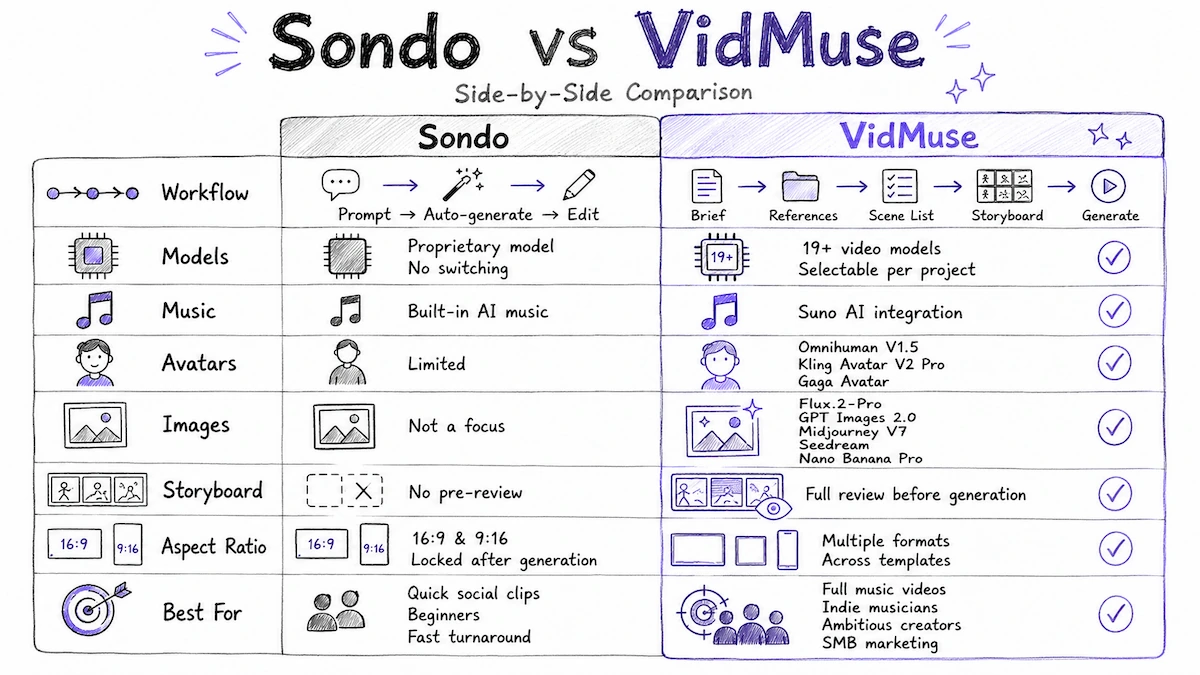
Sondo vs VidMuse — Side-by-Side Comparison
Workflow depth:
- Sondo: prompt → auto-generate → edit
- VidMuse: brief → references → scene list → storyboard → generate
Model selection:
- Sondo: proprietary internal model, no switching
- VidMuse: 19+ video generation models selectable per project
Music integration:
- Sondo: built-in AI music creation
- VidMuse: Suno AI integration inside the platform
AI Avatars:
- Sondo: limited
- VidMuse: Omnihuman V1.5, Kling AI Avatar V2 Pro, Gaga Avatar
Image generation:
- Sondo: not a focus
- VidMuse: Flux.2-Pro, GPT Images 2.0, Midjourney V7, Seedream 5.0 Lite, Seedream 4.5, Nano Banana Pro, and more
Storyboard review before generation:
- Sondo: no
- VidMuse: yes — full pre-generation review
Aspect ratios:
- Sondo: 16:9 and 9:16 (locked after generation)
- VidMuse: multiple formats across templates
Best for:
- Sondo: quick social clips, beginners, fast turnaround
- VidMuse: full MVs, indie musicians, creators with production ambitions, SMB marketing
Sondo AI
Best for
- Fast first video
- Simple music-to-video workflow
- Built-in AI music creation
- Social-first formats
Watch out
- No model switching
- No autosaved timeline edits
- Locked aspect ratio
- Limited pre-generation storyboard control
VidMuse AI
Best for
- Agent-based MV planning
- 19+ selectable video models
- Suno AI integration
- Timeline Editor and Shot Refine
Watch out
- Better suited to creators who want a fuller production workflow
Common Mistakes When Using Sondo AI
Creators new to the platform repeatedly run into the same avoidable issues:
- Choosing the wrong aspect ratio and regenerating.
Select 16:9 or 9:16 deliberately before clicking Create. Changing it after generation uses additional credits.
- Writing vague prompts.
A short, generic description produces generic visuals. Use all 2,000 available characters. Describe the setting, time of day, character appearance, color palette, and emotional tone.
- Logging out before exporting.
Timeline edits reset on logout. Export as soon as the edit session is complete.
- Ignoring the storyline review step.
The Deep Thinking page lets you edit the auto-generated storyline before video generation begins. Skipping this review and editing after generation costs more credits.
- Not testing with a short track first.
For new users, starting with a 30–60 second clip lets you learn how the tool interprets your prompts before committing credits to a full track.
FAQ
What is Sondo AI and how does it work?
Sondo AI is a music-to-video platform that analyzes an uploaded audio track's rhythm, melody, and mood to generate a synchronized AI music video automatically. Users upload a track, write a visual description, select an aspect ratio, and the platform builds a complete video — including storyboard and scene generation — without requiring video editing skills.
Is Sondo AI free to use?
Sondo AI offers a free trial on the web platform. Full access requires a paid credit-based subscription. Credits are consumed during initial generation and again when individual clips are regenerated, so cost-per-video varies depending on how much editing and retrying a project requires.
How good is Sondo AI video quality?
Sondo AI video quality is competitive for quick social content. Auto-direction aligns well with the music in a majority of generations, but AI artifacts — inconsistent character faces, extra limbs, visual glitches — appear frequently enough that most users expect to regenerate at least some clips. For YouTube-quality or release-grade MVs, a platform with model selection and storyboard control produces more reliable results.
Can I use Sondo AI with Suno tracks?
Yes. Sondo AI supports uploading any audio file, so Suno-generated tracks can be uploaded directly into the sondo ai music video workflow. Alternatively, VidMuse integrates Suno AI natively inside the platform, letting you generate the track and build the MV in one place without file transfers.
What is the best Sondo AI alternative for serious music video production?
VidMuse is the most capable alternative for creators who need structured MV production. It provides access to 19+ video generation models (including Kling V3.0 Pro, Veo 3.1, Seedance 2.0, Hailuo 2.3, and more), an agent-based workflow that plans the full MV before generation, Suno AI integration, AI Avatar models, and a Timeline Editor — all features absent from Sondo's current platform.
Does Sondo AI save my editing progress automatically?
No. Sondo AI does not autosave timeline edits. Generated images and video clips remain in the resource library, but the timeline layout resets to its default state if you log out or close the tab before exporting. Always export your project before ending a session.
What video formats does Sondo AI support?
Sondo AI currently supports 16:9 (landscape, optimized for YouTube and desktop) and 9:16 (vertical, optimized for TikTok, Instagram Reels, and YouTube Shorts). The aspect ratio must be selected before generation and cannot be changed afterward.
Final Words
Sondo AI is a real, working platform with a legitimate user base — over 10 million users and 15 million videos generated is not a trivial footprint. For creators who want to go from a finished track to a shareable social video in under an hour, it does exactly what it says.
The honest constraints are equally real: no model selection, no pre-generation storyboard review, no autosave, and a support track record that has frustrated paying users. For a quick social clip or a first experiment in AI music video, Sondo is a reasonable starting point.
For creators who are building actual music video releases, producing content at scale, or have outgrown one-click generation — VidMuse closes the gap. Its agent-based planning pipeline, access to the leading AI video models, Suno integration, and shot-level control are designed specifically for indie musicians and professional creators who need studio-level output without studio-level budgets. For broader tool selection, compare the best AI music video generator roundup.
Try VidMuse's AI Director workflow and see what changes when your music video has a director behind it.
Create Your AI Video in Minutes
Turn your idea into a video with VidMuse AI - the best alternative to Sondo AI.

Written By
VidMuse Team
Continue Reading
Latest blog posts related to AI video creation.
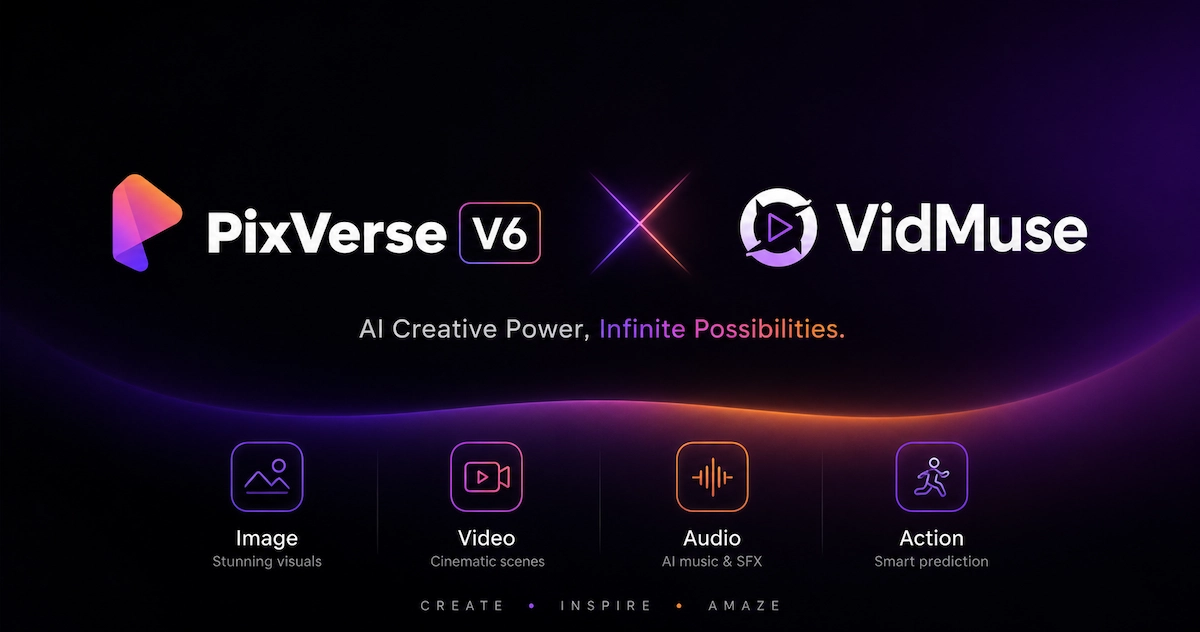
PixVerse V6 x VidMuse AI: Model Guide and Video Workflow
PixVerse V6 review and VidMuse integration guide. Capabilities, 15s 1080p video, prompt tips, model comparison, pricing, and how to use V6 in VidMuse workflows.
FLUX 3: What It Is, Capabilities, and How to Access It
FLUX 3 is Black Forest Labs' multimodal AI model for image, video, audio, and action. Full guide: capabilities, FLUX 3 vs FLUX 2, availability, and pricing.
Free Music Visualizer: 10 Best Free Tools in 2026
Compare 10 best free music visualizers in 2026. Waveform tools, AI music video makers, watermark policies, export limits, and which tool fits your workflow.